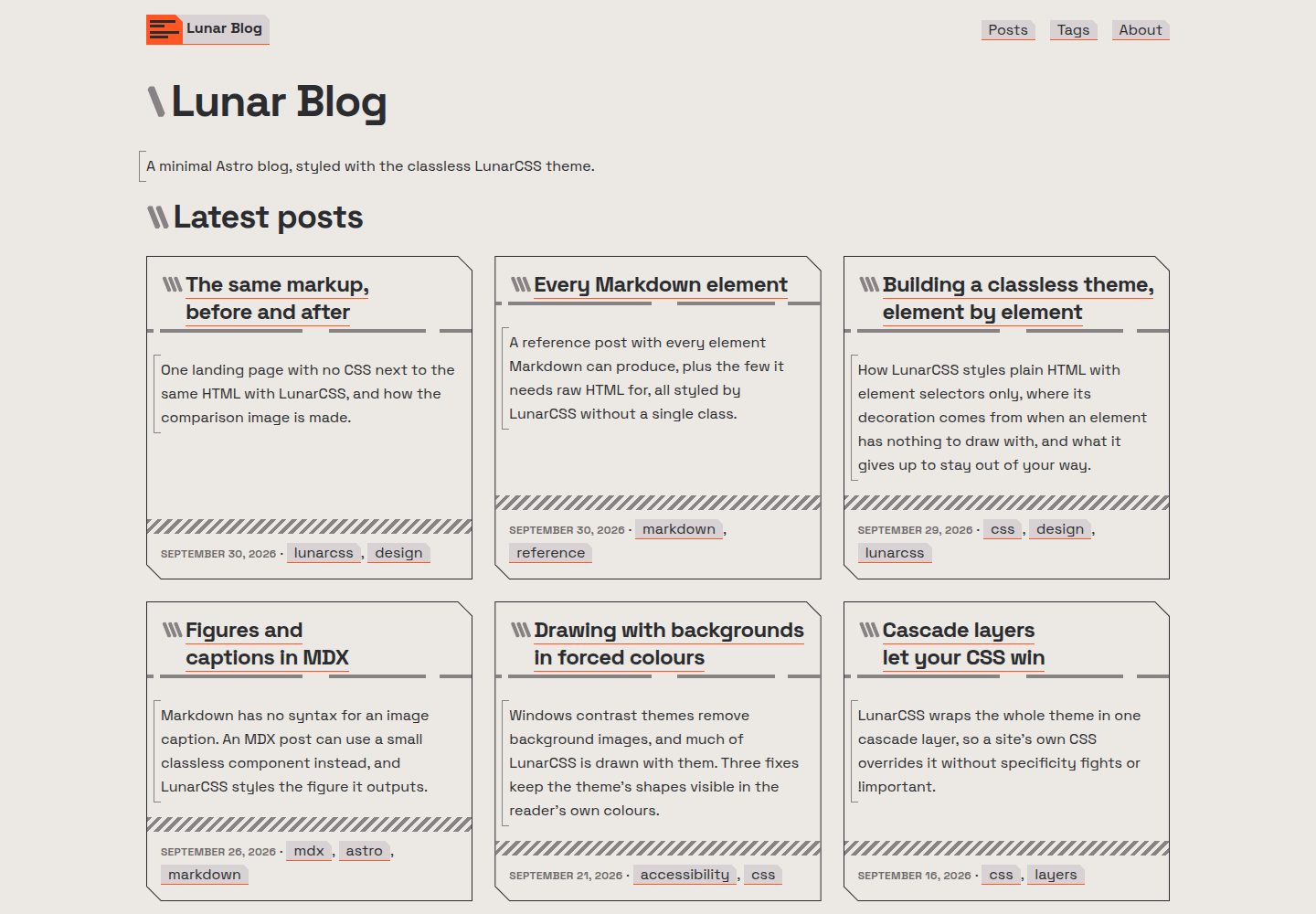
Classless styling: outputs semantic HTML without class attributes, with appearance controlled uniformly by the LunarCSS theme
AstroHTMLBlogStarter
lunar-blog — Astro Blog Template
By nikolaiwu
A minimal Astro blog starter using the classless CSS theme LunarCSS, outputting pure static HTML with no client-side JavaScript.
Explore the design
Compare the page layouts and mobile experience. Open any screenshot for a closer look.
Desktop homepage1 / 3
Desktop captureTop of page
Actual screenshot captured by the server browser.
All pages & views 3
Screenshots show visual appearance; interactive behavior may differ.
Recorded 2026-10-07View source
What stands out
A quick read of the recorded project description.
No client-side JavaScript: static site, light/dark theme follows the reader's system settings
No third-party requests: self-hosted fonts, no analytics or CDN scripts
Markdown and MDX posts: support typed frontmatter, drafts, hero images, footnotes, captioned images, and wide tables that scroll horizontally
Built-in archives (paginated cards or list), tag pages, previous/next links, plus RSS, sitemap, robots.txt, and Open Graph previews
Can be deployed at the domain root or under a subpath, with a GitHub Pages workflow included
Template Details
lunar-blog is an Astro blog starter. Content is written in Markdown or MDX, and pages are output as semantic HTML without class attributes. Styling is handled by the classless CSS theme LunarCSS, which has a retro-futuristic look and switches between light and dark themes based on the reader's system settings. The site is statically built, includes no client-side JavaScript, self-hosts fonts, and does not load analytics or CDN scripts.
Content features include: posts support typed frontmatter fields, drafts, hero images, footnotes, images with captions, and wide tables that scroll horizontally on small screens; code highlighting is generated at build time and switches with the page's light/dark theme. Archives can be displayed as paginated cards or a single list, with tag pages, previous/next links, and RSS, sitemap, robots.txt, canonical links, and Open Graph previews (pages without a hero image use a default preview image). The site can be deployed at the domain root or under a subpath, such as a GitHub Pages project site. The repository includes CLAUDE.md to explain the blog's writing conventions to Claude Code.
Before use, you need to adjust the configuration yourself: set the title, description, author, language, and navigation in src/site.config.ts; set the site address in astro.config.mjs or via the SITE_URL and BASE_PATH environment variables; delete the sample posts and sample images, and replace the logo, favicon, apple-touch-icon, and default social preview image. Theme colors are adjusted via LunarCSS tokens in src/styles/site.css. The repository is MIT licensed, but third-party assets such as demo images, fonts, and icons must be checked separately under their own licenses.
AstroHTMLBlogStarter
Is it right for your project?
Use Cases
- Building a personal writing blog with Markdown files as the main content source
- Needing a static site with no client-side JavaScript and no third-party requests
- Wanting the theme to switch between light and dark modes automatically based on the reader's system settings
- Deploying to a GitHub Pages project site or a subpath under a custom domain
- Using coding agents such as Claude Code to write posts and pages according to existing conventions
Suitable For
- Personal bloggers who prefer minimal, classless CSS and semantic HTML
- Sites that need static output without client-side scripts
- Developers using Astro who want to manage content with Markdown/MDX
- Blogs that need basic SEO output such as RSS, sitemap, and social previews
Getting started & customization
Use these recorded setup notes alongside the repository instructions for your chosen version.
- 1
Create the project with npm create astro@latest -- --template nikolaiwu/lunar-blog, then run npm run dev
- 2
Set the title, description, author, language, and navigation in src/site.config.ts; set SITE_URL and BASE_PATH in astro.config.mjs or via environment variables
- 3
Delete the sample posts in src/content/posts/ and src/assets/moonrise.svg, rewrite src/pages/about.md and README, and replace the logo, favicon, apple-touch-icon, and og-image
- 4
Place posts in src/content/posts/; the filename becomes the URL. To add image captions, switch to MDX and use the Figure component
- 5
Before deploying, run npm run build && npm run preview to check links under a subpath; when using a platform other than GitHub Pages, delete .github/workflows/pages.yml
License & source material
Usage conditions & limitations
Free to use · keep license noticeThis entry covers the free version in the public repository under the MIT license; the free scope is the code of that version and does not imply that external services or third-party assets are free.
Must comply with when using
- You may use, modify, commercialize, and distribute the code of this version for free.
- When distributing copies or substantial portions of the code, retain the original author's copyright notice and the full MIT license notice.
- The code is provided as is; warranties and limitations of liability are governed by the original license and applicable law.
Additional costs & items to verify
- Demo images, fonts, icons, and other third-party assets must be checked under their own licenses; the code's MIT license alone is not sufficient to determine this.
- External services such as domains, hosting, databases, payments, or AI may incur additional charges.
- When deploying to platforms other than GitHub Pages, such as Netlify, Cloudflare Pages, or Vercel, you must delete the repository's .github/workflows/pages.yml; otherwise every push will trigger that workflow and fail.
- When deploying to any static host, you likewise need to delete the .github/workflows/pages.yml workflow; otherwise pushes will trigger a failed GitHub Pages deployment.
- When using the included GitHub Pages workflow, you must set the Pages source to GitHub Actions once in the repository settings; otherwise automatic deployment will not work.
- If you install with npm, yarn, or bun, delete the template's pnpm-lock.yaml to avoid package manager lockfile conflicts.
- create astro generates a generic AGENTS.md; if you use a coding agent other than Claude Code, replace its contents with Read CLAUDE.md. or delete it.
- To change fonts, self-host the font files and set --lunar-font-sans and --lunar-font-mono, and remove the theme's font import from src/layouts/Base.astro.
View Original Text Basis
Permission is hereby granted, free of charge
Original License Text
Delete `.github/workflows/pages.yml`, or every push runs it and it fails.
Original README
Delete the workflow here too.
Original README
Set **Settings → Pages → Source** to **GitHub Actions**, once.
Original README
delete the starter's `pnpm-lock.yaml` too
Original README
replace its contents with `Read CLAUDE.md.`, or delete it.
Original README
https://github.com/nikolaiwu/lunar-blog/blob/main/LICENSEhttps://github.com/nikolaiwu/lunar-blog/blob/main/README.mdremove the fonts import from `src/layouts/Base.astro`
Original README
Compiled by DeepSeek based on repository license and README ·2026-10-07. Results only cover the materials read; dependencies, images, fonts, and subsequent term changes are subject to their respective original texts.
Project checks & description sources
Template Information
- Source platforms
- GitHub
- Documentation and maintenance reference score
- More documented · 85 / 100
- Technologies
- Astro · HTML
- Website type
- Blog · Starter
How this score is calculated
Our heuristic uses license records (up to 30), a demo link (12), a preview (10), stars (15), recorded maintenance (15), description completeness (8), feature records (5) and classification data (5). It is not a code, security or performance test, or a Google score. A link does not establish tested functionality.
What to verify for this project
- Repository update recorded
- 2026-10-07
- Screenshot last checked
- 2026-10-07
A demo link is listed. Check it with your own content and viewport sizes; its presence does not confirm that forms, authentication or payments work.
The catalog identifies Astro as the primary stack. Check the actual dependency manifest and lockfile for versions and hosting requirements. These notes use recorded metadata, not a code audit or a deployment test.
Use a selection guide →How this description was prepared
AI-assisted description based on catalog records and repository material. Repository authors are not automatically the reviewers of this description.
Review declaration: [email protected] · 2026-10-08
Inspect the recorded source material
SHA-256: c990cce6455e1434001a54b3d2a8e1de0a237c020739aacb9ace50b7c8cd1929
2026-10-07T13:15:10.270Z
Source file / repository# 🌙 Lunar Blog
[](LICENSE)
[](https://astro.build)
[](https://github.com/nikolaiwu/lunarcss)
A minimal Astro blog starter with no classes and no JavaScript. Write Markdown, and [LunarCSS](https://github.com/nikolaiwu/lunarcss), a classless CSS theme, styles the plain HTML it becomes: retro-futuristic, in light and dark.
[Live demo](https://nikolaiwu.github.io/lunar-blog/) · [Changelog](CHANGELOG.md)
[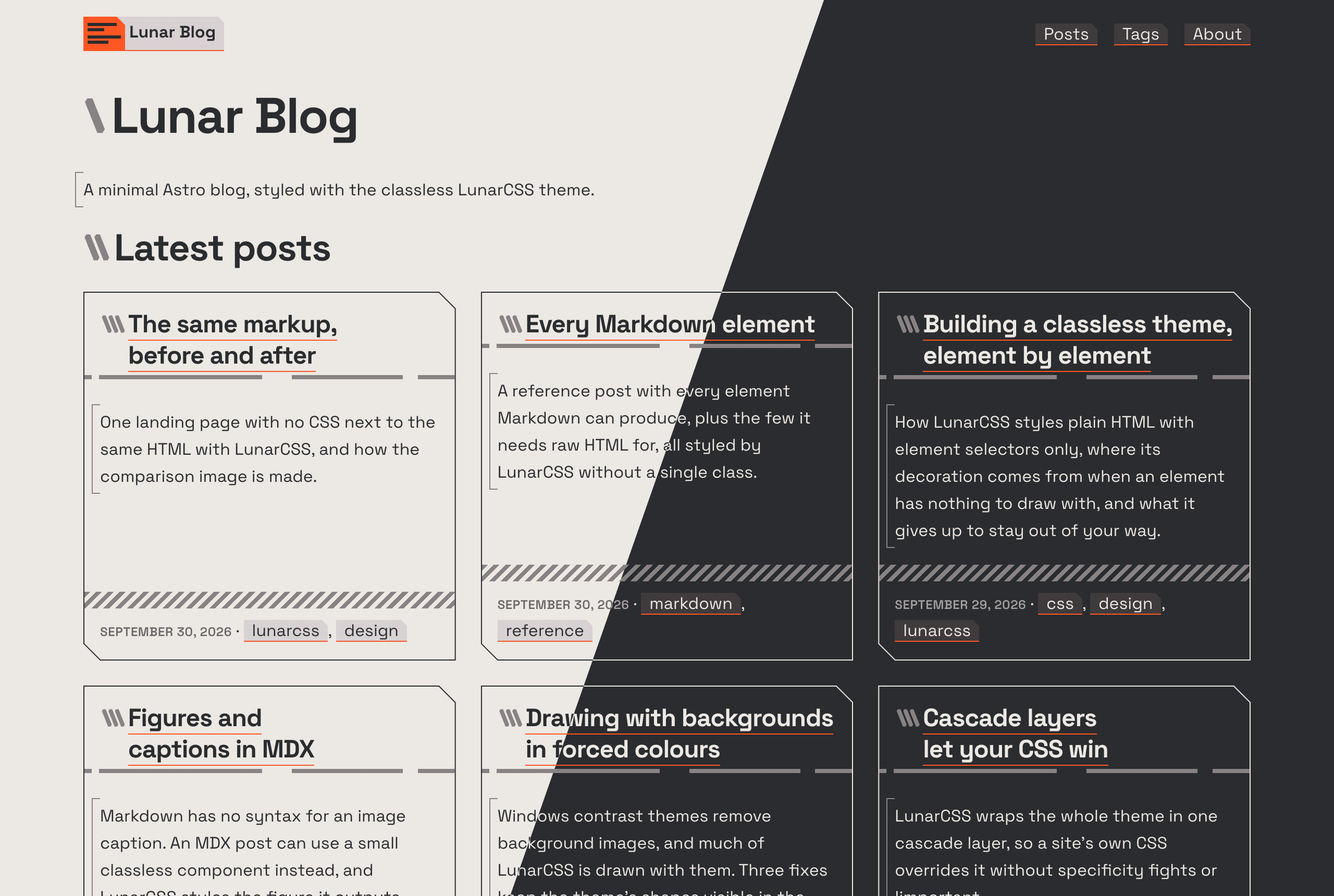](https://nikolaiwu.github.io/lunar-blog/)
## Install
```bash
npm create astro@latest -- --template nikolaiwu/lunar-blog
```
Or with pnpm: `pnpm create astro@latest --template nikolaiwu/lunar-blog`. Then `npm run dev`, and open the address it prints.
## Features
- **Classless:** plain, semantic HTML with no `class` attributes, styled by LunarCSS. One small stylesheet of your own for tweaks
- **No client JavaScript:** a static site; light and dark follow the reader's system setting
- **No third-party requests:** self-hosted fonts, no analytics, no CDN scripts
- **Markdown and MDX posts,** with a typed frontmatter schema, drafts, hero images, footnotes, captioned figures, and wide tables that scroll on small screens
- **Code highlighting at build time,** switching between light and dark with the page
- **Archive** as cards (paginated) or as one list, **tag pages**, previous and next post links
- **RSS, sitemap, robots.txt,** canonical URLs and link previews (Open Graph), with each post's hero image as its preview
- **Works anywhere:** at a domain root or under a path, such as a GitHub Pages project site
- **Accessible:** semantic structure, visible focus, WCAG AA text contrast, and Windows contrast themes
- **Claude Code ready:** [CLAUDE.md](CLAUDE.md) explains the blog to Claude, so it can write posts and pages the way the theme expects
## Getting started
1. **Make it yours:** set the title, description, author, language and navigation in [`src/site.config.ts`](src/site.config.ts).
2. **Set its address:** in [`astro.config.mjs`](astro.config.mjs), change the `site` and `base` defaults (the demo's) to your own, or set them when you deploy (see [Deploying](#deploying)). Links, previews, the feed and the sitemap are built from them.
3. **Clear the samples:** delete everything in `src/content/posts/` and `src/assets/moonrise.svg`, and rewrite `src/pages/about.md` and this README (its screenshot is `.github/screenshot.png`). If you installed with npm, yarn or bun, delete the starter's `pnpm-lock.yaml` too. `create astro` also adds a generic `AGENTS.md`: for a coding agent other than Claude Code, replace its contents with `Read CLAUDE.md.`, or delete it.
4. **Write a post:** add a Markdown file to `src/content/posts/`. Its name is its URL: `hello-world.md` becomes `/posts/hello-world/`.
```md
---
title: Hello, world
description: One or two sentences, for cards, search results and the RSS feed.
pubDate: 2026-10-07
updatedDate: 2026-10-08 # optional
tags: [astro, dark-mode] # optional, lower-case words joined by hyphens
draft: true # optional: shows in dev, left out of the build
heroImage: ./cover.jpg # optional, next to the post
heroImageAlt: What the image shows # required with heroImage
---
Your post, in Markdown.
```
A post with its own images can be a folder: `hello-world/index.md`, with the images beside it. For an image with a caption, write the post in MDX and use the `Figure` component; a Markdown file in `src/pages/` becomes a standalone page. [CLAUDE.md](CLAUDE.md) has the details, with or without Claude.
| Command | What it does |
| ----------------- | ------------------------------------------- |
| `npm run dev` | Dev server with hot reload; drafts included |
| `npm run build` | Build the static site to `dist/` |
| `npm run preview` | Serve the build, under its base path |
| `npm run check` | Type-check |
| `npm run format` | Format with Prettier |
## Customizing
Set LunarCSS's tokens in [`src/styles/site.css`](src/styles/site.css). The main colors are a light and a dark one, swapped between the themes, plus an accent:
```css
:root {
--lunar-light: #f5f5f4;
--lunar-dark: #1c1917;
--lunar-accent: light-dark(#7c3aed, #a78bfa);
}
```
- **Everything else** (type, spacing, borders, the muted tones) is a token too. See the [LunarCSS User Guide](https://github.com/nikolaiwu/lunarcss/blob/main/USER-GUIDE.md).
- **Fonts:** Space Grotesk and Space Mono are self-hosted by the theme's fonts stylesheet. To change them, self-host your own (a [Fontsource](https://fontsource.org) package, or files with `@font-face`), set `--lunar-font-sans` and `--lunar-font-mono`, and remove the fonts import from `src/layouts/Base.astro`.
- **Logo and icons:** replace `src/assets/logo.svg` (inlined into the header, sized in `em`), `public/favicon.svg`, `public/apple-touch-icon.png` (180×180) and `public/og-image.png` (1200×630, the preview for pages without a hero image).
Keep the markup classless: the theme styles elements by what they are. If something looks wrong with your content, it may be a gap in the theme; please [open an issue on LunarCSS](https://github.com/nikolaiwu/lunarcss/issues).
## Deploying
`npm run build` writes a static site to `dist/`. Two settings decide its address: `SITE_URL`, the origin (`https://example.com`), and `BASE_PATH`, the path it's served under (`/` at a domain root). Set them as environment variables when building, or change the defaults in `astro.config.mjs`.
- **GitHub Pages:** the included workflow (`.github/workflows/pages.yml`) deploys on every push to `main`. Set **Settings → Pages → Source** to **GitHub Actions**, once. It gets the site's address from GitHub, so a project site, a user site and a custom domain all work with nothing to change.
- **Netlify, Cloudflare Pages, Vercel and similar:** build command `npm run build`, output directory `dist`, with `SITE_URL` and `BASE_PATH=/` in the host's environment variables. Delete `.github/workflows/pages.yml`, or every push runs it and it fails.
- **Any static host:** build with the right `SITE_URL` and `BASE_PATH`, and upload `dist/`. Delete the workflow here too.
Check with `npm run build && npm run preview` before deploying: it serves the build under its base path, so broken links show up.
## Contributing
Bug reports and fixes are welcome. See [CONTRIBUTING.md](CONTRIBUTING.md).
## Credits
- [LunarCSS](https://github.com/nikolaiwu/lunarcss), the classless theme, MIT
- [Astro](https://astro.build), MIT
- [Space Grotesk](https://github.com/floriankarsten/space-grotesk) and [Space Mono](https://github.com/googlefonts/spacemono), SIL Open Font License 1.1
- Code highlighting with [Shiki](https://shiki.style): GitHub Light High Contrast (MIT) and [Catppuccin](https://github.com/catppuccin/catppuccin) Mocha (MIT)
MIT, see [LICENSE](LICENSE).
Explore similar templates
Compare previews and descriptions within the same stack and category.

astrowind
AstroWind is a free, open-source Astro starter theme using Astro and Tailwind CSS, released under the MIT license.
Astro · Blog

astro-paper
AstroPaper is a minimal, responsive, accessible, and SEO-friendly Astro blog theme. Articles are stored as Markdown/MDX in src/content/posts/, with subdirectories affecting URLs.
Astro · Blog

fuwari
Fuwari is a static blog template built with Astro and Tailwind CSS for personal blogs. It manages posts as Markdown files in src/content/posts/, with frontmatter for title, date, description, cover, tags, categories, draft status, and language.
Astro · Blog

Firefly
Firefly is a clean personal blog theme forked from Astro and Fuwari, offering four background modes, single/double sidebar and list/grid layouts, Pagefind client-side full-text search, and a six-language UI.
Astro · Blog

astro-theme-cactus
Astro Cactus is an Astro-based blog and portfolio theme that uses Markdown/MDX content collections to manage posts, notes, and tags, with frontmatter type-checked by a schema.
Astro · Portfolio

astrofy
Astrofy is a free and open-source personal portfolio website template built with Astro and TailwindCSS, with built-in blog, CV timeline, project showcase, store, and RSS feed modules.
Astro · Portfolio