无类名样式:输出语义化 HTML,不使用 class 属性,由 LunarCSS 主题统一控制外观
AstroHTML博客启动器
lunar-blog — Astro 博客模板
作者 nikolaiwu
基于 Astro 的极简博客启动器,使用无类名 CSS 主题 LunarCSS,输出纯静态 HTML,不依赖客户端 JavaScript。
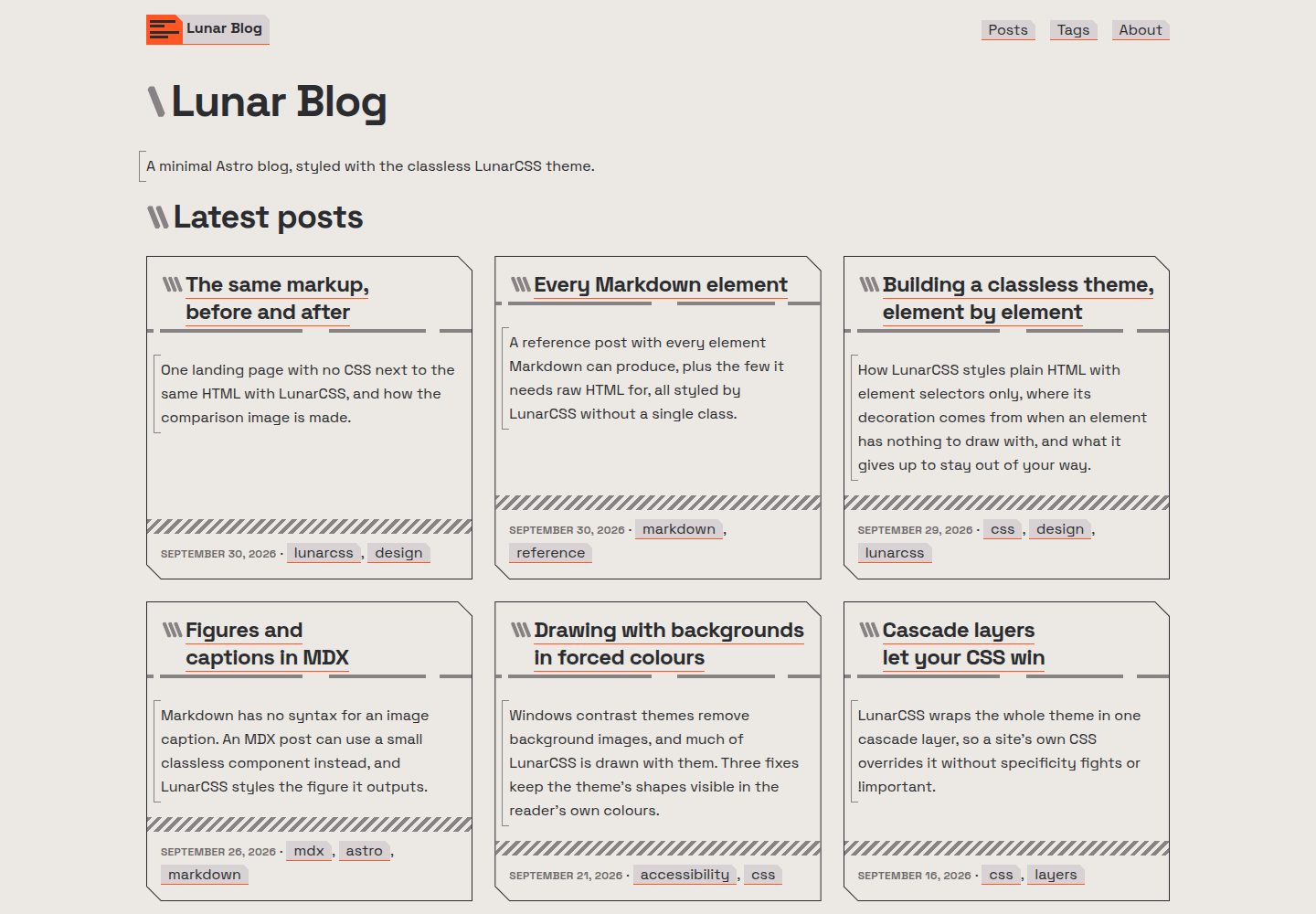
看看你的网站会是什么样
浏览真实页面截图,比较内容排版与手机效果。点击下方缩略图切换,放大查看整页细节。
全部页面与视图 3
截图用于了解视觉与布局,交互效果请以实际项目为准。
采集于 2026-10-07查看来源
值得关注的模板亮点
从已有项目资料中,快速了解它的特点。
无客户端 JavaScript:静态站点,明暗主题跟随读者系统设置
无第三方请求:字体自托管,不含分析脚本和 CDN 脚本
Markdown 与 MDX 文章:支持类型化 frontmatter、草稿、主图、脚注、带说明图片和可横向滚动的宽表格
内置归档(分页卡片或列表)、标签页、上下篇链接,以及 RSS、站点地图、robots.txt 和 Open Graph 预览
可部署在域名根路径或子路径,附带 GitHub Pages 工作流
模板详细介绍
lunar-blog 是一个 Astro 博客启动器,写作方式为 Markdown 或 MDX,页面输出为语义化 HTML,不使用 class 属性,由无类名 CSS 主题 LunarCSS 负责样式,呈现复古未来风格,并跟随读者系统设置切换明暗主题。站点为静态构建,不包含客户端 JavaScript,字体自托管,不引入分析脚本或 CDN 脚本。
内容功能包括:文章支持类型化 frontmatter 字段、草稿、主图、脚注、带说明的图片以及在小屏幕上横向滚动的宽表格;代码高亮在构建时生成,并随页面明暗主题切换。归档可显示为分页卡片或单一列表,另有标签页、上一篇/下一篇链接,以及 RSS、站点地图、robots.txt、规范链接和 Open Graph 预览(无主图的页面使用默认预览图)。站点可部署在域名根路径或子路径下,例如 GitHub Pages 项目站点。仓库附带 CLAUDE.md,用于向 Claude Code 说明该博客的写作约定。
使用前需要自行调整配置:在 src/site.config.ts 中设置标题、描述、作者、语言和导航;在 astro.config.mjs 中或通过环境变量 SITE_URL、BASE_PATH 设置站点地址;删除示例文章与示例图片,并替换 logo、favicon、apple-touch-icon 和默认社交预览图。主题色通过 src/styles/site.css 中的 LunarCSS 令牌调整。仓库采用 MIT 许可,但演示图片、字体、图标等第三方素材需按各自许可单独核对。
AstroHTML博客启动器
适合你的项目吗?
适用场景
- 搭建个人写作博客,以 Markdown 文件为主要内容来源
- 需要无客户端 JavaScript、无第三方请求的静态站点
- 希望主题跟随读者系统设置自动切换明暗模式
- 部署到 GitHub Pages 项目站点或自定义域名下的子路径
- 使用 Claude Code 等编码代理按既有约定撰写文章和页面
适合人群
- 偏好极简、无类名 CSS 与语义化 HTML 的个人博主
- 需要静态输出、不引入客户端脚本的站点
- 使用 Astro 并希望以 Markdown/MDX 管理内容的开发者
- 需要 RSS、站点地图和社交预览等基础 SEO 输出的博客
上手与定制指南
结合仓库当前版本的说明,按下面的资料检查内容、配置与运行要求。
- 1
使用 npm create astro@latest -- --template nikolaiwu/lunar-blog 创建项目,然后运行 npm run dev
- 2
在 src/site.config.ts 设置标题、描述、作者、语言和导航,在 astro.config.mjs 或环境变量中设置 SITE_URL 与 BASE_PATH
- 3
删除 src/content/posts/ 中的示例文章和 src/assets/moonrise.svg,重写 src/pages/about.md 与 README,并替换 logo、favicon、apple-touch-icon 和 og-image
- 4
文章放在 src/content/posts/,文件名即 URL;需要图片说明时改用 MDX 和 Figure 组件
- 5
部署前运行 npm run build && npm run preview 检查子路径下的链接;使用非 GitHub Pages 平台时删除 .github/workflows/pages.yml
授权与来源资料
使用条件与限制
免费使用 · 保留许可声明本次收录的是公开仓库中采用 MIT 许可的免费版本;免费范围为该版本代码,不代表外部服务或第三方素材免费。
使用时需要遵守
- 允许免费使用、修改、商用和分发该版本代码。
- 分发代码副本或实质性部分时,保留原作者版权声明和完整 MIT 许可声明。
- 代码按现状提供;担保与责任限制以原许可证及适用法律为准。
额外费用与待核对事项
- 演示图片、字体、图标及其他第三方素材需按各自许可核对,不能仅凭代码的 MIT 许可判断。
- 域名、托管、数据库、支付或 AI 等外部服务可能另外收费。
- 部署到 Netlify、Cloudflare Pages、Vercel 等非 GitHub Pages 平台时,必须删除仓库自带的 .github/workflows/pages.yml,否则每次推送都会触发该工作流并失败。
- 部署到任意静态托管时,同样需要删除 .github/workflows/pages.yml 工作流,否则推送会触发失败的 GitHub Pages 部署。
- 使用自带的 GitHub Pages 工作流时,需在仓库设置中一次性将 Pages 来源设为 GitHub Actions,否则无法自动部署。
- 若使用 npm、yarn 或 bun 安装,需删除模板自带的 pnpm-lock.yaml,以避免包管理器锁文件冲突。
- create astro 会生成通用 AGENTS.md;若使用 Claude Code 之外的编码代理,需将其内容替换为 Read CLAUDE.md. 或直接删除。
- 若要更换字体,需自托管字体文件并设置 --lunar-font-sans 与 --lunar-font-mono,同时从 src/layouts/Base.astro 中移除主题的字体导入。
查看原文依据
Permission is hereby granted, free of charge
许可证原文
Delete `.github/workflows/pages.yml`, or every push runs it and it fails.
README 原文
Delete the workflow here too.
README 原文
Set **Settings → Pages → Source** to **GitHub Actions**, once.
README 原文
delete the starter's `pnpm-lock.yaml` too
README 原文
replace its contents with `Read CLAUDE.md.`, or delete it.
README 原文
https://github.com/nikolaiwu/lunar-blog/blob/main/LICENSEhttps://github.com/nikolaiwu/lunar-blog/blob/main/README.mdremove the fonts import from `src/layouts/Base.astro`
README 原文
DeepSeek 根据仓库许可证和 README 整理 ·2026-10-07。结果仅覆盖已读取资料,依赖、图片、字体及后续条款变更以各自原文为准。
项目核对记录与介绍依据
模板资料
- 来源平台
- GitHub
- 资料与维护参考分
- 资料较完整 · 85 / 100
- 技术栈
- Astro · HTML
- 网站类型
- 博客 · 启动器
这个分数如何计算
本站按许可资料(最高30分)、演示链接(12分)、预览图(10分)、Star数(15分)、记录的维护时间(15分)、描述完整度(8分)、功能记录(5分)和分类资料(5分)计算。它不是代码、安全或性能测试,也不是 Google 评分;有链接不代表已实测可用。
这个项目需要核对什么
- 记录的仓库更新时间
- 2026-10-07
- 截图检查日期
- 2026-10-07
已收录演示链接。请用你的内容与屏幕尺寸检查;有演示不代表表单、认证或支付已经可用。
目录记录的主要技术栈是 Astro。请通过依赖清单和锁文件核对实际版本与托管要求。这些说明基于收录资料,不代表代码审计或部署实测。
查看具体选型方法 →介绍的制作与核对状态
介绍由 AI 辅助整理目录与仓库资料。仓库作者不等于这篇介绍的审核者。
审核声明: [email protected] · 2026-10-08
查看当时使用的来源资料
SHA-256: c990cce6455e1434001a54b3d2a8e1de0a237c020739aacb9ace50b7c8cd1929
2026-10-07T13:15:10.270Z
来源文件 / 仓库# 🌙 Lunar Blog
[](LICENSE)
[](https://astro.build)
[](https://github.com/nikolaiwu/lunarcss)
A minimal Astro blog starter with no classes and no JavaScript. Write Markdown, and [LunarCSS](https://github.com/nikolaiwu/lunarcss), a classless CSS theme, styles the plain HTML it becomes: retro-futuristic, in light and dark.
[Live demo](https://nikolaiwu.github.io/lunar-blog/) · [Changelog](CHANGELOG.md)
[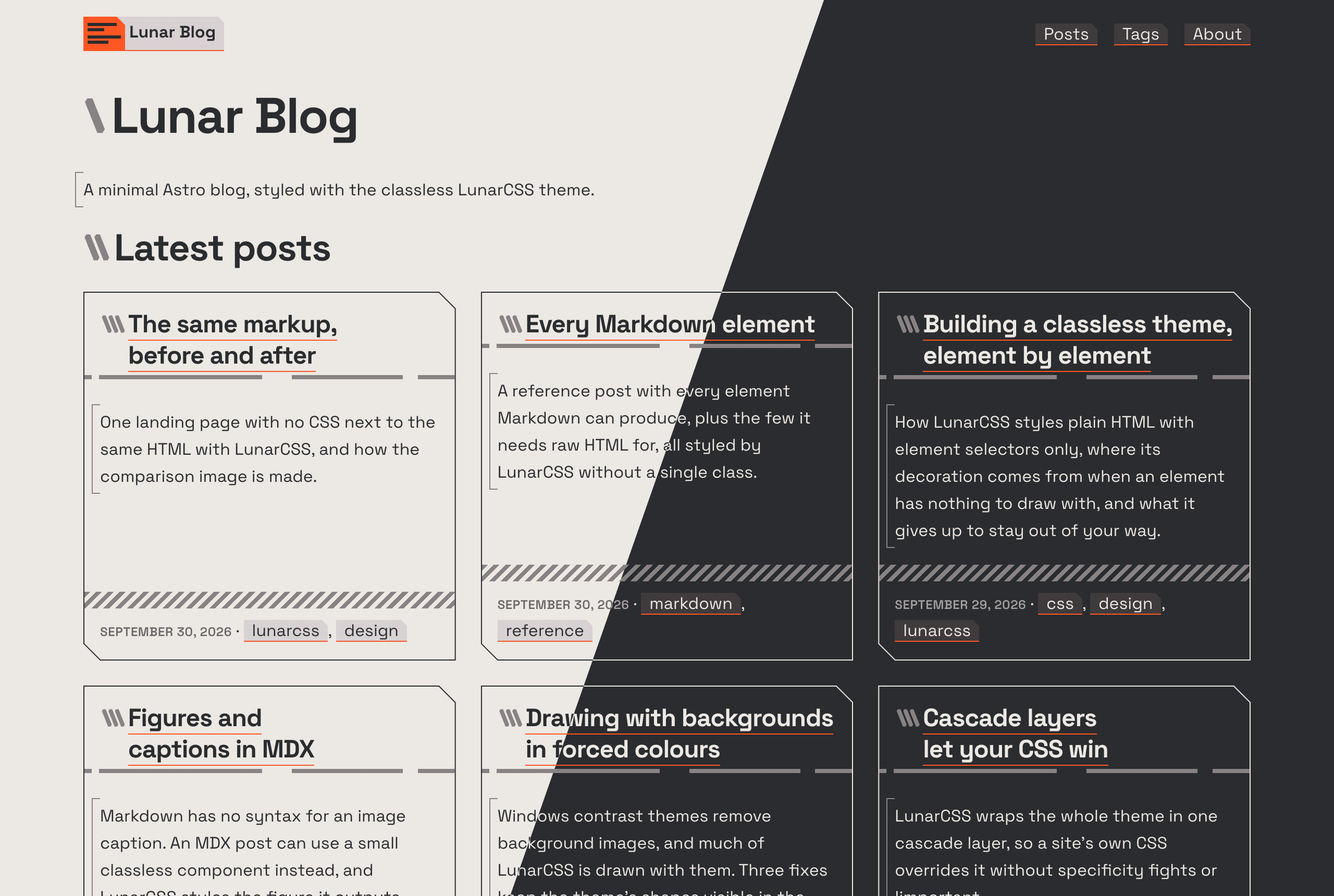](https://nikolaiwu.github.io/lunar-blog/)
## Install
```bash
npm create astro@latest -- --template nikolaiwu/lunar-blog
```
Or with pnpm: `pnpm create astro@latest --template nikolaiwu/lunar-blog`. Then `npm run dev`, and open the address it prints.
## Features
- **Classless:** plain, semantic HTML with no `class` attributes, styled by LunarCSS. One small stylesheet of your own for tweaks
- **No client JavaScript:** a static site; light and dark follow the reader's system setting
- **No third-party requests:** self-hosted fonts, no analytics, no CDN scripts
- **Markdown and MDX posts,** with a typed frontmatter schema, drafts, hero images, footnotes, captioned figures, and wide tables that scroll on small screens
- **Code highlighting at build time,** switching between light and dark with the page
- **Archive** as cards (paginated) or as one list, **tag pages**, previous and next post links
- **RSS, sitemap, robots.txt,** canonical URLs and link previews (Open Graph), with each post's hero image as its preview
- **Works anywhere:** at a domain root or under a path, such as a GitHub Pages project site
- **Accessible:** semantic structure, visible focus, WCAG AA text contrast, and Windows contrast themes
- **Claude Code ready:** [CLAUDE.md](CLAUDE.md) explains the blog to Claude, so it can write posts and pages the way the theme expects
## Getting started
1. **Make it yours:** set the title, description, author, language and navigation in [`src/site.config.ts`](src/site.config.ts).
2. **Set its address:** in [`astro.config.mjs`](astro.config.mjs), change the `site` and `base` defaults (the demo's) to your own, or set them when you deploy (see [Deploying](#deploying)). Links, previews, the feed and the sitemap are built from them.
3. **Clear the samples:** delete everything in `src/content/posts/` and `src/assets/moonrise.svg`, and rewrite `src/pages/about.md` and this README (its screenshot is `.github/screenshot.png`). If you installed with npm, yarn or bun, delete the starter's `pnpm-lock.yaml` too. `create astro` also adds a generic `AGENTS.md`: for a coding agent other than Claude Code, replace its contents with `Read CLAUDE.md.`, or delete it.
4. **Write a post:** add a Markdown file to `src/content/posts/`. Its name is its URL: `hello-world.md` becomes `/posts/hello-world/`.
```md
---
title: Hello, world
description: One or two sentences, for cards, search results and the RSS feed.
pubDate: 2026-10-07
updatedDate: 2026-10-08 # optional
tags: [astro, dark-mode] # optional, lower-case words joined by hyphens
draft: true # optional: shows in dev, left out of the build
heroImage: ./cover.jpg # optional, next to the post
heroImageAlt: What the image shows # required with heroImage
---
Your post, in Markdown.
```
A post with its own images can be a folder: `hello-world/index.md`, with the images beside it. For an image with a caption, write the post in MDX and use the `Figure` component; a Markdown file in `src/pages/` becomes a standalone page. [CLAUDE.md](CLAUDE.md) has the details, with or without Claude.
| Command | What it does |
| ----------------- | ------------------------------------------- |
| `npm run dev` | Dev server with hot reload; drafts included |
| `npm run build` | Build the static site to `dist/` |
| `npm run preview` | Serve the build, under its base path |
| `npm run check` | Type-check |
| `npm run format` | Format with Prettier |
## Customizing
Set LunarCSS's tokens in [`src/styles/site.css`](src/styles/site.css). The main colors are a light and a dark one, swapped between the themes, plus an accent:
```css
:root {
--lunar-light: #f5f5f4;
--lunar-dark: #1c1917;
--lunar-accent: light-dark(#7c3aed, #a78bfa);
}
```
- **Everything else** (type, spacing, borders, the muted tones) is a token too. See the [LunarCSS User Guide](https://github.com/nikolaiwu/lunarcss/blob/main/USER-GUIDE.md).
- **Fonts:** Space Grotesk and Space Mono are self-hosted by the theme's fonts stylesheet. To change them, self-host your own (a [Fontsource](https://fontsource.org) package, or files with `@font-face`), set `--lunar-font-sans` and `--lunar-font-mono`, and remove the fonts import from `src/layouts/Base.astro`.
- **Logo and icons:** replace `src/assets/logo.svg` (inlined into the header, sized in `em`), `public/favicon.svg`, `public/apple-touch-icon.png` (180×180) and `public/og-image.png` (1200×630, the preview for pages without a hero image).
Keep the markup classless: the theme styles elements by what they are. If something looks wrong with your content, it may be a gap in the theme; please [open an issue on LunarCSS](https://github.com/nikolaiwu/lunarcss/issues).
## Deploying
`npm run build` writes a static site to `dist/`. Two settings decide its address: `SITE_URL`, the origin (`https://example.com`), and `BASE_PATH`, the path it's served under (`/` at a domain root). Set them as environment variables when building, or change the defaults in `astro.config.mjs`.
- **GitHub Pages:** the included workflow (`.github/workflows/pages.yml`) deploys on every push to `main`. Set **Settings → Pages → Source** to **GitHub Actions**, once. It gets the site's address from GitHub, so a project site, a user site and a custom domain all work with nothing to change.
- **Netlify, Cloudflare Pages, Vercel and similar:** build command `npm run build`, output directory `dist`, with `SITE_URL` and `BASE_PATH=/` in the host's environment variables. Delete `.github/workflows/pages.yml`, or every push runs it and it fails.
- **Any static host:** build with the right `SITE_URL` and `BASE_PATH`, and upload `dist/`. Delete the workflow here too.
Check with `npm run build && npm run preview` before deploying: it serves the build under its base path, so broken links show up.
## Contributing
Bug reports and fixes are welcome. See [CONTRIBUTING.md](CONTRIBUTING.md).
## Credits
- [LunarCSS](https://github.com/nikolaiwu/lunarcss), the classless theme, MIT
- [Astro](https://astro.build), MIT
- [Space Grotesk](https://github.com/floriankarsten/space-grotesk) and [Space Mono](https://github.com/googlefonts/spacemono), SIL Open Font License 1.1
- Code highlighting with [Shiki](https://shiki.style): GitHub Light High Contrast (MIT) and [Catppuccin](https://github.com/catppuccin/catppuccin) Mocha (MIT)
MIT, see [LICENSE](LICENSE).
看看同类模板
对比同技术栈与用途的模板,找到更适合的视觉与内容结构。

astrowind
⭕️ AstroWind: A free template using Astro v7 and Tailwind CSS v4. Astro starter theme.
Astro · 博客

astro-paper
A minimal, accessible and SEO-friendly Astro blog theme.
Astro · 博客

fuwari
✨A static blog template built with Astro.
Astro · 博客

Firefly
Firefly 是一款基于 Astro 的静态博客主题,由 CuteLeaf 在 saicaca 的 Fuwari 模板基础上二次开发,主打清新美观的视觉风格。
Astro · 博客

astro-theme-cactus
A simple Astro theme. Use it to create your blog or website.
Astro · 作品集

astrofy
Astrofy is a free and open-source template for your Personal Portfolio Website built with Astro and TailwindCS…
Astro · 作品集