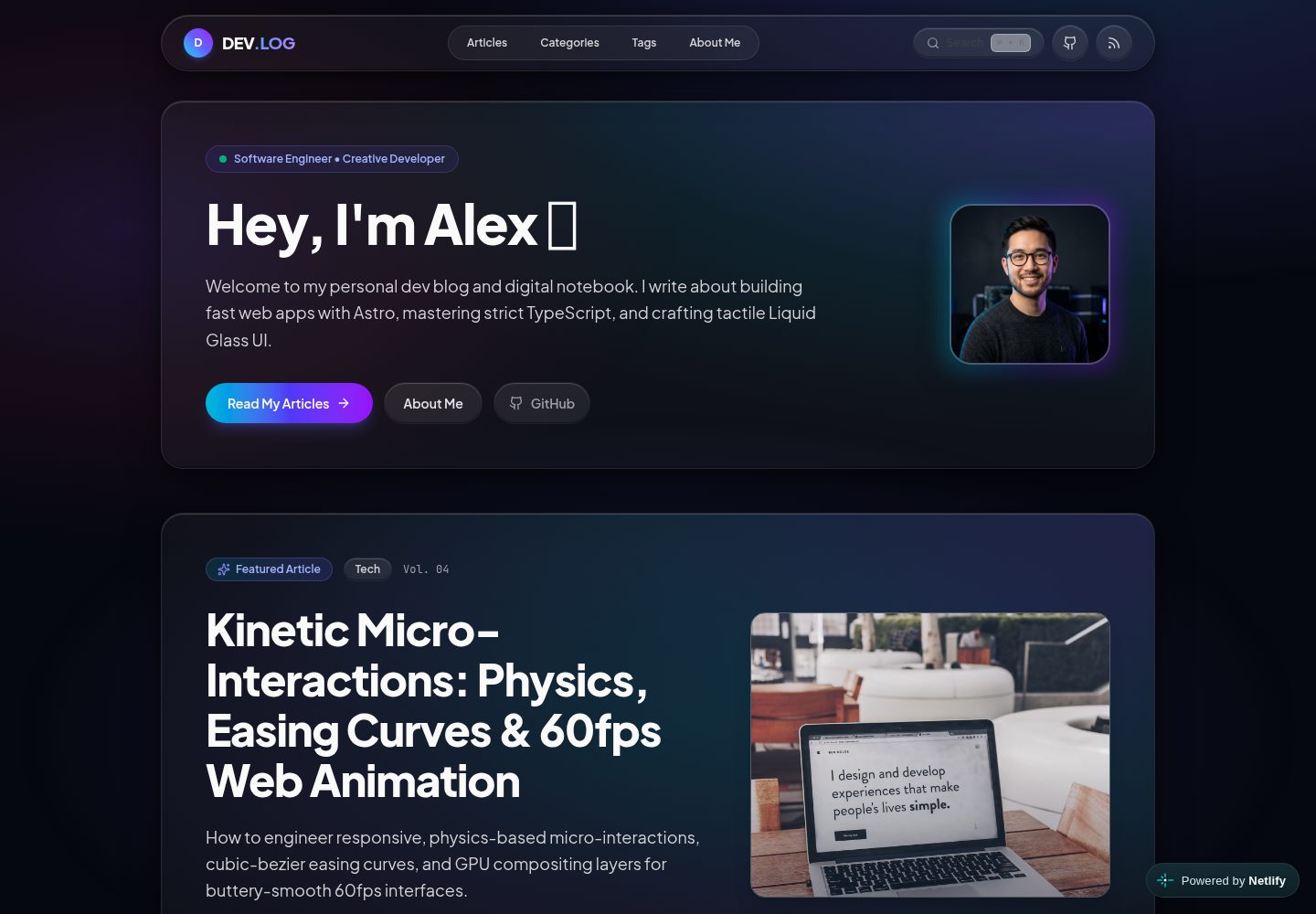
Dark liquid glass interface with translucent cards and dynamic glow effects
AstroBlog
devlog-astro-template — Astro Blog Template
By nivinvysakh
An Astro-based personal developer blog template with a dark liquid glass interface, built-in Pagefind static search, MDX components, RSS and sitemap, plus Docker and CI configurations.
Explore the design
Compare the page layouts and mobile experience. Open any screenshot for a closer look.
Desktop homepage1 / 3
Desktop captureTop of page
Actual screenshot captured by the server browser.
All pages & views 3
Screenshots show visual appearance; interactive behavior may differ.
Recorded 2026-10-02View source
What stands out
A quick read of the recorded project description.
Client-side static full-text search based on Pagefind, supporting Cmd+K / Ctrl+K shortcuts
Content uses Markdown or MDX, with interactive components such as Callout and ArchitecturePanel
Site information, author profile, navigation, and page copy are centralized in src/config/site.ts
Built-in RSS 2.0 feed, XML sitemap, and OpenGraph / Twitter meta tags
Includes multi-stage Docker, Docker Compose, GitHub Actions CI, and Dependabot configurations
Template Details
This is an Astro template for personal developer blogs and digital notes, released under the MIT license with a demo site deployed on Netlify. The interface centers on a dark liquid glass style, including a homepage hero, article list, categories, tags, about page, 404 page, and search modal.
Content is stored as Markdown or MDX files in the src/content/blog/ directory, supporting frontmatter fields and several interactive MDX components (such as Callout and ArchitecturePanel), with code highlighting handled by Astro Expressive Code. Site information, author profile, navigation, categories, about page copy, subscription card, 404 copy, and search placeholder are all adjusted in a single configuration file, src/config/site.ts.
The build process consists of two steps, astro build and pagefind, to generate static output and build the client-side full-text search index; it also provides an RSS 2.0 feed, XML sitemap, and OpenGraph/Twitter meta tags. The repository includes multi-stage Docker and Docker Compose configurations, GitHub Actions CI, and Dependabot update settings.
Note: the framework version numbers and performance descriptions mentioned in the README have not been individually verified against the dependency manifest and are not repeated here; the licenses for third-party assets such as demo images, fonts, and icons must be confirmed separately and cannot be judged solely by the code's MIT license.
AstroBlog
Is it right for your project?
Use Cases
- Building a personal developer blog and publishing technical articles
- Using as a static site for a digital garden or development notes
- Blogs that need client-side full-text search and category/tag navigation
- Writing scenarios where interactive components like callouts and architecture panels are embedded in MDX articles
- Deploying a static blog using Docker or CI workflows
Suitable For
- Individual developers familiar with Astro and Markdown/MDX
- Bloggers who prefer a dark, glass-textured visual style
- Sites that need basic SEO and distribution capabilities such as RSS, sitemap, and static search
- Users who want to maintain site information and page copy with a single configuration file
Getting started & customization
Use these recorded setup notes alongside the repository instructions for your chosen version.
- 1
Requires Node.js v22.12.0 or higher, and one of npm, pnpm, yarn, or bun
- 2
After cloning the repository, run npm install, then start the local development server with npm run dev (default port 4321)
- 3
For production builds, use npm run build, which first runs astro build and then pagefind to generate the search index
- 4
Site information, author profile, navigation, categories, and page copy are modified in src/config/site.ts
- 5
Third-party assets such as demo images, fonts, and icons must be checked separately under their respective licenses
License & source material
Usage conditions & limitations
Free to use · keep license noticeThis entry covers the free version under the MIT license in the public repository; the free scope is the code of this version and does not mean external services or third-party assets are free.
Must comply with when using
- Free use, modification, commercial use, and distribution of this version's code are permitted.
- When distributing copies or substantial portions of the code, retain the original author's copyright notice and the full MIT license notice.
- The code is provided as is; warranties and limitations of liability are governed by the original license and applicable law.
Additional costs & items to verify
- Demo images, fonts, icons, and other third-party assets must be checked under their respective licenses and cannot be judged solely by the code's MIT license.
- External services such as domains, hosting, databases, payments, or AI may incur additional charges.
View Original Text Basis
https://github.com/nivinvysakh/devlog-astro-template/blob/main/LICENSEhttps://github.com/nivinvysakh/devlog-astro-template/blob/main/README.mdPermission is hereby granted, free of charge
Original License Text
Compiled by DeepSeek based on repository license and README ·2026-10-02. Results only cover the materials read; dependencies, images, fonts, and subsequent term changes are subject to their respective original texts.
Project checks & description sources
Template Information
- Source platforms
- Astro Themes
- Documentation and maintenance reference score
- More documented · 83 / 100
- Technologies
- Astro
- Website type
- Blog
How this score is calculated
Our heuristic uses license records (up to 30), a demo link (12), a preview (10), stars (15), recorded maintenance (15), description completeness (8), feature records (5) and classification data (5). It is not a code, security or performance test, or a Google score. A link does not establish tested functionality.
What to verify for this project
- Repository update recorded
- 2026-09-28
- Screenshot last checked
- 2026-10-02
A demo link is listed. Check it with your own content and viewport sizes; its presence does not confirm that forms, authentication or payments work.
The catalog identifies Astro as the primary stack. Check the actual dependency manifest and lockfile for versions and hosting requirements. These notes use recorded metadata, not a code audit or a deployment test.
Use a selection guide →How this description was prepared
AI-assisted description based on catalog records and repository material. Repository authors are not automatically the reviewers of this description.
Automatically checked against source and license rules; no manual editorial review.
Inspect the recorded source material
SHA-256: 92de8fc799ad699e9b04126ba3ce31c4795e5a489b06142d86fa53efe8592757
2026-10-02T10:29:58.938Z
Source file / repository<div align="center">
# 🌐 DEV.LOG — Personal Developer Blog & Digital Garden
**A high-performance personal developer blog, digital notebook, and portfolio template.**
Crafted with **Astro 7**, **Tailwind CSS 4**, strict **TypeScript**, and a tactile **Liquid Glass Dark UI**.
[](./LICENSE)
[](https://portal.astro.build/themes/liquid-glass-blog/)
[](https://app.netlify.com/projects/devblogsite/deploys)
[](https://devblogsite.netlify.app)
[](https://astro.build)
[](https://tailwindcss.com)
[](https://www.typescriptlang.org)
[](https://pagefind.app)
[](https://www.docker.com)
[](./.github/workflows/ci.yml)
[**Explore Live Demo »**](https://devblogsite.netlify.app) · [**Official Astro Theme Listing »**](https://portal.astro.build/themes/liquid-glass-blog/) · [**Report Bug »**](https://github.com/nivinvysakh/devlog-astro-template/issues) · [**Request Feature »**](https://github.com/nivinvysakh/devlog-astro-template/issues)
</div>
---
## 📑 Table of Contents
- [✨ Key Features](#-key-features)
- [🚀 Live Demo & Screenshots](#-live-demo--screenshots)
- [⚡ 1-Minute Customization](#-1-minute-customization-single-config-file)
- [🛠️ Quick Start](#-quick-start)
- [✍️ Writing Articles & MDX Components](#-writing-articles--mdx-components)
- [Frontmatter Schema](#1-frontmatter-schema-reference)
- [Interactive Components](#2-interactive-mdx-components)
- [Advanced Code Highlighting](#3-advanced-code-highlighting--diffs)
- [📂 Project Structure](#-project-structure)
- [🌐 1-Click Deployment Options](#-1-click-deployment-options)
- [🐳 Docker Support](#-docker-support)
- [🛡️ Automated CI & Dependabot](#-automated-ci--dependabot)
- [� License & Credits](#-license--credits)
---
## ✨ Key Features
| Category | Features |
| :--- | :--- |
| **🚀 Framework & Core** | **Astro 7.2** Islands architecture, **Zero-JS** baseline by default, sub-50ms static delivery, and full SSR/SSG support. |
| **🎨 Design & Theme** | **Liquid Glass UI** built with **Tailwind CSS 4**, translucent frosted glass cards, dynamic ambient glow meshes, and smooth spring physics micro-interactions. |
| **🔍 Search & Indexing** | **Pagefind** client-side static full-text search with instant modal dialog and keyboard shortcut navigation (`Cmd+K` / `Ctrl+K`). |
| **📝 Rich Content & MDX** | Interactive MDX story components (`<Callout />`, `<ArchitecturePanel />`, `<SpeechBubble />`, `<CharacterAside />`) and **Astro Expressive Code** for syntax highlighting. |
| **⚡ 1-Minute Setup** | Configure your entire personal brand, bio, social links, hero text, and navigation from **a single configuration file** (`src/config/site.ts`). |
| **🏷️ Taxonomy & Navigation** | Dynamic category showcases (`/categories/*`), tag explorer (`/tags/*`), table of contents with scroll spy, and reading time estimation. |
| **📡 Syndication & SEO** | Out-of-the-box **RSS 2.0 feed** (`/rss.xml`), automated **XML Sitemap** (`/sitemap-index.xml`), and OpenGraph / Twitter meta tags. |
| **🐳 Production Ready** | Multi-stage **Docker** & Docker Compose setup, **GitHub Actions CI**, and automated **Dependabot** security updates. |
---
## 🚀 Live Demo & Screenshots
Experience the template live in action at: **[https://devblogsite.netlify.app](https://devblogsite.netlify.app)**
> 🌟 **Official Listing:** This theme is officially featured on the [Astro Themes Directory](https://portal.astro.build/themes/liquid-glass-blog/).
### 🖼️ UI Showcase
<table>
<tr>
<td width="50%" align="center">
<strong>🏠 Home Page & Hero</strong><br/><br/>
<img src="assets/home.png" alt="Home Page Screenshot" width="100%">
</td>
<td width="50%" align="center">
<strong>📖 Blog Post & MDX Layout</strong><br/><br/>
<img src="assets/post.png" alt="Blog Post Screenshot" width="100%">
</td>
</tr>
<tr>
<td width="50%" align="center">
<strong>👤 About Me & Experience</strong><br/><br/>
<img src="assets/about_me.png" alt="About Page Screenshot" width="100%">
</td>
<td width="50%" align="center">
<strong>📚 All Articles Directory</strong><br/><br/>
<img src="assets/articles.png" alt="Articles Page Screenshot" width="100%">
</td>
</tr>
<tr>
<td width="50%" align="center">
<strong>📂 Categories Matrix</strong><br/><br/>
<img src="assets/categories.png" alt="Categories Page Screenshot" width="100%">
</td>
<td width="50%" align="center">
<strong>🏷️ Tag Explorer</strong><br/><br/>
<img src="assets/tag.png" alt="Tags Page Screenshot" width="100%">
</td>
</tr>
</table>
---
## ⚡ 1-Minute Customization (Single Config File)
Customize your entire blog from **one single file** — no hunting through nested components:
👉 **[`src/config/site.ts`](./src/config/site.ts)** (or root alias **[`site.config.ts`](./site.config.ts)**)
```typescript
export const siteConfig = {
// 1. Site Metadata, Title & Favicon
name: "DEV.LOG",
logoLetter: "D", // Monogram badge in header
title: "DEV.LOG — Personal Dev Blog & Digital Garden",
description: "A high-performance personal developer blog crafted with Astro and Liquid Glass UI.",
url: "https://yourdomain.com",
favicon: "/favicon.svg", // Supports /favicon.svg, /favicon.ico, /favicon.png
defaultOgImage: "/images/og-default.png",
// 2. Author Profile (Appears on all articles, hero, author cards & about page)
author: {
name: "Alex Morgan",
role: "Software Engineer & Creative Developer",
avatar: "/images/avatar.jpg", // Drop your photo into public/images/avatar.jpg
bio: "Frontend engineer and creative developer fascinated by fast web apps and resilient architectures.",
location: "San Francisco, CA",
status: "Building the future of spatial web interfaces",
social: {
github: "https://github.com/yourhandle",
twitter: "https://twitter.com/yourhandle",
linkedin: "https://linkedin.com/in/yourhandle",
email: "[email protected]",
},
},
// 3. Home Hero Section
hero: {
greeting: "Hey, I'm Alex",
badge: "Software Engineer • Creative Developer",
tagline: "Welcome to my personal dev blog and digital notebook...",
primaryButton: { text: "Read My Articles", href: "/blog" },
secondaryButton: { text: "About Me", href: "/about" },
},
// 4. Navigation Links & Topic Categories
navLinks: [
{ text: "Articles", href: "/blog" },
{ text: "Categories", href: "/categories" },
{ text: "Tags", href: "/tags" },
{ text: "About Me", href: "/about" },
],
categories: [
{ name: "Tech", desc: "Astro Islands architecture, core web performance, and TypeScript." },
{ name: "Design", desc: "Liquid Glass UI, spatial design systems, fluid motion, and modern aesthetics." },
{ name: "Architecture", desc: "Domain-Driven Design, clean decoupled systems, and durability." },
{ name: "Story", desc: "Engineering insights, case studies, and modern frontend storytelling." },
],
// 5. About Me Page Content
about: {
philosophyTitle: "My Engineering Philosophy",
philosophyParagraphs: [
"I started this blog as my personal digital garden—a place to document experiments...",
"I believe that a modern website should feel instantaneous, tactile, and visually delightful...",
],
quote: "Every byte of JavaScript saved makes the web a faster space for everyone.",
highlights: [
{ icon: "⚡", title: "Speed & Zero-JS", desc: "Shipping ultra-lightweight static HTML..." },
{ icon: "✨", title: "Liquid Glass Design", desc: "Crafting translucent, refractive spatial UI..." },
{ icon: "🛡️", title: "Type Safety", desc: "Eliminating runtime bugs with strict TypeScript..." },
{ icon: "🚀", title: "60fps Micro-Interactions", desc: "Building responsive spring physics..." },
],
techArsenal: [
{ name: "Astro 7", desc: "Islands architecture and zero-JS defaults", category: "Framework" },
{ name: "TypeScript", desc: "Strict domain models and nominal branding", category: "Language" },
{ name: "Tailwind CSS 4", desc: "Liquid Glass design system & CSS tokens", category: "Styling" },
{ name: "Vite & Pagefind", desc: "Instant HMR & fast static indexing", category: "Tooling" },
],
},
// 6. Newsletter Subscription Card
newsletter: {
badge: "Personal Dev Notes",
title: "Follow My Engineering Journey & Experiments",
description: "Occasional writeups on frontend architecture, liquid glass UI craft, and Astro experiments.",
placeholder: "[email protected]",
buttonText: "Get Updates",
successMessage: "Thanks for subscribing to my dev notes!",
},
// 7. 404 Page Not Found
notFound: {
badge: "HTTP_STATUS // 404_NOT_FOUND",
title: "Page Lost in the Stream",
description: "The route, article, or resource you were looking for doesn't exist or has moved.",
homeButtonText: "Return Home",
browseButtonText: "Browse Articles",
},
// 8. Search Modal
search: {
modalTitle: "Search Publications",
placeholder: "Type keywords (e.g. Astro, TypeScript, Islands, CSS)...",
},
// 9. Footer Details
footer: {
tagline: "Crafted with Astro 7, TypeScript, and Liquid Glass aesthetics.",
copyright: "Alex Morgan",
brandDescription: "Personal blog & digital notebook template.",
},
};
```
---
## 🛠️ Quick Start
### Prerequisites
- **Node.js** `v22.12.0` or higher (compatible with modern Node versions)
- **npm**, **pnpm**, **yarn**, or **bun**
### 1. Clone & Install
```bash
# Clone the repository
git clone https://github.com/yourhandle/devlog-astro-template.git my-blog
# Navigate into project directory
cd my-blog
# Install dependencies
npm install
```
### 2. Run Development Server
```bash
npm run dev
```
Open [http://localhost:4321](http://localhost:4321) in your browser to see your blog running live with instant Hot Module Replacement (HMR).
### 3. Available NPM Scripts
| Script | Command | Description |
| :--- | :--- | :--- |
| **`npm run dev`** | `astro dev` | Starts the local dev server on port `4321` |
| **`npm run check`** | `astro check` | Runs Astro diagnostic & strict TypeScript type-checking |
| **`npm run build`** | `astro build && pagefind` | Compiles production bundle & builds static Pagefind search index |
| **`npm run preview`** | `astro preview` | Previews the compiled `dist/` directory locally |
| **`npm run pagefind`** | `pagefind --site dist` | Re-indexes search records manually from static output |
---
## ✍️ Writing Articles & MDX Components
Articles are standard Markdown or MDX documents located in **`src/content/blog/`**.
### 1. Frontmatter Schema Reference
Create a file like `src/content/blog/my-new-post.mdx`:
```yaml
---
title: "The Architecture of Modern Frontend Systems"
description: "A deep dive into zero-JS static generation, reactive component boundaries, and spatial UI."
pubDate: 2026-09-15
category: "Tech" # Options: 'Tech' | 'Design' | 'Architecture' | 'Story' | 'Culture'
tags: ["Astro", "TypeScript", "Performance", "CSS"]
heroImage: "https://images.unsplash.com/photo-1555066931-4365d14bab8c?auto=format&fit=crop&w=1400&q=80"
heroImageAlt: "High performance code editor and server architecture"
issueNumber: "Vol. 05"
featured: false # Set to true to feature this article on the homepage hero
---
```
#### Field Reference:
| Field | Type | Required | Description |
| :--- | :--- | :--- | :--- |
| `title` | `string` | **Yes** | Article headline |
| `description` | `string` | **Yes** | Short summary for excerpts & SEO meta description |
| `pubDate` | `Date` | **Yes** | Publication date (`YYYY-MM-DD`) |
| `category` | `enum` | **Yes** | `'Tech'`, `'Design'`, `'Architecture'`, `'Story'`, `'Culture'` |
| `tags` | `string[]` | No | List of keyword tags (e.g. `["Astro", "CSS"]`) |
| `heroImage` | `string` | No | Path (`/images/...`) or remote URL for article banner |
| `heroImageAlt`| `string` | No | Accessible image description |
| `issueNumber` | `string` | No | Volume/Issue badge (e.g. `"Vol. 01"`) |
| `featured` | `boolean` | No | Defaults to `false`. If `true`, pins to the homepage hero |
---
### 2. Interactive MDX Components
Import interactive components directly at the top of your `.mdx` file:
```mdx
import Callout from '../../components/mdx/Callout.astro';
import ArchitecturePanel from '../../components/mdx/ArchitecturePanel.astro';
import SpeechBubble from '../../components/mdx/SpeechBubble.astro';
import CharacterAside from '../../components/mdx/CharacterAside.astro';
```
---
#### 💡 Component 1: `<Callout />` (Alerts, Pro Tips & Warnings)
Used for highlighting key technical principles, tips, warnings, and architectural insights.
##### Props:
- `type`: `'tip'` (cyan) | `'technique'` (indigo) | `'warning'` (rose) | `'secret'` (purple)
- `title`: String header (e.g. `"Zero-JS Baseline"`)
- `badge`: Optional custom badge label (defaults to `"PRO TIP"`, `"CORE TECHNIQUE"`, etc.)
##### Code Example:
```mdx
<Callout type="tip" title="Pro Tip on Bundle Sizes">
Astro components render pure static HTML on the server by default. No client JS is sent unless a `client:*` directive is attached!
</Callout>
<Callout type="technique" title="State Machine Principle">
Model complex UI states using discriminated unions to guarantee illegal states are impossible at compile-time.
</Callout>
<Callout type="warning" title="Avoid Layout Thrashing">
Do not animate `top`, `left`, `width`, or `height`. Animate only compositor-friendly properties: `transform` and `opacity`.
</Callout>
<Callout type="secret" title="Deep Architecture Insight" badge="UNDER THE HOOD">
Server Islands defer dynamic SSR fragments while serving the outer shell straight from edge CDN cache.
</Callout>
```
---
#### 🏗️ Component 2: `<ArchitecturePanel />` (Side-by-Side Comparison Grids)
Used for before/after architecture comparisons, pros & cons, and multi-column technical matrices.
##### Props:
- `columns`: `1` | `2` (default) | `3`
- `title`: String header (default: `"Architecture Matrix"`)
- `caption`: Optional footer caption (displayed in monospace)
- `badge`: Optional right-side header tag (default: `"ARCHITECTURE PANEL"`)
##### Code Example:
```mdx
<ArchitecturePanel columns={2} title="Architecture Comparison" caption="Monolithic Single-Page Apps vs Astro Islands">
<div class="p-5 rounded-2xl bg-rose-500/10 border border-rose-500/20">
<h5 class="text-sm text-rose-600 dark:text-rose-400 font-bold mb-3 flex items-center gap-2">
<span>❌</span> Traditional SPA Monolith
</h5>
<ul class="text-xs space-y-2 text-zinc-700 dark:text-zinc-300">
<li>• Ships full client bundle (350KB+)</li>
<li>• Hydration cascade blocks interactivity</li>
<li>• Fragile runtime mismatches</li>
</ul>
</div>
<div class="p-5 rounded-2xl bg-emerald-500/10 border border-emerald-500/20">
<h5 class="text-sm text-emerald-600 dark:text-emerald-400 font-bold mb-3 flex items-center gap-2">
<span>⚡</span> Astro Islands Architecture
</h5>
<ul class="text-xs space-y-2 text-zinc-700 dark:text-zinc-300">
<li>• Zero JavaScript sent over the wire by default</li>
<li>• Isolated component hydration</li>
<li>• Instant sub-50ms First Contentful Paint</li>
</ul>
</div>
</ArchitecturePanel>
```
---
#### 💬 Component 3: `<SpeechBubble />` (Dialogue & Interview Cards)
Used for conversational technical debates, quotes, and expert interview snippets.
##### Props:
- `speaker`: Name of speaker (e.g. `"Alex Rivera"`)
- `role`: Optional job title / subtitle (e.g. `"Principal Systems Architect"`)
- `avatar`: Emoji (e.g. `"🚀"`, `"⚡"`, `"🎨"`) OR image path (`"/images/avatar.jpg"`, `"https://..."`)
- `side`: `'left'` (default) | `'right'`
- `variant`: `'normal'` (default) | `'shout'` (accent glow) | `'thought'` (dashed border & italic)
##### Code Example:
```mdx
<SpeechBubble
speaker="Elena Rostova"
role="Core Performance Specialist"
avatar="🚀"
side="left"
>
"Is there a clean way to deliver rich interactive widgets without paying the penalty of 500KB hydration bundles across the entire page?"
</SpeechBubble>
<SpeechBubble
speaker="Alex Rivera"
role="Principal Systems Architect"
avatar="⚡"
side="right"
variant="shout"
>
"That is precisely what **Islands Architecture** solves. The page remains pure, static HTML at the edge, while interactive components hydrate independently as isolated islands."
</SpeechBubble>
```
---
#### 👤 Component 4: `<CharacterAside />` (Author Commentary)
Used for inline author side-notes, practical lessons, and tips.
##### Props:
- `name`: Author name (default: `"Architecture Note"`)
- `role`: Role or subtitle (default: `"Lead Engineer"`)
- `avatar`: Emoji or image path (default: `"⚡"`)
##### Code Example:
```mdx
<CharacterAside name="Alex Morgan" role="Software Engineer" avatar="⚡">
"By setting `isolation: isolate` on liquid glass containers, browser compositors render subpixel corner curves smoothly without artifact bleeding."
</CharacterAside>
```
---
### 3. Advanced Code Highlighting & Diffs
Powered by **Astro Expressive Code** for syntax-highlighted code presentations:
#### File Headers:
````markdown
```typescript title="src/utils/math.ts"
export function add(a: number, b: number): number {
return a + b;
}
```
````
#### Line Highlighting & Diffs:
````markdown
```typescript title="src/domain/payment.ts" ins={5-6} del={2-3}
// Remove ambiguous flags:
isLoading: boolean;
isSuccess: boolean;
// Use strict tagged union:
| { status: 'loading' }
| { status: 'success'; transactionId: string }
```
````
---
## 📂 Project Structure
```
├── site.config.ts # 🌟 Root alias for 1-file site configuration
├── src/
│ ├── config/
│ │ └── site.ts # ⭐ Single Source of Truth (Author, Bio, Socials, Hero, Meta)
│ ├── content/
│ │ ├── config.ts # Zod collection schema validation
│ │ └── blog/ # MDX Blog Articles (01-*.mdx, 02-*.mdx, etc.)
│ ├── components/
│ │ ├── layout/ # Header, Footer, Navigation, ThemeToggle, SearchModal
│ │ ├── mdx/ # ArchitecturePanel, Callout, SpeechBubble, CharacterAside
│ │ └── ui/ # HeroMagazineCover, PostCard, ArticleSidebar, HankoStamp
│ ├── layouts/
│ │ ├── BaseLayout.astro # Main layout with Liquid Glass ambient mesh & SEO
│ │ └── BlogPostLayout.astro # Article layout with reading time, TOC, and author bio
│ ├── pages/
│ │ ├── index.astro # Home page with Hero, Featured post & Recent articles
│ │ ├── blog/ # Article index & Dynamic [slug] routes
│ │ ├── categories/ # Category directory & Category filter pages
│ │ ├── tags/ # Tag cloud & Tag filter pages
│ │ ├── about.astro # Personal About Me page with bio, tech stack & experience
│ │ ├── 404.astro # Custom 404 Not Found page
│ │ └── rss.xml.ts # Full RSS 2.0 feed generator
│ └── styles/
│ └── global.css # Tailwind 4 imports, Liquid Glass tokens, typography
├── public/
│ ├── favicon.svg # Site favicon
│ └── images/ # Local images and avatar photo
├── .github/
│ ├── workflows/
│ │ ├── ci.yml # Automated Astro check & build CI workflow
│ │ └── deploy-github-pages.yml # Free GitHub Pages deployment workflow
│ └── dependabot.yml # Automated dependency security monitor
├── netlify.toml # Netlify build, caching & security config
├── vercel.json # Vercel framework, clean URLs & headers config
├── wrangler.toml # Cloudflare Pages / Workers static config
├── render.yaml # Render Static Site blueprint
├── Dockerfile # Multi-stage lightweight Nginx container build
├── docker-compose.yml # 1-command Docker environment
├── astro.config.mjs # Astro integrations & Vite plugins
├── package.json # Project scripts and dependencies
└── tsconfig.json # Strict TypeScript configuration
```
---
## 🌐 1-Click Deployment Options
Deploy your blog in under 60 seconds to any modern hosting platform:
### 🚀 One-Click Deployments
| Platform | 1-Click Deploy Button | Config File |
| :--- | :--- | :--- |
| **Netlify** | [](https://app.netlify.com/start/deploy?repository=https://github.com/nivinvysakh/devlog-astro-template) | [`netlify.toml`](./netlify.toml) |
| **Vercel** | [](https://vercel.com/new/clone?repository-url=https://github.com/nivinvysakh/devlog-astro-template) | [`vercel.json`](./vercel.json) |
| **Render** | [](https://render.com/deploy?repo=https://github.com/nivinvysakh/devlog-astro-template) | [`render.yaml`](./render.yaml) |
---
### 1. Deploy to Netlify (Zero-Config)
This repository includes [`netlify.toml`](./netlify.toml) with pre-configured immutable caching for `/_astro/` and custom 404 redirects:
1. Click the **Deploy to Netlify** button above or connect your GitHub repository.
2. Netlify will automatically detect:
- **Build Command:** `npm run build`
- **Publish Directory:** `dist`
3. Click **Deploy Site** — your blog is live!
---
### 2. Deploy to Vercel
This repository includes [`vercel.json`](./vercel.json):
1. Import your repository into the [Vercel Dashboard](https://vercel.com/new).
2. Framework Preset will auto-detect as **Astro**.
3. Click **Deploy**.
Alternatively via CLI:
```bash
npx vercel
```
---
### 3. Deploy to GitHub Pages (100% Free & Native)
An automated GitHub Actions workflow is already included in [`.github/workflows/deploy-github-pages.yml`](./.github/workflows/deploy-github-pages.yml):
1. Go to your repository **Settings** → **Pages**.
2. Under **Build and deployment** → **Source**, select **GitHub Actions**.
3. Push any commit to `main` or `master` — GitHub Actions will automatically compile your site, generate Pagefind search indexes, and publish your blog!
---
### 4. Deploy to Cloudflare Pages
This repository includes [`wrangler.toml`](./wrangler.toml):
1. In Cloudflare Dashboard, go to **Workers & Pages** → **Create application** → **Pages** → **Connect to Git**.
2. Set **Framework Preset** to `Astro`.
3. Set **Build command** to `npm run build` and **Build output directory** to `dist`.
4. Click **Save and Deploy**.
Or via Cloudflare Wrangler CLI:
```bash
npm run build && npx wrangler pages deploy dist --project-name=my-blog
```
---
### 5. Deploy to Render
This repository includes [`render.yaml`](./render.yaml) blueprint:
1. Connect your repository on [Render Dashboard](https://dashboard.render.com).
2. Render will automatically provision a global CDN static site using `render.yaml`.
---
## 🐳 Docker Support
Run the blog locally or deploy in production using Docker:
### Using Docker Compose (Fastest):
```bash
docker compose up --build
```
Open **`http://localhost:3000`** in your browser.
### Using Plain Docker:
```bash
# 1. Build the multi-stage image
docker build -t devlog-blog .
# 2. Run container on port 3000
docker run -d -p 3000:80 --name devlog-blog devlog-blog
```
---
## 🛡️ Automated CI & Dependabot
This repository includes production-ready GitHub Actions and automated dependency management:
- **Continuous Integration ([`.github/workflows/ci.yml`](./.github/workflows/ci.yml))**:
- Automatically executes on pushes and pull requests to `main` and `master`.
- Runs **`npm run check`** (Astro compiler diagnostics and strict TypeScript verification).
- Runs **`npm run build`** (validating that all static routes and Pagefind search index compile cleanly).
- **Dependabot Security & Updates ([`.github/dependabot.yml`](./.github/dependabot.yml))**:
- Weekly checks every Monday at 04:00 UTC.
- Monitors **`npm`** packages, **`github-actions`**, and **`docker`** base images (`node:20-alpine`, `nginx:alpine`).
- Automatically creates categorized, labelled pull requests with conventional commit prefixes.
---
## 📄 License & Credits
This project is licensed under the **MIT License** — see the [LICENSE](./LICENSE) file for details.
You are completely free to use, modify, customize, and deploy this template for your personal blog, digital garden, or portfolio website.
---
<div align="center">
Crafted with ❤️ using **[Astro](https://astro.build)** & **[Tailwind CSS](https://tailwindcss.com)**.
⭐ **If you find this template helpful, please consider giving it a star on GitHub!**
</div>
Explore similar templates
Compare previews and descriptions within the same stack and category.

astrowind
AstroWind is a free, open-source Astro starter theme using Astro and Tailwind CSS, released under the MIT license.
Astro · Blog

astro-paper
AstroPaper is a minimal, responsive, accessible, and SEO-friendly Astro blog theme. Articles are stored as Markdown/MDX in src/content/posts/, with subdirectories affecting URLs.
Astro · Blog

fuwari
Fuwari is a static blog template built with Astro and Tailwind CSS for personal blogs. It manages posts as Markdown files in src/content/posts/, with frontmatter for title, date, description, cover, tags, categories, draft status, and language.
Astro · Blog

Firefly
Firefly is a clean personal blog theme forked from Astro and Fuwari, offering four background modes, single/double sidebar and list/grid layouts, Pagefind client-side full-text search, and a six-language UI.
Astro · Blog

astro-theme-cactus
Astro Cactus is an Astro-based blog and portfolio theme that uses Markdown/MDX content collections to manage posts, notes, and tags, with frontmatter type-checked by a schema.
Astro · Portfolio

astrofy
Astrofy is a free and open-source personal portfolio website template built with Astro and TailwindCSS, with built-in blog, CV timeline, project showcase, store, and RSS feed modules.
Astro · Portfolio