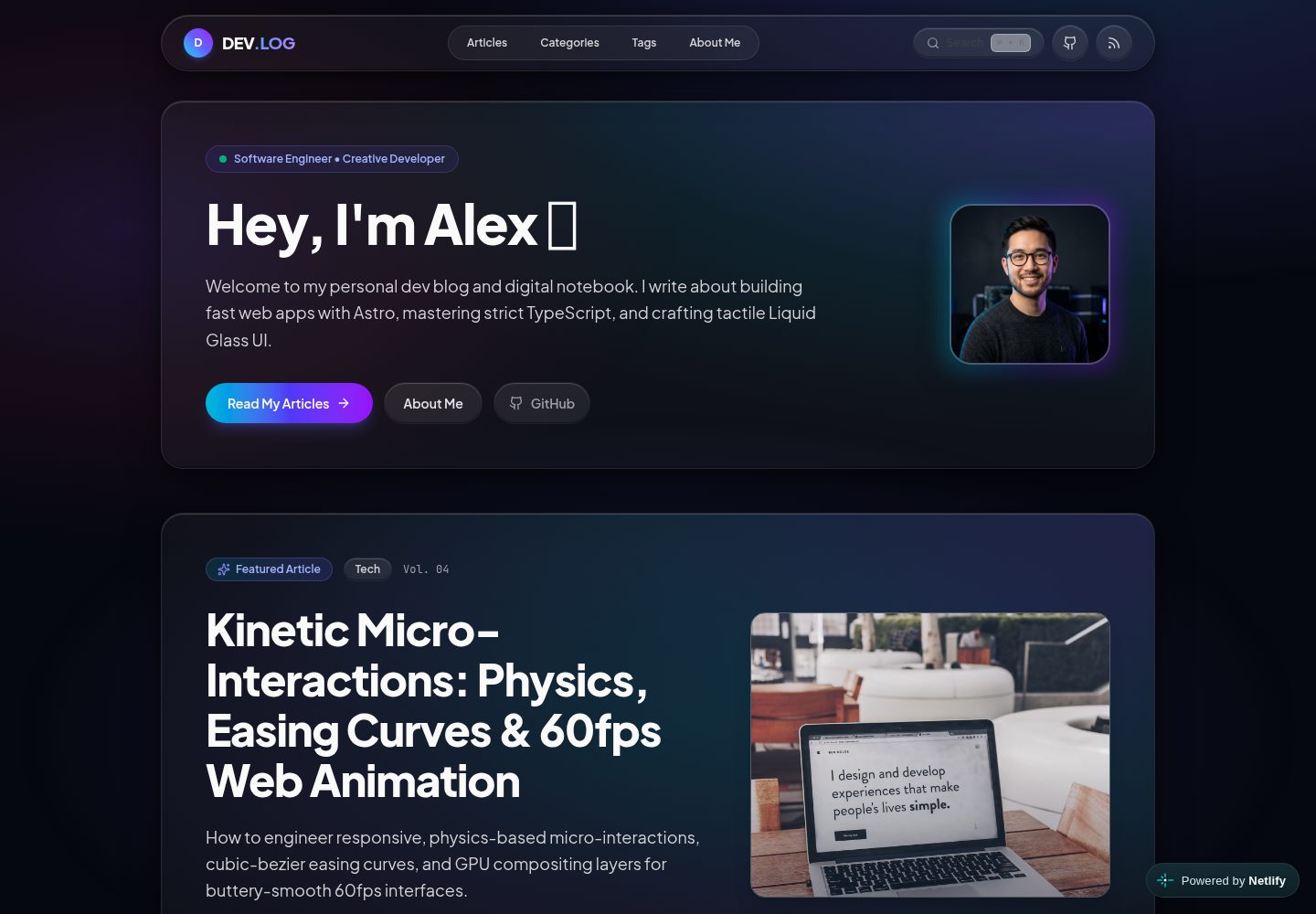
液态玻璃暗色界面,配合半透明卡片与动态光晕效果
Astro博客
devlog-astro-template — Astro 博客模板
作者 nivinvysakh
基于 Astro 的个人开发者博客模板,采用液态玻璃暗色界面,内置 Pagefind 静态搜索、MDX 组件、RSS 与站点地图,并提供 Docker 与 CI 配置。
看看你的网站会是什么样
浏览真实页面截图,比较内容排版与手机效果。点击下方缩略图切换,放大查看整页细节。
全部页面与视图 3
截图用于了解视觉与布局,交互效果请以实际项目为准。
采集于 2026-10-02查看来源
值得关注的模板亮点
从已有项目资料中,快速了解它的特点。
基于 Pagefind 的客户端静态全文搜索,支持 Cmd+K / Ctrl+K 快捷键
内容使用 Markdown 或 MDX,提供 Callout、ArchitecturePanel 等交互组件
站点信息、作者资料、导航与页面文案集中在 src/config/site.ts 配置
内置 RSS 2.0 feed、XML sitemap 与 OpenGraph / Twitter 元标签
附带多阶段 Docker、Docker Compose、GitHub Actions CI 与 Dependabot 配置
模板详细介绍
这是一个面向个人开发者博客与数字笔记场景的 Astro 模板,仓库采用 MIT 许可,演示站部署在 Netlify。界面以液态玻璃暗色风格为主,包含首页 Hero、文章列表、分类、标签、关于页、404 页与搜索弹窗等页面结构。
内容以 Markdown 或 MDX 文件存放在 src/content/blog/ 目录,支持 frontmatter 字段与若干交互式 MDX 组件(如 Callout、ArchitecturePanel 等),代码高亮由 Astro Expressive Code 处理。站点信息、作者资料、导航、分类、关于页文案、订阅卡片、404 文案与搜索占位符等集中在单一配置文件 src/config/site.ts 中调整。
构建流程包含 astro build 与 pagefind 两步,用于生成静态产物并建立客户端全文搜索索引;同时提供 RSS 2.0 feed、XML sitemap 与 OpenGraph/Twitter 元标签。仓库附带多阶段 Docker 与 Docker Compose 配置、GitHub Actions CI 以及 Dependabot 更新设置。
需要留意:README 中提到的框架版本号与性能描述未在依赖清单中逐一核对,此处不复述;演示图片、字体、图标等第三方素材的许可需单独确认,不能仅凭代码的 MIT 许可判断。
Astro博客
适合你的项目吗?
适用场景
- 搭建个人开发者博客并发布技术文章
- 作为数字花园或开发笔记的静态站点
- 需要客户端全文搜索与分类、标签导航的博客
- 希望在 MDX 文章中嵌入提示框、架构面板等交互组件的写作场景
- 使用 Docker 或 CI 流程部署静态博客
适合人群
- 熟悉 Astro 与 Markdown/MDX 的个人开发者
- 偏好暗色、玻璃质感视觉风格的博客作者
- 需要 RSS、sitemap 与静态搜索等基础 SEO 与分发能力的站点
- 希望用单一配置文件维护站点信息与页面文案的用户
上手与定制指南
结合仓库当前版本的说明,按下面的资料检查内容、配置与运行要求。
- 1
需要 Node.js v22.12.0 或更高版本,以及 npm、pnpm、yarn 或 bun 之一
- 2
克隆仓库后执行 npm install,再用 npm run dev 启动本地开发服务器(默认端口 4321)
- 3
生产构建使用 npm run build,该命令先执行 astro build 再运行 pagefind 生成搜索索引
- 4
站点信息、作者资料、导航、分类与页面文案在 src/config/site.ts 中修改
- 5
演示图片、字体、图标等第三方素材需按各自许可单独核对
授权与来源资料
使用条件与限制
免费使用 · 保留许可声明本次收录的是公开仓库中采用 MIT 许可的免费版本;免费范围为该版本代码,不代表外部服务或第三方素材免费。
使用时需要遵守
- 允许免费使用、修改、商用和分发该版本代码。
- 分发代码副本或实质性部分时,保留原作者版权声明和完整 MIT 许可声明。
- 代码按现状提供;担保与责任限制以原许可证及适用法律为准。
额外费用与待核对事项
- 演示图片、字体、图标及其他第三方素材需按各自许可核对,不能仅凭代码的 MIT 许可判断。
- 域名、托管、数据库、支付或 AI 等外部服务可能另外收费。
查看原文依据
https://github.com/nivinvysakh/devlog-astro-template/blob/main/LICENSEhttps://github.com/nivinvysakh/devlog-astro-template/blob/main/README.mdPermission is hereby granted, free of charge
许可证原文
DeepSeek 根据仓库许可证和 README 整理 ·2026-10-02。结果仅覆盖已读取资料,依赖、图片、字体及后续条款变更以各自原文为准。
项目核对记录与介绍依据
模板资料
- 来源平台
- Astro Themes
- 资料与维护参考分
- 资料较完整 · 83 / 100
- 技术栈
- Astro
- 网站类型
- 博客
这个分数如何计算
本站按许可资料(最高30分)、演示链接(12分)、预览图(10分)、Star数(15分)、记录的维护时间(15分)、描述完整度(8分)、功能记录(5分)和分类资料(5分)计算。它不是代码、安全或性能测试,也不是 Google 评分;有链接不代表已实测可用。
这个项目需要核对什么
- 记录的仓库更新时间
- 2026-09-28
- 截图检查日期
- 2026-10-02
已收录演示链接。请用你的内容与屏幕尺寸检查;有演示不代表表单、认证或支付已经可用。
目录记录的主要技术栈是 Astro。请通过依赖清单和锁文件核对实际版本与托管要求。这些说明基于收录资料,不代表代码审计或部署实测。
查看具体选型方法 →介绍的制作与核对状态
介绍由 AI 辅助整理目录与仓库资料。仓库作者不等于这篇介绍的审核者。
已完成服务器许可规则与 AI 来源核对;未经过人工编辑审核。
查看当时使用的来源资料
SHA-256: 92de8fc799ad699e9b04126ba3ce31c4795e5a489b06142d86fa53efe8592757
2026-10-02T10:29:58.938Z
来源文件 / 仓库<div align="center">
# 🌐 DEV.LOG — Personal Developer Blog & Digital Garden
**A high-performance personal developer blog, digital notebook, and portfolio template.**
Crafted with **Astro 7**, **Tailwind CSS 4**, strict **TypeScript**, and a tactile **Liquid Glass Dark UI**.
[](./LICENSE)
[](https://portal.astro.build/themes/liquid-glass-blog/)
[](https://app.netlify.com/projects/devblogsite/deploys)
[](https://devblogsite.netlify.app)
[](https://astro.build)
[](https://tailwindcss.com)
[](https://www.typescriptlang.org)
[](https://pagefind.app)
[](https://www.docker.com)
[](./.github/workflows/ci.yml)
[**Explore Live Demo »**](https://devblogsite.netlify.app) · [**Official Astro Theme Listing »**](https://portal.astro.build/themes/liquid-glass-blog/) · [**Report Bug »**](https://github.com/nivinvysakh/devlog-astro-template/issues) · [**Request Feature »**](https://github.com/nivinvysakh/devlog-astro-template/issues)
</div>
---
## 📑 Table of Contents
- [✨ Key Features](#-key-features)
- [🚀 Live Demo & Screenshots](#-live-demo--screenshots)
- [⚡ 1-Minute Customization](#-1-minute-customization-single-config-file)
- [🛠️ Quick Start](#-quick-start)
- [✍️ Writing Articles & MDX Components](#-writing-articles--mdx-components)
- [Frontmatter Schema](#1-frontmatter-schema-reference)
- [Interactive Components](#2-interactive-mdx-components)
- [Advanced Code Highlighting](#3-advanced-code-highlighting--diffs)
- [📂 Project Structure](#-project-structure)
- [🌐 1-Click Deployment Options](#-1-click-deployment-options)
- [🐳 Docker Support](#-docker-support)
- [🛡️ Automated CI & Dependabot](#-automated-ci--dependabot)
- [� License & Credits](#-license--credits)
---
## ✨ Key Features
| Category | Features |
| :--- | :--- |
| **🚀 Framework & Core** | **Astro 7.2** Islands architecture, **Zero-JS** baseline by default, sub-50ms static delivery, and full SSR/SSG support. |
| **🎨 Design & Theme** | **Liquid Glass UI** built with **Tailwind CSS 4**, translucent frosted glass cards, dynamic ambient glow meshes, and smooth spring physics micro-interactions. |
| **🔍 Search & Indexing** | **Pagefind** client-side static full-text search with instant modal dialog and keyboard shortcut navigation (`Cmd+K` / `Ctrl+K`). |
| **📝 Rich Content & MDX** | Interactive MDX story components (`<Callout />`, `<ArchitecturePanel />`, `<SpeechBubble />`, `<CharacterAside />`) and **Astro Expressive Code** for syntax highlighting. |
| **⚡ 1-Minute Setup** | Configure your entire personal brand, bio, social links, hero text, and navigation from **a single configuration file** (`src/config/site.ts`). |
| **🏷️ Taxonomy & Navigation** | Dynamic category showcases (`/categories/*`), tag explorer (`/tags/*`), table of contents with scroll spy, and reading time estimation. |
| **📡 Syndication & SEO** | Out-of-the-box **RSS 2.0 feed** (`/rss.xml`), automated **XML Sitemap** (`/sitemap-index.xml`), and OpenGraph / Twitter meta tags. |
| **🐳 Production Ready** | Multi-stage **Docker** & Docker Compose setup, **GitHub Actions CI**, and automated **Dependabot** security updates. |
---
## 🚀 Live Demo & Screenshots
Experience the template live in action at: **[https://devblogsite.netlify.app](https://devblogsite.netlify.app)**
> 🌟 **Official Listing:** This theme is officially featured on the [Astro Themes Directory](https://portal.astro.build/themes/liquid-glass-blog/).
### 🖼️ UI Showcase
<table>
<tr>
<td width="50%" align="center">
<strong>🏠 Home Page & Hero</strong><br/><br/>
<img src="assets/home.png" alt="Home Page Screenshot" width="100%">
</td>
<td width="50%" align="center">
<strong>📖 Blog Post & MDX Layout</strong><br/><br/>
<img src="assets/post.png" alt="Blog Post Screenshot" width="100%">
</td>
</tr>
<tr>
<td width="50%" align="center">
<strong>👤 About Me & Experience</strong><br/><br/>
<img src="assets/about_me.png" alt="About Page Screenshot" width="100%">
</td>
<td width="50%" align="center">
<strong>📚 All Articles Directory</strong><br/><br/>
<img src="assets/articles.png" alt="Articles Page Screenshot" width="100%">
</td>
</tr>
<tr>
<td width="50%" align="center">
<strong>📂 Categories Matrix</strong><br/><br/>
<img src="assets/categories.png" alt="Categories Page Screenshot" width="100%">
</td>
<td width="50%" align="center">
<strong>🏷️ Tag Explorer</strong><br/><br/>
<img src="assets/tag.png" alt="Tags Page Screenshot" width="100%">
</td>
</tr>
</table>
---
## ⚡ 1-Minute Customization (Single Config File)
Customize your entire blog from **one single file** — no hunting through nested components:
👉 **[`src/config/site.ts`](./src/config/site.ts)** (or root alias **[`site.config.ts`](./site.config.ts)**)
```typescript
export const siteConfig = {
// 1. Site Metadata, Title & Favicon
name: "DEV.LOG",
logoLetter: "D", // Monogram badge in header
title: "DEV.LOG — Personal Dev Blog & Digital Garden",
description: "A high-performance personal developer blog crafted with Astro and Liquid Glass UI.",
url: "https://yourdomain.com",
favicon: "/favicon.svg", // Supports /favicon.svg, /favicon.ico, /favicon.png
defaultOgImage: "/images/og-default.png",
// 2. Author Profile (Appears on all articles, hero, author cards & about page)
author: {
name: "Alex Morgan",
role: "Software Engineer & Creative Developer",
avatar: "/images/avatar.jpg", // Drop your photo into public/images/avatar.jpg
bio: "Frontend engineer and creative developer fascinated by fast web apps and resilient architectures.",
location: "San Francisco, CA",
status: "Building the future of spatial web interfaces",
social: {
github: "https://github.com/yourhandle",
twitter: "https://twitter.com/yourhandle",
linkedin: "https://linkedin.com/in/yourhandle",
email: "[email protected]",
},
},
// 3. Home Hero Section
hero: {
greeting: "Hey, I'm Alex",
badge: "Software Engineer • Creative Developer",
tagline: "Welcome to my personal dev blog and digital notebook...",
primaryButton: { text: "Read My Articles", href: "/blog" },
secondaryButton: { text: "About Me", href: "/about" },
},
// 4. Navigation Links & Topic Categories
navLinks: [
{ text: "Articles", href: "/blog" },
{ text: "Categories", href: "/categories" },
{ text: "Tags", href: "/tags" },
{ text: "About Me", href: "/about" },
],
categories: [
{ name: "Tech", desc: "Astro Islands architecture, core web performance, and TypeScript." },
{ name: "Design", desc: "Liquid Glass UI, spatial design systems, fluid motion, and modern aesthetics." },
{ name: "Architecture", desc: "Domain-Driven Design, clean decoupled systems, and durability." },
{ name: "Story", desc: "Engineering insights, case studies, and modern frontend storytelling." },
],
// 5. About Me Page Content
about: {
philosophyTitle: "My Engineering Philosophy",
philosophyParagraphs: [
"I started this blog as my personal digital garden—a place to document experiments...",
"I believe that a modern website should feel instantaneous, tactile, and visually delightful...",
],
quote: "Every byte of JavaScript saved makes the web a faster space for everyone.",
highlights: [
{ icon: "⚡", title: "Speed & Zero-JS", desc: "Shipping ultra-lightweight static HTML..." },
{ icon: "✨", title: "Liquid Glass Design", desc: "Crafting translucent, refractive spatial UI..." },
{ icon: "🛡️", title: "Type Safety", desc: "Eliminating runtime bugs with strict TypeScript..." },
{ icon: "🚀", title: "60fps Micro-Interactions", desc: "Building responsive spring physics..." },
],
techArsenal: [
{ name: "Astro 7", desc: "Islands architecture and zero-JS defaults", category: "Framework" },
{ name: "TypeScript", desc: "Strict domain models and nominal branding", category: "Language" },
{ name: "Tailwind CSS 4", desc: "Liquid Glass design system & CSS tokens", category: "Styling" },
{ name: "Vite & Pagefind", desc: "Instant HMR & fast static indexing", category: "Tooling" },
],
},
// 6. Newsletter Subscription Card
newsletter: {
badge: "Personal Dev Notes",
title: "Follow My Engineering Journey & Experiments",
description: "Occasional writeups on frontend architecture, liquid glass UI craft, and Astro experiments.",
placeholder: "[email protected]",
buttonText: "Get Updates",
successMessage: "Thanks for subscribing to my dev notes!",
},
// 7. 404 Page Not Found
notFound: {
badge: "HTTP_STATUS // 404_NOT_FOUND",
title: "Page Lost in the Stream",
description: "The route, article, or resource you were looking for doesn't exist or has moved.",
homeButtonText: "Return Home",
browseButtonText: "Browse Articles",
},
// 8. Search Modal
search: {
modalTitle: "Search Publications",
placeholder: "Type keywords (e.g. Astro, TypeScript, Islands, CSS)...",
},
// 9. Footer Details
footer: {
tagline: "Crafted with Astro 7, TypeScript, and Liquid Glass aesthetics.",
copyright: "Alex Morgan",
brandDescription: "Personal blog & digital notebook template.",
},
};
```
---
## 🛠️ Quick Start
### Prerequisites
- **Node.js** `v22.12.0` or higher (compatible with modern Node versions)
- **npm**, **pnpm**, **yarn**, or **bun**
### 1. Clone & Install
```bash
# Clone the repository
git clone https://github.com/yourhandle/devlog-astro-template.git my-blog
# Navigate into project directory
cd my-blog
# Install dependencies
npm install
```
### 2. Run Development Server
```bash
npm run dev
```
Open [http://localhost:4321](http://localhost:4321) in your browser to see your blog running live with instant Hot Module Replacement (HMR).
### 3. Available NPM Scripts
| Script | Command | Description |
| :--- | :--- | :--- |
| **`npm run dev`** | `astro dev` | Starts the local dev server on port `4321` |
| **`npm run check`** | `astro check` | Runs Astro diagnostic & strict TypeScript type-checking |
| **`npm run build`** | `astro build && pagefind` | Compiles production bundle & builds static Pagefind search index |
| **`npm run preview`** | `astro preview` | Previews the compiled `dist/` directory locally |
| **`npm run pagefind`** | `pagefind --site dist` | Re-indexes search records manually from static output |
---
## ✍️ Writing Articles & MDX Components
Articles are standard Markdown or MDX documents located in **`src/content/blog/`**.
### 1. Frontmatter Schema Reference
Create a file like `src/content/blog/my-new-post.mdx`:
```yaml
---
title: "The Architecture of Modern Frontend Systems"
description: "A deep dive into zero-JS static generation, reactive component boundaries, and spatial UI."
pubDate: 2026-09-15
category: "Tech" # Options: 'Tech' | 'Design' | 'Architecture' | 'Story' | 'Culture'
tags: ["Astro", "TypeScript", "Performance", "CSS"]
heroImage: "https://images.unsplash.com/photo-1555066931-4365d14bab8c?auto=format&fit=crop&w=1400&q=80"
heroImageAlt: "High performance code editor and server architecture"
issueNumber: "Vol. 05"
featured: false # Set to true to feature this article on the homepage hero
---
```
#### Field Reference:
| Field | Type | Required | Description |
| :--- | :--- | :--- | :--- |
| `title` | `string` | **Yes** | Article headline |
| `description` | `string` | **Yes** | Short summary for excerpts & SEO meta description |
| `pubDate` | `Date` | **Yes** | Publication date (`YYYY-MM-DD`) |
| `category` | `enum` | **Yes** | `'Tech'`, `'Design'`, `'Architecture'`, `'Story'`, `'Culture'` |
| `tags` | `string[]` | No | List of keyword tags (e.g. `["Astro", "CSS"]`) |
| `heroImage` | `string` | No | Path (`/images/...`) or remote URL for article banner |
| `heroImageAlt`| `string` | No | Accessible image description |
| `issueNumber` | `string` | No | Volume/Issue badge (e.g. `"Vol. 01"`) |
| `featured` | `boolean` | No | Defaults to `false`. If `true`, pins to the homepage hero |
---
### 2. Interactive MDX Components
Import interactive components directly at the top of your `.mdx` file:
```mdx
import Callout from '../../components/mdx/Callout.astro';
import ArchitecturePanel from '../../components/mdx/ArchitecturePanel.astro';
import SpeechBubble from '../../components/mdx/SpeechBubble.astro';
import CharacterAside from '../../components/mdx/CharacterAside.astro';
```
---
#### 💡 Component 1: `<Callout />` (Alerts, Pro Tips & Warnings)
Used for highlighting key technical principles, tips, warnings, and architectural insights.
##### Props:
- `type`: `'tip'` (cyan) | `'technique'` (indigo) | `'warning'` (rose) | `'secret'` (purple)
- `title`: String header (e.g. `"Zero-JS Baseline"`)
- `badge`: Optional custom badge label (defaults to `"PRO TIP"`, `"CORE TECHNIQUE"`, etc.)
##### Code Example:
```mdx
<Callout type="tip" title="Pro Tip on Bundle Sizes">
Astro components render pure static HTML on the server by default. No client JS is sent unless a `client:*` directive is attached!
</Callout>
<Callout type="technique" title="State Machine Principle">
Model complex UI states using discriminated unions to guarantee illegal states are impossible at compile-time.
</Callout>
<Callout type="warning" title="Avoid Layout Thrashing">
Do not animate `top`, `left`, `width`, or `height`. Animate only compositor-friendly properties: `transform` and `opacity`.
</Callout>
<Callout type="secret" title="Deep Architecture Insight" badge="UNDER THE HOOD">
Server Islands defer dynamic SSR fragments while serving the outer shell straight from edge CDN cache.
</Callout>
```
---
#### 🏗️ Component 2: `<ArchitecturePanel />` (Side-by-Side Comparison Grids)
Used for before/after architecture comparisons, pros & cons, and multi-column technical matrices.
##### Props:
- `columns`: `1` | `2` (default) | `3`
- `title`: String header (default: `"Architecture Matrix"`)
- `caption`: Optional footer caption (displayed in monospace)
- `badge`: Optional right-side header tag (default: `"ARCHITECTURE PANEL"`)
##### Code Example:
```mdx
<ArchitecturePanel columns={2} title="Architecture Comparison" caption="Monolithic Single-Page Apps vs Astro Islands">
<div class="p-5 rounded-2xl bg-rose-500/10 border border-rose-500/20">
<h5 class="text-sm text-rose-600 dark:text-rose-400 font-bold mb-3 flex items-center gap-2">
<span>❌</span> Traditional SPA Monolith
</h5>
<ul class="text-xs space-y-2 text-zinc-700 dark:text-zinc-300">
<li>• Ships full client bundle (350KB+)</li>
<li>• Hydration cascade blocks interactivity</li>
<li>• Fragile runtime mismatches</li>
</ul>
</div>
<div class="p-5 rounded-2xl bg-emerald-500/10 border border-emerald-500/20">
<h5 class="text-sm text-emerald-600 dark:text-emerald-400 font-bold mb-3 flex items-center gap-2">
<span>⚡</span> Astro Islands Architecture
</h5>
<ul class="text-xs space-y-2 text-zinc-700 dark:text-zinc-300">
<li>• Zero JavaScript sent over the wire by default</li>
<li>• Isolated component hydration</li>
<li>• Instant sub-50ms First Contentful Paint</li>
</ul>
</div>
</ArchitecturePanel>
```
---
#### 💬 Component 3: `<SpeechBubble />` (Dialogue & Interview Cards)
Used for conversational technical debates, quotes, and expert interview snippets.
##### Props:
- `speaker`: Name of speaker (e.g. `"Alex Rivera"`)
- `role`: Optional job title / subtitle (e.g. `"Principal Systems Architect"`)
- `avatar`: Emoji (e.g. `"🚀"`, `"⚡"`, `"🎨"`) OR image path (`"/images/avatar.jpg"`, `"https://..."`)
- `side`: `'left'` (default) | `'right'`
- `variant`: `'normal'` (default) | `'shout'` (accent glow) | `'thought'` (dashed border & italic)
##### Code Example:
```mdx
<SpeechBubble
speaker="Elena Rostova"
role="Core Performance Specialist"
avatar="🚀"
side="left"
>
"Is there a clean way to deliver rich interactive widgets without paying the penalty of 500KB hydration bundles across the entire page?"
</SpeechBubble>
<SpeechBubble
speaker="Alex Rivera"
role="Principal Systems Architect"
avatar="⚡"
side="right"
variant="shout"
>
"That is precisely what **Islands Architecture** solves. The page remains pure, static HTML at the edge, while interactive components hydrate independently as isolated islands."
</SpeechBubble>
```
---
#### 👤 Component 4: `<CharacterAside />` (Author Commentary)
Used for inline author side-notes, practical lessons, and tips.
##### Props:
- `name`: Author name (default: `"Architecture Note"`)
- `role`: Role or subtitle (default: `"Lead Engineer"`)
- `avatar`: Emoji or image path (default: `"⚡"`)
##### Code Example:
```mdx
<CharacterAside name="Alex Morgan" role="Software Engineer" avatar="⚡">
"By setting `isolation: isolate` on liquid glass containers, browser compositors render subpixel corner curves smoothly without artifact bleeding."
</CharacterAside>
```
---
### 3. Advanced Code Highlighting & Diffs
Powered by **Astro Expressive Code** for syntax-highlighted code presentations:
#### File Headers:
````markdown
```typescript title="src/utils/math.ts"
export function add(a: number, b: number): number {
return a + b;
}
```
````
#### Line Highlighting & Diffs:
````markdown
```typescript title="src/domain/payment.ts" ins={5-6} del={2-3}
// Remove ambiguous flags:
isLoading: boolean;
isSuccess: boolean;
// Use strict tagged union:
| { status: 'loading' }
| { status: 'success'; transactionId: string }
```
````
---
## 📂 Project Structure
```
├── site.config.ts # 🌟 Root alias for 1-file site configuration
├── src/
│ ├── config/
│ │ └── site.ts # ⭐ Single Source of Truth (Author, Bio, Socials, Hero, Meta)
│ ├── content/
│ │ ├── config.ts # Zod collection schema validation
│ │ └── blog/ # MDX Blog Articles (01-*.mdx, 02-*.mdx, etc.)
│ ├── components/
│ │ ├── layout/ # Header, Footer, Navigation, ThemeToggle, SearchModal
│ │ ├── mdx/ # ArchitecturePanel, Callout, SpeechBubble, CharacterAside
│ │ └── ui/ # HeroMagazineCover, PostCard, ArticleSidebar, HankoStamp
│ ├── layouts/
│ │ ├── BaseLayout.astro # Main layout with Liquid Glass ambient mesh & SEO
│ │ └── BlogPostLayout.astro # Article layout with reading time, TOC, and author bio
│ ├── pages/
│ │ ├── index.astro # Home page with Hero, Featured post & Recent articles
│ │ ├── blog/ # Article index & Dynamic [slug] routes
│ │ ├── categories/ # Category directory & Category filter pages
│ │ ├── tags/ # Tag cloud & Tag filter pages
│ │ ├── about.astro # Personal About Me page with bio, tech stack & experience
│ │ ├── 404.astro # Custom 404 Not Found page
│ │ └── rss.xml.ts # Full RSS 2.0 feed generator
│ └── styles/
│ └── global.css # Tailwind 4 imports, Liquid Glass tokens, typography
├── public/
│ ├── favicon.svg # Site favicon
│ └── images/ # Local images and avatar photo
├── .github/
│ ├── workflows/
│ │ ├── ci.yml # Automated Astro check & build CI workflow
│ │ └── deploy-github-pages.yml # Free GitHub Pages deployment workflow
│ └── dependabot.yml # Automated dependency security monitor
├── netlify.toml # Netlify build, caching & security config
├── vercel.json # Vercel framework, clean URLs & headers config
├── wrangler.toml # Cloudflare Pages / Workers static config
├── render.yaml # Render Static Site blueprint
├── Dockerfile # Multi-stage lightweight Nginx container build
├── docker-compose.yml # 1-command Docker environment
├── astro.config.mjs # Astro integrations & Vite plugins
├── package.json # Project scripts and dependencies
└── tsconfig.json # Strict TypeScript configuration
```
---
## 🌐 1-Click Deployment Options
Deploy your blog in under 60 seconds to any modern hosting platform:
### 🚀 One-Click Deployments
| Platform | 1-Click Deploy Button | Config File |
| :--- | :--- | :--- |
| **Netlify** | [](https://app.netlify.com/start/deploy?repository=https://github.com/nivinvysakh/devlog-astro-template) | [`netlify.toml`](./netlify.toml) |
| **Vercel** | [](https://vercel.com/new/clone?repository-url=https://github.com/nivinvysakh/devlog-astro-template) | [`vercel.json`](./vercel.json) |
| **Render** | [](https://render.com/deploy?repo=https://github.com/nivinvysakh/devlog-astro-template) | [`render.yaml`](./render.yaml) |
---
### 1. Deploy to Netlify (Zero-Config)
This repository includes [`netlify.toml`](./netlify.toml) with pre-configured immutable caching for `/_astro/` and custom 404 redirects:
1. Click the **Deploy to Netlify** button above or connect your GitHub repository.
2. Netlify will automatically detect:
- **Build Command:** `npm run build`
- **Publish Directory:** `dist`
3. Click **Deploy Site** — your blog is live!
---
### 2. Deploy to Vercel
This repository includes [`vercel.json`](./vercel.json):
1. Import your repository into the [Vercel Dashboard](https://vercel.com/new).
2. Framework Preset will auto-detect as **Astro**.
3. Click **Deploy**.
Alternatively via CLI:
```bash
npx vercel
```
---
### 3. Deploy to GitHub Pages (100% Free & Native)
An automated GitHub Actions workflow is already included in [`.github/workflows/deploy-github-pages.yml`](./.github/workflows/deploy-github-pages.yml):
1. Go to your repository **Settings** → **Pages**.
2. Under **Build and deployment** → **Source**, select **GitHub Actions**.
3. Push any commit to `main` or `master` — GitHub Actions will automatically compile your site, generate Pagefind search indexes, and publish your blog!
---
### 4. Deploy to Cloudflare Pages
This repository includes [`wrangler.toml`](./wrangler.toml):
1. In Cloudflare Dashboard, go to **Workers & Pages** → **Create application** → **Pages** → **Connect to Git**.
2. Set **Framework Preset** to `Astro`.
3. Set **Build command** to `npm run build` and **Build output directory** to `dist`.
4. Click **Save and Deploy**.
Or via Cloudflare Wrangler CLI:
```bash
npm run build && npx wrangler pages deploy dist --project-name=my-blog
```
---
### 5. Deploy to Render
This repository includes [`render.yaml`](./render.yaml) blueprint:
1. Connect your repository on [Render Dashboard](https://dashboard.render.com).
2. Render will automatically provision a global CDN static site using `render.yaml`.
---
## 🐳 Docker Support
Run the blog locally or deploy in production using Docker:
### Using Docker Compose (Fastest):
```bash
docker compose up --build
```
Open **`http://localhost:3000`** in your browser.
### Using Plain Docker:
```bash
# 1. Build the multi-stage image
docker build -t devlog-blog .
# 2. Run container on port 3000
docker run -d -p 3000:80 --name devlog-blog devlog-blog
```
---
## 🛡️ Automated CI & Dependabot
This repository includes production-ready GitHub Actions and automated dependency management:
- **Continuous Integration ([`.github/workflows/ci.yml`](./.github/workflows/ci.yml))**:
- Automatically executes on pushes and pull requests to `main` and `master`.
- Runs **`npm run check`** (Astro compiler diagnostics and strict TypeScript verification).
- Runs **`npm run build`** (validating that all static routes and Pagefind search index compile cleanly).
- **Dependabot Security & Updates ([`.github/dependabot.yml`](./.github/dependabot.yml))**:
- Weekly checks every Monday at 04:00 UTC.
- Monitors **`npm`** packages, **`github-actions`**, and **`docker`** base images (`node:20-alpine`, `nginx:alpine`).
- Automatically creates categorized, labelled pull requests with conventional commit prefixes.
---
## 📄 License & Credits
This project is licensed under the **MIT License** — see the [LICENSE](./LICENSE) file for details.
You are completely free to use, modify, customize, and deploy this template for your personal blog, digital garden, or portfolio website.
---
<div align="center">
Crafted with ❤️ using **[Astro](https://astro.build)** & **[Tailwind CSS](https://tailwindcss.com)**.
⭐ **If you find this template helpful, please consider giving it a star on GitHub!**
</div>
看看同类模板
对比同技术栈与用途的模板,找到更适合的视觉与内容结构。

astrowind
⭕️ AstroWind: A free template using Astro v7 and Tailwind CSS v4. Astro starter theme.
Astro · 博客

astro-paper
A minimal, accessible and SEO-friendly Astro blog theme.
Astro · 博客

fuwari
✨A static blog template built with Astro.
Astro · 博客

Firefly
Firefly 是一款基于 Astro 的静态博客主题,由 CuteLeaf 在 saicaca 的 Fuwari 模板基础上二次开发,主打清新美观的视觉风格。
Astro · 博客

astro-theme-cactus
A simple Astro theme. Use it to create your blog or website.
Astro · 作品集

astrofy
Astrofy is a free and open-source template for your Personal Portfolio Website built with Astro and TailwindCS…
Astro · 作品集