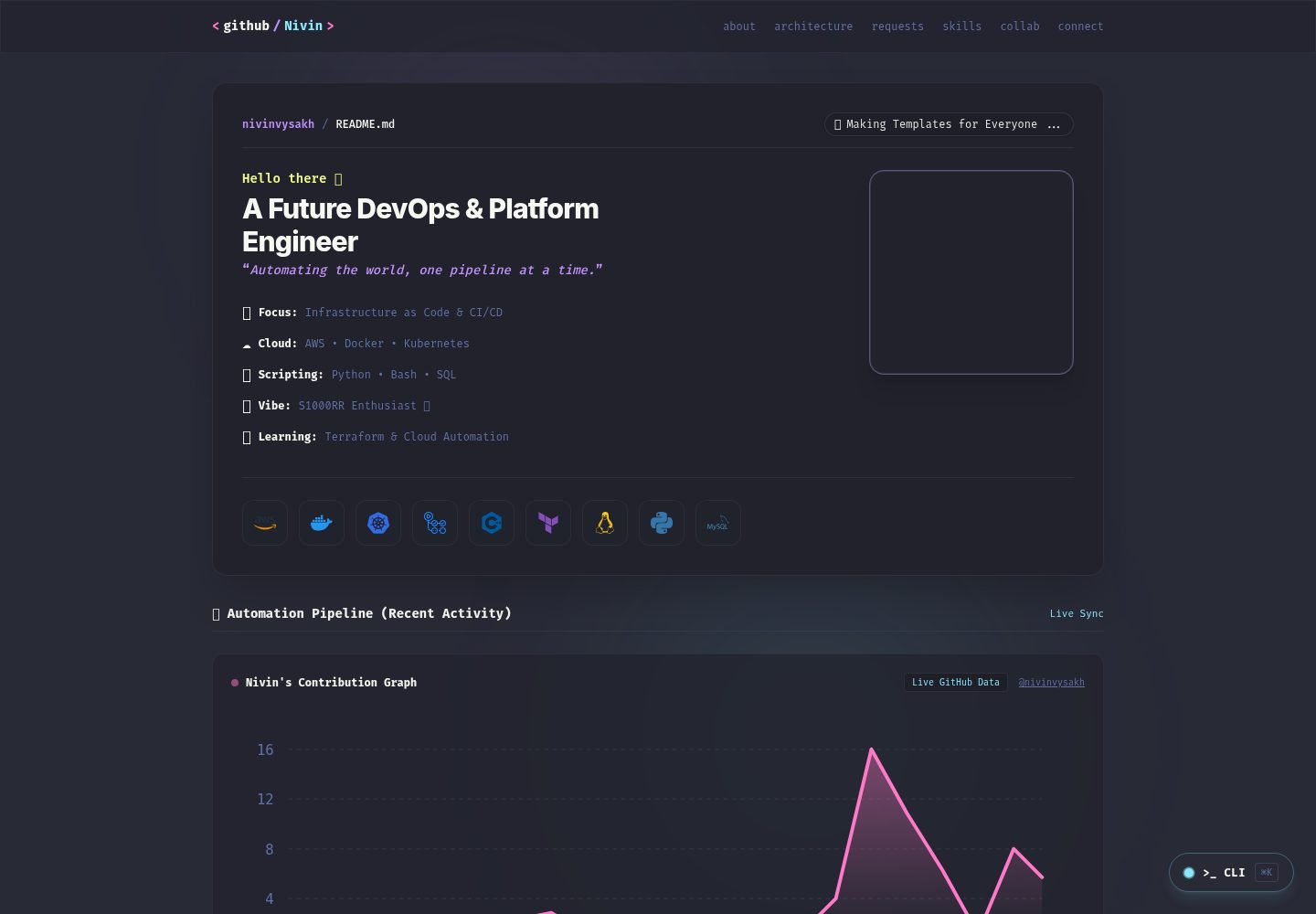
Dracula color scheme, using theme colors such as #282a36, #bd93f9, and #ff79c6
AstroPortfolio
Dracula-portfolio — Astro Portfolio Template
By nivinvysakh
Dracula-portfolio is an Astro-based developer portfolio template that uses the Dracula color scheme and GitHub README-style layout, and supports replacing personal information, social links, and project content through a centralized configuration file.
Explore the design
Compare the page layouts and mobile experience. Open any screenshot for a closer look.
Desktop homepage1 / 2
Desktop captureTop of page
Actual screenshot captured by the server browser.
All pages & views 2
Screenshots show visual appearance; interactive behavior may differ.
Recorded 2026-10-02View source
What stands out
A quick read of the recorded project description.
Personal information, social links, tech stack, and projects are configured in src/config.ts
Displays Discord online status and Spotify playback information via the Lanyard WebSocket
Syncs GitHub contribution data via an API, with a fallback display
Provides two Docker configurations for development and production; the production environment uses NGINX Alpine and handles 404 routing
Includes GitHub Actions workflows that run type checking and build checks
Template Details
Dracula-portfolio is a personal portfolio template for developers, built with Astro. Visually, it references the Dracula theme colors from VS Code, and it organizes content in a layout similar to a GitHub README. The template centralizes personal information such as name, title, tagline, email, Discord ID, avatar URL, social links, tech stack, and projects in src/config.ts, making it easy to replace with your own details.
The template includes a GitHub contribution graph component that syncs recent contribution data via an API and provides a fallback display when the request fails. It also provides Discord online status and Spotify playback information display based on the Lanyard WebSocket. These features depend on external services and require configuring the corresponding Discord user ID to work. The project includes Docker configuration: the development container runs the Astro development server in a Node 20 environment, while the production container uses NGINX Alpine to serve static files and handle 404 routing. The repository also includes GitHub Actions workflows for type checking and build checks.
Before use, note that modules such as real-time status and the contribution graph depend on third-party interfaces, and their availability is affected by external services. The licensing of third-party assets such as demo screenshots, fonts, and icons needs to be verified separately.
AstroPortfolio
Is it right for your project?
Use Cases
- A developer needs a static portfolio page where personal information can be replaced directly
- Wants the portfolio to present a Dracula dark theme and GitHub README-style layout
- Wants to show Discord online status or Spotify now playing content in the portfolio
- Needs to run the portfolio as a Docker container locally or on a server
- Wants to maintain social links, tech stack, and project lists through a centralized configuration file
Suitable For
- Developers familiar with Astro or willing to modify configuration files according to the documentation
- Individuals who need a portfolio template that can be freely modified and distributed under the MIT license
- Users with Docker experience who want to deploy a static site as a container
- Developers who want to display a GitHub contribution graph and Discord real-time status
Getting started & customization
Use these recorded setup notes alongside the repository instructions for your chosen version.
- 1
Local development requires Node.js 18 or higher and npm 9 or higher. After installing dependencies, run npm run dev, and it is accessible on port 4321 by default
- 2
Replace the name, title, tagline, email, Discord ID, avatar URL, social links, tech stack, and projects in src/config.ts
- 3
Discord status and Spotify playback information depend on the Lanyard WebSocket, and a valid Discord user ID must be filled in for them to display
- 4
The GitHub contribution graph depends on an external API for syncing, and fallback content is displayed when the interface is unavailable
- 5
When using Docker, the development container maps to port 4321 and the production container maps to port 8080. They can be started with docker compose commands
License & source material
Usage conditions & limitations
Free to use · keep license noticeThis entry covers the free version under the MIT license in the public repository; the free scope is the code of this version and does not mean that external services or third-party assets are free.
Must comply with when using
- Free use, modification, commercial use, and distribution of this version's code are permitted.
- When distributing copies or substantial portions of the code, retain the original author's copyright notice and the complete MIT license notice.
- The code is provided as is; warranties and limitations of liability are governed by the original license and applicable law.
Additional costs & items to verify
- Discord online status and Spotify playback information depend on the third-party Lanyard WebSocket service, require a valid Discord user ID to work, and feature availability is affected by external services.
- The GitHub contribution graph depends on an external API for real-time syncing. When the interface is unavailable or restricted, only fallback content is displayed, and data display is affected by third-party services.
- Demo images, fonts, icons, and other third-party assets must be checked against their respective licenses and cannot be judged solely by the code's MIT license.
- External services such as domains, hosting, databases, payments, or AI may incur additional charges.
View Original Text Basis
Permission is hereby granted, free of charge
Original License Text
Live Discord & Spotify Integration (Lanyard WebSocket)
Original README
https://github.com/nivinvysakh/Dracula-portfolio/blob/main/LICENSE.MDhttps://github.com/nivinvysakh/Dracula-portfolio/blob/main/README.mdDynamic wave graph rendering recent GitHub contribution activity via live API sync with graceful fallbacks.
Original README
Compiled by DeepSeek based on repository license and README ·2026-10-02. Results only cover the materials read; dependencies, images, fonts, and subsequent term changes are subject to their respective original texts.
Project checks & description sources
Template Information
- Source platforms
- GitHub
- Documentation and maintenance reference score
- More documented · 80 / 100
- Technologies
- Astro
- Website type
- Portfolio
How this score is calculated
Our heuristic uses license records (up to 30), a demo link (12), a preview (10), stars (15), recorded maintenance (15), description completeness (8), feature records (5) and classification data (5). It is not a code, security or performance test, or a Google score. A link does not establish tested functionality.
What to verify for this project
- Repository update recorded
- 2026-09-26
- Screenshot last checked
- 2026-10-02
A demo link is listed. Check it with your own content and viewport sizes; its presence does not confirm that forms, authentication or payments work.
The catalog identifies Astro as the primary stack. Check the actual dependency manifest and lockfile for versions and hosting requirements. These notes use recorded metadata, not a code audit or a deployment test.
Use a selection guide →How this description was prepared
AI-assisted description based on catalog records and repository material. Repository authors are not automatically the reviewers of this description.
Automatically checked against source and license rules; no manual editorial review.
Inspect the recorded source material
SHA-256: 5626ff6d8d63926cbb99bba05b03ce9f3480afe2d26f978e648f0e63982c808d
2026-10-02T07:59:13.422Z
Source file / repository# Nivin | Portfolio & Developer README 🚀
[](https://github.com/nivinvysakh/Dracula-portfolio/actions/workflows/ci.yml)





A minimalist, retro Dracula-themed developer portfolio built with **Astro 7**, **Tailwind CSS v4**, **TypeScript**, and enterprise **DevOps Docker Containerization**.
---
## ✨ Features
- 🎨 **Dracula Theme Palette**: Premium dark mode styling using curated Dracula color tokens (`#282a36`, `#44475a`, `#f8f8f2`, `#bd93f9`, `#ff79c6`, `#8be9fd`, `#50fa7b`).
- ⚡ **Lightning Fast (Astro 7)**: Near-zero JS runtime footprint, static SSR generation, optimized images, and high performance scores.
- 🎵 **Live Discord & Spotify Integration (Lanyard WebSocket)**: Real-time status updates (Online/Idle/DND/Offline), custom status messages, live Spotify playback details, and active game rich presence.
- 📊 **GitHub Contribution Graph**: Dynamic wave graph rendering recent GitHub contribution activity via live API sync with graceful fallbacks.
- 🐳 **Production Containerization**: Multi-stage `dockerfile` (`node:20-alpine` builder $\rightarrow$ `nginx:alpine` runtime) with NGINX 404 error page routing.
- 🤖 **CI/CD Automation**: GitHub Actions pipeline for automated type checking, build audits, and Dependabot package updates.
---
## 🐳 Docker Setup
You can run the portfolio inside Docker containers for both **development** and **production**:
### 1. Development Container (with Hot Reload)
Run the Astro dev server inside Node 20 Docker container:
```bash
docker compose up -d dracula-portfolio-dev
```
- **Access**: [http://localhost:4321](http://localhost:4321)
### 2. Production Container (NGINX Alpine)
Build & run the optimized production container with custom NGINX 404 page routing:
```bash
docker compose up -d --build dracula-portfolio-prod
```
- **Access**: [http://localhost:8080](http://localhost:8080)
- **Test 404 Page**: [http://localhost:8080/invalid-route](http://localhost:8080/invalid-route) (renders custom floating sad anime 404 page).
### 3. Stop Containers
```bash
docker compose down
```
---
## 🛠️ Local Development (Without Docker)
### Prerequisites
- **Node.js** (v18.0.0 or higher recommended)
- **npm** (v9.0.0 or higher)
### 1. Clone the repository
```bash
git clone https://github.com/nivinvysakh/Dracula-portfolio.git
cd Dracula-portfolio
```
### 2. Install dependencies
```bash
npm install
```
### 3. Run development server
```bash
npm run dev
```
Open [http://localhost:4321](http://localhost:4321) in your browser to view the site.
---
## ⚙️ Configuration & Customization
All personal details, socials, tech stack items, and projects are centralized in [`src/config.ts`](file:///Users/nivin/Desktop/Dev/PortfolioWebsite/src/config.ts):
```typescript
export const SITE_CONFIG = {
name: "nivinvysakh",
title: "A Future DevOps & Platform Engineer",
tagline: "Automating the world, one pipeline at a time.",
email: "[email protected]",
discordId: "957196694393614367",
avatarUrl: "https://github.com/nivinvysakh.png",
// ...
};
```
---
## 📦 Scripts
- `npm run dev`: Launches the Astro development server locally.
- `npm run build`: Compiles the static production site to `./dist`.
- `npm run preview`: Previews the build output locally.
- `npm run astro check`: Runs type checking and Astro diagnostic audit.
- `docker compose up -d --build dracula-portfolio-prod`: Builds and launches NGINX production container on `http://localhost:8080`.
---
## 📄 License
Distributed under the MIT License. Feel free to fork, customize, and build your own portfolio!
Explore similar templates
Compare previews and descriptions within the same stack and category.

astro-theme-cactus
Astro Cactus is an Astro-based blog and portfolio theme that uses Markdown/MDX content collections to manage posts, notes, and tags, with frontmatter type-checked by a schema.
Astro · Portfolio

astrofy
Astrofy is a free and open-source personal portfolio website template built with Astro and TailwindCSS, with built-in blog, CV timeline, project showcase, store, and RSS feed modules.
Astro · Portfolio

astro-nano
Astro Nano is a static, minimalist portfolio and blog template built with Astro, Tailwind, and TypeScript without frontend frameworks. It includes light/dark themes, animated UI, automatic sitemap and RSS feed generation, and Markdown/MDX support with component imports.
Astro · Portfolio

astro-erudite
astro-erudite is an opinionated, unstyled static blog template built with Astro and native CSS, with no UI or CSS framework and minimal dependencies.
Astro · Portfolio

astro-sphere
Astro Sphere is a static, minimalist portfolio and blog theme maintained by markhorn-dev, built mainly with Astro, Tailwind, and TypeScript, with a small amount of SolidJS for stateful components.
Astro · Portfolio

astro-micro
Astro Micro is a framework-free blog and portfolio theme for Astro, forked from Astro Nano. It adds Pagefind search and Giscus comments while retaining type safety, sitemap, RSS, Markdown and MDX support, and TailwindCSS with system, light, and dark themes.
Astro · Portfolio