User authentication based on NextAuth.js, supporting email/password login and social login via GitHub, Google, Apple and others, and including email verification and session management
Next.jsReactSaaS
ShipMore — Next.js SaaS Template
By nuknal
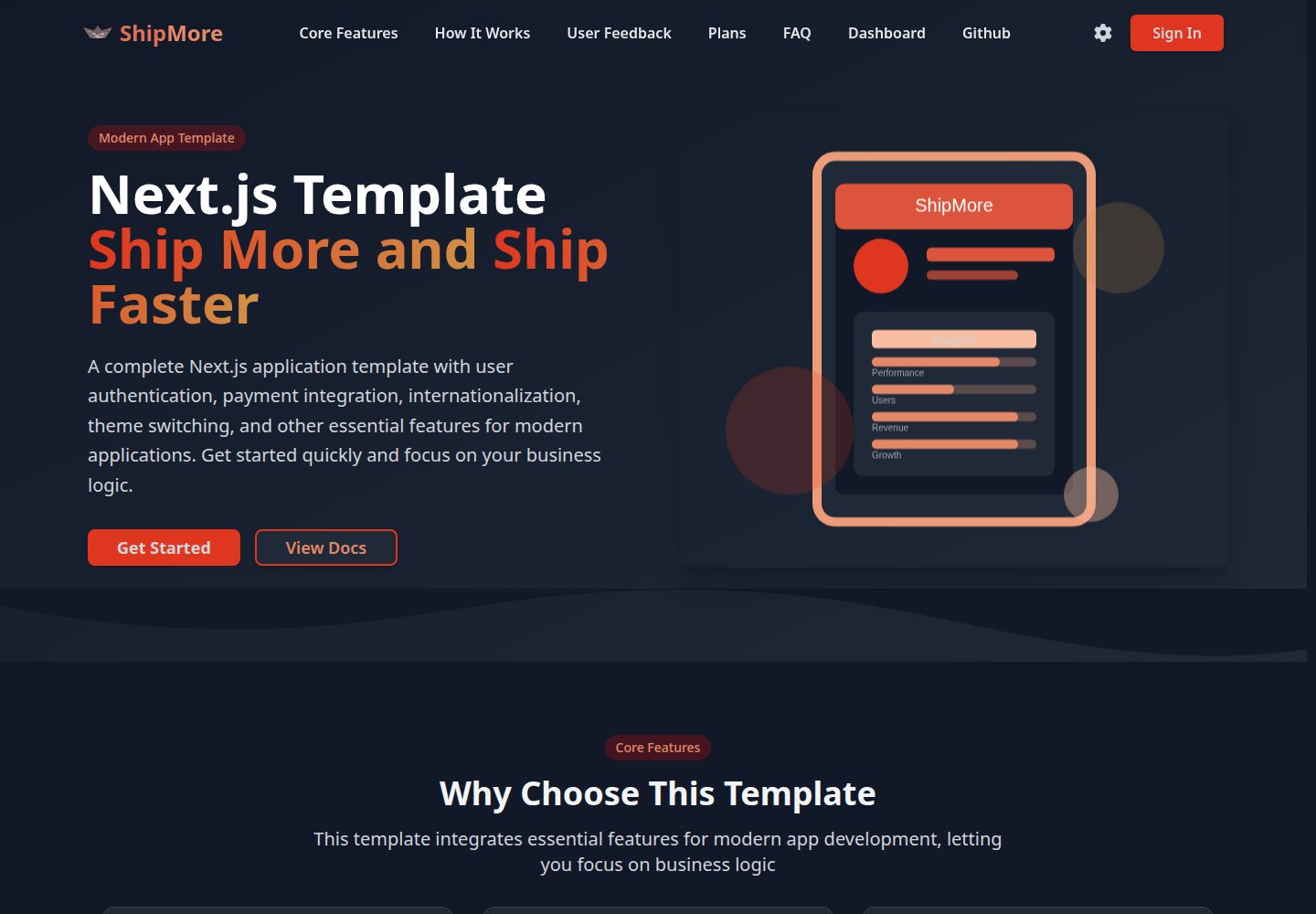
ShipMore is an application template based on the Next.js 15 App Router, integrating NextAuth.js authentication, Stripe payments, next-intl multilingual support, theme switching, and a Drizzle ORM + PostgreSQL database, helping developers skip infrastructure setup and write business logic directly.
Explore the design
Compare the page layouts and mobile experience. Open any screenshot for a closer look.
Desktop homepage1 / 3
Desktop captureTop of page
Actual screenshot captured by the server browser.
All pages & views 3
Screenshots show visual appearance; interactive behavior may differ.
Recorded 2026-10-14View source
What stands out
A quick read of the recorded project description.
Stripe payment integration; the README describes subscription management, billing history and usage statistics
Multilingual support based on next-intl, providing Chinese/English switching and localized routing
Dark/light theme switching, supporting system theme detection and settings persistence
Uses Drizzle ORM and PostgreSQL as the database layer, and provides migration, push, Studio and seed data scripts
Builds the interface with Tailwind CSS and Shadcn UI, and is declared to be responsive
Template Details
ShipMore is a Next.js application template whose README positions it as a foundation project that helps developers build modern web applications faster. It pre-integrates common application infrastructure, including user authentication based on NextAuth.js, Stripe payments and subscriptions, multilingual support based on next-intl, dark/light theme switching, and a database layer using Drizzle ORM to connect to PostgreSQL. The UI uses Tailwind CSS and Shadcn UI and is declared to be responsive.
The project uses the Next.js 15 App Router and TypeScript, with a directory structure divided by app/[locale] for multilingual routing and separated into (auth) and (unauth) page groups, along with directories such as components, db, hooks, i18n, lib, locales, services, styles, types and utils. The README provides complete steps from cloning, installing dependencies, configuring environment variables, and initializing the database to starting the development server, as well as Vercel deployment instructions, and states it can be deployed to other platforms that support Next.js.
The README does not provide an online demo address, version number, performance data or production environment validation for the template, nor does it document the specific implementation details of payment integrations other than Stripe; the documentation mentions both Stripe and Creem, and the relationship between the two is not explained.
Next.jsSaaS
Is it right for your project?
Use Cases
- Rapidly building a SaaS-style web application prototype with user authentication and subscription payments
- Wanting to start writing business logic directly rather than configuring infrastructure, based on the Next.js App Router
- Application projects that need multilingual routing and theme switching capabilities
- Projects that use PostgreSQL and want to manage schemas and migrations through Drizzle ORM
Suitable For
- Developers familiar with Next.js, TypeScript and Tailwind CSS
- Application projects that need common capabilities such as authentication, payments and multilingual support as a starting point
- Projects planned for deployment to Vercel or other platforms that support Next.js
Getting started & customization
Use these recorded setup notes alongside the repository instructions for your chosen version.
- 1
After cloning the repository, use pnpm install to install dependencies
- 2
Copy .env.example to .env.local, and configure environment variables such as DATABASE_URL, NEXTAUTH_SECRET, NEXTAUTH_URL, GitHub/Google OAuth, Stripe, as well as Resend and Cloudflare R2
- 3
Generate migrations with pnpm db:generate, push the database structure with pnpm db:push, and optionally run pnpm db:seed to write seed data
- 4
Run pnpm dev to start the development server, and visit http://localhost:3000 to view the application
- 5
Vercel deployment requires connecting a GitHub repository and configuring environment variables; the README states it can also be deployed to platforms that support Next.js, such as Netlify, Railway and Render
License & source material
Usage conditions & limitations
Free to use · keep license noticeThis listing covers the free version under the MIT license in the public repository; the free scope is the code of that version and does not mean that external services or third-party assets are free.
Must comply with when using
- Free use, modification, commercial use and distribution of that version's code are permitted.
- When distributing copies or substantial portions of the code, the original author's copyright notice and the complete MIT license notice must be retained.
- The code is provided as is; warranties and limitations of liability are governed by the original license and applicable law.
Additional costs & items to verify
- Demo images, fonts, icons and other third-party assets must be checked against their respective licenses and cannot be judged solely by the code's MIT license.
- External services such as domains, hosting, databases, payments or AI may incur additional charges.
- You must provide your own PostgreSQL database connection string (DATABASE_URL); the template itself does not provide a database service.
- You must generate and configure NEXTAUTH_SECRET and NEXTAUTH_URL yourself to run authentication.
- GitHub social login requires you to apply for and configure GITHUB_ID and GITHUB_SECRET yourself.
- Google social login requires you to apply for and configure GOOGLE_CLIENT_ID and GOOGLE_CLIENT_SECRET yourself.
- Stripe payment functionality requires your own Stripe keys (including the webhook secret) and is an external paid service account.
- Email-related functionality depends on the Resend service, and you must apply for RESEND_API_KEY yourself.
- File storage depends on Cloudflare R2, and you must configure access keys yourself.
- The README's payment system section describes a Creem integration, which is inconsistent with the Stripe statements in the feature list and tech stack; the actual payment implementation must be verified yourself.
- The README claims support for Apple social login, but the environment variable example does not list Apple-related configuration items.
View Original Text Basis
Permission is hereby granted, free of charge
Original License Text
DATABASE_URL="postgresql://..."
Original README
NEXTAUTH_SECRET="your-secret"
Original README
GITHUB_ID="your-github-id"
Original README
GOOGLE_CLIENT_ID="your-google-id"
Original README
STRIPE_SECRET_KEY="sk_test_..."
Original README
RESEND_API_KEY="your-resend-key"
Original README
CLOUDFLARE_R2_ACCESS_KEY_ID="your-r2-key"
Original README
- Creem integration
Original README
https://github.com/nuknal/ShipMore/blob/main/LICENSEhttps://github.com/nuknal/ShipMore/blob/main/README.md- Social login (GitHub, Google, Apple)
Original README
Compiled by DeepSeek based on repository license and README ·2026-10-14. Results only cover the materials read; dependencies, images, fonts, and subsequent term changes are subject to their respective original texts.
Project checks & description sources
Template Information
- Source platforms
- GitHub
- Documentation and maintenance reference score
- More documented · 80 / 100
- Technologies
- Next.js · React
- Website type
- SaaS
How this score is calculated
Our heuristic uses license records (up to 30), a demo link (12), a preview (10), stars (15), recorded maintenance (15), description completeness (8), feature records (5) and classification data (5). It is not a code, security or performance test, or a Google score. A link does not establish tested functionality.
What to verify for this project
- Repository update recorded
- 2025-12-16
- Screenshot last checked
- 2026-10-14
A demo link is listed. Check it with your own content and viewport sizes; its presence does not confirm that forms, authentication or payments work.
The catalog identifies Next.js as the primary stack. Check the actual dependency manifest and lockfile for versions and hosting requirements. These notes use recorded metadata, not a code audit or a deployment test.
Use a selection guide →How this description was prepared
AI-assisted description based on catalog records and repository material. Repository authors are not automatically the reviewers of this description.
Review declaration: codex-user-requested-batch-review-20261017 · 2026-10-16
Inspect the recorded source material
SHA-256: ed4fb6572304e36aa1c2c32f0be30d04757813585bbed97c3788006ba93e0835
2026-10-14T12:42:37.682Z
Source file / repository# ShipMore - Next.js Application Template A comprehensive Next.js application template that helps developers build modern web applications faster. Includes user authentication, payment integration, multi-language support, theme switching, and other essential features for modern applications, allowing you to focus on business logic rather than infrastructure. ## ✨ Features - 🔐 **User Authentication** - Based on NextAuth.js, supports multiple login methods - 💳 **Payment Integration** - Complete subscription and payment system - 🌍 **Internationalization** - Multi-language support based on next-intl - 🎨 **Theme Switching** - Dark/light mode toggle - 📊 **Database** - Using Drizzle ORM and PostgreSQL - 🎯 **Modern UI** - Tailwind CSS + Shadcn UI - 📱 **Responsive Design** - Perfect adaptation to various devices - 🚀 **Performance Optimization** - Next.js 15 best practices ## 🛠️ Tech Stack - **Framework**: Next.js 15 (App Router) - **Language**: TypeScript - **Styling**: Tailwind CSS - **UI Components**: Shadcn UI - **Authentication**: NextAuth.js - **Database**: PostgreSQL + Drizzle ORM - **Payment**: Stripe - **Internationalization**: next-intl - **Deployment**: Vercel ## 📦 Quick Start ### 1. Clone the Project ```bash git clone <your-repo-url> cd shipmore ``` ### 2. Install Dependencies ```bash pnpm install ``` ### 3. Environment Configuration Copy `.env.example` to `.env.local` and configure environment variables: ```bash cp .env.example .env.local ``` Configure the following environment variables: ```env # Database DATABASE_URL="postgresql://..." # NextAuth NEXTAUTH_SECRET="your-secret" NEXTAUTH_URL="http://localhost:3000" # OAuth Providers GITHUB_ID="your-github-id" GITHUB_SECRET="your-github-secret" GOOGLE_CLIENT_ID="your-google-id" GOOGLE_CLIENT_SECRET="your-google-secret" # Stripe STRIPE_SECRET_KEY="sk_test_..." STRIPE_PUBLISHABLE_KEY="pk_test_..." STRIPE_WEBHOOK_SECRET="whsec_..." # Other Services RESEND_API_KEY="your-resend-key" CLOUDFLARE_R2_ACCESS_KEY_ID="your-r2-key" CLOUDFLARE_R2_SECRET_ACCESS_KEY="your-r2-secret" ``` ### 4. Database Setup ```bash # Generate database migrations pnpm db:generate # Push to database pnpm db:push # Run seed data (optional) pnpm db:seed ``` ### 5. Start Development Server ```bash pnpm dev ``` Visit [http://localhost:3000](http://localhost:3000) to view the application. ## 📁 Project Structure ``` src/ ├── app/ # Next.js App Router │ ├── [locale]/ # Multi-language routing │ │ ├── (auth)/ # Authenticated pages │ │ └── (unauth)/ # Public pages │ └── api/ # API routes ├── components/ # React components │ ├── auth/ # Authentication related components │ ├── landing/ # Landing page components │ ├── settings/ # Settings related components │ ├── subscription/ # Subscription related components │ └── ui/ # Base UI components ├── db/ # Database configuration and schema ├── hooks/ # Custom React Hooks ├── i18n/ # Internationalization configuration ├── lib/ # Utility libraries and configuration ├── locales/ # Translation files ├── services/ # API services ├── styles/ # Style files ├── types/ # TypeScript type definitions └── utils/ # Utility functions ``` ## 🔧 Core Features ### User Authentication - Email/password login support - Social login (GitHub, Google, Apple) - Email verification - Session management ### Payment System - Creem integration - Subscription management - Billing history - Usage statistics ### Internationalization - Chinese/English support - Dynamic language switching - Localized routing ### Theme System - Dark/light mode - System theme detection - Persistent settings ## 📝 Development Guide ### Adding New Pages 1. Create pages in `src/app/[locale]/(auth)` or `src/app/[locale]/(unauth)` 2. Add corresponding translations to `src/locales/` 3. Add to sidebar navigation if needed ### Adding New Components 1. Create components in `src/components/` 2. Use TypeScript and Tailwind CSS 3. Follow project naming conventions ### Database Operations ```bash # Generate new migrations pnpm db:generate # Push to database pnpm db:push # View database pnpm db:studio ``` ## 🚀 Deployment ### Vercel Deployment 1. Connect GitHub repository to Vercel 2. Configure environment variables 3. Deploy ### Other Platforms The project supports deployment to any platform that supports Next.js, such as Netlify, Railway, Render, etc. ## 📄 Script Commands ```bash # Development pnpm dev # Build pnpm build # Start production server pnpm start # Code linting pnpm lint # Type checking pnpm type-check # Database related pnpm db:generate # Generate migrations pnpm db:push # Push to database pnpm db:studio # Open database management interface pnpm db:seed # Run seed data ``` ## 🤝 Contributing Issues and Pull Requests are welcome! ## 📄 License [MIT License](LICENSE) ## 🔗 Related Links - [Next.js Documentation](https://nextjs.org/docs) - [NextAuth.js Documentation](https://next-auth.js.org) - [Tailwind CSS Documentation](https://tailwindcss.com/docs) - [Shadcn UI Documentation](https://ui.shadcn.com) - [Drizzle ORM Documentation](https://orm.drizzle.team) ## 📞 Support If you have any questions or need support, please contact us at [[email protected]](mailto:[email protected]).
Explore similar templates
Compare previews and descriptions within the same stack and category.

Next.js SaaS Starter
The official Next.js SaaS starter template, integrating email/password authentication, Stripe Checkout subscriptions, a dashboard with user/team CRUD, basic Owner/Member RBAC, and activity logging.
Next.js · SaaS

SaaS-Boilerplate
SaaS-Boilerplate is an open-source SaaS starter template built with Next.js App Router, React 19, TypeScript, Tailwind CSS, and Shadcn UI.
Next.js · SaaS

create-t3-turbo
A full-stack TypeScript monorepo starter from T3 OSS, listed in the Vercel template directory. It splits apps for Next.js, Expo and optional TanStack Start, with shared packages for tRPC v11, better-auth, Drizzle + Supabase and shadcn/ui.
Next.js · Starter

saas-starter-kit
BoxyHQ's open-source Next.js enterprise SaaS starter template provides a reusable foundation with authentication, team management, SAML SSO, directory sync, webhooks, audit logs, and Stripe payments.
Next.js · SaaS
saasfly
Saasfly is an MIT-licensed Next.js SaaS starter template with built-in Clerk authentication, Stripe payment, PostgreSQL, Resend email, internationalization, SEO, tRPC, and Zustand. It is created via `bun create saasfly` and deployable on Vercel.
Next.js · SaaS

next-saas-starter
A free Next.js SaaS marketing landing page template from Blazity, using static generation and styled-components with no extra UI library.
Next.js · SaaS