Standard Hugo theme structure, with theme files at the repository root and example content in exampleSite/
HugoBlogStarter
tailbliss — Hugo Blog Template
By nusserstudios
TailBliss is a Hugo-based blog theme that uses Tailwind CSS 4, Vite, and Alpine.js, includes light and dark modes, and is licensed under Apache-2.0.
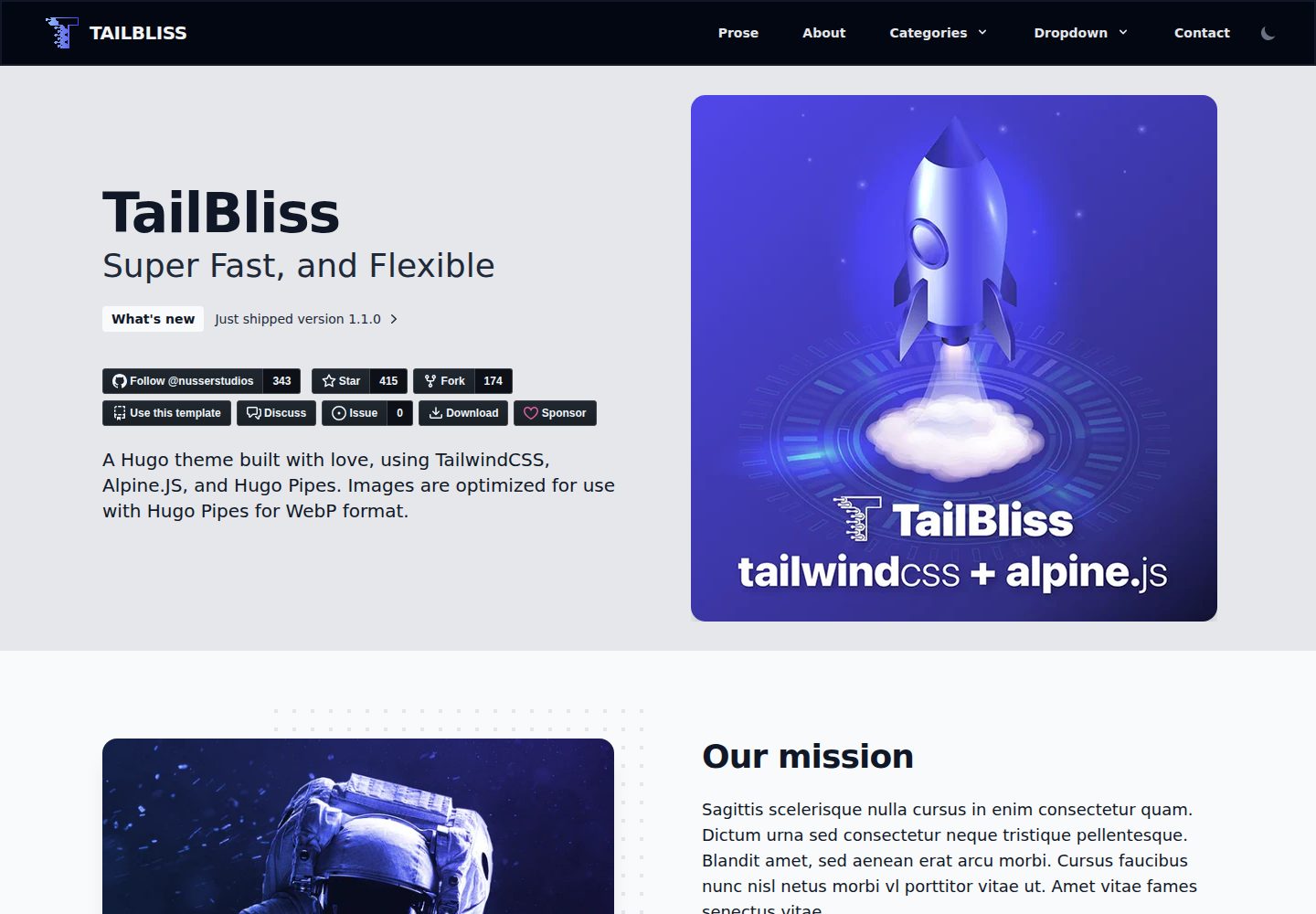
Explore the design
Compare the page layouts and mobile experience. Open any screenshot for a closer look.
Desktop homepage1 / 2
Desktop captureTop of page
Actual screenshot captured by the server browser.
All pages & views 2
Screenshots show visual appearance; interactive behavior may differ.
Recorded 2026-10-02View source
What stands out
A quick read of the recorded project description.
Uses Tailwind CSS 4, with a Vite plugin and lightningcss handling CSS build and autoprefixing
Integrates Alpine.js and provides light and dark modes
Offers dev:watch automatic watch and dev manual development modes, plus rebuild and build commands
The installation script automatically extracts example content when no content/ directory exists, including 3 pages and 14 example articles
Licensed under Apache-2.0, allowing free use, modification, commercial use, and distribution
Template Details
TailBliss is a Hugo theme maintained by nusserstudios, positioned as a blog and starter. It follows the standard Hugo theme structure: layouts, static assets, assets, archetypes, and theme.toml are located at the repository root, with example content under exampleSite/, and a symbolic link at exampleSite/themes/tailbliss pointing to the theme itself. The theme uses Tailwind CSS 4 for styling, with a Vite plugin and lightningcss handling CSS build and autoprefixing, Alpine.js for the interaction layer, and provides light and dark modes.
When used in a site, the theme should be placed in the Hugo site's themes/tailbliss/ directory, and theme: tailbliss declared in the site configuration. The repository offers two usage paths: adding it as a theme to an existing site via git submodule, or cloning the repository for developing and contributing to the theme itself. The installation script extracts example content from the git repository when no content/ directory exists, including about.md, contact.md, prose.md, and 14 example blog and news articles.
The development workflow distinguishes between automatic watch and manual modes: dev:watch starts CSS watching and runs the Hugo server simultaneously, so no manual rebuild is needed when modifying HTML or Tailwind classes; dev builds CSS only once, and after changing colors or CSS variables, rebuild must be run. In development mode, CSS filenames include a timestamp to avoid browser caching, while production builds use content hashing. The theme's CSS is built on the theme side and copied to the site's static/css/, so the Hugo project itself does not need PostCSS configuration.
Known limitations and notes: upgrading from v0.5 requires content migration; if the site retains the hugo.toml generated by hugo new site, theme = "tailbliss" must be added, otherwise a no layout file error may occur; if an error appears that the static/css directory does not exist, CSS must first be built and copied to the site's static/css/. The repository provides Lighthouse screenshots, but this material does not give verifiable performance data, so performance conclusions are not repeated here.
HugoBlogStarter
Is it right for your project?
Use Cases
- Add a Tailwind CSS-based blog theme to a Hugo site
- Use TailBliss as a starting point to build a personal blog or content site
- Preview effects with exampleSite and dev:watch when developing the theme locally
- Hugo projects that need light and dark modes and Alpine.js interactions
Suitable For
- Developers building blogs or content sites with Hugo
- Users who want to customize styles with Tailwind CSS
- Projects that need a standard Hugo theme structure for updates via submodule
- Users who accept the Apache-2.0 license terms and independently verify third-party asset licenses
Getting started & customization
Use these recorded setup notes alongside the repository instructions for your chosen version.
- 1
Add the theme to themes/tailbliss/ in a Hugo site via git submodule, and set theme: tailbliss in the site configuration
- 2
Run pnpm install (or npm install) in the theme directory, then run pnpm run build:css:dev and copy static/css/main.*.css to the site's static/css/
- 3
If retaining the hugo.toml generated by hugo new site, add theme = "tailbliss", otherwise a no layout file error may occur
- 4
During development, pnpm run dev:watch is recommended for automatic CSS rebuilds; after changing colors or CSS variables, run pnpm run rebuild
- 5
Upgrading from v0.5 requires handling content according to the migration guide; the installation script extracts example content only when no content/ directory exists
License & source material
Usage conditions & limitations
Free to use · keep license noticeThis entry covers the free version under the Apache-2.0 license in the public repository; the free scope is the code of that version and does not mean external services or third-party assets are free.
Must comply with when using
- Free use, modification, commercial use, and distribution are permitted; the Apache-2.0 license must be included when distributing.
- Modified files must prominently indicate changes, and relevant copyright, patent, trademark, and attribution notices must be retained.
- If the original project includes a NOTICE file, applicable attribution notices in it must be retained when distributing derivative works.
- The license includes an applicable contributor patent grant; initiating patent litigation as described in the license terminates that patent grant, and no trademark use rights are granted.
- The code is provided as is; warranties and limitations of liability are governed by the original license and applicable law.
Additional costs & items to verify
- The contact form relies on the third-party service FormSubmit.Co, requiring the form action to point to that service and your own email address, which is an external service dependency.
- Using the contact form requires replacing the form action in content/contact.md with your own email address, otherwise the form cannot be delivered properly.
- When used as a theme, the repository must be added to the site's themes/tailbliss/ directory via git submodule, and theme: tailbliss declared in the site configuration.
- Before use, dependencies must be installed by running pnpm install (or npm install) in the theme directory, and CSS must be built and copied to the site's static/css/.
- Upgrading from v0.5 to v1.1+ requires manually migrating content according to the migration guide; it cannot be used by direct overwrite.
- If the site retains the hugo.toml generated by hugo new site, theme = "tailbliss" must be added, otherwise a no layout file error may occur.
- Demo images, fonts, icons, and other third-party assets must be checked against their respective licenses and cannot be judged solely by the code's Apache-2.0 license.
- External services such as domains, hosting, databases, payments, or AI may incur additional charges.
View Original Text Basis
no-charge, royalty-free, irrevocable copyright license
Original License Text
1. Visit [FormSubmit.Co](https://formsubmit.co/)
Original README
Update the form action with your email address:
Original README
git submodule add https://github.com/nusserstudios/tailbliss.git themes/tailbliss
Original README
pnpm install
Original README
If you're upgrading from v0.5, you'll need to migrate your content.
Original README
https://github.com/nusserstudios/tailbliss/blob/main/LICENSEhttps://github.com/nusserstudios/tailbliss/blob/main/README.mdadd theme = "tailbliss" to hugo.toml,
Original README
Compiled by DeepSeek based on repository license and README ·2026-10-02. Results only cover the materials read; dependencies, images, fonts, and subsequent term changes are subject to their respective original texts.
Project checks & description sources
Template Information
- Source platforms
- Hugo Themes
- Documentation and maintenance reference score
- More documented · 96 / 100
- Technologies
- Hugo
- Website type
- Blog · Starter
How this score is calculated
Our heuristic uses license records (up to 30), a demo link (12), a preview (10), stars (15), recorded maintenance (15), description completeness (8), feature records (5) and classification data (5). It is not a code, security or performance test, or a Google score. A link does not establish tested functionality.
What to verify for this project
- Repository update recorded
- 2026-10-01
- Screenshot last checked
- 2026-10-02
A demo link is listed. Check it with your own content and viewport sizes; its presence does not confirm that forms, authentication or payments work.
The catalog identifies Hugo as the primary stack. Check the actual dependency manifest and lockfile for versions and hosting requirements. These notes use recorded metadata, not a code audit or a deployment test.
Use a selection guide →How this description was prepared
AI-assisted description based on catalog records and repository material. Repository authors are not automatically the reviewers of this description.
Automatically checked against source and license rules; no manual editorial review.
Inspect the recorded source material
SHA-256: f27dabafe8d589dad31ecda67aa539b8c5cac97ca23b0919903695c8f068957f
2026-10-02T15:31:57.651Z
Source file / repository<p align="center" style="padding-top:20px">
<img width="100px" src="images/logo-tailbliss-round.svg" align="center" alt="TailBliss Logo" />
<h1 align="center">TailBliss</h1>
<p align="center">TailBliss is an opinionated Hugo theme with Tailwind CSS 4.x, Vite integration, and Alpine.js with light/dark modes.</p>
<p align="center"><strong>Current Version: 1.1.0+ (Hugo Theme Structure)</strong></p>
</p>
<p align="center">
<a href="https://github.com/nusserstudios/tailbliss/actions/">
<img alt="Tests Passing" src="https://github.com/nusserstudios/tailbliss/actions/workflows/codeql.yml/badge.svg" />
</a>
<a href="https://github.com/nusserstudios/tailbliss/contributors">
<img alt="GitHub Contributors" src="https://img.shields.io/github/contributors/nusserstudios/tailbliss?color=0088ff" />
</a>
<a href="https://github.com/nusserstudios/tailbliss/issues">
<img alt="Issues" src="https://img.shields.io/github/issues/nusserstudios/tailbliss?color=fc0b03" />
</a>
<a href="https://github.com/nusserstudios/tailbliss/pulls">
<img alt="GitHub pull requests" src="https://img.shields.io/github/issues-pr/nusserstudios/tailbliss?color=f97316" />
</a>
<br />
<br />
<a href="https://gohugo.io/">
<img src="https://img.shields.io/badge/Hugo%20-0.164.0%20-gray.svg?colorA=c9177e&colorB=FF4088&style=for-the-badge"/>
</a>
<a href="https://tailwindcss.com/">
<img src="https://img.shields.io/badge/TailwindCSS%20-V4-gray.svg?colorA=0284c7&colorB=38bdf8&style=for-the-badge"/>
</a>
<a href="https://vitejs.dev/">
<img src="https://img.shields.io/badge/Vite%20-V7-gray.svg?colorA=646cff&colorB=747bff&style=for-the-badge"/>
</a>
<a href="https://alpinejs.dev/">
<img src="https://img.shields.io/badge/Alpine.js%20-V3-gray.svg?colorA=68a5af&colorB=77c1d2&style=for-the-badge"/>
</a>
</p>
<p align="center">
<a href="https://tailbliss.netlify.app/">View Demo</a>
·
<a href="https://github.com/nusserstudios/tailbliss/issues">Report Bug</a>
·
<a href="https://github.com/nusserstudios/tailbliss/discussions/categories/feature-request">Request Feature</a>
·
<a href="https://github.com/nusserstudios/tailbliss/discussions/categories/general">Ask Question</a>
</p>
<p align="center">
<img src="https://raw.githubusercontent.com/nusserstudios/tailbliss/main/images/tailbliss-lighthouse-11-03-22.png" alt="Tailbliss Google Lighthouse Score" style="margin: 25px auto; max-width: 830px" width="100%" height="" />
</p>
## 📚 **Table of Contents**
- [📁 Theme Structure](#-theme-structure)
- [🚀 Quick Start](#-quick-start)
- [⚙️ Configuration](#%EF%B8%8F-configuration)
- [🔄 Migration Guide](#-migration-guide)
- [✨ What's New in Tailwind CSS 4](#-whats-new-in-tailwind-css-4-migration)
- [✨ Features](#-features)
- [📧 Contact Form Setup](#-contact-form-setup)
- [Credits](#credits)
---
## 📁 **Theme Structure**
**TailBliss follows the standard Hugo theme structure**, making it easy to use in any Hugo site.
### 🎯 **Standard Hugo Theme Structure**
TailBliss is structured as a proper Hugo theme following Hugo's conventions:
- **Theme files in root**: All theme files (`layouts/`, `static/`, `assets/`, `archetypes/`, `theme.toml`) are located in the root directory
- **Example content**: Located in `exampleSite/` directory for reference and testing
- **Symlink setup**: The `exampleSite/themes/tailbliss` symlink points to the parent directory (the theme itself)
### 🔧 **Using TailBliss in Your Hugo Site**
When you add TailBliss to your Hugo site, it goes in the `themes/` directory:
```bash
# Your Hugo site structure will look like:
my-hugo-site/
├── content/
├── themes/
│ └── tailbliss/ # ← TailBliss theme here
│ ├── layouts/
│ ├── static/
│ ├── assets/
│ ├── archetypes/
│ └── theme.toml
├── hugo.yaml
└── ...
```
This is the standard way Hugo themes work - you reference the theme in your site's `hugo.yaml` with `theme: tailbliss`, and Hugo looks for it in the `themes/tailbliss/` directory.
### 📦 **How It Works**
1. **Theme Repository Structure** (this repo):
- Theme files (`layouts/`, `static/`, `assets/`, etc.) are in the root
- `exampleSite/` contains example content for testing
- This follows Hugo's standard theme structure
2. **Using in Your Hugo Site**:
- Clone or add as submodule to `themes/tailbliss/` in your site
- Reference it in your site's `hugo.yaml` with `theme: tailbliss`
- Hugo automatically finds and uses the theme from `themes/tailbliss/`
3. **Why This Structure?**:
- ✅ Standard Hugo convention - works with all Hugo tooling
- ✅ Easy to update - just update the submodule
- ✅ Clean separation - your content stays separate from theme files
- ✅ Multiple themes - you can use multiple themes if needed
### 🔄 **Migration from v0.5**
If you're upgrading from v0.5, you'll need to migrate your content. See the [Migration Guide](#migration-guide) below.
---
## 🚀 **Quick Start**
### Option 1: Use as Hugo Theme (Recommended)
This is the standard way to use TailBliss in your Hugo site. The theme will be placed in your site's `themes/` directory:
```bash
# Create a new Hugo site
hugo new site my-tailbliss-site
cd my-tailbliss-site
# Initialize git (required for submodule add)
git init
# Add TailBliss as a theme (places it in themes/tailbliss/)
git submodule add https://github.com/nusserstudios/tailbliss.git themes/tailbliss
# Copy example content (optional, excluding themes folder)
rsync -av --exclude='themes' themes/tailbliss/exampleSite/ .
# Or manually copy specific directories:
# cp -r themes/tailbliss/exampleSite/content themes/tailbliss/exampleSite/hugo.yaml themes/tailbliss/exampleSite/i18n .
# Install dependencies and build CSS (use pnpm or npm)
cd themes/tailbliss
pnpm install
# or: npm install
pnpm run build:css:dev
cp static/css/main.*.css ../../static/css/
cd ../..
# If you see "no layout file" warnings: add theme = "tailbliss" to hugo.toml,
# or remove hugo.toml so the rsync'd hugo.yaml (which has theme: tailbliss) is used.
# Start developing
hugo server
```
(The rsync creates `static/css/` in your site; the theme uses the built file from there so Hugo does not need PostCSS configuration or processing in the project. Tailwind v4 + the Vite plugin + lightningcss handles CSS processing and autoprefixing.)
**Note**: Your site config must reference the theme. If you keep the default `hugo.toml` from `hugo new site`, add `theme = "tailbliss"` to it. The rsync'd `hugo.yaml` already has `theme: tailbliss`; if you remove `hugo.toml`, that file will be used.
### Option 2: Clone for Development/Contributing
If you want to develop or contribute to the theme itself, clone the repository:
```bash
# Clone the repository
git clone https://github.com/nusserstudios/tailbliss.git tailbliss-theme
cd tailbliss-theme
# Install dependencies
pnpm install
# Test the theme using exampleSite
cd exampleSite
hugo server --themesDir=..
```
**Note**: This option is for theme development. For using the theme in your own site, use Option 1.
### 🎯 **Automatic Content Setup**
TailBliss includes an intelligent installation script that automatically sets up example content for you:
```bash
# The install script runs automatically with pnpm install
# Or run it manually:
pnpm run install
# or
node install.js
```
**What the install script does:**
- ✅ **Checks for existing content** - Won't overwrite your existing content
- ✅ **Extracts from git repository** - Gets the latest example content from the repository
- ✅ **Creates complete structure** - Sets up `content/` directory with:
- Sample pages (`about.md`, `contact.md`, `prose.md`)
- 14 example blog and news posts
- Proper directory structure (`posts/` subdirectory)
- ✅ **Safe operation** - Only runs if no `content/` directory exists
- ✅ **Clear feedback** - Shows progress and next steps
**First-time setup:**
```bash
git clone https://github.com/nusserstudios/tailbliss.git my-site
cd my-site
pnpm install # Automatically runs the install script
pnpm run dev # Start developing immediately
```
### 📋 **Available Commands**
##### Setup & Installation
```bash
# Install dependencies (automatically runs content setup)
pnpm install
# Manual content setup (if needed)
pnpm run install
# or
node install.js
```
##### Development
```bash
# Start development server with auto CSS rebuilding (RECOMMENDED)
pnpm run dev:watch
# Alternative: Traditional approach
pnpm run dev
# Manual CSS rebuild (when not using dev:watch)
pnpm run rebuild
```
##### Production Build
```bash
# Full production build
pnpm run build
```
### 🔄 **Development Workflow Explained**
TailBliss offers two development approaches - choose the one that fits your workflow:
#### **🚀 Recommended: Auto-Watch Mode**
```bash
pnpm run dev:watch
```
This command:
1. Starts CSS watcher (automatically rebuilds when Tailwind classes change)
2. Starts Hugo server with caching disabled
3. Opens your site at `http://localhost:1313`
4. **No manual rebuilding needed** - changes appear instantly!
#### **📦 Traditional: Manual Mode**
```bash
pnpm run dev
```
This command:
1. Builds CSS once in development mode
2. Starts Hugo server with caching disabled
3. Opens your site at `http://localhost:1313`
4. Requires manual rebuild when changing Tailwind classes
#### **Making Changes**
**✅ When changing HTML/Tailwind classes:**
- Edit your `.html` files in `layouts/`
- Hugo automatically detects changes and reloads
- **No rebuild needed!**
**🔄 When changing colors/CSS variables:**
- Edit `assets/css/main.css`
- Run: `pnpm run rebuild`
- Hugo automatically detects the new CSS and reloads
#### **What Each Command Does**
| Command | Purpose | When to Use |
|---------|---------|-------------|
| `pnpm run dev:watch` | **Auto-watch development** (RECOMMENDED) | Best for active development - auto-rebuilds CSS |
| `pnpm run dev` | Traditional development server | When you prefer manual control |
| `pnpm run rebuild` | Rebuild CSS only | After changing colors/CSS variables (manual mode) |
| `pnpm run build` | Production build | Deploying to production |
#### **Why This Approach?**
- **⚡ Fast rebuilds**: Timestamp-based filenames ensure instant cache busting
- **🚫 No cache issues**: Every rebuild generates a unique CSS filename
- **🔄 Auto-reload**: Hugo detects CSS changes instantly and reloads browser
- **🎯 Explicit control**: You decide when CSS rebuilds happen
- **🧹 Auto-cleanup**: Old CSS files are automatically removed
**Pro tip**: The `rebuild` command uses timestamp-based filenames in development (e.g., `main.abc123def.css`) which completely eliminates browser caching issues, while production builds still use content-based hashes for optimal caching.
### 🔧 **Troubleshooting Development Issues**
#### **Error: `failed to read directory "static/css": no such file or directory`**
Hugo's `readDir` only checks your **site root**. The theme uses the built CSS from your site's `static/css/`. **Fix**: (1) Use the latest TailBliss—`exampleSite` now includes `static/css/`, so `rsync` creates it. (2) After building CSS in the theme, copy it into your site: `cp themes/tailbliss/static/css/main.*.css static/css/`. Then run `hugo server`.
#### **CSS Changes Not Showing**
With the new timestamp-based approach, this should rarely happen, but if it does:
1. **Run rebuild**: `pnpm run rebuild`
2. **Check the CSS file**: Look in `static/css/` - you should see a new `main.xxxxxxxxx.css` file with a unique timestamp
3. **Hard refresh browser**: `Cmd+Shift+R` (Mac) or `Ctrl+Shift+R` (Windows) if needed
#### **Infinite Build Loops**
This has been completely eliminated with the new approach! If you somehow encounter it:
- **Stop the process**: `Ctrl+C`
- **Use the simple workflow**: `pnpm run dev` → make changes → `pnpm run rebuild`
#### **Old CSS Still Loading**
This is automatically handled now:
- **Old CSS files are automatically deleted** when you run `pnpm run rebuild`
- **Each rebuild generates a unique filename** (e.g., `main.abc123def.css`)
- **Browser cache is bypassed** because the filename is always different
#### **When to Use Each Command**
- **Starting work**: `pnpm run dev:watch` (RECOMMENDED - auto-rebuilds everything)
- **Alternative start**: `pnpm run dev` (manual mode)
- **Changed HTML/Tailwind classes**: No action needed with `dev:watch` (auto-rebuild)
- **Changed CSS colors/variables**: No action needed with `dev:watch` (auto-rebuild)
- **Manual rebuild**: `pnpm run rebuild` (only needed in manual mode)
- **Deploying**: `pnpm run build`
---
## ⚙️ **Configuration**
### **Basic Setup**
After installation, update your `hugo.yaml` configuration:
```yaml
baseURL: 'https://tailbliss.netlify.app' # Replace with your actual domain
title: Your Site Title
theme: tailbliss
```
### **Important Configuration Notes**
- **baseURL**: Set this to your actual domain for proper canonical URLs and social sharing
- **theme**: Must be set to `tailbliss` when using as a Hugo theme
- **Example**: The demo site uses `https://tailbliss.com/`
---
## 🚀 What's New in Tailwind CSS 4 Migration
TailBliss has been completely upgraded from Tailwind CSS 3.2 to 4.x with significant improvements:
### ⚡ **Vite Integration**
- **Cache Busting**: Automatic CSS hash generation (e.g., `main.abc123.css`)
- **Hot Reloading**: Instant CSS updates during development
- **Build Performance**: Faster CSS processing with Vite
### 🎨 **Modern Color System**
- **OKLCH Colors**: All colors now use the OKLCH color space for better perceptual uniformity
- **Indigo Primary**: Updated from blue to indigo with proper OKLCH values
- **Enhanced Contrast**: Better light/dark mode color relationships
### 🛠️ **New CSS Architecture**
- **CSS-First Approach**: Configuration moved from `tailwind.config.js` into CSS using `@theme` directive
- **Custom Variants**: Dark mode uses `@custom-variant` instead of class-based configuration
- **Custom Utilities**: Built-in `prose-2xl` utility for wider content (80ch with 110% font-size)
### 📝 **Improved Typography**
- **Custom Prose Styles**: Removed `@tailwindcss/typography` dependency
- **OKLCH Integration**: All text colors use OKLCH for consistent rendering
- **Enhanced Code Highlighting**: Better syntax highlighting colors in light/dark modes
- **Markdown Tables**: Improved table styling within prose content
### 🏗️ **Development Workflow**
#### Available Scripts:
```bash
pnpm run dev # Start development server
pnpm run rebuild # Rebuild CSS after changes
pnpm run build # Production build
```
#### Build Process:
1. **Development**: Vite processes `assets/css/main.css` and generates timestamped files like `main.abc123def.css`
2. **Production**: Vite generates content-hashed CSS files like `main.xyz789.css`
3. **Hugo template** automatically detects and references the latest CSS file
4. **Cache busting** handled automatically in both development and production
5. **Auto-cleanup** removes old CSS files during development rebuilds
### 🎯 **Key Benefits**
- **Zero Cache Issues**: Timestamp-based filenames eliminate all CSS caching problems
- **Faster Development**: Vite's lightning-fast processing with instant cache busting
- **Auto-Cleanup**: Old CSS files are automatically removed during rebuilds
- **Modern Colors**: OKLCH provides more accurate colors across devices
- **Simplified Config**: CSS-first configuration is more maintainable
- **Enhanced Typography**: Custom prose styles with better performance
### 📦 **Dependencies Updated**
- `tailwindcss`: `^3.2.x` → `^4.1.x`
- Added: `@tailwindcss/vite`, `vite`
- Removed (cleanup for #333): `@tailwindcss/postcss`, `postcss`, `autoprefixer`, `postcss-cli` (no longer required; Tailwind v4 + Vite + lightningcss is sufficient)
- Removed: `@tailwindcss/typography` (replaced with custom styles)
---
## 🔄 **Migration Guide**
### Migrating from TailBliss v0.5 to v1.1+
If you have an existing TailBliss v0.5 site, follow these steps to migrate:
#### **Step 1: Backup Your Content**
```bash
# Create a backup of your current site
cp -r my-old-tailbliss-site my-old-tailbliss-backup
```
#### **Step 2: Create New Hugo Site Structure**
```bash
# Create a new Hugo site
hugo new site my-new-tailbliss-site
cd my-new-tailbliss-site
# Add TailBliss v1.1 as a theme
git submodule add https://github.com/nusserstudios/tailbliss.git themes/tailbliss
```
#### **Step 3: Copy Your Content**
```bash
# Copy your existing content
cp -r ../my-old-tailbliss-backup/content/* ./content/
cp -r ../my-old-tailbliss-backup/static/* ./static/
cp -r ../my-old-tailbliss-backup/assets/* ./assets/
# Copy your Hugo configuration (and merge with new theme settings)
cp ../my-old-tailbliss-backup/hugo.yaml ./hugo.yaml
```
#### **Step 4: Update Configuration**
Edit your `hugo.yaml` to include the theme and your domain:
```yaml
baseURL: 'https://yourdomain.com/'
theme: tailbliss
```
#### **Step 5: Install Dependencies & Setup Content**
```bash
# Install dependencies and automatically setup example content
pnpm install
# Test your site
pnpm run dev
```
**Alternative: Use the install script for fresh content**
If you want to start with fresh example content instead of migrating:
```bash
# Remove existing content and let install script create fresh examples
rm -rf content/
pnpm run install # Creates fresh example content from repository
```
#### **Common Migration Issues**
1. **Missing Theme Reference**: Make sure `theme: tailbliss` is in your `hugo.yaml`
2. **CSS Not Loading**: Ensure you've run `pnpm install` in your site root
3. **Images Not Displaying**: Check that images are in the correct `/assets` or `/static` directories
4. **Custom Layouts**: If you customized layouts, copy them to your site's `layouts/` directory
5. **Quick Setup**: You can copy the entire `exampleSite` content to your root directory:
```bash
# Copy all exampleSite content to root
cp -r exampleSite/* .
```
#### **Fresh Start Option**
If you prefer to start fresh:
```bash
# Clone and let the install script handle content setup automatically
git clone https://github.com/nusserstudios/tailbliss.git my-site
cd my-site
pnpm install # Automatically runs install script and sets up content
pnpm run dev # Start developing immediately
```
**Manual approach** (if you prefer manual control):
```bash
git clone https://github.com/nusserstudios/tailbliss.git my-site
cd my-site
cp -r exampleSite/* . # Copy example files manually
pnpm install
pnpm run dev
```
---
## ✨ **Features**
Has paginated Categories and Tags. Markdown files will automatically convert images put into `/assets` folder to .webp images.
## Image shortcodes for webp as well.
```hugo
{{< imgc src="img-name.jpg" alt="Place alt text here." >}}
```
<a href="https://www.buymeacoffee.com/nusserstudios" target="_blank"><img src="https://cdn.buymeacoffee.com/buttons/default-blue.png" alt="Buy Me A Coffee" height="41" width="174" /></a>
## 📧 **Contact Form Setup**
To use the contact form:
1. Visit [FormSubmit.Co](https://formsubmit.co/)
2. Locate the contact form in `content/contact.md` (or `exampleSite/content/contact.md` if using as reference)
3. Update the form action with your email address:
```html
action="https://formsubmit.co/[email protected]" method="POST"
```
## Credits
**4044ever** - Original Theme
https://github.com/4044ever/Hugo-Tailwind-3.0.git
**Jan Heise** - Alpine.js Navbar
https://github.com/jan-heise/responsive-navbar-with-dropdown
**TailBliss Team** - Tailwind CSS 4 Migration, Vite Integration & OKLCH Colors
Made for Hacktoberfest, with ❤️ by NusserStudios.Explore similar templates
Compare previews and descriptions within the same stack and category.

hugo-PaperMod
A fast, clean, responsive Hugo theme for blogs and lightweight portfolios, with three layout modes (Regular, Home-Info, Profile), automatic and manual light/dark themes, Fuse.js client-side search, multilingual support, and built-in Open Graph, Twitter Cards, and Schema.org data.
Hugo · Portfolio

LoveIt
LoveIt is a clean, elegant, and feature-rich Hugo blog theme derived from LeaveIt and KeepIt, MIT-licensed. It offers light/dark modes, responsive layout, multilingual support, and search via Lunr.js or Algolia.
Hugo · Blog

hugo-coder
hugo-coder is a minimalist Hugo blog theme maintained by luizdepra under the MIT license. It provides a clean, text-focused blog appearance, configuration documentation in the docs directory, and a complete exampleSite with hugo.toml.
Hugo · Blog

blowfish
Blowfish is a Hugo personal website and blog theme built with Tailwind CSS 4, focused on lightness, simplicity, and content-first presentation.
Hugo · Blog

hugo-paper
hugo-paper is a simple, clean, and customizable Hugo blog theme configured through config.toml or hugo.toml.
Hugo · Blog

hextra
Hextra is a Hugo theme for documentation and blog sites, built on Hugo and Tailwind CSS with design referencing Nextra.
Hugo · Documentation