标准 Hugo 主题结构,主题文件位于仓库根目录,示例内容在 exampleSite/
Hugo博客启动器
tailbliss — Hugo 博客模板
作者 nusserstudios
TailBliss 是一个基于 Hugo 的博客主题,使用 Tailwind CSS 4、Vite 和 Alpine.js,内置明暗模式,采用 Apache-2.0 许可。
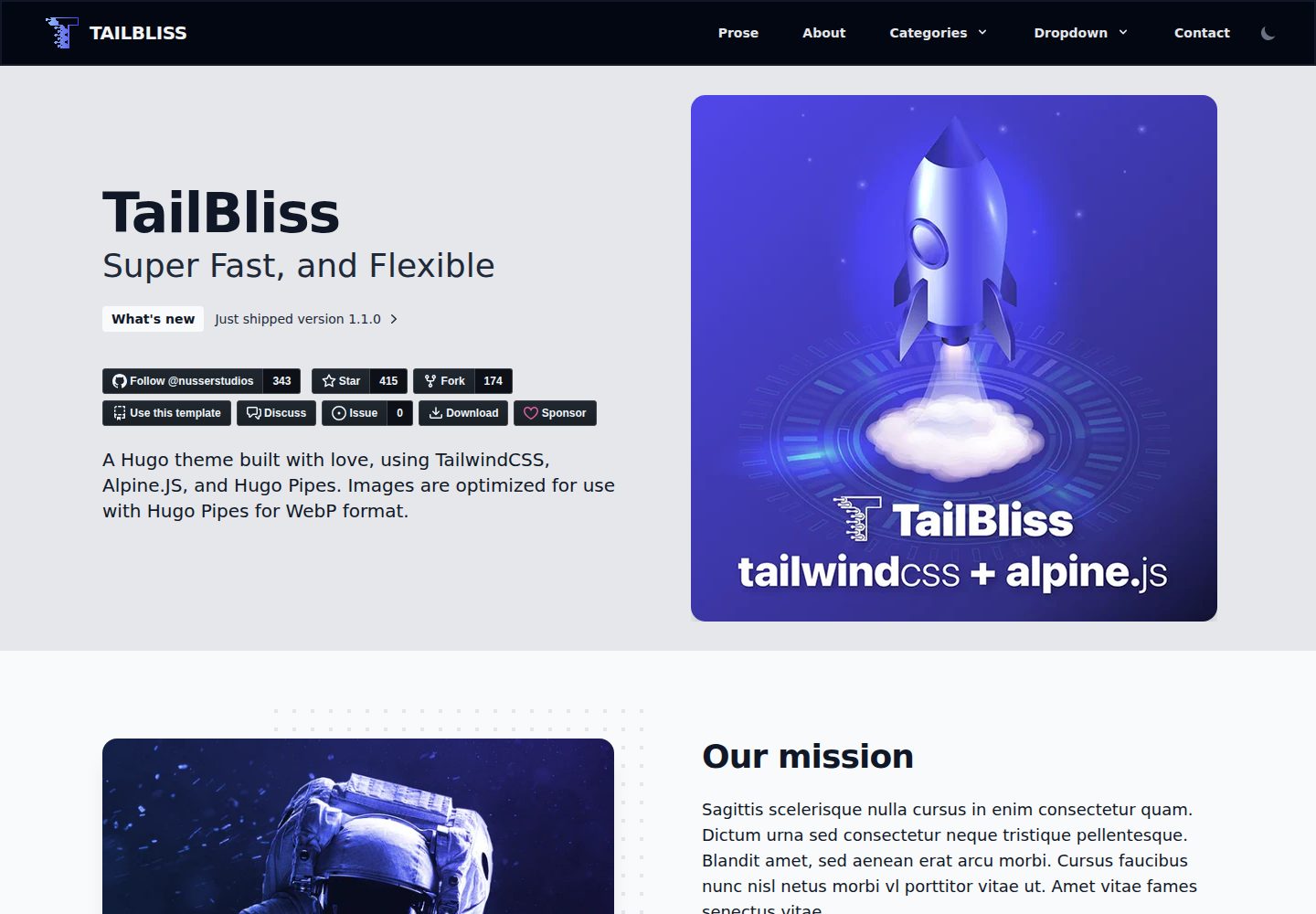
看看你的网站会是什么样
浏览真实页面截图,比较内容排版与手机效果。点击下方缩略图切换,放大查看整页细节。
全部页面与视图 2
截图用于了解视觉与布局,交互效果请以实际项目为准。
采集于 2026-10-02查看来源
值得关注的模板亮点
从已有项目资料中,快速了解它的特点。
使用 Tailwind CSS 4,通过 Vite 插件与 lightningcss 处理 CSS 构建和自动前缀
集成 Alpine.js,并提供明暗模式
提供 dev:watch 自动监听与 dev 手动两种开发模式,以及 rebuild 与 build 命令
安装脚本在无 content/ 目录时自动提取示例内容,包含 3 个页面与 14 篇示例文章
采用 Apache-2.0 许可,允许免费使用、修改、商用和分发
模板详细介绍
TailBliss 是 nusserstudios 维护的 Hugo 主题,定位为博客与启动器(starter)。它按 Hugo 标准主题结构组织:布局、静态资源、assets、archetypes 与 theme.toml 位于仓库根目录,示例内容放在 exampleSite/ 下,并通过 exampleSite/themes/tailbliss 符号链接指向主题自身。主题使用 Tailwind CSS 4 处理样式,借助 Vite 插件与 lightningcss 完成 CSS 构建与自动前缀,交互层使用 Alpine.js,并提供明暗模式。
在站点中使用时,主题应放入 Hugo 站点的 themes/tailbliss/ 目录,并在站点配置中声明 theme: tailbliss。仓库提供两种使用路径:作为主题通过 git submodule 加入现有站点,或克隆仓库用于主题本身的开发与贡献。安装脚本会在不存在 content/ 目录时从 git 仓库提取示例内容,包括 about.md、contact.md、prose.md 以及 14 篇博客与新闻示例文章。
开发流程区分自动监听与手动两种模式:dev:watch 会启动 CSS 监听并同时运行 Hugo 服务器,修改 HTML 或 Tailwind 类时无需手动重建;dev 只构建一次 CSS,修改颜色或 CSS 变量后需运行 rebuild。开发模式下 CSS 文件名带时间戳以避免浏览器缓存,生产构建使用内容哈希。主题的 CSS 由主题侧构建后复制到站点的 static/css/,因此 Hugo 项目本身不需要 PostCSS 配置。
已知限制与注意事项:从 v0.5 升级需要迁移内容;若站点保留 hugo new site 生成的 hugo.toml,需要补上 theme = "tailbliss",否则可能报 no layout file;若出现 static/css 目录不存在的错误,需要先构建 CSS 并复制到站点 static/css/。仓库提供 Lighthouse 截图,但本次资料未给出可核对的性能数据,故不在此复述性能结论。
Hugo博客启动器
适合你的项目吗?
适用场景
- 为 Hugo 站点添加一个基于 Tailwind CSS 的博客主题
- 以 TailBliss 作为起点搭建个人博客或内容站点
- 在本地开发主题时使用 exampleSite 与 dev:watch 预览效果
- 需要明暗模式与 Alpine.js 交互的 Hugo 项目
适合人群
- 使用 Hugo 构建博客或内容站点的开发者
- 希望以 Tailwind CSS 定制样式的用户
- 需要标准 Hugo 主题结构以便通过 submodule 更新的项目
- 接受 Apache-2.0 许可条款并自行核对第三方素材许可的使用者
上手与定制指南
结合仓库当前版本的说明,按下面的资料检查内容、配置与运行要求。
- 1
在 Hugo 站点中通过 git submodule 将主题加入 themes/tailbliss/,并在站点配置中设置 theme: tailbliss
- 2
在主题目录执行 pnpm install(或 npm install),并运行 pnpm run build:css:dev 后将 static/css/main.*.css 复制到站点 static/css/
- 3
若保留 hugo new site 生成的 hugo.toml,需添加 theme = "tailbliss",否则可能报 no layout file
- 4
开发时推荐 pnpm run dev:watch 自动重建 CSS;修改颜色或 CSS 变量后运行 pnpm run rebuild
- 5
从 v0.5 升级需按迁移指南处理内容,安装脚本仅在不存在 content/ 目录时提取示例内容
授权与来源资料
使用条件与限制
免费使用 · 保留许可声明本次收录的是公开仓库中采用 Apache-2.0 许可的免费版本;免费范围为该版本代码,不代表外部服务或第三方素材免费。
使用时需要遵守
- 允许免费使用、修改、商用和分发;分发时需随附 Apache-2.0 许可证。
- 修改过的文件需显著标明改动,并保留相关版权、专利、商标及归属声明。
- 若原项目附有 NOTICE 文件,分发衍生作品时需保留其中适用的归属声明。
- 许可包含适用的贡献者专利授权;发起许可所述专利诉讼会终止该专利授权,且不授予商标使用权。
- 代码按现状提供;担保与责任限制以原许可证及适用法律为准。
额外费用与待核对事项
- 联系表单依赖第三方服务 FormSubmit.Co,需将表单 action 指向该服务并填入自己的邮箱地址,属于外部服务依赖。
- 使用联系表单需在 content/contact.md 中把表单 action 替换为自己的邮箱地址,否则表单无法正常投递。
- 作为主题使用时需通过 git submodule 将仓库加入站点的 themes/tailbliss/ 目录,并在站点配置中声明 theme: tailbliss。
- 使用前需在主题目录执行 pnpm install(或 npm install)安装依赖,并构建 CSS 后复制到站点 static/css/。
- 从 v0.5 升级到 v1.1+ 需要按迁移指南手动迁移内容,不能直接覆盖使用。
- 若站点保留 hugo new site 生成的 hugo.toml,必须补上 theme = "tailbliss",否则可能报 no layout file 错误。
- 演示图片、字体、图标及其他第三方素材需按各自许可核对,不能仅凭代码的 Apache-2.0 许可判断。
- 域名、托管、数据库、支付或 AI 等外部服务可能另外收费。
查看原文依据
no-charge, royalty-free, irrevocable copyright license
许可证原文
1. Visit [FormSubmit.Co](https://formsubmit.co/)
README 原文
Update the form action with your email address:
README 原文
git submodule add https://github.com/nusserstudios/tailbliss.git themes/tailbliss
README 原文
pnpm install
README 原文
If you're upgrading from v0.5, you'll need to migrate your content.
README 原文
https://github.com/nusserstudios/tailbliss/blob/main/LICENSEhttps://github.com/nusserstudios/tailbliss/blob/main/README.mdadd theme = "tailbliss" to hugo.toml,
README 原文
DeepSeek 根据仓库许可证和 README 整理 ·2026-10-02。结果仅覆盖已读取资料,依赖、图片、字体及后续条款变更以各自原文为准。
项目核对记录与介绍依据
模板资料
- 来源平台
- Hugo Themes
- 资料与维护参考分
- 资料较完整 · 96 / 100
- 技术栈
- Hugo
- 网站类型
- 博客 · 启动器
这个分数如何计算
本站按许可资料(最高30分)、演示链接(12分)、预览图(10分)、Star数(15分)、记录的维护时间(15分)、描述完整度(8分)、功能记录(5分)和分类资料(5分)计算。它不是代码、安全或性能测试,也不是 Google 评分;有链接不代表已实测可用。
这个项目需要核对什么
- 记录的仓库更新时间
- 2026-10-01
- 截图检查日期
- 2026-10-02
已收录演示链接。请用你的内容与屏幕尺寸检查;有演示不代表表单、认证或支付已经可用。
目录记录的主要技术栈是 Hugo。请通过依赖清单和锁文件核对实际版本与托管要求。这些说明基于收录资料,不代表代码审计或部署实测。
查看具体选型方法 →介绍的制作与核对状态
介绍由 AI 辅助整理目录与仓库资料。仓库作者不等于这篇介绍的审核者。
已完成服务器许可规则与 AI 来源核对;未经过人工编辑审核。
查看当时使用的来源资料
SHA-256: f27dabafe8d589dad31ecda67aa539b8c5cac97ca23b0919903695c8f068957f
2026-10-02T15:31:57.651Z
来源文件 / 仓库<p align="center" style="padding-top:20px">
<img width="100px" src="images/logo-tailbliss-round.svg" align="center" alt="TailBliss Logo" />
<h1 align="center">TailBliss</h1>
<p align="center">TailBliss is an opinionated Hugo theme with Tailwind CSS 4.x, Vite integration, and Alpine.js with light/dark modes.</p>
<p align="center"><strong>Current Version: 1.1.0+ (Hugo Theme Structure)</strong></p>
</p>
<p align="center">
<a href="https://github.com/nusserstudios/tailbliss/actions/">
<img alt="Tests Passing" src="https://github.com/nusserstudios/tailbliss/actions/workflows/codeql.yml/badge.svg" />
</a>
<a href="https://github.com/nusserstudios/tailbliss/contributors">
<img alt="GitHub Contributors" src="https://img.shields.io/github/contributors/nusserstudios/tailbliss?color=0088ff" />
</a>
<a href="https://github.com/nusserstudios/tailbliss/issues">
<img alt="Issues" src="https://img.shields.io/github/issues/nusserstudios/tailbliss?color=fc0b03" />
</a>
<a href="https://github.com/nusserstudios/tailbliss/pulls">
<img alt="GitHub pull requests" src="https://img.shields.io/github/issues-pr/nusserstudios/tailbliss?color=f97316" />
</a>
<br />
<br />
<a href="https://gohugo.io/">
<img src="https://img.shields.io/badge/Hugo%20-0.164.0%20-gray.svg?colorA=c9177e&colorB=FF4088&style=for-the-badge"/>
</a>
<a href="https://tailwindcss.com/">
<img src="https://img.shields.io/badge/TailwindCSS%20-V4-gray.svg?colorA=0284c7&colorB=38bdf8&style=for-the-badge"/>
</a>
<a href="https://vitejs.dev/">
<img src="https://img.shields.io/badge/Vite%20-V7-gray.svg?colorA=646cff&colorB=747bff&style=for-the-badge"/>
</a>
<a href="https://alpinejs.dev/">
<img src="https://img.shields.io/badge/Alpine.js%20-V3-gray.svg?colorA=68a5af&colorB=77c1d2&style=for-the-badge"/>
</a>
</p>
<p align="center">
<a href="https://tailbliss.netlify.app/">View Demo</a>
·
<a href="https://github.com/nusserstudios/tailbliss/issues">Report Bug</a>
·
<a href="https://github.com/nusserstudios/tailbliss/discussions/categories/feature-request">Request Feature</a>
·
<a href="https://github.com/nusserstudios/tailbliss/discussions/categories/general">Ask Question</a>
</p>
<p align="center">
<img src="https://raw.githubusercontent.com/nusserstudios/tailbliss/main/images/tailbliss-lighthouse-11-03-22.png" alt="Tailbliss Google Lighthouse Score" style="margin: 25px auto; max-width: 830px" width="100%" height="" />
</p>
## 📚 **Table of Contents**
- [📁 Theme Structure](#-theme-structure)
- [🚀 Quick Start](#-quick-start)
- [⚙️ Configuration](#%EF%B8%8F-configuration)
- [🔄 Migration Guide](#-migration-guide)
- [✨ What's New in Tailwind CSS 4](#-whats-new-in-tailwind-css-4-migration)
- [✨ Features](#-features)
- [📧 Contact Form Setup](#-contact-form-setup)
- [Credits](#credits)
---
## 📁 **Theme Structure**
**TailBliss follows the standard Hugo theme structure**, making it easy to use in any Hugo site.
### 🎯 **Standard Hugo Theme Structure**
TailBliss is structured as a proper Hugo theme following Hugo's conventions:
- **Theme files in root**: All theme files (`layouts/`, `static/`, `assets/`, `archetypes/`, `theme.toml`) are located in the root directory
- **Example content**: Located in `exampleSite/` directory for reference and testing
- **Symlink setup**: The `exampleSite/themes/tailbliss` symlink points to the parent directory (the theme itself)
### 🔧 **Using TailBliss in Your Hugo Site**
When you add TailBliss to your Hugo site, it goes in the `themes/` directory:
```bash
# Your Hugo site structure will look like:
my-hugo-site/
├── content/
├── themes/
│ └── tailbliss/ # ← TailBliss theme here
│ ├── layouts/
│ ├── static/
│ ├── assets/
│ ├── archetypes/
│ └── theme.toml
├── hugo.yaml
└── ...
```
This is the standard way Hugo themes work - you reference the theme in your site's `hugo.yaml` with `theme: tailbliss`, and Hugo looks for it in the `themes/tailbliss/` directory.
### 📦 **How It Works**
1. **Theme Repository Structure** (this repo):
- Theme files (`layouts/`, `static/`, `assets/`, etc.) are in the root
- `exampleSite/` contains example content for testing
- This follows Hugo's standard theme structure
2. **Using in Your Hugo Site**:
- Clone or add as submodule to `themes/tailbliss/` in your site
- Reference it in your site's `hugo.yaml` with `theme: tailbliss`
- Hugo automatically finds and uses the theme from `themes/tailbliss/`
3. **Why This Structure?**:
- ✅ Standard Hugo convention - works with all Hugo tooling
- ✅ Easy to update - just update the submodule
- ✅ Clean separation - your content stays separate from theme files
- ✅ Multiple themes - you can use multiple themes if needed
### 🔄 **Migration from v0.5**
If you're upgrading from v0.5, you'll need to migrate your content. See the [Migration Guide](#migration-guide) below.
---
## 🚀 **Quick Start**
### Option 1: Use as Hugo Theme (Recommended)
This is the standard way to use TailBliss in your Hugo site. The theme will be placed in your site's `themes/` directory:
```bash
# Create a new Hugo site
hugo new site my-tailbliss-site
cd my-tailbliss-site
# Initialize git (required for submodule add)
git init
# Add TailBliss as a theme (places it in themes/tailbliss/)
git submodule add https://github.com/nusserstudios/tailbliss.git themes/tailbliss
# Copy example content (optional, excluding themes folder)
rsync -av --exclude='themes' themes/tailbliss/exampleSite/ .
# Or manually copy specific directories:
# cp -r themes/tailbliss/exampleSite/content themes/tailbliss/exampleSite/hugo.yaml themes/tailbliss/exampleSite/i18n .
# Install dependencies and build CSS (use pnpm or npm)
cd themes/tailbliss
pnpm install
# or: npm install
pnpm run build:css:dev
cp static/css/main.*.css ../../static/css/
cd ../..
# If you see "no layout file" warnings: add theme = "tailbliss" to hugo.toml,
# or remove hugo.toml so the rsync'd hugo.yaml (which has theme: tailbliss) is used.
# Start developing
hugo server
```
(The rsync creates `static/css/` in your site; the theme uses the built file from there so Hugo does not need PostCSS configuration or processing in the project. Tailwind v4 + the Vite plugin + lightningcss handles CSS processing and autoprefixing.)
**Note**: Your site config must reference the theme. If you keep the default `hugo.toml` from `hugo new site`, add `theme = "tailbliss"` to it. The rsync'd `hugo.yaml` already has `theme: tailbliss`; if you remove `hugo.toml`, that file will be used.
### Option 2: Clone for Development/Contributing
If you want to develop or contribute to the theme itself, clone the repository:
```bash
# Clone the repository
git clone https://github.com/nusserstudios/tailbliss.git tailbliss-theme
cd tailbliss-theme
# Install dependencies
pnpm install
# Test the theme using exampleSite
cd exampleSite
hugo server --themesDir=..
```
**Note**: This option is for theme development. For using the theme in your own site, use Option 1.
### 🎯 **Automatic Content Setup**
TailBliss includes an intelligent installation script that automatically sets up example content for you:
```bash
# The install script runs automatically with pnpm install
# Or run it manually:
pnpm run install
# or
node install.js
```
**What the install script does:**
- ✅ **Checks for existing content** - Won't overwrite your existing content
- ✅ **Extracts from git repository** - Gets the latest example content from the repository
- ✅ **Creates complete structure** - Sets up `content/` directory with:
- Sample pages (`about.md`, `contact.md`, `prose.md`)
- 14 example blog and news posts
- Proper directory structure (`posts/` subdirectory)
- ✅ **Safe operation** - Only runs if no `content/` directory exists
- ✅ **Clear feedback** - Shows progress and next steps
**First-time setup:**
```bash
git clone https://github.com/nusserstudios/tailbliss.git my-site
cd my-site
pnpm install # Automatically runs the install script
pnpm run dev # Start developing immediately
```
### 📋 **Available Commands**
##### Setup & Installation
```bash
# Install dependencies (automatically runs content setup)
pnpm install
# Manual content setup (if needed)
pnpm run install
# or
node install.js
```
##### Development
```bash
# Start development server with auto CSS rebuilding (RECOMMENDED)
pnpm run dev:watch
# Alternative: Traditional approach
pnpm run dev
# Manual CSS rebuild (when not using dev:watch)
pnpm run rebuild
```
##### Production Build
```bash
# Full production build
pnpm run build
```
### 🔄 **Development Workflow Explained**
TailBliss offers two development approaches - choose the one that fits your workflow:
#### **🚀 Recommended: Auto-Watch Mode**
```bash
pnpm run dev:watch
```
This command:
1. Starts CSS watcher (automatically rebuilds when Tailwind classes change)
2. Starts Hugo server with caching disabled
3. Opens your site at `http://localhost:1313`
4. **No manual rebuilding needed** - changes appear instantly!
#### **📦 Traditional: Manual Mode**
```bash
pnpm run dev
```
This command:
1. Builds CSS once in development mode
2. Starts Hugo server with caching disabled
3. Opens your site at `http://localhost:1313`
4. Requires manual rebuild when changing Tailwind classes
#### **Making Changes**
**✅ When changing HTML/Tailwind classes:**
- Edit your `.html` files in `layouts/`
- Hugo automatically detects changes and reloads
- **No rebuild needed!**
**🔄 When changing colors/CSS variables:**
- Edit `assets/css/main.css`
- Run: `pnpm run rebuild`
- Hugo automatically detects the new CSS and reloads
#### **What Each Command Does**
| Command | Purpose | When to Use |
|---------|---------|-------------|
| `pnpm run dev:watch` | **Auto-watch development** (RECOMMENDED) | Best for active development - auto-rebuilds CSS |
| `pnpm run dev` | Traditional development server | When you prefer manual control |
| `pnpm run rebuild` | Rebuild CSS only | After changing colors/CSS variables (manual mode) |
| `pnpm run build` | Production build | Deploying to production |
#### **Why This Approach?**
- **⚡ Fast rebuilds**: Timestamp-based filenames ensure instant cache busting
- **🚫 No cache issues**: Every rebuild generates a unique CSS filename
- **🔄 Auto-reload**: Hugo detects CSS changes instantly and reloads browser
- **🎯 Explicit control**: You decide when CSS rebuilds happen
- **🧹 Auto-cleanup**: Old CSS files are automatically removed
**Pro tip**: The `rebuild` command uses timestamp-based filenames in development (e.g., `main.abc123def.css`) which completely eliminates browser caching issues, while production builds still use content-based hashes for optimal caching.
### 🔧 **Troubleshooting Development Issues**
#### **Error: `failed to read directory "static/css": no such file or directory`**
Hugo's `readDir` only checks your **site root**. The theme uses the built CSS from your site's `static/css/`. **Fix**: (1) Use the latest TailBliss—`exampleSite` now includes `static/css/`, so `rsync` creates it. (2) After building CSS in the theme, copy it into your site: `cp themes/tailbliss/static/css/main.*.css static/css/`. Then run `hugo server`.
#### **CSS Changes Not Showing**
With the new timestamp-based approach, this should rarely happen, but if it does:
1. **Run rebuild**: `pnpm run rebuild`
2. **Check the CSS file**: Look in `static/css/` - you should see a new `main.xxxxxxxxx.css` file with a unique timestamp
3. **Hard refresh browser**: `Cmd+Shift+R` (Mac) or `Ctrl+Shift+R` (Windows) if needed
#### **Infinite Build Loops**
This has been completely eliminated with the new approach! If you somehow encounter it:
- **Stop the process**: `Ctrl+C`
- **Use the simple workflow**: `pnpm run dev` → make changes → `pnpm run rebuild`
#### **Old CSS Still Loading**
This is automatically handled now:
- **Old CSS files are automatically deleted** when you run `pnpm run rebuild`
- **Each rebuild generates a unique filename** (e.g., `main.abc123def.css`)
- **Browser cache is bypassed** because the filename is always different
#### **When to Use Each Command**
- **Starting work**: `pnpm run dev:watch` (RECOMMENDED - auto-rebuilds everything)
- **Alternative start**: `pnpm run dev` (manual mode)
- **Changed HTML/Tailwind classes**: No action needed with `dev:watch` (auto-rebuild)
- **Changed CSS colors/variables**: No action needed with `dev:watch` (auto-rebuild)
- **Manual rebuild**: `pnpm run rebuild` (only needed in manual mode)
- **Deploying**: `pnpm run build`
---
## ⚙️ **Configuration**
### **Basic Setup**
After installation, update your `hugo.yaml` configuration:
```yaml
baseURL: 'https://tailbliss.netlify.app' # Replace with your actual domain
title: Your Site Title
theme: tailbliss
```
### **Important Configuration Notes**
- **baseURL**: Set this to your actual domain for proper canonical URLs and social sharing
- **theme**: Must be set to `tailbliss` when using as a Hugo theme
- **Example**: The demo site uses `https://tailbliss.com/`
---
## 🚀 What's New in Tailwind CSS 4 Migration
TailBliss has been completely upgraded from Tailwind CSS 3.2 to 4.x with significant improvements:
### ⚡ **Vite Integration**
- **Cache Busting**: Automatic CSS hash generation (e.g., `main.abc123.css`)
- **Hot Reloading**: Instant CSS updates during development
- **Build Performance**: Faster CSS processing with Vite
### 🎨 **Modern Color System**
- **OKLCH Colors**: All colors now use the OKLCH color space for better perceptual uniformity
- **Indigo Primary**: Updated from blue to indigo with proper OKLCH values
- **Enhanced Contrast**: Better light/dark mode color relationships
### 🛠️ **New CSS Architecture**
- **CSS-First Approach**: Configuration moved from `tailwind.config.js` into CSS using `@theme` directive
- **Custom Variants**: Dark mode uses `@custom-variant` instead of class-based configuration
- **Custom Utilities**: Built-in `prose-2xl` utility for wider content (80ch with 110% font-size)
### 📝 **Improved Typography**
- **Custom Prose Styles**: Removed `@tailwindcss/typography` dependency
- **OKLCH Integration**: All text colors use OKLCH for consistent rendering
- **Enhanced Code Highlighting**: Better syntax highlighting colors in light/dark modes
- **Markdown Tables**: Improved table styling within prose content
### 🏗️ **Development Workflow**
#### Available Scripts:
```bash
pnpm run dev # Start development server
pnpm run rebuild # Rebuild CSS after changes
pnpm run build # Production build
```
#### Build Process:
1. **Development**: Vite processes `assets/css/main.css` and generates timestamped files like `main.abc123def.css`
2. **Production**: Vite generates content-hashed CSS files like `main.xyz789.css`
3. **Hugo template** automatically detects and references the latest CSS file
4. **Cache busting** handled automatically in both development and production
5. **Auto-cleanup** removes old CSS files during development rebuilds
### 🎯 **Key Benefits**
- **Zero Cache Issues**: Timestamp-based filenames eliminate all CSS caching problems
- **Faster Development**: Vite's lightning-fast processing with instant cache busting
- **Auto-Cleanup**: Old CSS files are automatically removed during rebuilds
- **Modern Colors**: OKLCH provides more accurate colors across devices
- **Simplified Config**: CSS-first configuration is more maintainable
- **Enhanced Typography**: Custom prose styles with better performance
### 📦 **Dependencies Updated**
- `tailwindcss`: `^3.2.x` → `^4.1.x`
- Added: `@tailwindcss/vite`, `vite`
- Removed (cleanup for #333): `@tailwindcss/postcss`, `postcss`, `autoprefixer`, `postcss-cli` (no longer required; Tailwind v4 + Vite + lightningcss is sufficient)
- Removed: `@tailwindcss/typography` (replaced with custom styles)
---
## 🔄 **Migration Guide**
### Migrating from TailBliss v0.5 to v1.1+
If you have an existing TailBliss v0.5 site, follow these steps to migrate:
#### **Step 1: Backup Your Content**
```bash
# Create a backup of your current site
cp -r my-old-tailbliss-site my-old-tailbliss-backup
```
#### **Step 2: Create New Hugo Site Structure**
```bash
# Create a new Hugo site
hugo new site my-new-tailbliss-site
cd my-new-tailbliss-site
# Add TailBliss v1.1 as a theme
git submodule add https://github.com/nusserstudios/tailbliss.git themes/tailbliss
```
#### **Step 3: Copy Your Content**
```bash
# Copy your existing content
cp -r ../my-old-tailbliss-backup/content/* ./content/
cp -r ../my-old-tailbliss-backup/static/* ./static/
cp -r ../my-old-tailbliss-backup/assets/* ./assets/
# Copy your Hugo configuration (and merge with new theme settings)
cp ../my-old-tailbliss-backup/hugo.yaml ./hugo.yaml
```
#### **Step 4: Update Configuration**
Edit your `hugo.yaml` to include the theme and your domain:
```yaml
baseURL: 'https://yourdomain.com/'
theme: tailbliss
```
#### **Step 5: Install Dependencies & Setup Content**
```bash
# Install dependencies and automatically setup example content
pnpm install
# Test your site
pnpm run dev
```
**Alternative: Use the install script for fresh content**
If you want to start with fresh example content instead of migrating:
```bash
# Remove existing content and let install script create fresh examples
rm -rf content/
pnpm run install # Creates fresh example content from repository
```
#### **Common Migration Issues**
1. **Missing Theme Reference**: Make sure `theme: tailbliss` is in your `hugo.yaml`
2. **CSS Not Loading**: Ensure you've run `pnpm install` in your site root
3. **Images Not Displaying**: Check that images are in the correct `/assets` or `/static` directories
4. **Custom Layouts**: If you customized layouts, copy them to your site's `layouts/` directory
5. **Quick Setup**: You can copy the entire `exampleSite` content to your root directory:
```bash
# Copy all exampleSite content to root
cp -r exampleSite/* .
```
#### **Fresh Start Option**
If you prefer to start fresh:
```bash
# Clone and let the install script handle content setup automatically
git clone https://github.com/nusserstudios/tailbliss.git my-site
cd my-site
pnpm install # Automatically runs install script and sets up content
pnpm run dev # Start developing immediately
```
**Manual approach** (if you prefer manual control):
```bash
git clone https://github.com/nusserstudios/tailbliss.git my-site
cd my-site
cp -r exampleSite/* . # Copy example files manually
pnpm install
pnpm run dev
```
---
## ✨ **Features**
Has paginated Categories and Tags. Markdown files will automatically convert images put into `/assets` folder to .webp images.
## Image shortcodes for webp as well.
```hugo
{{< imgc src="img-name.jpg" alt="Place alt text here." >}}
```
<a href="https://www.buymeacoffee.com/nusserstudios" target="_blank"><img src="https://cdn.buymeacoffee.com/buttons/default-blue.png" alt="Buy Me A Coffee" height="41" width="174" /></a>
## 📧 **Contact Form Setup**
To use the contact form:
1. Visit [FormSubmit.Co](https://formsubmit.co/)
2. Locate the contact form in `content/contact.md` (or `exampleSite/content/contact.md` if using as reference)
3. Update the form action with your email address:
```html
action="https://formsubmit.co/[email protected]" method="POST"
```
## Credits
**4044ever** - Original Theme
https://github.com/4044ever/Hugo-Tailwind-3.0.git
**Jan Heise** - Alpine.js Navbar
https://github.com/jan-heise/responsive-navbar-with-dropdown
**TailBliss Team** - Tailwind CSS 4 Migration, Vite Integration & OKLCH Colors
Made for Hacktoberfest, with ❤️ by NusserStudios.看看同类模板
对比同技术栈与用途的模板,找到更适合的视觉与内容结构。

hugo-PaperMod
PaperMod 是 Hugo 生态里知名度较高的主题之一,定位很明确:给博客和轻量作品集站点提供一套干净、响应式的阅读界面。
Hugo · 作品集

LoveIt
❤️A clean, elegant but advanced blog theme for Hugo 一个简洁、优雅且高效的 Hugo 主题
Hugo · 博客

hugo-coder
A minimalist blog theme for hugo.
Hugo · 博客

blowfish
Personal Website & Blog Theme for Hugo
Hugo · 博客

hugo-paper
🪺 A simple, clean, customizable Hugo theme
Hugo · 博客

hextra
Hextra 是一个 Hugo 主题,定位在文档站与博客之间:既提供侧边栏导航、目录、面包屑、分页这类文档站结构,也能承载博客内容。
Hugo · 文档