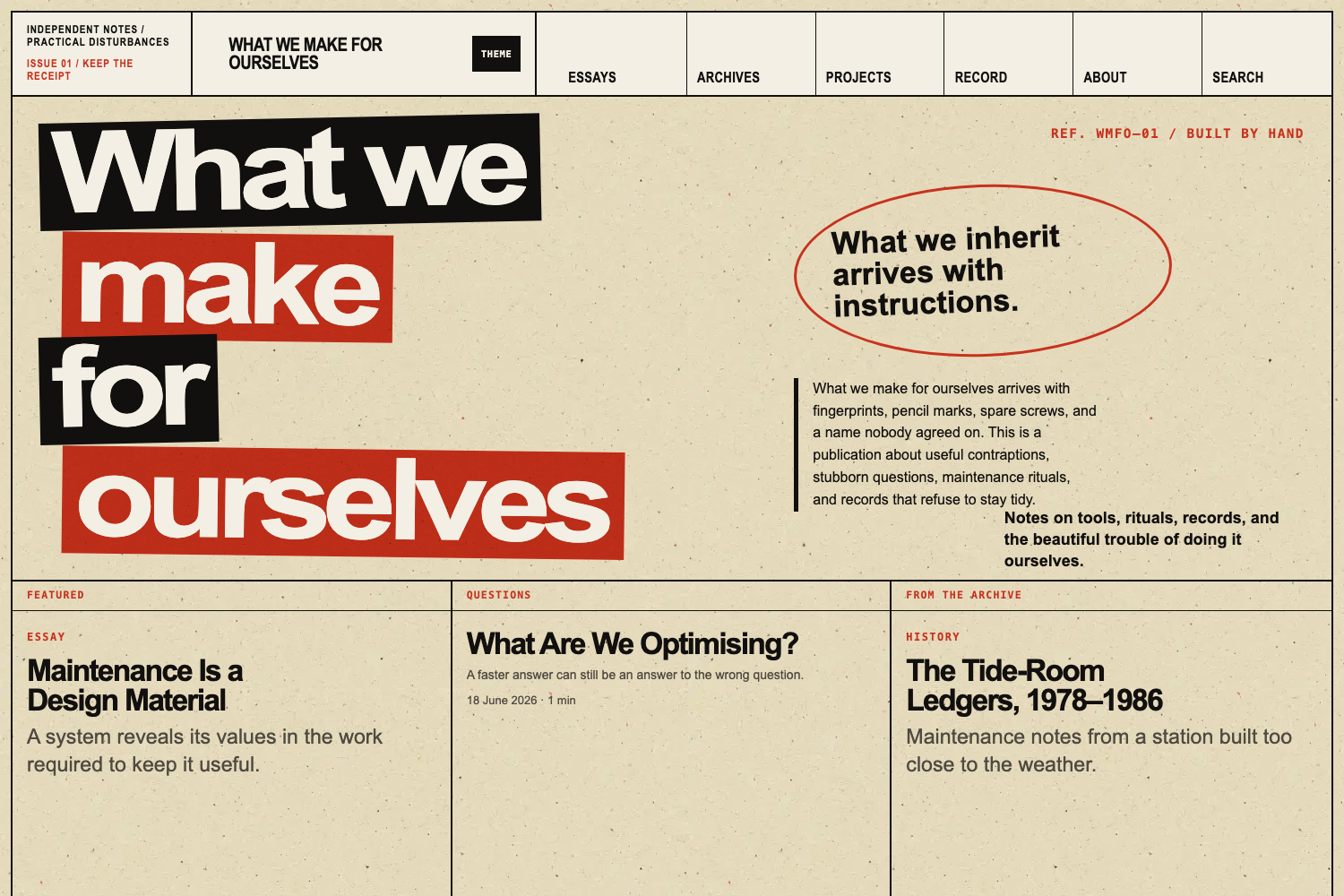
Four page modes: editorial, poster, archive, and record, sharing a semantic article shell
HugoBlogTool Site
no-fate — Hugo Blog Template
By OliverObst
No Fate is a Hugo-based editorial and archival publishing theme that offers four page modes, two visual styles, and content model validation, suitable for personal publications, independent journals, and project archives.
Explore the design
Compare the page layouts and mobile experience. Open any screenshot for a closer look.
Author preview
Author-provided previewTop of page
Preview provided in the project README.
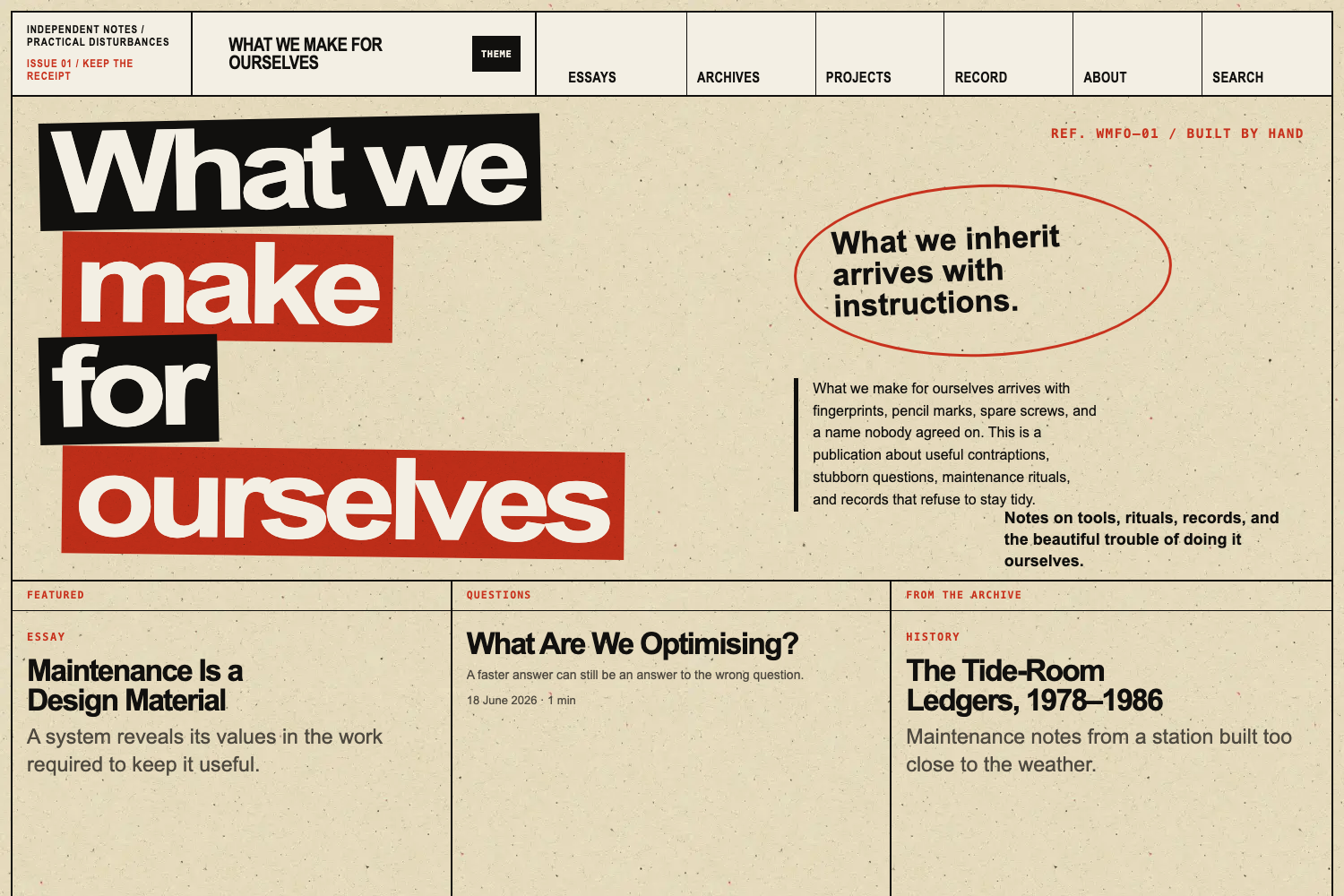
One original preview is available. Open the full image to inspect the design.
Screenshots show visual appearance; interactive behavior may differ.
Recorded 2026-10-03View source
What stands out
A quick read of the recorded project description.
Two visual presentation layers, clean and wild, switchable site-wide without changing content or accessibility behaviour
Content model with build-time validation that checks modes, hero alt text, bundle structure, and proposition references
Modular homepage including proposition, questions, recent notes, current work, and formal record modules
No dependency on Node.js, Tailwind, webpack, or JavaScript frameworks; content remains readable without JavaScript
Provides hooks extension points and a downstream style loading location at assets/css/extended
Template Details
No Fate is a reusable Hugo theme aimed at sites that need to balance editorial expression with structured records, such as personal publications, independent journals, portfolios, research, or project archives. It does not presuppose an author, institution, subject area, domain, navigation structure, or editorial stance.
The theme provides four page modes: editorial, poster, archive, and record. They share the same semantic article shell, but change presentation through mode-specific openings, metadata, width rules, components, and print behaviour. The content model uses the content, editorial, visual, archive, and seo namespaces, and validates modes, hero metadata, bundle structure, and proposition references at build time. The homepage is composed of modules such as opening, featured_argument, questions, featured_archive, selected_writing, visual_interruption, current_work, and formal_record, which can be ordered as needed.
Visually, it offers two presentation layers: clean and wild. clean is quiet, with generous whitespace and direct typography; wild uses a dense editorial grid, black and signal colour blocks, oversized type, and a lightly distressed print surface. Both styles share the same content types, page modes, accessibility behaviour, and downstream extension points. The theme does not depend on Node.js, Tailwind, webpack, or JavaScript frameworks, uses semantic HTML, remains readable without JavaScript, and provides light and dark modes.
The theme is an independent derivative of Hugo PaperMod. It retains infrastructure such as search, RSS, social metadata, syntax highlighting, responsive cover images, and theme preference handling, but its public contract, content architecture, and presentation differ substantially. It is currently in basic development and has not yet published its first tagged release; the repository currently establishes the public theme contract and retains some infrastructure from the pinned PaperMod base version. Before use, note that the theme requires Hugo 0.158.0 or later (standard or Extended), installation should pin a release tag rather than follow the main branch, demo content is fictional and removable, and third-party assets such as sample images, fonts, and icons must be checked against their respective licences.
HugoBlogTool site
Is it right for your project?
Use Cases
- Personal publications or independent journals that need both editorial expression and structured records
- Research or project archives that need dense record views filterable by year, type, or subject
- Portfolios or image-led historical narratives using archive mode and responsive cover images
- Blogs or tool sites that need light/dark modes, accessible content, and a no-JavaScript reading experience
Suitable For
- Developers using Hugo who want to install the theme from a pinned release tag
- Individual authors or small editorial organizations that need a mixed editorial and archival content model
- Sites that want to publish long-form articles and records using semantic HTML and progressive enhancement
Getting started & customization
Use these recorded setup notes alongside the repository instructions for your chosen version.
- 1
Requires Hugo 0.158.0 or later, either standard or Extended; installing as a Hugo Module requires Go and Git
- 2
Pin a release tag during installation; do not let a production site follow the theme's main branch; an exact commit SHA may be used for evaluation before release
- 3
All No Fate-specific configuration lives under params.noFate, and page modes can be set in front matter under visual.mode
- 4
Do not edit files inside themes/no-fate directly; override templates, assets, and hooks through the downstream site to preserve update capability
- 5
Third-party assets such as demo images, fonts, and icons must be checked against their respective licences; the code's MIT licence alone is not sufficient to judge them
License & source material
Usage conditions & limitations
Free to use · keep license noticeThis entry covers the free version under the MIT licence in the public repository; the free scope is the code of that version and does not mean external services or third-party assets are free.
Must comply with when using
- You may use, modify, commercially use, and distribute the code of this version for free.
- When distributing copies or substantial portions of the code, retain the original author's copyright notice and the complete MIT licence notice.
- The code is provided as is; warranties and limitations of liability are governed by the original licence and applicable law.
Additional costs & items to verify
- Using this theme requires Hugo 0.158.0 or later (standard or Extended); earlier versions cannot build it.
- If installing the theme as a Hugo Module, the Go toolchain must also be installed; using a Git submodule does not require it.
- Production sites must pin a release tag and must not follow the theme's main branch; an exact commit SHA may be used for evaluation before release.
- Do not edit files inside themes/no-fate directly; override templates and assets through the downstream site, otherwise you lose the ability to update the theme.
- Node.js is only used for the optional repository quality test suite; installing and building the theme itself does not require Node.js.
- The example site uses example.invalid as its baseURL, which is an unpublished demo configuration; a production site must replace it with its own domain.
- Content in exampleSite is removable fictional demo material and should not be used as the starting identity or content of a production site.
- Demo images, fonts, icons, and other third-party assets must be checked against their respective licences; the code's MIT licence alone is not sufficient to judge them.
- External services such as domains, hosting, databases, payments, or AI may incur separate charges.
View Original Text Basis
Permission is hereby granted, free of charge
Original License Text
Hugo 0.158.0 or later, standard or Extended
Original README
Go when installing the theme as a Hugo Module
Original README
Pin a released tag. Do not make a production site follow the theme's `main` branch.
Original README
Do not edit files in `themes/no-fate`. Override templates and assets from the downstream site so theme updates remain possible.
Original README
Node.js is used only by the optional repository quality suite.
Original README
The unpublished example uses `https://example.invalid/` as its base URL.
Original README
https://github.com/OliverObst/no-fate/blob/main/LICENSEhttps://github.com/OliverObst/no-fate/blob/main/README.mdThe material in `exampleSite/` is a removable publication fixture rather than starter identity.
Original README
Compiled by DeepSeek based on repository license and README ·2026-10-03. Results only cover the materials read; dependencies, images, fonts, and subsequent term changes are subject to their respective original texts.
Project checks & description sources
Template Information
- Source platforms
- Hugo Themes
- Documentation and maintenance reference score
- More documented · 76 / 100
- Technologies
- Hugo
- Website type
- Blog · Tool Site
How this score is calculated
Our heuristic uses license records (up to 30), a demo link (12), a preview (10), stars (15), recorded maintenance (15), description completeness (8), feature records (5) and classification data (5). It is not a code, security or performance test, or a Google score. A link does not establish tested functionality.
What to verify for this project
- Repository update recorded
- 2026-09-05
- Screenshot last checked
- 2026-10-03
No demo link is recorded. Use the repository instructions to evaluate the project locally; the screenshot alone cannot establish interactive behavior.
The catalog identifies Hugo as the primary stack. Check the actual dependency manifest and lockfile for versions and hosting requirements. These notes use recorded metadata, not a code audit or a deployment test.
Use a selection guide →How this description was prepared
AI-assisted description based on catalog records and repository material. Repository authors are not automatically the reviewers of this description.
Review declaration: [email protected] · 2026-10-04
Inspect the recorded source material
SHA-256: 616e06a0017c3154262550686e7ba2c9dbb0493efd40e9ffd8b7b8a605963cf5
2026-10-03T14:16:45.168Z
Source file / repository# No Fate
No Fate is a reusable Hugo theme for sites that combine an editorial voice
with structured records, archives, projects, and long-form writing.
It is designed for personal publications, independent journals, portfolios,
research or project archives, and small editorial organisations. It does not
assume a particular author, institution, subject area, domain, navigation
structure, or editorial position.
> Development status: No Fate is in foundation development and has not yet
> published its first tagged release. The repository currently establishes the
> public theme contract and retains selected infrastructure from its pinned
> PaperMod foundation. See [UPSTREAM.md](UPSTREAM.md) for exact provenance.
## Principles
- Hugo-native templates and asset processing
- No Node.js, Tailwind, webpack, or JavaScript framework
- Semantic HTML and readable content without JavaScript
- Accessible light and dark modes
- Generic configuration under `params.noFate`
- Fictional, removable demonstration content
- Site content and identity kept outside the theme
## Relationship to PaperMod
No Fate is an independent derivative of
[Hugo PaperMod](https://github.com/adityatelange/hugo-PaperMod). It retains
selected, proven infrastructure for search, RSS, social metadata, syntax
highlighting, responsive cover images and theme-preference handling. The
upstream MIT notices remain in [LICENSE](LICENSE), and [UPSTREAM.md](UPSTREAM.md)
records the exact source revision and update policy.
No Fate is not a colour variant or CSS reskin of PaperMod. Its public contract,
content architecture and presentation have diverged in substantial ways:
- PaperMod's Profile and Home-Info modes are removed from the active theme
architecture. No Fate instead provides `editorial`, `poster`, `archive` and
`record` page modes through a shared semantic article shell.
- A namespaced content model covers editorial metadata, visual treatment,
archive records and SEO. Build-time validation catches invalid modes,
incomplete hero metadata, unsuitable bundle structures and broken
proposition references.
- The homepage is modular and publication-oriented, with propositions,
questions, recent notes, current work and formal-record modules rather than
PaperMod's homepage models.
- Section-independent mode inheritance, structured record views, archival
components and reusable editorial shortcodes support publications that are
not organised as conventional blogs.
- The CSS architecture is an ordered semantic system with separate `clean` and
`wild` presentation layers. The wild layer adds its own editorial grid,
masthead, display typography, signal blocks and print surface; both layers
share the same accessible content behaviour.
- Configuration lives under `params.noFate`, with No Fate data defaults and
stable downstream extension hooks. The demonstration site is a purpose-built
fictional publication and content-model fixture.
These differences are documented for the
[Hugo theme acceptance criteria](https://github.com/gohugoio/hugoThemesSiteBuilder#criteria-for-acceptance-of-a-theme),
which require derivative themes to be notably different from their source.
## Requirements
- Hugo 0.158.0 or later, standard or Extended
- Git
- Go when installing the theme as a Hugo Module
The build matrix checks standard Hugo at 0.158.0 and the current supported
version recorded in CI, plus the current Hugo Extended release.
## Installation
Pin a released tag. Do not make a production site follow the theme's `main`
branch.
### Hugo Module
Initialise modules in the downstream site if needed:
```sh
hugo mod init github.com/example/site
```
Add the import to the downstream site's `hugo.toml`:
```toml
[module]
[[module.imports]]
path = "github.com/OliverObst/no-fate"
```
Pin the release in the downstream site's module graph:
```sh
hugo mod get github.com/OliverObst/[email protected]
```
Before a release exists, evaluators may use an exact commit SHA. Released sites
should use a semantic version tag.
### Git submodule
```sh
git submodule add https://github.com/OliverObst/no-fate.git themes/no-fate
git -C themes/no-fate checkout v0.1.0
```
Then select the theme:
```toml
theme = "no-fate"
```
Do not edit files in `themes/no-fate`. Override templates and assets from the
downstream site so theme updates remain possible.
## Basic configuration
All No Fate-specific settings live below `params.noFate`:
```toml
baseURL = "https://example.invalid/"
title = "Example publication"
[params.noFate]
style = "clean"
defaultMode = "editorial"
defaultAccent = "signal"
showThemeToggle = true
showSearch = true
showReadingTime = true
showPropositions = true
enableImageProcessing = true
validateContentModel = true
strictHomeSelections = false
[params.noFate.home]
modules = ["opening", "featured_argument", "questions", "featured_archive", "selected_writing", "visual_interruption", "current_work", "formal_record"]
featuredProposition = ""
[params.noFate.archive]
showArtefactNumbers = true
showRights = true
[params.noFate.images]
widths = [480, 800, 1200, 1600]
webpQuality = 82
[params.noFate.record]
dataFile = "record"
enableClientFilters = true
selectedGroupBy = "collection"
filterFields = ["year", "type", "topic"]
highlightCreators = []
showAbstracts = false
```
The namespace is deliberately compact. Prefer consistent defaults and page
front matter to large collections of one-off switches.
`strictHomeSelections` makes a production build fail when an explicitly
selected homepage path is missing or unpublished. Development builds omit the
missing item so drafts can move around without replacing sections with
placeholder cards.
## Visual styles
No Fate ships with two presentation layers:
| Style | Character |
| --- | --- |
| `clean` | Quiet, spacious and typographically direct. This is the default. |
| `wild` | Dense editorial grids, black-and-signal colour blocks, oversized type and a lightly worn print surface. |
Choose one site-wide:
```toml
[params.noFate]
style = "wild"
```
The style setting changes presentation only. Content types, page modes,
accessibility behaviour and downstream extension points remain the same.
Unrecognised values fall back to `clean` with a build warning.
The optional wild masthead labels are ordinary site configuration:
```toml
[params.noFate.wild]
masthead = "Independent notes / practical disturbances"
issue = "Issue 01"
```
Homepage authors may provide deliberate display-line breaks without changing
the accessible page title:
```yaml
visual:
wild_title_lines:
- "What we"
- "make"
- "for ourselves"
wild_reference: "Ref. 01 / Built by hand"
```
## Page modes
Every substantive page selects one of four modes. These names form the public
content contract. A shared resolver and semantic article shell preserve the
same document structure while mode-specific openings, metadata, width rules,
components and print behaviour change the presentation.
| Mode | Intended use |
| --- | --- |
| `editorial` | Essays, histories, and substantial notes. This is the default. |
| `poster` | Major arguments, questions, and short declarative pieces. |
| `archive` | Image-led histories, collections, and evidence-rich narratives. |
| `record` | Publications, formal indexes, bibliographies, and dense tables. |
Set a mode in page front matter:
```yaml
---
title: "What are we optimising?"
date: 2026-06-18
summary: "A fictional question used to demonstrate the poster mode."
demo: true
content:
format: "question"
visual:
mode: "poster"
accent: "signal"
---
```
Resolution order is page `visual.mode`, then the current section's
`visual.mode`, then `params.noFate.defaultMode`. The current section may have
any name and may be nested. Unsupported values produce a build warning and
fall back to the configured default. See [Page modes](docs/page-modes.md) for
the complete behaviour, front matter options and authoring constraints.
## Repository architecture
The theme follows Hugo's modern root-level lookup structure:
```text
archetypes/ Generic content starters
assets/css/ Ordered No Fate foundations and mode layers
assets/js/ Progressive theme, navigation, search, and gallery scripts
data/no-fate/ Generic defaults and component definitions
images/ Hugo theme-gallery screenshot and thumbnail
layouts/_markup/ Markdown render hooks
layouts/_partials/ Shared article, home, mode, record, and extension partials
layouts/_shortcodes/ Semantic editorial components
schemas/ Machine-readable downstream data contracts
exampleSite/ Clearly fictional build and behaviour fixtures
hugo.toml Theme defaults
theme.toml Public theme metadata
```
The numbered stylesheets run from reset and semantic tokens through shell,
typography, components, articles, homepage, record, mode, and utility layers.
Downstream styles in `assets/css/extended/` continue to load last.
`single.html` is shared by every page mode. Mode-specific partials control the
opening and body boundary without duplicating the complete page template.
The `hooks/head-start.html`, `hooks/head-end.html`, and `hooks/body-end.html`
partials are stable downstream extension points. Override them from the
downstream site instead of editing the theme.
## Content structure
Section names are not fixed. The demonstration site uses Essays, Questions,
Notes, Archives, Projects, Record, and About only as examples. A downstream
site may rename or remove all of them without changing the theme.
Use leaf bundles for substantive pages and their media. The content validator
checks this convention for essays, questions, notes, histories, projects, and
artefacts:
```text
content/
└── archives/
└── tide-room-ledgers/
├── index.md
├── feature.jpg
├── ledger-01.jpg
└── source-note.pdf
```
When a hero image is present, provide meaningful alternative text:
```yaml
visual:
mode: "archive"
hero: "feature.jpg"
hero_alt: "Fictional ledger pages arranged beside a tide gauge"
hero_treatment: "raw"
```
The stable front matter contract uses the `content`, `editorial`, `visual`,
`archive`, and `seo` namespaces. Published pages are checked for required
fields, recognised modes and image treatments, hero alternative text, bundle
structure, and proposition references. See
[Content model](docs/content-model.md) for the complete schema, inheritance
rules, supported values, proposition behaviour, and migration fallbacks.
Reusable posters, questions, asides, quotations, image groups, contact sheets,
artefacts and timelines are documented in
[Editorial components](docs/editorial-components.md). Responsive images,
typed quotations, anchored headings, external links and sortable tables are
implemented as Markdown render hooks or progressive enhancements.
The image pipeline, prepared treatment derivatives and public/private rights
boundary are documented in [Images and rights](docs/images-and-rights.md).
Homepage order, selected-content validation, section densities and generic
front matter-driven filters are documented in
[Homepage and sections](docs/homepage-and-sections.md).
Primary and secondary menu labels, local search-index rules, section RSS and
discovery metadata are documented in
[Navigation, search and feeds](docs/navigation-search-and-feeds.md).
The optional data-driven publications, talks, exhibitions, releases, datasets,
and other outputs system is documented in
[Structured records](docs/structured-records.md). It provides selected groups,
a complete chronological list, progressive year/type/topic filters, creator
highlighting, source and export links, machine-readable entries, and
print-specific behaviour without requiring JavaScript.
The release standards for keyboard and assistive-technology use, static-first
asset delivery, Lighthouse budgets and A4 output are documented in
[Accessibility, performance and print](docs/accessibility-performance-and-print.md).
Sites moving from another theme or publishing system should follow the
[migration guide](docs/migration.md). It covers content inventory, page-mode
mapping, leaf bundles, redirects, public-content review, staged cut-over and
rollback.
## Demonstration site
The material in `exampleSite/` is a removable publication fixture rather than
starter identity. The rendered copy stays in character; maintainer notes about
the fixture live in `exampleSite/README.md`.
Run the development site from the theme repository root:
```sh
hugo server \
--source exampleSite \
--themesDir ../.. \
--buildDrafts
```
Run the production smoke test:
```sh
hugo \
--source exampleSite \
--themesDir ../.. \
--minify
```
The unpublished example uses `https://example.invalid/` as its base URL.
The hidden `fixtures/structural-components/` page exercises the Sections 10–11
render hooks and baseline shortcodes without adding those fixtures to the
demonstration navigation. The Section 27.2 fixture set adds a 20-image archive,
a 60-row table, maths/code/footnotes, a downloadable PDF and long English and
German titles.
## Automated quality tests
The repository includes test-only tooling for rendered links, HTML validation,
fixture integrity, axe, Lighthouse accessibility/performance/CLS thresholds and
Linux Chromium visual regression. Install it and run the rendered-site suite
with:
```sh
npm ci
npx playwright install chromium
npm run test:quality
```
The repository also creates and destroys minimal downstream sites to verify
both supported installation paths:
```sh
npm run test:installation
```
This checks a Hugo Module import and a real `themes/no-fate` Git submodule
without publishing or modifying the current repository.
Visual checks automatically use the pinned Playwright Linux container on
macOS or Windows. The committed baselines cover desktop and mobile homepages,
all page modes, both colour themes, wide and narrow navigation, record
filtering, Section 27.2 stress fixtures, contact sheets and print-media output.
See
[Automated quality testing](docs/testing.md) for individual commands, baseline
updates, deliberate validator exceptions and CI behaviour.
## Compatibility
No Fate supports standard and Extended Hugo 0.158.0 and later. Module
installation and its repository test require Go. Installing and building the
theme does not require Node.js or a JavaScript build tool; Node.js is used only
by the optional repository quality suite.
## Contributing
Read [CONTRIBUTING.md](CONTRIBUTING.md) before opening an issue or pull request.
Contributions must remain generic, use fictional fixtures, preserve
accessibility and publishing behaviour, and include the relevant build checks.
Changes are developed through reviewed pull requests. Breaking front matter,
template, and CSS changes must be recorded in [CHANGELOG.md](CHANGELOG.md).
Maintainers preparing a tag must complete the
[release checklist](RELEASE.md).
## Licence and provenance
No Fate is distributed under the MIT Licence. Copyright notices from PaperMod
and its own upstream foundation remain in [LICENSE](LICENSE). The exact source
revision and update policy are recorded in [UPSTREAM.md](UPSTREAM.md).
Explore similar templates
Compare previews and descriptions within the same stack and category.

hugo-PaperMod
A fast, clean, responsive Hugo theme for blogs and lightweight portfolios, with three layout modes (Regular, Home-Info, Profile), automatic and manual light/dark themes, Fuse.js client-side search, multilingual support, and built-in Open Graph, Twitter Cards, and Schema.org data.
Hugo · Portfolio

LoveIt
LoveIt is a clean, elegant, and feature-rich Hugo blog theme derived from LeaveIt and KeepIt, MIT-licensed. It offers light/dark modes, responsive layout, multilingual support, and search via Lunr.js or Algolia.
Hugo · Blog

hugo-coder
hugo-coder is a minimalist Hugo blog theme maintained by luizdepra under the MIT license. It provides a clean, text-focused blog appearance, configuration documentation in the docs directory, and a complete exampleSite with hugo.toml.
Hugo · Blog

blowfish
Blowfish is a Hugo personal website and blog theme built with Tailwind CSS 4, focused on lightness, simplicity, and content-first presentation.
Hugo · Blog

hugo-paper
hugo-paper is a simple, clean, and customizable Hugo blog theme configured through config.toml or hugo.toml.
Hugo · Blog

hextra
Hextra is a Hugo theme for documentation and blog sites, built on Hugo and Tailwind CSS with design referencing Nextra.
Hugo · Documentation