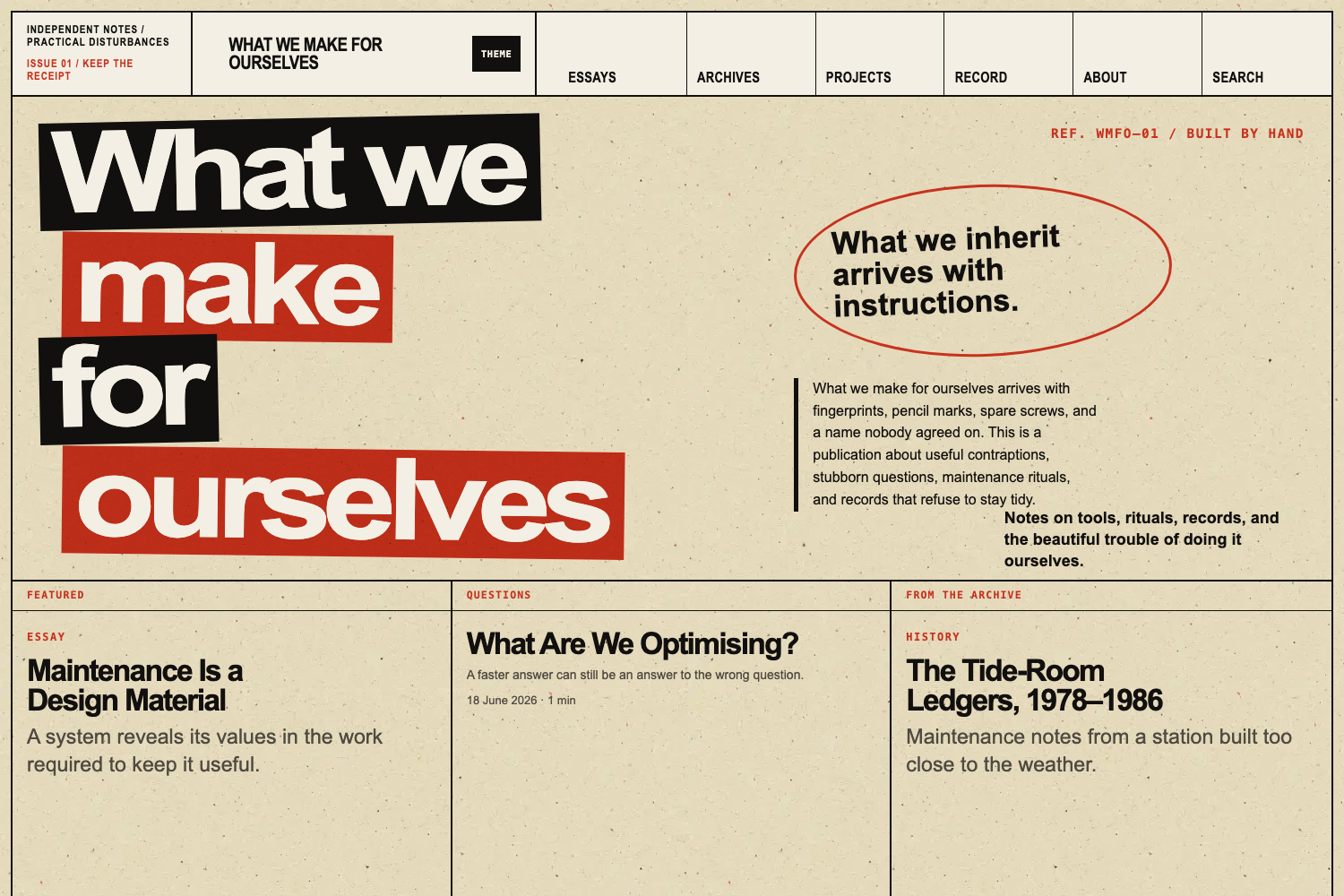
四种页面模式:editorial、poster、archive、record,共用语义文章外壳
Hugo博客工具站
no-fate — Hugo 博客模板
作者 OliverObst
No Fate 是一个基于 Hugo 的编辑与档案型出版主题,提供四种页面模式、两套视觉风格和内容模型校验,适合个人出版物、独立期刊与项目档案。
看看你的网站会是什么样
浏览真实页面截图,比较内容排版与手机效果。点击下方缩略图切换,放大查看整页细节。
目前有 1 张原始预览,可打开完整图片查看设计细节。
截图用于了解视觉与布局,交互效果请以实际项目为准。
采集于 2026-10-03查看来源
值得关注的模板亮点
从已有项目资料中,快速了解它的特点。
clean 与 wild 两套视觉表现层,可整站切换,内容与无障碍行为不变
内容模型带构建时校验,检查模式、hero 替代文本、bundle 结构与 proposition 引用
首页模块化,包含 proposition、问题、近期笔记、当前工作与正式记录等模块
不依赖 Node.js、Tailwind、webpack 或 JavaScript 框架,无 JavaScript 时内容可读
提供 hooks 扩展点与 assets/css/extended 下游样式加载位置
模板详细介绍
No Fate 是一个可复用的 Hugo 主题,面向需要兼顾编辑表达与结构化记录的站点,例如个人出版物、独立期刊、作品集、研究或项目档案。它不预设作者、机构、主题领域、域名、导航结构或编辑立场。
主题提供 editorial、poster、archive、record 四种页面模式,共用同一套语义文章外壳,通过模式专属的开头、元数据、宽度规则、组件和打印行为改变呈现。内容模型使用 content、editorial、visual、archive、seo 命名空间,构建时校验模式、hero 元数据、bundle 结构和 proposition 引用。首页由 opening、featured_argument、questions、featured_archive、selected_writing、visual_interruption、current_work、formal_record 等模块组成,可按需排序。
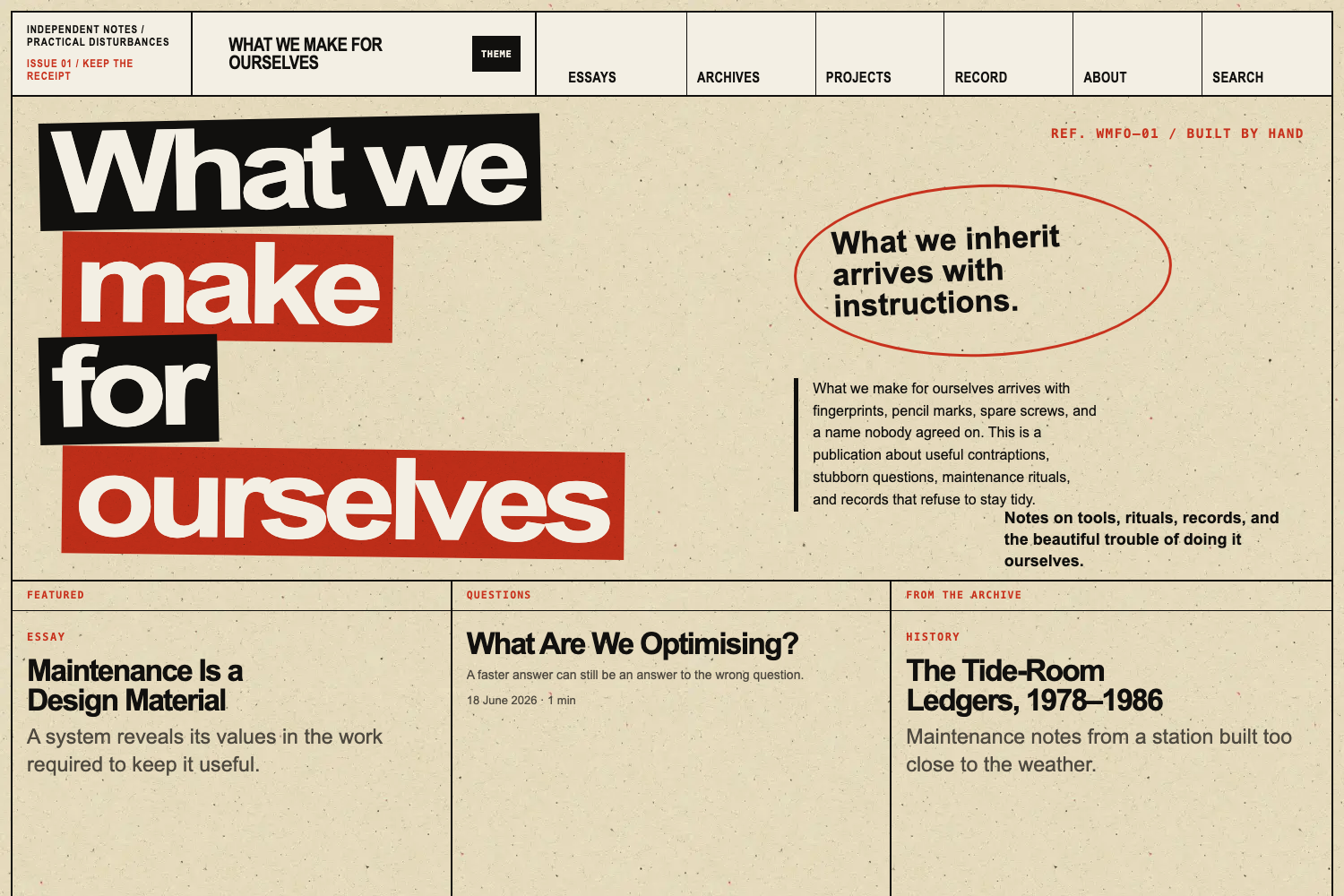
视觉上提供 clean 与 wild 两套表现层:clean 安静、留白多、排版直接;wild 使用密集编辑网格、黑与信号色块、超大字号和轻微做旧印刷表面。两套风格共享相同的内容类型、页面模式、无障碍行为和下游扩展点。主题不依赖 Node.js、Tailwind、webpack 或 JavaScript 框架,使用语义化 HTML,无 JavaScript 时内容仍可阅读,并提供浅色与深色模式。
主题是 Hugo PaperMod 的独立衍生版本,保留了搜索、RSS、社交元数据、语法高亮、响应式封面图和主题偏好处理等基础设施,但公开契约、内容架构和呈现方式已有较大差异。当前处于基础开发阶段,尚未发布首个带标签的版本,仓库目前确立公开主题契约并保留部分来自固定 PaperMod 基础版本的基础设施。使用前需注意:主题要求 Hugo 0.158.0 或更高版本(标准版或 Extended 版),安装时建议固定发布标签而非跟随 main 分支;演示内容为虚构且可移除;示例图片、字体、图标等第三方素材需按各自许可核对。
Hugo博客工具站
适合你的项目吗?
适用场景
- 个人出版物或独立期刊,需要编辑表达与结构化记录并存
- 研究或项目档案,需要按年份、类型、主题筛选的密集记录视图
- 作品集或图像主导的历史叙述,使用 archive 模式与响应式封面图
- 需要浅色/深色模式、可访问内容和无 JavaScript 阅读体验的博客或工具站
适合人群
- 使用 Hugo 并希望固定发布标签安装主题的开发者
- 需要编辑与档案混合内容模型的个人作者或小型编辑组织
- 希望以语义 HTML 和渐进增强方式发布长文与记录的站点
上手与定制指南
结合仓库当前版本的说明,按下面的资料检查内容、配置与运行要求。
- 1
要求 Hugo 0.158.0 或更高版本,标准版或 Extended 版均可;以 Hugo Module 安装时需要 Go 和 Git
- 2
安装时固定发布标签,不要让生产站点跟随主题 main 分支;发布前可使用精确 commit SHA 评估
- 3
所有 No Fate 专属配置位于 params.noFate 下,页面模式可在 front matter 的 visual.mode 中设置
- 4
不要直接编辑 themes/no-fate 内的文件,应通过下游站点覆盖模板、资源与 hooks 以保留更新能力
- 5
演示图片、字体、图标等第三方素材需按各自许可核对,不能仅凭代码的 MIT 许可判断
授权与来源资料
使用条件与限制
免费使用 · 保留许可声明本次收录的是公开仓库中采用 MIT 许可的免费版本;免费范围为该版本代码,不代表外部服务或第三方素材免费。
使用时需要遵守
- 允许免费使用、修改、商用和分发该版本代码。
- 分发代码副本或实质性部分时,保留原作者版权声明和完整 MIT 许可声明。
- 代码按现状提供;担保与责任限制以原许可证及适用法律为准。
额外费用与待核对事项
- 使用本主题要求 Hugo 0.158.0 或更高版本(标准版或 Extended 版均可),低于该版本无法构建。
- 若以 Hugo Module 方式安装主题,需要额外安装 Go 工具链;使用 Git submodule 方式则不需要。
- 生产站点必须固定发布标签,不得跟随主题 main 分支;发布前评估可使用精确 commit SHA。
- 不得直接编辑 themes/no-fate 内的文件,应通过下游站点覆盖模板与资源,否则会失去主题更新能力。
- Node.js 仅用于可选的仓库质量测试套件,安装和构建主题本身不需要 Node.js。
- 示例站点使用 example.invalid 作为 baseURL,属于未发布演示配置,正式站点需替换为自有域名。
- exampleSite 中的内容是可移除的虚构演示素材,不应作为正式站点的起始身份或内容。
- 演示图片、字体、图标及其他第三方素材需按各自许可核对,不能仅凭代码的 MIT 许可判断。
- 域名、托管、数据库、支付或 AI 等外部服务可能另外收费。
查看原文依据
Permission is hereby granted, free of charge
许可证原文
Hugo 0.158.0 or later, standard or Extended
README 原文
Go when installing the theme as a Hugo Module
README 原文
Pin a released tag. Do not make a production site follow the theme's `main` branch.
README 原文
Do not edit files in `themes/no-fate`. Override templates and assets from the downstream site so theme updates remain possible.
README 原文
Node.js is used only by the optional repository quality suite.
README 原文
The unpublished example uses `https://example.invalid/` as its base URL.
README 原文
https://github.com/OliverObst/no-fate/blob/main/LICENSEhttps://github.com/OliverObst/no-fate/blob/main/README.mdThe material in `exampleSite/` is a removable publication fixture rather than starter identity.
README 原文
DeepSeek 根据仓库许可证和 README 整理 ·2026-10-03。结果仅覆盖已读取资料,依赖、图片、字体及后续条款变更以各自原文为准。
项目核对记录与介绍依据
模板资料
- 来源平台
- Hugo Themes
- 资料与维护参考分
- 资料较完整 · 76 / 100
- 技术栈
- Hugo
- 网站类型
- 博客 · 工具站
这个分数如何计算
本站按许可资料(最高30分)、演示链接(12分)、预览图(10分)、Star数(15分)、记录的维护时间(15分)、描述完整度(8分)、功能记录(5分)和分类资料(5分)计算。它不是代码、安全或性能测试,也不是 Google 评分;有链接不代表已实测可用。
这个项目需要核对什么
- 记录的仓库更新时间
- 2026-09-05
- 截图检查日期
- 2026-10-03
目前没有记录演示链接。请依据仓库说明在本地评估;仅凭截图无法确认交互行为。
目录记录的主要技术栈是 Hugo。请通过依赖清单和锁文件核对实际版本与托管要求。这些说明基于收录资料,不代表代码审计或部署实测。
查看具体选型方法 →介绍的制作与核对状态
介绍由 AI 辅助整理目录与仓库资料。仓库作者不等于这篇介绍的审核者。
审核声明: [email protected] · 2026-10-04
查看当时使用的来源资料
SHA-256: 616e06a0017c3154262550686e7ba2c9dbb0493efd40e9ffd8b7b8a605963cf5
2026-10-03T14:16:45.168Z
来源文件 / 仓库# No Fate
No Fate is a reusable Hugo theme for sites that combine an editorial voice
with structured records, archives, projects, and long-form writing.
It is designed for personal publications, independent journals, portfolios,
research or project archives, and small editorial organisations. It does not
assume a particular author, institution, subject area, domain, navigation
structure, or editorial position.
> Development status: No Fate is in foundation development and has not yet
> published its first tagged release. The repository currently establishes the
> public theme contract and retains selected infrastructure from its pinned
> PaperMod foundation. See [UPSTREAM.md](UPSTREAM.md) for exact provenance.
## Principles
- Hugo-native templates and asset processing
- No Node.js, Tailwind, webpack, or JavaScript framework
- Semantic HTML and readable content without JavaScript
- Accessible light and dark modes
- Generic configuration under `params.noFate`
- Fictional, removable demonstration content
- Site content and identity kept outside the theme
## Relationship to PaperMod
No Fate is an independent derivative of
[Hugo PaperMod](https://github.com/adityatelange/hugo-PaperMod). It retains
selected, proven infrastructure for search, RSS, social metadata, syntax
highlighting, responsive cover images and theme-preference handling. The
upstream MIT notices remain in [LICENSE](LICENSE), and [UPSTREAM.md](UPSTREAM.md)
records the exact source revision and update policy.
No Fate is not a colour variant or CSS reskin of PaperMod. Its public contract,
content architecture and presentation have diverged in substantial ways:
- PaperMod's Profile and Home-Info modes are removed from the active theme
architecture. No Fate instead provides `editorial`, `poster`, `archive` and
`record` page modes through a shared semantic article shell.
- A namespaced content model covers editorial metadata, visual treatment,
archive records and SEO. Build-time validation catches invalid modes,
incomplete hero metadata, unsuitable bundle structures and broken
proposition references.
- The homepage is modular and publication-oriented, with propositions,
questions, recent notes, current work and formal-record modules rather than
PaperMod's homepage models.
- Section-independent mode inheritance, structured record views, archival
components and reusable editorial shortcodes support publications that are
not organised as conventional blogs.
- The CSS architecture is an ordered semantic system with separate `clean` and
`wild` presentation layers. The wild layer adds its own editorial grid,
masthead, display typography, signal blocks and print surface; both layers
share the same accessible content behaviour.
- Configuration lives under `params.noFate`, with No Fate data defaults and
stable downstream extension hooks. The demonstration site is a purpose-built
fictional publication and content-model fixture.
These differences are documented for the
[Hugo theme acceptance criteria](https://github.com/gohugoio/hugoThemesSiteBuilder#criteria-for-acceptance-of-a-theme),
which require derivative themes to be notably different from their source.
## Requirements
- Hugo 0.158.0 or later, standard or Extended
- Git
- Go when installing the theme as a Hugo Module
The build matrix checks standard Hugo at 0.158.0 and the current supported
version recorded in CI, plus the current Hugo Extended release.
## Installation
Pin a released tag. Do not make a production site follow the theme's `main`
branch.
### Hugo Module
Initialise modules in the downstream site if needed:
```sh
hugo mod init github.com/example/site
```
Add the import to the downstream site's `hugo.toml`:
```toml
[module]
[[module.imports]]
path = "github.com/OliverObst/no-fate"
```
Pin the release in the downstream site's module graph:
```sh
hugo mod get github.com/OliverObst/[email protected]
```
Before a release exists, evaluators may use an exact commit SHA. Released sites
should use a semantic version tag.
### Git submodule
```sh
git submodule add https://github.com/OliverObst/no-fate.git themes/no-fate
git -C themes/no-fate checkout v0.1.0
```
Then select the theme:
```toml
theme = "no-fate"
```
Do not edit files in `themes/no-fate`. Override templates and assets from the
downstream site so theme updates remain possible.
## Basic configuration
All No Fate-specific settings live below `params.noFate`:
```toml
baseURL = "https://example.invalid/"
title = "Example publication"
[params.noFate]
style = "clean"
defaultMode = "editorial"
defaultAccent = "signal"
showThemeToggle = true
showSearch = true
showReadingTime = true
showPropositions = true
enableImageProcessing = true
validateContentModel = true
strictHomeSelections = false
[params.noFate.home]
modules = ["opening", "featured_argument", "questions", "featured_archive", "selected_writing", "visual_interruption", "current_work", "formal_record"]
featuredProposition = ""
[params.noFate.archive]
showArtefactNumbers = true
showRights = true
[params.noFate.images]
widths = [480, 800, 1200, 1600]
webpQuality = 82
[params.noFate.record]
dataFile = "record"
enableClientFilters = true
selectedGroupBy = "collection"
filterFields = ["year", "type", "topic"]
highlightCreators = []
showAbstracts = false
```
The namespace is deliberately compact. Prefer consistent defaults and page
front matter to large collections of one-off switches.
`strictHomeSelections` makes a production build fail when an explicitly
selected homepage path is missing or unpublished. Development builds omit the
missing item so drafts can move around without replacing sections with
placeholder cards.
## Visual styles
No Fate ships with two presentation layers:
| Style | Character |
| --- | --- |
| `clean` | Quiet, spacious and typographically direct. This is the default. |
| `wild` | Dense editorial grids, black-and-signal colour blocks, oversized type and a lightly worn print surface. |
Choose one site-wide:
```toml
[params.noFate]
style = "wild"
```
The style setting changes presentation only. Content types, page modes,
accessibility behaviour and downstream extension points remain the same.
Unrecognised values fall back to `clean` with a build warning.
The optional wild masthead labels are ordinary site configuration:
```toml
[params.noFate.wild]
masthead = "Independent notes / practical disturbances"
issue = "Issue 01"
```
Homepage authors may provide deliberate display-line breaks without changing
the accessible page title:
```yaml
visual:
wild_title_lines:
- "What we"
- "make"
- "for ourselves"
wild_reference: "Ref. 01 / Built by hand"
```
## Page modes
Every substantive page selects one of four modes. These names form the public
content contract. A shared resolver and semantic article shell preserve the
same document structure while mode-specific openings, metadata, width rules,
components and print behaviour change the presentation.
| Mode | Intended use |
| --- | --- |
| `editorial` | Essays, histories, and substantial notes. This is the default. |
| `poster` | Major arguments, questions, and short declarative pieces. |
| `archive` | Image-led histories, collections, and evidence-rich narratives. |
| `record` | Publications, formal indexes, bibliographies, and dense tables. |
Set a mode in page front matter:
```yaml
---
title: "What are we optimising?"
date: 2026-06-18
summary: "A fictional question used to demonstrate the poster mode."
demo: true
content:
format: "question"
visual:
mode: "poster"
accent: "signal"
---
```
Resolution order is page `visual.mode`, then the current section's
`visual.mode`, then `params.noFate.defaultMode`. The current section may have
any name and may be nested. Unsupported values produce a build warning and
fall back to the configured default. See [Page modes](docs/page-modes.md) for
the complete behaviour, front matter options and authoring constraints.
## Repository architecture
The theme follows Hugo's modern root-level lookup structure:
```text
archetypes/ Generic content starters
assets/css/ Ordered No Fate foundations and mode layers
assets/js/ Progressive theme, navigation, search, and gallery scripts
data/no-fate/ Generic defaults and component definitions
images/ Hugo theme-gallery screenshot and thumbnail
layouts/_markup/ Markdown render hooks
layouts/_partials/ Shared article, home, mode, record, and extension partials
layouts/_shortcodes/ Semantic editorial components
schemas/ Machine-readable downstream data contracts
exampleSite/ Clearly fictional build and behaviour fixtures
hugo.toml Theme defaults
theme.toml Public theme metadata
```
The numbered stylesheets run from reset and semantic tokens through shell,
typography, components, articles, homepage, record, mode, and utility layers.
Downstream styles in `assets/css/extended/` continue to load last.
`single.html` is shared by every page mode. Mode-specific partials control the
opening and body boundary without duplicating the complete page template.
The `hooks/head-start.html`, `hooks/head-end.html`, and `hooks/body-end.html`
partials are stable downstream extension points. Override them from the
downstream site instead of editing the theme.
## Content structure
Section names are not fixed. The demonstration site uses Essays, Questions,
Notes, Archives, Projects, Record, and About only as examples. A downstream
site may rename or remove all of them without changing the theme.
Use leaf bundles for substantive pages and their media. The content validator
checks this convention for essays, questions, notes, histories, projects, and
artefacts:
```text
content/
└── archives/
└── tide-room-ledgers/
├── index.md
├── feature.jpg
├── ledger-01.jpg
└── source-note.pdf
```
When a hero image is present, provide meaningful alternative text:
```yaml
visual:
mode: "archive"
hero: "feature.jpg"
hero_alt: "Fictional ledger pages arranged beside a tide gauge"
hero_treatment: "raw"
```
The stable front matter contract uses the `content`, `editorial`, `visual`,
`archive`, and `seo` namespaces. Published pages are checked for required
fields, recognised modes and image treatments, hero alternative text, bundle
structure, and proposition references. See
[Content model](docs/content-model.md) for the complete schema, inheritance
rules, supported values, proposition behaviour, and migration fallbacks.
Reusable posters, questions, asides, quotations, image groups, contact sheets,
artefacts and timelines are documented in
[Editorial components](docs/editorial-components.md). Responsive images,
typed quotations, anchored headings, external links and sortable tables are
implemented as Markdown render hooks or progressive enhancements.
The image pipeline, prepared treatment derivatives and public/private rights
boundary are documented in [Images and rights](docs/images-and-rights.md).
Homepage order, selected-content validation, section densities and generic
front matter-driven filters are documented in
[Homepage and sections](docs/homepage-and-sections.md).
Primary and secondary menu labels, local search-index rules, section RSS and
discovery metadata are documented in
[Navigation, search and feeds](docs/navigation-search-and-feeds.md).
The optional data-driven publications, talks, exhibitions, releases, datasets,
and other outputs system is documented in
[Structured records](docs/structured-records.md). It provides selected groups,
a complete chronological list, progressive year/type/topic filters, creator
highlighting, source and export links, machine-readable entries, and
print-specific behaviour without requiring JavaScript.
The release standards for keyboard and assistive-technology use, static-first
asset delivery, Lighthouse budgets and A4 output are documented in
[Accessibility, performance and print](docs/accessibility-performance-and-print.md).
Sites moving from another theme or publishing system should follow the
[migration guide](docs/migration.md). It covers content inventory, page-mode
mapping, leaf bundles, redirects, public-content review, staged cut-over and
rollback.
## Demonstration site
The material in `exampleSite/` is a removable publication fixture rather than
starter identity. The rendered copy stays in character; maintainer notes about
the fixture live in `exampleSite/README.md`.
Run the development site from the theme repository root:
```sh
hugo server \
--source exampleSite \
--themesDir ../.. \
--buildDrafts
```
Run the production smoke test:
```sh
hugo \
--source exampleSite \
--themesDir ../.. \
--minify
```
The unpublished example uses `https://example.invalid/` as its base URL.
The hidden `fixtures/structural-components/` page exercises the Sections 10–11
render hooks and baseline shortcodes without adding those fixtures to the
demonstration navigation. The Section 27.2 fixture set adds a 20-image archive,
a 60-row table, maths/code/footnotes, a downloadable PDF and long English and
German titles.
## Automated quality tests
The repository includes test-only tooling for rendered links, HTML validation,
fixture integrity, axe, Lighthouse accessibility/performance/CLS thresholds and
Linux Chromium visual regression. Install it and run the rendered-site suite
with:
```sh
npm ci
npx playwright install chromium
npm run test:quality
```
The repository also creates and destroys minimal downstream sites to verify
both supported installation paths:
```sh
npm run test:installation
```
This checks a Hugo Module import and a real `themes/no-fate` Git submodule
without publishing or modifying the current repository.
Visual checks automatically use the pinned Playwright Linux container on
macOS or Windows. The committed baselines cover desktop and mobile homepages,
all page modes, both colour themes, wide and narrow navigation, record
filtering, Section 27.2 stress fixtures, contact sheets and print-media output.
See
[Automated quality testing](docs/testing.md) for individual commands, baseline
updates, deliberate validator exceptions and CI behaviour.
## Compatibility
No Fate supports standard and Extended Hugo 0.158.0 and later. Module
installation and its repository test require Go. Installing and building the
theme does not require Node.js or a JavaScript build tool; Node.js is used only
by the optional repository quality suite.
## Contributing
Read [CONTRIBUTING.md](CONTRIBUTING.md) before opening an issue or pull request.
Contributions must remain generic, use fictional fixtures, preserve
accessibility and publishing behaviour, and include the relevant build checks.
Changes are developed through reviewed pull requests. Breaking front matter,
template, and CSS changes must be recorded in [CHANGELOG.md](CHANGELOG.md).
Maintainers preparing a tag must complete the
[release checklist](RELEASE.md).
## Licence and provenance
No Fate is distributed under the MIT Licence. Copyright notices from PaperMod
and its own upstream foundation remain in [LICENSE](LICENSE). The exact source
revision and update policy are recorded in [UPSTREAM.md](UPSTREAM.md).
看看同类模板
对比同技术栈与用途的模板,找到更适合的视觉与内容结构。

hugo-PaperMod
PaperMod 是 Hugo 生态里知名度较高的主题之一,定位很明确:给博客和轻量作品集站点提供一套干净、响应式的阅读界面。
Hugo · 作品集

LoveIt
❤️A clean, elegant but advanced blog theme for Hugo 一个简洁、优雅且高效的 Hugo 主题
Hugo · 博客

hugo-coder
A minimalist blog theme for hugo.
Hugo · 博客

blowfish
Personal Website & Blog Theme for Hugo
Hugo · 博客

hugo-paper
🪺 A simple, clean, customizable Hugo theme
Hugo · 博客

hextra
Hextra 是一个 Hugo 主题,定位在文档站与博客之间:既提供侧边栏导航、目录、面包屑、分页这类文档站结构,也能承载博客内容。
Hugo · 文档