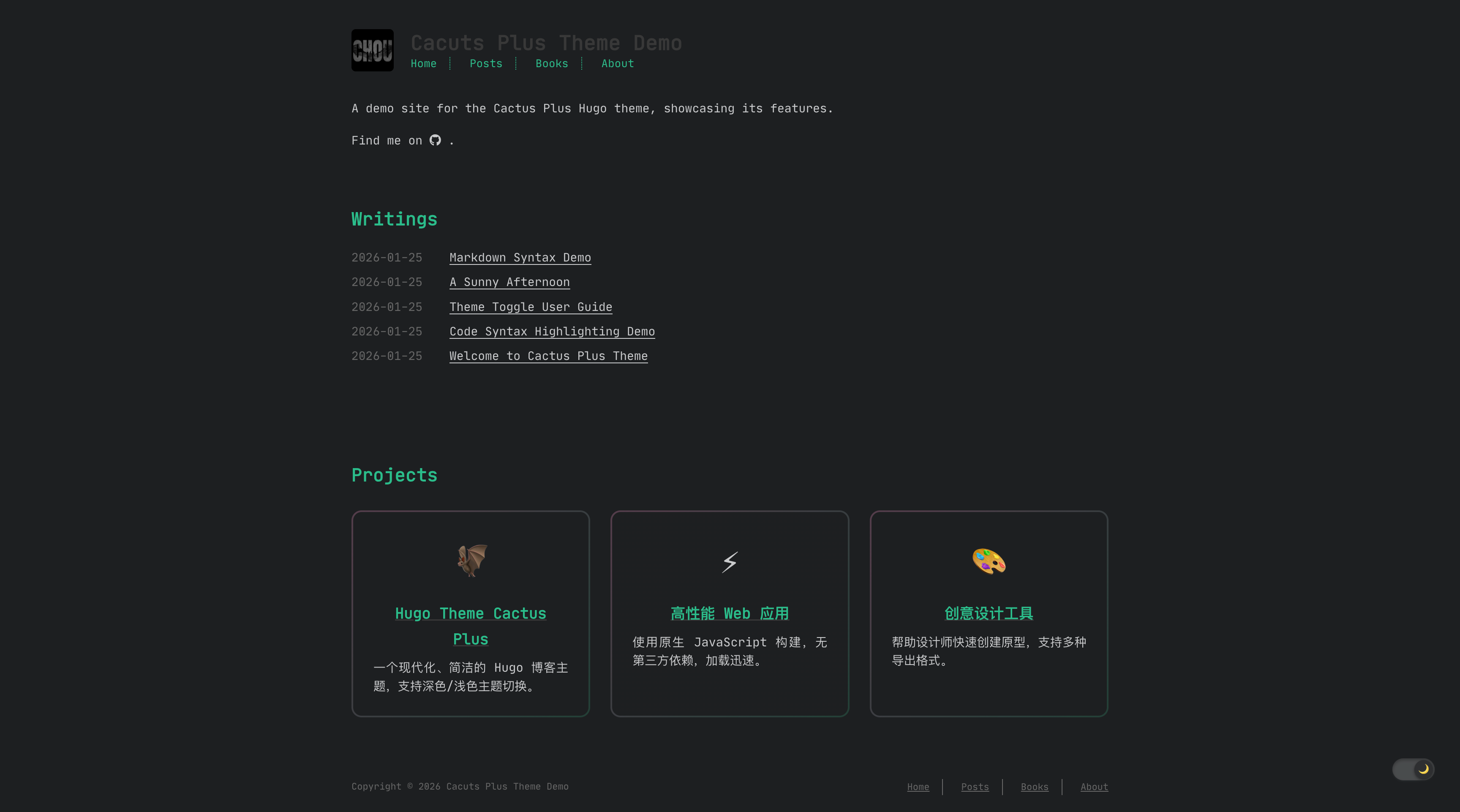
Dark/light mode switching with preference persisted via localStorage
HugoBlog
hugo-theme-cactus-plus — Hugo Blog Template
By orechou
A Hugo-based personal blog theme supporting dark/light mode, table of contents, comments, music player, painting gallery, and NeoDB media shelf and other extended content types.
Explore the design
Compare the page layouts and mobile experience. Open any screenshot for a closer look.
Author preview
Author-provided preview
Preview provided in the project README.
One original preview is available. Open the full image to inspect the design.
Screenshots show visual appearance; interactive behavior may differ.
Recorded 2026-10-12View source
What stands out
A quick read of the recorded project description.
Automatically generated multi-level table of contents with smooth scrolling and current section highlighting
Code block syntax highlighting, copy button, and line numbers
Comments optionally via Disqus, Utterances, or Matrix-based Cactus comments
Extended content types: diary, painting gallery, music player, and NeoDB media shelf
SPA-style client-side routing and built-in features such as RSS, MathJax, and share buttons
Template Details
hugo-theme-cactus-plus is a personal blog theme for Hugo, maintained by orechou and licensed under MIT. It is derived from hugo-theme-cactus (Zeran Wu), which in turn is based on hexo-theme-cactus (Pieter Robberechts), thus retaining the clean typographic style of the Cactus series. The theme offers dark and light mode switching, with the preference saved in localStorage; it also includes multi-level table of contents, code highlighting and copy buttons, RSS, MathJax, archives, share buttons, and SPA-style client-side routing.
Beyond regular blog posts, the theme extends several content types: diary (content/diary/, supporting location, weather, and mood fields), painting gallery (data/paintings.json, masonry layout, lightbox, and tag filtering), music player (data/music.json, vinyl-style floating player that records playback position), project list (data/projects.json), and a NeoDB shelf for books, movies, TV, and games proxied through a Cloudflare Worker. Comments support Disqus, Utterances, or Matrix-based Cactus comments, and can be enabled site-wide or per post.
Before use, note: NeoDB integration requires deploying your own Cloudflare Worker and configuring NEODB_TOKEN; the theme itself does not provide this proxy service. Cactus/Matrix comments depend on an external homeserver. Third-party assets such as demo images, fonts (JetBrains Mono, OFL), and icons (Font Awesome, CC BY 4.0) must be checked separately under their respective licenses. The theme does not declare production readiness; it is recommended to verify in a local or preview environment before deployment.
HugoBlog
Is it right for your project?
Use Cases
- Building a personal blog and publishing text and image posts
- Recording daily entries with location, weather, and mood in a diary section
- Displaying paintings in a masonry gallery with tag filtering and lightbox viewing
- Embedding a vinyl-style music player in the blog to play a local audio list
- Showcasing NeoDB book, movie, TV, and game collections via a Cloudflare Worker proxy
Suitable For
- Developers or writers building personal blogs with Hugo
- Writing scenarios that require dark mode, table of contents, and code highlighting
- Individual users who want to integrate diary, gallery, music, and media collections on the same site
- Technical users who can deploy their own Cloudflare Worker or Matrix homeserver
Getting started & customization
Use these recorded setup notes alongside the repository instructions for your chosen version.
- 1
Clone the repository into the themes directory of your Hugo site and set theme = "cactus" in config.toml
- 2
You can copy the exampleSite content as a starting configuration, then run hugo server for local preview
- 3
The NeoDB shelf requires deploying a Cloudflare Worker, setting NEODB_TOKEN, and filling in apiUrl under [params.neodb]
- 4
Cactus/Matrix comments require configuring parameters such as siteName under [params.comments.batcomments]
- 5
Third-party assets such as demo images, fonts, and icons must be checked under their respective licenses before use
License & source material
Usage conditions & limitations
Free to use · keep license noticeThis entry covers the free version under the MIT license in the public repository; the free scope applies to that version's code and does not imply that external services or third-party assets are free.
Must comply with when using
- Free use, modification, commercial use, and distribution of this version's code are permitted.
- When distributing copies or substantial portions of the code, retain the original author's copyright notice and the full MIT license notice.
- The code is provided as is; warranties and limitations of liability are governed by the original license and applicable law.
Additional costs & items to verify
- Demo images, fonts, icons, and other third-party assets must be checked under their respective licenses; they cannot be judged solely by the code's MIT license.
- External services such as domains, hosting, databases, payments, or AI may incur separate charges.
- The NeoDB shelf feature depends on the external NeoDB service and requires deploying your own Cloudflare Worker as a proxy; the theme itself does not provide this proxy service.
- Using NeoDB integration requires deploying your own Cloudflare Worker and configuring the NEODB_TOKEN environment variable, which are external service and account configuration requirements.
- The Cactus/Matrix comment mode loads the client script from the external latest.cactus.chat and depends on a third-party homeserver service.
- Enabling Cactus/Matrix comments requires configuring siteName and depends on an external Matrix homeserver (default cactus.chat).
- Using Disqus comments requires providing your own Disqus shortname, which is an external service account requirement.
- Using Utterances comments requires configuring a GitHub repository (repo) and depends on the external GitHub service.
- Icons (Font Awesome, CC BY 4.0) and fonts (JetBrains Mono, OFL) are third-party assets under separate licenses and must be used according to their respective license terms.
View Original Text Basis
Permission is hereby granted, free of charge
Original License Text
A client-side book/movie/TV/music/game shelf backed by NeoDB, proxied through a Cloudflare Worker so your API token never reaches the browser.
Original README
1. Deploy the worker: `wrangler deploy` (config in `wrangler.toml`). 2. Set `NEODB_TOKEN` in your Worker environment.
Original README
For Cactus/Matrix comments (`engine = "bat_comments"`), the Cactus client (`latest.cactus.chat/cactus.js`) is loaded automatically.
Original README
serverUrl = "https://matrix.cactus.chat:8448" # default serverName = "cactus.chat" # default siteName = "your-site-name" # required
Original README
For Disqus, set your shortname:
Original README
For Utterances (config is nested under `[params.comments.utterances]`):
Original README
https://github.com/orechou/hugo-theme-cactus-plus/blob/main/LICENSEhttps://github.com/orechou/hugo-theme-cactus-plus/blob/main/README.md- **Icons**: [Font Awesome](https://fontawesome.com/) (CC BY 4.0) - **Fonts**: [JetBrains Mono](https://www.jetbrains.com/lp/mono/) (OFL)
Original README
Compiled by DeepSeek based on repository license and README ·2026-10-12. Results only cover the materials read; dependencies, images, fonts, and subsequent term changes are subject to their respective original texts.
Project checks & description sources
Template Information
- Source platforms
- GitHub
- Documentation and maintenance reference score
- Partly documented · 68 / 100
- Technologies
- Hugo
- Website type
- Blog
How this score is calculated
Our heuristic uses license records (up to 30), a demo link (12), a preview (10), stars (15), recorded maintenance (15), description completeness (8), feature records (5) and classification data (5). It is not a code, security or performance test, or a Google score. A link does not establish tested functionality.
What to verify for this project
- Repository update recorded
- 2026-09-09
- Screenshot last checked
- 2026-10-12
No demo link is recorded. Use the repository instructions to evaluate the project locally; the screenshot alone cannot establish interactive behavior.
The catalog identifies Hugo as the primary stack. Check the actual dependency manifest and lockfile for versions and hosting requirements. These notes use recorded metadata, not a code audit or a deployment test.
Use a selection guide →How this description was prepared
AI-assisted description based on catalog records and repository material. Repository authors are not automatically the reviewers of this description.
Review declaration: [email protected] · 2026-10-13
Inspect the recorded source material
SHA-256: 875c6def5a8e02b86ba4a2ad274478583e4f8ca423f5e4db1712af8ec89cdcfd
2026-10-12T06:24:23.059Z
Source file / repository# Hugo Theme Cactus Plus A modern, clean, and responsive Hugo theme for personal blogs with dark/light mode support.   ## Features - **Dark/Light Mode** - Toggle between color themes with persistent preference - **Table of Contents** - Auto-generated, multi-level TOC with smooth scrolling - **Responsive Design** - Optimized for desktop, tablet, and mobile - **Syntax Highlighting** - Code blocks with copy button and line numbers - **Comments** - Support for Disqus, Utterances, or built-in (Cactus/Matrix) comments - **SPA Navigation** - Single-page-app style client-side routing - **Social Links** - Easy social media integration - **RSS Feed** - Built-in RSS generation - **MathJax** - Mathematical formula support - **Archive** - Chronological post listing with pagination - **Share Buttons** - Social media sharing for posts - **Music Player** - Floating vinyl-styled player with persistence - **Paintings Gallery** - Masonry layout with lightbox & tag filtering - **NeoDB Integration** - Book/movie/tv/music/game shelf via Cloudflare Worker proxy - **Diary** - Personal journal section - **Post Timeline** - Visual year-grouped timeline of all posts ## Installation 1. Clone the repository to your Hugo site's `themes` directory: ```bash git clone https://github.com/OreChou/hugo-theme-cactus-plus.git themes/cactus ``` 2. Set the theme in your `config.toml`: ```toml theme = "cactus" ``` 3. Copy the example site configuration: ```bash cp -r themes/cactus/exampleSite/* . ``` 4. Start the development server: ```bash hugo server ``` ## Configuration ### Basic Settings ```toml baseURL = "https://example.com" languageCode = "en-us" defaultContentLanguage = "en" title = "Your Site Title" theme = "cactus" ``` ### Color Theme Choose from `dark`, `light`, `white`, or `classic`: ```toml [params] colortheme = "white" # Options: dark, light, white, classic ``` ### Navigation Menu ```toml [[menu.main]] name = "Home" url = "/" weight = 1 [[menu.main]] name = "Posts" url = "/posts" weight = 2 [[menu.main]] name = "About" url = "/about" weight = 3 ``` ### Homepage Settings ```toml [params] description = "Your site description" mainSection = "posts" mainSectionTitle = "Blog" postsOnHomePage = 5 showAllPostsOnHomePage = false tagsOverview = true showProjectsList = true projectsUrl = "https://github.com/yourusername" ``` ### Post Settings ```toml [params] showReadTime = true dateFormat = "2006-01-02" ``` ### Table of Contents Configure TOC depth in your `config.toml`: ```toml [markup.tableOfContents] endLevel = 4 ordered = false startLevel = 2 ``` ### Social Links ```toml [[params.social]] name = "github" link = "https://github.com/yourusername" [[params.social]] name = "twitter" link = "https://twitter.com/yourusername" [[params.social]] name = "email" link = "[email protected]" ``` ### Comments Enable comments globally: ```toml [params.comments] enabled = true engine = "disqus" # Options: disqus, utterances, bat_comments ``` Or enable per post in front matter (overrides the site setting): ```yaml --- comments: true --- ``` For Disqus, set your shortname: ```toml disqusShortname = "your-shortname" ``` For Utterances (config is nested under `[params.comments.utterances]`): ```toml [params.comments] enabled = true engine = "utterances" [params.comments.utterances] repo = "yourusername/your-repo" theme = "github-light" # default issueTerm = "pathname" # default label = "comments" # default ``` For Cactus/Matrix comments (`engine = "bat_comments"`), the Cactus client (`latest.cactus.chat/cactus.js`) is loaded automatically. Configure your homeserver under `[params.comments.batcomments]`: ```toml [params.comments] enabled = true engine = "bat_comments" [params.comments.batcomments] serverUrl = "https://matrix.cactus.chat:8448" # default serverName = "cactus.chat" # default siteName = "your-site-name" # required ``` ### Syntax Highlighting ```toml [markup.highlight] codeFences = true guessSyntax = false lineNos = true style = "dracula" ``` ### RSS Feed ```toml [params] rss = true ``` ### MathJax ```toml [params] mathjax = true ``` Or enable per post: ```yaml --- mathjax: true --- ``` ### Archive Show all posts in archive without pagination: ```toml [params] showAllPostsArchive = true ``` ## Content Types ### Blog Posts Create posts in `content/posts/`: ```yaml --- title: "My Post Title" date: 2026-01-26 draft: false tags: ["tag1", "tag2"] categories: ["category"] --- ``` ### Projects Create `data/projects.json`: ```json { "list": [ { "name": "Project Name", "url": "https://github.com/username/repo", "desc": "Project description", "icon": "📁" } ] } ``` ### Diary Create diary entries in `content/diary/`: ```yaml --- title: "A Day" date: 2026-01-26 location: "City" weather: "Sunny" mood: "Calm" --- ``` Control pagination with `[params.diary] diaryPerPage`. ### Paintings Create `data/paintings.json` (each item supports `title`, `date`, `image`, `model`, `prompt`, `negative_prompt`, `parameters`, `tags`, `description`): ```json [ { "title": "Dragon's Flight", "image": "/images/dragon.jpg", "model": "Stable Diffusion XL", "prompt": "a majestic dragon ...", "tags": ["dragon", "fantasy"] } ] ``` ### Music Player Provide a playlist in `data/music.json` and enable it: ```toml [params.music] enabled = true ``` ```json [ { "title": "Song", "artist": "Artist", "src": "/audio/song.mp3", "cover": "/images/cover.jpg" } ] ``` The player persists playback position in `localStorage`. ### NeoDB Library A client-side book/movie/TV/music/game shelf backed by NeoDB, proxied through a Cloudflare Worker so your API token never reaches the browser. 1. Deploy the worker: `wrangler deploy` (config in `wrangler.toml`). 2. Set `NEODB_TOKEN` in your Worker environment. 3. Point the theme at the worker URL: ```toml [params.neodb] enabled = true apiUrl = "https://your-worker-name.workers.dev" ``` ## Features in Detail ### Theme Toggle Users can toggle between dark and light modes. The preference is saved in localStorage and persists across sessions. ### Table of Contents - Supports up to 4 heading levels - Compact vertical layout with left border indicators - Hierarchical indentation - Active section highlighting - Smooth scroll to section - Responsive (hidden on smaller screens) ### Code Blocks - Syntax highlighting with Hugo - Copy button on code blocks - Line numbers support - Multiple theme styles ## Customization ### Custom CSS Add custom styles in `static/css/custom.css`: ```toml [params] css = ["css/custom.css"] ``` ### Favicon Place your favicon in `static/images/favicon.ico` ### Logo Place your logo in `static/images/logo.png` ## Deployment ### GitHub Pages ```bash hugo -d docs ``` Then set the source to `docs` folder in repository settings. ### Netlify Connect your repository and set the build command to `hugo`. ### Vercel Connect your repository and set the build command to `hugo`. ## License MIT License - see [LICENSE](LICENSE) for details. This theme is a fork of [hugo-theme-cactus](https://github.com/monkeyWzr/hugo-theme-cactus) by Zeran Wu, which was originally based on [hexo-theme-cactus](https://github.com/probberechts/hexo-theme-cactus) by Pieter Robberechts. Both projects are licensed under the MIT License. ## Credits - **Forked from**: [hugo-theme-cactus](https://github.com/monkeyWzr/hugo-theme-cactus) by [Zeran Wu](https://github.com/monkeyWzr) - **Originally based on**: [hexo-theme-cactus](https://github.com/probberechts/hexo-theme-cactus) by [Pieter Robberechts](https://github.com/probberechts) - **Icons**: [Font Awesome](https://fontawesome.com/) (CC BY 4.0) - **Fonts**: [JetBrains Mono](https://www.jetbrains.com/lp/mono/) (OFL)
Explore similar templates
Compare previews and descriptions within the same stack and category.

hugo-PaperMod
A fast, clean, responsive Hugo theme for blogs and lightweight portfolios, with three layout modes (Regular, Home-Info, Profile), automatic and manual light/dark themes, Fuse.js client-side search, multilingual support, and built-in Open Graph, Twitter Cards, and Schema.org data.
Hugo · Portfolio

LoveIt
LoveIt is a clean, elegant, and feature-rich Hugo blog theme derived from LeaveIt and KeepIt, MIT-licensed. It offers light/dark modes, responsive layout, multilingual support, and search via Lunr.js or Algolia.
Hugo · Blog

hugo-coder
hugo-coder is a minimalist Hugo blog theme maintained by luizdepra under the MIT license. It provides a clean, text-focused blog appearance, configuration documentation in the docs directory, and a complete exampleSite with hugo.toml.
Hugo · Blog

blowfish
Blowfish is a Hugo personal website and blog theme built with Tailwind CSS 4, focused on lightness, simplicity, and content-first presentation.
Hugo · Blog

hugo-paper
hugo-paper is a simple, clean, and customizable Hugo blog theme configured through config.toml or hugo.toml.
Hugo · Blog

hextra
Hextra is a Hugo theme for documentation and blog sites, built on Hugo and Tailwind CSS with design referencing Nextra.
Hugo · Documentation