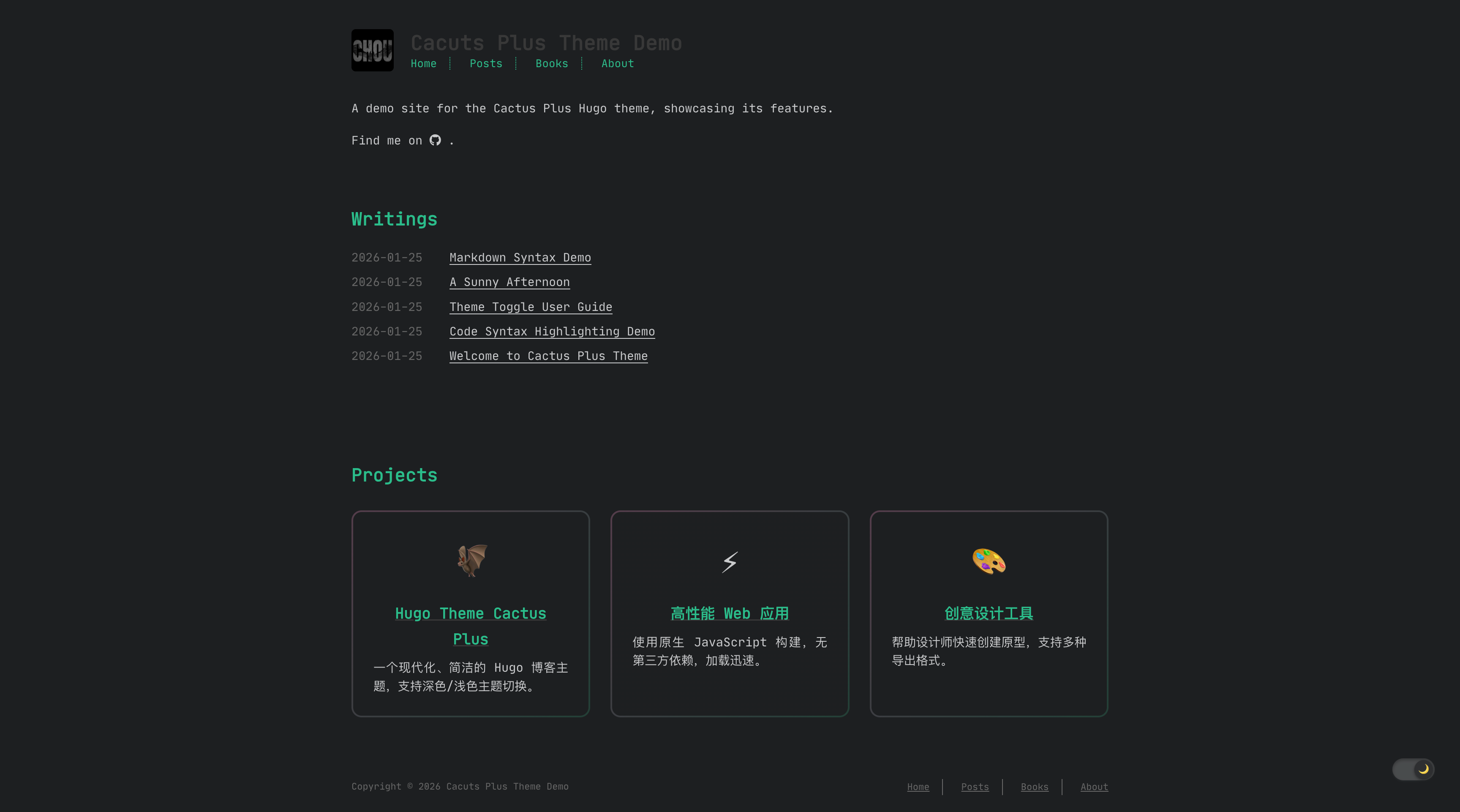
深色/浅色模式切换,偏好通过 localStorage 持久保存
Hugo博客
hugo-theme-cactus-plus — Hugo 博客模板
作者 orechou
基于 Hugo 的个人博客主题,支持深色/浅色模式、目录、评论、音乐播放器、画作画廊与 NeoDB 书影音书架等扩展内容类型。
看看你的网站会是什么样
浏览真实页面截图,比较内容排版与手机效果。点击下方缩略图切换,放大查看整页细节。
目前有 1 张原始预览,可打开完整图片查看设计细节。
截图用于了解视觉与布局,交互效果请以实际项目为准。
采集于 2026-10-12查看来源
值得关注的模板亮点
从已有项目资料中,快速了解它的特点。
自动生成多级目录,支持平滑滚动与当前章节高亮
代码块语法高亮、复制按钮与行号显示
评论可选 Disqus、Utterances 或基于 Matrix 的 Cactus 评论
扩展内容类型:日记、画作画廊、音乐播放器与 NeoDB 书影音书架
SPA 式客户端路由与 RSS、MathJax、分享按钮等内置功能
模板详细介绍
hugo-theme-cactus-plus 是面向 Hugo 的个人博客主题,由 orechou 维护,采用 MIT 许可。它源自 hugo-theme-cactus(Zeran Wu),后者又基于 hexo-theme-cactus(Pieter Robberechts),因此保留了 Cactus 系列的简洁排版风格。主题提供深色与浅色模式切换,偏好保存在 localStorage 中;同时内置多级目录、代码高亮与复制按钮、RSS、MathJax、归档、分享按钮和 SPA 式客户端路由。
除常规博客文章外,主题还扩展了多种内容类型:日记(content/diary/,支持地点、天气、心情字段)、画作画廊(data/paintings.json,瀑布流布局、灯箱与标签筛选)、音乐播放器(data/music.json,黑胶风格悬浮播放器并记录播放位置)、项目列表(data/projects.json)以及通过 Cloudflare Worker 代理的 NeoDB 书影音游戏书架。评论支持 Disqus、Utterances 或基于 Matrix 的 Cactus 评论,可在站点或单篇文章中启用。
使用前需注意:NeoDB 集成要求自行部署 Cloudflare Worker 并配置 NEODB_TOKEN,主题本身不提供该代理服务;Cactus/Matrix 评论依赖外部 homeserver;演示图片、字体(JetBrains Mono,OFL)与图标(Font Awesome,CC BY 4.0)等第三方素材需按各自许可单独核对。主题未声明生产就绪程度,建议在本地或预览环境验证后再部署。
Hugo博客
适合你的项目吗?
适用场景
- 搭建个人博客并发布图文文章
- 用日记栏目记录带地点、天气、心情的日常条目
- 以瀑布流画廊展示画作并支持标签筛选与灯箱查看
- 在博客中嵌入黑胶风格音乐播放器播放本地音频列表
- 通过 Cloudflare Worker 代理展示 NeoDB 书影音游戏收藏
适合人群
- 使用 Hugo 构建个人博客的开发者或写作者
- 需要深色模式、目录与代码高亮的写作场景
- 希望在同一站点整合日记、画廊、音乐与书影音收藏的个人用户
- 能自行部署 Cloudflare Worker 或 Matrix homeserver 的技术用户
上手与定制指南
结合仓库当前版本的说明,按下面的资料检查内容、配置与运行要求。
- 1
将仓库克隆到 Hugo 站点的 themes 目录,并在 config.toml 中设置 theme = "cactus"
- 2
可复制 exampleSite 内容作为起始配置,再运行 hugo server 本地预览
- 3
NeoDB 书架需先部署 Cloudflare Worker、设置 NEODB_TOKEN,并在 [params.neodb] 中填写 apiUrl
- 4
Cactus/Matrix 评论需配置 [params.comments.batcomments] 中的 siteName 等参数
- 5
演示图片、字体与图标等第三方素材需按各自许可核对后再使用
授权与来源资料
使用条件与限制
免费使用 · 保留许可声明本次收录的是公开仓库中采用 MIT 许可的免费版本;免费范围为该版本代码,不代表外部服务或第三方素材免费。
使用时需要遵守
- 允许免费使用、修改、商用和分发该版本代码。
- 分发代码副本或实质性部分时,保留原作者版权声明和完整 MIT 许可声明。
- 代码按现状提供;担保与责任限制以原许可证及适用法律为准。
额外费用与待核对事项
- 演示图片、字体、图标及其他第三方素材需按各自许可核对,不能仅凭代码的 MIT 许可判断。
- 域名、托管、数据库、支付或 AI 等外部服务可能另外收费。
- NeoDB 书架功能依赖外部 NeoDB 服务,并需自行部署 Cloudflare Worker 作为代理,主题本身不提供该代理服务。
- 使用 NeoDB 集成需自行部署 Cloudflare Worker 并配置 NEODB_TOKEN 环境变量,属于外部服务与账号配置要求。
- Cactus/Matrix 评论模式会从外部加载 latest.cactus.chat 的客户端脚本,依赖第三方 homeserver 服务。
- 启用 Cactus/Matrix 评论必须配置 siteName,并依赖外部 Matrix homeserver(默认 cactus.chat)。
- 使用 Disqus 评论需提供自己的 Disqus shortname,属于外部服务账号要求。
- 使用 Utterances 评论需配置 GitHub 仓库(repo),依赖外部 GitHub 服务。
- 图标(Font Awesome,CC BY 4.0)与字体(JetBrains Mono,OFL)为单独许可的第三方素材,需按各自许可条款使用。
查看原文依据
Permission is hereby granted, free of charge
许可证原文
A client-side book/movie/TV/music/game shelf backed by NeoDB, proxied through a Cloudflare Worker so your API token never reaches the browser.
README 原文
1. Deploy the worker: `wrangler deploy` (config in `wrangler.toml`). 2. Set `NEODB_TOKEN` in your Worker environment.
README 原文
For Cactus/Matrix comments (`engine = "bat_comments"`), the Cactus client (`latest.cactus.chat/cactus.js`) is loaded automatically.
README 原文
serverUrl = "https://matrix.cactus.chat:8448" # default serverName = "cactus.chat" # default siteName = "your-site-name" # required
README 原文
For Disqus, set your shortname:
README 原文
For Utterances (config is nested under `[params.comments.utterances]`):
README 原文
https://github.com/orechou/hugo-theme-cactus-plus/blob/main/LICENSEhttps://github.com/orechou/hugo-theme-cactus-plus/blob/main/README.md- **Icons**: [Font Awesome](https://fontawesome.com/) (CC BY 4.0) - **Fonts**: [JetBrains Mono](https://www.jetbrains.com/lp/mono/) (OFL)
README 原文
DeepSeek 根据仓库许可证和 README 整理 ·2026-10-12。结果仅覆盖已读取资料,依赖、图片、字体及后续条款变更以各自原文为准。
项目核对记录与介绍依据
模板资料
- 来源平台
- GitHub
- 资料与维护参考分
- 资料一般 · 68 / 100
- 技术栈
- Hugo
- 网站类型
- 博客
这个分数如何计算
本站按许可资料(最高30分)、演示链接(12分)、预览图(10分)、Star数(15分)、记录的维护时间(15分)、描述完整度(8分)、功能记录(5分)和分类资料(5分)计算。它不是代码、安全或性能测试,也不是 Google 评分;有链接不代表已实测可用。
这个项目需要核对什么
- 记录的仓库更新时间
- 2026-09-09
- 截图检查日期
- 2026-10-12
目前没有记录演示链接。请依据仓库说明在本地评估;仅凭截图无法确认交互行为。
目录记录的主要技术栈是 Hugo。请通过依赖清单和锁文件核对实际版本与托管要求。这些说明基于收录资料,不代表代码审计或部署实测。
查看具体选型方法 →介绍的制作与核对状态
介绍由 AI 辅助整理目录与仓库资料。仓库作者不等于这篇介绍的审核者。
审核声明: [email protected] · 2026-10-13
查看当时使用的来源资料
SHA-256: 875c6def5a8e02b86ba4a2ad274478583e4f8ca423f5e4db1712af8ec89cdcfd
2026-10-12T06:24:23.059Z
来源文件 / 仓库# Hugo Theme Cactus Plus A modern, clean, and responsive Hugo theme for personal blogs with dark/light mode support.   ## Features - **Dark/Light Mode** - Toggle between color themes with persistent preference - **Table of Contents** - Auto-generated, multi-level TOC with smooth scrolling - **Responsive Design** - Optimized for desktop, tablet, and mobile - **Syntax Highlighting** - Code blocks with copy button and line numbers - **Comments** - Support for Disqus, Utterances, or built-in (Cactus/Matrix) comments - **SPA Navigation** - Single-page-app style client-side routing - **Social Links** - Easy social media integration - **RSS Feed** - Built-in RSS generation - **MathJax** - Mathematical formula support - **Archive** - Chronological post listing with pagination - **Share Buttons** - Social media sharing for posts - **Music Player** - Floating vinyl-styled player with persistence - **Paintings Gallery** - Masonry layout with lightbox & tag filtering - **NeoDB Integration** - Book/movie/tv/music/game shelf via Cloudflare Worker proxy - **Diary** - Personal journal section - **Post Timeline** - Visual year-grouped timeline of all posts ## Installation 1. Clone the repository to your Hugo site's `themes` directory: ```bash git clone https://github.com/OreChou/hugo-theme-cactus-plus.git themes/cactus ``` 2. Set the theme in your `config.toml`: ```toml theme = "cactus" ``` 3. Copy the example site configuration: ```bash cp -r themes/cactus/exampleSite/* . ``` 4. Start the development server: ```bash hugo server ``` ## Configuration ### Basic Settings ```toml baseURL = "https://example.com" languageCode = "en-us" defaultContentLanguage = "en" title = "Your Site Title" theme = "cactus" ``` ### Color Theme Choose from `dark`, `light`, `white`, or `classic`: ```toml [params] colortheme = "white" # Options: dark, light, white, classic ``` ### Navigation Menu ```toml [[menu.main]] name = "Home" url = "/" weight = 1 [[menu.main]] name = "Posts" url = "/posts" weight = 2 [[menu.main]] name = "About" url = "/about" weight = 3 ``` ### Homepage Settings ```toml [params] description = "Your site description" mainSection = "posts" mainSectionTitle = "Blog" postsOnHomePage = 5 showAllPostsOnHomePage = false tagsOverview = true showProjectsList = true projectsUrl = "https://github.com/yourusername" ``` ### Post Settings ```toml [params] showReadTime = true dateFormat = "2006-01-02" ``` ### Table of Contents Configure TOC depth in your `config.toml`: ```toml [markup.tableOfContents] endLevel = 4 ordered = false startLevel = 2 ``` ### Social Links ```toml [[params.social]] name = "github" link = "https://github.com/yourusername" [[params.social]] name = "twitter" link = "https://twitter.com/yourusername" [[params.social]] name = "email" link = "[email protected]" ``` ### Comments Enable comments globally: ```toml [params.comments] enabled = true engine = "disqus" # Options: disqus, utterances, bat_comments ``` Or enable per post in front matter (overrides the site setting): ```yaml --- comments: true --- ``` For Disqus, set your shortname: ```toml disqusShortname = "your-shortname" ``` For Utterances (config is nested under `[params.comments.utterances]`): ```toml [params.comments] enabled = true engine = "utterances" [params.comments.utterances] repo = "yourusername/your-repo" theme = "github-light" # default issueTerm = "pathname" # default label = "comments" # default ``` For Cactus/Matrix comments (`engine = "bat_comments"`), the Cactus client (`latest.cactus.chat/cactus.js`) is loaded automatically. Configure your homeserver under `[params.comments.batcomments]`: ```toml [params.comments] enabled = true engine = "bat_comments" [params.comments.batcomments] serverUrl = "https://matrix.cactus.chat:8448" # default serverName = "cactus.chat" # default siteName = "your-site-name" # required ``` ### Syntax Highlighting ```toml [markup.highlight] codeFences = true guessSyntax = false lineNos = true style = "dracula" ``` ### RSS Feed ```toml [params] rss = true ``` ### MathJax ```toml [params] mathjax = true ``` Or enable per post: ```yaml --- mathjax: true --- ``` ### Archive Show all posts in archive without pagination: ```toml [params] showAllPostsArchive = true ``` ## Content Types ### Blog Posts Create posts in `content/posts/`: ```yaml --- title: "My Post Title" date: 2026-01-26 draft: false tags: ["tag1", "tag2"] categories: ["category"] --- ``` ### Projects Create `data/projects.json`: ```json { "list": [ { "name": "Project Name", "url": "https://github.com/username/repo", "desc": "Project description", "icon": "📁" } ] } ``` ### Diary Create diary entries in `content/diary/`: ```yaml --- title: "A Day" date: 2026-01-26 location: "City" weather: "Sunny" mood: "Calm" --- ``` Control pagination with `[params.diary] diaryPerPage`. ### Paintings Create `data/paintings.json` (each item supports `title`, `date`, `image`, `model`, `prompt`, `negative_prompt`, `parameters`, `tags`, `description`): ```json [ { "title": "Dragon's Flight", "image": "/images/dragon.jpg", "model": "Stable Diffusion XL", "prompt": "a majestic dragon ...", "tags": ["dragon", "fantasy"] } ] ``` ### Music Player Provide a playlist in `data/music.json` and enable it: ```toml [params.music] enabled = true ``` ```json [ { "title": "Song", "artist": "Artist", "src": "/audio/song.mp3", "cover": "/images/cover.jpg" } ] ``` The player persists playback position in `localStorage`. ### NeoDB Library A client-side book/movie/TV/music/game shelf backed by NeoDB, proxied through a Cloudflare Worker so your API token never reaches the browser. 1. Deploy the worker: `wrangler deploy` (config in `wrangler.toml`). 2. Set `NEODB_TOKEN` in your Worker environment. 3. Point the theme at the worker URL: ```toml [params.neodb] enabled = true apiUrl = "https://your-worker-name.workers.dev" ``` ## Features in Detail ### Theme Toggle Users can toggle between dark and light modes. The preference is saved in localStorage and persists across sessions. ### Table of Contents - Supports up to 4 heading levels - Compact vertical layout with left border indicators - Hierarchical indentation - Active section highlighting - Smooth scroll to section - Responsive (hidden on smaller screens) ### Code Blocks - Syntax highlighting with Hugo - Copy button on code blocks - Line numbers support - Multiple theme styles ## Customization ### Custom CSS Add custom styles in `static/css/custom.css`: ```toml [params] css = ["css/custom.css"] ``` ### Favicon Place your favicon in `static/images/favicon.ico` ### Logo Place your logo in `static/images/logo.png` ## Deployment ### GitHub Pages ```bash hugo -d docs ``` Then set the source to `docs` folder in repository settings. ### Netlify Connect your repository and set the build command to `hugo`. ### Vercel Connect your repository and set the build command to `hugo`. ## License MIT License - see [LICENSE](LICENSE) for details. This theme is a fork of [hugo-theme-cactus](https://github.com/monkeyWzr/hugo-theme-cactus) by Zeran Wu, which was originally based on [hexo-theme-cactus](https://github.com/probberechts/hexo-theme-cactus) by Pieter Robberechts. Both projects are licensed under the MIT License. ## Credits - **Forked from**: [hugo-theme-cactus](https://github.com/monkeyWzr/hugo-theme-cactus) by [Zeran Wu](https://github.com/monkeyWzr) - **Originally based on**: [hexo-theme-cactus](https://github.com/probberechts/hexo-theme-cactus) by [Pieter Robberechts](https://github.com/probberechts) - **Icons**: [Font Awesome](https://fontawesome.com/) (CC BY 4.0) - **Fonts**: [JetBrains Mono](https://www.jetbrains.com/lp/mono/) (OFL)
看看同类模板
对比同技术栈与用途的模板,找到更适合的视觉与内容结构。

hugo-PaperMod
PaperMod 是 Hugo 生态里知名度较高的主题之一,定位很明确:给博客和轻量作品集站点提供一套干净、响应式的阅读界面。
Hugo · 作品集

LoveIt
❤️A clean, elegant but advanced blog theme for Hugo 一个简洁、优雅且高效的 Hugo 主题
Hugo · 博客

hugo-coder
A minimalist blog theme for hugo.
Hugo · 博客

blowfish
Personal Website & Blog Theme for Hugo
Hugo · 博客

hugo-paper
🪺 A simple, clean, customizable Hugo theme
Hugo · 博客

hextra
Hextra 是一个 Hugo 主题,定位在文档站与博客之间:既提供侧边栏导航、目录、面包屑、分页这类文档站结构,也能承载博客内容。
Hugo · 文档