Built with Astro, using content collections to manage blog content
AstroBlogSaaSCorporate WebsiteStarter
mizu-light-astro-theme — Astro Blog Template
By oxygenna-themes
Mizu Light is an Astro product launch template by Oxygenna, aimed at SaaS products, digital product launches, and early-stage startups. It provides prebuilt pages, modular blocks, and reusable UI components, under the MIT license.
Explore the design
Compare the page layouts and mobile experience. Open any screenshot for a closer look.
Desktop homepage1 / 3
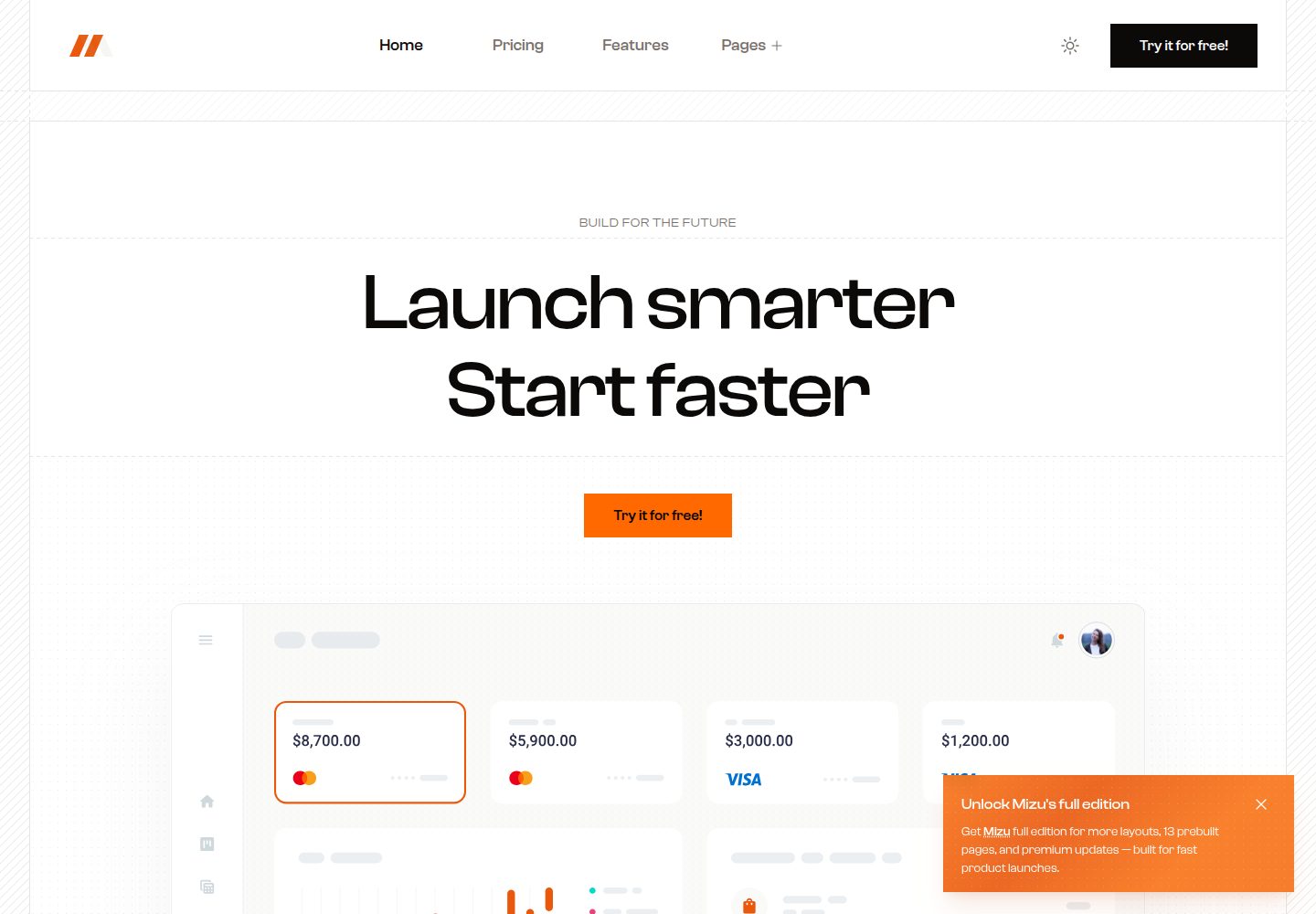
Desktop captureTop of page
Actual screenshot captured by the server browser.
All pages & views 3
Screenshots show visual appearance; interactive behavior may differ.
Recorded 2026-10-08View source
What stands out
A quick read of the recorded project description.
Provides prebuilt pages, modular blocks, and reusable UI components
Includes light and dark modes, defaulting to forced mode, switchable to auto mode
Uses Tailwind CSS; primary and neutral colors can be adjusted in global.css
Configuration is centralized in src/config, covering SEO, navigation, and analytics
MIT licensed, allowing modification, commercial use, and distribution of this version of the code
Template Details
Mizu Light is an Astro-based product launch template positioned as a landing page for modern SaaS products, digital product launches, and early-stage startups. The README states it is suitable for promoting beta programs, early access signups, or pre-launch teaser campaigns. Pages are composed of reusable modular blocks, and it provides prebuilt pages and reusable UI components, making it easy to add, remove, and rearrange content.
The template includes light and dark modes, defaulting to forced mode (mode-light or mode-dark). To let users switch, change to mode-auto and enable the ThemeSwitcher component in the navigation bar. Styling is based on Tailwind CSS; primary and neutral colors are defined in the theme section of global.css, and fonts are adjusted via @font-face. For content, blog data is managed using Astro content collections; features, testimonials, etc. are stored as JSON in src/data, and icons mainly come from Heroicons. Configuration is centralized in src/config: config.ts (SEO, mode, scroll animations), navigation.ts, and analytics.ts.
Before use, note: local development requires Node.js 22.12.0 or higher; the PageSpeed scores and performance descriptions mentioned in the README are the author's own claims and have not been independently verified in this material. The free scope is limited to this MIT-licensed version of the code; demo images, fonts, icons, and other third-party assets must be checked against their respective licenses, and external services such as domains and hosting may incur separate charges. The README also promotes paid themes such as the full Mizu version, Toki, and Foxi Pro, which are not part of this template.
AstroBlogSaaSCorporate websiteLauncher
Is it right for your project?
Use Cases
- Launch landing pages and feature introduction pages for SaaS products
- Signup and teaser campaign pages for beta programs or early access
- Promotional sites before digital product launches
- Product websites that need blog content collections and light/dark modes
Suitable For
- Front-end developers using Astro and Tailwind CSS
- SaaS teams needing to quickly build product launch pages
- Startup projects that want to organize landing page content with modular blocks
- Users who accept the MIT license and independently verify third-party asset licensing
Getting started & customization
Use these recorded setup notes alongside the repository instructions for your chosen version.
- 1
Local environment requires Node.js 22.12.0 or higher
- 2
Run npm install to install dependencies, npm run dev to start the local development server (localhost:4321)
- 3
npm run build generates the production site to ./dist/, and npm run preview allows local preview of the build before deployment
- 4
Modify primary and neutral colors in the theme section of global.css; adjust fonts via @font-face
- 5
Demo images, fonts, icons, and other third-party assets must be checked separately against their respective licenses; external services may incur separate charges
License & source material
Usage conditions & limitations
Free to use · keep license noticeThis entry covers the free version under the MIT license in the public repository; the free scope is this version of the code and does not imply that external services or third-party assets are free.
Must comply with when using
- Free use, modification, commercial use, and distribution of this version of the code are permitted.
- When distributing copies or substantial portions of the code, retain the original author's copyright notice and the full MIT license notice.
- The code is provided as is; warranties and limitations of liability are governed by the original license and applicable law.
Additional costs & items to verify
- Demo images, fonts, icons, and other third-party assets must be checked against their respective licenses; they cannot be judged solely by the code's MIT license.
- External services such as domains, hosting, databases, payments, or AI may incur separate charges.
- The free version is only Mizu Light; the full Mizu version is a paid upgrade that must be purchased separately to obtain complete features such as 14 pages, 34 UI components, 33 blocks, sliders, and Mega Menu.
- Foxi Pro, promoted in the README, is a paid premium template and is not part of this free template; its use requires a separate purchase.
- Toki is another independent template that must be obtained separately and is not included in this free template.
- Local development and building require Node.js 22.12.0 or higher; lower versions cannot run as documented.
- Project icons mainly come from third-party sources such as Heroicons; their licensing must be checked separately and is not granted along with this template's MIT code license.
View Original Text Basis
Permission is hereby granted, free of charge
Original License Text
Get the **Mizu** full version to unlock everything you need for a polished SaaS or product launch.
Original README
Check out **Foxi Pro**, our premium Astro website template with fully responsive, customizable Tailwind CSS components.
Original README
Check out **Toki**, a standout agency template with striking design, blazing speed, built for modern agencies and creatives.
Original README
> **Note**: Requires Node.js version 22.12.0 or later.
Original README
https://github.com/oxygenna-themes/mizu-light-astro-theme/blob/main/LICENSEhttps://github.com/oxygenna-themes/mizu-light-astro-theme/blob/main/README.mdContains all icons used in the project, most are sourced from [Heroicons](https://heroicons.com/).
Original README
Compiled by DeepSeek based on repository license and README ·2026-10-08. Results only cover the materials read; dependencies, images, fonts, and subsequent term changes are subject to their respective original texts.
Project checks & description sources
Template Information
- Source platforms
- GitHub
- Documentation and maintenance reference score
- More documented · 92 / 100
- Technologies
- Astro
- Website type
- Blog · SaaS · Corporate Website · Starter
How this score is calculated
Our heuristic uses license records (up to 30), a demo link (12), a preview (10), stars (15), recorded maintenance (15), description completeness (8), feature records (5) and classification data (5). It is not a code, security or performance test, or a Google score. A link does not establish tested functionality.
What to verify for this project
- Repository update recorded
- 2026-09-17
- Screenshot last checked
- 2026-10-08
A demo link is listed. Check it with your own content and viewport sizes; its presence does not confirm that forms, authentication or payments work.
The catalog identifies Astro as the primary stack. Check the actual dependency manifest and lockfile for versions and hosting requirements. These notes use recorded metadata, not a code audit or a deployment test.
Use a selection guide →How this description was prepared
AI-assisted description based on catalog records and repository material. Repository authors are not automatically the reviewers of this description.
Review declaration: [email protected] · 2026-10-08
Inspect the recorded source material
SHA-256: 83b4c4e88b58b7247f825275cb109c12fcd6db2b224d53237d82cf896d007437
2026-10-08T11:53:58.110Z
Source file / repository# Mizu Light Astro Theme Mizu Light is a product launch template designed specifically for modern SaaS products, digital launches, and ambitious startups. Perfect for landing pages, beta signups, and early access campaigns.  [](https://mizu-light-theme.netlify.app/) [](https://pagespeed.web.dev/analysis/https-mizu-light-theme-netlify-app/r1kw15xyy9?form_factor=desktop) ## Introduction ### About Mizu Light is a product launch template designed for modern SaaS companies, digital products, and ambitious startups. With its clean design, intuitive layout, and focus on user experience, it’s the perfect solution for promoting beta programs, early access signups, or pre-launch campaigns. ### Features - **Astro v6:** Built with the latest Astro framework for optimal performance. - **Pre-Built Pages:** Get started quickly with a full set of professionally designed pages, ready to launch right out of the box. - **Optimized 100/100 PageSpeed:** Mizu Light is built for speed, delivering lightning-fast load times and perfect scores on Google PageSpeed. - **Flexible Modular Blocks:** Every page is made from reusable, flexible blocks—easily add, rearrange, or expand content using our ever-growing library. - **Reusable UI Components:** Keep your design consistent and save time with a complete set of customizable, reusable components. - **Built with Astro & Tailwind CSS v4:** Harness the latest frameworks for blazing-fast development and modern, utility-first styling. - **Light & Dark Mode:** Let users switch seamlessly between light and dark themes for a fully customizable experience. - **SEO-Ready:** Crafted with clean, semantic HTML and optimized metadata to help your site rank higher in search engines. - **Content Collections:** Organize, manage, and display content efficiently with Astro’s powerful content collections system. - **Smooth Animations:** Enhance the user experience with subtle transitions and page effects. - **Analytics Ready:** Supports Google Analytics and Tag Manager for easy tracking and insights. - **Responsive Design:** Fully responsive across desktops, tablets, and mobile devices. ## Getting Started ### Commands After downloading the theme, install the dependencies and run it on your local server. Check the `package.json` file for available scripts. > **Note**: Requires Node.js version 22.12.0 or later. | Command | Action | | :---------------- | :------------------------------------------- | | `npm install` | Installs dependencies | | `npm run dev` | Starts local dev server at `localhost:4321` | | `npm run build` | Build your production site to `./dist/` | | `npm run preview` | Preview your build locally, before deploying | ### Folder structure Inside Toki Astro project, you'll see the following folders and files: ```plaintext / ├── public/ │ └── favicon.svg ├── src/ │ ├── assets/ │ ├── components/ │ │ ├── blocks/ │ │ │ └── ... │ │ ├── scripts/ │ │ │ └── ... │ │ └── ui/ │ │ └── ... │ ├── config/ │ │ └── ... │ ├── content/ │ │ └── blog/ │ ├── data/ │ │ └── ... │ ├── icons/ │ │ └── ... │ ├── layouts/ │ │ └── ... │ └── pages/ │ └── ... └── package.json ``` | Directory/File | Description | | ------------------------ | ---------------------------------------------------------------------------------------------------------------------------------- | | `public/` | Contains static assets like images and the favicon. These files are served directly at the root URL. | | `src/assets/` | Contains all images and assets used in the project. | | `src/components/` | Contains reusable components for your site. This directory is divided into `ui` for UI components and `blocks` for section blocks. | | `src/components/blocks/` | Contains Section blocks used throughout the site. | | `src/components/ui/` | Contains individual UI components. | | `src/config/` | Contains configuration files for the project in typescript format. | | `src/content/` | Holds collection data, such as case studies. | | `src/data/` | Contains JSON files with content data (like features, testimonials etc). | | `src/icons/` | Contains all icons used in the project, most are sourced from [Heroicons](https://heroicons.com/). | | `src/layouts/` | Contains layout components that define the overall structure of your pages. | | `src/pages/` | Contains `.astro` files for each page. Each file here is exposed as a route based on its file name. | | `package.json` | Lists dependencies and scripts for your project, including metadata and various package requirements. | ## Theme Configuration The configuration files are located in the `src/config` directory, written in TypeScript. They contain various settings for the theme, including: | Configuration Files | Description | | -------------------------- | ------------------------------------------------------------------------ | | `src/config/config.ts` | Basic configuration settings including SEO, mode, and scroll animations. | | `src/config/navigation.ts` | Menu TypeScript interface options and JSON files for navigation. | | `src/config/analytics.ts` | Analytics configuration file. | ## Theme Customization ### Customize the Colors The theme uses two main colors: primary and neutral. These colors are defined in the Tailwind CSS configuration file. To personalize the color scheme of your project, you can easily modify these color values. To customize the colors, follow these steps: 1. Open the `global.css` file. 2. Find the `theme` section within the file. 3. Under `theme`, locate the `Colors`. 4. Modify the color values for `primary` and `neutral` to suit your preferred color palette. You can use the [tailwind CSS colors](https://nodejs.org/en/download/) or create your [own palette](https://uicolors.app/create) . ### Customize the Fonts To customize the fonts used in your project, follow these steps: 1. **Add Your Custom Font Files** Replace or add the desired font files in the public directory of your project. 2. **Update the Tailwind CSS Configuration** Open the `global.css` file. In the `@font-face` section, find the `font-family` property and update the `font-family` object. ### Dark/Light Mode By default, the site uses forced modes, which can be either light or dark, depending on the chosen layout. The light layout sets the class to **`mode-light`** and the dark layout sets it to **`mode-dark`**. This setting allows you to maintain a fixed appearance across the site regardless of user preferences or system settings. However, if you want to give users the ability to switch between themes, you can configure the theme to use the **`mode-auto`** class. You can easily do this by adding the **`mode-auto`** class to the **`src/layouts/Layout.astro`** file instead of using **`mode-light`** or **`mode-dark`** and uncommenting the ThemeSwitcher component in the NavigationBar component. ## Want more themes? ### Mizu Full Version Get the **Mizu** full version to unlock everything you need for a polished SaaS or product launch. Building on Mizu Light, it includes 14 ready-to-use pages, 34 reusable UI components, and 33 pre-built blocks, along with sliders and refined animations, a powerful Mega Menu, integrated analytics, and full light and dark mode support — making Mizu a complete solution for modern product and startup websites.  [](https://astro.build/themes/details/mizu/) [](https://mizu-theme.netlify.app/) ### Toki Check out **Toki**, a standout agency template with striking design, blazing speed, built for modern agencies and creatives.  [](https://astro.build/themes/details/toki/) [](https://toki-theme.netlify.app/) ### Foxi Pro Check out **Foxi Pro**, our premium Astro website template with fully responsive, customizable Tailwind CSS components.  [](https://astro.build/themes/details/foxi-pro/) [](https://foxi-pro.netlify.app) ## License Copyright 2026 - Designed & Developed by [Oxygenna](http://www.oxygenna.com/) [](mailto:[email protected],[email protected])
Explore similar templates
Compare previews and descriptions within the same stack and category.

astrowind
AstroWind is a free, open-source Astro starter theme using Astro and Tailwind CSS, released under the MIT license.
Astro · Blog

astro-paper
AstroPaper is a minimal, responsive, accessible, and SEO-friendly Astro blog theme. Articles are stored as Markdown/MDX in src/content/posts/, with subdirectories affecting URLs.
Astro · Blog

fuwari
Fuwari is a static blog template built with Astro and Tailwind CSS for personal blogs. It manages posts as Markdown files in src/content/posts/, with frontmatter for title, date, description, cover, tags, categories, draft status, and language.
Astro · Blog

Firefly
Firefly is a clean personal blog theme forked from Astro and Fuwari, offering four background modes, single/double sidebar and list/grid layouts, Pagefind client-side full-text search, and a six-language UI.
Astro · Blog

astro-theme-cactus
Astro Cactus is an Astro-based blog and portfolio theme that uses Markdown/MDX content collections to manage posts, notes, and tags, with frontmatter type-checked by a schema.
Astro · Portfolio

astrofy
Astrofy is a free and open-source personal portfolio website template built with Astro and TailwindCSS, with built-in blog, CV timeline, project showcase, store, and RSS feed modules.
Astro · Portfolio