基于 Astro 构建,使用内容集合管理博客内容
Astro博客SaaS企业官网启动器
mizu-light-astro-theme — Astro 博客模板
作者 oxygenna-themes
Mizu Light 是 Oxygenna 推出的 Astro 产品发布模板,面向 SaaS 产品、数字产品发布与早期创业项目,提供预置页面、模块化区块与可复用 UI 组件,采用 MIT 许可。
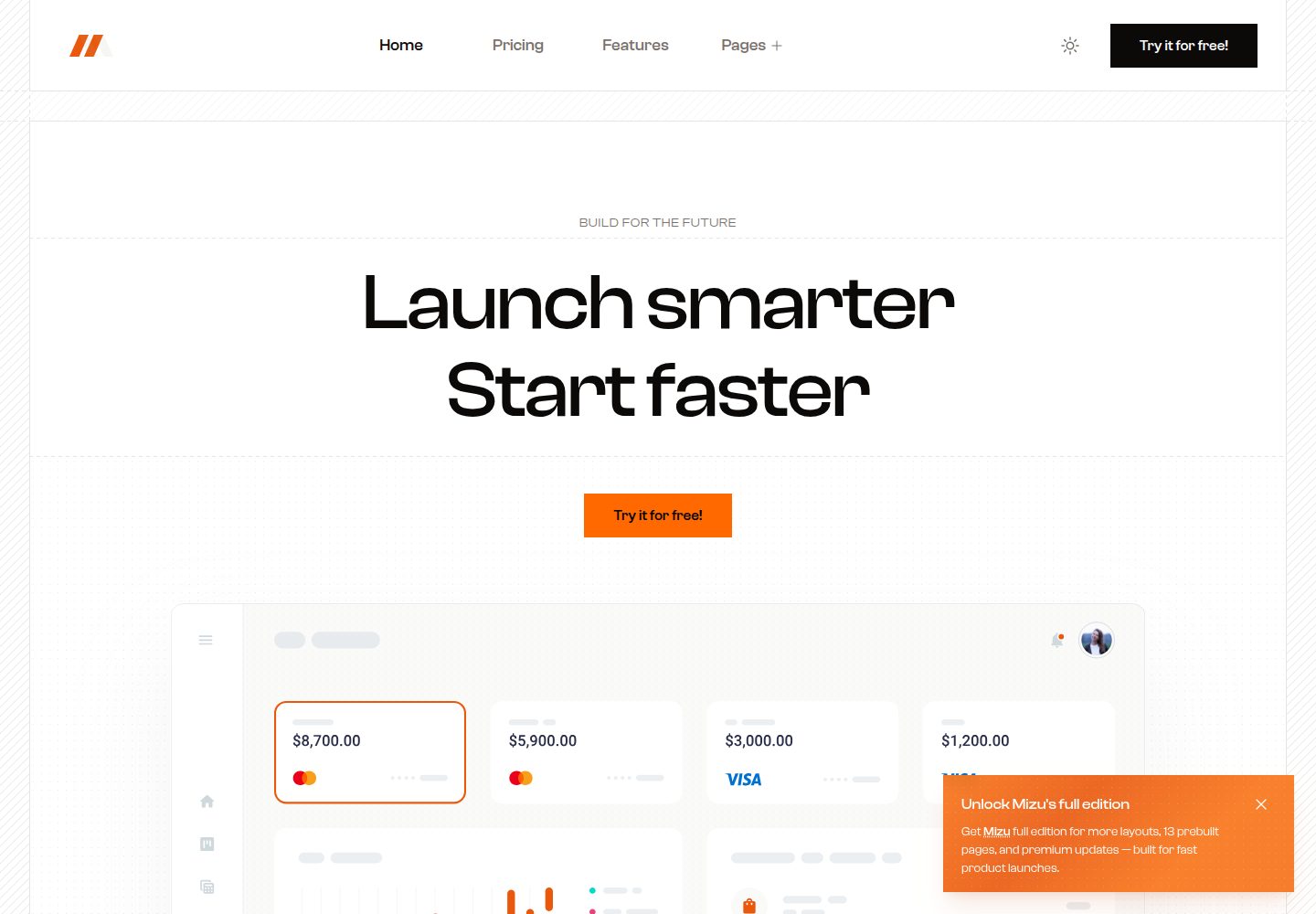
看看你的网站会是什么样
浏览真实页面截图,比较内容排版与手机效果。点击下方缩略图切换,放大查看整页细节。
全部页面与视图 3
截图用于了解视觉与布局,交互效果请以实际项目为准。
采集于 2026-10-08查看来源
值得关注的模板亮点
从已有项目资料中,快速了解它的特点。
提供预置页面、模块化区块与可复用 UI 组件
内置浅色与深色模式,默认强制模式,可切换为自动模式
使用 Tailwind CSS,主色与中性色可在 global.css 中调整
配置集中在 src/config,涵盖 SEO、导航与分析
采用 MIT 许可,允许修改、商用与分发该版本代码
模板详细介绍
Mizu Light 是一个基于 Astro 的产品发布模板,定位为现代 SaaS 产品、数字产品发布和早期创业项目的落地页。README 说明其适用于推广 beta 计划、早期访问注册或发布前预热活动,页面由可复用的模块化区块组成,并提供预置页面与可复用 UI 组件,便于增删和重排内容。
模板内置浅色与深色模式,默认采用强制模式(mode-light 或 mode-dark),如需用户自行切换可改用 mode-auto 并启用导航栏中的 ThemeSwitcher 组件。样式基于 Tailwind CSS,主色与中性色在 global.css 的 theme 段中定义,字体通过 @font-face 调整。内容方面使用 Astro 内容集合管理博客数据,features、testimonials 等以 JSON 形式存放在 src/data,图标主要来自 Heroicons。配置集中在 src/config 下的 config.ts(SEO、模式、滚动动画)、navigation.ts 与 analytics.ts。
使用前需注意:本地开发要求 Node.js 22.12.0 或更高版本;README 中提到的 PageSpeed 分数与性能描述属于作者自述,未在本资料中独立验证。免费范围仅限该 MIT 许可版本代码,演示图片、字体、图标等第三方素材需按各自许可核对,域名、托管等外部服务可能另行收费。README 同时推广了 Mizu 完整版、Toki 与 Foxi Pro 等付费主题,这些不属于本模板内容。
Astro博客SaaS企业官网启动器
适合你的项目吗?
适用场景
- SaaS 产品的发布落地页与功能介绍页
- beta 计划或早期访问的注册与预热活动页面
- 数字产品发布前的宣传站点
- 需要博客内容集合与浅色/深色模式的产品官网
适合人群
- 使用 Astro 与 Tailwind CSS 的前端开发者
- 需要快速搭建产品发布页的 SaaS 团队
- 希望以模块化区块组织落地页内容的创业项目
- 接受 MIT 许可并自行核对第三方素材授权的使用者
上手与定制指南
结合仓库当前版本的说明,按下面的资料检查内容、配置与运行要求。
- 1
本地环境需 Node.js 22.12.0 或更高版本
- 2
运行 npm install 安装依赖,npm run dev 启动本地开发服务器(localhost:4321)
- 3
npm run build 生成生产站点到 ./dist/,npm run preview 可在部署前本地预览构建结果
- 4
颜色在 global.css 的 theme 段中修改 primary 与 neutral,字体通过 @font-face 调整
- 5
演示图片、字体、图标等第三方素材需按各自许可单独核对,外部服务可能另行收费
授权与来源资料
使用条件与限制
免费使用 · 保留许可声明本次收录的是公开仓库中采用 MIT 许可的免费版本;免费范围为该版本代码,不代表外部服务或第三方素材免费。
使用时需要遵守
- 允许免费使用、修改、商用和分发该版本代码。
- 分发代码副本或实质性部分时,保留原作者版权声明和完整 MIT 许可声明。
- 代码按现状提供;担保与责任限制以原许可证及适用法律为准。
额外费用与待核对事项
- 演示图片、字体、图标及其他第三方素材需按各自许可核对,不能仅凭代码的 MIT 许可判断。
- 域名、托管、数据库、支付或 AI 等外部服务可能另外收费。
- 免费版仅为 Mizu Light;完整版 Mizu 为付费升级,需另行购买才能获得 14 个页面、34 个 UI 组件、33 个区块、滑块、Mega Menu 等完整功能。
- README 推广的 Foxi Pro 为付费高级模板,不属于本免费模板内容,使用需另行购买。
- Toki 为另一独立模板,需单独获取,不包含在本免费模板中。
- 本地开发与构建要求 Node.js 22.12.0 或更高版本,低于该版本无法按文档运行。
- 项目图标主要来自 Heroicons 等第三方来源,其授权需单独核对,不随本模板的 MIT 代码许可一并授予。
查看原文依据
Permission is hereby granted, free of charge
许可证原文
Get the **Mizu** full version to unlock everything you need for a polished SaaS or product launch.
README 原文
Check out **Foxi Pro**, our premium Astro website template with fully responsive, customizable Tailwind CSS components.
README 原文
Check out **Toki**, a standout agency template with striking design, blazing speed, built for modern agencies and creatives.
README 原文
> **Note**: Requires Node.js version 22.12.0 or later.
README 原文
https://github.com/oxygenna-themes/mizu-light-astro-theme/blob/main/LICENSEhttps://github.com/oxygenna-themes/mizu-light-astro-theme/blob/main/README.mdContains all icons used in the project, most are sourced from [Heroicons](https://heroicons.com/).
README 原文
DeepSeek 根据仓库许可证和 README 整理 ·2026-10-08。结果仅覆盖已读取资料,依赖、图片、字体及后续条款变更以各自原文为准。
项目核对记录与介绍依据
模板资料
- 来源平台
- GitHub
- 资料与维护参考分
- 资料较完整 · 92 / 100
- 技术栈
- Astro
- 网站类型
- 博客 · SaaS · 企业官网 · 启动器
这个分数如何计算
本站按许可资料(最高30分)、演示链接(12分)、预览图(10分)、Star数(15分)、记录的维护时间(15分)、描述完整度(8分)、功能记录(5分)和分类资料(5分)计算。它不是代码、安全或性能测试,也不是 Google 评分;有链接不代表已实测可用。
这个项目需要核对什么
- 记录的仓库更新时间
- 2026-09-17
- 截图检查日期
- 2026-10-08
已收录演示链接。请用你的内容与屏幕尺寸检查;有演示不代表表单、认证或支付已经可用。
目录记录的主要技术栈是 Astro。请通过依赖清单和锁文件核对实际版本与托管要求。这些说明基于收录资料,不代表代码审计或部署实测。
查看具体选型方法 →介绍的制作与核对状态
介绍由 AI 辅助整理目录与仓库资料。仓库作者不等于这篇介绍的审核者。
审核声明: [email protected] · 2026-10-08
查看当时使用的来源资料
SHA-256: 83b4c4e88b58b7247f825275cb109c12fcd6db2b224d53237d82cf896d007437
2026-10-08T11:53:58.110Z
来源文件 / 仓库# Mizu Light Astro Theme Mizu Light is a product launch template designed specifically for modern SaaS products, digital launches, and ambitious startups. Perfect for landing pages, beta signups, and early access campaigns.  [](https://mizu-light-theme.netlify.app/) [](https://pagespeed.web.dev/analysis/https-mizu-light-theme-netlify-app/r1kw15xyy9?form_factor=desktop) ## Introduction ### About Mizu Light is a product launch template designed for modern SaaS companies, digital products, and ambitious startups. With its clean design, intuitive layout, and focus on user experience, it’s the perfect solution for promoting beta programs, early access signups, or pre-launch campaigns. ### Features - **Astro v6:** Built with the latest Astro framework for optimal performance. - **Pre-Built Pages:** Get started quickly with a full set of professionally designed pages, ready to launch right out of the box. - **Optimized 100/100 PageSpeed:** Mizu Light is built for speed, delivering lightning-fast load times and perfect scores on Google PageSpeed. - **Flexible Modular Blocks:** Every page is made from reusable, flexible blocks—easily add, rearrange, or expand content using our ever-growing library. - **Reusable UI Components:** Keep your design consistent and save time with a complete set of customizable, reusable components. - **Built with Astro & Tailwind CSS v4:** Harness the latest frameworks for blazing-fast development and modern, utility-first styling. - **Light & Dark Mode:** Let users switch seamlessly between light and dark themes for a fully customizable experience. - **SEO-Ready:** Crafted with clean, semantic HTML and optimized metadata to help your site rank higher in search engines. - **Content Collections:** Organize, manage, and display content efficiently with Astro’s powerful content collections system. - **Smooth Animations:** Enhance the user experience with subtle transitions and page effects. - **Analytics Ready:** Supports Google Analytics and Tag Manager for easy tracking and insights. - **Responsive Design:** Fully responsive across desktops, tablets, and mobile devices. ## Getting Started ### Commands After downloading the theme, install the dependencies and run it on your local server. Check the `package.json` file for available scripts. > **Note**: Requires Node.js version 22.12.0 or later. | Command | Action | | :---------------- | :------------------------------------------- | | `npm install` | Installs dependencies | | `npm run dev` | Starts local dev server at `localhost:4321` | | `npm run build` | Build your production site to `./dist/` | | `npm run preview` | Preview your build locally, before deploying | ### Folder structure Inside Toki Astro project, you'll see the following folders and files: ```plaintext / ├── public/ │ └── favicon.svg ├── src/ │ ├── assets/ │ ├── components/ │ │ ├── blocks/ │ │ │ └── ... │ │ ├── scripts/ │ │ │ └── ... │ │ └── ui/ │ │ └── ... │ ├── config/ │ │ └── ... │ ├── content/ │ │ └── blog/ │ ├── data/ │ │ └── ... │ ├── icons/ │ │ └── ... │ ├── layouts/ │ │ └── ... │ └── pages/ │ └── ... └── package.json ``` | Directory/File | Description | | ------------------------ | ---------------------------------------------------------------------------------------------------------------------------------- | | `public/` | Contains static assets like images and the favicon. These files are served directly at the root URL. | | `src/assets/` | Contains all images and assets used in the project. | | `src/components/` | Contains reusable components for your site. This directory is divided into `ui` for UI components and `blocks` for section blocks. | | `src/components/blocks/` | Contains Section blocks used throughout the site. | | `src/components/ui/` | Contains individual UI components. | | `src/config/` | Contains configuration files for the project in typescript format. | | `src/content/` | Holds collection data, such as case studies. | | `src/data/` | Contains JSON files with content data (like features, testimonials etc). | | `src/icons/` | Contains all icons used in the project, most are sourced from [Heroicons](https://heroicons.com/). | | `src/layouts/` | Contains layout components that define the overall structure of your pages. | | `src/pages/` | Contains `.astro` files for each page. Each file here is exposed as a route based on its file name. | | `package.json` | Lists dependencies and scripts for your project, including metadata and various package requirements. | ## Theme Configuration The configuration files are located in the `src/config` directory, written in TypeScript. They contain various settings for the theme, including: | Configuration Files | Description | | -------------------------- | ------------------------------------------------------------------------ | | `src/config/config.ts` | Basic configuration settings including SEO, mode, and scroll animations. | | `src/config/navigation.ts` | Menu TypeScript interface options and JSON files for navigation. | | `src/config/analytics.ts` | Analytics configuration file. | ## Theme Customization ### Customize the Colors The theme uses two main colors: primary and neutral. These colors are defined in the Tailwind CSS configuration file. To personalize the color scheme of your project, you can easily modify these color values. To customize the colors, follow these steps: 1. Open the `global.css` file. 2. Find the `theme` section within the file. 3. Under `theme`, locate the `Colors`. 4. Modify the color values for `primary` and `neutral` to suit your preferred color palette. You can use the [tailwind CSS colors](https://nodejs.org/en/download/) or create your [own palette](https://uicolors.app/create) . ### Customize the Fonts To customize the fonts used in your project, follow these steps: 1. **Add Your Custom Font Files** Replace or add the desired font files in the public directory of your project. 2. **Update the Tailwind CSS Configuration** Open the `global.css` file. In the `@font-face` section, find the `font-family` property and update the `font-family` object. ### Dark/Light Mode By default, the site uses forced modes, which can be either light or dark, depending on the chosen layout. The light layout sets the class to **`mode-light`** and the dark layout sets it to **`mode-dark`**. This setting allows you to maintain a fixed appearance across the site regardless of user preferences or system settings. However, if you want to give users the ability to switch between themes, you can configure the theme to use the **`mode-auto`** class. You can easily do this by adding the **`mode-auto`** class to the **`src/layouts/Layout.astro`** file instead of using **`mode-light`** or **`mode-dark`** and uncommenting the ThemeSwitcher component in the NavigationBar component. ## Want more themes? ### Mizu Full Version Get the **Mizu** full version to unlock everything you need for a polished SaaS or product launch. Building on Mizu Light, it includes 14 ready-to-use pages, 34 reusable UI components, and 33 pre-built blocks, along with sliders and refined animations, a powerful Mega Menu, integrated analytics, and full light and dark mode support — making Mizu a complete solution for modern product and startup websites.  [](https://astro.build/themes/details/mizu/) [](https://mizu-theme.netlify.app/) ### Toki Check out **Toki**, a standout agency template with striking design, blazing speed, built for modern agencies and creatives.  [](https://astro.build/themes/details/toki/) [](https://toki-theme.netlify.app/) ### Foxi Pro Check out **Foxi Pro**, our premium Astro website template with fully responsive, customizable Tailwind CSS components.  [](https://astro.build/themes/details/foxi-pro/) [](https://foxi-pro.netlify.app) ## License Copyright 2026 - Designed & Developed by [Oxygenna](http://www.oxygenna.com/) [](mailto:[email protected],[email protected])
看看同类模板
对比同技术栈与用途的模板,找到更适合的视觉与内容结构。

astrowind
⭕️ AstroWind: A free template using Astro v7 and Tailwind CSS v4. Astro starter theme.
Astro · 博客

astro-paper
A minimal, accessible and SEO-friendly Astro blog theme.
Astro · 博客

fuwari
✨A static blog template built with Astro.
Astro · 博客

Firefly
Firefly 是一款基于 Astro 的静态博客主题,由 CuteLeaf 在 saicaca 的 Fuwari 模板基础上二次开发,主打清新美观的视觉风格。
Astro · 博客

astro-theme-cactus
A simple Astro theme. Use it to create your blog or website.
Astro · 作品集

astrofy
Astrofy is a free and open-source template for your Personal Portfolio Website built with Astro and TailwindCS…
Astro · 作品集