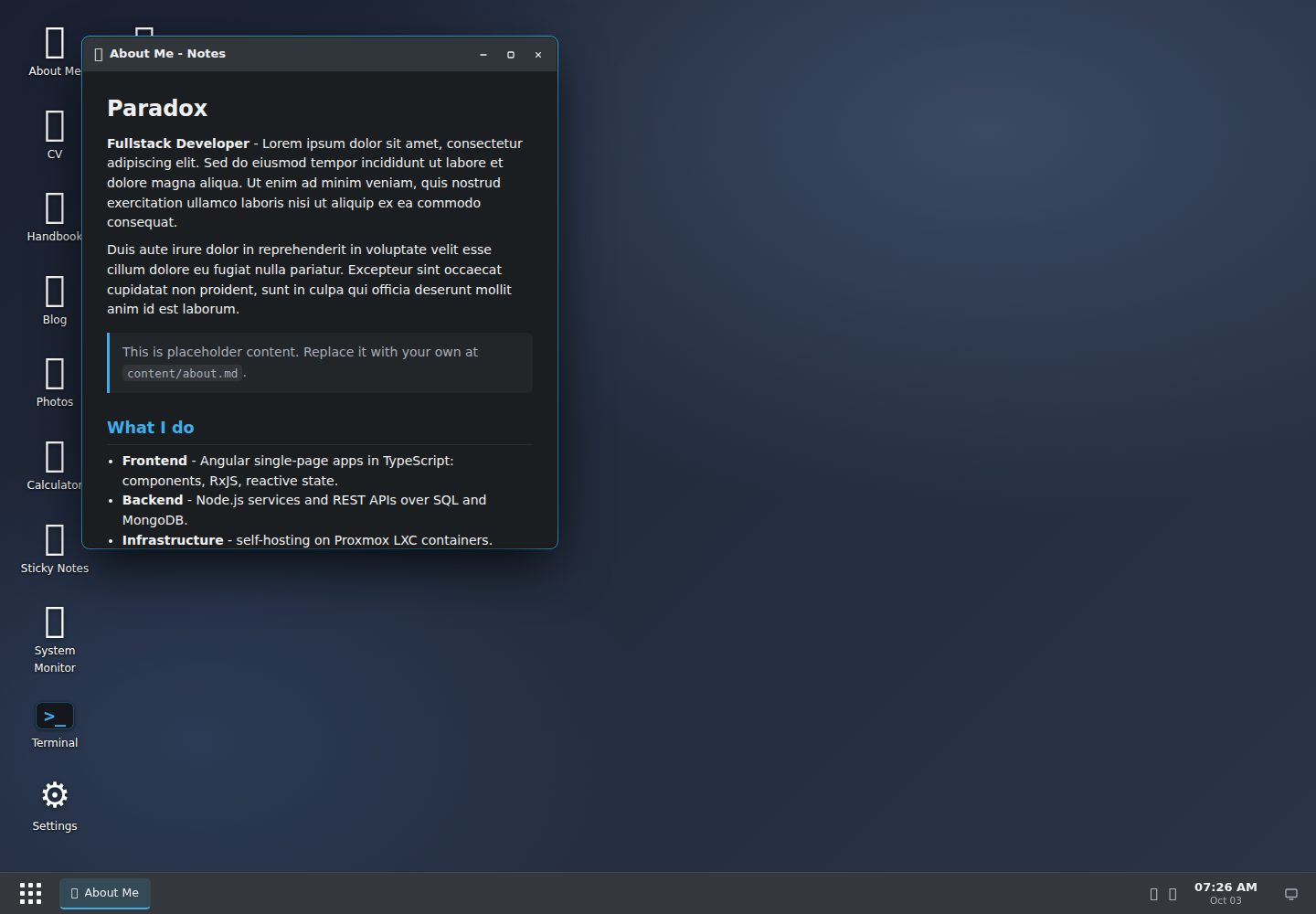
The desktop is generated from Markdown under content/ and data/desktop.yaml; new content appears automatically without modifying templates or writing code
HugoHTMLPortfolioTool Site
hugos-theme — Hugo Portfolio Template
By paradox-ng
hugOS is a theme that turns a Hugo site into a draggable "web desktop," where each content section corresponds to an app and pages open in movable, resizable windows, implemented with vanilla JavaScript and CSS.
Explore the design
Compare the page layouts and mobile experience. Open any screenshot for a closer look.
Desktop homepage
Desktop captureTop of page
Actual screenshot captured by the server browser.
One original preview is available. Open the full image to inspect the design.
Screenshots show visual appearance; interactive behavior may differ.
Recorded 2026-10-03View source
What stands out
A quick read of the recorded project description.
Windows support dragging, resizing, minimizing, maximizing, and edge-snapping tiling, with a taskbar and deep-linkable windows
Built-in terminal, browser, file explorer, searchable Wiki, gallery, settings panel, plus calculator, sticky notes, system monitor, trash, and other tools
Apps are added, removed, and ordered via YAML declarations; types include page, folder, wiki, gallery, web, and built-in tools
Uses a single vanilla JavaScript file and CSS custom properties with no framework dependencies; each window also renders as a crawlable normal Hugo page
The gallery supports image bundles, a lightbox, and automatic WebP thumbnails; thumbnail functionality requires Hugo Extended
Template Details
hugOS is a "web desktop" theme for Hugo: the entire desktop is generated from Markdown content under content/ and a data/desktop.yaml configuration file, with no hardcoded layout. New Markdown files automatically appear in windows, content sections can be declared as apps, and apps are added, removed, and ordered via YAML without modifying templates or writing code.
Windows support dragging, resizing, minimizing, maximizing, and edge-snapping tiling, and include a taskbar and deep-linkable windows. Built-in tools include a terminal (with commands such as help, ls, open, neofetch), a browser (which can embed sites and render GitHub profiles), a file explorer, a searchable Wiki/manual, a gallery with lightbox and WebP thumbnails, a settings panel (accent color, wallpaper, light/dark theme, persisted), plus a calculator, sticky notes, system monitor, and trash. App types include page, folder, wiki, gallery, web, and several built-in tools.
The theme is implemented as a single vanilla JavaScript file with no framework dependencies; styles are based on CSS custom properties, and the overall appearance is variable-driven. Each window also renders as a normal crawlable Hugo page, so the site remains accessible and indexable when JavaScript is disabled. WebP thumbnails for the gallery require Hugo Extended.
The theme is an experimental project made by the author for personal use and preference, with a clear subjective direction; it is not a general-purpose theme for all sites and is not a guaranteed maintained product. The repository contains lorem-ipsum placeholder content (about page, CV, blog, gallery, manual), all of which can be replaced; the example content in content/ and data/desktop.yaml is not a required part of the theme.
HugoHTMLPortfolioUtility site
Is it right for your project?
Use Cases
- Build a personal portfolio or homepage with a desktop metaphor in Hugo, turning about, blog, documentation, and gallery into openable windows
- Quickly convert existing Hugo content sections into a file explorer, searchable Wiki, or photo gallery without changing templates
- Add interactive built-in tools such as a terminal, browser, and settings panel to a site for display or demonstration
- Hugo sites that need content to remain accessible and indexable when JavaScript is disabled
Suitable For
- Individual site authors using Hugo who want to organize content as desktop windows
- Users who accept the theme's subjective style and are willing to configure it via data/desktop.yaml and content/
- Portfolio or documentation sites that need content-driven views such as a file explorer, Wiki, or gallery
- Developers who accept the experimental personal-project positioning and will evaluate and adjust it themselves
Getting started & customization
Use these recorded setup notes alongside the repository instructions for your chosen version.
- 1
Add the theme via Hugo module, git submodule, or by copying it to themes/hugos-theme/
- 2
Set theme = "hugos-theme" in hugo.toml, optionally specify an accent color with params.accent, and enable unsafe in markup.goldmark.renderer to allow raw HTML in Markdown
- 3
Define profile and apps in data/desktop.yaml; app entries can optionally use open: true to open the window automatically and menu: true to show it in the start menu
- 4
Add content under content/ following the directory structures for page, folder, wiki, and gallery, then run hugo server
- 5
WebP thumbnails for the gallery require Hugo Extended; third-party assets such as demo images, fonts, and icons must be checked separately under their respective licenses
License & source material
Usage conditions & limitations
Free to use · keep license noticeThis entry covers the free version in the public repository under the Unlicense; the free scope is the code of that version and does not mean external services or third-party assets are free.
Must comply with when using
- The code of this version may be freely copied, modified, published, used, compiled, sold, and distributed, including for commercial purposes.
- The author waives related copyright through a public-domain dedication; the legal effect of that dedication depends on the applicable jurisdiction.
- The code is provided as is; warranties and limitations of liability are governed by the original license and applicable law.
Additional costs & items to verify
- Demo images, fonts, icons, and other third-party assets must be checked under their respective licenses and cannot be judged solely by the code's Unlicense.
- External services such as domains, hosting, databases, payments, or AI may incur separate charges.
- The gallery's WebP thumbnail feature requires Hugo Extended; with standard Hugo, that thumbnail functionality is unavailable.
- The unsafe option for Goldmark must be enabled in hugo.toml to allow raw HTML in Markdown content; otherwise related rendering may be limited.
- The repository ships with lorem-ipsum placeholder demo content (about page, CV, blog, gallery, manual) that must be replaced with real content.
- The author explicitly states that this is a personal experimental project, not a guaranteed maintained product, and provides no warranty or ongoing maintenance commitment.
View Original Text Basis
for any purpose, commercial or non-commercial, and by any means
Original License Text
**Hugo** (Extended recommended - only the photo gallery's WebP thumbnails require it)
Original README
[markup.goldmark.renderer] unsafe = true # allow raw HTML in markdown content
Original README
This repository includes a full set of placeholder content (lorem-ipsum) so you can see every app working
Original README
https://github.com/paradox-ng/hugos-theme/blob/main/LICENSEhttps://github.com/paradox-ng/hugos-theme/blob/main/README.mdit's a personal project, shared openly, not a maintained product with guarantees.
Original README
Compiled by DeepSeek based on repository license and README ·2026-10-04. Results only cover the materials read; dependencies, images, fonts, and subsequent term changes are subject to their respective original texts.
Project checks & description sources
Template Information
- Source platforms
- GitHub
- Documentation and maintenance reference score
- More documented · 85 / 100
- Technologies
- Hugo · HTML
- Website type
- Portfolio · Tool Site
How this score is calculated
Our heuristic uses license records (up to 30), a demo link (12), a preview (10), stars (15), recorded maintenance (15), description completeness (8), feature records (5) and classification data (5). It is not a code, security or performance test, or a Google score. A link does not establish tested functionality.
What to verify for this project
- Repository update recorded
- 2026-06-05
- Screenshot last checked
- 2026-10-04
A demo link is listed. Check it with your own content and viewport sizes; its presence does not confirm that forms, authentication or payments work.
The catalog identifies Hugo as the primary stack. Check the actual dependency manifest and lockfile for versions and hosting requirements. These notes use recorded metadata, not a code audit or a deployment test.
Use a selection guide →How this description was prepared
AI-assisted description based on catalog records and repository material. Repository authors are not automatically the reviewers of this description.
Review declaration: [email protected] · 2026-10-04
Inspect the recorded source material
SHA-256: 1881be068cb4201c213a0ee70dd0751b0e1c0da6a2b7d7be28a10b092b32ea93
2026-10-04T07:37:12.260Z
Source file / repository# hugOS
**A "web desktop" theme for [Hugo](https://gohugo.io).**
hugOS turns a Hugo site into a small, draggable desktop environment. Each
section of your content becomes an **app**; pages, images and links open in
**movable, resizable windows**. It ships with a terminal, a web browser, a file
explorer, a photo gallery, a settings panel and a handful of small tools - all
driven by config and content, with no JavaScript framework and no build step
beyond Hugo itself.

## It's dynamic - the desktop grows with your content
There is no hard-coded layout. The entire desktop is generated from your
**markdown files** plus **one small YAML file** (`data/desktop.yaml`) - so it
grows and reshapes itself as you write:
- **Drop in a markdown file and it just appears** - a new note, a new blog post,
a new wiki page shows up in its window with **no template edits and no code**.
- **A content section *becomes* an app** - point an app at a section and it
renders as a folder of files, a searchable wiki, or a photo gallery, built
from whatever is inside it.
- **Apps are declared, not coded** - add, remove, or reorder them by editing a
few lines of YAML.
You write content the way you already do in Hugo, and the desktop builds itself
around it.
## Why this exists
This started as an experiment: I wanted to learn Hugo properly and see how far a
**custom theme** could be pushed without reaching for a framework. The "desktop
in the browser" idea was an excuse to explore Hugo's templating, data files,
image processing, and page bundles, and to write a self-contained window manager
in vanilla JavaScript.
It is shared in case it's useful or fun to someone else - but it was **built for
my own use and taste**. It is opinionated, a little playful, and not trying to be
a general-purpose theme for every site. If it fits your needs, wonderful; if not,
that's expected.
## Built on
- **Hugo** (Extended recommended - only the photo gallery's WebP thumbnails
require it) - templating, content model, image processing.
- **Vanilla JavaScript** - one file, no framework, no dependencies. Drag,
resize, snap-tiling, a taskbar, deep-linkable windows, a terminal, and more.
- **Modern CSS** - custom properties for theming; the whole look is variable-driven.
Every window also renders as a plain, crawlable Hugo page, so the site stays
accessible and indexable even with JavaScript turned off.
## Features
- 🪟 Draggable, **resizable** windows - minimize, maximize, **edge-snap tiling**
- 🧩 **Config-driven** - the entire desktop is described in `data/desktop.yaml`
- 📁 **File Explorer** - any content section becomes a folder of files
- 📖 **Handbook / Wiki** - a section rendered as a searchable documentation wiki
- 🖼️ **Gallery** - image bundles with a lightbox and auto WebP thumbnails
- 🖥️ **Terminal** - a small Unix-like shell (`help`, `ls`, `open`, `neofetch`, …)
- 🌐 **Browser** - frames embeddable sites, renders a live GitHub profile
- ⚙️ **Settings** - live accent colour, wallpaper, and dark / light theme (persisted)
- 📱 Mobile-friendly, themed scrollbars, reduced-motion aware
- 🕰️ A few **easter eggs** for the curious (try the clock → "time travel")
## Screenshots
Several windows open at once, with live theming from the Settings app:

The built-in **Handbook** (a searchable wiki) alongside the Unix-like **terminal**:

### Time travel 🕰️
Open the clock, pick a year, and the whole desktop re-skins itself - boot splash,
wallpaper, window chrome and all. It's a hidden easter egg; your content stays
exactly the same underneath.
| Windows 95 | Windows XP | Windows 7 (Aero) |
|:---:|:---:|:---:|
|  |  |  |
## Quick start
1. **Add the theme** (Hugo module, git submodule, or copy into `themes/hugos-theme/`).
2. **Configure** `hugo.toml`:
```toml
theme = "hugos-theme"
[params]
accent = "#3daee9" # desktop accent colour
[markup.goldmark.renderer]
unsafe = true # allow raw HTML in markdown content
```
3. **Describe the desktop** in `data/desktop.yaml`:
```yaml
profile:
name: "Paradox"
role: "Fullstack Developer"
initials: "P"
apps:
- { id: about, label: "About", icon: "📄", title: "About - Notes", type: page, source: "about", open: true }
- { id: handbook, label: "Handbook", icon: "📖", title: "Handbook - Wiki", type: wiki, source: "docs", menu: true }
- { id: blog, label: "Blog", icon: "📰", title: "Blog - Files", type: folder, source: "blog" }
- { id: photos, label: "Photos", icon: "🖼️", title: "Photos - Gallery", type: gallery, source: "photos", menu: true }
- { id: terminal, label: "Terminal", icon: ">_", title: "Terminal", type: terminal, menu: true }
- { id: settings, label: "Settings", icon: "⚙️", title: "Settings", type: settings, menu: true }
```
> Two optional per-app flags: **`open: true`** auto-opens the window on load;
> **`menu: true`** lists the app in the Start menu (without it the app is
> desktop-only).
4. **Add content** under `content/` and run `hugo server`.
The full documentation also lives in the theme itself: open the **Handbook** app
on the running site, or read the markdown in `content/docs/`.
## App types
| `type` | Opens |
|------------|--------------------------------------------|
| `page` | a single markdown page as a document |
| `folder` | a content section as a file manager |
| `wiki` | a content section as a searchable wiki |
| `gallery` | an image page-bundle as a photo gallery |
| `terminal` · `browser` · `settings` · `calculator` · `sticky` · `sysmon` · `trash` | built-in tools |
| `web` | a desktop shortcut that opens a URL |
See the **Handbook** for the complete reference, including content layout,
galleries, customization, SEO, and the easter eggs.
## Adding your content
You only ever edit two things: **`data/desktop.yaml`** (what apps exist) and
**`content/`** (what they open). No templates, no code.
Every app entry points its `source` at a piece of content. Here's how to add
each kind.
### A single page → `type: page`
```markdown
<!-- content/about.md -->
---
title: "About"
---
# Hi, I'm …
…your markdown…
```
```yaml
- { id: about, type: page, source: "about", label: "About", icon: "📄",
title: "About - Notes", open: true }
```
`source: "about"` resolves to `content/about.md`.
### A blog / folder of posts → `type: folder`
Drop markdown files into a section folder; each becomes a file in the window,
sorted newest-first by `date`.
```text
content/blog/
├── my-first-post.md
└── another-post.md
```
```yaml
- { id: blog, type: folder, source: "blog", label: "Blog", icon: "📰",
title: "Blog - File Explorer" }
```
Post front matter:
```yaml
---
title: "My first post"
date: 2024-05-01
tags: ["hello", "world"]
---
```
### A wiki / handbook → `type: wiki`
Same as a folder, but rendered as a searchable sidebar wiki. Order the pages
with a `weight` (lowest first) in each file's front matter.
```text
content/docs/
├── getting-started.md # weight: 10
└── advanced.md # weight: 20
```
```yaml
- { id: handbook, type: wiki, source: "docs", label: "Handbook", icon: "📖",
title: "Handbook - Wiki", menu: true }
```
### A photo gallery → `type: gallery`
Make a **page bundle**: a folder with an `index.md` and the images beside it.
```text
content/photos/
├── index.md
├── 01-sunrise.jpg
└── 02-coast.jpg
```
```yaml
- { id: photos, type: gallery, source: "photos", label: "Photos", icon: "🖼️",
title: "Photos - Gallery", menu: true }
```
Captions are derived from file names (`01-blue_hour.jpg` → "Blue Hour"); numeric
prefixes set the order. Raster images get WebP thumbnails (needs Hugo Extended);
SVGs are used as-is.
### Built-in tools & shortcuts
`terminal`, `browser`, `settings`, `calculator`, `sticky`, `sysmon` and `trash`
need no `source` - just give them an `id`, `label`, `icon`, `title`. A `web` app
is a shortcut that opens a URL in the browser:
```yaml
- { id: github, type: web, label: "GitHub", icon: "🐙",
url: "https://github.com/you" }
```
### Where everything lives
```text
my-site/
├── hugo.toml
├── data/
│ └── desktop.yaml # the whole desktop
└── content/
├── about.md # → page
├── blog/ # → folder
├── docs/ # → wiki
└── photos/ # → gallery (page bundle)
```
## Demo content
This repository includes a full set of placeholder content (lorem-ipsum) so you
can see every app working: an about page, a CV, a blog, a photo gallery, and the
Handbook. Replace it with your own - nothing in `content/` or
`data/desktop.yaml` is load-bearing for the theme.
## A note on the build
This theme was designed and built as an experiment, with substantial help from
**Claude Opus 4.8** (Anthropic) used as a pair-programming assistant. It was as
much about testing what that workflow could produce as it was about the theme
itself. Treat it accordingly: it's a personal project, shared openly, not a
maintained product with guarantees.
## Author
Made by **Paradox**.
- [GitHub](https://github.com/paradox-ng)
- [LinkedIn](https://www.linkedin.com/in/carles-romagosa/)
## License
[The Unlicense](LICENSE) - this is free and unencumbered software released into
the public domain. Do anything you want with it, with or without credit.
Explore similar templates
Compare previews and descriptions within the same stack and category.

hugo-PaperMod
A fast, clean, responsive Hugo theme for blogs and lightweight portfolios, with three layout modes (Regular, Home-Info, Profile), automatic and manual light/dark themes, Fuse.js client-side search, multilingual support, and built-in Open Graph, Twitter Cards, and Schema.org data.
Hugo · Portfolio

hugo-coder
hugo-coder is a minimalist Hugo blog theme maintained by luizdepra under the MIT license. It provides a clean, text-focused blog appearance, configuration documentation in the docs directory, and a complete exampleSite with hugo.toml.
Hugo · Blog

doks
Doks is a Hugo documentation theme in the Thulite ecosystem, built for long-form reading with a minimal responsive layout and documentation-optimized typography. It includes FlexSearch-powered configurable search, dark/light mode, code syntax highlighting, i18n, multi-version documentation management, and blog pages.
Hugo · Tool Site

Congo
Congo is a minimal Hugo content theme built on Tailwind CSS 3.0, designed for blogs, portfolios, and lightweight content sites. It offers multiple homepage layouts, customizable dark mode, multilingual support including RTL, and built-in client-side search, Mermaid, Chart.js, and KaTeX.
Hugo · Blog

toha
Toha is a Hugo theme for personal portfolios, featuring a minimalist, responsive design with configurable homepage sections such as about, experience timeline, and achievements gallery.
Hugo · Portfolio

hugo-profile
hugo-profile is a mobile-first Hugo theme for personal portfolios and blogs, with multilingual support, light/dark themes, categories and tags, Google Analytics, Disqus comments, and Formspree contact forms.
Hugo · Portfolio