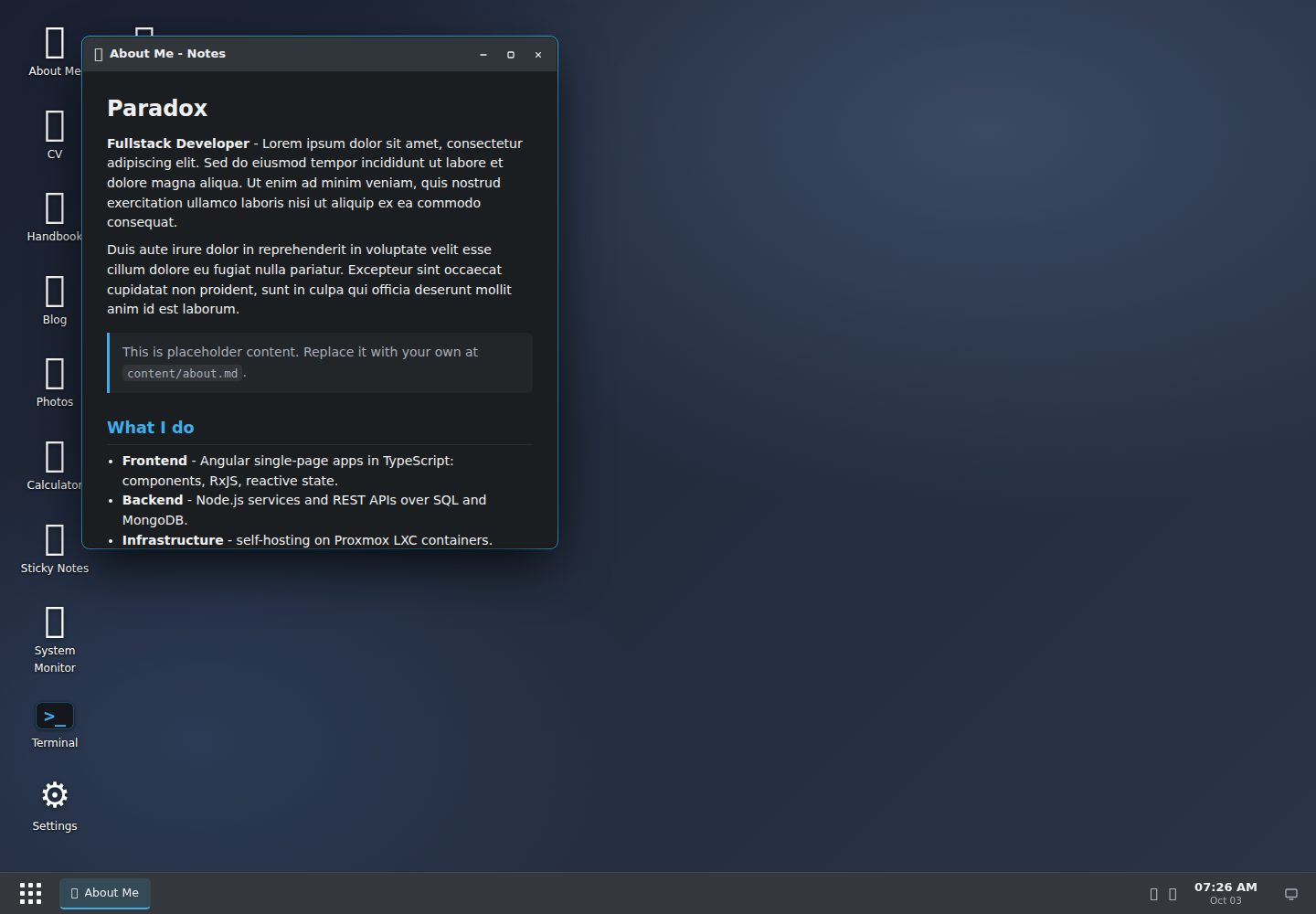
桌面由 content/ 下的 Markdown 与 data/desktop.yaml 生成,新增内容自动出现,无需改模板或写代码
HugoHTML作品集工具站
hugos-theme — Hugo 作品集模板
作者 paradox-ng
hugOS 是一个把 Hugo 站点变成可拖拽“网页桌面”的主题,每个内容分区对应一个应用,页面在可移动、可缩放的窗口中打开,使用原生 JavaScript 与 CSS 实现。
看看你的网站会是什么样
浏览真实页面截图,比较内容排版与手机效果。点击下方缩略图切换,放大查看整页细节。
目前有 1 张原始预览,可打开完整图片查看设计细节。
截图用于了解视觉与布局,交互效果请以实际项目为准。
采集于 2026-10-03查看来源
值得关注的模板亮点
从已有项目资料中,快速了解它的特点。
窗口支持拖拽、缩放、最小化、最大化与边缘吸附平铺,并带任务栏和可深链接窗口
内置终端、浏览器、文件浏览器、可搜索 Wiki、相册、设置面板及计算器、便签、系统监视、回收站等工具
应用通过 YAML 声明增删排序,类型包括 page、folder、wiki、gallery、web 与内置工具
使用原生 JavaScript 单文件与 CSS 自定义属性,无框架依赖;每个窗口同时渲染为可抓取的普通 Hugo 页面
相册支持图片包、灯箱与自动 WebP 缩略图,缩略图功能需要 Hugo Extended
模板详细介绍
hugOS 是面向 Hugo 的“网页桌面”主题:整个桌面由 content/ 下的 Markdown 内容和一个 data/desktop.yaml 配置文件生成,没有硬编码布局。新增 Markdown 文件会自动出现在窗口中,内容分区可被声明为应用,应用通过 YAML 增删和排序,不需要改模板或写代码。
窗口支持拖拽、缩放、最小化、最大化和边缘吸附平铺,并带有任务栏与可深链接的窗口。内置工具包括终端(help、ls、open、neofetch 等命令)、浏览器(可嵌入站点、渲染 GitHub 个人资料)、文件浏览器、可搜索的 Wiki/手册、带灯箱与 WebP 缩略图的相册、设置面板(强调色、壁纸、深浅主题,可持久化),以及计算器、便签、系统监视、回收站等。应用类型分为 page、folder、wiki、gallery、web 和若干内置工具。
主题使用原生 JavaScript 单文件实现,无框架依赖;样式基于 CSS 自定义属性,整体外观由变量驱动。每个窗口同时渲染为普通可抓取的 Hugo 页面,关闭 JavaScript 时站点仍可访问和索引。相册的 WebP 缩略图需要 Hugo Extended。
该主题是作者为个人使用和喜好而做的实验性项目,带有明确的主观取向,并非面向所有站点的通用主题,也不作为有保障的维护产品。仓库内含 lorem-ipsum 占位内容(关于页、CV、博客、相册、手册),可全部替换,content/ 与 data/desktop.yaml 中的示例内容不构成主题的必需部分。
HugoHTML作品集工具站
适合你的项目吗?
适用场景
- 用 Hugo 搭建带桌面隐喻的个人作品集或主页,把关于、博客、文档、相册分别做成可打开的窗口
- 把已有 Hugo 内容分区快速转成文件浏览器、可搜索 Wiki 或照片相册,而不改动模板
- 在站点中加入终端、浏览器、设置面板等交互式内置工具,用于展示或演示
- 需要关闭 JavaScript 后仍可访问和索引内容的 Hugo 站点
适合人群
- 使用 Hugo 并希望以桌面窗口形式组织内容的个人站点作者
- 接受主题主观风格、愿意按 data/desktop.yaml 与 content/ 自行配置的用户
- 需要文件浏览器、Wiki、相册等由内容驱动视图的作品集或文档类站点
- 能接受实验性个人项目定位、自行评估与调整的开发者
上手与定制指南
结合仓库当前版本的说明,按下面的资料检查内容、配置与运行要求。
- 1
通过 Hugo module、git submodule 或复制到 themes/hugos-theme/ 的方式添加主题
- 2
在 hugo.toml 中设置 theme = "hugos-theme",可选 params.accent 指定强调色,并在 markup.goldmark.renderer 中开启 unsafe 以允许 Markdown 中的原始 HTML
- 3
在 data/desktop.yaml 中定义 profile 与 apps,应用条目可选用 open: true 自动打开窗口、menu: true 显示在开始菜单
- 4
在 content/ 下按 page、folder、wiki、gallery 对应的目录结构添加内容,然后运行 hugo server
- 5
相册的 WebP 缩略图需要 Hugo Extended;演示图片、字体、图标等第三方素材需按各自许可单独核对
授权与来源资料
使用条件与限制
免费使用 · 保留许可声明本次收录的是公开仓库中采用 Unlicense 许可的免费版本;免费范围为该版本代码,不代表外部服务或第三方素材免费。
使用时需要遵守
- 允许免费复制、修改、发布、使用、编译、销售和分发该版本代码,包括商业用途。
- 作者通过公有领域贡献声明放弃相关版权;该声明的法律效果取决于适用司法辖区。
- 代码按现状提供;担保与责任限制以原许可证及适用法律为准。
额外费用与待核对事项
- 演示图片、字体、图标及其他第三方素材需按各自许可核对,不能仅凭代码的 Unlicense 许可判断。
- 域名、托管、数据库、支付或 AI 等外部服务可能另外收费。
- 相册的 WebP 缩略图功能需要 Hugo Extended 版本;使用标准版 Hugo 时该缩略图功能不可用。
- 需在 hugo.toml 中开启 Goldmark 的 unsafe 选项以允许 Markdown 内容中的原始 HTML,否则相关渲染可能受限。
- 仓库自带的是 lorem-ipsum 占位演示内容(关于页、CV、博客、相册、手册),需自行替换为真实内容。
- 作者明确说明这是个人实验项目,并非有保障的维护产品,不提供任何保证或持续维护承诺。
查看原文依据
for any purpose, commercial or non-commercial, and by any means
许可证原文
**Hugo** (Extended recommended - only the photo gallery's WebP thumbnails require it)
README 原文
[markup.goldmark.renderer] unsafe = true # allow raw HTML in markdown content
README 原文
This repository includes a full set of placeholder content (lorem-ipsum) so you can see every app working
README 原文
https://github.com/paradox-ng/hugos-theme/blob/main/LICENSEhttps://github.com/paradox-ng/hugos-theme/blob/main/README.mdit's a personal project, shared openly, not a maintained product with guarantees.
README 原文
DeepSeek 根据仓库许可证和 README 整理 ·2026-10-04。结果仅覆盖已读取资料,依赖、图片、字体及后续条款变更以各自原文为准。
项目核对记录与介绍依据
模板资料
- 来源平台
- GitHub
- 资料与维护参考分
- 资料较完整 · 85 / 100
- 技术栈
- Hugo · HTML
- 网站类型
- 作品集 · 工具站
这个分数如何计算
本站按许可资料(最高30分)、演示链接(12分)、预览图(10分)、Star数(15分)、记录的维护时间(15分)、描述完整度(8分)、功能记录(5分)和分类资料(5分)计算。它不是代码、安全或性能测试,也不是 Google 评分;有链接不代表已实测可用。
这个项目需要核对什么
- 记录的仓库更新时间
- 2026-06-05
- 截图检查日期
- 2026-10-04
已收录演示链接。请用你的内容与屏幕尺寸检查;有演示不代表表单、认证或支付已经可用。
目录记录的主要技术栈是 Hugo。请通过依赖清单和锁文件核对实际版本与托管要求。这些说明基于收录资料,不代表代码审计或部署实测。
查看具体选型方法 →介绍的制作与核对状态
介绍由 AI 辅助整理目录与仓库资料。仓库作者不等于这篇介绍的审核者。
审核声明: [email protected] · 2026-10-04
查看当时使用的来源资料
SHA-256: 1881be068cb4201c213a0ee70dd0751b0e1c0da6a2b7d7be28a10b092b32ea93
2026-10-04T07:37:12.260Z
来源文件 / 仓库# hugOS
**A "web desktop" theme for [Hugo](https://gohugo.io).**
hugOS turns a Hugo site into a small, draggable desktop environment. Each
section of your content becomes an **app**; pages, images and links open in
**movable, resizable windows**. It ships with a terminal, a web browser, a file
explorer, a photo gallery, a settings panel and a handful of small tools - all
driven by config and content, with no JavaScript framework and no build step
beyond Hugo itself.

## It's dynamic - the desktop grows with your content
There is no hard-coded layout. The entire desktop is generated from your
**markdown files** plus **one small YAML file** (`data/desktop.yaml`) - so it
grows and reshapes itself as you write:
- **Drop in a markdown file and it just appears** - a new note, a new blog post,
a new wiki page shows up in its window with **no template edits and no code**.
- **A content section *becomes* an app** - point an app at a section and it
renders as a folder of files, a searchable wiki, or a photo gallery, built
from whatever is inside it.
- **Apps are declared, not coded** - add, remove, or reorder them by editing a
few lines of YAML.
You write content the way you already do in Hugo, and the desktop builds itself
around it.
## Why this exists
This started as an experiment: I wanted to learn Hugo properly and see how far a
**custom theme** could be pushed without reaching for a framework. The "desktop
in the browser" idea was an excuse to explore Hugo's templating, data files,
image processing, and page bundles, and to write a self-contained window manager
in vanilla JavaScript.
It is shared in case it's useful or fun to someone else - but it was **built for
my own use and taste**. It is opinionated, a little playful, and not trying to be
a general-purpose theme for every site. If it fits your needs, wonderful; if not,
that's expected.
## Built on
- **Hugo** (Extended recommended - only the photo gallery's WebP thumbnails
require it) - templating, content model, image processing.
- **Vanilla JavaScript** - one file, no framework, no dependencies. Drag,
resize, snap-tiling, a taskbar, deep-linkable windows, a terminal, and more.
- **Modern CSS** - custom properties for theming; the whole look is variable-driven.
Every window also renders as a plain, crawlable Hugo page, so the site stays
accessible and indexable even with JavaScript turned off.
## Features
- 🪟 Draggable, **resizable** windows - minimize, maximize, **edge-snap tiling**
- 🧩 **Config-driven** - the entire desktop is described in `data/desktop.yaml`
- 📁 **File Explorer** - any content section becomes a folder of files
- 📖 **Handbook / Wiki** - a section rendered as a searchable documentation wiki
- 🖼️ **Gallery** - image bundles with a lightbox and auto WebP thumbnails
- 🖥️ **Terminal** - a small Unix-like shell (`help`, `ls`, `open`, `neofetch`, …)
- 🌐 **Browser** - frames embeddable sites, renders a live GitHub profile
- ⚙️ **Settings** - live accent colour, wallpaper, and dark / light theme (persisted)
- 📱 Mobile-friendly, themed scrollbars, reduced-motion aware
- 🕰️ A few **easter eggs** for the curious (try the clock → "time travel")
## Screenshots
Several windows open at once, with live theming from the Settings app:

The built-in **Handbook** (a searchable wiki) alongside the Unix-like **terminal**:

### Time travel 🕰️
Open the clock, pick a year, and the whole desktop re-skins itself - boot splash,
wallpaper, window chrome and all. It's a hidden easter egg; your content stays
exactly the same underneath.
| Windows 95 | Windows XP | Windows 7 (Aero) |
|:---:|:---:|:---:|
|  |  |  |
## Quick start
1. **Add the theme** (Hugo module, git submodule, or copy into `themes/hugos-theme/`).
2. **Configure** `hugo.toml`:
```toml
theme = "hugos-theme"
[params]
accent = "#3daee9" # desktop accent colour
[markup.goldmark.renderer]
unsafe = true # allow raw HTML in markdown content
```
3. **Describe the desktop** in `data/desktop.yaml`:
```yaml
profile:
name: "Paradox"
role: "Fullstack Developer"
initials: "P"
apps:
- { id: about, label: "About", icon: "📄", title: "About - Notes", type: page, source: "about", open: true }
- { id: handbook, label: "Handbook", icon: "📖", title: "Handbook - Wiki", type: wiki, source: "docs", menu: true }
- { id: blog, label: "Blog", icon: "📰", title: "Blog - Files", type: folder, source: "blog" }
- { id: photos, label: "Photos", icon: "🖼️", title: "Photos - Gallery", type: gallery, source: "photos", menu: true }
- { id: terminal, label: "Terminal", icon: ">_", title: "Terminal", type: terminal, menu: true }
- { id: settings, label: "Settings", icon: "⚙️", title: "Settings", type: settings, menu: true }
```
> Two optional per-app flags: **`open: true`** auto-opens the window on load;
> **`menu: true`** lists the app in the Start menu (without it the app is
> desktop-only).
4. **Add content** under `content/` and run `hugo server`.
The full documentation also lives in the theme itself: open the **Handbook** app
on the running site, or read the markdown in `content/docs/`.
## App types
| `type` | Opens |
|------------|--------------------------------------------|
| `page` | a single markdown page as a document |
| `folder` | a content section as a file manager |
| `wiki` | a content section as a searchable wiki |
| `gallery` | an image page-bundle as a photo gallery |
| `terminal` · `browser` · `settings` · `calculator` · `sticky` · `sysmon` · `trash` | built-in tools |
| `web` | a desktop shortcut that opens a URL |
See the **Handbook** for the complete reference, including content layout,
galleries, customization, SEO, and the easter eggs.
## Adding your content
You only ever edit two things: **`data/desktop.yaml`** (what apps exist) and
**`content/`** (what they open). No templates, no code.
Every app entry points its `source` at a piece of content. Here's how to add
each kind.
### A single page → `type: page`
```markdown
<!-- content/about.md -->
---
title: "About"
---
# Hi, I'm …
…your markdown…
```
```yaml
- { id: about, type: page, source: "about", label: "About", icon: "📄",
title: "About - Notes", open: true }
```
`source: "about"` resolves to `content/about.md`.
### A blog / folder of posts → `type: folder`
Drop markdown files into a section folder; each becomes a file in the window,
sorted newest-first by `date`.
```text
content/blog/
├── my-first-post.md
└── another-post.md
```
```yaml
- { id: blog, type: folder, source: "blog", label: "Blog", icon: "📰",
title: "Blog - File Explorer" }
```
Post front matter:
```yaml
---
title: "My first post"
date: 2024-05-01
tags: ["hello", "world"]
---
```
### A wiki / handbook → `type: wiki`
Same as a folder, but rendered as a searchable sidebar wiki. Order the pages
with a `weight` (lowest first) in each file's front matter.
```text
content/docs/
├── getting-started.md # weight: 10
└── advanced.md # weight: 20
```
```yaml
- { id: handbook, type: wiki, source: "docs", label: "Handbook", icon: "📖",
title: "Handbook - Wiki", menu: true }
```
### A photo gallery → `type: gallery`
Make a **page bundle**: a folder with an `index.md` and the images beside it.
```text
content/photos/
├── index.md
├── 01-sunrise.jpg
└── 02-coast.jpg
```
```yaml
- { id: photos, type: gallery, source: "photos", label: "Photos", icon: "🖼️",
title: "Photos - Gallery", menu: true }
```
Captions are derived from file names (`01-blue_hour.jpg` → "Blue Hour"); numeric
prefixes set the order. Raster images get WebP thumbnails (needs Hugo Extended);
SVGs are used as-is.
### Built-in tools & shortcuts
`terminal`, `browser`, `settings`, `calculator`, `sticky`, `sysmon` and `trash`
need no `source` - just give them an `id`, `label`, `icon`, `title`. A `web` app
is a shortcut that opens a URL in the browser:
```yaml
- { id: github, type: web, label: "GitHub", icon: "🐙",
url: "https://github.com/you" }
```
### Where everything lives
```text
my-site/
├── hugo.toml
├── data/
│ └── desktop.yaml # the whole desktop
└── content/
├── about.md # → page
├── blog/ # → folder
├── docs/ # → wiki
└── photos/ # → gallery (page bundle)
```
## Demo content
This repository includes a full set of placeholder content (lorem-ipsum) so you
can see every app working: an about page, a CV, a blog, a photo gallery, and the
Handbook. Replace it with your own - nothing in `content/` or
`data/desktop.yaml` is load-bearing for the theme.
## A note on the build
This theme was designed and built as an experiment, with substantial help from
**Claude Opus 4.8** (Anthropic) used as a pair-programming assistant. It was as
much about testing what that workflow could produce as it was about the theme
itself. Treat it accordingly: it's a personal project, shared openly, not a
maintained product with guarantees.
## Author
Made by **Paradox**.
- [GitHub](https://github.com/paradox-ng)
- [LinkedIn](https://www.linkedin.com/in/carles-romagosa/)
## License
[The Unlicense](LICENSE) - this is free and unencumbered software released into
the public domain. Do anything you want with it, with or without credit.
看看同类模板
对比同技术栈与用途的模板,找到更适合的视觉与内容结构。

hugo-PaperMod
PaperMod 是 Hugo 生态里知名度较高的主题之一,定位很明确:给博客和轻量作品集站点提供一套干净、响应式的阅读界面。
Hugo · 作品集

hugo-coder
A minimalist blog theme for hugo.
Hugo · 博客

doks
Doks 是 Thulite 生态下的文档主题,底层是 Hugo 静态站点生成器。 它把重点放在长文阅读体验上:极简且响应式的布局、为文档优化的排版,以及代码块语法高亮,整体更接近技术手册的形态,而不是通用营销页模板。
Hugo · 工具站

Congo
Congo 是一款为 Hugo 设计的现代内容主题,核心定位是让内容本身成为页面焦点。 它基于 Tailwind CSS 3.0 构建,整体布局完全响应式,视觉风格干净且克制,没有多余装饰。
Hugo · 博客

toha
Toha 是一款面向个人作品集场景的 Hugo 主题,以极简设计和响应式布局为核心,适合用来搭建个人主页、作品展示或技术博客。
Hugo · 作品集

hugo-profile
A highly customizable and mobile first Hugo template for personal portfolio and blog.
Hugo · 作品集