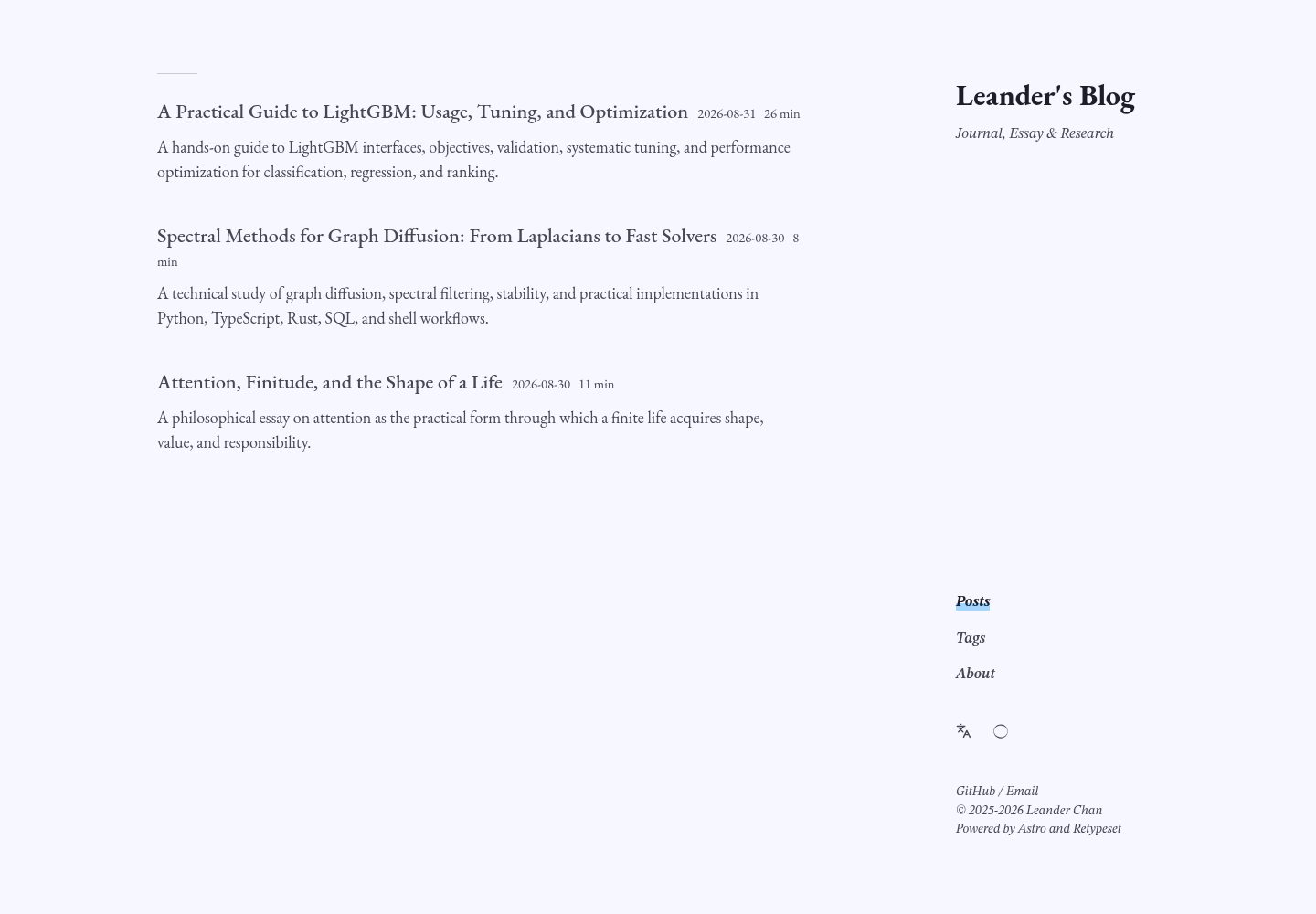
Typography-first: EB Garamond for Latin headings and optional body text, paired with CJK fallback fonts, with separate font sizes for body text, math, and code.
AstroBlog
astro-theme-pelagic — Astro Blog Template
By Parsnip77
Pelagic is a typography-first multilingual Astro blog theme for long-form writing, notes, and research, supporting Markdown/MDX, KaTeX, Mermaid, and multilingual content.
Explore the design
Compare the page layouts and mobile experience. Open any screenshot for a closer look.
Desktop homepage1 / 3
Desktop captureTop of page
Actual screenshot captured by the server browser.
All pages & views 3
Screenshots show visual appearance; interactive behavior may differ.
Recorded 2026-10-02View source
What stands out
A quick read of the recorded project description.
Long-form navigation: wide reading column, responsive two-level sidebar table of contents, corner navigation, scrollable tables and diagrams, and a focused mobile layout.
Writing and research in one interface: supports Markdown and MDX, KaTeX, Mermaid, syntax highlighting, callouts, collapsible sections, footnotes, and media embeds.
Multilingual and private by default: starter content in English and Simplified Chinese, interface translations for 11 languages, local fonts, no analytics scripts, and optional Giscus comments.
Static publishing support: outputs RSS/Atom, sitemaps, and Open Graph, infers GitHub Pages root and subpath configurations, and includes content validation, generated link checks, and responsive regression tests.
Template Details
Pelagic is an Astro-based blog theme positioned as a typography-first multilingual writing environment, suited to essays, notes, and research content. It continues Retypeset's restrained approach to typography and whitespace, but shifts focus from presenting a personal blog identity to depersonalized immersive reading: author-related modules are downplayed, and the article itself becomes the interface. The theme covers long-form humanities and social science arguments, multilingual texts and annotations, as well as formulas, code, tables, and diagrams in the natural sciences and computing. Article pages provide a dynamic sidebar table of contents that follows the reading position, making long-form navigation smoother. The public default content does not include the demo site's personal content.
At the content level, it supports Markdown and MDX, integrates KaTeX, Mermaid, syntax highlighting, callouts, collapsible sections, footnotes, and media embeds, and provides starter content in English and Simplified Chinese plus interface translations for 11 languages. No analytics scripts are included by default, and comments are optionally available via Giscus. On the publishing side, it outputs RSS/Atom, sitemaps, and Open Graph, and infers GitHub Pages root and subpath configurations.
The theme requires Node.js 22 or later and pnpm 11. Site identity, language, typography, layout, and links are centralized in src/config.ts; localized interface copy is in src/i18n/ui.ts; the About page and sample articles are in src/content/. Before publishing, run pnpm verify:release for validation.
AstroBlog
Is it right for your project?
Use Cases
- Writing long-form humanities and social science arguments, multilingual texts, and annotations.
- Publishing natural science or computing articles with formulas, code, tables, and diagrams.
- Maintaining a personal blog for essays, notes, or research records.
- Writing sites that need multilingual content and interface translations.
- Static blogs deployed to GitHub Pages.
Suitable For
- Writers who value typography and reading experience and focus on long-form content.
- Research or technical blogs that need Markdown/MDX and math or diagram rendering.
- Multilingual sites that want to maintain both English and Simplified Chinese content.
- Users who prefer static hosting and accept the GitHub Pages deployment workflow.
Getting started & customization
Use these recorded setup notes alongside the repository instructions for your chosen version.
- 1
Requires Node.js 22 or later and pnpm 11.
- 2
After cloning the repository, run pnpm install and pnpm dev; the local default address is http://localhost:4321.
- 3
Configure site identity, language, typography, layout, and links in src/config.ts; when site.i18nTitle is enabled, edit localized interface copy in src/i18n/ui.ts.
- 4
Replace the About page and sample articles under src/content/, and replace the favicon and social assets in public/ as needed.
- 5
Run pnpm verify:release before publishing; when deploying to GitHub Pages, select GitHub Actions as the source in the repository's Settings → Pages.
License & source material
Usage conditions & limitations
Free to use · keep license noticeThis entry covers the free version under the MIT license in the public repository; the free scope is the code of that version and does not mean external services or third-party assets are free.
Must comply with when using
- You may use, modify, commercially use, and distribute the code of this version for free.
- When distributing copies or substantial portions of the code, retain the original author's copyright notice and the full MIT license notice.
- The code is provided as is; warranties and limitations of liability are governed by the original license and applicable law.
Additional costs & items to verify
- Fonts bundled with the project and the base parts of the Giscus theme retain their own original licenses; using or redistributing these third-party resources requires complying with their respective license terms, not only MIT.
- The comment feature is optional; enabling Giscus depends on external services such as GitHub Discussions and requires corresponding configuration, making it an external service dependency.
- When deploying with a custom domain, you need to configure the repository variable SITE_URL and the public/CNAME file, which are additional configuration requirements in the deployment step.
- Demo images, fonts, icons, and other third-party assets must be checked against their respective licenses and cannot be judged solely by the code's MIT license.
- External services such as domains, hosting, databases, payments, or AI may incur additional charges.
View Original Text Basis
Permission is hereby granted, free of charge
Original License Text
Bundled fonts and the Giscus theme base keep their respective licenses.
Original README
optional Giscus comments
Original README
https://github.com/Parsnip77/astro-theme-pelagic/blob/main/LICENSEhttps://github.com/Parsnip77/astro-theme-pelagic/blob/main/README.mdCustom domains use the `SITE_URL` repository variable and `public/CNAME`.
Original README
Compiled by DeepSeek based on repository license and README ·2026-10-02. Results only cover the materials read; dependencies, images, fonts, and subsequent term changes are subject to their respective original texts.
Project checks & description sources
Template Information
- Source platforms
- GitHub
- Documentation and maintenance reference score
- More documented · 83 / 100
- Technologies
- Astro
- Website type
- Blog
How this score is calculated
Our heuristic uses license records (up to 30), a demo link (12), a preview (10), stars (15), recorded maintenance (15), description completeness (8), feature records (5) and classification data (5). It is not a code, security or performance test, or a Google score. A link does not establish tested functionality.
What to verify for this project
- Repository update recorded
- 2026-09-06
- Screenshot last checked
- 2026-10-02
A demo link is listed. Check it with your own content and viewport sizes; its presence does not confirm that forms, authentication or payments work.
The catalog identifies Astro as the primary stack. Check the actual dependency manifest and lockfile for versions and hosting requirements. These notes use recorded metadata, not a code audit or a deployment test.
Use a selection guide →How this description was prepared
AI-assisted description based on catalog records and repository material. Repository authors are not automatically the reviewers of this description.
Automatically checked against source and license rules; no manual editorial review.
Inspect the recorded source material
SHA-256: 9cea3a876ea14963775a3710bd9c642f880e9647f89c6307eb82147ac37aec34
2026-10-02T21:01:51.110Z
Source file / repository<p align="center">
<img src="public/icons/pelagic-mark.svg" width="88" alt="Pelagic wave mark">
</p>
<h1 align="center">Pelagic</h1>
<p align="center">
A typography-first, multilingual Astro blog theme for essays, notes, and research.
</p>
<p align="center">
<a href="README.md">English</a> · <a href="README.zh-CN.md">简体中文</a> · <a href="https://leanderc.com">Live demo</a>
</p>
<p align="center">
<a href="https://github.com/Parsnip77/astro-theme-pelagic/actions/workflows/verify.yml"><img alt="Verification status" src="https://github.com/Parsnip77/astro-theme-pelagic/actions/workflows/verify.yml/badge.svg"></a>
<a href="https://astro.build/"><img alt="Astro 6" src="https://img.shields.io/badge/Astro-6-BC52EE?logo=astro&logoColor=white"></a>
<a href="LICENSE"><img alt="MIT license" src="https://img.shields.io/badge/License-MIT-3B82F6"></a>
</p>

## Design approach
Pelagic carries forward [Retypeset](https://github.com/radishzzz/astro-theme-retypeset)'s restraint in typography and whitespace, but shifts the focus from presenting a personal blog identity to creating a depersonalized, immersive reading environment. Author-centered modules recede so that the article itself becomes the interface; the same typographic system can accommodate long-form argument, multilingual text, and annotations in the humanities and social sciences, as well as formulas, code, tables, and diagrams in the natural sciences and computer science. On article pages, the dynamic margin table of contents follows the reader's position and expands subordinate headings when needed, making long texts easier to navigate and revisit without interrupting the reading flow. The public defaults contain no personal content from the [live design](https://leanderc.com).
## Highlights
- **Purposeful typography:** EB Garamond Latin titles and optional prose, balanced CJK fallbacks, and independent sizing for body text, math, and code.
- **Long-form navigation:** a wide reading column, responsive two-level margin TOC, compact corner navigation, scrollable tables and diagrams, and a focused mobile layout.
- **One surface for essays and research:** Markdown and MDX, KaTeX, Mermaid, syntax highlighting, callouts, folds, footnotes, and media embeds.
- **Multilingual and private by default:** English and Simplified Chinese starter content, interface translations for 11 locales, local fonts, no analytics, and optional Giscus comments.
- **Static publishing with safeguards:** RSS/Atom, sitemap and Open Graph output, GitHub Pages root/subpath inference, content validation, generated-link checks, and responsive regression tests.

## Quick start
Requirements: Node.js 22 or newer and pnpm 11.
```bash
git clone https://github.com/Parsnip77/astro-theme-pelagic.git my-blog
cd my-blog
pnpm install
pnpm dev
```
Open `http://localhost:4321`. Before publishing:
1. Edit identity, languages, typography, layout, and links in `src/config.ts`.
2. Edit localized site text in `src/i18n/ui.ts` when `site.i18nTitle` is enabled.
3. Replace the About pages and sample posts under `src/content/`.
4. Replace the favicon and social assets in `public/` if desired.
5. Run `pnpm verify:release`.
## Write a post
```bash
pnpm new-post my-first-post
```
This creates a draft in `src/content/posts/`. A published post needs a description, language, and stable `abbrlink`.
```yaml
---
title: My First Post
published: 2026-01-20
description: A concise summary for lists, feeds, and search metadata.
tags:
- Notes
draft: false
toc: true
bodyFont: garamond
bodyFontSize: 18
bodyAuxFontSize: 16
lang: en
abbrlink: my-first-post
---
```
Translations share the same `abbrlink` and use different `lang` values. Pelagic only links translations that actually exist.
## Configuration at a glance
Most owner-facing settings live in one file:
```ts
export const themeConfig = {
site: { title: 'Pelagic', author: 'Your Name', i18nTitle: true },
locale: { default: 'en', additional: ['zh'] },
typography: { postBodyFont: 'garamond' },
layout: { articleWidth: '50rem', tocWidth: '16rem' },
comments: { enabled: false },
}
```
See the [configuration reference](docs/configuration.md) for every setting and the [content guide](docs/content.md) for supported Markdown syntax.
## Deploy to GitHub Pages
The included workflow builds and deploys every push to `main`.
1. Push the repository to GitHub.
2. Open **Settings → Pages**.
3. Choose **GitHub Actions** as the source.
4. Push again or run **Deploy to GitHub Pages** manually.
Pelagic automatically distinguishes `<owner>.github.io` from a project repository such as `my-blog`. Custom domains use the `SITE_URL` repository variable and `public/CNAME`. Follow the [deployment guide](docs/deployment.md) for exact scenarios.
## Verification
```bash
pnpm check # Astro and TypeScript diagnostics
pnpm build # production build and generated-link validation
pnpm verify # lint, config/docs checks, build, responsive browser tests
pnpm verify:release # verify plus a GitHub project-subpath build
```
The CI suite checks content metadata and route stability, documentation references, root and subpath builds, canonical/internal URLs, draft isolation, image alternative text, and responsive layouts at 390, 1280, 1440, and 1920 pixels. Read the [testing guide](docs/testing.md) for the complete matrix.
## Documentation
| English | 简体中文 |
| --- | --- |
| [Configuration](docs/configuration.md) | [配置参考](docs/zh-CN/configuration.md) |
| [Content authoring](docs/content.md) | [内容写作](docs/zh-CN/content.md) |
| [Deployment](docs/deployment.md) | [部署指南](docs/zh-CN/deployment.md) |
| [Testing](docs/testing.md) | [测试说明](docs/zh-CN/testing.md) |
| [Screenshot gallery](docs/showcase.md) | [截图与效果](docs/zh-CN/showcase.md) |
## Project structure
```text
src/config.ts Site, typography, layout, and feature settings
src/i18n/ Interface translations and locale routing
src/content/about/ Localized About pages
src/content/posts/ Markdown and MDX posts
src/components/ Astro UI components and widgets
src/styles/ Theme and typography styles
public/ Fonts, icons, feeds, and optional CNAME
scripts/ Authoring and validation utilities
tests/ Responsive layout regression tests
.github/workflows/ Verification and GitHub Pages deployment
```
## Credits and license
Pelagic is derived from [Retypeset](https://github.com/radishzzz/astro-theme-retypeset). Source code is available under the MIT License. Original Retypeset notices are retained, and Pelagic modifications are copyright © 2026 Parsnip77. Bundled fonts and the Giscus theme base keep their respective licenses.
See [LICENSE](LICENSE), [NOTICE.md](NOTICE.md), and [THIRD_PARTY_LICENSES.md](THIRD_PARTY_LICENSES.md).
Explore similar templates
Compare previews and descriptions within the same stack and category.

astrowind
AstroWind is a free, open-source Astro starter theme using Astro and Tailwind CSS, released under the MIT license.
Astro · Blog

astro-paper
AstroPaper is a minimal, responsive, accessible, and SEO-friendly Astro blog theme. Articles are stored as Markdown/MDX in src/content/posts/, with subdirectories affecting URLs.
Astro · Blog

fuwari
Fuwari is a static blog template built with Astro and Tailwind CSS for personal blogs. It manages posts as Markdown files in src/content/posts/, with frontmatter for title, date, description, cover, tags, categories, draft status, and language.
Astro · Blog

Firefly
Firefly is a clean personal blog theme forked from Astro and Fuwari, offering four background modes, single/double sidebar and list/grid layouts, Pagefind client-side full-text search, and a six-language UI.
Astro · Blog

astro-theme-cactus
Astro Cactus is an Astro-based blog and portfolio theme that uses Markdown/MDX content collections to manage posts, notes, and tags, with frontmatter type-checked by a schema.
Astro · Portfolio

astrofy
Astrofy is a free and open-source personal portfolio website template built with Astro and TailwindCSS, with built-in blog, CV timeline, project showcase, store, and RSS feed modules.
Astro · Portfolio