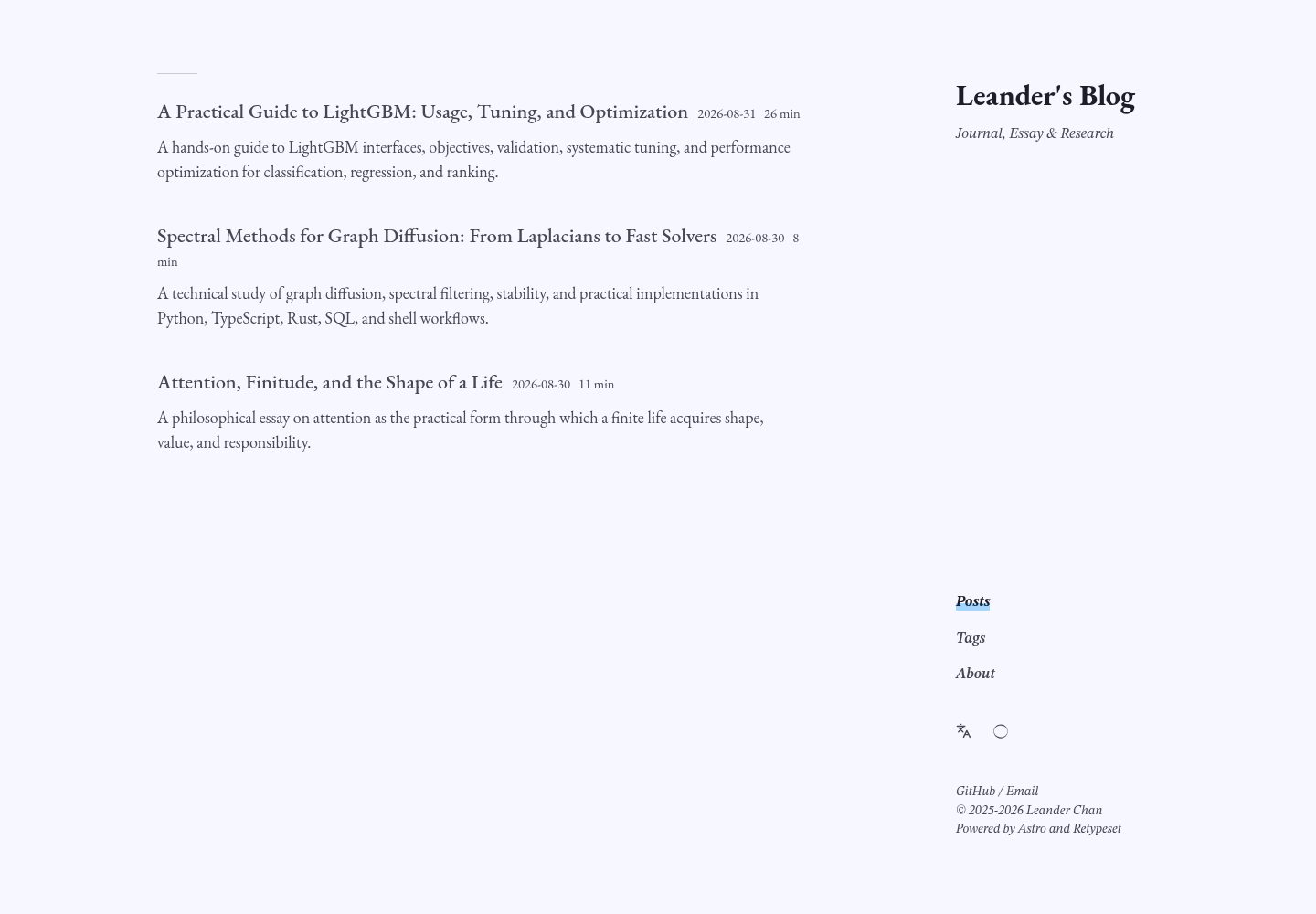
排版优先:EB Garamond 用于拉丁标题与可选正文,搭配 CJK 回退字体,正文、数学与代码分别设定字号。
Astro博客
astro-theme-pelagic — Astro 博客模板
作者 Parsnip77
Pelagic 是一个以排版为核心的多语言 Astro 博客主题,面向长文、笔记与研究写作,支持 Markdown/MDX、KaTeX、Mermaid 与多语言内容。
看看你的网站会是什么样
浏览真实页面截图,比较内容排版与手机效果。点击下方缩略图切换,放大查看整页细节。
全部页面与视图 3
截图用于了解视觉与布局,交互效果请以实际项目为准。
采集于 2026-10-02查看来源
值得关注的模板亮点
从已有项目资料中,快速了解它的特点。
长文导航:宽阅读栏、响应式两级边栏目录、角落导航、可滚动表格与图表,以及专注的移动端布局。
写作与科研同界面:支持 Markdown 与 MDX、KaTeX、Mermaid、语法高亮、callout、折叠、脚注与媒体嵌入。
多语言与默认私密:提供英文与简体中文起始内容、11 种语言界面翻译、本地字体、无分析脚本,评论可选 Giscus。
静态发布配套:输出 RSS/Atom、站点地图与 Open Graph,推断 GitHub Pages 根路径与子路径,并包含内容校验、生成链接检查与响应式回归测试。
模板详细介绍
Pelagic 是一个基于 Astro 的博客主题,定位为「排版优先」的多语言写作环境,适合随笔、笔记与研究类内容。它延续 Retypeset 在排版与留白上的克制风格,但把重心从展示个人博客身份转向去个人化的沉浸阅读:作者相关模块被弱化,文章本身成为界面。主题同时覆盖人文社科的长篇论述、多语言文本与注释,以及自然科学和计算机方向的公式、代码、表格与图表。文章页提供随阅读位置移动的动态边栏目录,长文导航更顺畅。公开默认内容不含演示站点的个人内容。
内容层面支持 Markdown 与 MDX,集成 KaTeX、Mermaid、语法高亮、callout、折叠、脚注与媒体嵌入,并提供英文与简体中文的起始内容以及 11 种语言界面翻译。默认不含分析脚本,评论可选 Giscus。发布侧提供 RSS/Atom、站点地图与 Open Graph 输出,并针对 GitHub Pages 的根路径与子路径做推断。
主题要求 Node.js 22 或更新版本与 pnpm 11。站点身份、语言、排版、布局与链接集中在 src/config.ts;本地化界面文案在 src/i18n/ui.ts;About 页面与示例文章位于 src/content/。发布前可运行 pnpm verify:release 做校验。
Astro博客
适合你的项目吗?
适用场景
- 撰写人文社科方向的长篇论述、多语言文本与注释。
- 发布含公式、代码、表格与图表的自然科学或计算机类文章。
- 维护个人随笔、笔记或研究记录类博客。
- 需要多语言内容与界面翻译的写作站点。
- 部署到 GitHub Pages 的静态博客。
适合人群
- 重视排版与阅读体验、以长文为主的写作者。
- 需要 Markdown/MDX 与数学、图表渲染的研究或技术博客。
- 希望同时维护英文与简体中文内容的多语言站点。
- 倾向静态托管并接受 GitHub Pages 部署流程的用户。
上手与定制指南
结合仓库当前版本的说明,按下面的资料检查内容、配置与运行要求。
- 1
环境要求 Node.js 22 或更新版本与 pnpm 11。
- 2
克隆仓库后执行 pnpm install 与 pnpm dev,本地默认地址为 http://localhost:4321。
- 3
在 src/config.ts 配置站点身份、语言、排版、布局与链接;启用 site.i18nTitle 时在 src/i18n/ui.ts 修改本地化界面文案。
- 4
替换 src/content/ 下的 About 页面与示例文章,按需替换 public/ 中的 favicon 与社交资源。
- 5
发布前运行 pnpm verify:release;部署到 GitHub Pages 时在仓库 Settings → Pages 选择 GitHub Actions 作为来源。
授权与来源资料
使用条件与限制
免费使用 · 保留许可声明本次收录的是公开仓库中采用 MIT 许可的免费版本;免费范围为该版本代码,不代表外部服务或第三方素材免费。
使用时需要遵守
- 允许免费使用、修改、商用和分发该版本代码。
- 分发代码副本或实质性部分时,保留原作者版权声明和完整 MIT 许可声明。
- 代码按现状提供;担保与责任限制以原许可证及适用法律为准。
额外费用与待核对事项
- 项目捆绑的字体与 Giscus 主题基础部分保留各自原有许可证,使用或再分发这些第三方资源时须遵守其各自许可条款,而非仅遵循 MIT。
- 评论功能为可选项,启用 Giscus 需依赖 GitHub Discussions 等外部服务并完成相应配置,属于外部服务依赖。
- 使用自定义域名部署时需配置仓库变量 SITE_URL 与 public/CNAME 文件,属于部署环节的额外配置要求。
- 演示图片、字体、图标及其他第三方素材需按各自许可核对,不能仅凭代码的 MIT 许可判断。
- 域名、托管、数据库、支付或 AI 等外部服务可能另外收费。
查看原文依据
Permission is hereby granted, free of charge
许可证原文
Bundled fonts and the Giscus theme base keep their respective licenses.
README 原文
optional Giscus comments
README 原文
https://github.com/Parsnip77/astro-theme-pelagic/blob/main/LICENSEhttps://github.com/Parsnip77/astro-theme-pelagic/blob/main/README.mdCustom domains use the `SITE_URL` repository variable and `public/CNAME`.
README 原文
DeepSeek 根据仓库许可证和 README 整理 ·2026-10-02。结果仅覆盖已读取资料,依赖、图片、字体及后续条款变更以各自原文为准。
项目核对记录与介绍依据
模板资料
- 来源平台
- GitHub
- 资料与维护参考分
- 资料较完整 · 83 / 100
- 技术栈
- Astro
- 网站类型
- 博客
这个分数如何计算
本站按许可资料(最高30分)、演示链接(12分)、预览图(10分)、Star数(15分)、记录的维护时间(15分)、描述完整度(8分)、功能记录(5分)和分类资料(5分)计算。它不是代码、安全或性能测试,也不是 Google 评分;有链接不代表已实测可用。
这个项目需要核对什么
- 记录的仓库更新时间
- 2026-09-06
- 截图检查日期
- 2026-10-02
已收录演示链接。请用你的内容与屏幕尺寸检查;有演示不代表表单、认证或支付已经可用。
目录记录的主要技术栈是 Astro。请通过依赖清单和锁文件核对实际版本与托管要求。这些说明基于收录资料,不代表代码审计或部署实测。
查看具体选型方法 →介绍的制作与核对状态
介绍由 AI 辅助整理目录与仓库资料。仓库作者不等于这篇介绍的审核者。
已完成服务器许可规则与 AI 来源核对;未经过人工编辑审核。
查看当时使用的来源资料
SHA-256: 9cea3a876ea14963775a3710bd9c642f880e9647f89c6307eb82147ac37aec34
2026-10-02T21:01:51.110Z
来源文件 / 仓库<p align="center">
<img src="public/icons/pelagic-mark.svg" width="88" alt="Pelagic wave mark">
</p>
<h1 align="center">Pelagic</h1>
<p align="center">
A typography-first, multilingual Astro blog theme for essays, notes, and research.
</p>
<p align="center">
<a href="README.md">English</a> · <a href="README.zh-CN.md">简体中文</a> · <a href="https://leanderc.com">Live demo</a>
</p>
<p align="center">
<a href="https://github.com/Parsnip77/astro-theme-pelagic/actions/workflows/verify.yml"><img alt="Verification status" src="https://github.com/Parsnip77/astro-theme-pelagic/actions/workflows/verify.yml/badge.svg"></a>
<a href="https://astro.build/"><img alt="Astro 6" src="https://img.shields.io/badge/Astro-6-BC52EE?logo=astro&logoColor=white"></a>
<a href="LICENSE"><img alt="MIT license" src="https://img.shields.io/badge/License-MIT-3B82F6"></a>
</p>

## Design approach
Pelagic carries forward [Retypeset](https://github.com/radishzzz/astro-theme-retypeset)'s restraint in typography and whitespace, but shifts the focus from presenting a personal blog identity to creating a depersonalized, immersive reading environment. Author-centered modules recede so that the article itself becomes the interface; the same typographic system can accommodate long-form argument, multilingual text, and annotations in the humanities and social sciences, as well as formulas, code, tables, and diagrams in the natural sciences and computer science. On article pages, the dynamic margin table of contents follows the reader's position and expands subordinate headings when needed, making long texts easier to navigate and revisit without interrupting the reading flow. The public defaults contain no personal content from the [live design](https://leanderc.com).
## Highlights
- **Purposeful typography:** EB Garamond Latin titles and optional prose, balanced CJK fallbacks, and independent sizing for body text, math, and code.
- **Long-form navigation:** a wide reading column, responsive two-level margin TOC, compact corner navigation, scrollable tables and diagrams, and a focused mobile layout.
- **One surface for essays and research:** Markdown and MDX, KaTeX, Mermaid, syntax highlighting, callouts, folds, footnotes, and media embeds.
- **Multilingual and private by default:** English and Simplified Chinese starter content, interface translations for 11 locales, local fonts, no analytics, and optional Giscus comments.
- **Static publishing with safeguards:** RSS/Atom, sitemap and Open Graph output, GitHub Pages root/subpath inference, content validation, generated-link checks, and responsive regression tests.

## Quick start
Requirements: Node.js 22 or newer and pnpm 11.
```bash
git clone https://github.com/Parsnip77/astro-theme-pelagic.git my-blog
cd my-blog
pnpm install
pnpm dev
```
Open `http://localhost:4321`. Before publishing:
1. Edit identity, languages, typography, layout, and links in `src/config.ts`.
2. Edit localized site text in `src/i18n/ui.ts` when `site.i18nTitle` is enabled.
3. Replace the About pages and sample posts under `src/content/`.
4. Replace the favicon and social assets in `public/` if desired.
5. Run `pnpm verify:release`.
## Write a post
```bash
pnpm new-post my-first-post
```
This creates a draft in `src/content/posts/`. A published post needs a description, language, and stable `abbrlink`.
```yaml
---
title: My First Post
published: 2026-01-20
description: A concise summary for lists, feeds, and search metadata.
tags:
- Notes
draft: false
toc: true
bodyFont: garamond
bodyFontSize: 18
bodyAuxFontSize: 16
lang: en
abbrlink: my-first-post
---
```
Translations share the same `abbrlink` and use different `lang` values. Pelagic only links translations that actually exist.
## Configuration at a glance
Most owner-facing settings live in one file:
```ts
export const themeConfig = {
site: { title: 'Pelagic', author: 'Your Name', i18nTitle: true },
locale: { default: 'en', additional: ['zh'] },
typography: { postBodyFont: 'garamond' },
layout: { articleWidth: '50rem', tocWidth: '16rem' },
comments: { enabled: false },
}
```
See the [configuration reference](docs/configuration.md) for every setting and the [content guide](docs/content.md) for supported Markdown syntax.
## Deploy to GitHub Pages
The included workflow builds and deploys every push to `main`.
1. Push the repository to GitHub.
2. Open **Settings → Pages**.
3. Choose **GitHub Actions** as the source.
4. Push again or run **Deploy to GitHub Pages** manually.
Pelagic automatically distinguishes `<owner>.github.io` from a project repository such as `my-blog`. Custom domains use the `SITE_URL` repository variable and `public/CNAME`. Follow the [deployment guide](docs/deployment.md) for exact scenarios.
## Verification
```bash
pnpm check # Astro and TypeScript diagnostics
pnpm build # production build and generated-link validation
pnpm verify # lint, config/docs checks, build, responsive browser tests
pnpm verify:release # verify plus a GitHub project-subpath build
```
The CI suite checks content metadata and route stability, documentation references, root and subpath builds, canonical/internal URLs, draft isolation, image alternative text, and responsive layouts at 390, 1280, 1440, and 1920 pixels. Read the [testing guide](docs/testing.md) for the complete matrix.
## Documentation
| English | 简体中文 |
| --- | --- |
| [Configuration](docs/configuration.md) | [配置参考](docs/zh-CN/configuration.md) |
| [Content authoring](docs/content.md) | [内容写作](docs/zh-CN/content.md) |
| [Deployment](docs/deployment.md) | [部署指南](docs/zh-CN/deployment.md) |
| [Testing](docs/testing.md) | [测试说明](docs/zh-CN/testing.md) |
| [Screenshot gallery](docs/showcase.md) | [截图与效果](docs/zh-CN/showcase.md) |
## Project structure
```text
src/config.ts Site, typography, layout, and feature settings
src/i18n/ Interface translations and locale routing
src/content/about/ Localized About pages
src/content/posts/ Markdown and MDX posts
src/components/ Astro UI components and widgets
src/styles/ Theme and typography styles
public/ Fonts, icons, feeds, and optional CNAME
scripts/ Authoring and validation utilities
tests/ Responsive layout regression tests
.github/workflows/ Verification and GitHub Pages deployment
```
## Credits and license
Pelagic is derived from [Retypeset](https://github.com/radishzzz/astro-theme-retypeset). Source code is available under the MIT License. Original Retypeset notices are retained, and Pelagic modifications are copyright © 2026 Parsnip77. Bundled fonts and the Giscus theme base keep their respective licenses.
See [LICENSE](LICENSE), [NOTICE.md](NOTICE.md), and [THIRD_PARTY_LICENSES.md](THIRD_PARTY_LICENSES.md).
看看同类模板
对比同技术栈与用途的模板,找到更适合的视觉与内容结构。

astrowind
⭕️ AstroWind: A free template using Astro v7 and Tailwind CSS v4. Astro starter theme.
Astro · 博客

astro-paper
A minimal, accessible and SEO-friendly Astro blog theme.
Astro · 博客

fuwari
✨A static blog template built with Astro.
Astro · 博客

Firefly
Firefly 是一款基于 Astro 的静态博客主题,由 CuteLeaf 在 saicaca 的 Fuwari 模板基础上二次开发,主打清新美观的视觉风格。
Astro · 博客

astro-theme-cactus
A simple Astro theme. Use it to create your blog or website.
Astro · 作品集

astrofy
Astrofy is a free and open-source template for your Personal Portfolio Website built with Astro and TailwindCS…
Astro · 作品集