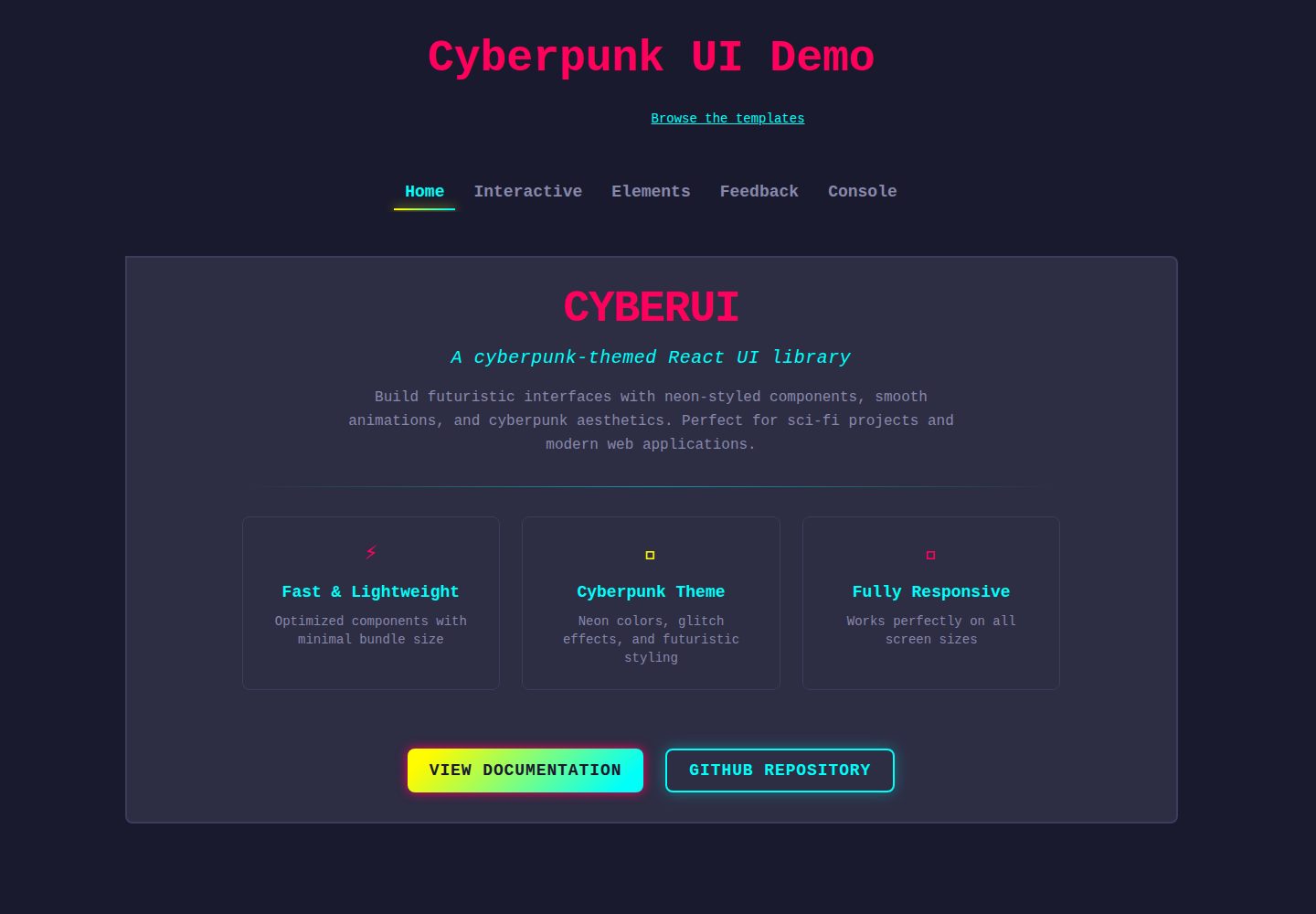
Provides 33 components covering forms, layout, feedback, progress, navigation, typography, display and media categories
ReactAdmin dashboardStarter
CyberUI — React Admin dashboard Template
By patrickkuei
CyberUI is a cyberpunk-style React UI component library offering neon-styled form, layout, feedback, progress, navigation, typography, display and media components, along with Storybook documentation, example templates and AI coding assistant configuration tooling.
Explore the design
Compare the page layouts and mobile experience. Open any screenshot for a closer look.
Desktop homepage1 / 2
Desktop captureTop of page
Actual screenshot captured by the server browser.
All pages & views 2
Screenshots show visual appearance; interactive behavior may differ.
Recorded 2026-10-09View source
What stands out
A quick read of the recorded project description.
Includes hooks such as useCyberScrollbar, useCyberNotifications, useAnimatedProgress and usePrefersReducedMotion, plus the CyberNotificationProvider context
Overrides the color palette via CSS tokens, which the README states remain stable across minor versions
All components accept a className prop merged via tailwind-merge, and a cn() utility function is exported
Ships with Storybook interactive documentation and an online demo
Provides the cyberui-2045 init command to generate usage guides for Claude Code, Gemini CLI, Cursor, GitHub Copilot and AGENTS.md
Template Details
CyberUI is a React UI library themed around cyberpunk visuals, published as cyberui-2045. The README states it provides neon-styled components with a futuristic look. The component list covers Forms (Button, Input, Toggle, Select, Checkbox, FormField, RadioGroup, Slider, Combobox, DatePicker), Layout (Card, Modal, Divider, Accordion, Drawer), Feedback (Notification, Badge, Skeleton, Tooltip), Progress (CircularProgress, SegmentedProgress, LinearProgress), Navigation (TabNavigation, Carousel, Steps, DropdownMenu, Pagination), Typography (GradientText, SectionTitle), Display (Timeline, Table) and Media (Image, Avatar). It also includes hooks such as useCyberScrollbar, useCyberNotifications, useAnimatedProgress and usePrefersReducedMotion, plus the CyberNotificationProvider context.
Usage involves installing, importing the stylesheet once, then importing components as needed. The README provides example code for Button, Card and CircularProgress. The project ships with Storybook interactive component documentation and an online demo, and links to two complete example apps in the cyberui-templates repository: AI Product Monitoring (showing request volume, latency percentiles, error rates and a real-time alert stream) and Agent Control Panel (showing conversations, task queues, live status and reasoning traces, including a human approval step).
For customization, CyberUI is described as a system with clear design opinions: layout, spacing and motion are fixed, while users can control the color palette. The README lists overridable CSS tokens (such as --color-primary, --color-secondary, --color-base, --color-surface and others) and states that these tokens remain stable across minor versions, while other CSS variables (shadows, gradients, animation values, --tw-*) are internal implementation details that may change. All components accept a className prop merged via tailwind-merge, and the library also exports a cn() utility function.
The README also includes init command instructions for AI coding assistants, which can generate or inline usage guides for Claude Code, Gemini CLI, Cursor, GitHub Copilot and AGENTS.md, and supports parameters such as --dry-run, --all and --inline. The repository additionally includes a CHANGELOG and development script documentation. The README does not provide performance data beyond the component count, a browser compatibility list, or production validation notes.
ReactAdminStarter
Is it right for your project?
Use Cases
- Building React interfaces with a cyberpunk or neon visual style
- Quickly assembling dashboards or control panels using components such as Card, CircularProgress and Button
- Referencing the AI Product Monitoring template in cyberui-templates to display request volume, latency, error rates and alerts
- Referencing the Agent Control Panel template in cyberui-templates to build interfaces for conversations, task queues, status and reasoning traces
- Changing the theme colors of an existing CyberUI app by overriding CSS color tokens
Suitable For
- Frontend projects using React that need a cyberpunk-style component library
- Developers who want to start new projects from ready-made example apps (monitoring, agent-panel)
- Teams that need to provide component library usage guidelines to AI coding assistants
- Users who accept fixed layout, spacing and motion and only need to customize the color palette
Getting started & customization
Use these recorded setup notes alongside the repository instructions for your chosen version.
- 1
Install via npm install cyberui-2045 and import 'cyberui-2045/styles.css' once at the app entry point
- 2
Create an app from a template with npx cyberui-2045 create <template> <dir>; this command requires network access and refuses non-empty directories, and --dry-run can preview the command
- 3
After installation, run npx cyberui-2045 init to generate usage guides for AI coding assistants, supporting parameters such as --claude, --gemini, --cursor, --copilot, --agents, --all, --inline and --dry-run
- 4
The README recommends committing the generated guide files to version control, to avoid imports failing if their directory is gitignored
- 5
To customize colors, override the color tokens under :root in global CSS after importing styles.css
License & source material
Usage conditions & limitations
Free to use · keep license noticeThis entry covers the free version under the MIT license in the public repository; the free scope is the code of that version and does not mean external services or third-party assets are free.
Must comply with when using
- Free use, modification, commercial use and distribution of that version's code are permitted.
- When distributing copies or substantial portions of the code, retain the original author's copyright notice and the full MIT license notice.
- The code is provided as-is; warranties and limitations of liability are governed by the original license and applicable law.
Additional costs & items to verify
- Demo images, fonts, icons and other third-party assets must be checked against their respective licenses; the code's MIT license alone cannot be used to judge them.
- External services such as domains, hosting, databases, payments or AI may incur separate charges.
- The create command requires network access (it internally calls npx tiged) and refuses directories that already contain files.
- It is recommended to commit the generated AI assistant guide files to version control; otherwise, if their directory is gitignored, imports may fail or the guides may be missing.
- CyberUI is a system with clear design opinions: layout, spacing and motion are fixed, and users can only customize the color palette.
- Only the listed color CSS tokens remain stable across minor versions; other CSS variables (shadows, gradients, animation values, --tw-*) are internal implementation details and may change.
View Original Text Basis
Permission is hereby granted, free of charge
Original License Text
`create` runs `npx tiged` for you, so it needs network access. It refuses a directory that already has files in it, and `--dry-run` prints the command without running it. The same thing by hand:
Original README
**Commit the generated guide file** (`.claude/cyberui.md`, `.gemini/cyberui.md`, `.cursor/rules/cyberui.mdc` or `.github/instructions/cyberui.instructions.md`). If its folder is gitignored, teammates and CI get a dangling import or no guide at all.
Original README
CyberUI is an opinionated design system. Layout, spacing, and motion are intentional and fixed. You own the **color palette**.
Original README
https://github.com/patrickkuei/CyberUI/blob/master/LICENSEhttps://github.com/patrickkuei/CyberUI/blob/master/README.mdThese tokens are **guaranteed stable** across minor versions. All other CSS variables (shadows, gradients, animation values, `--tw-*`) are internal and may change.
Original README
Compiled by DeepSeek based on repository license and README ·2026-10-09. Results only cover the materials read; dependencies, images, fonts, and subsequent term changes are subject to their respective original texts.
Project checks & description sources
Template Information
- Source platforms
- GitHub
- Documentation and maintenance reference score
- More documented · 92 / 100
- Technologies
- React
- Website type
- Admin dashboard · Starter
How this score is calculated
Our heuristic uses license records (up to 30), a demo link (12), a preview (10), stars (15), recorded maintenance (15), description completeness (8), feature records (5) and classification data (5). It is not a code, security or performance test, or a Google score. A link does not establish tested functionality.
What to verify for this project
- Repository update recorded
- 2026-10-09
- Screenshot last checked
- 2026-10-09
A demo link is listed. Check it with your own content and viewport sizes; its presence does not confirm that forms, authentication or payments work.
The catalog identifies React as the primary stack. Check the actual dependency manifest and lockfile for versions and hosting requirements. These notes use recorded metadata, not a code audit or a deployment test.
Use a selection guide →How this description was prepared
AI-assisted description based on catalog records and repository material. Repository authors are not automatically the reviewers of this description.
Review declaration: codex-user-requested-batch-review-20261017 · 2026-10-16
Inspect the recorded source material
SHA-256: 77dabf36f2101911845884bdda2c7c8523f32de4dce877ae4540034b1d64c626
2026-10-09T03:34:37.544Z
Source file / repository# CyberUI
A cyberpunk-themed React UI library with neon-styled components and futuristic aesthetics.
[](https://opensource.org/licenses/MIT)
## Demo & Documentation
<details>
<summary>Check out the Demo Video 🎬</summary>
<video src="https://github.com/user-attachments/assets/00d3de8d-d243-4ae0-80c4-e6b97b71c0f0">
</video>
</details>
- **[Live Demo & Storybook](https://patrickkuei.github.io/CyberUI)** — interactive component docs and examples
## Quick Start
```bash
npm install cyberui-2045
```
Import the stylesheet once in your app entry, then use any component:
```tsx
import 'cyberui-2045/styles.css';
import { Button, Card, CircularProgress } from 'cyberui-2045';
function App() {
return (
<Card>
<CircularProgress progress={75} radius={20}>
<span>75%</span>
</CircularProgress>
<Button variant="primary">Jack In</Button>
</Card>
);
}
```
## Templates
[cyberui-templates](https://github.com/patrickkuei/cyberui-templates) are complete example apps built with CyberUI that you can start a new app from.
| Template | What it is | Live preview |
|----------|------------|--------------|
| [AI Product Monitoring](https://github.com/patrickkuei/cyberui-templates/tree/main/packages/monitoring) (`monitoring`) | Request volume, latency percentiles, error rate, and a live alerts feed for an AI API. | [Open](https://patrickkuei.github.io/cyberui-templates/live/monitoring/) |
| [Agent Control Panel](https://github.com/patrickkuei/cyberui-templates/tree/main/packages/agent-panel) (`agent-panel`) | A conversation, task queue, live status and reasoning trace for an AI assistant, with a human approval step. | [Open](https://patrickkuei.github.io/cyberui-templates/live/agent-panel/) |
Start a **new** app from a template:
```bash
npx cyberui-2045 templates # list the templates, with live previews
npx cyberui-2045 create monitoring my-app # copy one into ./my-app (dir defaults to the template name)
cd my-app && npm install && npm run dev
```
`create` runs `npx tiged` for you, so it needs network access. It refuses a directory that already has files in it, and `--dry-run` prints the command without running it. The same thing by hand:
```bash
npx tiged patrickkuei/cyberui-templates/packages/<template-name> my-app
```
In an existing app, read a template's source for patterns instead of copying it in.
Browse all templates on the [templates site](https://patrickkuei.github.io/cyberui-templates/). The [repository](https://github.com/patrickkuei/cyberui-templates) has the current list as more templates are added.
## Components
<!-- cyberui-2045:manifest:start -->
| Component | Category | Docs |
|-----------|----------|------|
| Button | Forms | [→](https://patrickkuei.github.io/CyberUI/storybook/?path=/docs/components-button--docs) |
| Input | Forms | [→](https://patrickkuei.github.io/CyberUI/storybook/?path=/docs/components-input--docs) |
| Toggle | Forms | [→](https://patrickkuei.github.io/CyberUI/storybook/?path=/docs/components-toggle--docs) |
| Select | Forms | [→](https://patrickkuei.github.io/CyberUI/storybook/?path=/docs/components-select--docs) |
| Checkbox | Forms | [→](https://patrickkuei.github.io/CyberUI/storybook/?path=/docs/components-checkbox--docs) |
| FormField | Forms | [→](https://patrickkuei.github.io/CyberUI/storybook/?path=/docs/components-formfield--docs) |
| RadioGroup | Forms | [→](https://patrickkuei.github.io/CyberUI/storybook/?path=/docs/components-radiogroup--docs) |
| Slider | Forms | [→](https://patrickkuei.github.io/CyberUI/storybook/?path=/docs/components-slider--docs) |
| Combobox | Forms | [→](https://patrickkuei.github.io/CyberUI/storybook/?path=/docs/components-combobox--docs) |
| DatePicker | Forms | [→](https://patrickkuei.github.io/CyberUI/storybook/?path=/docs/components-datepicker--docs) |
| Card | Layout | [→](https://patrickkuei.github.io/CyberUI/storybook/?path=/docs/components-card--docs) |
| Modal | Layout | [→](https://patrickkuei.github.io/CyberUI/storybook/?path=/docs/components-modal--docs) |
| Divider | Layout | [→](https://patrickkuei.github.io/CyberUI/storybook/?path=/docs/components-divider--docs) |
| Accordion | Layout | [→](https://patrickkuei.github.io/CyberUI/storybook/?path=/docs/components-accordion--docs) |
| Drawer | Layout | [→](https://patrickkuei.github.io/CyberUI/storybook/?path=/docs/components-drawer--docs) |
| Notification | Feedback | [→](https://patrickkuei.github.io/CyberUI/storybook/?path=/docs/components-notification--docs) |
| Badge | Feedback | [→](https://patrickkuei.github.io/CyberUI/storybook/?path=/docs/components-badge--docs) |
| Skeleton | Feedback | [→](https://patrickkuei.github.io/CyberUI/storybook/?path=/docs/components-skeleton--docs) |
| Tooltip | Feedback | [→](https://patrickkuei.github.io/CyberUI/storybook/?path=/docs/components-tooltip--docs) |
| CircularProgress | Progress | [→](https://patrickkuei.github.io/CyberUI/storybook/?path=/docs/components-circularprogress--docs) |
| SegmentedProgress | Progress | [→](https://patrickkuei.github.io/CyberUI/storybook/?path=/docs/components-segmentedprogress--docs) |
| LinearProgress | Progress | [→](https://patrickkuei.github.io/CyberUI/storybook/?path=/docs/components-linearprogress--docs) |
| TabNavigation | Navigation | [→](https://patrickkuei.github.io/CyberUI/storybook/?path=/docs/components-tabnavigation--docs) |
| Carousel | Navigation | [→](https://patrickkuei.github.io/CyberUI/storybook/?path=/docs/components-carousel--docs) |
| Steps | Navigation | [→](https://patrickkuei.github.io/CyberUI/storybook/?path=/docs/components-steps--docs) |
| DropdownMenu | Navigation | [→](https://patrickkuei.github.io/CyberUI/storybook/?path=/docs/components-dropdownmenu--docs) |
| Pagination | Navigation | [→](https://patrickkuei.github.io/CyberUI/storybook/?path=/docs/components-pagination--docs) |
| GradientText | Typography | [→](https://patrickkuei.github.io/CyberUI/storybook/?path=/docs/components-gradienttext--docs) |
| SectionTitle | Typography | [→](https://patrickkuei.github.io/CyberUI/storybook/?path=/docs/components-sectiontitle--docs) |
| Timeline | Display | [→](https://patrickkuei.github.io/CyberUI/storybook/?path=/docs/components-timeline--docs) |
| Table | Display | [→](https://patrickkuei.github.io/CyberUI/storybook/?path=/docs/components-table--docs) |
| Image | Media | [→](https://patrickkuei.github.io/CyberUI/storybook/?path=/docs/components-image--docs) |
| Avatar | Media | [→](https://patrickkuei.github.io/CyberUI/storybook/?path=/docs/components-avatar--docs) |
Also includes hooks (`useCyberScrollbar`, `useCyberNotifications`, `useAnimatedProgress`, `usePrefersReducedMotion`) and `CyberNotificationProvider` context.
<!-- cyberui-2045:manifest:end -->
## AI Coding Setup
If you use an AI coding assistant (Claude Code, Gemini CLI, Cursor, GitHub Copilot, or any tool that reads the open `AGENTS.md` standard), run this once after installing:
```bash
npx cyberui-2045 init
```
It gives your assistant a concise CyberUI usage guide — components, hooks, tokens, and patterns — in the way each tool supports best. By default the guide goes in a file of its own, so your own instruction file stays short:
| Flag | Default: the guide's own file | With `--inline` |
|---|---|---|
| `--claude` | `.claude/cyberui.md`, imported from `CLAUDE.md` by one `@.claude/cyberui.md` line | pasted into `CLAUDE.md` |
| `--gemini` | `.gemini/cyberui.md`, imported from `GEMINI.md` by one `@./.gemini/cyberui.md` line | pasted into `GEMINI.md` |
| `--cursor` | `.cursor/rules/cyberui.mdc` (always applied) | pasted into `.cursorrules` |
| `--copilot` | `.github/instructions/cyberui.instructions.md` (applies to TS/JS/CSS files) | pasted into `.github/copilot-instructions.md` |
| `--agents` | pasted into `AGENTS.md` (the format has no alternative) | same |
```bash
npx cyberui-2045 init --claude --cursor # combine targets
npx cyberui-2045 init --all # all five
npx cyberui-2045 init --all --inline # paste the guide in everywhere instead
npx cyberui-2045 init --all --dry-run # show every file it would write; write nothing
```
With no flags, `init` asks which tools to set up, then "own file (recommended) or inline?". Where the guide is pasted in, it sits between `<!-- cyberui-2045:start -->` and `<!-- cyberui-2045:end -->` markers. Updating the guide changes only what is between them. Adding a new block trims trailing blank lines and spaces at the end of your file and puts one blank line before the block. For Claude Code, `CLAUDE.md` gets only this:
```md
<!-- cyberui-2045:start -->
@.claude/cyberui.md
<!-- cyberui-2045:end -->
```
Re-run `init` after upgrading: it rewrites only the guide file, and a file that is already up to date is left alone. If an older version pasted the guide into `CLAUDE.md` or `GEMINI.md`, that block becomes the import line; if it pasted it into `.cursorrules` or `.github/copilot-instructions.md`, the block is taken out of that file together with the blank line next to it (and, if the block was at the end, any trailing blank lines and spaces before it), the file is deleted only if nothing else was in it, and the new rule file takes over. `init` prints what it did to each file, and `--dry-run` shows the exact lines it would take out.
**Commit the generated guide file** (`.claude/cyberui.md`, `.gemini/cyberui.md`, `.cursor/rules/cyberui.mdc` or `.github/instructions/cyberui.instructions.md`). If its folder is gitignored, teammates and CI get a dangling import or no guide at all.
[docs/agent-instruction-files.md](https://github.com/patrickkuei/CyberUI/blob/master/docs/agent-instruction-files.md) explains what each tool supports, with links to its documentation.
## Customization
CyberUI is an opinionated design system. Layout, spacing, and motion are intentional and fixed. You own the **color palette**.
### CSS token overrides
Override in your global CSS after importing `cyberui-2045/styles.css`:
```css
:root {
--color-primary: #ff005d; /* neon pink */
--color-secondary: #00fff9; /* cyan */
--color-accent: #fffb00; /* yellow */
--color-success: #00ff9e; /* green */
--color-error: #ff4f4f; /* red */
--color-warning: #ffaa00; /* orange */
--color-base: #1a1a2e; /* page background */
--color-surface: #2d2d44; /* card / component surface */
--color-border-default: #3c3c5e; /* borders */
--color-default: #e0e0e0; /* primary text */
--color-muted: #8888aa; /* secondary text */
--color-inverse: #1a1a2e; /* inverted text */
}
```
These tokens are **guaranteed stable** across minor versions. All other CSS variables (shadows, gradients, animation values, `--tw-*`) are internal and may change.
Which components read which token (so you know what else changes when you re-theme one subtree), and the global rules `styles.css` applies to the page: [Design Tokens in Storybook](https://patrickkuei.github.io/CyberUI/storybook/?path=/docs/foundation-design-tokens--docs).
### className prop
All components accept a `className` prop, merged via [`tailwind-merge`](https://github.com/dcastil/tailwind-merge) — your classes win on conflict:
```tsx
<Button className="mt-8 w-full">Full width with margin</Button>
```
Use `className` for layout and spacing. Overriding color or variant classes is supported but visual coherence becomes your responsibility.
### cn() utility
CyberUI re-exports its `cn()` helper (clsx + tailwind-merge) for use in your own components:
```tsx
import { cn } from 'cyberui-2045';
<div className={cn('base-classes', isActive && 'active', userClassName)} />
```
## Changelog
See [CHANGELOG.md](./CHANGELOG.md) for the full history.
## Development
```bash
git clone https://github.com/patrickkuei/CyberUI.git
cd CyberUI
npm install
npm run dev # demo app
npm run storybook # Storybook on :6006
npm run test # unit + Storybook tests
npm run build # typecheck + bundle → dist/
```
## Contributing
Contributions are welcome! Please see [CONTRIBUTING.md](CONTRIBUTING.md).
## License
MIT — see [LICENSE](LICENSE) for details.
---
Made with ⚡ by [Patrick Yang](https://github.com/patrickkuei)
Explore similar templates
Compare previews and descriptions within the same stack and category.
ant-design-pro
Ant Design Pro is an enterprise-grade React admin scaffold built on React 19, Umi Max 4, and antd 6 with TypeScript.
React · Admin dashboard

react-boilerplate
A production-grade React + Redux starter for experienced developers, integrating Redux, redux-saga, styled-components, and react-router, with offline-first and PWA support, CLI code generation, and built-in testing and CI configuration. Requires Node.js v8.15.1 and npm v5 or higher; not suitable for beginners.
React · Starter

react-starter-kit
A full-stack React SaaS starter monorepo with a React application, an Astro marketing site, tRPC and Cloudflare Workers. Bun and Vite are part of its toolchain.
React · SaaS

coreui-free-react-admin-template
CoreUI's free React admin template, built on React and the CoreUI component library, provides dashboard layouts, sidebar navigation, routing, and example views. It includes .cursorrules, ARCHITECTURE.md, and DEVELOPMENT.md context files, plus JSDoc comments and PropTypes, to support AI-assisted development.
React · Admin dashboard

fastapi-react
A Cookiecutter template for FastAPI + React (TypeScript) full-stack projects, integrating PostgreSQL, SQLAlchemy, Alembic, Celery, Redis, JWT authentication, a react-admin admin panel, and a Docker Compose development environment with Nginx reverse proxy.
React · Admin dashboard

react-antd-admin-template
A React + Ant Design admin template for mid- and back-office products, with built-in login/logout, dynamic routing, permission checks, and user management.
React · Admin dashboard