提供 33 个组件,覆盖表单、布局、反馈、进度、导航、排版、展示和媒体类别
React后台启动器
CyberUI — React 后台模板
作者 patrickkuei
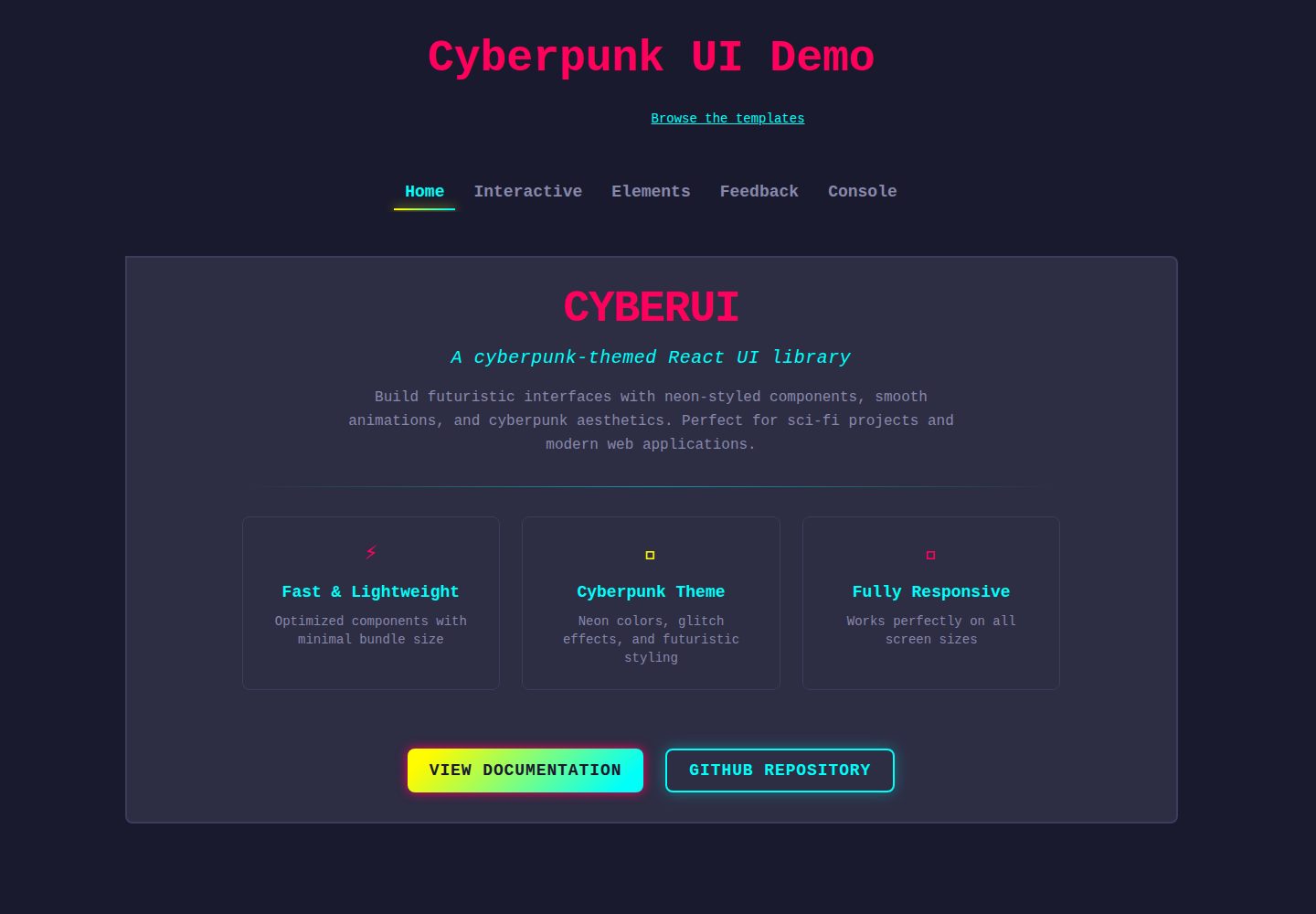
CyberUI 是一个赛博朋克风格的 React UI 组件库,提供霓虹风格的表单、布局、反馈、进度、导航、排版、展示和媒体组件,并附带 Storybook 文档、示例模板和 AI 编码助手配置工具。
看看你的网站会是什么样
浏览真实页面截图,比较内容排版与手机效果。点击下方缩略图切换,放大查看整页细节。
全部页面与视图 2
截图用于了解视觉与布局,交互效果请以实际项目为准。
采集于 2026-10-09查看来源
值得关注的模板亮点
从已有项目资料中,快速了解它的特点。
包含 useCyberScrollbar、useCyberNotifications、useAnimatedProgress、usePrefersReducedMotion 等 hooks 与 CyberNotificationProvider 上下文
通过 CSS 令牌覆盖颜色调色板,README 声明这些令牌在次要版本间保持稳定
所有组件接受 className 属性,经 tailwind-merge 合并,并导出 cn() 工具函数
附带 Storybook 交互式文档与在线演示
提供 cyberui-2045 init 命令,为 Claude Code、Gemini CLI、Cursor、GitHub Copilot 和 AGENTS.md 生成使用指南
模板详细介绍
CyberUI 是一个以赛博朋克视觉为主题的 React UI 库,包名为 cyberui-2045。README 说明其提供霓虹风格组件与未来感外观,组件清单覆盖 Forms(Button、Input、Toggle、Select、Checkbox、FormField、RadioGroup、Slider、Combobox、DatePicker)、Layout(Card、Modal、Divider、Accordion、Drawer)、Feedback(Notification、Badge、Skeleton、Tooltip)、Progress(CircularProgress、SegmentedProgress、LinearProgress)、Navigation(TabNavigation、Carousel、Steps、DropdownMenu、Pagination)、Typography(GradientText、SectionTitle)、Display(Timeline、Table)和 Media(Image、Avatar),另含 useCyberScrollbar、useCyberNotifications、useAnimatedProgress、usePrefersReducedMotion 等 hooks 与 CyberNotificationProvider 上下文。
使用方式为安装后导入一次样式表,再按需引入组件。README 提供了 Button、Card、CircularProgress 的示例代码。项目附带 Storybook 交互式组件文档与在线演示,并链接到 cyberui-templates 仓库中的两个完整示例应用:AI Product Monitoring(展示请求量、延迟分位数、错误率和实时告警流)与 Agent Control Panel(展示对话、任务队列、实时状态与推理轨迹,并包含人工审批步骤)。
定制方面,CyberUI 被描述为有明确设计主张的系统,布局、间距和动效固定,用户可控制颜色调色板。README 列出可覆盖的 CSS 令牌(如 --color-primary、--color-secondary、--color-base、--color-surface 等),并说明这些令牌在次要版本间保持稳定,其余 CSS 变量(阴影、渐变、动画值、--tw-*)为内部实现可能变化。所有组件接受 className 属性并通过 tailwind-merge 合并,库还导出 cn() 工具函数。
README 还包含面向 AI 编码助手的 init 命令说明,可为 Claude Code、Gemini CLI、Cursor、GitHub Copilot 和 AGENTS.md 生成或内联使用指南,并支持 --dry-run、--all、--inline 等参数。仓库另附 CHANGELOG 与开发脚本说明。README 未提供组件数量之外的性能数据、浏览器兼容性列表或生产环境验证说明。
React后台启动器
适合你的项目吗?
适用场景
- 构建具有赛博朋克或霓虹视觉风格的 React 界面
- 使用 Card、CircularProgress、Button 等组件快速搭建仪表盘或控制面板
- 参考 cyberui-templates 中的 AI Product Monitoring 模板实现请求量、延迟、错误率与告警展示
- 参考 cyberui-templates 中的 Agent Control Panel 模板实现对话、任务队列、状态与推理轨迹界面
- 通过覆盖 CSS 颜色令牌为现有 CyberUI 应用更换主题配色
适合人群
- 使用 React 并需要赛博朋克风格组件库的前端项目
- 希望基于现成示例应用(monitoring、agent-panel)启动新项目的开发者
- 需要为 AI 编码助手提供组件库使用规范的团队
- 接受固定布局、间距与动效,仅需自定义颜色调色板的使用者
上手与定制指南
结合仓库当前版本的说明,按下面的资料检查内容、配置与运行要求。
- 1
通过 npm install cyberui-2045 安装,并在应用入口导入一次 'cyberui-2045/styles.css'
- 2
使用 npx cyberui-2045 create <template> <dir> 从模板创建应用,该命令依赖网络访问并拒绝非空目录,可用 --dry-run 预览命令
- 3
安装后运行 npx cyberui-2045 init 为 AI 编码助手生成使用指南,支持 --claude、--gemini、--cursor、--copilot、--agents、--all、--inline、--dry-run 等参数
- 4
README 建议将生成的指南文件提交到版本控制,避免其所在目录被 gitignore 导致导入失效
- 5
自定义颜色时在导入 styles.css 之后于全局 CSS 中覆盖 :root 下的颜色令牌
授权与来源资料
使用条件与限制
免费使用 · 保留许可声明本次收录的是公开仓库中采用 MIT 许可的免费版本;免费范围为该版本代码,不代表外部服务或第三方素材免费。
使用时需要遵守
- 允许免费使用、修改、商用和分发该版本代码。
- 分发代码副本或实质性部分时,保留原作者版权声明和完整 MIT 许可声明。
- 代码按现状提供;担保与责任限制以原许可证及适用法律为准。
额外费用与待核对事项
- 演示图片、字体、图标及其他第三方素材需按各自许可核对,不能仅凭代码的 MIT 许可判断。
- 域名、托管、数据库、支付或 AI 等外部服务可能另外收费。
- create 命令依赖网络访问(内部调用 npx tiged),且会拒绝已包含文件的目录。
- 建议将生成的 AI 助手指南文件提交到版本控制,否则其所在目录被 gitignore 会导致导入失效或缺失指南。
- CyberUI 为有明确设计主张的系统,布局、间距与动效固定,用户仅可自定义颜色调色板。
- 仅列出的颜色 CSS 令牌在次要版本间保持稳定,其余 CSS 变量(阴影、渐变、动画值、--tw-*)为内部实现,可能变化。
查看原文依据
Permission is hereby granted, free of charge
许可证原文
`create` runs `npx tiged` for you, so it needs network access. It refuses a directory that already has files in it, and `--dry-run` prints the command without running it. The same thing by hand:
README 原文
**Commit the generated guide file** (`.claude/cyberui.md`, `.gemini/cyberui.md`, `.cursor/rules/cyberui.mdc` or `.github/instructions/cyberui.instructions.md`). If its folder is gitignored, teammates and CI get a dangling import or no guide at all.
README 原文
CyberUI is an opinionated design system. Layout, spacing, and motion are intentional and fixed. You own the **color palette**.
README 原文
https://github.com/patrickkuei/CyberUI/blob/master/LICENSEhttps://github.com/patrickkuei/CyberUI/blob/master/README.mdThese tokens are **guaranteed stable** across minor versions. All other CSS variables (shadows, gradients, animation values, `--tw-*`) are internal and may change.
README 原文
DeepSeek 根据仓库许可证和 README 整理 ·2026-10-09。结果仅覆盖已读取资料,依赖、图片、字体及后续条款变更以各自原文为准。
项目核对记录与介绍依据
模板资料
- 来源平台
- GitHub
- 资料与维护参考分
- 资料较完整 · 92 / 100
- 技术栈
- React
- 网站类型
- 后台 · 启动器
这个分数如何计算
本站按许可资料(最高30分)、演示链接(12分)、预览图(10分)、Star数(15分)、记录的维护时间(15分)、描述完整度(8分)、功能记录(5分)和分类资料(5分)计算。它不是代码、安全或性能测试,也不是 Google 评分;有链接不代表已实测可用。
这个项目需要核对什么
- 记录的仓库更新时间
- 2026-10-09
- 截图检查日期
- 2026-10-09
已收录演示链接。请用你的内容与屏幕尺寸检查;有演示不代表表单、认证或支付已经可用。
目录记录的主要技术栈是 React。请通过依赖清单和锁文件核对实际版本与托管要求。这些说明基于收录资料,不代表代码审计或部署实测。
查看具体选型方法 →介绍的制作与核对状态
介绍由 AI 辅助整理目录与仓库资料。仓库作者不等于这篇介绍的审核者。
审核声明: codex-user-requested-batch-review-20261017 · 2026-10-16
查看当时使用的来源资料
SHA-256: 77dabf36f2101911845884bdda2c7c8523f32de4dce877ae4540034b1d64c626
2026-10-09T03:34:37.544Z
来源文件 / 仓库# CyberUI
A cyberpunk-themed React UI library with neon-styled components and futuristic aesthetics.
[](https://opensource.org/licenses/MIT)
## Demo & Documentation
<details>
<summary>Check out the Demo Video 🎬</summary>
<video src="https://github.com/user-attachments/assets/00d3de8d-d243-4ae0-80c4-e6b97b71c0f0">
</video>
</details>
- **[Live Demo & Storybook](https://patrickkuei.github.io/CyberUI)** — interactive component docs and examples
## Quick Start
```bash
npm install cyberui-2045
```
Import the stylesheet once in your app entry, then use any component:
```tsx
import 'cyberui-2045/styles.css';
import { Button, Card, CircularProgress } from 'cyberui-2045';
function App() {
return (
<Card>
<CircularProgress progress={75} radius={20}>
<span>75%</span>
</CircularProgress>
<Button variant="primary">Jack In</Button>
</Card>
);
}
```
## Templates
[cyberui-templates](https://github.com/patrickkuei/cyberui-templates) are complete example apps built with CyberUI that you can start a new app from.
| Template | What it is | Live preview |
|----------|------------|--------------|
| [AI Product Monitoring](https://github.com/patrickkuei/cyberui-templates/tree/main/packages/monitoring) (`monitoring`) | Request volume, latency percentiles, error rate, and a live alerts feed for an AI API. | [Open](https://patrickkuei.github.io/cyberui-templates/live/monitoring/) |
| [Agent Control Panel](https://github.com/patrickkuei/cyberui-templates/tree/main/packages/agent-panel) (`agent-panel`) | A conversation, task queue, live status and reasoning trace for an AI assistant, with a human approval step. | [Open](https://patrickkuei.github.io/cyberui-templates/live/agent-panel/) |
Start a **new** app from a template:
```bash
npx cyberui-2045 templates # list the templates, with live previews
npx cyberui-2045 create monitoring my-app # copy one into ./my-app (dir defaults to the template name)
cd my-app && npm install && npm run dev
```
`create` runs `npx tiged` for you, so it needs network access. It refuses a directory that already has files in it, and `--dry-run` prints the command without running it. The same thing by hand:
```bash
npx tiged patrickkuei/cyberui-templates/packages/<template-name> my-app
```
In an existing app, read a template's source for patterns instead of copying it in.
Browse all templates on the [templates site](https://patrickkuei.github.io/cyberui-templates/). The [repository](https://github.com/patrickkuei/cyberui-templates) has the current list as more templates are added.
## Components
<!-- cyberui-2045:manifest:start -->
| Component | Category | Docs |
|-----------|----------|------|
| Button | Forms | [→](https://patrickkuei.github.io/CyberUI/storybook/?path=/docs/components-button--docs) |
| Input | Forms | [→](https://patrickkuei.github.io/CyberUI/storybook/?path=/docs/components-input--docs) |
| Toggle | Forms | [→](https://patrickkuei.github.io/CyberUI/storybook/?path=/docs/components-toggle--docs) |
| Select | Forms | [→](https://patrickkuei.github.io/CyberUI/storybook/?path=/docs/components-select--docs) |
| Checkbox | Forms | [→](https://patrickkuei.github.io/CyberUI/storybook/?path=/docs/components-checkbox--docs) |
| FormField | Forms | [→](https://patrickkuei.github.io/CyberUI/storybook/?path=/docs/components-formfield--docs) |
| RadioGroup | Forms | [→](https://patrickkuei.github.io/CyberUI/storybook/?path=/docs/components-radiogroup--docs) |
| Slider | Forms | [→](https://patrickkuei.github.io/CyberUI/storybook/?path=/docs/components-slider--docs) |
| Combobox | Forms | [→](https://patrickkuei.github.io/CyberUI/storybook/?path=/docs/components-combobox--docs) |
| DatePicker | Forms | [→](https://patrickkuei.github.io/CyberUI/storybook/?path=/docs/components-datepicker--docs) |
| Card | Layout | [→](https://patrickkuei.github.io/CyberUI/storybook/?path=/docs/components-card--docs) |
| Modal | Layout | [→](https://patrickkuei.github.io/CyberUI/storybook/?path=/docs/components-modal--docs) |
| Divider | Layout | [→](https://patrickkuei.github.io/CyberUI/storybook/?path=/docs/components-divider--docs) |
| Accordion | Layout | [→](https://patrickkuei.github.io/CyberUI/storybook/?path=/docs/components-accordion--docs) |
| Drawer | Layout | [→](https://patrickkuei.github.io/CyberUI/storybook/?path=/docs/components-drawer--docs) |
| Notification | Feedback | [→](https://patrickkuei.github.io/CyberUI/storybook/?path=/docs/components-notification--docs) |
| Badge | Feedback | [→](https://patrickkuei.github.io/CyberUI/storybook/?path=/docs/components-badge--docs) |
| Skeleton | Feedback | [→](https://patrickkuei.github.io/CyberUI/storybook/?path=/docs/components-skeleton--docs) |
| Tooltip | Feedback | [→](https://patrickkuei.github.io/CyberUI/storybook/?path=/docs/components-tooltip--docs) |
| CircularProgress | Progress | [→](https://patrickkuei.github.io/CyberUI/storybook/?path=/docs/components-circularprogress--docs) |
| SegmentedProgress | Progress | [→](https://patrickkuei.github.io/CyberUI/storybook/?path=/docs/components-segmentedprogress--docs) |
| LinearProgress | Progress | [→](https://patrickkuei.github.io/CyberUI/storybook/?path=/docs/components-linearprogress--docs) |
| TabNavigation | Navigation | [→](https://patrickkuei.github.io/CyberUI/storybook/?path=/docs/components-tabnavigation--docs) |
| Carousel | Navigation | [→](https://patrickkuei.github.io/CyberUI/storybook/?path=/docs/components-carousel--docs) |
| Steps | Navigation | [→](https://patrickkuei.github.io/CyberUI/storybook/?path=/docs/components-steps--docs) |
| DropdownMenu | Navigation | [→](https://patrickkuei.github.io/CyberUI/storybook/?path=/docs/components-dropdownmenu--docs) |
| Pagination | Navigation | [→](https://patrickkuei.github.io/CyberUI/storybook/?path=/docs/components-pagination--docs) |
| GradientText | Typography | [→](https://patrickkuei.github.io/CyberUI/storybook/?path=/docs/components-gradienttext--docs) |
| SectionTitle | Typography | [→](https://patrickkuei.github.io/CyberUI/storybook/?path=/docs/components-sectiontitle--docs) |
| Timeline | Display | [→](https://patrickkuei.github.io/CyberUI/storybook/?path=/docs/components-timeline--docs) |
| Table | Display | [→](https://patrickkuei.github.io/CyberUI/storybook/?path=/docs/components-table--docs) |
| Image | Media | [→](https://patrickkuei.github.io/CyberUI/storybook/?path=/docs/components-image--docs) |
| Avatar | Media | [→](https://patrickkuei.github.io/CyberUI/storybook/?path=/docs/components-avatar--docs) |
Also includes hooks (`useCyberScrollbar`, `useCyberNotifications`, `useAnimatedProgress`, `usePrefersReducedMotion`) and `CyberNotificationProvider` context.
<!-- cyberui-2045:manifest:end -->
## AI Coding Setup
If you use an AI coding assistant (Claude Code, Gemini CLI, Cursor, GitHub Copilot, or any tool that reads the open `AGENTS.md` standard), run this once after installing:
```bash
npx cyberui-2045 init
```
It gives your assistant a concise CyberUI usage guide — components, hooks, tokens, and patterns — in the way each tool supports best. By default the guide goes in a file of its own, so your own instruction file stays short:
| Flag | Default: the guide's own file | With `--inline` |
|---|---|---|
| `--claude` | `.claude/cyberui.md`, imported from `CLAUDE.md` by one `@.claude/cyberui.md` line | pasted into `CLAUDE.md` |
| `--gemini` | `.gemini/cyberui.md`, imported from `GEMINI.md` by one `@./.gemini/cyberui.md` line | pasted into `GEMINI.md` |
| `--cursor` | `.cursor/rules/cyberui.mdc` (always applied) | pasted into `.cursorrules` |
| `--copilot` | `.github/instructions/cyberui.instructions.md` (applies to TS/JS/CSS files) | pasted into `.github/copilot-instructions.md` |
| `--agents` | pasted into `AGENTS.md` (the format has no alternative) | same |
```bash
npx cyberui-2045 init --claude --cursor # combine targets
npx cyberui-2045 init --all # all five
npx cyberui-2045 init --all --inline # paste the guide in everywhere instead
npx cyberui-2045 init --all --dry-run # show every file it would write; write nothing
```
With no flags, `init` asks which tools to set up, then "own file (recommended) or inline?". Where the guide is pasted in, it sits between `<!-- cyberui-2045:start -->` and `<!-- cyberui-2045:end -->` markers. Updating the guide changes only what is between them. Adding a new block trims trailing blank lines and spaces at the end of your file and puts one blank line before the block. For Claude Code, `CLAUDE.md` gets only this:
```md
<!-- cyberui-2045:start -->
@.claude/cyberui.md
<!-- cyberui-2045:end -->
```
Re-run `init` after upgrading: it rewrites only the guide file, and a file that is already up to date is left alone. If an older version pasted the guide into `CLAUDE.md` or `GEMINI.md`, that block becomes the import line; if it pasted it into `.cursorrules` or `.github/copilot-instructions.md`, the block is taken out of that file together with the blank line next to it (and, if the block was at the end, any trailing blank lines and spaces before it), the file is deleted only if nothing else was in it, and the new rule file takes over. `init` prints what it did to each file, and `--dry-run` shows the exact lines it would take out.
**Commit the generated guide file** (`.claude/cyberui.md`, `.gemini/cyberui.md`, `.cursor/rules/cyberui.mdc` or `.github/instructions/cyberui.instructions.md`). If its folder is gitignored, teammates and CI get a dangling import or no guide at all.
[docs/agent-instruction-files.md](https://github.com/patrickkuei/CyberUI/blob/master/docs/agent-instruction-files.md) explains what each tool supports, with links to its documentation.
## Customization
CyberUI is an opinionated design system. Layout, spacing, and motion are intentional and fixed. You own the **color palette**.
### CSS token overrides
Override in your global CSS after importing `cyberui-2045/styles.css`:
```css
:root {
--color-primary: #ff005d; /* neon pink */
--color-secondary: #00fff9; /* cyan */
--color-accent: #fffb00; /* yellow */
--color-success: #00ff9e; /* green */
--color-error: #ff4f4f; /* red */
--color-warning: #ffaa00; /* orange */
--color-base: #1a1a2e; /* page background */
--color-surface: #2d2d44; /* card / component surface */
--color-border-default: #3c3c5e; /* borders */
--color-default: #e0e0e0; /* primary text */
--color-muted: #8888aa; /* secondary text */
--color-inverse: #1a1a2e; /* inverted text */
}
```
These tokens are **guaranteed stable** across minor versions. All other CSS variables (shadows, gradients, animation values, `--tw-*`) are internal and may change.
Which components read which token (so you know what else changes when you re-theme one subtree), and the global rules `styles.css` applies to the page: [Design Tokens in Storybook](https://patrickkuei.github.io/CyberUI/storybook/?path=/docs/foundation-design-tokens--docs).
### className prop
All components accept a `className` prop, merged via [`tailwind-merge`](https://github.com/dcastil/tailwind-merge) — your classes win on conflict:
```tsx
<Button className="mt-8 w-full">Full width with margin</Button>
```
Use `className` for layout and spacing. Overriding color or variant classes is supported but visual coherence becomes your responsibility.
### cn() utility
CyberUI re-exports its `cn()` helper (clsx + tailwind-merge) for use in your own components:
```tsx
import { cn } from 'cyberui-2045';
<div className={cn('base-classes', isActive && 'active', userClassName)} />
```
## Changelog
See [CHANGELOG.md](./CHANGELOG.md) for the full history.
## Development
```bash
git clone https://github.com/patrickkuei/CyberUI.git
cd CyberUI
npm install
npm run dev # demo app
npm run storybook # Storybook on :6006
npm run test # unit + Storybook tests
npm run build # typecheck + bundle → dist/
```
## Contributing
Contributions are welcome! Please see [CONTRIBUTING.md](CONTRIBUTING.md).
## License
MIT — see [LICENSE](LICENSE) for details.
---
Made with ⚡ by [Patrick Yang](https://github.com/patrickkuei)
看看同类模板
对比同技术栈与用途的模板,找到更适合的视觉与内容结构。
ant-design-pro
Ant Design Pro 是 Ant Design 官方推出的企业级中后台前端脚手架,基于 React 19、Umi Max 4 和 antd 6 构建,内置 TypeScript 支持。
React · 后台

react-boilerplate
react-boilerplate 是一个为有一定 React 和 Redux 经验的开发者设计的启动器,目标是快速搭建可扩展、离线优先的 Web 应用。
React · 启动器

react-starter-kit
全栈 React SaaS 启动器 Monorepo,包含 React 应用、Astro 营销站、tRPC 和 Cloudflare Workers;Bun 与 Vite 属于其工具链。
React · SaaS

coreui-free-react-admin-template
Free React Admin & Dashboard Template Built for AI-Assisted Development
React · 后台

fastapi-react
fastapi-react 是一个基于 Cookiecutter 的模板,用于快速搭建 FastAPI 与 React(TypeScript)的全栈项目。
React · 后台

react-antd-admin-template
一个基于React+Antd的后台管理模版,在线预览https://nlrx-wjc.github.io/react-antd-admin-template/
React · 后台