Designed for AI agent collaboration: provides AGENTS.md, .ai guides, automatic llms.txt generation, and Schema.org structured data
AstroStarter
stardrive — Astro Starter Template
By peltmonger
Stardrive is an Astro-based starter template for building websites in the AI era, with built-in TypeScript, TailwindCSS, i18n, blog, events, FAQ, SEO, and accessibility foundations, under the MIT license.
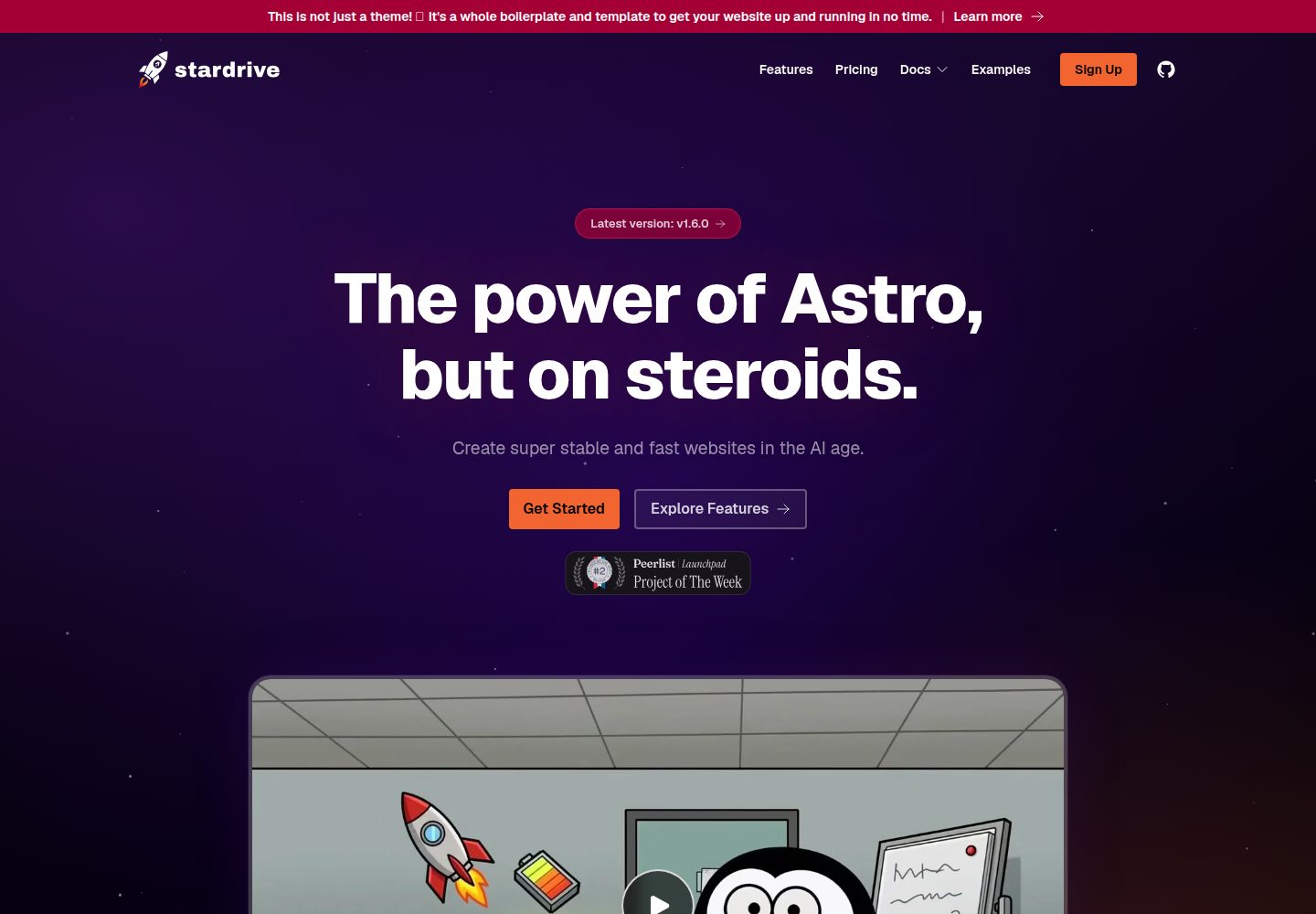
Explore the design
Compare the page layouts and mobile experience. Open any screenshot for a closer look.
Desktop homepage1 / 3
Desktop captureTop of page
Actual screenshot captured by the server browser.
All pages & views 3
Screenshots show visual appearance; interactive behavior may differ.
Recorded 2026-10-02View source
What stands out
A quick read of the recorded project description.
End-to-end TypeScript types, integrated with TailwindCSS, ESLint, and Prettier, supporting multiple package managers
Built-in blog, events, and FAQ content collections; the blog supports automatic table of contents, reading time, and social preview image generation
Includes design-level capabilities such as light and dark modes, full i18n, page transition animations, and a configurable pricing table
Prepared for Cloudflare Worker deployment while allowing other hosting providers
Uses the MIT license, allowing free use, modification, commercial use, and distribution of this version of the code
Template Details
Stardrive is an Astro-based starter template positioned as a highly complete starting point for building websites in the AI era. It incorporates security, SEO, metadata, accessibility, and other foundational items in advance, and is specifically designed for AI agent collaboration: the repository includes AGENTS.md and configuration guides under the .ai directory, provides automatic llms.txt generation, Schema.org structured data, WebMCP readiness, and an agent-discoverable Agent Skill.
For developer experience, the template uses end-to-end TypeScript types, TailwindCSS, ESLint, and Prettier, and supports package managers such as npm, pnpm, yarn, and bun. Most brand, i18n, blog, promotion, and llms.txt related settings are adjusted centrally in theme.config.ts. At the content level, it provides Markdown-driven blog, events, and FAQ collections; the blog supports automatic table of contents, optimized YouTube embeds, external link highlighting, reading time, and social preview image generation; events support time zones and an "add to calendar" interaction. At the design level, it includes light and dark modes, full i18n, page transitions and animations, a dynamic header, a configurable pricing table, and optional promotional slots.
For deployment, the template is prepared for Cloudflare Worker and provides wrangler configuration, while noting that other hosting providers can be freely chosen. The repository includes files needed for the demo site, such as SECURITY.md, CHANGELOG.md, .github, and a version sync script; these are automatically cleaned up when generating a project with the create command, but manual cloning requires deleting them according to the README instructions.
Regarding licensing, this public repository uses the MIT license, allowing free use, modification, commercial use, and distribution of this version of the code, provided the copyright notice and license notice are retained when distributing. Third-party assets such as demo images, fonts, and icons must be checked against their respective licenses; external services such as domains, hosting, databases, payments, or AI may incur separate charges.
AstroStarter
Is it right for your project?
Use Cases
- Quickly building an Astro site with SEO, accessibility, and structured data foundations
- Introducing AI agent-assisted development into a project, with the expectation that the agent can directly read project configuration instructions
- Planning to create a multilingual blog, event calendar, or FAQ content website
- Preparing to deploy the site to Cloudflare Worker or a similar edge hosting environment
- Needing a starter template that includes marketing components such as a pricing table, promotional slots, and a dynamic header
Suitable For
- Front-end developers familiar with Astro or willing to learn Astro
- Teams or individuals needing multilingual content sites
- Users who want to build upon MIT-licensed code for secondary development
- Developers planning to use AI agents to assist with project configuration and development
Getting started & customization
Use these recorded setup notes alongside the repository instructions for your chosen version.
- 1
Recommended to create a project via npm create stardrive@latest, pnpm create stardrive@latest, or yarn create stardrive@latest; bun requires Node to be installed as well
- 2
Use --no-install to skip dependency installation, and --version X.X.X to specify a version
- 3
Projects generated via the create command automatically clean up demo files; manual cloning of the repository requires deleting SECURITY.md, CHANGELOG.md, repository-header.png, contents of .github except copilot-instructions.md, scripts/syncVersion.js, and related scripts in package.json according to the README
- 4
Initial configuration can be done by an AI agent referring to AGENTS.md and .ai/SETUP.md, and optionally adding Astro MCP to provide more context
- 5
When deploying to Cloudflare, use the wrangler.jsonc in the repository; clearing Cloudflare cache requires configuring CF_PURGE_* environment variables
License & source material
Usage conditions & limitations
Free to use · keep license noticeThis entry covers the free version of the public repository under the MIT license; the free scope is this version of the code and does not imply that external services or third-party assets are free.
Must comply with when using
- Free use, modification, commercial use, and distribution of this version of the code are allowed.
- When distributing copies or substantial portions of the code, retain the original author's copyright notice and the full MIT license notice.
- The code is provided as is; warranties and limitations of liability are governed by the original license and applicable law.
Additional costs & items to verify
- Using the event dynamic injection adapter requires configuring ADD_TO_CALENDAR_PRO_API_KEY, i.e., it depends on the third-party Add to Calendar PRO service and requires your own API key; this is an optional external service.
- Using the cache purge script on Cloudflare Workers requires setting the CF_PURGE_API_KEY and CF_PURGE_ZONE_ID environment variables; this is an optional deployment configuration.
- Deployment to Cloudflare Workers is recommended, but other hosting providers can also be used; hosting services themselves may incur costs.
- If using Cloudflare, Speed Brain must be disabled in the console, otherwise its prefetch logic will conflict with Astro's built-in prefetch, potentially causing duplicate requests or navigation anomalies.
- Astro is a front-end framework; sensitive information must not be placed on the front end; any backend data must be handled by a separate backend service.
- If custom web fonts are needed, install them via fontsource and handle font licensing yourself.
- Demo images, fonts, icons, and other third-party assets must be checked against their respective licenses; they cannot be judged solely by the code's MIT license.
- External services such as domains, hosting, databases, payments, or AI may incur additional charges.
View Original Text Basis
Permission is hereby granted, free of charge
Original License Text
ADD_TO_CALENDAR_PRO_API_KEY: If you want to use the pre-configured adapter for dynamically infusing events, set your API key via env variable.
Original README
CF_PURGE_API_KEY and CF_PURGE_ZONE_ID: Required if you want to use the Cloudflare purge script when hosting on Cloudflare workers.
Original README
We recommend deploying on Cloudflare as Astro and Stardrive are optimized for their workers, but you are also free to use any other hoster.
Original README
Disable **Speed Brain** in your Cloudflare dashboard (Speed → Optimization → Speed Brain).
Original README
Do never add any sensitive information here! Any backend data needs to be processed by a respective backend service.
Original README
https://github.com/peltmonger/stardrive/blob/main/LICENSEhttps://github.com/peltmonger/stardrive/blob/main/README.mdIf you want to use Webfonts, add them by installing via fontsource.
Original README
Compiled by DeepSeek based on repository license and README ·2026-10-02. Results only cover the materials read; dependencies, images, fonts, and subsequent term changes are subject to their respective original texts.
Project checks & description sources
Template Information
- Source platforms
- Astro Themes
- Documentation and maintenance reference score
- More documented · 91 / 100
- Technologies
- Astro
- Website type
- Starter
How this score is calculated
Our heuristic uses license records (up to 30), a demo link (12), a preview (10), stars (15), recorded maintenance (15), description completeness (8), feature records (5) and classification data (5). It is not a code, security or performance test, or a Google score. A link does not establish tested functionality.
What to verify for this project
- Repository update recorded
- 2026-10-01
- Screenshot last checked
- 2026-10-02
A demo link is listed. Check it with your own content and viewport sizes; its presence does not confirm that forms, authentication or payments work.
The catalog identifies Astro as the primary stack. Check the actual dependency manifest and lockfile for versions and hosting requirements. These notes use recorded metadata, not a code audit or a deployment test.
Use a selection guide →How this description was prepared
AI-assisted description based on catalog records and repository material. Repository authors are not automatically the reviewers of this description.
Automatically checked against source and license rules; no manual editorial review.
Inspect the recorded source material
SHA-256: e38349f2b595918962e1ab9bc5f1c3b4203a484ddd913e831198cadd0c3ab36b
2026-10-02T19:17:24.102Z
Source file / repository
[](https://www.typescriptlang.org/)
[](https://astro.build/)
[](https://tailwindcss.com/)
[](./AGENTS.md)
<br />
# Stardrive - the Astro boilerplate for the AI age
## 🚀 Intro and Philosophy
Stardrive is a very opinionated boilerplate for [Astro](https://astro.build/).
The core idea is to have a strong boilerplate to...
1. skip the first 36 steps of creating a high-class website, if you do it manually;
2. make sure all the important basics (security, SEO, meta data, accessibility, ...) are included when using AI agents.
3. focus on providing the best technical foundation, not necessarily the most fancy design.
We are building on the amazing Astro project, because it is the maybe most performant and stable, yet flexible frontend framework out there at the very moment.
It also enables you to include components from any other big JavaScript framework, like React, Vue, Svelte, or Solid.
We recommend deploying on Cloudflare as Astro and Stardrive are optimized for their workers, but you are also free to use any other hoster.
<br />
---
<br />
## ▶️ Demo
See [astro-stardrive.com](https://astro-stardrive.com/) for a live demo.
It actually is a hosted version of this exact boilerplate, which already comes with all batteries included 🤩.
<br />
---
<br />
## ✨ Features
Everything you need to launch a fast, modern, AI-ready website - batteries included.
### 🤖 Built for the AI age
- **LLM-friendly by design** - Super well documented, so AI agents immediately know what to do.
- **WebMCP prepared** - Ship tools your visitors' AI agents can actually use.
- **`llms.txt` auto-populated** - Your content, served on a silver platter to LLMs.
- **Agent Skill published** - Compatible agents can discover a verified Stardrive project workflow.
- **[Schema.org](https://schema.org) auto-generated** - Rich, structured data without the busywork.
### 🛠️ Developer experience
- **Fully typed** - TypeScript end to end.
- **TailwindCSS** - Utility-first styling, ready to go.
- **ESLint & Prettier** - Linting and formatting, pre-configured.
- **Use any package manager** - npm, pnpm, yarn, or bun.
- **Centralized config** - Tweak most things from a single `theme.config.ts`.
- **Cloudflare Worker prepared** - Deploy to the edge in seconds.
### 🎨 Design & UX
- **Hot theme included** - Looks great out of the box.
- **Light / Dark mode** - Automatic and toggleable.
- **Full i18n support** - Go global from day one.
- **Smooth page transitions & animations** - Polished feel, zero fuss.
- **Dynamic header** - Adapts to different use cases.
- **References marquee** - Show off your logos in style.
- **Highly configurable pricing table** - Switch between monthly, annual, and lifetime tiers, toggle prices with or without taxes, and drive everything (plans, features, prices, currency) from a single typed config file - ready for hard-coded or API-fed (Paddle/Stripe) prices.
- **Optional promotional elements** - Banners, signups, and more when you need them.
### 📝 Content
- **Powerful blog** - Auto-generated Table of Contents, optimized YouTube embeds, auto-highlighting of external links, reading-time calculation, and proper auto-generated social preview images.
- **Events** - Markdown-driven, i18n-ready, with server-rendered "Add to Calendar" button shells that hydrate for one-click interaction, time zones, and rich detail pages. Optionally bridge to **Add to Calendar PRO** for external, code-free event management.
- **Markdown-based FAQ** - Manage answers as simple files.
### 🖖 Accessibility & SEO
- **WCAG prepared** - Accessibility baked in.
- **A thousand tiny tweaks** - Optimized for SEO, social sharing, page-speed scores, and more…
<br />
---
<br />
## 📦 Installation
### Creation
It is highly recommended to create a new project via:
```sh
npm create stardrive@latest
```
_or_
```sh
pnpm create stardrive@latest
```
_or_
```sh
yarn create stardrive@latest
```
<br />
`bun` also works as long as Node is installed as well.
The installer helps you to already adjust the boilerplate a little bit to your needs right from the beginning.
> [!TIP]
> Use the flag `--no-install` to skip the dependency install.
> Use the flag `--version X.X.X` to use a specific version.
<br />
_(Alternatively, you can fork the official repository and clone your fork, clone the official repository directly, or download its source.)_
<br />
### Cleanup
Remove the following as this is only relevant for the official boilerplate demo and repository.
- `./SECURITY.md`
- `./CHANGELOG.md`
- `./repository-header.png`
- `./.github` (everything except the copilot-instructions.md; if you are not working with Copilot, remove the whole thing)
- `./scripts/syncVersion.js`
- In the [package.json](../package.json), remove the "prebuild" script, the "sync-version" script, and the `npm run sync-version && ` from the "fix" script.
During the further configuration, you will delete and adjust even more content, but this is the stuff, you can and should blindy trash at the very beginning.
> [!NOTE]
> If you have created your project via the `npm create stardrive` command, this cleanup already happend automatically!
<br />
---
<br />
## 🤖 Getting started with AI
### Initial configuration and kick-off
In order to get started with an AI agent or assistant, task them to configure the project first.
You can use the following prompt:
```text
Start the configuration of this new Astro Stardrive Project. Mindt the AGENTS.md and especially the SETUP.md in the .ai folder.
More specifications about the project I want to build:
[put your specs here]
```
<br />
### Astro MCP
You might want to add the Astro MCP to your setup. It gives the AI immediately more context. More tokens, but better results.
See [their documentation](https://docs.astro.build/de/guides/build-with-ai/#installation) for guidance.
---
<br />
## 🗂️ Structure
The code structure follows the official Astro scheme. It is recommended to rather keep it that way.
A clear exception is the component directory. There, we rather keep the amount of files low than splitting everything into atoms.
Adjust this based on your project, personal taste, and coding guidelines!
<details>
<summary>Click here to open</summary>
<pre>
.
├── astro.config.ts # Base Astro config (integrations, build, adapter)
├── theme.config.ts # 🎯 Central project config: branding, i18n, blog, promo, llms.txt
├── expressive-code-themes.mjs # Shared light/dark code themes for Node and Astro
├── eslint.config.mjs # ESLint rules
├── tsconfig.json # TypeScript config
├── wrangler.jsonc # Cloudflare Worker deployment config
├── worker-configuration.d.ts # Auto-generated Cloudflare Worker types
├── package.json # Defining the project and its dependencies
├── AGENTS.md # Entry point and general guidance for AI agents
│
├── .ai/ # AI guides on specific topics and tasks. Triggered via AGENTS.md
│
├── public/ # Served as-is at the site root
│ ├── .well-known/agent-skills # Agent Skills discovery index + Stardrive skill
│ ├── _headers # Cloudflare HTTP headers (security, agent discovery, caching)
│ ├── _redirects # Cloudflare redirects (keep updated on migrations)
│ ├── favicon.svg # Dynamic light/dark favicon (handled inside the SVG)
│ ├── favicon.ico # Classic favicon fallbacks (+ dark-mode variant)
│ ├── apple-touch-icon.png # iOS home-screen icon (sits on a theme color)
│ ├── web-app-manifest-*.png # PWA manifest icons (192/512)
│ ├── data/ # Public downloadable files (articles/ for blog assets)
│ ├── images/ # Stable-URL images: og.png, x.png, structured-preview.png (social fallbacks)
│ └── map/
│ └── office.pmtiles # Demo map tiles for the contact page (replace/remove)
│
├── scripts/
│ ├── generateLLMFiles.js # Builds llms.txt from your content
│ ├── postbuild.js # Post-build hook (runs the steps below)
│ ├── processSocialImages.js # Auto-generates social preview images for articles
│ ├── purgeCloudflareCache.js # Purges CF cache after deploy (needs CF_PURGE_* env vars)
│ └── syncVersion.js # ⛔ Demo/repo only - delete in your project
│
├── types/ # Global type definitions
│
└── src/
├── content.config.ts # Astro content collections schema (articles, faq, integrations, events)
│
├── pages/ # File-based routing - one file per route
│ ├── index.astro # Home page
│ ├── about.astro · contact.astro · features.astro · pricing.astro · examples.astro · faq.astro
│ ├── signup.astro · get-listed.astro · legal-notice.astro · privacy-policy.astro
│ ├── 404.astro # Not-found page
│ ├── robots.txt.ts # Generates robots.txt (honors the ROBOTS env override)
│ ├── rss.xml.js # Generates the blog RSS feed
│ ├── site.webmanifest.ts # Generates the PWA manifest from theme.config.ts
│ ├── sitemap.xsl.ts # Styles XML sitemaps using the name and accessible colors from theme.config.ts
│ ├── dynamic-events-sitemap.xml.ts # Generates a sitemap for events dynamically, if we pull them in from an external API
│ ├── [lang]/ # i18n routes (string-translated pages share this folder)
│ ├── de/ · es/ · fr/ # Per-language folders for hard-coded/long-form content
│ ├── blog/ # Blog routes: [...article], [...page], categories/, tags/
│ ├── docs/ # Docs pages (index, guide, configuration)
│ ├── events/ # Event listing routes: detail/[...event], [...year]
│ └── integration/ # Integration listing routes: [type]/, index
│
├── layouts/
│ ├── default.astro # Base page layout
│ └── article.astro # Blog article layout
│
├── components/ # Kept intentionally coarse (not atomic)
│ ├── headline.astro · contact-form.astro · contact-map.astro · integration-list.astro
│ ├── webmcp-tools.astro # Experimental WebMCP tools exposed to visitor AI agents
│ ├── head/ # <head> bits: base.astro (favicons), hreflang.astro, ogx.astro (OG/X meta)
│ ├── layout/ # header, footer, hero, references, language + light-mode switchers, nav/
│ ├── blog/ # ToC, list/single, pagination, social-share, cat-tag-list
│ ├── promo/ # Optional promo slots: banners, nav-ad, newsletter signup
│ └── structured/ # Schema.org JSON-LD (website.astro, article.astro)
│
├── content/ # Markdown-based content collections
│ ├── articles/ # Blog posts (per language)
│ ├── faq-answers/ # FAQ entries as Markdown (per language)
│ ├── events/ # Events as Markdown (per language)
│ └── integration-options/ # Integration data (per language)
│
├── i18n/ # Translation strings - one JSON per language
│
├── data/ # Static data files (e.g. examples.json, pricing.ts)
│
├── images/ # Build-optimized images (logos, content/, references/)
│
├── plugins/ # Markdown/rehype plugins
│ ├── external-linking.ts # Auto-highlights & secures external links
│ └── youtube-embed.ts # Optimized YouTube embeds in Markdown
│
├── styles/
│ ├── tailwind.config.css # 🎯 Tailwind base: fonts, colors/branding, breakpoints
│ ├── global.css # Custom global rules + single-source-of-truth styles (e.g. buttons)
│ ├── long-text-content.css # Styling for text-heavy pages (e.g. privacy policy)
│ ├── blog.css # Styling for the blog section (excluding the markdown styling)
│ └── markdown.css # Styling for rendered markdown pages
│
└── utils/ # Helpers
</pre>
</details>
<br />
---
<br />
## 🎛️ Configuration
### General
The configuration for your project happens on multiple levels.
First, you should adjust the [theme.config.ts](theme.config.ts) to match your requirements and specifications.
This already gives the boilerplate your branding.
Second, you would adjust the whole codebase to your needs.
This is an Astro project. The boilerplate brings in the easy-to-use general theme config as well as a pre-structured website.
You still need to build the actual website 😉.
Third, some things are configurable via env variables at build time.
- SITE_OVERRIDE: Would override the global site url. Useful for dev environments.
- ROBOTS: Would override the global default robots setting. Useful for dev environments. Settings on the page level would still override this again!
- CF_PURGE_API_KEY and CF_PURGE_ZONE_ID: Required if you want to use the Cloudflare purge script when hosting on Cloudflare workers.
- ADD_TO_CALENDAR_PRO_API_KEY: If you want to use the pre-configured adapter for dynamically infusing events, set your API key via env variable.
<br />
### Step by Step Guide
We have created a step by step guide, so you do not miss anything.
1. If you did not use the `create stardrive@latest` command to create the project, check the [Trimming Guide](./.ai/TRIMMING_GUIDE.md) to remove those features you do not need first! The guide is built for AI agents, but can also be used for manual actions. At least check the `.gitignore` file and update the "# Lock files" part to match your package manager (if not using npm). If you went for `create stardrive@latest` case, mind that `npm run check` would find some issues. We are intentionally not cleaning up everything in order to have some functionality still in place, if the project, for example, establishes new content collections. Use the `npm run check` findings to clean up manually.
2. Adjust the [package.json](./package.json) to reflect your project.
3. Adjust the [README.md](./README.md) file to at least hold the name of your project as headline. This makes it easier for you to identify your project later.
4. Replace the favicon and web-app-manifest files in ./public/. We recommend to use [realfavicongenerator.net](https://realfavicongenerator.net/) to do so. You only need to replace the image files. The webmanifest is generated dynamically based on the theme.config.ts. Mind that for the favicons, we have different ones for light vs. dark mode users (refering to their device, not the website). This makes sense for transparent or black/white icons. If you do not use this, also adjust [./src/components/head/base.astro](./src/components/head/base.astro) and drop the dark-mode icons. For the svg file, we recommend to handle light/dark mode directly in the svg code - you can check our [demo favicon.svg](./public/favicon.svg) for reference.
5. Also replace the social preview images (og.png, x.png, structured-preview.png) in ./public/images/. They act as a general fallback, For articles, we auto-generate them from the article's main image.
6. Adjust the [theme.config.ts](./theme.config.ts):
- Set the base information first - like the site url, primary color, and so on. Everything is typed here - your IDE should be able to read-he comments from the types to help you understand the respective settings.
- Decide which languages you want to support, create a respective json file in the ./src/i18n/ directory, and import it in the config file. Adjust the "i18n" block respectively.
- Choose the `expressiveCodeThemes` in [expressive-code-themes.mjs](./expressive-code-themes.mjs). Pick two: one for light and one for dark mode. If you do not use dark mode, use the same theme for both. Find the available options at the [Expressive Code repository](https://expressive-code.com/guides/themes/#available-themes).
- If you are using the blog feature, specifying basic article settings would be next. This mainly defines the general layout and functionality. if you decide to use the image fallback feature, check the [demo fallback image](./src/images/content/articles-fallback.jpg) and replace it.
- Set promotion slots, if you want to - you can adjust the content later. Drop it or set everything to `false`, if you do not need this at the moment.
- Last but not least, define how the llms.txt file is created. As of today, it is not clearly stated whether this is really useful or not - however, Lighthouse has started testing for it, so it doesn't hurt.
7. If you want to use Webfonts, add them by installing via fontsource. The boilerplate comes with "Geist". You might want to uninstall this with `npm un @fontsource/geist` and install your own. Mind to import them on the layout level!
8. Adjust the TailwindCSS base config at [./src/styles/tailwind.config.css](./src/styles/tailwind.config.css).
- Adjust the font section. For example, replace "Geist" with your main font or even add new font styles.
- Adjust the colors section (Branding and maybe Utility). We recommend to only adjust color hex codes and optionally add additional ones. If you remove lines, this breaks the demo content, which can be confusing - only do this at the very end when you replaced the demo content with your own!
- Adjusting breakpoints could be a thing for design nerds.
- Add anything else you already know you require. But, of course, you can also adjust things any time later.
9. If you already have some CSS you want to use, adjust/extend the [global.css](./src/styles/global.css) file to your needs. Also have a look at the other CSS files in the ./src/styles folder and adjust to your needs and taste. Our logic for styling goes as follows:
- TailwindCSS as base
- global.css to add custom rules and base styling. We also put things there, that are duplicated a lot and where the Tailwind classes should have a single source of truth (e.g. buttons).
- Additional CSS files for special pages (gets imported in addition on the page level). For example, we have a long-text-content.css, which is super useful to style boring things like the privacy policy page.
- Super custom stuff goes into the respective page or component; and on that level, as Tailwind classes or into its own scoped CSS block, if we would have a lot of class duplication otherwise (mind to set the [reference](https://tailwindcss.com/docs/functions-and-directives#reference-directive) to the tailwind.config.css file in those `<style>` blocks!).
10. Delete the subfolders in ./src/content/ and ./src/pages/ for those languages (e.g. "/fr"), which you do not want to support (see step 2). If you are only using 1 language, you can also drop the ./src/pages/[lang] folder as well as the [language-switcher.tsx](./src/components/layout/language-switcher.tsx) and [language-select.astro](./src/components/layout/language-select.astro) files in the components folder.
11. Check what we put into the `<head>` for open graph and x at [./src/components/head/ogx.astro](./src/components/head/ogx.astro). Extend if you want to.
12. Define your page structure and adjust the given demo structure under ./src/pages/ by creating a file (can be empty at first) per page. If you support >1 language, you should have a subfolder for that language as well as the generic [lang] folder. Pages, where i18n only happens via translated string go into [lang]. This keeps things simple. If you are changing a lot per language (different content) or have huge text blocks, put them in the explicit subfolder and hard-code the text.
13. In the [astro.config.ts](./astro.config.ts), we went for static site generation. You can specify some content collections to be still rendered on-demand. You can specify them in the [theme.config.ts](./theme.config.ts) file. Integrations are set to "on-demand" for the purpose of this demo. Revert this, if your hosting solution only (!) supports static files. Also mind that you will need an [Astro server adapter](https://docs.astro.build/en/guides/on-demand-rendering/#server-adapters) if you are not going for Cloudflare and want to use on-demand rendering! On-demand collections also have `deferRender` enabled, so their entries are not rendered eagerly during sync — lowering memory usage for large collections at the cost of not caching rendered HTML across builds.
14. Adjust the navigation in the ./src/components/layout/nav folder.
15. Check the other layout files at ./src/layouts and also everything within ./src/components/layout. Adjust to match the general layout of your website.
16. Already while building the layout, adjust the content of the json files in ./src/i18n/ to match your project.
17. Adjust or delete the [map data file](./public/map/office.pmtiles), which is used at the demo contact page.
18. Delete the demo content in ./src/images. Mind to keep the folder structure for the content! The images for your website should go into this images folder, images for articles and integrations into their respective subdirectoy. Fyi: Use ./public/images/ for images that need to be available via a clean and stable url to external pages/services/bots and **are not** about articles. Use ./public/data/ for public files you want to share - files used in articles go into the respective subfolder.
19. Run `npm run check:astro` and resolve all potential erros that popped up due to now missing links or stuff. This easily happens when you delete some demo content while you keep other demo files untouched.
20. Review [`public/.well-known/agent-skills`](./public/.well-known/agent-skills). It advertises a Stardrive-specific skill on the boilerplate website; replace it with skills your project genuinely publishes, or remove it. If you edit a skill artifact, update its SHA-256 digest in `index.json`.
21. Adjust the [`_headers`](./public/_headers) and [`_redirects`](./public/_redirects) files - only if on Cloudflare. Check their [documentation](https://developers.cloudflare.com/workers/static-assets/). The homepage `Link` header advertises `/llms.txt` for agent discovery; preserve it or point it to another useful machine-readable resource. Configure an equivalent response header at your host if you are not using Cloudflare.
If your project is a migration from an existing website, when using Cloudflare, adjust ./public/\_redirects to redirect old paths to the new structure. If not using Cloudlfare, set up your hosting setup accordingly.
22. Prepare for deployment. If going with Cloudflare, you can use the integrated wrangler/worker config. Adjust the [wrangler.jsonc](./wrangler.jsonc) to your needs and link your (usually) GitHub repository with a Cloudflare worker. Set environment variables for `CF_PURGE_API_KEY` and `CF_PURGE_ZONE_ID` and set `npm run purge:cloudflare` as command after build to clean the cache on each deployment. If you do this, you should consider setting up a rule on Cloudflare to cache all requests and not only static files. Also mind to activate Media > Images > Transformations in the Cloudflare dashboard for your Zone/Worker!
> **⚠️ Important:** Disable **Speed Brain** in your Cloudflare dashboard (Speed → Optimization → Speed Brain). Stardrive (like Astro in general) ships with its own [prefetching logic](https://docs.astro.build/en/guides/prefetch/) that conflicts with Cloudflare's Speed Brain, which can cause double-fetches, stale content, or broken navigation. Keep it off for any zone/worker serving an Astro site.
<br />
> [!TIP]
> Find this guide in a more interactive style at our demo page!
<br />
### Additional things you might want to check
1. Check the [astro.config.ts](./astro.config.ts) file. It holds the base Astro configuration. Theoretically, you do not need to touch it, if your project is close to the boilerplate. See the [official Astro docs](https://astro.build/config) for more information on what you can set up there.
2. In ./src/components/structured, we define a Schema.org structure for the website. This is covering an opinionated base scope. Extend, if you want to go wild on this.
3. The [webmcp-tools.astro](./src/components/webmcp-tools.astro) presents some basic tools to the new concept of [WebMCP](https://astro-stardrive.com/blog/webmcp-introduction). This is rather experimental and acts as base and inspiration. Extend it to your needs, if you want.
4. Adjus the ESLint, Typescript, and Prettier rules, if you have special needs here and do not like the default.
5. In [astro.config.ts](./astro.config.ts), we explicitly disabled the session functionality, so the page can be easier deployed. Check it, if you require session handling.
<br />
> [!WARNING]
> Mind Astro's frontend nature!
> Astro is a frontend framework. This means it runs as a static site on the client side.
> Do never add any sensitive information here! Any backend data needs to be processed by a respective backend service.
> While there are things that can act as a backend service (mainly Astro's on-demand server-side rendering, optionally combined with Middleware), it still is a frontend framework.
<br />
---
<br />
## 🤗 Support it!
You like this project? It would be awesome if you would support it, so it lives on!
- ⭐ [Star the repository](#) in order to stay up-to-date and save it for later!
- 📣 Spread the word! On X, Medium, Discord, Facebook, ...
- 💌 Send us some positive feedback at the [discussion board](https://github.com/peltmonger/stardrive/discussions).
<br /><br />
## ⚡ Changelog
Find all minor and major changes at the [CHANGELOG.md](CHANGELOG.md).
<br /><br />
## 🙌 Contributing
Anyone is welcome to contribute. Mind the [guidelines](.github/CONTRIBUTING.md):
- [Bug reports](.github/CONTRIBUTING.md#bugs)
- [Feature requests](.github/CONTRIBUTING.md#features)
- [Pull requests](.github/CONTRIBUTING.md#pull-requests)
**IMPORTANT NOTE:** Run `npm run fix` to auto-fix linting issues!
<br /><br />
## 📃 Copyright and License
Created by [Jens Kuerschner](https://jekuer.com) (Peltmonger Ventures GmbH).
Licensed under the [MIT License](LICENSE.txt).
<br />
Explore similar templates
Compare previews and descriptions within the same stack and category.

astrowind
AstroWind is a free, open-source Astro starter theme using Astro and Tailwind CSS, released under the MIT license.
Astro · Blog
accessible-astro-starter
An accessibility-focused Astro 6 starter template with WCAG 2.2 AA practices, Tailwind CSS 4, TypeScript, Prettier, ESLint, form validation, blog and portfolio examples, and preference toggles for dark mode, high contrast, and reduced motion.
Astro · Blog

astro-erudite
astro-erudite is an opinionated, unstyled static blog template built with Astro and native CSS, with no UI or CSS framework and minimal dependencies.
Astro · Portfolio

astro-shopify
A lightweight Shopify headless ecommerce starter template built with Astro and Svelte, integrating the Shopify Storefront API for product and inventory data, with built-in cart state management and basic add-to-cart and checkout flow.
Astro · E-commerce

brutal
Brutal is a neobrutalism Astro starter theme from ElianCodes, derived from the author's personal site and generalized. It includes a Markdown blog collection, build-time RSS and sitemap, image optimization, Tailwind CSS styling, and Biome checks, with no JavaScript by default.
Astro · Starter

qwind
Qwind is a free and open-source website template built on Qwik and Tailwind CSS, featuring directory-based routing via QwikCity, a Markdown blog, dark mode, and static deployment configuration.
Astro · Tool Site