面向 AI 代理协作设计:提供 AGENTS.md、.ai 指南、llms.txt 自动生成与 Schema.org 结构化数据
Astro启动器
stardrive — Astro 启动器模板
作者 peltmonger
Stardrive 是一个基于 Astro 的启动器模板,面向 AI 时代建站,内置 TypeScript、TailwindCSS、i18n、博客、事件、FAQ、SEO 与无障碍等基础配置,采用 MIT 许可。
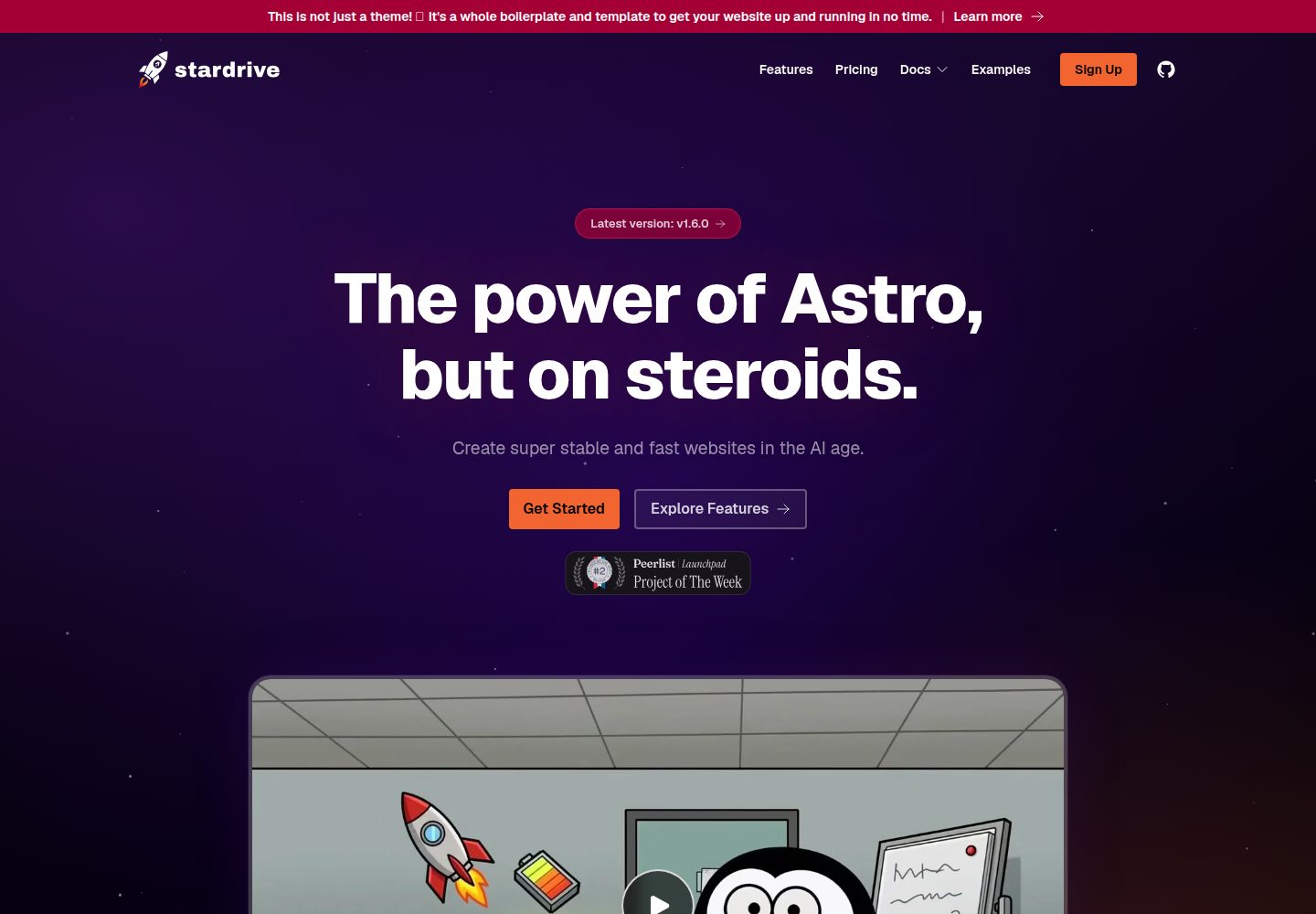
看看你的网站会是什么样
浏览真实页面截图,比较内容排版与手机效果。点击下方缩略图切换,放大查看整页细节。
全部页面与视图 3
截图用于了解视觉与布局,交互效果请以实际项目为准。
采集于 2026-10-02查看来源
值得关注的模板亮点
从已有项目资料中,快速了解它的特点。
TypeScript 端到端类型,集成 TailwindCSS、ESLint 与 Prettier,支持多种包管理器
内置博客、事件与 FAQ 内容集合,博客支持自动目录、阅读时长与社交预览图生成
包含明暗模式、完整 i18n、页面过渡动画与可配置定价表等设计层能力
为 Cloudflare Worker 部署做好准备,同时允许使用其他托管商
采用 MIT 许可,允许免费使用、修改、商用与分发该版本代码
模板详细介绍
Stardrive 是一个基于 Astro 的启动器模板,定位为面向 AI 时代建站的高完成度起点。它把安全、SEO、元数据、无障碍等基础项预先纳入,并针对 AI 代理协作做了专门设计:仓库包含 AGENTS.md 与 .ai 目录下的配置指南,提供 llms.txt 自动生成、Schema.org 结构化数据、WebMCP 准备以及可被代理发现的 Agent Skill。
模板在开发体验上采用 TypeScript 端到端类型、TailwindCSS、ESLint 与 Prettier,并支持 npm、pnpm、yarn、bun 等包管理器。大部分品牌、i18n、博客、推广与 llms.txt 相关设置集中在 theme.config.ts 中调整。内容层面提供 Markdown 驱动的博客、事件与 FAQ 集合,博客支持自动目录、YouTube 嵌入优化、外链高亮、阅读时长与社交预览图生成;事件支持时区与“添加到日历”交互。设计层面包含明暗模式、完整 i18n、页面过渡与动画、动态页头、可配置定价表以及可选推广位。
部署方面,模板为 Cloudflare Worker 做了准备并提供 wrangler 配置,同时说明可自由选择其他托管商。仓库中带有演示站点所需的 SECURITY.md、CHANGELOG.md、.github 与同步版本脚本等文件,使用创建命令生成项目时会自动清理,手动克隆则需按 README 指引删除。
许可方面,该公开仓库采用 MIT 许可,允许免费使用、修改、商用和分发该版本代码,分发时需保留版权声明与许可声明。演示图片、字体、图标等第三方素材需按各自许可核对;域名、托管、数据库、支付或 AI 等外部服务可能另行收费。
Astro启动器
适合你的项目吗?
适用场景
- 希望快速搭建具备 SEO、无障碍与结构化数据基础的 Astro 站点
- 需要在项目中引入 AI 代理辅助开发,并希望代理能直接读取项目配置说明
- 计划创建多语言博客、事件日历或 FAQ 内容型网站
- 准备将站点部署到 Cloudflare Worker 或类似边缘托管环境
- 需要一个包含定价表、推广位与动态页头等营销组件的启动模板
适合人群
- 熟悉 Astro 或愿意学习 Astro 的前端开发者
- 需要多语言内容站点的团队或个人
- 希望以 MIT 许可代码为基础进行二次开发的用户
- 计划使用 AI 代理辅助配置与开发项目的开发者
上手与定制指南
结合仓库当前版本的说明,按下面的资料检查内容、配置与运行要求。
- 1
推荐通过 npm create stardrive@latest、pnpm create stardrive@latest 或 yarn create stardrive@latest 创建项目,bun 需同时安装 Node
- 2
使用 --no-install 可跳过依赖安装,使用 --version X.X.X 可指定版本
- 3
通过创建命令生成的项目会自动完成演示文件清理;手动克隆仓库则需按 README 删除 SECURITY.md、CHANGELOG.md、repository-header.png、.github 中除 copilot-instructions.md 外的内容、scripts/syncVersion.js 及 package.json 中相关脚本
- 4
初始配置可让 AI 代理参照 AGENTS.md 与 .ai/SETUP.md 进行,并可选择添加 Astro MCP 以提供更多上下文
- 5
部署到 Cloudflare 时使用仓库中的 wrangler.jsonc;清理 Cloudflare 缓存需要配置 CF_PURGE_* 环境变量
授权与来源资料
使用条件与限制
免费使用 · 保留许可声明本次收录的是公开仓库中采用 MIT 许可的免费版本;免费范围为该版本代码,不代表外部服务或第三方素材免费。
使用时需要遵守
- 允许免费使用、修改、商用和分发该版本代码。
- 分发代码副本或实质性部分时,保留原作者版权声明和完整 MIT 许可声明。
- 代码按现状提供;担保与责任限制以原许可证及适用法律为准。
额外费用与待核对事项
- 使用事件动态注入适配器需配置 ADD_TO_CALENDAR_PRO_API_KEY,即依赖第三方 Add to Calendar PRO 服务并需自备 API 密钥,属可选外部服务。
- 在 Cloudflare Workers 上使用缓存清理脚本需设置 CF_PURGE_API_KEY 与 CF_PURGE_ZONE_ID 环境变量,属可选部署配置。
- 推荐部署到 Cloudflare Workers,但也可使用其他托管商;托管服务本身可能产生费用。
- 若使用 Cloudflare,需在控制台关闭 Speed Brain,否则其预取逻辑会与 Astro 自带预取冲突,可能导致重复请求或导航异常。
- Astro 为前端框架,不得在前端放置敏感信息;任何后端数据须由独立后端服务处理。
- 如需自定义网页字体,需通过 fontsource 安装并自行处理字体许可。
- 演示图片、字体、图标及其他第三方素材需按各自许可核对,不能仅凭代码的 MIT 许可判断。
- 域名、托管、数据库、支付或 AI 等外部服务可能另外收费。
查看原文依据
Permission is hereby granted, free of charge
许可证原文
ADD_TO_CALENDAR_PRO_API_KEY: If you want to use the pre-configured adapter for dynamically infusing events, set your API key via env variable.
README 原文
CF_PURGE_API_KEY and CF_PURGE_ZONE_ID: Required if you want to use the Cloudflare purge script when hosting on Cloudflare workers.
README 原文
We recommend deploying on Cloudflare as Astro and Stardrive are optimized for their workers, but you are also free to use any other hoster.
README 原文
Disable **Speed Brain** in your Cloudflare dashboard (Speed → Optimization → Speed Brain).
README 原文
Do never add any sensitive information here! Any backend data needs to be processed by a respective backend service.
README 原文
https://github.com/peltmonger/stardrive/blob/main/LICENSEhttps://github.com/peltmonger/stardrive/blob/main/README.mdIf you want to use Webfonts, add them by installing via fontsource.
README 原文
DeepSeek 根据仓库许可证和 README 整理 ·2026-10-02。结果仅覆盖已读取资料,依赖、图片、字体及后续条款变更以各自原文为准。
项目核对记录与介绍依据
模板资料
- 来源平台
- Astro Themes
- 资料与维护参考分
- 资料较完整 · 91 / 100
- 技术栈
- Astro
- 网站类型
- 启动器
这个分数如何计算
本站按许可资料(最高30分)、演示链接(12分)、预览图(10分)、Star数(15分)、记录的维护时间(15分)、描述完整度(8分)、功能记录(5分)和分类资料(5分)计算。它不是代码、安全或性能测试,也不是 Google 评分;有链接不代表已实测可用。
这个项目需要核对什么
- 记录的仓库更新时间
- 2026-10-01
- 截图检查日期
- 2026-10-02
已收录演示链接。请用你的内容与屏幕尺寸检查;有演示不代表表单、认证或支付已经可用。
目录记录的主要技术栈是 Astro。请通过依赖清单和锁文件核对实际版本与托管要求。这些说明基于收录资料,不代表代码审计或部署实测。
查看具体选型方法 →介绍的制作与核对状态
介绍由 AI 辅助整理目录与仓库资料。仓库作者不等于这篇介绍的审核者。
已完成服务器许可规则与 AI 来源核对;未经过人工编辑审核。
查看当时使用的来源资料
SHA-256: e38349f2b595918962e1ab9bc5f1c3b4203a484ddd913e831198cadd0c3ab36b
2026-10-02T19:17:24.102Z
来源文件 / 仓库
[](https://www.typescriptlang.org/)
[](https://astro.build/)
[](https://tailwindcss.com/)
[](./AGENTS.md)
<br />
# Stardrive - the Astro boilerplate for the AI age
## 🚀 Intro and Philosophy
Stardrive is a very opinionated boilerplate for [Astro](https://astro.build/).
The core idea is to have a strong boilerplate to...
1. skip the first 36 steps of creating a high-class website, if you do it manually;
2. make sure all the important basics (security, SEO, meta data, accessibility, ...) are included when using AI agents.
3. focus on providing the best technical foundation, not necessarily the most fancy design.
We are building on the amazing Astro project, because it is the maybe most performant and stable, yet flexible frontend framework out there at the very moment.
It also enables you to include components from any other big JavaScript framework, like React, Vue, Svelte, or Solid.
We recommend deploying on Cloudflare as Astro and Stardrive are optimized for their workers, but you are also free to use any other hoster.
<br />
---
<br />
## ▶️ Demo
See [astro-stardrive.com](https://astro-stardrive.com/) for a live demo.
It actually is a hosted version of this exact boilerplate, which already comes with all batteries included 🤩.
<br />
---
<br />
## ✨ Features
Everything you need to launch a fast, modern, AI-ready website - batteries included.
### 🤖 Built for the AI age
- **LLM-friendly by design** - Super well documented, so AI agents immediately know what to do.
- **WebMCP prepared** - Ship tools your visitors' AI agents can actually use.
- **`llms.txt` auto-populated** - Your content, served on a silver platter to LLMs.
- **Agent Skill published** - Compatible agents can discover a verified Stardrive project workflow.
- **[Schema.org](https://schema.org) auto-generated** - Rich, structured data without the busywork.
### 🛠️ Developer experience
- **Fully typed** - TypeScript end to end.
- **TailwindCSS** - Utility-first styling, ready to go.
- **ESLint & Prettier** - Linting and formatting, pre-configured.
- **Use any package manager** - npm, pnpm, yarn, or bun.
- **Centralized config** - Tweak most things from a single `theme.config.ts`.
- **Cloudflare Worker prepared** - Deploy to the edge in seconds.
### 🎨 Design & UX
- **Hot theme included** - Looks great out of the box.
- **Light / Dark mode** - Automatic and toggleable.
- **Full i18n support** - Go global from day one.
- **Smooth page transitions & animations** - Polished feel, zero fuss.
- **Dynamic header** - Adapts to different use cases.
- **References marquee** - Show off your logos in style.
- **Highly configurable pricing table** - Switch between monthly, annual, and lifetime tiers, toggle prices with or without taxes, and drive everything (plans, features, prices, currency) from a single typed config file - ready for hard-coded or API-fed (Paddle/Stripe) prices.
- **Optional promotional elements** - Banners, signups, and more when you need them.
### 📝 Content
- **Powerful blog** - Auto-generated Table of Contents, optimized YouTube embeds, auto-highlighting of external links, reading-time calculation, and proper auto-generated social preview images.
- **Events** - Markdown-driven, i18n-ready, with server-rendered "Add to Calendar" button shells that hydrate for one-click interaction, time zones, and rich detail pages. Optionally bridge to **Add to Calendar PRO** for external, code-free event management.
- **Markdown-based FAQ** - Manage answers as simple files.
### 🖖 Accessibility & SEO
- **WCAG prepared** - Accessibility baked in.
- **A thousand tiny tweaks** - Optimized for SEO, social sharing, page-speed scores, and more…
<br />
---
<br />
## 📦 Installation
### Creation
It is highly recommended to create a new project via:
```sh
npm create stardrive@latest
```
_or_
```sh
pnpm create stardrive@latest
```
_or_
```sh
yarn create stardrive@latest
```
<br />
`bun` also works as long as Node is installed as well.
The installer helps you to already adjust the boilerplate a little bit to your needs right from the beginning.
> [!TIP]
> Use the flag `--no-install` to skip the dependency install.
> Use the flag `--version X.X.X` to use a specific version.
<br />
_(Alternatively, you can fork the official repository and clone your fork, clone the official repository directly, or download its source.)_
<br />
### Cleanup
Remove the following as this is only relevant for the official boilerplate demo and repository.
- `./SECURITY.md`
- `./CHANGELOG.md`
- `./repository-header.png`
- `./.github` (everything except the copilot-instructions.md; if you are not working with Copilot, remove the whole thing)
- `./scripts/syncVersion.js`
- In the [package.json](../package.json), remove the "prebuild" script, the "sync-version" script, and the `npm run sync-version && ` from the "fix" script.
During the further configuration, you will delete and adjust even more content, but this is the stuff, you can and should blindy trash at the very beginning.
> [!NOTE]
> If you have created your project via the `npm create stardrive` command, this cleanup already happend automatically!
<br />
---
<br />
## 🤖 Getting started with AI
### Initial configuration and kick-off
In order to get started with an AI agent or assistant, task them to configure the project first.
You can use the following prompt:
```text
Start the configuration of this new Astro Stardrive Project. Mindt the AGENTS.md and especially the SETUP.md in the .ai folder.
More specifications about the project I want to build:
[put your specs here]
```
<br />
### Astro MCP
You might want to add the Astro MCP to your setup. It gives the AI immediately more context. More tokens, but better results.
See [their documentation](https://docs.astro.build/de/guides/build-with-ai/#installation) for guidance.
---
<br />
## 🗂️ Structure
The code structure follows the official Astro scheme. It is recommended to rather keep it that way.
A clear exception is the component directory. There, we rather keep the amount of files low than splitting everything into atoms.
Adjust this based on your project, personal taste, and coding guidelines!
<details>
<summary>Click here to open</summary>
<pre>
.
├── astro.config.ts # Base Astro config (integrations, build, adapter)
├── theme.config.ts # 🎯 Central project config: branding, i18n, blog, promo, llms.txt
├── expressive-code-themes.mjs # Shared light/dark code themes for Node and Astro
├── eslint.config.mjs # ESLint rules
├── tsconfig.json # TypeScript config
├── wrangler.jsonc # Cloudflare Worker deployment config
├── worker-configuration.d.ts # Auto-generated Cloudflare Worker types
├── package.json # Defining the project and its dependencies
├── AGENTS.md # Entry point and general guidance for AI agents
│
├── .ai/ # AI guides on specific topics and tasks. Triggered via AGENTS.md
│
├── public/ # Served as-is at the site root
│ ├── .well-known/agent-skills # Agent Skills discovery index + Stardrive skill
│ ├── _headers # Cloudflare HTTP headers (security, agent discovery, caching)
│ ├── _redirects # Cloudflare redirects (keep updated on migrations)
│ ├── favicon.svg # Dynamic light/dark favicon (handled inside the SVG)
│ ├── favicon.ico # Classic favicon fallbacks (+ dark-mode variant)
│ ├── apple-touch-icon.png # iOS home-screen icon (sits on a theme color)
│ ├── web-app-manifest-*.png # PWA manifest icons (192/512)
│ ├── data/ # Public downloadable files (articles/ for blog assets)
│ ├── images/ # Stable-URL images: og.png, x.png, structured-preview.png (social fallbacks)
│ └── map/
│ └── office.pmtiles # Demo map tiles for the contact page (replace/remove)
│
├── scripts/
│ ├── generateLLMFiles.js # Builds llms.txt from your content
│ ├── postbuild.js # Post-build hook (runs the steps below)
│ ├── processSocialImages.js # Auto-generates social preview images for articles
│ ├── purgeCloudflareCache.js # Purges CF cache after deploy (needs CF_PURGE_* env vars)
│ └── syncVersion.js # ⛔ Demo/repo only - delete in your project
│
├── types/ # Global type definitions
│
└── src/
├── content.config.ts # Astro content collections schema (articles, faq, integrations, events)
│
├── pages/ # File-based routing - one file per route
│ ├── index.astro # Home page
│ ├── about.astro · contact.astro · features.astro · pricing.astro · examples.astro · faq.astro
│ ├── signup.astro · get-listed.astro · legal-notice.astro · privacy-policy.astro
│ ├── 404.astro # Not-found page
│ ├── robots.txt.ts # Generates robots.txt (honors the ROBOTS env override)
│ ├── rss.xml.js # Generates the blog RSS feed
│ ├── site.webmanifest.ts # Generates the PWA manifest from theme.config.ts
│ ├── sitemap.xsl.ts # Styles XML sitemaps using the name and accessible colors from theme.config.ts
│ ├── dynamic-events-sitemap.xml.ts # Generates a sitemap for events dynamically, if we pull them in from an external API
│ ├── [lang]/ # i18n routes (string-translated pages share this folder)
│ ├── de/ · es/ · fr/ # Per-language folders for hard-coded/long-form content
│ ├── blog/ # Blog routes: [...article], [...page], categories/, tags/
│ ├── docs/ # Docs pages (index, guide, configuration)
│ ├── events/ # Event listing routes: detail/[...event], [...year]
│ └── integration/ # Integration listing routes: [type]/, index
│
├── layouts/
│ ├── default.astro # Base page layout
│ └── article.astro # Blog article layout
│
├── components/ # Kept intentionally coarse (not atomic)
│ ├── headline.astro · contact-form.astro · contact-map.astro · integration-list.astro
│ ├── webmcp-tools.astro # Experimental WebMCP tools exposed to visitor AI agents
│ ├── head/ # <head> bits: base.astro (favicons), hreflang.astro, ogx.astro (OG/X meta)
│ ├── layout/ # header, footer, hero, references, language + light-mode switchers, nav/
│ ├── blog/ # ToC, list/single, pagination, social-share, cat-tag-list
│ ├── promo/ # Optional promo slots: banners, nav-ad, newsletter signup
│ └── structured/ # Schema.org JSON-LD (website.astro, article.astro)
│
├── content/ # Markdown-based content collections
│ ├── articles/ # Blog posts (per language)
│ ├── faq-answers/ # FAQ entries as Markdown (per language)
│ ├── events/ # Events as Markdown (per language)
│ └── integration-options/ # Integration data (per language)
│
├── i18n/ # Translation strings - one JSON per language
│
├── data/ # Static data files (e.g. examples.json, pricing.ts)
│
├── images/ # Build-optimized images (logos, content/, references/)
│
├── plugins/ # Markdown/rehype plugins
│ ├── external-linking.ts # Auto-highlights & secures external links
│ └── youtube-embed.ts # Optimized YouTube embeds in Markdown
│
├── styles/
│ ├── tailwind.config.css # 🎯 Tailwind base: fonts, colors/branding, breakpoints
│ ├── global.css # Custom global rules + single-source-of-truth styles (e.g. buttons)
│ ├── long-text-content.css # Styling for text-heavy pages (e.g. privacy policy)
│ ├── blog.css # Styling for the blog section (excluding the markdown styling)
│ └── markdown.css # Styling for rendered markdown pages
│
└── utils/ # Helpers
</pre>
</details>
<br />
---
<br />
## 🎛️ Configuration
### General
The configuration for your project happens on multiple levels.
First, you should adjust the [theme.config.ts](theme.config.ts) to match your requirements and specifications.
This already gives the boilerplate your branding.
Second, you would adjust the whole codebase to your needs.
This is an Astro project. The boilerplate brings in the easy-to-use general theme config as well as a pre-structured website.
You still need to build the actual website 😉.
Third, some things are configurable via env variables at build time.
- SITE_OVERRIDE: Would override the global site url. Useful for dev environments.
- ROBOTS: Would override the global default robots setting. Useful for dev environments. Settings on the page level would still override this again!
- CF_PURGE_API_KEY and CF_PURGE_ZONE_ID: Required if you want to use the Cloudflare purge script when hosting on Cloudflare workers.
- ADD_TO_CALENDAR_PRO_API_KEY: If you want to use the pre-configured adapter for dynamically infusing events, set your API key via env variable.
<br />
### Step by Step Guide
We have created a step by step guide, so you do not miss anything.
1. If you did not use the `create stardrive@latest` command to create the project, check the [Trimming Guide](./.ai/TRIMMING_GUIDE.md) to remove those features you do not need first! The guide is built for AI agents, but can also be used for manual actions. At least check the `.gitignore` file and update the "# Lock files" part to match your package manager (if not using npm). If you went for `create stardrive@latest` case, mind that `npm run check` would find some issues. We are intentionally not cleaning up everything in order to have some functionality still in place, if the project, for example, establishes new content collections. Use the `npm run check` findings to clean up manually.
2. Adjust the [package.json](./package.json) to reflect your project.
3. Adjust the [README.md](./README.md) file to at least hold the name of your project as headline. This makes it easier for you to identify your project later.
4. Replace the favicon and web-app-manifest files in ./public/. We recommend to use [realfavicongenerator.net](https://realfavicongenerator.net/) to do so. You only need to replace the image files. The webmanifest is generated dynamically based on the theme.config.ts. Mind that for the favicons, we have different ones for light vs. dark mode users (refering to their device, not the website). This makes sense for transparent or black/white icons. If you do not use this, also adjust [./src/components/head/base.astro](./src/components/head/base.astro) and drop the dark-mode icons. For the svg file, we recommend to handle light/dark mode directly in the svg code - you can check our [demo favicon.svg](./public/favicon.svg) for reference.
5. Also replace the social preview images (og.png, x.png, structured-preview.png) in ./public/images/. They act as a general fallback, For articles, we auto-generate them from the article's main image.
6. Adjust the [theme.config.ts](./theme.config.ts):
- Set the base information first - like the site url, primary color, and so on. Everything is typed here - your IDE should be able to read-he comments from the types to help you understand the respective settings.
- Decide which languages you want to support, create a respective json file in the ./src/i18n/ directory, and import it in the config file. Adjust the "i18n" block respectively.
- Choose the `expressiveCodeThemes` in [expressive-code-themes.mjs](./expressive-code-themes.mjs). Pick two: one for light and one for dark mode. If you do not use dark mode, use the same theme for both. Find the available options at the [Expressive Code repository](https://expressive-code.com/guides/themes/#available-themes).
- If you are using the blog feature, specifying basic article settings would be next. This mainly defines the general layout and functionality. if you decide to use the image fallback feature, check the [demo fallback image](./src/images/content/articles-fallback.jpg) and replace it.
- Set promotion slots, if you want to - you can adjust the content later. Drop it or set everything to `false`, if you do not need this at the moment.
- Last but not least, define how the llms.txt file is created. As of today, it is not clearly stated whether this is really useful or not - however, Lighthouse has started testing for it, so it doesn't hurt.
7. If you want to use Webfonts, add them by installing via fontsource. The boilerplate comes with "Geist". You might want to uninstall this with `npm un @fontsource/geist` and install your own. Mind to import them on the layout level!
8. Adjust the TailwindCSS base config at [./src/styles/tailwind.config.css](./src/styles/tailwind.config.css).
- Adjust the font section. For example, replace "Geist" with your main font or even add new font styles.
- Adjust the colors section (Branding and maybe Utility). We recommend to only adjust color hex codes and optionally add additional ones. If you remove lines, this breaks the demo content, which can be confusing - only do this at the very end when you replaced the demo content with your own!
- Adjusting breakpoints could be a thing for design nerds.
- Add anything else you already know you require. But, of course, you can also adjust things any time later.
9. If you already have some CSS you want to use, adjust/extend the [global.css](./src/styles/global.css) file to your needs. Also have a look at the other CSS files in the ./src/styles folder and adjust to your needs and taste. Our logic for styling goes as follows:
- TailwindCSS as base
- global.css to add custom rules and base styling. We also put things there, that are duplicated a lot and where the Tailwind classes should have a single source of truth (e.g. buttons).
- Additional CSS files for special pages (gets imported in addition on the page level). For example, we have a long-text-content.css, which is super useful to style boring things like the privacy policy page.
- Super custom stuff goes into the respective page or component; and on that level, as Tailwind classes or into its own scoped CSS block, if we would have a lot of class duplication otherwise (mind to set the [reference](https://tailwindcss.com/docs/functions-and-directives#reference-directive) to the tailwind.config.css file in those `<style>` blocks!).
10. Delete the subfolders in ./src/content/ and ./src/pages/ for those languages (e.g. "/fr"), which you do not want to support (see step 2). If you are only using 1 language, you can also drop the ./src/pages/[lang] folder as well as the [language-switcher.tsx](./src/components/layout/language-switcher.tsx) and [language-select.astro](./src/components/layout/language-select.astro) files in the components folder.
11. Check what we put into the `<head>` for open graph and x at [./src/components/head/ogx.astro](./src/components/head/ogx.astro). Extend if you want to.
12. Define your page structure and adjust the given demo structure under ./src/pages/ by creating a file (can be empty at first) per page. If you support >1 language, you should have a subfolder for that language as well as the generic [lang] folder. Pages, where i18n only happens via translated string go into [lang]. This keeps things simple. If you are changing a lot per language (different content) or have huge text blocks, put them in the explicit subfolder and hard-code the text.
13. In the [astro.config.ts](./astro.config.ts), we went for static site generation. You can specify some content collections to be still rendered on-demand. You can specify them in the [theme.config.ts](./theme.config.ts) file. Integrations are set to "on-demand" for the purpose of this demo. Revert this, if your hosting solution only (!) supports static files. Also mind that you will need an [Astro server adapter](https://docs.astro.build/en/guides/on-demand-rendering/#server-adapters) if you are not going for Cloudflare and want to use on-demand rendering! On-demand collections also have `deferRender` enabled, so their entries are not rendered eagerly during sync — lowering memory usage for large collections at the cost of not caching rendered HTML across builds.
14. Adjust the navigation in the ./src/components/layout/nav folder.
15. Check the other layout files at ./src/layouts and also everything within ./src/components/layout. Adjust to match the general layout of your website.
16. Already while building the layout, adjust the content of the json files in ./src/i18n/ to match your project.
17. Adjust or delete the [map data file](./public/map/office.pmtiles), which is used at the demo contact page.
18. Delete the demo content in ./src/images. Mind to keep the folder structure for the content! The images for your website should go into this images folder, images for articles and integrations into their respective subdirectoy. Fyi: Use ./public/images/ for images that need to be available via a clean and stable url to external pages/services/bots and **are not** about articles. Use ./public/data/ for public files you want to share - files used in articles go into the respective subfolder.
19. Run `npm run check:astro` and resolve all potential erros that popped up due to now missing links or stuff. This easily happens when you delete some demo content while you keep other demo files untouched.
20. Review [`public/.well-known/agent-skills`](./public/.well-known/agent-skills). It advertises a Stardrive-specific skill on the boilerplate website; replace it with skills your project genuinely publishes, or remove it. If you edit a skill artifact, update its SHA-256 digest in `index.json`.
21. Adjust the [`_headers`](./public/_headers) and [`_redirects`](./public/_redirects) files - only if on Cloudflare. Check their [documentation](https://developers.cloudflare.com/workers/static-assets/). The homepage `Link` header advertises `/llms.txt` for agent discovery; preserve it or point it to another useful machine-readable resource. Configure an equivalent response header at your host if you are not using Cloudflare.
If your project is a migration from an existing website, when using Cloudflare, adjust ./public/\_redirects to redirect old paths to the new structure. If not using Cloudlfare, set up your hosting setup accordingly.
22. Prepare for deployment. If going with Cloudflare, you can use the integrated wrangler/worker config. Adjust the [wrangler.jsonc](./wrangler.jsonc) to your needs and link your (usually) GitHub repository with a Cloudflare worker. Set environment variables for `CF_PURGE_API_KEY` and `CF_PURGE_ZONE_ID` and set `npm run purge:cloudflare` as command after build to clean the cache on each deployment. If you do this, you should consider setting up a rule on Cloudflare to cache all requests and not only static files. Also mind to activate Media > Images > Transformations in the Cloudflare dashboard for your Zone/Worker!
> **⚠️ Important:** Disable **Speed Brain** in your Cloudflare dashboard (Speed → Optimization → Speed Brain). Stardrive (like Astro in general) ships with its own [prefetching logic](https://docs.astro.build/en/guides/prefetch/) that conflicts with Cloudflare's Speed Brain, which can cause double-fetches, stale content, or broken navigation. Keep it off for any zone/worker serving an Astro site.
<br />
> [!TIP]
> Find this guide in a more interactive style at our demo page!
<br />
### Additional things you might want to check
1. Check the [astro.config.ts](./astro.config.ts) file. It holds the base Astro configuration. Theoretically, you do not need to touch it, if your project is close to the boilerplate. See the [official Astro docs](https://astro.build/config) for more information on what you can set up there.
2. In ./src/components/structured, we define a Schema.org structure for the website. This is covering an opinionated base scope. Extend, if you want to go wild on this.
3. The [webmcp-tools.astro](./src/components/webmcp-tools.astro) presents some basic tools to the new concept of [WebMCP](https://astro-stardrive.com/blog/webmcp-introduction). This is rather experimental and acts as base and inspiration. Extend it to your needs, if you want.
4. Adjus the ESLint, Typescript, and Prettier rules, if you have special needs here and do not like the default.
5. In [astro.config.ts](./astro.config.ts), we explicitly disabled the session functionality, so the page can be easier deployed. Check it, if you require session handling.
<br />
> [!WARNING]
> Mind Astro's frontend nature!
> Astro is a frontend framework. This means it runs as a static site on the client side.
> Do never add any sensitive information here! Any backend data needs to be processed by a respective backend service.
> While there are things that can act as a backend service (mainly Astro's on-demand server-side rendering, optionally combined with Middleware), it still is a frontend framework.
<br />
---
<br />
## 🤗 Support it!
You like this project? It would be awesome if you would support it, so it lives on!
- ⭐ [Star the repository](#) in order to stay up-to-date and save it for later!
- 📣 Spread the word! On X, Medium, Discord, Facebook, ...
- 💌 Send us some positive feedback at the [discussion board](https://github.com/peltmonger/stardrive/discussions).
<br /><br />
## ⚡ Changelog
Find all minor and major changes at the [CHANGELOG.md](CHANGELOG.md).
<br /><br />
## 🙌 Contributing
Anyone is welcome to contribute. Mind the [guidelines](.github/CONTRIBUTING.md):
- [Bug reports](.github/CONTRIBUTING.md#bugs)
- [Feature requests](.github/CONTRIBUTING.md#features)
- [Pull requests](.github/CONTRIBUTING.md#pull-requests)
**IMPORTANT NOTE:** Run `npm run fix` to auto-fix linting issues!
<br /><br />
## 📃 Copyright and License
Created by [Jens Kuerschner](https://jekuer.com) (Peltmonger Ventures GmbH).
Licensed under the [MIT License](LICENSE.txt).
<br />
看看同类模板
对比同技术栈与用途的模板,找到更适合的视觉与内容结构。

astrowind
⭕️ AstroWind: A free template using Astro v7 and Tailwind CSS v4. Astro starter theme.
Astro · 博客
accessible-astro-starter
Accessible Astro Starter 是一个以无障碍为核心理念的 Astro 6 启动模板,由 incluud 团队维护。
Astro · 博客

astro-erudite
An opinionated, unstyled static blogging template built with Astro and native CSS.
Astro · 作品集

astro-shopify
astro-shopify 是一个面向开发者的轻量级电商启动模板,用于构建基于 Shopify 的无头店面。
Astro · 电商

brutal
A neobrutalism Astro starter theme
Astro · 启动器

qwind
⭕️ Qwind: A template to make your website using Qwik + Tailwind CSS.
Astro · 工具站