Based on Pico CSS 2, no build step, no JavaScript framework, no web font requests
HugoBlogCorporate Website
hugo-theme-pico-corp — Hugo Blog Template
By PhantomPixelDev
A Hugo corporate/agency theme based on Pico CSS 2, offering editorial typography, composable page sections, case studies, services, and journal modules, with light and dark color schemes and no build step.
Explore the design
Compare the page layouts and mobile experience. Open any screenshot for a closer look.
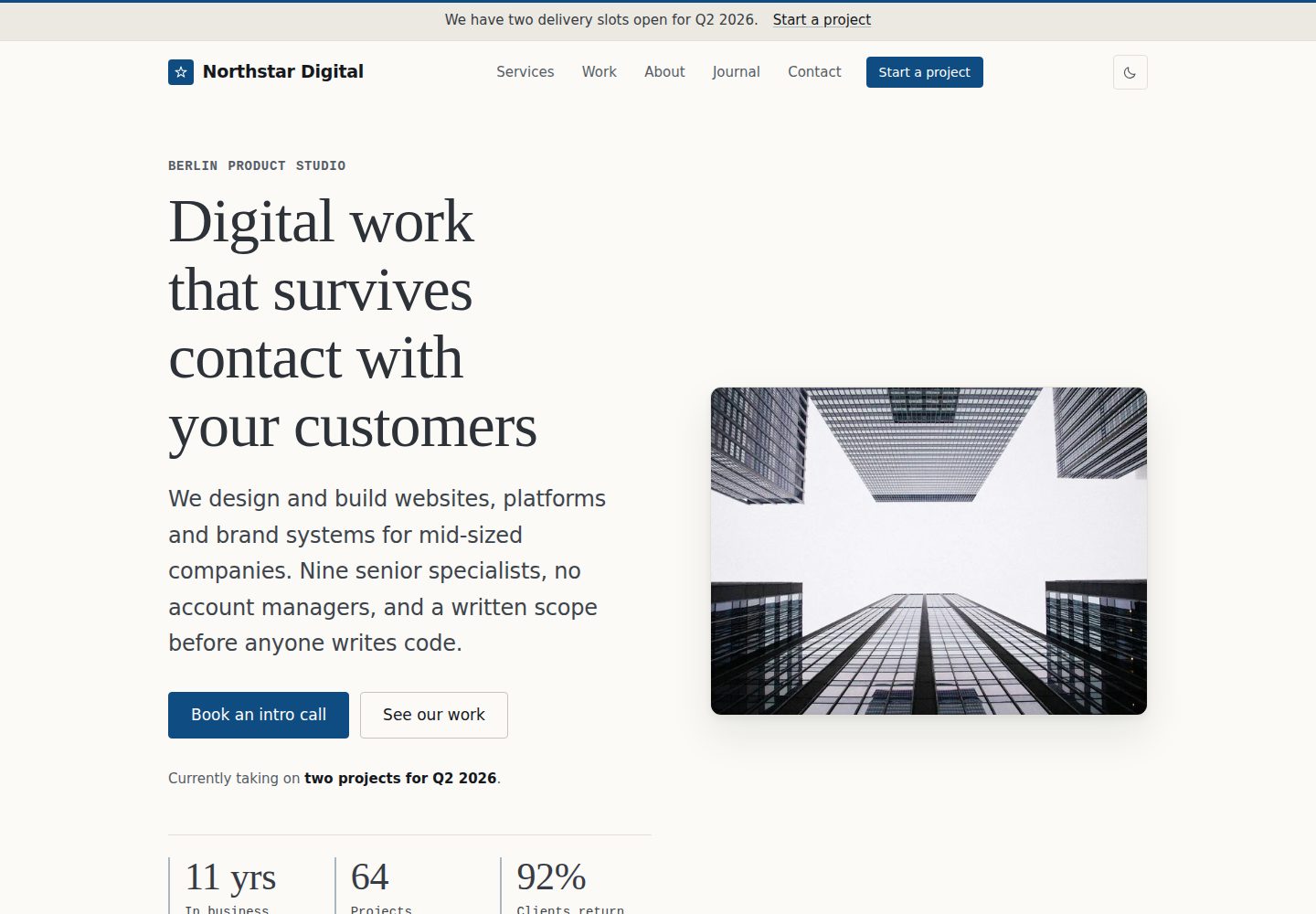
Desktop homepage1 / 2
Desktop captureTop of page
Actual screenshot captured by the server browser.
All pages & views 2
Screenshots show visual appearance; interactive behavior may differ.
Recorded 2026-10-02View source
What stands out
A quick read of the recorded project description.
Pages are composed via a sections list in front matter, supporting 15 section types including hero, services, work, faq, and pricing
Built-in case study, service, and journal content systems, with categories, tags, pagination, and related articles
Independently designed light and dark color schemes, with WCAG 2.2 AA in mind
Uses Hugo's asset pipeline to output fingerprinted CSS/JS with subresource integrity; images are converted to WebP at build time and generate srcset
All interface strings can be translated via i18n/en.toml; no third-party requests until analytics is configured
Template Details
hugo-theme-pico-corp is a Hugo theme for corporate websites and agency sites, built on Pico CSS 2. It uses an editorial design system: serif display type, monospace metadata, generous whitespace, hairline dividers, and a single accent color, with independently designed light and dark color schemes.
The core of the theme is "composable page sections." The homepage, about page, and section indexes are assembled via a sections list in front matter; each entry's type corresponds to a partial under layouts/_partials/sections/, and the remaining fields serve as configuration for that section. Available types include hero, logos, services, work, about, stats, process, testimonials, pricing, faq, timeline, values, team, content, and cta; unknown types cause the build to fail and indicate the page where they occur, rather than being silently skipped.
At the content level, the theme includes a case study system (client, category, year, challenge, solution, results, metrics, tech stack, gallery, and related projects), service layouts (benefits, process, deliverables, and related work), and a journal with categories, tags, pagination, reading time, author, and related articles. The contact page provides a form that can point to Formspree, Netlify Forms, or a custom endpoint.
On the engineering side, the theme uses Hugo's asset pipeline to output concatenated, minified, and fingerprinted CSS and JS, with subresource integrity in production; images are processed at build time to WebP with fallback formats, and generate srcset, intrinsic dimensions, and lazy loading (except for the hero). It also includes Organization, Article, and BreadcrumbList structured data, Open Graph and X cards, sitemap, RSS, and robots.txt. All user-facing strings can be translated via i18n/en.toml; no third-party requests are made until an analytics service is configured.
Usage constraints: requires Hugo 0.146.0 or newer, standard edition is sufficient, no Sass or Hugo extended needed; no Node, package manager, or build step required. The repository includes a complete demo site (fictional Berlin product studio Northstar Digital) that runs after cloning. The theme is MIT licensed, but third-party assets such as demo images, fonts, and icons must be checked separately under their own licenses; quotas and fees for external services like Formspree also need separate confirmation.
HugoBlogCorporate Website
Is it right for your project?
Use Cases
- Building an agency or product studio website that needs services, case studies, and journal modules
- Providing editorial typography and composable homepage sections for a corporate site
- Content-oriented sites that need light and dark color schemes, structured data, and RSS/sitemap
- Projects that want pure Hugo static deployment without introducing a Node build chain
Suitable For
- Developers using Hugo 0.146.0 or newer who prefer a no-build-step workflow
- Agency or corporate sites that need case studies, service descriptions, and a blog side by side
- Editorial websites that value typographic detail, light and dark color schemes, and basic accessibility support
- Teams willing to organize content via front matter and data files rather than modifying layout templates
Getting started & customization
Use these recorded setup notes alongside the repository instructions for your chosen version.
- 1
Requires Hugo 0.146.0 or newer; standard edition is sufficient, no Hugo extended needed
- 2
Can be installed via Hugo module or Git submodule; configuration should start from exampleSite/hugo.toml
- 3
Run the demo from the repository root: hugo server --source exampleSite --themesDir ../.., and keep the cloned directory named hugo-theme-pico-corp
- 4
The contact form requires configuring an action in params.contactForm or Netlify Forms; otherwise the form renders in a disabled state
- 5
Third-party assets such as demo images, fonts, and icons must be checked under their own licenses; the MIT license covers only the theme code
License & source material
Usage conditions & limitations
Free to use · keep license noticeThis entry covers the free version in the public repository under the MIT license; the free scope is the code of that version and does not imply that external services or third-party assets are free.
Must comply with when using
- Permits free use, modification, commercial use, and distribution of that version's code.
- When distributing copies or substantial portions of the code, retain the original author's copyright notice and the full MIT license notice.
- The code is provided as is; warranties and limitations of liability are governed by the original license and applicable law.
Additional costs & items to verify
- The README mentions the Formspree form service; real submissions require configuring a service endpoint, and its usage quotas and fees must be checked separately.
- Demo images, fonts, icons, and other third-party assets must be checked under their own licenses; they cannot be judged solely by the code's MIT license.
- External services such as domains, hosting, databases, payments, or AI may incur additional charges.
- Using this theme requires Hugo 0.146.0 or newer; older versions cannot use the current template layouts.
- Standard Hugo is sufficient; installing Hugo extended is not required.
- When running the demo, keep the cloned directory named hugo-theme-pico-corp, otherwise the theme path will not match.
- The contact form requires configuring an external form service endpoint (such as Formspree or Netlify Forms) yourself; otherwise the form is unusable.
- Demo images come from Lorem Picsum and are placeholder assets only; they must be replaced before going live.
- The companies, clients, and quotes in the demo are fictional and do not represent real individuals or organizations.
- No third-party requests are made by default; once analytics parameters (Plausible or Google Analytics) are configured, external requests are introduced.
View Original Text Basis
Permission is hereby granted, free of charge
Original License Text
- Hugo **0.146.0 or newer** (the theme uses the current template layout with `_partials/` and flat kind templates). Tested on 0.161.1.
Original README
- The standard Hugo edition is enough. There is no Sass, so you do not need Hugo extended.
Original README
`--themesDir ../..` resolves to the directory *above* this repository, and the demo's `theme = "hugo-theme-pico-corp"` then matches this repository's own folder name. Keep the clone named `hugo-theme-pico-corp` and it just works.
Original README
For the contact form, point `params.contactForm.action` at your provider. Netlify Forms users should also set `netlify = true`, which adds the `data-netlify` attribute and the honeypot field Netlify expects.
Original README
> The demo photography comes from [Lorem Picsum](https://picsum.photos) and is > placeholder imagery. Replace `assets/images/` before you launch anything.
Original README
Pico CSS is vendored at `assets/css/pico.min.css` and is also MIT licensed. Demo photography is from Lorem Picsum and is placeholder imagery only; the fictional company, its clients and their quoted words were written for this demo and do not describe real people or organisations.
Original README
https://github.com/PhantomPixelDev/hugo-theme-pico-corp/blob/main/LICENSEhttps://github.com/PhantomPixelDev/hugo-theme-pico-corp/blob/main/README.mdNo third-party requests at all until you set an analytics parameter.
Original README
Compiled by DeepSeek based on repository license and README ·2026-10-04. Results only cover the materials read; dependencies, images, fonts, and subsequent term changes are subject to their respective original texts.
Project checks & description sources
Template Information
- Source platforms
- Hugo Themes
- Documentation and maintenance reference score
- More documented · 88 / 100
- Technologies
- Hugo
- Website type
- Blog · Corporate Website
How this score is calculated
Our heuristic uses license records (up to 30), a demo link (12), a preview (10), stars (15), recorded maintenance (15), description completeness (8), feature records (5) and classification data (5). It is not a code, security or performance test, or a Google score. A link does not establish tested functionality.
What to verify for this project
- Repository update recorded
- 2026-09-13
- Screenshot last checked
- 2026-10-04
A demo link is listed. Check it with your own content and viewport sizes; its presence does not confirm that forms, authentication or payments work.
The catalog identifies Hugo as the primary stack. Check the actual dependency manifest and lockfile for versions and hosting requirements. These notes use recorded metadata, not a code audit or a deployment test.
Use a selection guide →How this description was prepared
AI-assisted description based on catalog records and repository material. Repository authors are not automatically the reviewers of this description.
Review declaration: [email protected] · 2026-10-05
Inspect the recorded source material
SHA-256: d22f50681efd1dede1092c2eabf9632d9d51f50d31502080cda35ba3568ff2c0
2026-10-04T21:25:40.680Z
Source file / repository# pico-corp
A minimal, premium corporate and agency theme for [Hugo](https://gohugo.io),
built on [Pico CSS 2](https://picocss.com).
No build step, no JavaScript framework, no webfont requests. One stylesheet,
about 4 KB of vanilla JavaScript, and a full demo site that runs the moment you
clone the repository.
**[Live demo](https://phantompixeldev.github.io/hugo-theme-pico-corp/)**
```bash
git clone https://github.com/PhantomPixelDev/hugo-theme-pico-corp.git
cd hugo-theme-pico-corp
hugo server --source exampleSite --themesDir ../..
```
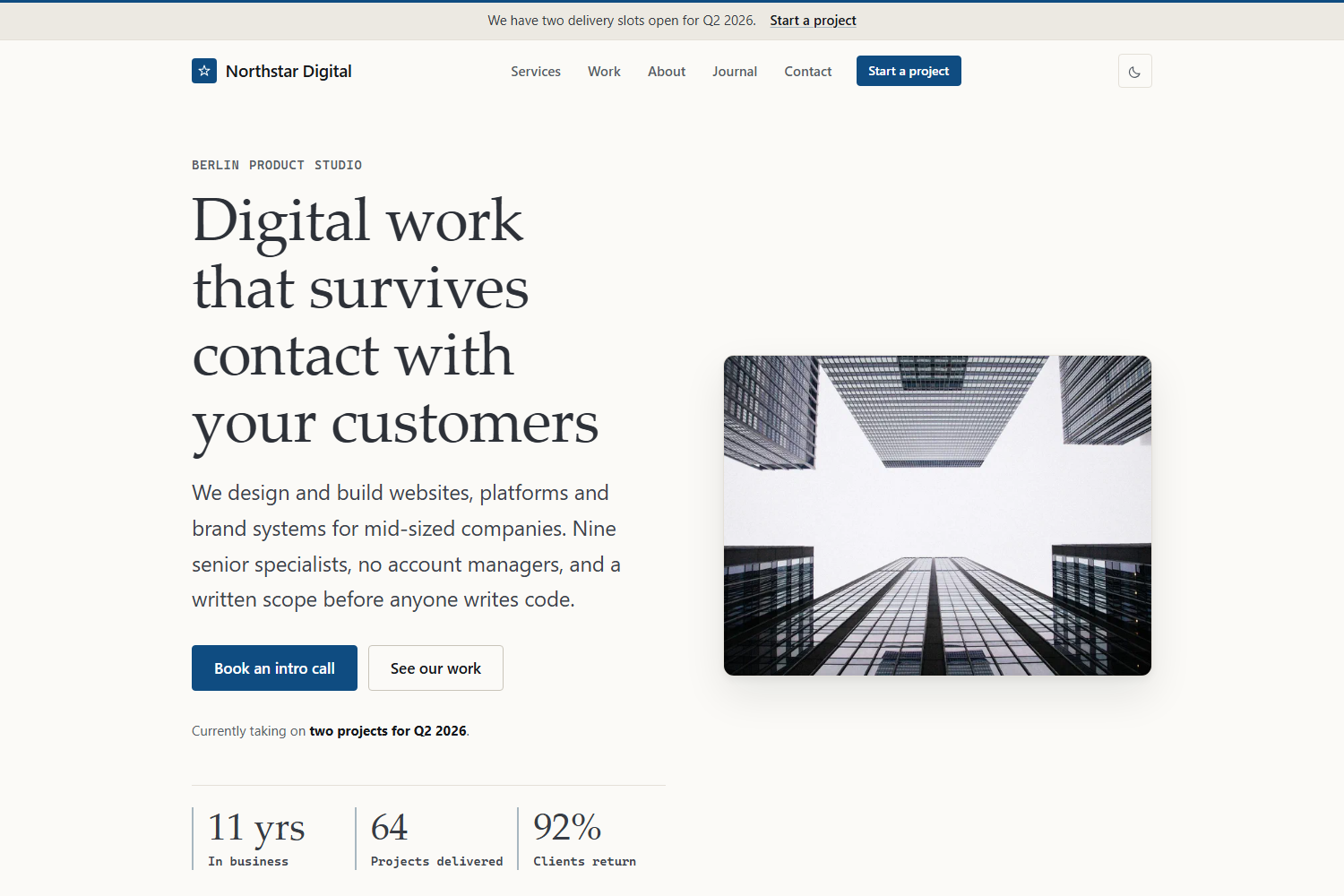
That serves the complete demo for **Northstar Digital**, a fictional Berlin
product studio: home page, about, six services, six case studies, a journal with
categories and tags, contact page, and legal pages.
---
## Contents
- [Features](#features)
- [Screenshots](#screenshots)
- [Requirements](#requirements)
- [Installing the theme in your own site](#installing-the-theme-in-your-own-site)
- [Repository structure](#repository-structure)
- [Configuration](#configuration)
- [Composing pages from sections](#composing-pages-from-sections)
- [Creating content](#creating-content)
- [Data files](#data-files)
- [Shortcodes](#shortcodes)
- [Images](#images)
- [Customisation](#customisation)
- [Dark mode](#dark-mode)
- [Accessibility](#accessibility)
- [Performance](#performance)
- [SEO](#seo)
- [Deployment](#deployment)
- [Licence](#licence)
---
## Features
**Design**
- An editorial design system: system serif display type, monospaced metadata,
generous whitespace, hairline rules, one soft shadow, one accent colour. No
gradients, no glassmorphism, nothing that will date in a year.
- Detail that has a job rather than ornament: a brand rule across the top of
every page, drop caps and an asterism in long-form copy, numbered process
steps, dotted leaders on case-study labels, and rules leading into captions.
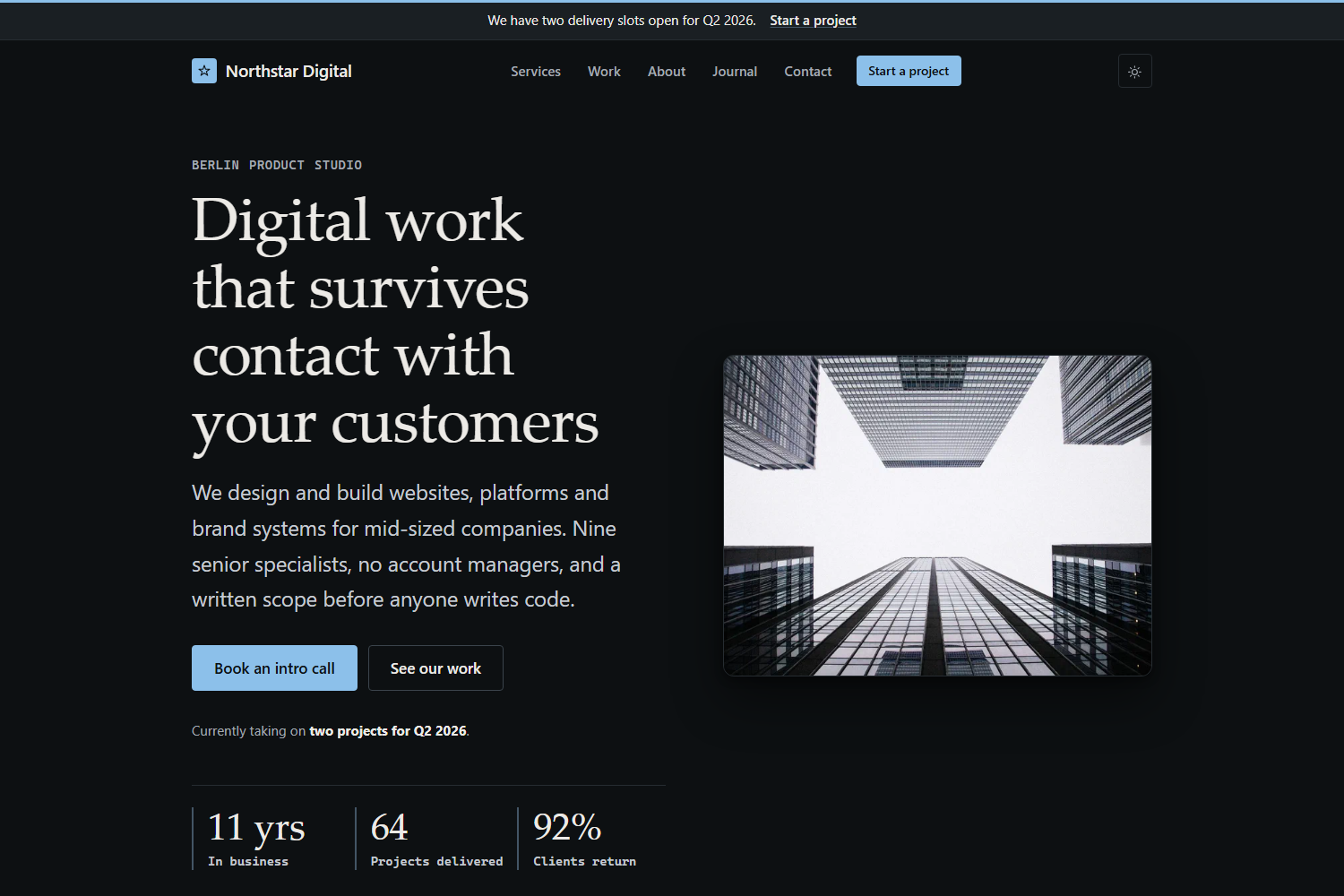
- Light and dark schemes, both deliberately designed rather than inverted.
- Fluid typography and auto-fitting grids, so layouts reflow from 320 px to
ultrawide without a stack of breakpoints.
**Structure**
- Composable page sections: order and configure hero, services, work,
statistics, process, testimonials, pricing, FAQ, timeline, values, team and
CTA blocks from a page's front matter.
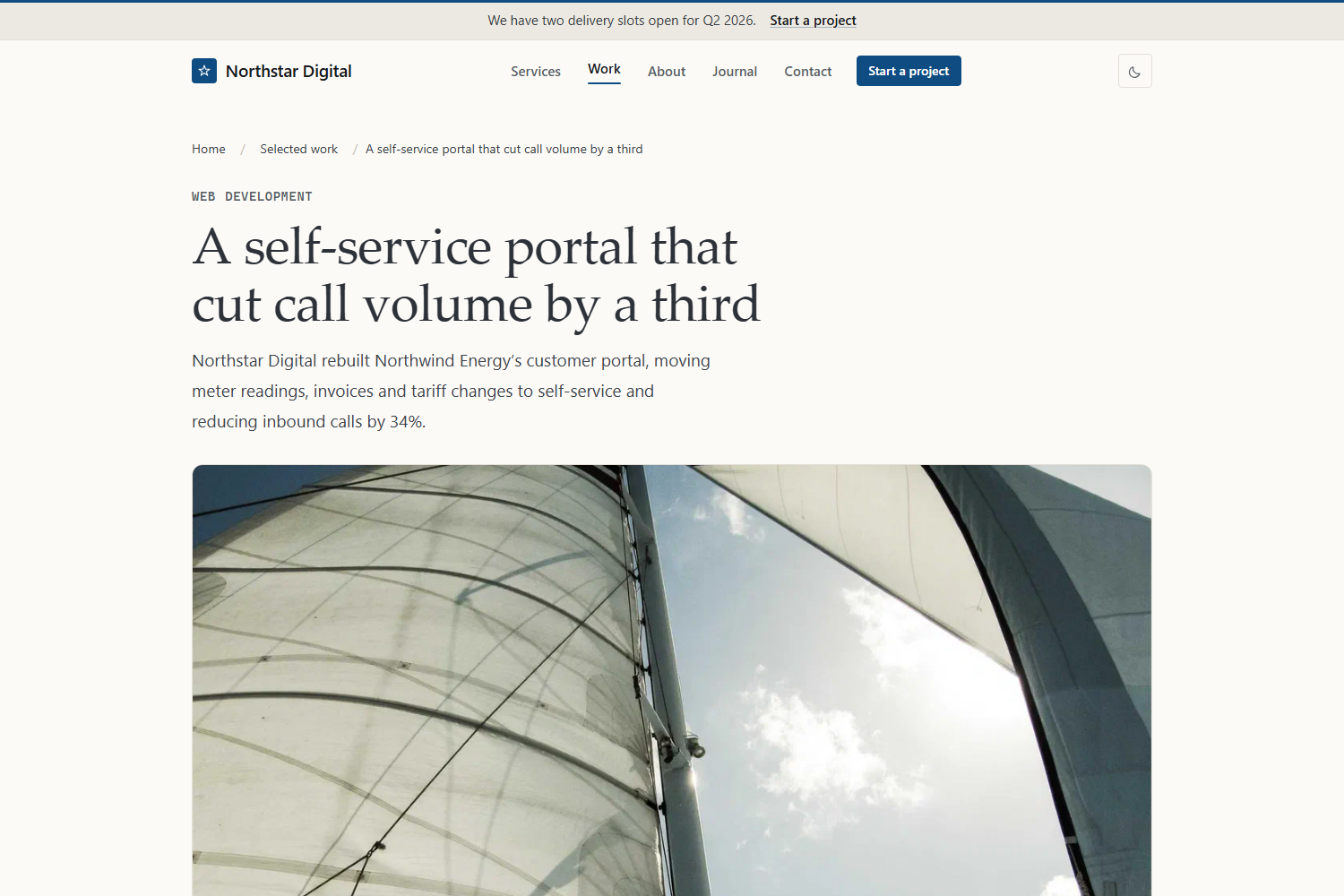
- A proper case-study system with client, category, year, challenge, solution,
results, statistics, technologies, gallery and related projects.
- A service layout with benefits, process, deliverables and related work.
- A journal with categories, tags, pagination, reading time, authors and
related articles.
- Contact page with a real form, ready to point at Formspree, Netlify Forms or
your own endpoint.
**Engineering**
- Hugo's asset pipeline: concatenated, minified, fingerprinted CSS and JS with
subresource integrity in production.
- Images processed at build time into WebP plus a fallback, with `srcset`,
intrinsic dimensions and lazy loading everywhere except the hero.
- Organization, Article and BreadcrumbList structured data; Open Graph and X
cards; sitemap, RSS and `robots.txt`.
- Every string translatable through `i18n/en.toml`.
- Zero third-party requests until you configure analytics.
## Screenshots
Home page in the dark scheme:
A case study, showing the field list, the challenge and solution blocks and the
sidebar of measured results:
## Requirements
- Hugo **0.146.0 or newer** (the theme uses the current template layout with
`_partials/` and flat kind templates). Tested on 0.161.1.
- The standard Hugo edition is enough. There is no Sass, so you do not need
Hugo extended.
- No Node, no package manager, no build step.
## Installing the theme in your own site
**As a Hugo module** (recommended — `hugo mod get -u` then updates it):
```bash
hugo new site my-agency
cd my-agency
hugo mod init github.com/you/my-agency
```
Then in your `hugo.toml`:
```toml
[module]
[[module.imports]]
path = "github.com/PhantomPixelDev/hugo-theme-pico-corp"
```
**As a Git submodule:**
```bash
git submodule add https://github.com/PhantomPixelDev/hugo-theme-pico-corp.git themes/hugo-theme-pico-corp
```
…with `theme = "hugo-theme-pico-corp"` in your configuration.
Either way, start from `exampleSite/hugo.toml`. It is the demo site's own
configuration, so every parameter the theme reads is set there with a real
value rather than left blank:
```bash
curl -o hugo.toml https://raw.githubusercontent.com/PhantomPixelDev/hugo-theme-pico-corp/main/exampleSite/hugo.toml
```
## Repository structure
```text
theme.toml theme metadata for the Hugo themes gallery
hugo.toml theme-level defaults (params and taxonomies only)
archetypes/ default, blog, work and services front matter
assets/css/ pico.min.css plus the eight theme layers
assets/js/theme.js the only JavaScript in the theme
assets/icons/ one SVG sprite
i18n/en.toml every user-facing string
images/ screenshots for the gallery and this README
layouts/
baseof.html home.html page.html section.html taxonomy.html term.html 404.html
blog/ services/ work/ contact/ kind templates per section
_partials/ header, footer, cards, sections, utils
_shortcodes/ button, callout, stats, figure, gallery, …
_markup/ image, link and heading render hooks
exampleSite/ the demo site: content, data, images and configuration
```
Run the demo from the repository root:
```bash
hugo server --source exampleSite --themesDir ../..
```
`--themesDir ../..` resolves to the directory *above* this repository, and the
demo's `theme = "hugo-theme-pico-corp"` then matches this repository's own
folder name. Keep the clone named `hugo-theme-pico-corp` and it just works.
## Configuration
All options live under `[params]`. Nothing company-specific is hardcoded in a
template, so you should never need to edit a layout to change copy.
```toml
[params]
description = "One sentence used as the default meta description."
companyName = "Northstar Digital"
legalName = "Northstar Digital GmbH"
tagline = "Product studio for considered digital work"
founded = 2014
email = "[email protected]"
phone = "+49 30 5550 1847"
phoneHref = "+493055501847" # digits only, for tel: links
vatId = "DE 312 998 471"
openingHours = "Monday to Friday, 09:00–18:00 CET"
[params.address]
street = "Chausseestraße 42"
postalCode = "10115"
city = "Berlin"
region = "Berlin"
country = "Germany"
countryCode = "DE"
mapURL = "https://www.openstreetmap.org/…"
# Brand
primaryColor = "#0f4c81" # accent in the light scheme
primaryColorDark = "#8cc0ea" # accent in the dark scheme
radius = "0.5rem"
headingFont = "serif" # or "sans"
logo = "" # e.g. "images/logo.svg"; empty renders a wordmark
logoDark = ""
favicon = "/favicon.svg"
appleTouchIcon = "/apple-touch-icon.png"
ogImage = "images/og-default.jpg"
# Behaviour
defaultScheme = "system" # "system" | "light" | "dark"
showSchemeToggle = true
showBreadcrumbs = true
showReadingTime = true
showRelated = true
dateFormat = "2 January 2006"
[params.announcement] # the bar above the header
enabled = true
text = "We have two delivery slots open for Q2 2026."
linkLabel = "Start a project"
linkURL = "/contact/"
[params.navCta] # header button; enabled = false hides it
label = "Start a project"
url = "/contact/"
[params.cta] # site-wide closing call to action
eyebrow = "Next step"
title = "Tell us what you are building"
text = "…"
primaryLabel = "Book an intro call"
primaryURL = "/contact/"
secondaryLabel = "See our work"
secondaryURL = "/work/"
[params.footer]
text = "A short paragraph about the company."
note = "Optional small print."
[params.seo]
titleSeparator = "·"
twitterSite = "@example"
twitterCreator = "@example"
organizationType = "ProfessionalService" # any schema.org Organization subtype
[params.analytics] # both empty = zero third-party requests
plausibleDomain = ""
googleAnalyticsID = ""
[params.contactForm]
action = "" # empty renders the form disabled with a note
method = "POST"
netlify = false
successMessage = "…"
[[params.social]]
name = "LinkedIn"
icon = "linkedin" # linkedin, github, mastodon, rss, x, instagram, dribbble, mail
url = "https://www.linkedin.com/company/example"
```
Navigation uses three Hugo menus: `main` for the header, `footer` for the footer
columns, and `legal` for the small print row. Footer columns are grouped by a
menu parameter:
```toml
[[menu.footer]]
name = 'Web Development'
pageRef = '/services/web-development'
weight = 10
[menu.footer.params]
group = 'Services' # becomes the column heading
```
Any page can override the closing CTA, or remove it:
```yaml
cta: false
```
## Composing pages from sections
The home page, about page and section indexes are assembled from a `sections`
list in front matter. Each entry's `type` maps to a partial in
`layouts/_partials/sections/`, and the rest of the entry is that section's
configuration:
```yaml
sections:
- type: hero
eyebrow: "Berlin product studio"
title: "Digital work that survives contact with your customers"
lead: "Markdown **is** allowed here."
image: images/hero.jpg
primary: { label: "Book an intro call", url: /contact/ }
secondary: { label: "See our work", url: /work/ }
facts:
- { value: "11 yrs", label: "In business" }
- type: services
title: "Six disciplines, one delivery team"
tone: muted # "muted" | "inverse", or omit for the page background
limit: 6
link: { label: "All services", url: /services/ }
- type: work
featuredOnly: true # only pages with featured = true
feature: true # render the first card full width
limit: 3
- type: faq
group: pricing # filter data/faq.yaml by its group field
- type: cta
```
Available types: `hero`, `logos`, `services`, `work`, `about`, `stats`,
`process`, `testimonials`, `pricing`, `faq`, `timeline`, `values`, `team`,
`content` and `cta`. Every one accepts `eyebrow`, `title`, `lead`, `tone`,
`tight`, `center` and `class`. An unknown type fails the build with a message
naming the page, rather than silently rendering nothing.
Sections that read from `data/` accept `data` to point at a different file and
`items` to supply entries inline instead.
## Creating content
```bash
hugo new content blog/a-post-about-something.md # uses archetypes/blog.md
hugo new content work/client-project.md # archetypes/work.md
hugo new content services/new-service.md # archetypes/services.md
```
**A service** (`content/services/web-development.md`)
```yaml
---
title: "Web Development"
weight: 10
icon: "code" # any sprite id: code, server, frame, compass, spark, bulb, …
summary: "One sentence for the service card."
lead: "A longer sentence for the page header."
highlights: ["Shown on the card", "Up to three", "Short phrases"]
engagement: "Sidebar: how the work is structured."
timeline: "Sidebar: typical duration."
stack: ["Hugo", "TypeScript"]
benefits:
- { title: "A benefit", text: "Why it matters." }
process:
- { title: "Phase", text: "What happens.", duration: "1 week" }
deliverables: ["What the client receives"]
relatedWork: [/work/a-case-study]
---
```
**A case study** (`content/work/client-project.md`)
```yaml
---
title: "A self-service portal that cut call volume by a third"
date: 2026-02-18
client: "Northwind Energy"
industry: "Energy and utilities"
category: "Web Development"
year: 2026
duration: "5 months"
featured: true
weight: 10
summary: "One sentence for the card."
headline: "34% fewer inbound calls" # the result line on the card
image: images/work-northwind.jpg
challenge: |
Markdown. Rendered under "The challenge".
solution: |
Markdown. Rendered under "What we did".
results: ["One measured outcome per line"]
stats:
- { value: "-34%", label: "Inbound support calls" }
technologies: ["TypeScript", "Go"]
services: [/services/web-development]
testimonial:
quote: "…"
name: "Annika Roth"
role: "Head of Digital, Northwind Energy"
gallery:
- { image: images/gallery-a.jpg, alt: "…", caption: "…" }
related: [/work/another-case-study]
---
```
Case studies are ordered by `weight`, then date. Anything in the front matter
that you leave out is simply not rendered.
**A journal post** (`content/blog/a-post.md`)
```yaml
---
title: "Shipping fast sites without a framework"
date: 2026-06-24
author: "Daniel Okonjo" # a key in data/authors.yaml
description: "Used for the meta description and the card."
image: images/blog-performance.jpg
categories: ["Engineering"]
tags: ["performance", "css"]
toc: true # show the table of contents in the sidebar
---
```
Related articles use Hugo's built-in related-content index, so shared tags and
categories are enough.
## Data files
| File | Used by |
| ------------------- | ---------------------------------------- |
| `clients.yaml` | `logos` section (`name`, optional `logo`) |
| `stats.yaml` | `stats` section (`value`, `label`) |
| `values.yaml` | `values` section (`title`, `text`, `icon`) |
| `process.yaml` | `process` section (`title`, `text`, `duration`) |
| `testimonials.yaml` | `testimonials` section (`quote`, `name`, `role`, `company`) |
| `pricing.yaml` | `pricing` section (`name`, `price`, `unit`, `text`, `features`, `featured`, `badge`, `cta`) |
| `faq.yaml` | `faq` section and shortcode (`question`, `answer`, `group`) |
| `team.yaml` | `team` section (`name`, `role`, `image`, `bio`, `link`) |
| `timeline.yaml` | `timeline` section (`year`, `title`, `text`) |
| `authors.yaml` | post bylines, keyed by author name |
## Shortcodes
```text
{{< button url="/contact/" label="Book a call" variant="primary" >}}
{{< stats "3.1s → 0.9s|Largest contentful paint" "+38%|Qualified leads" >}}
{{< figure src="images/foo.jpg" alt="…" caption="…" >}}
{{< gallery "images/a.jpg" "images/b.jpg" >}}
{{< faq group="pricing" >}}
{{< callout title="Note" >}} markdown body {{< /callout >}}
{{< testimonial name="Annika Roth" role="Head of Digital" >}} quote {{< /testimonial >}}
```
All of them use the angle-bracket form. A percent-delimited shortcode has its
output re-parsed as markdown, so its HTML would be discarded unless the site
turns on `markup.goldmark.renderer.unsafe`; these render their own inner
markdown instead, which keeps that setting off.
## Images
Put images in `assets/images/` and reference them by path (`images/hero.jpg`),
or use page bundles and reference the resource name. Both work everywhere the
theme takes an image, because every image goes through one partial:
```go-html-template
{{ partial "utils/image.html" (dict
"page" .
"path" "images/hero.jpg"
"alt" "Describe the image"
"sizes" "(min-width: 62rem) 46vw, 100vw"
"priority" true) }}
```
It emits a `<picture>` with a WebP source, an original-format fallback, a
`srcset` at 480/768/1200/1600, intrinsic `width` and `height`, and
`loading="lazy"`. Pass `priority true` for the one image above the fold: it
switches to eager loading with `fetchpriority="high"` so the largest contentful
paint is not delayed.
SVGs and remote URLs pass through untouched.
> The demo photography comes from [Lorem Picsum](https://picsum.photos) and is
> placeholder imagery. Replace `assets/images/` before you launch anything.
## Customisation
The stylesheet is Pico plus eight small layers, concatenated in order:
```text
pico.min.css vendored Pico 2.1.1
theme/00-tokens.css spacing, type scale, palette, radii, shadows, Pico overrides
theme/01-brand.css generated from your params (colour, radius, display font)
theme/10-base.css typography, focus rings, code, tables, reduced motion
theme/20-layout.css containers, section rhythm, grids, prose
theme/30-header.css announcement bar, header, navigation, footer
theme/40-components.css buttons, cards, badges, stats, testimonials, FAQ, forms
theme/50-sections.css hero, process, timeline, pricing, CTA
theme/60-pages.css case studies, articles, contact, 404
```
Two ways to change the look, in order of preference:
1. **Set parameters.** `primaryColor`, `primaryColorDark`, `radius` and
`headingFont` are compiled into the stylesheet.
2. **Add `assets/css/custom.css` in your site.** If that file exists it is
appended last, so anything in it wins. Override tokens rather than
components:
```css
:root {
--pc-container: 76rem;
--pc-section-padding: 5rem;
--pc-font-display: "Your Font", Georgia, serif;
}
```
To change wording rather than design, copy this theme's `i18n/en.toml` to
`i18n/en.toml` in your own site and edit it. Templates contain no hardcoded English.
## Dark mode
Both schemes are defined as token sets on `:root`, mirroring Pico's own
selectors, so three states work correctly:
- **System** (default): `prefers-color-scheme` decides.
- **Explicit**: the toggle sets `data-theme="light"` or `"dark"` on `<html>` and
stores the choice in `localStorage`.
- **Forced**: set `params.defaultScheme` to `light` or `dark`.
A ten-line inline script in `<head>` applies the stored choice before first
paint, so there is no flash of the wrong scheme. The toggle reflects the
effective scheme on itself, which is how the icon and the label stay correct
without a second render. Storage failures are caught; the page still works, it
just stops remembering.
Set `showSchemeToggle = false` to remove the control entirely.
## Accessibility
The theme targets WCAG 2.2 AA:
- Semantic landmarks, one `h1` per page, headings in order.
- A skip link, visible 3 px focus rings on every interactive element, and
`:focus:not(:focus-visible)` suppression so pointer users do not see them.
- The mobile navigation is a real button with `aria-expanded`, closes on Escape
and on outside click, and returns focus to the trigger.
- FAQs are native `<details>`, so they work with JavaScript disabled.
- Every form control has a real `<label>`; hints are wired with
`aria-describedby`; required fields are marked in the label, not by colour.
- Cards are linked through the title, so the link text is the accessible name
rather than "read more".
- Text contrast is at least 4.5:1 in both schemes; large display text and UI
borders clear their thresholds too.
- `prefers-reduced-motion` disables transitions and smooth scrolling, and there
is a `forced-colors` block for Windows high contrast mode.
- ARIA appears only where HTML cannot express the state.
Automated tools catch perhaps half of this. Test with a keyboard and a screen
reader before you ship.
## Performance
What the theme does:
- One stylesheet and one script, concatenated, minified, fingerprinted and
served with subresource integrity in production. Development skips
minification for fast rebuilds.
- No webfonts. The display face is whichever quality serif the reader's system
already has, which removes the usual 100–300 KB of font requests along with
the layout shift they cause.
- About 4 KB of uncompressed JavaScript, deferred. Nothing is required for the
page to be readable.
- Images resized at build time, WebP first, correct `srcset` and `sizes`,
intrinsic dimensions on every `<img>`, lazy except the hero.
- No third-party requests at all until you set an analytics parameter.
What you still have to do: keep source images reasonable, do not add a chat
widget, and re-check after each new dependency.
## SEO
- Title template, meta description, canonical URL.
- Open Graph and X card tags, with a 1200×630 image generated from the page's
own image or the site default.
- JSON-LD: Organization (or any `organizationType` you choose) on every page,
Article on posts, BreadcrumbList below the top level.
- `sitemap.xml` and RSS from Hugo, plus a `robots.txt` that blocks everything
outside production builds so staging is never indexed.
- `noindex = true` in a page's front matter keeps it out of search results.
## Deployment
```bash
hugo --source exampleSite --themesDir ../.. --gc --minify # the demo site
hugo --gc --minify # your own site
```
`hugo.IsProduction` gates minification, fingerprinting and analytics, and
`HUGO_ENVIRONMENT=production` is the default for `hugo`, so a plain build is
already a production build. Set `baseURL` in your configuration or pass
`--baseURL`.
**Netlify** (`netlify.toml`)
```toml
[build]
publish = "public"
command = "hugo --gc --minify"
[build.environment]
HUGO_VERSION = "0.161.1"
```
The demo site in this repository is deployed to GitHub Pages by
`.github/workflows/pages.yml`, which builds `exampleSite` against the theme in
the repository root.
**Cloudflare Pages**: build command `hugo --gc --minify`, output directory
`public`, environment variable `HUGO_VERSION = 0.161.1`.
**GitHub Pages**: use the official `actions/configure-pages` plus
`peaceiris/actions-hugo` workflow; nothing theme-specific is required.
For the contact form, point `params.contactForm.action` at your provider.
Netlify Forms users should also set `netlify = true`, which adds the
`data-netlify` attribute and the honeypot field Netlify expects.
## Licence
MIT. See [LICENSE](LICENSE).
Pico CSS is vendored at `assets/css/pico.min.css` and is also MIT licensed. Demo photography is from Lorem Picsum and is placeholder imagery only;
the fictional company, its clients and their quoted words were written for this
demo and do not describe real people or organisations.
Explore similar templates
Compare previews and descriptions within the same stack and category.

hugo-PaperMod
A fast, clean, responsive Hugo theme for blogs and lightweight portfolios, with three layout modes (Regular, Home-Info, Profile), automatic and manual light/dark themes, Fuse.js client-side search, multilingual support, and built-in Open Graph, Twitter Cards, and Schema.org data.
Hugo · Portfolio

LoveIt
LoveIt is a clean, elegant, and feature-rich Hugo blog theme derived from LeaveIt and KeepIt, MIT-licensed. It offers light/dark modes, responsive layout, multilingual support, and search via Lunr.js or Algolia.
Hugo · Blog

hugo-coder
hugo-coder is a minimalist Hugo blog theme maintained by luizdepra under the MIT license. It provides a clean, text-focused blog appearance, configuration documentation in the docs directory, and a complete exampleSite with hugo.toml.
Hugo · Blog

blowfish
Blowfish is a Hugo personal website and blog theme built with Tailwind CSS 4, focused on lightness, simplicity, and content-first presentation.
Hugo · Blog

hugo-paper
hugo-paper is a simple, clean, and customizable Hugo blog theme configured through config.toml or hugo.toml.
Hugo · Blog

hextra
Hextra is a Hugo theme for documentation and blog sites, built on Hugo and Tailwind CSS with design referencing Nextra.
Hugo · Documentation