基于 Pico CSS 2,无需构建步骤、无 JavaScript 框架、无 Web 字体请求
Hugo博客企业官网
hugo-theme-pico-corp — Hugo 博客模板
作者 PhantomPixelDev
基于 Pico CSS 2 的 Hugo 企业/机构主题,提供编辑风格排版、可组合页面区块、案例研究、服务与日志模块,支持明暗配色,无需构建步骤。
看看你的网站会是什么样
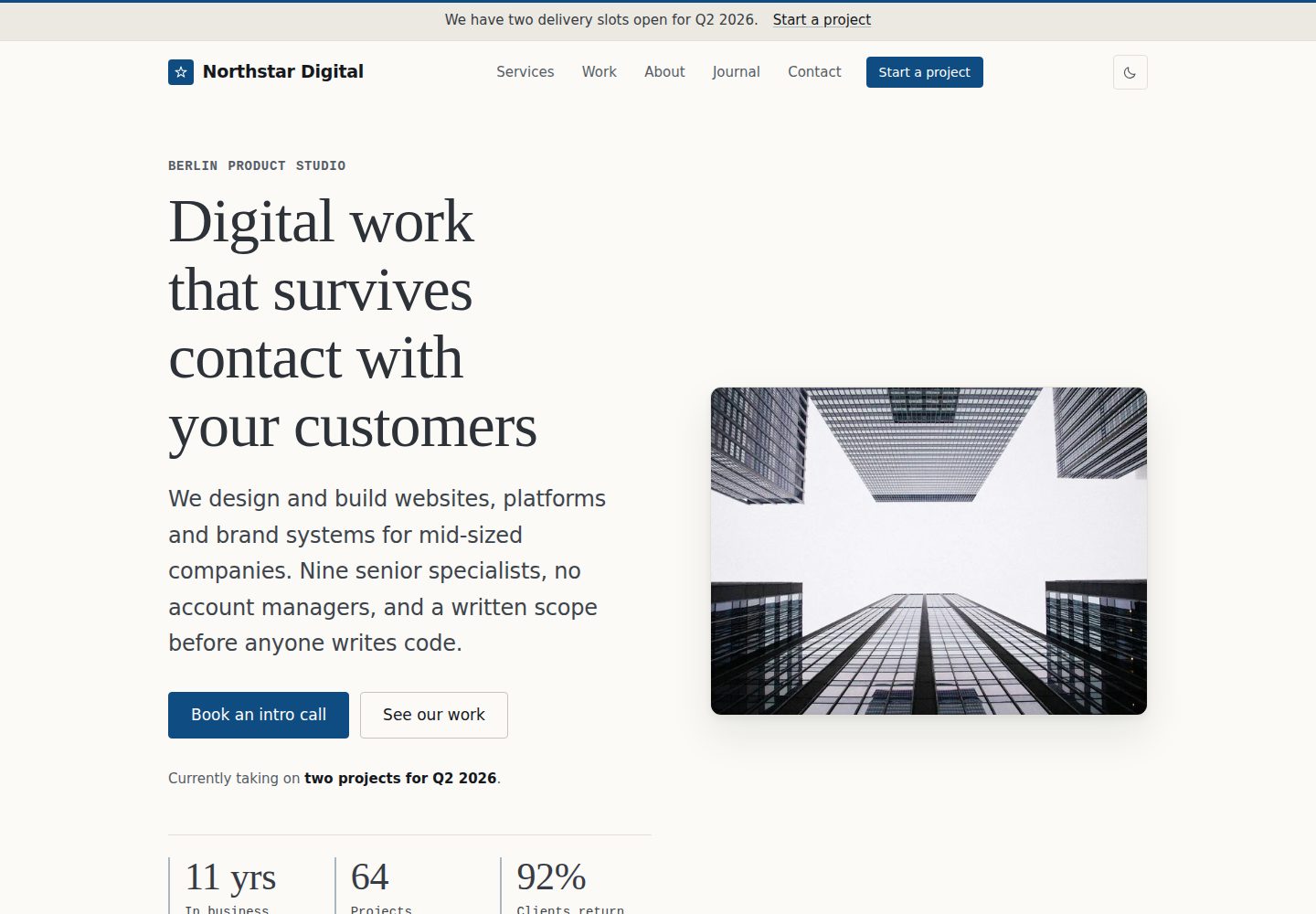
浏览真实页面截图,比较内容排版与手机效果。点击下方缩略图切换,放大查看整页细节。
全部页面与视图 2
截图用于了解视觉与布局,交互效果请以实际项目为准。
采集于 2026-10-02查看来源
值得关注的模板亮点
从已有项目资料中,快速了解它的特点。
页面由 front matter 中的 sections 列表组合,支持 hero、services、work、faq、pricing 等 15 种区块类型
内置案例研究、服务与日志三类内容系统,含分类、标签、分页与相关文章
明暗两套独立设计的配色方案,并考虑 WCAG 2.2 AA
使用 Hugo 资源管线输出带指纹与子资源完整性的 CSS/JS,图片构建时转为 WebP 并生成 srcset
所有界面字符串可通过 i18n/en.toml 翻译,未配置分析前无第三方请求
模板详细介绍
hugo-theme-pico-corp 是一个面向企业官网与代理机构站点的 Hugo 主题,构建在 Pico CSS 2 之上。它采用编辑风格的设计系统:衬线展示字体、等宽元数据、大量留白、细线分隔与单一强调色,并提供经过独立设计的明暗两套配色。
主题的核心是「可组合页面区块」。首页、关于页和栏目索引通过 front matter 中的 sections 列表组装,每个条目的 type 对应 layouts/_partials/sections/ 下的一个 partial,其余字段作为该区块的配置。可用类型包括 hero、logos、services、work、about、stats、process、testimonials、pricing、faq、timeline、values、team、content 和 cta;未知类型会令构建失败并指出所在页面,而不是静默跳过。
内容层面,主题内置案例研究系统(客户、类别、年份、挑战、方案、结果、数据、技术栈、图库与相关项目)、服务布局(收益、流程、交付物与相关工作),以及带分类、标签、分页、阅读时长、作者与相关文章的日志。联系页提供表单,可指向 Formspree、Netlify Forms 或自有端点。
工程方面,主题使用 Hugo 的资源管线输出拼接、压缩并带指纹的 CSS 与 JS,生产环境附带子资源完整性;图片在构建时处理为 WebP 加回退格式,并生成 srcset、固有尺寸与懒加载(hero 除外)。此外包含 Organization、Article、BreadcrumbList 结构化数据,Open Graph 与 X 卡片,sitemap、RSS 与 robots.txt。所有面向用户的字符串可通过 i18n/en.toml 翻译;在未配置分析服务前不产生第三方请求。
使用限制:需要 Hugo 0.146.0 或更新版本,标准版即可,无需 Sass 或 Hugo extended;不需要 Node、包管理器或构建步骤。仓库附带一个完整的演示站点(虚构的柏林产品工作室 Northstar Digital),克隆后即可运行。主题采用 MIT 许可,但演示图片、字体、图标等第三方素材需按各自许可单独核对;Formspree 等外部服务的额度与费用也需另行确认。
Hugo博客企业官网
适合你的项目吗?
适用场景
- 搭建代理机构或产品工作室的官网,需要服务、案例与日志模块
- 为企业站点提供编辑风格排版与可组合的首页区块
- 需要明暗配色、结构化数据与 RSS/sitemap 的内容型站点
- 希望以纯 Hugo 静态方式部署、不引入 Node 构建链的项目
适合人群
- 使用 Hugo 0.146.0 或更新版本、偏好无构建步骤工作流的开发者
- 需要案例研究、服务介绍与博客并存的代理机构或企业站点
- 重视排版细节、明暗配色与基础无障碍支持的编辑型网站
- 愿意通过 front matter 与 data 文件组织内容、而非修改布局模板的团队
上手与定制指南
结合仓库当前版本的说明,按下面的资料检查内容、配置与运行要求。
- 1
需要 Hugo 0.146.0 或更新版本,标准版即可,无需 Hugo extended
- 2
可通过 Hugo module 或 Git submodule 安装,配置建议从 exampleSite/hugo.toml 起步
- 3
在仓库根目录运行演示:hugo server --source exampleSite --themesDir ../..,并保持克隆目录名为 hugo-theme-pico-corp
- 4
联系表单需在 params.contactForm 中配置 action 或 Netlify Forms,否则表单以禁用状态渲染
- 5
演示图片、字体、图标等第三方素材需按各自许可核对,MIT 许可仅覆盖主题代码
授权与来源资料
使用条件与限制
免费使用 · 保留许可声明本次收录的是公开仓库中采用 MIT 许可的免费版本;免费范围为该版本代码,不代表外部服务或第三方素材免费。
使用时需要遵守
- 允许免费使用、修改、商用和分发该版本代码。
- 分发代码副本或实质性部分时,保留原作者版权声明和完整 MIT 许可声明。
- 代码按现状提供;担保与责任限制以原许可证及适用法律为准。
额外费用与待核对事项
- README 提及 Formspree 表单服务;真实提交需配置服务端点,其使用额度与费用需单独核对。
- 演示图片、字体、图标及其他第三方素材需按各自许可核对,不能仅凭代码的 MIT 许可判断。
- 域名、托管、数据库、支付或 AI 等外部服务可能另外收费。
- 使用该主题需要 Hugo 0.146.0 或更新版本;旧版本无法使用当前模板布局。
- 标准版 Hugo 即可,无需安装 Hugo extended 版本。
- 运行演示时需保持克隆目录名为 hugo-theme-pico-corp,否则主题路径无法匹配。
- 联系表单需自行配置外部表单服务端点(如 Formspree 或 Netlify Forms),否则表单不可用。
- 演示图片来自 Lorem Picsum,仅为占位素材,正式上线前必须替换。
- 演示中的公司、客户及引述均为虚构内容,不代表真实个人或组织。
- 默认不发起第三方请求;一旦配置分析参数(Plausible 或 Google Analytics)即会引入外部请求。
查看原文依据
Permission is hereby granted, free of charge
许可证原文
- Hugo **0.146.0 or newer** (the theme uses the current template layout with `_partials/` and flat kind templates). Tested on 0.161.1.
README 原文
- The standard Hugo edition is enough. There is no Sass, so you do not need Hugo extended.
README 原文
`--themesDir ../..` resolves to the directory *above* this repository, and the demo's `theme = "hugo-theme-pico-corp"` then matches this repository's own folder name. Keep the clone named `hugo-theme-pico-corp` and it just works.
README 原文
For the contact form, point `params.contactForm.action` at your provider. Netlify Forms users should also set `netlify = true`, which adds the `data-netlify` attribute and the honeypot field Netlify expects.
README 原文
> The demo photography comes from [Lorem Picsum](https://picsum.photos) and is > placeholder imagery. Replace `assets/images/` before you launch anything.
README 原文
Pico CSS is vendored at `assets/css/pico.min.css` and is also MIT licensed. Demo photography is from Lorem Picsum and is placeholder imagery only; the fictional company, its clients and their quoted words were written for this demo and do not describe real people or organisations.
README 原文
https://github.com/PhantomPixelDev/hugo-theme-pico-corp/blob/main/LICENSEhttps://github.com/PhantomPixelDev/hugo-theme-pico-corp/blob/main/README.mdNo third-party requests at all until you set an analytics parameter.
README 原文
DeepSeek 根据仓库许可证和 README 整理 ·2026-10-04。结果仅覆盖已读取资料,依赖、图片、字体及后续条款变更以各自原文为准。
项目核对记录与介绍依据
模板资料
- 来源平台
- Hugo Themes
- 资料与维护参考分
- 资料较完整 · 88 / 100
- 技术栈
- Hugo
- 网站类型
- 博客 · 企业官网
这个分数如何计算
本站按许可资料(最高30分)、演示链接(12分)、预览图(10分)、Star数(15分)、记录的维护时间(15分)、描述完整度(8分)、功能记录(5分)和分类资料(5分)计算。它不是代码、安全或性能测试,也不是 Google 评分;有链接不代表已实测可用。
这个项目需要核对什么
- 记录的仓库更新时间
- 2026-09-13
- 截图检查日期
- 2026-10-04
已收录演示链接。请用你的内容与屏幕尺寸检查;有演示不代表表单、认证或支付已经可用。
目录记录的主要技术栈是 Hugo。请通过依赖清单和锁文件核对实际版本与托管要求。这些说明基于收录资料,不代表代码审计或部署实测。
查看具体选型方法 →介绍的制作与核对状态
介绍由 AI 辅助整理目录与仓库资料。仓库作者不等于这篇介绍的审核者。
审核声明: [email protected] · 2026-10-05
查看当时使用的来源资料
SHA-256: d22f50681efd1dede1092c2eabf9632d9d51f50d31502080cda35ba3568ff2c0
2026-10-04T21:25:40.680Z
来源文件 / 仓库# pico-corp
A minimal, premium corporate and agency theme for [Hugo](https://gohugo.io),
built on [Pico CSS 2](https://picocss.com).
No build step, no JavaScript framework, no webfont requests. One stylesheet,
about 4 KB of vanilla JavaScript, and a full demo site that runs the moment you
clone the repository.
**[Live demo](https://phantompixeldev.github.io/hugo-theme-pico-corp/)**
```bash
git clone https://github.com/PhantomPixelDev/hugo-theme-pico-corp.git
cd hugo-theme-pico-corp
hugo server --source exampleSite --themesDir ../..
```
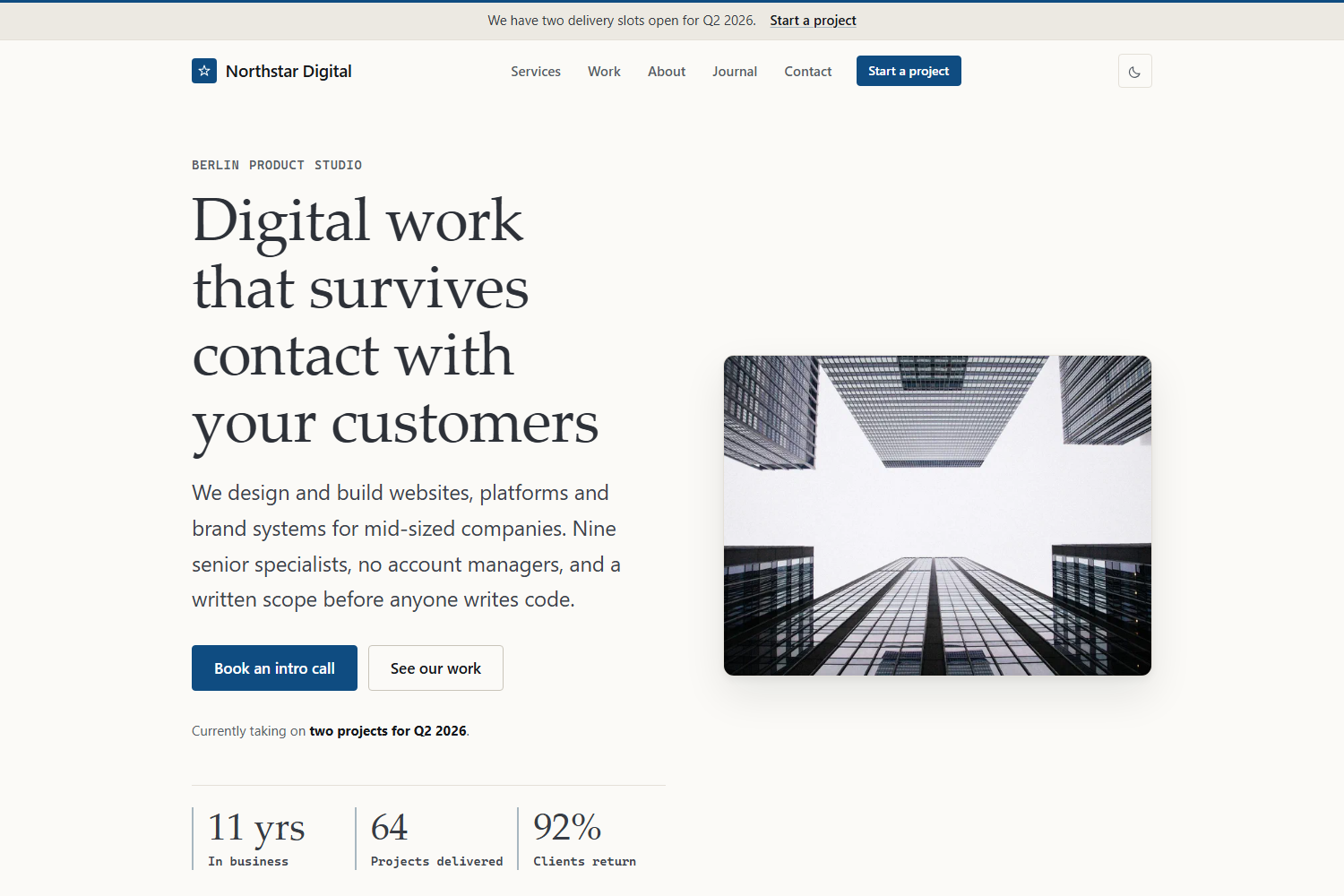
That serves the complete demo for **Northstar Digital**, a fictional Berlin
product studio: home page, about, six services, six case studies, a journal with
categories and tags, contact page, and legal pages.
---
## Contents
- [Features](#features)
- [Screenshots](#screenshots)
- [Requirements](#requirements)
- [Installing the theme in your own site](#installing-the-theme-in-your-own-site)
- [Repository structure](#repository-structure)
- [Configuration](#configuration)
- [Composing pages from sections](#composing-pages-from-sections)
- [Creating content](#creating-content)
- [Data files](#data-files)
- [Shortcodes](#shortcodes)
- [Images](#images)
- [Customisation](#customisation)
- [Dark mode](#dark-mode)
- [Accessibility](#accessibility)
- [Performance](#performance)
- [SEO](#seo)
- [Deployment](#deployment)
- [Licence](#licence)
---
## Features
**Design**
- An editorial design system: system serif display type, monospaced metadata,
generous whitespace, hairline rules, one soft shadow, one accent colour. No
gradients, no glassmorphism, nothing that will date in a year.
- Detail that has a job rather than ornament: a brand rule across the top of
every page, drop caps and an asterism in long-form copy, numbered process
steps, dotted leaders on case-study labels, and rules leading into captions.
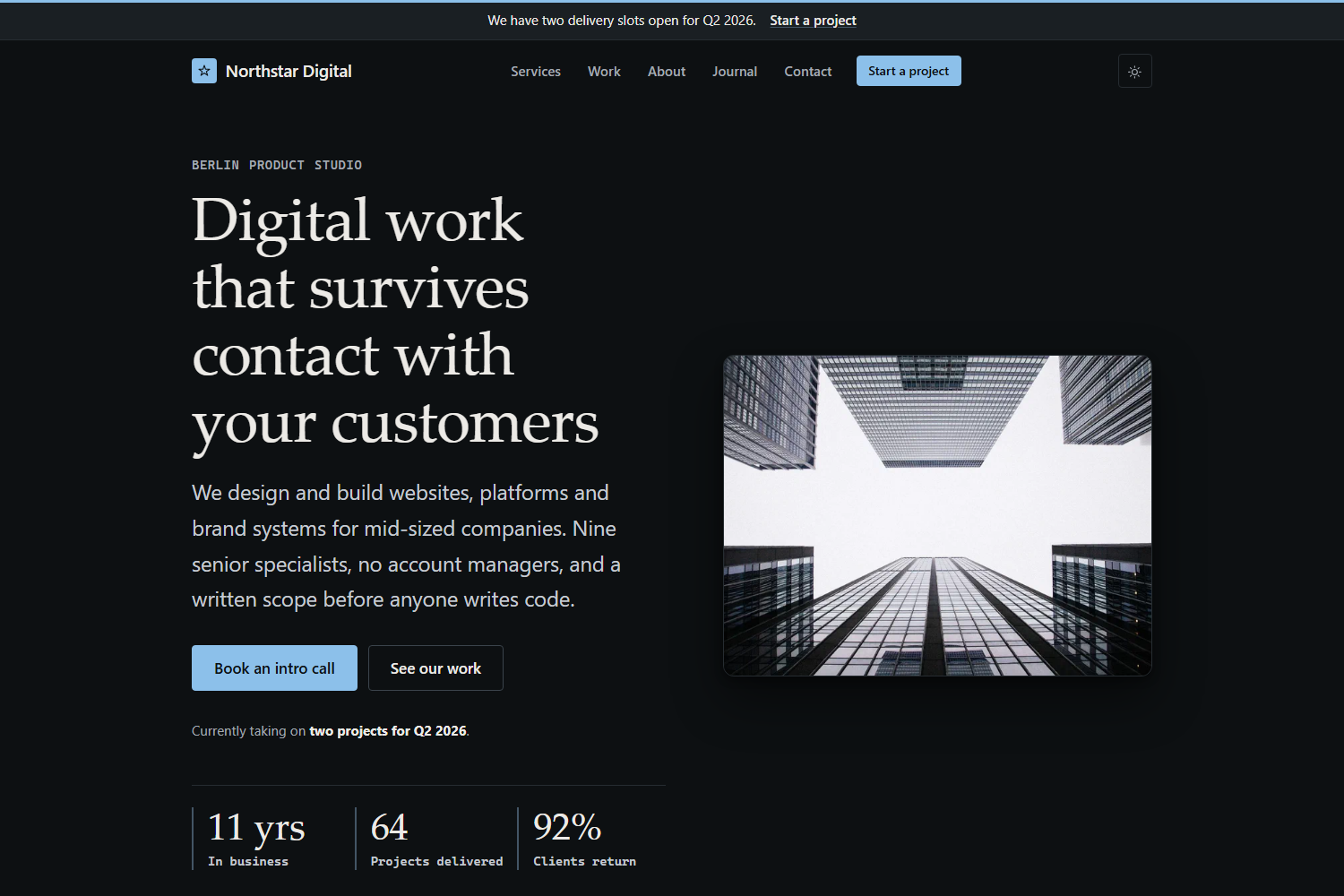
- Light and dark schemes, both deliberately designed rather than inverted.
- Fluid typography and auto-fitting grids, so layouts reflow from 320 px to
ultrawide without a stack of breakpoints.
**Structure**
- Composable page sections: order and configure hero, services, work,
statistics, process, testimonials, pricing, FAQ, timeline, values, team and
CTA blocks from a page's front matter.
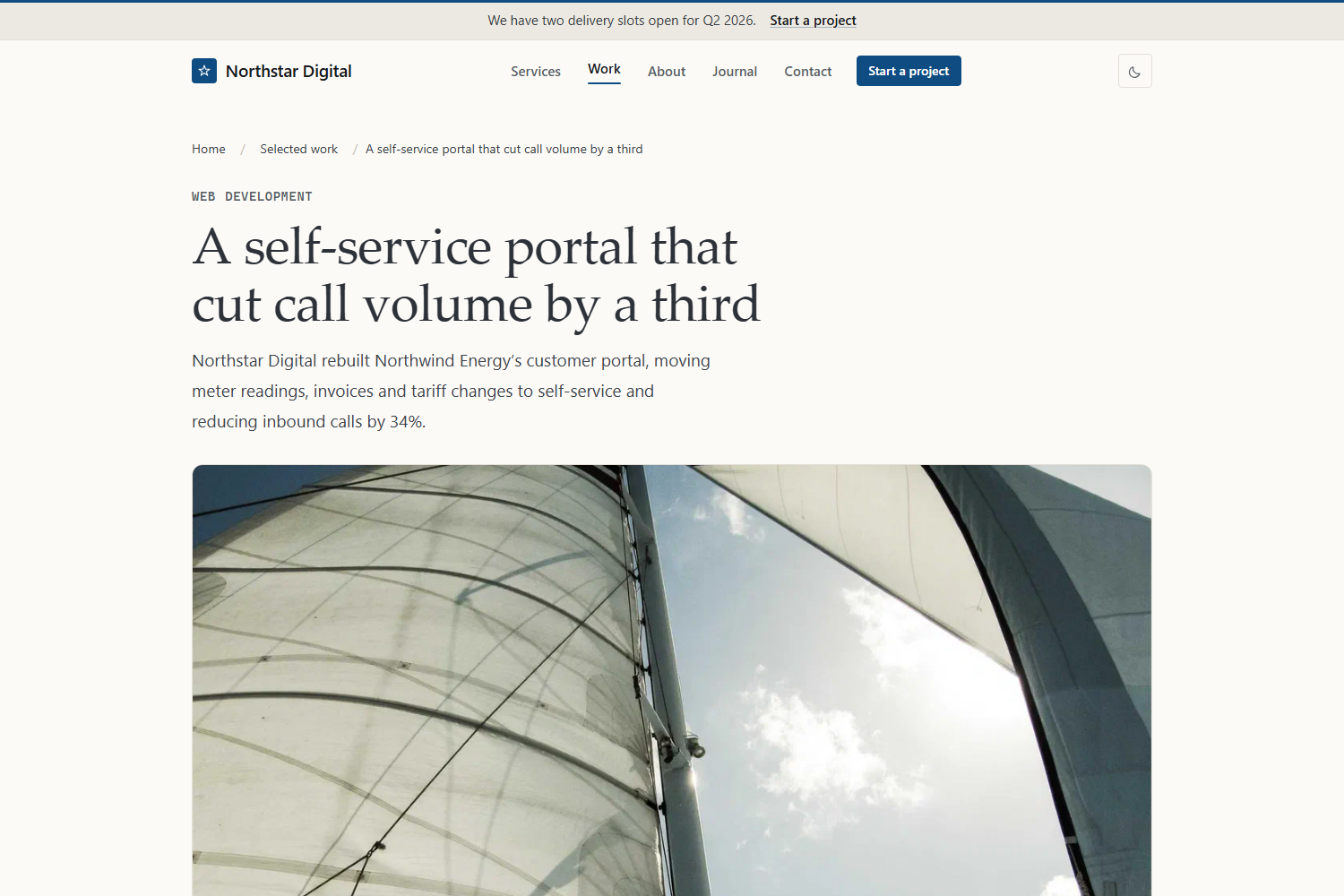
- A proper case-study system with client, category, year, challenge, solution,
results, statistics, technologies, gallery and related projects.
- A service layout with benefits, process, deliverables and related work.
- A journal with categories, tags, pagination, reading time, authors and
related articles.
- Contact page with a real form, ready to point at Formspree, Netlify Forms or
your own endpoint.
**Engineering**
- Hugo's asset pipeline: concatenated, minified, fingerprinted CSS and JS with
subresource integrity in production.
- Images processed at build time into WebP plus a fallback, with `srcset`,
intrinsic dimensions and lazy loading everywhere except the hero.
- Organization, Article and BreadcrumbList structured data; Open Graph and X
cards; sitemap, RSS and `robots.txt`.
- Every string translatable through `i18n/en.toml`.
- Zero third-party requests until you configure analytics.
## Screenshots
Home page in the dark scheme:
A case study, showing the field list, the challenge and solution blocks and the
sidebar of measured results:
## Requirements
- Hugo **0.146.0 or newer** (the theme uses the current template layout with
`_partials/` and flat kind templates). Tested on 0.161.1.
- The standard Hugo edition is enough. There is no Sass, so you do not need
Hugo extended.
- No Node, no package manager, no build step.
## Installing the theme in your own site
**As a Hugo module** (recommended — `hugo mod get -u` then updates it):
```bash
hugo new site my-agency
cd my-agency
hugo mod init github.com/you/my-agency
```
Then in your `hugo.toml`:
```toml
[module]
[[module.imports]]
path = "github.com/PhantomPixelDev/hugo-theme-pico-corp"
```
**As a Git submodule:**
```bash
git submodule add https://github.com/PhantomPixelDev/hugo-theme-pico-corp.git themes/hugo-theme-pico-corp
```
…with `theme = "hugo-theme-pico-corp"` in your configuration.
Either way, start from `exampleSite/hugo.toml`. It is the demo site's own
configuration, so every parameter the theme reads is set there with a real
value rather than left blank:
```bash
curl -o hugo.toml https://raw.githubusercontent.com/PhantomPixelDev/hugo-theme-pico-corp/main/exampleSite/hugo.toml
```
## Repository structure
```text
theme.toml theme metadata for the Hugo themes gallery
hugo.toml theme-level defaults (params and taxonomies only)
archetypes/ default, blog, work and services front matter
assets/css/ pico.min.css plus the eight theme layers
assets/js/theme.js the only JavaScript in the theme
assets/icons/ one SVG sprite
i18n/en.toml every user-facing string
images/ screenshots for the gallery and this README
layouts/
baseof.html home.html page.html section.html taxonomy.html term.html 404.html
blog/ services/ work/ contact/ kind templates per section
_partials/ header, footer, cards, sections, utils
_shortcodes/ button, callout, stats, figure, gallery, …
_markup/ image, link and heading render hooks
exampleSite/ the demo site: content, data, images and configuration
```
Run the demo from the repository root:
```bash
hugo server --source exampleSite --themesDir ../..
```
`--themesDir ../..` resolves to the directory *above* this repository, and the
demo's `theme = "hugo-theme-pico-corp"` then matches this repository's own
folder name. Keep the clone named `hugo-theme-pico-corp` and it just works.
## Configuration
All options live under `[params]`. Nothing company-specific is hardcoded in a
template, so you should never need to edit a layout to change copy.
```toml
[params]
description = "One sentence used as the default meta description."
companyName = "Northstar Digital"
legalName = "Northstar Digital GmbH"
tagline = "Product studio for considered digital work"
founded = 2014
email = "[email protected]"
phone = "+49 30 5550 1847"
phoneHref = "+493055501847" # digits only, for tel: links
vatId = "DE 312 998 471"
openingHours = "Monday to Friday, 09:00–18:00 CET"
[params.address]
street = "Chausseestraße 42"
postalCode = "10115"
city = "Berlin"
region = "Berlin"
country = "Germany"
countryCode = "DE"
mapURL = "https://www.openstreetmap.org/…"
# Brand
primaryColor = "#0f4c81" # accent in the light scheme
primaryColorDark = "#8cc0ea" # accent in the dark scheme
radius = "0.5rem"
headingFont = "serif" # or "sans"
logo = "" # e.g. "images/logo.svg"; empty renders a wordmark
logoDark = ""
favicon = "/favicon.svg"
appleTouchIcon = "/apple-touch-icon.png"
ogImage = "images/og-default.jpg"
# Behaviour
defaultScheme = "system" # "system" | "light" | "dark"
showSchemeToggle = true
showBreadcrumbs = true
showReadingTime = true
showRelated = true
dateFormat = "2 January 2006"
[params.announcement] # the bar above the header
enabled = true
text = "We have two delivery slots open for Q2 2026."
linkLabel = "Start a project"
linkURL = "/contact/"
[params.navCta] # header button; enabled = false hides it
label = "Start a project"
url = "/contact/"
[params.cta] # site-wide closing call to action
eyebrow = "Next step"
title = "Tell us what you are building"
text = "…"
primaryLabel = "Book an intro call"
primaryURL = "/contact/"
secondaryLabel = "See our work"
secondaryURL = "/work/"
[params.footer]
text = "A short paragraph about the company."
note = "Optional small print."
[params.seo]
titleSeparator = "·"
twitterSite = "@example"
twitterCreator = "@example"
organizationType = "ProfessionalService" # any schema.org Organization subtype
[params.analytics] # both empty = zero third-party requests
plausibleDomain = ""
googleAnalyticsID = ""
[params.contactForm]
action = "" # empty renders the form disabled with a note
method = "POST"
netlify = false
successMessage = "…"
[[params.social]]
name = "LinkedIn"
icon = "linkedin" # linkedin, github, mastodon, rss, x, instagram, dribbble, mail
url = "https://www.linkedin.com/company/example"
```
Navigation uses three Hugo menus: `main` for the header, `footer` for the footer
columns, and `legal` for the small print row. Footer columns are grouped by a
menu parameter:
```toml
[[menu.footer]]
name = 'Web Development'
pageRef = '/services/web-development'
weight = 10
[menu.footer.params]
group = 'Services' # becomes the column heading
```
Any page can override the closing CTA, or remove it:
```yaml
cta: false
```
## Composing pages from sections
The home page, about page and section indexes are assembled from a `sections`
list in front matter. Each entry's `type` maps to a partial in
`layouts/_partials/sections/`, and the rest of the entry is that section's
configuration:
```yaml
sections:
- type: hero
eyebrow: "Berlin product studio"
title: "Digital work that survives contact with your customers"
lead: "Markdown **is** allowed here."
image: images/hero.jpg
primary: { label: "Book an intro call", url: /contact/ }
secondary: { label: "See our work", url: /work/ }
facts:
- { value: "11 yrs", label: "In business" }
- type: services
title: "Six disciplines, one delivery team"
tone: muted # "muted" | "inverse", or omit for the page background
limit: 6
link: { label: "All services", url: /services/ }
- type: work
featuredOnly: true # only pages with featured = true
feature: true # render the first card full width
limit: 3
- type: faq
group: pricing # filter data/faq.yaml by its group field
- type: cta
```
Available types: `hero`, `logos`, `services`, `work`, `about`, `stats`,
`process`, `testimonials`, `pricing`, `faq`, `timeline`, `values`, `team`,
`content` and `cta`. Every one accepts `eyebrow`, `title`, `lead`, `tone`,
`tight`, `center` and `class`. An unknown type fails the build with a message
naming the page, rather than silently rendering nothing.
Sections that read from `data/` accept `data` to point at a different file and
`items` to supply entries inline instead.
## Creating content
```bash
hugo new content blog/a-post-about-something.md # uses archetypes/blog.md
hugo new content work/client-project.md # archetypes/work.md
hugo new content services/new-service.md # archetypes/services.md
```
**A service** (`content/services/web-development.md`)
```yaml
---
title: "Web Development"
weight: 10
icon: "code" # any sprite id: code, server, frame, compass, spark, bulb, …
summary: "One sentence for the service card."
lead: "A longer sentence for the page header."
highlights: ["Shown on the card", "Up to three", "Short phrases"]
engagement: "Sidebar: how the work is structured."
timeline: "Sidebar: typical duration."
stack: ["Hugo", "TypeScript"]
benefits:
- { title: "A benefit", text: "Why it matters." }
process:
- { title: "Phase", text: "What happens.", duration: "1 week" }
deliverables: ["What the client receives"]
relatedWork: [/work/a-case-study]
---
```
**A case study** (`content/work/client-project.md`)
```yaml
---
title: "A self-service portal that cut call volume by a third"
date: 2026-02-18
client: "Northwind Energy"
industry: "Energy and utilities"
category: "Web Development"
year: 2026
duration: "5 months"
featured: true
weight: 10
summary: "One sentence for the card."
headline: "34% fewer inbound calls" # the result line on the card
image: images/work-northwind.jpg
challenge: |
Markdown. Rendered under "The challenge".
solution: |
Markdown. Rendered under "What we did".
results: ["One measured outcome per line"]
stats:
- { value: "-34%", label: "Inbound support calls" }
technologies: ["TypeScript", "Go"]
services: [/services/web-development]
testimonial:
quote: "…"
name: "Annika Roth"
role: "Head of Digital, Northwind Energy"
gallery:
- { image: images/gallery-a.jpg, alt: "…", caption: "…" }
related: [/work/another-case-study]
---
```
Case studies are ordered by `weight`, then date. Anything in the front matter
that you leave out is simply not rendered.
**A journal post** (`content/blog/a-post.md`)
```yaml
---
title: "Shipping fast sites without a framework"
date: 2026-06-24
author: "Daniel Okonjo" # a key in data/authors.yaml
description: "Used for the meta description and the card."
image: images/blog-performance.jpg
categories: ["Engineering"]
tags: ["performance", "css"]
toc: true # show the table of contents in the sidebar
---
```
Related articles use Hugo's built-in related-content index, so shared tags and
categories are enough.
## Data files
| File | Used by |
| ------------------- | ---------------------------------------- |
| `clients.yaml` | `logos` section (`name`, optional `logo`) |
| `stats.yaml` | `stats` section (`value`, `label`) |
| `values.yaml` | `values` section (`title`, `text`, `icon`) |
| `process.yaml` | `process` section (`title`, `text`, `duration`) |
| `testimonials.yaml` | `testimonials` section (`quote`, `name`, `role`, `company`) |
| `pricing.yaml` | `pricing` section (`name`, `price`, `unit`, `text`, `features`, `featured`, `badge`, `cta`) |
| `faq.yaml` | `faq` section and shortcode (`question`, `answer`, `group`) |
| `team.yaml` | `team` section (`name`, `role`, `image`, `bio`, `link`) |
| `timeline.yaml` | `timeline` section (`year`, `title`, `text`) |
| `authors.yaml` | post bylines, keyed by author name |
## Shortcodes
```text
{{< button url="/contact/" label="Book a call" variant="primary" >}}
{{< stats "3.1s → 0.9s|Largest contentful paint" "+38%|Qualified leads" >}}
{{< figure src="images/foo.jpg" alt="…" caption="…" >}}
{{< gallery "images/a.jpg" "images/b.jpg" >}}
{{< faq group="pricing" >}}
{{< callout title="Note" >}} markdown body {{< /callout >}}
{{< testimonial name="Annika Roth" role="Head of Digital" >}} quote {{< /testimonial >}}
```
All of them use the angle-bracket form. A percent-delimited shortcode has its
output re-parsed as markdown, so its HTML would be discarded unless the site
turns on `markup.goldmark.renderer.unsafe`; these render their own inner
markdown instead, which keeps that setting off.
## Images
Put images in `assets/images/` and reference them by path (`images/hero.jpg`),
or use page bundles and reference the resource name. Both work everywhere the
theme takes an image, because every image goes through one partial:
```go-html-template
{{ partial "utils/image.html" (dict
"page" .
"path" "images/hero.jpg"
"alt" "Describe the image"
"sizes" "(min-width: 62rem) 46vw, 100vw"
"priority" true) }}
```
It emits a `<picture>` with a WebP source, an original-format fallback, a
`srcset` at 480/768/1200/1600, intrinsic `width` and `height`, and
`loading="lazy"`. Pass `priority true` for the one image above the fold: it
switches to eager loading with `fetchpriority="high"` so the largest contentful
paint is not delayed.
SVGs and remote URLs pass through untouched.
> The demo photography comes from [Lorem Picsum](https://picsum.photos) and is
> placeholder imagery. Replace `assets/images/` before you launch anything.
## Customisation
The stylesheet is Pico plus eight small layers, concatenated in order:
```text
pico.min.css vendored Pico 2.1.1
theme/00-tokens.css spacing, type scale, palette, radii, shadows, Pico overrides
theme/01-brand.css generated from your params (colour, radius, display font)
theme/10-base.css typography, focus rings, code, tables, reduced motion
theme/20-layout.css containers, section rhythm, grids, prose
theme/30-header.css announcement bar, header, navigation, footer
theme/40-components.css buttons, cards, badges, stats, testimonials, FAQ, forms
theme/50-sections.css hero, process, timeline, pricing, CTA
theme/60-pages.css case studies, articles, contact, 404
```
Two ways to change the look, in order of preference:
1. **Set parameters.** `primaryColor`, `primaryColorDark`, `radius` and
`headingFont` are compiled into the stylesheet.
2. **Add `assets/css/custom.css` in your site.** If that file exists it is
appended last, so anything in it wins. Override tokens rather than
components:
```css
:root {
--pc-container: 76rem;
--pc-section-padding: 5rem;
--pc-font-display: "Your Font", Georgia, serif;
}
```
To change wording rather than design, copy this theme's `i18n/en.toml` to
`i18n/en.toml` in your own site and edit it. Templates contain no hardcoded English.
## Dark mode
Both schemes are defined as token sets on `:root`, mirroring Pico's own
selectors, so three states work correctly:
- **System** (default): `prefers-color-scheme` decides.
- **Explicit**: the toggle sets `data-theme="light"` or `"dark"` on `<html>` and
stores the choice in `localStorage`.
- **Forced**: set `params.defaultScheme` to `light` or `dark`.
A ten-line inline script in `<head>` applies the stored choice before first
paint, so there is no flash of the wrong scheme. The toggle reflects the
effective scheme on itself, which is how the icon and the label stay correct
without a second render. Storage failures are caught; the page still works, it
just stops remembering.
Set `showSchemeToggle = false` to remove the control entirely.
## Accessibility
The theme targets WCAG 2.2 AA:
- Semantic landmarks, one `h1` per page, headings in order.
- A skip link, visible 3 px focus rings on every interactive element, and
`:focus:not(:focus-visible)` suppression so pointer users do not see them.
- The mobile navigation is a real button with `aria-expanded`, closes on Escape
and on outside click, and returns focus to the trigger.
- FAQs are native `<details>`, so they work with JavaScript disabled.
- Every form control has a real `<label>`; hints are wired with
`aria-describedby`; required fields are marked in the label, not by colour.
- Cards are linked through the title, so the link text is the accessible name
rather than "read more".
- Text contrast is at least 4.5:1 in both schemes; large display text and UI
borders clear their thresholds too.
- `prefers-reduced-motion` disables transitions and smooth scrolling, and there
is a `forced-colors` block for Windows high contrast mode.
- ARIA appears only where HTML cannot express the state.
Automated tools catch perhaps half of this. Test with a keyboard and a screen
reader before you ship.
## Performance
What the theme does:
- One stylesheet and one script, concatenated, minified, fingerprinted and
served with subresource integrity in production. Development skips
minification for fast rebuilds.
- No webfonts. The display face is whichever quality serif the reader's system
already has, which removes the usual 100–300 KB of font requests along with
the layout shift they cause.
- About 4 KB of uncompressed JavaScript, deferred. Nothing is required for the
page to be readable.
- Images resized at build time, WebP first, correct `srcset` and `sizes`,
intrinsic dimensions on every `<img>`, lazy except the hero.
- No third-party requests at all until you set an analytics parameter.
What you still have to do: keep source images reasonable, do not add a chat
widget, and re-check after each new dependency.
## SEO
- Title template, meta description, canonical URL.
- Open Graph and X card tags, with a 1200×630 image generated from the page's
own image or the site default.
- JSON-LD: Organization (or any `organizationType` you choose) on every page,
Article on posts, BreadcrumbList below the top level.
- `sitemap.xml` and RSS from Hugo, plus a `robots.txt` that blocks everything
outside production builds so staging is never indexed.
- `noindex = true` in a page's front matter keeps it out of search results.
## Deployment
```bash
hugo --source exampleSite --themesDir ../.. --gc --minify # the demo site
hugo --gc --minify # your own site
```
`hugo.IsProduction` gates minification, fingerprinting and analytics, and
`HUGO_ENVIRONMENT=production` is the default for `hugo`, so a plain build is
already a production build. Set `baseURL` in your configuration or pass
`--baseURL`.
**Netlify** (`netlify.toml`)
```toml
[build]
publish = "public"
command = "hugo --gc --minify"
[build.environment]
HUGO_VERSION = "0.161.1"
```
The demo site in this repository is deployed to GitHub Pages by
`.github/workflows/pages.yml`, which builds `exampleSite` against the theme in
the repository root.
**Cloudflare Pages**: build command `hugo --gc --minify`, output directory
`public`, environment variable `HUGO_VERSION = 0.161.1`.
**GitHub Pages**: use the official `actions/configure-pages` plus
`peaceiris/actions-hugo` workflow; nothing theme-specific is required.
For the contact form, point `params.contactForm.action` at your provider.
Netlify Forms users should also set `netlify = true`, which adds the
`data-netlify` attribute and the honeypot field Netlify expects.
## Licence
MIT. See [LICENSE](LICENSE).
Pico CSS is vendored at `assets/css/pico.min.css` and is also MIT licensed. Demo photography is from Lorem Picsum and is placeholder imagery only;
the fictional company, its clients and their quoted words were written for this
demo and do not describe real people or organisations.
看看同类模板
对比同技术栈与用途的模板,找到更适合的视觉与内容结构。

hugo-PaperMod
PaperMod 是 Hugo 生态里知名度较高的主题之一,定位很明确:给博客和轻量作品集站点提供一套干净、响应式的阅读界面。
Hugo · 作品集

LoveIt
❤️A clean, elegant but advanced blog theme for Hugo 一个简洁、优雅且高效的 Hugo 主题
Hugo · 博客

hugo-coder
A minimalist blog theme for hugo.
Hugo · 博客

blowfish
Personal Website & Blog Theme for Hugo
Hugo · 博客

hugo-paper
🪺 A simple, clean, customizable Hugo theme
Hugo · 博客

hextra
Hextra 是一个 Hugo 主题,定位在文档站与博客之间:既提供侧边栏导航、目录、面包屑、分页这类文档站结构,也能承载博客内容。
Hugo · 文档