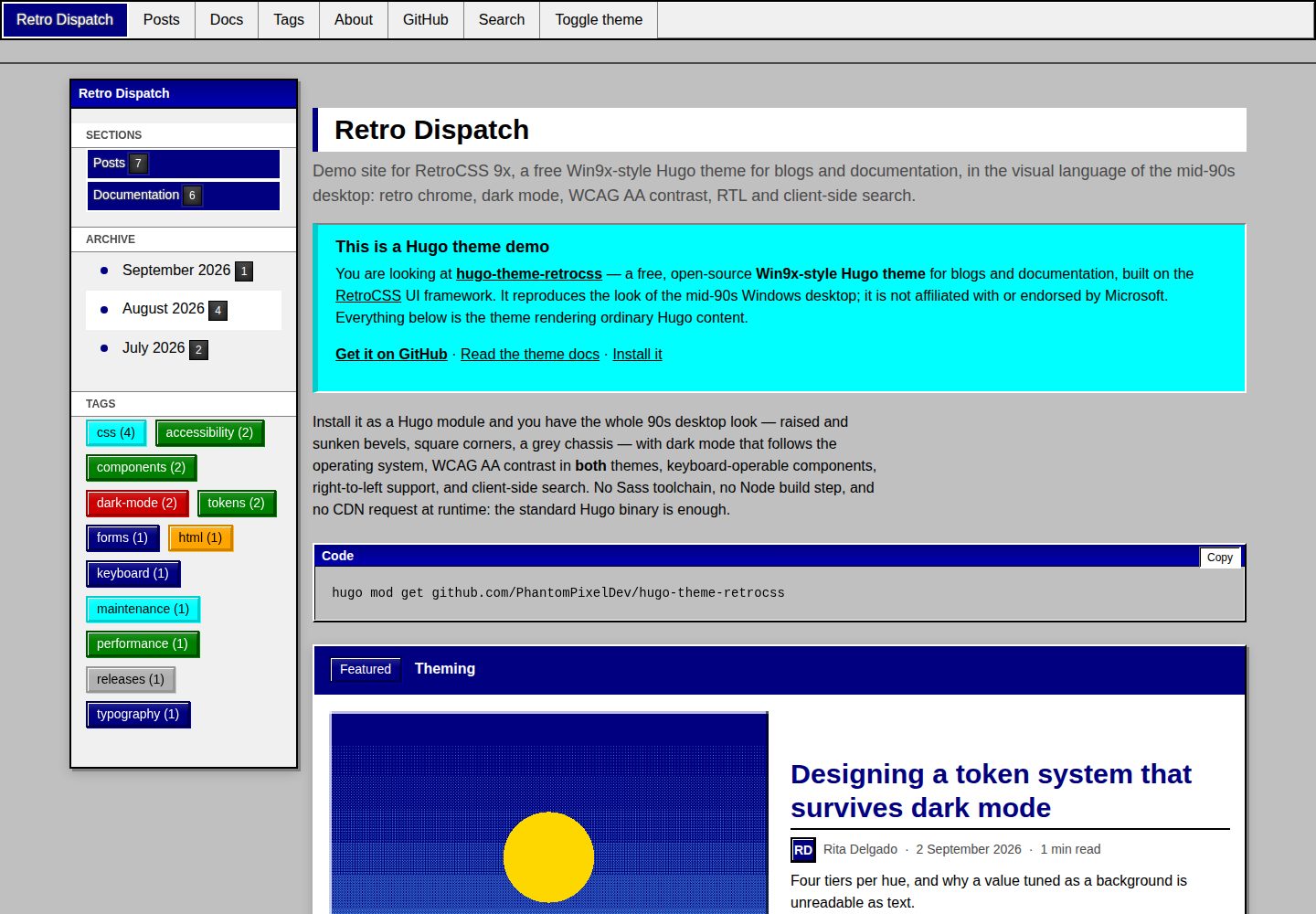
Recreates the Windows 95/98 desktop look: raised and sunken bevels, square corners, a gray chassis, a fixed top-left light source, and code blocks with title bars
HugoBlogDocumentation
hugo-theme-retrocss — Hugo Blog Template
By PhantomPixelDev
A Hugo theme based on RetroCSS that applies a Windows 95/98 desktop look to blogs and documentation sites, with light and dark color schemes, keyboard operation, RTL, and client-side search, and no Sass or Node build chain.
Explore the design
Compare the page layouts and mobile experience. Open any screenshot for a closer look.
Desktop homepage1 / 3
Desktop captureTop of page
Actual screenshot captured by the server browser.
All pages & views 3
Screenshots show visual appearance; interactive behavior may differ.
Recorded 2026-10-02View source
What stands out
A quick read of the recorded project description.
The dark color scheme is provided through both prefers-color-scheme and data-theme to reduce first-frame theme flashes
Both light and dark color schemes are stated to meet WCAG AA, with a script measuring text contrast page by page at five widths
Keyboard-operable: skip links, roving tabindex, tooltips shown on focus, and named controls
No Sass, Node, or CDN dependency; the framework's compiled output is served through Hugo Pipes with SRI fingerprints, and the standard Hugo binary is sufficient
One theme covers blogs and documentation: article grids, taxonomies, pagination, RSS, plus a weighted documentation tree, breadcrumbs, and an in-page table of contents
Template Details
RetroCSS 9x is a Hugo theme that brings the RetroCSS UI framework—a recreation of the Windows 95/98 desktop appearance—into Hugo for blog and documentation sites. The theme itself adds only about eighty lines of layout CSS; interface elements come from the framework components: raised and sunken beveled borders, square corners, a gray chassis, a light source fixed at the top left, and code blocks with title bars.
The theme provides templates for the home page, section pages, article pages, tag and category lists, a documentation tree, a search page, and a 404 page. Article pages include author attribution, tags, previous/next links, related articles, and a comment slot; the documentation layout is selected by page type, and the sidebar tree, breadcrumbs, and in-page table of contents all read weight ordering. Render hooks turn images into figures, mark external links, add heading anchors, and give code blocks a title bar and copy button.
For accessibility, the theme states that it meets WCAG AA in both light and dark color schemes and includes check scripts: it renders every page of the demo site in Chromium at five widths—1200/980/760/420/360 pixels—and reports console errors, horizontal overflow, missing or duplicate h1 elements, insufficient text contrast, and first-paint theme flashes; keyboard checks cover control reachability and naming, roving tabindex groups exposing only one tab stop, tooltips appearing on focus, and skip links working. The dark color scheme is provided through both prefers-color-scheme and data-theme to reduce first-frame flashes.
Search does not depend on external libraries: the index is generated at build time as a page resource, and retrieval happens in the browser. RTL mirrors the layout through a single line of configuration, while beveled borders are not mirrored. The theme does not require Sass, Node, or a CDN; the framework's compiled CSS and JS are served through Hugo Pipes with Subresource Integrity fingerprints, the standard Hugo binary is sufficient, and sites can run offline and adapt to a strict CSP.
There are several explicit limitations in use. Hugo does not merge the theme's markup configuration into the site configuration, so [markup.goldmark.renderer] unsafe = true and capitalizeListTitles = false must be set in the site's own configuration. The documentation layout depends on page type and weight, and sections not named docs also need params.docsSection set. Custom CSS must be placed in the site's assets/css/custom.css, and the theme concatenates it last. Comments support three providers: none, giscus, and utterances. The theme imitates mid-1990s desktop software and is not affiliated with Microsoft; it contains no Microsoft artwork, icons, or fonts.
HugoBlogDocumentation
Is it right for your project?
Use Cases
- Building a Hugo blog with a 1990s desktop visual style
- Writing a project documentation site that needs a sidebar tree, breadcrumbs, and an in-page table of contents
- Sites that need light and dark color schemes and care about text contrast and keyboard accessibility
- Static sites that want search to run in the browser without introducing an external search service
- Sites that need RTL layouts or mirrored multilingual layouts
Suitable For
- Developers using Hugo who can run the standard binary (0.158.0 or newer)
- Blog or documentation authors who prefer a retro desktop interface and accept square corners and beveled borders
- Site maintainers who need light and dark color schemes, keyboard operation, and RTL support
- Projects that want to avoid a Sass/Node build chain and prefer to use compiled CSS and JS directly
Getting started & customization
Use these recorded setup notes alongside the repository instructions for your chosen version.
- 1
Hugo must be 0.158.0 or newer; the standard build is sufficient, with no extended build required
- 2
Hugo does not merge the theme's markup configuration, so [markup.goldmark.renderer] unsafe = true and capitalizeListTitles = false must be set in the site configuration
- 3
It can be installed via Hugo Modules, a Git submodule, or by copying directly into the themes/ directory
- 4
Documentation sections need type: docs set on the section and passed through cascade, with pages ordered by weight; if the section name is not docs, params.docsSection must also be set
- 5
Custom styles go in the site's assets/css/custom.css, and the theme concatenates them last, so !important is not needed
License & source material
Usage conditions & limitations
Free to use · keep license noticeThis listing covers the free version in the public repository under the MIT license; the free scope is the code of that version and does not mean that external services or third-party assets are free.
Must comply with when using
- You may use, modify, commercially use, and distribute the code of this version for free.
- When distributing copies or substantial portions of the code, retain the original author's copyright notice and the complete MIT license notice.
- The code is provided as is; warranties and limitations of liability are governed by the original license and applicable law.
Additional costs & items to verify
- Hugo does not merge the theme's markup configuration into the site configuration, so [markup.goldmark.renderer] unsafe = true and capitalizeListTitles = false must be set in the site's own configuration; otherwise shortcodes and render hooks cannot output real markup.
- The documentation layout depends on page type and weight; if the documentation section name is not docs, params.docsSection must also be set, otherwise the sidebar tree, breadcrumbs, and in-page table of contents cannot be generated correctly.
- Custom styles must be placed in the site's assets/css/custom.css, and the theme concatenates them last; placing them elsewhere will not take effect.
- Comments support only three providers: none, giscus, and utterances; choosing giscus or utterances depends on the corresponding external comment service.
- Running the check:pages and check:keyboard check scripts requires installing the Chromium browser first (npx playwright install chromium).
- Local development and the check scripts depend on npm and a Node environment; Node is not needed when only using the theme itself to render the site, but it is needed to run the development and validation workflows.
- Demo images, fonts, icons, and other third-party assets must be checked against their respective licenses and cannot be judged solely by the code's MIT license.
- External services such as domains, hosting, databases, payments, or AI may incur additional charges.
View Original Text Basis
Permission is hereby granted, free of charge
Original License Text
Hugo does not merge a theme's `markup` config into the site's, so two settings have to live in **your** config.
Original README
A section not named `docs` also needs `params.docsSection`.
Original README
Drop a file at `assets/css/custom.css` in your site.
Original README
provider = "none" # none | giscus | utterances
Original README
Both need a browser once: `npx playwright install chromium`.
Original README
https://github.com/PhantomPixelDev/hugo-theme-retrocss/blob/main/LICENSEhttps://github.com/PhantomPixelDev/hugo-theme-retrocss/blob/main/README.mdnpm install npm run serve
Original README
Compiled by DeepSeek based on repository license and README ·2026-10-03. Results only cover the materials read; dependencies, images, fonts, and subsequent term changes are subject to their respective original texts.
Project checks & description sources
Template Information
- Source platforms
- GitHub
- Documentation and maintenance reference score
- More documented · 88 / 100
- Technologies
- Hugo
- Website type
- Blog · Documentation
How this score is calculated
Our heuristic uses license records (up to 30), a demo link (12), a preview (10), stars (15), recorded maintenance (15), description completeness (8), feature records (5) and classification data (5). It is not a code, security or performance test, or a Google score. A link does not establish tested functionality.
What to verify for this project
- Repository update recorded
- 2026-09-08
- Screenshot last checked
- 2026-10-03
A demo link is listed. Check it with your own content and viewport sizes; its presence does not confirm that forms, authentication or payments work.
The catalog identifies Hugo as the primary stack. Check the actual dependency manifest and lockfile for versions and hosting requirements. These notes use recorded metadata, not a code audit or a deployment test.
Use a selection guide →How this description was prepared
AI-assisted description based on catalog records and repository material. Repository authors are not automatically the reviewers of this description.
Review declaration: [email protected] · 2026-10-04
Inspect the recorded source material
SHA-256: 4ef5f56e3b8f93a6a08303c67a50e0f0259180c0f9f0920ff4a455d1c0a6342a
2026-10-03T18:16:48.121Z
Source file / repository<div align="center">
# 🖥️ RetroCSS 9x
**A Win9x-style Hugo theme for blogs and documentation** — mid-90s desktop chrome, WCAG AA in light *and* dark, keyboard-operable components, RTL, client-side search, and no build step beyond Hugo itself.
[](https://github.com/PhantomPixelDev/hugo-theme-retrocss/actions/workflows/ci.yml)
[](LICENSE)
[](https://gohugo.io/)
[](https://github.com/PhantomPixelDev/RetroCSS)
**[📺 Live demo](https://phantompixeldev.github.io/hugo-theme-retrocss/) • [🎨 RetroCSS](https://github.com/PhantomPixelDev/RetroCSS) • [📖 Theme docs](https://phantompixeldev.github.io/hugo-theme-retrocss/docs/)**
</div>
---
## Why this theme
It is [RetroCSS](https://github.com/PhantomPixelDev/RetroCSS) — a UI framework that reproduces the Windows 95/98 desktop look, with a real accessibility budget — wired into Hugo. The theme adds about eighty lines of layout CSS and nothing else: no second palette, no bespoke colours, no per-page overrides. Every surface you see is a framework component.
- **Authentic 90s desktop chrome.** Raised and sunken bevels, square corners, a grey chassis, and a light source fixed at the top-left. Code blocks get a real title bar.
- **Dark mode that follows the OS, with no flash.** The dark palette ships under `prefers-color-scheme` as well as `[data-theme]`, so a dark-OS visitor is painted dark on the first frame — even with the bundle blocked. CI fails the build on a theme flash.
- **WCAG AA in both themes, enforced.** Every rendered text node on every page is measured against the surface actually painted behind it, at five widths, in both themes.
- **Keyboard-operable.** Skip link, roving tabindex on tab strips and rating groups, tooltips on focus, named controls. Also a gate, not a claim.
- **No Sass, no Node, no CDN.** The framework's compiled CSS and JS are vendored and served through Hugo Pipes, fingerprinted with Subresource Integrity. The **standard** Hugo binary is enough — you do not need the extended build, and the site works offline and under a strict CSP.
- **Blog and docs in one theme.** Post grids, taxonomies, pagination, RSS; plus a weighted docs tree, breadcrumbs and in-page contents.
- **Search with no library.** The index is a page resource built at compile time; the whole search runs in the browser.
- **Right-to-left.** One config line mirrors the layout. The bevels deliberately do not mirror — the desktops they imitate did not mirror them either.
## Screens
Every shot below is the demo site in this repository, captured from the built output by `node scripts/screenshots.mjs` — so they cannot drift from what the theme actually renders.
| | |
| --- | --- |
| 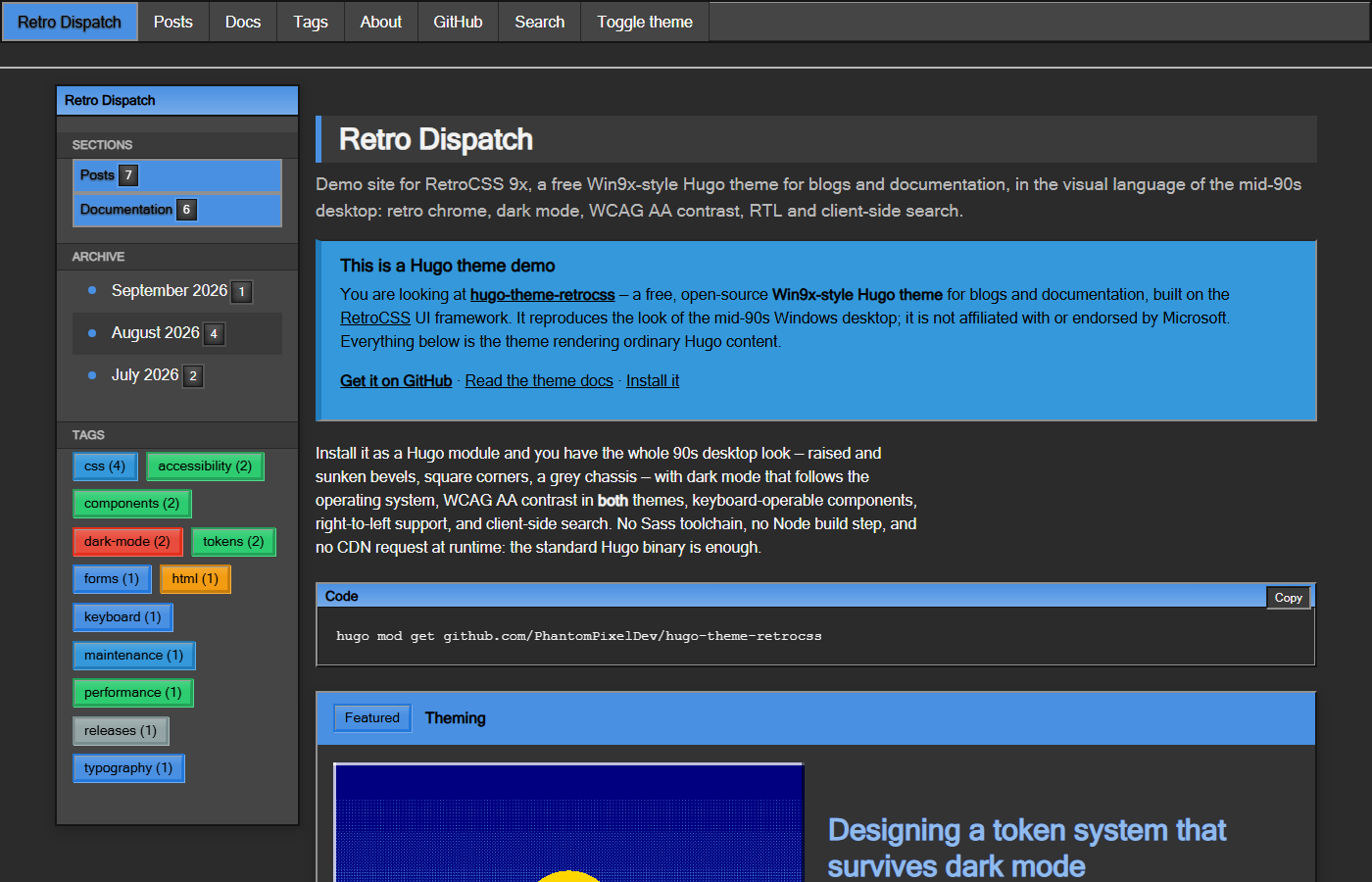 **Home, dark** | 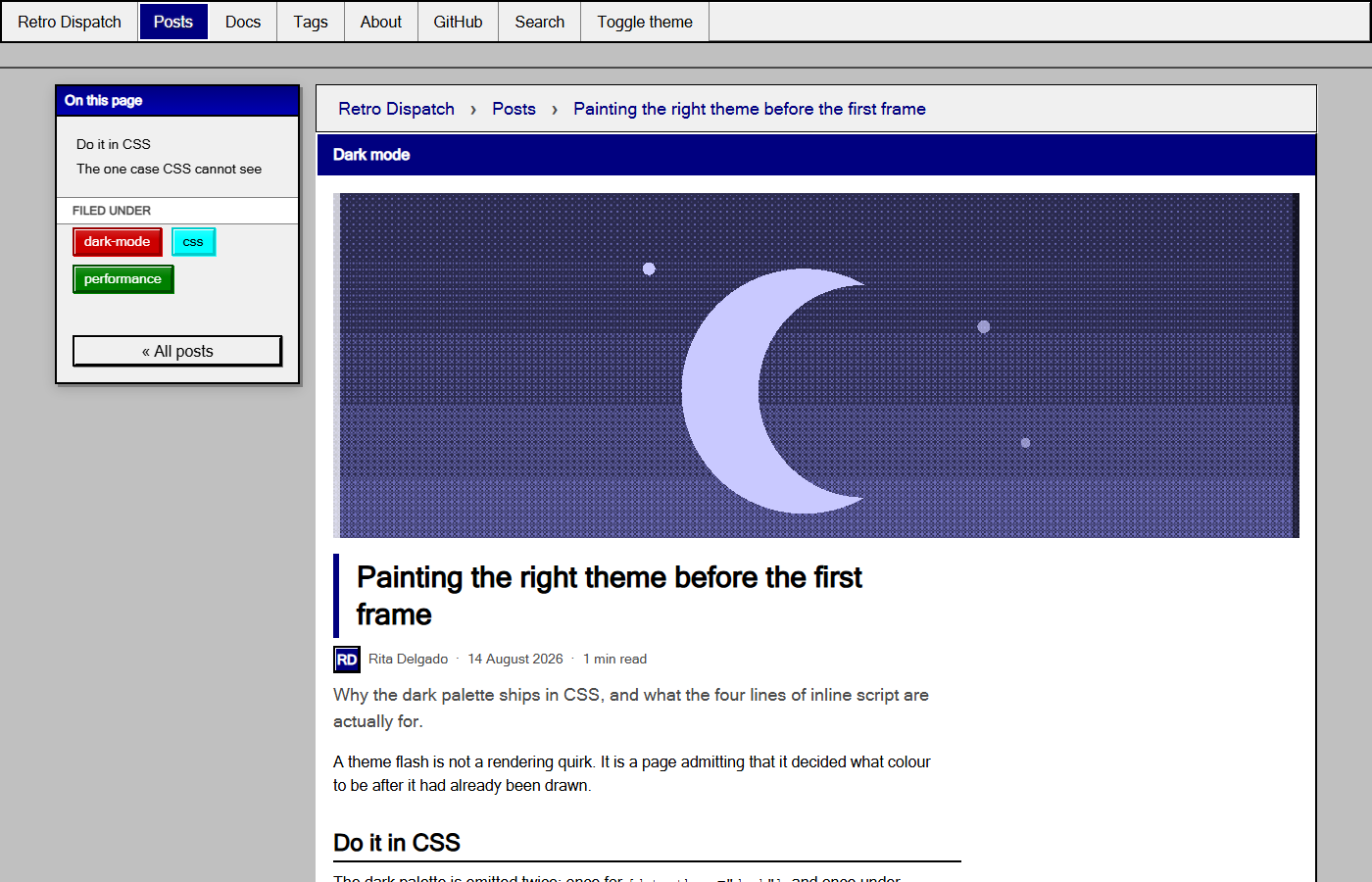 **Post, light** |
| 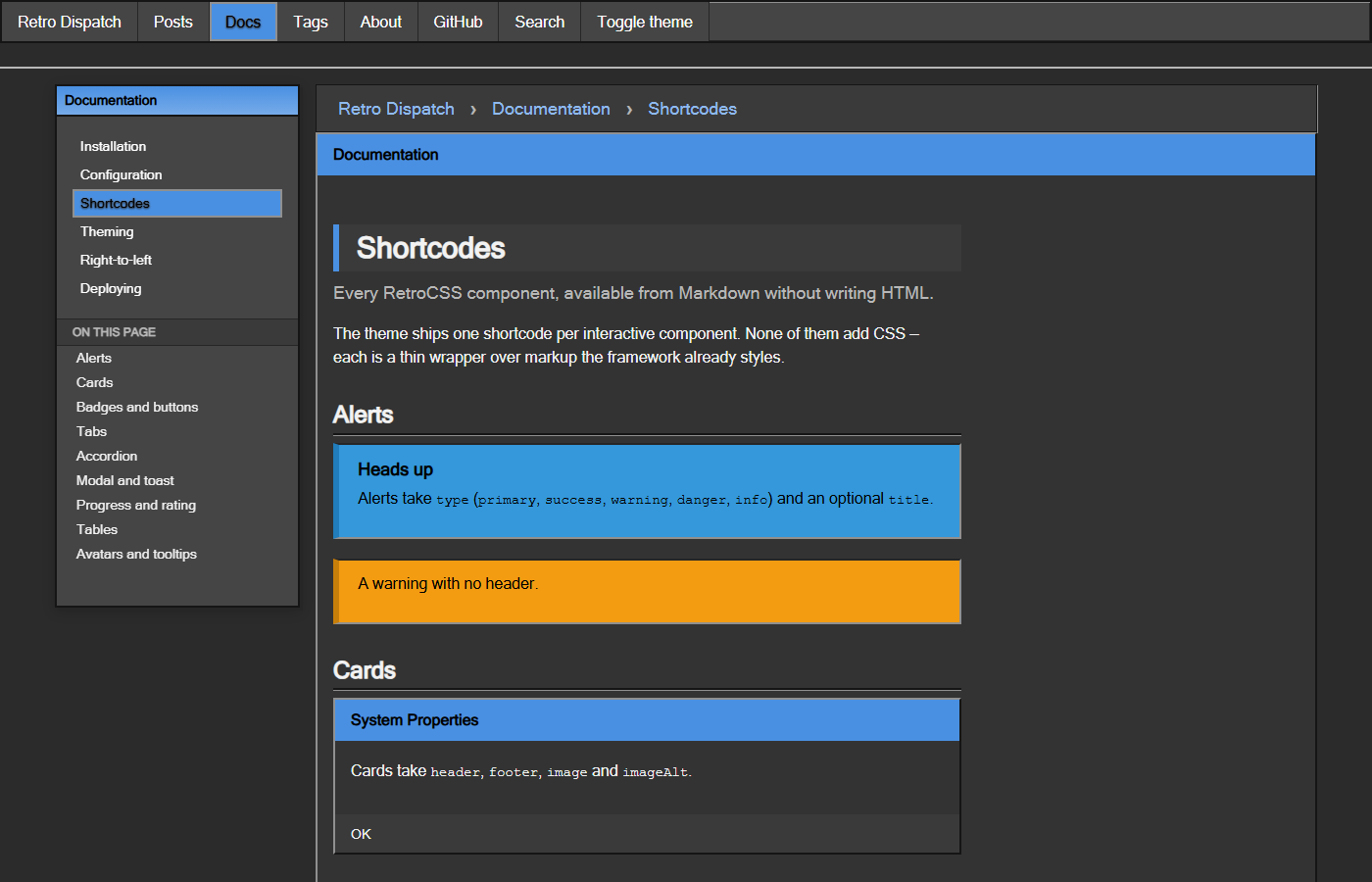 **Docs, dark** | 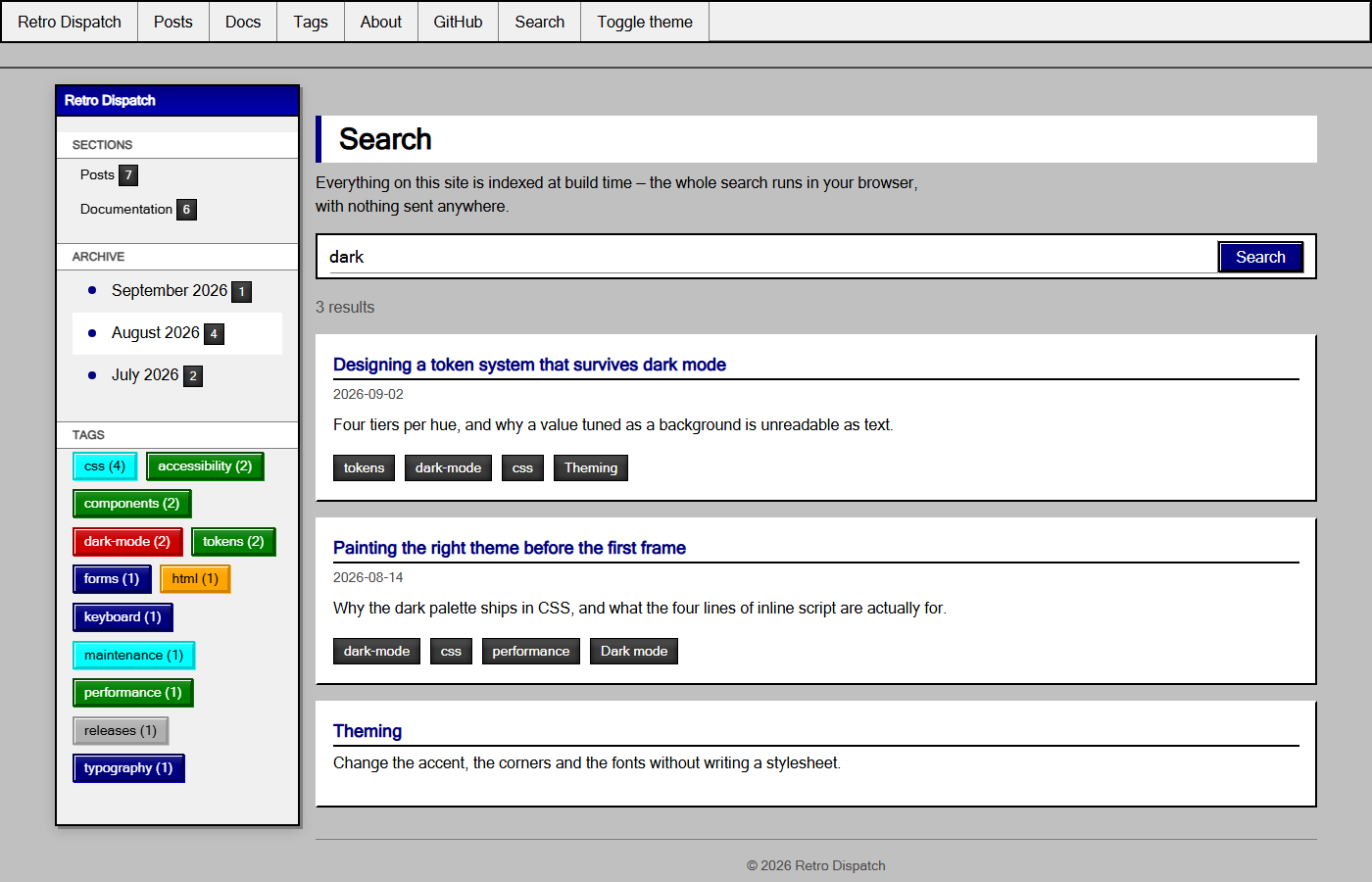 **Search, light** |
## Requirements
Hugo **0.158.0 or newer**. The standard build is fine; extended is not required.
## Installation
### Hugo Modules (recommended)
```bash
hugo mod init github.com/you/your-site
```
```toml
# hugo.toml
[module]
[[module.imports]]
path = "github.com/PhantomPixelDev/hugo-theme-retrocss"
```
```bash
hugo mod get -u
```
### Git submodule
```bash
git submodule add https://github.com/PhantomPixelDev/hugo-theme-retrocss themes/hugo-theme-retrocss
```
```toml
theme = "hugo-theme-retrocss"
```
### Download
Copy the repository into `themes/hugo-theme-retrocss/` and set `theme` as above.
## Site configuration
Hugo does not merge a theme's `markup` config into the site's, so two settings have to live in **your** config. Everything else has a working default.
```toml
baseURL = "https://example.com/"
title = "Retro Dispatch"
theme = "hugo-theme-retrocss"
# Shortcodes and render hooks emit real markup.
[markup.goldmark.renderer]
unsafe = true
# Keep tags reading the way they were written.
capitalizeListTitles = false
[pagination]
pagerSize = 6
[params]
description = "Notes on building interfaces that look like 1995 and behave like today."
tagline = "a Win9x-style Hugo theme" # appended to the home page's <title>
# --- chrome ---
accentHue = "primary" # any RetroCSS hue: teal, violet, gold, navy, …
borderRadius = "0" # one token rounds the entire framework
fontHeading = "" # e.g. "'Segoe UI', Tahoma, sans-serif"
sidebar = "left" # left | right | off
# --- content ---
dateFormat = "2 January 2006"
showReadingTime = true
showAuthor = true
showToc = true
relatedPosts = 3
mainSections = ["posts"]
docsSection = "docs"
# --- features ---
search = true
themeCredit = true # "Built with Hugo and RetroCSS for Hugo" in the footer
# --- SEO ---
images = ["images/og-card.png"]
twitterSite = "@you"
[params.author]
name = "Rita Delgado"
initials = "RD"
bio = "Writes about interface archaeology."
[params.comments]
provider = "none" # none | giscus | utterances
```
Full reference: **[the theme's own docs](https://phantompixeldev.github.io/hugo-theme-retrocss/docs/)**, which are themselves a docs section built with the theme.
### Docs section
Docs layouts are chosen by page type, so set it once on the section and let it
cascade:
```yaml
---
title: "Documentation"
type: "docs"
cascade:
type: "docs"
---
```
Order pages with `weight`; the sidebar tree, breadcrumbs and prev/next all read
it. A section not named `docs` also needs `params.docsSection`.
### Search page
```markdown
---
title: "Search"
layout: "search"
---
```
### Custom CSS
Drop a file at `assets/css/custom.css` in your site. The theme concatenates it last, so it wins without `!important`:
```css
:root { --retro-body-bg: #008080; }
```
## Shortcodes
One per interactive component, each a thin wrapper over markup the framework already styles.
| Shortcode | Notes |
| --- | --- |
| `alert` | `type`, optional `title` |
| `card` | `header`, `footer`, `image`, `imageAlt` |
| `badge`, `button` | `type`, and `size`/`href` on `button` |
| `tabs` + `tab` | `title` per tab |
| `accordion` + `accordion-item` | `title` per item |
| `modal` | `id`, `title`, `trigger`, `footer` |
| `toast` | `message`, `type`, `duration` |
| `progress` | `value`, `label`, `type`, `striped` |
| `rating` | `value`, `max`, `label` — an ARIA radiogroup |
| `carousel` + `slide` | keyboard-driven dots |
| `table` | `striped`, `bordered`, `sortable`; wraps for small screens |
| `avatar` | `initials`, `size`, `hue` |
| `tooltip` | `text` — appears on focus, not only hover |
```markdown
{{</* alert type="warning" title="Careful" */>}}
Corners are square on purpose.
{{</* /alert */>}}
```
## What the theme renders
| Template | Covers |
| --- | --- |
| `home.html` | featured post, post grid, pagination |
| `section.html` | any content section |
| `page.html` | article, byline, tags, prev/next, related, comments |
| `taxonomy.html` / `term.html` | tag and category listings |
| `docs/section.html`, `docs/page.html` | docs tree, breadcrumbs, in-page contents |
| `search.html` | client-side search over a build-time index |
| `404.html` | with links out |
Render hooks style images as figures, mark external links, add heading anchors, and give every code block the framework's title bar plus a copy button.
## Development
```bash
npm install
npm run serve # http://localhost:1313
```
```bash
npm run check # build the demo site, then both gates
```
`check:pages` renders every page of the demo site in Chromium, in both themes, at 1200/980/760/420/360px, and fails on a console error, horizontal overflow, a missing or duplicated `<h1>`, any rendered text below AA against the surface actually painted behind it, or a theme flash on first paint. `check:keyboard` asserts every control the framework drives is reachable and named, that roving-tabindex groups expose exactly one tab stop, that tooltips appear on focus, and that the skip link lands somewhere.
Both need a browser once: `npx playwright install chromium`.
### Updating RetroCSS
```bash
npm run vendor # from a sibling RetroCSS checkout
npm run vendor:npm # from the published package
```
The script refuses to vendor a `dist/` older than its `src/`, strips the sourcemap comment Hugo's fingerprinting would break, and rewrites `data/retrocss.toml` with the version and hashes. CI re-runs it and fails if the committed bundle has drifted.
## Credits
Built on [RetroCSS](https://github.com/PhantomPixelDev/RetroCSS) by PhantomPixelDev. The demo site's cover art ships with RetroCSS.
## Trademarks
This theme imitates the visual style of mid-1990s desktop software. It is an independent project, **not affiliated with, sponsored by, or endorsed by Microsoft**. Windows is a trademark of Microsoft Corporation; it is named here only to describe the look the theme reproduces, and no Microsoft artwork, icon or font is included.
## License
MIT
Explore similar templates
Compare previews and descriptions within the same stack and category.

hugo-PaperMod
A fast, clean, responsive Hugo theme for blogs and lightweight portfolios, with three layout modes (Regular, Home-Info, Profile), automatic and manual light/dark themes, Fuse.js client-side search, multilingual support, and built-in Open Graph, Twitter Cards, and Schema.org data.
Hugo · Portfolio

hugo-book
Hugo Book is a Hugo documentation theme that aims to make documentation sites as simple as a plain book. It emphasizes clean, lightweight, mobile-friendly, and zero initial configuration, and comes with an example site that doubles as documentation.
Hugo · Documentation

LoveIt
LoveIt is a clean, elegant, and feature-rich Hugo blog theme derived from LeaveIt and KeepIt, MIT-licensed. It offers light/dark modes, responsive layout, multilingual support, and search via Lunr.js or Algolia.
Hugo · Blog

hugo-coder
hugo-coder is a minimalist Hugo blog theme maintained by luizdepra under the MIT license. It provides a clean, text-focused blog appearance, configuration documentation in the docs directory, and a complete exampleSite with hugo.toml.
Hugo · Blog

docsy
Docsy is a Hugo theme for technical documentation sites, governed by the Linux Foundation and licensed under Apache-2.0. It provides simple navigation and site structure for open source project and product documentation.
Hugo · Documentation

blowfish
Blowfish is a Hugo personal website and blog theme built with Tailwind CSS 4, focused on lightness, simplicity, and content-first presentation.
Hugo · Blog