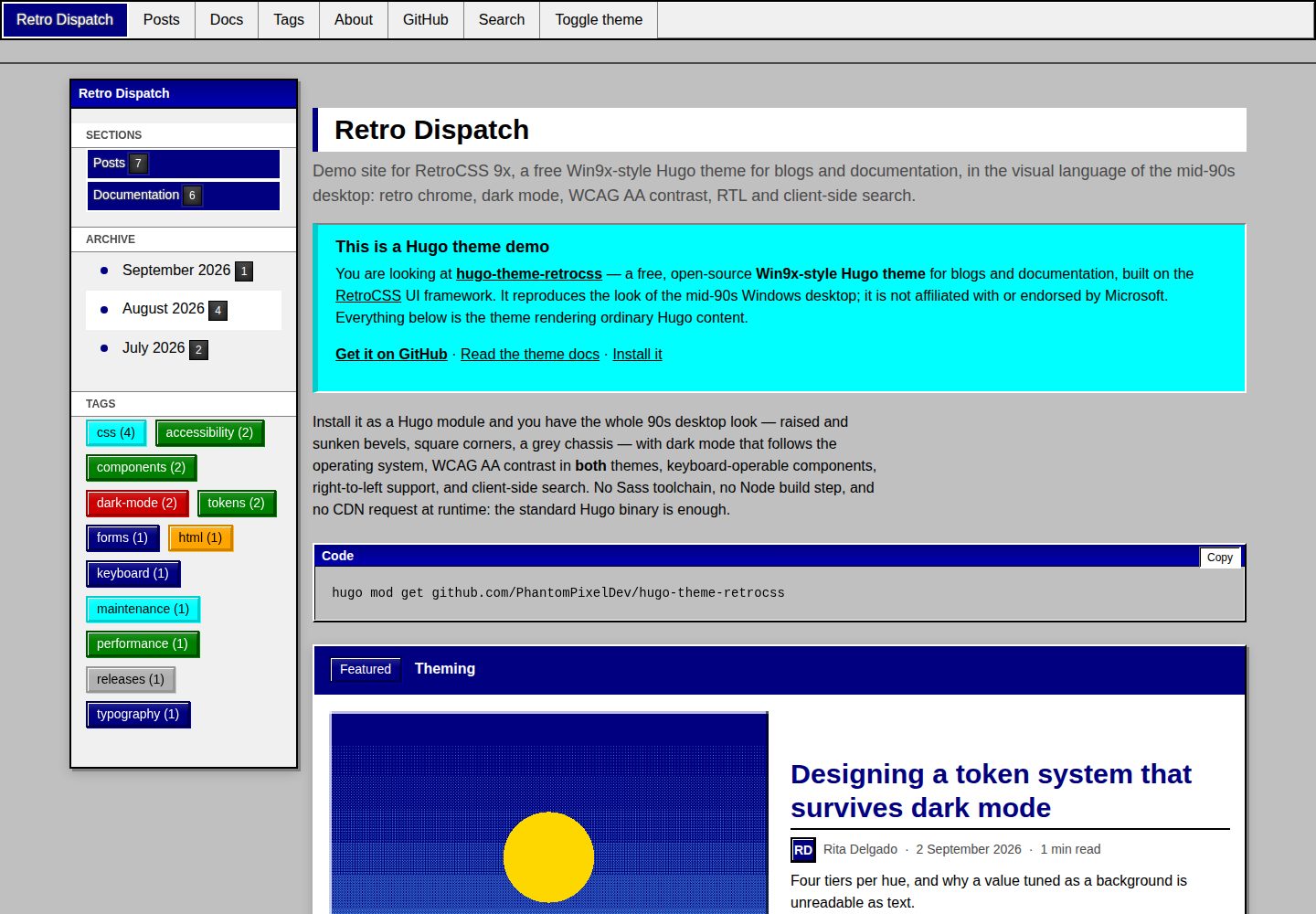
复刻 Windows 95/98 桌面外观:凸起与凹陷斜面、直角、灰色机身、固定左上光源,代码块带标题栏
Hugo博客文档
hugo-theme-retrocss — Hugo 博客模板
作者 PhantomPixelDev
基于 RetroCSS 的 Hugo 主题,把 Windows 95/98 桌面外观用于博客与文档站点,支持明暗两套配色、键盘操作、RTL 与客户端搜索,无需 Sass 或 Node 构建链。
看看你的网站会是什么样
浏览真实页面截图,比较内容排版与手机效果。点击下方缩略图切换,放大查看整页细节。
全部页面与视图 3
截图用于了解视觉与布局,交互效果请以实际项目为准。
采集于 2026-10-02查看来源
值得关注的模板亮点
从已有项目资料中,快速了解它的特点。
深色配色同时通过 prefers-color-scheme 与 data-theme 提供,减少首帧主题闪烁
明暗两套配色均声明满足 WCAG AA,并有脚本在五种宽度下逐页测量文本对比度
键盘可操作:跳转链接、roving tabindex、聚焦时显示的 tooltip、具名控件
不依赖 Sass、Node 或 CDN,框架编译产物经 Hugo Pipes 提供并带 SRI 指纹,标准版 Hugo 即可
同一主题覆盖博客与文档:文章网格、分类法、分页、RSS,以及带权重的文档树、面包屑与页内目录
模板详细介绍
RetroCSS 9x 是一个 Hugo 主题,把 RetroCSS 这套复刻 Windows 95/98 桌面外观的 UI 框架接入 Hugo,用于博客和文档两类站点。主题自身只增加约八十行布局 CSS,界面元素都来自框架组件:凸起与凹陷的斜面边框、直角、灰色机身、固定在左上角的光源,代码块带标题栏。
主题提供首页、栏目页、文章页、标签与分类列表、文档树、搜索页和 404 页模板。文章页包含作者署名、标签、上一篇/下一篇、相关文章和评论位;文档布局按页面 type 选择,侧边栏树、面包屑和页内目录都读取 weight 排序。渲染钩子会把图片处理成 figure、标记外部链接、添加标题锚点,并给代码块加上标题栏和复制按钮。
可访问性方面,主题声明在明暗两套配色下均满足 WCAG AA,并配有检查脚本:在 Chromium 中按 1200/980/760/420/360 像素五种宽度渲染演示站每个页面,对控制台错误、横向溢出、缺失或重复的 h1、文本对比度不足以及首屏主题闪烁报错;键盘检查覆盖控件可达性与命名、roving tabindex 组只暴露一个 tab 停靠点、tooltip 在聚焦时出现、跳转链接有效。深色配色同时通过 prefers-color-scheme 和 data-theme 提供,以减少首帧闪烁。
搜索不依赖外部库:索引在编译期作为页面资源生成,检索在浏览器中完成。RTL 通过一行配置镜像布局,斜面边框不镜像。主题不要求 Sass、Node 或 CDN,框架编译后的 CSS 与 JS 通过 Hugo Pipes 提供并带 Subresource Integrity 指纹,标准版 Hugo 二进制即可,站点可离线运行并适配严格 CSP。
使用上有若干明确限制。Hugo 不会把主题的 markup 配置合并进站点配置,因此 [markup.goldmark.renderer] unsafe = true 和 capitalizeListTitles = false 需要写在站点自己的配置里。文档布局依赖页面 type 与 weight,非 docs 名称的栏目还需设置 params.docsSection。自定义 CSS 需放在站点的 assets/css/custom.css,主题会将其拼接在最后。评论支持 none、giscus、utterances 三种 provider。主题模仿 1990 年代中期桌面软件外观,与 Microsoft 无关联,不包含任何 Microsoft 的美术资源、图标或字体。
Hugo博客文档
适合你的项目吗?
适用场景
- 用 Hugo 搭建带有 1990 年代桌面视觉风格的博客
- 为项目编写文档站点,需要侧边栏树、面包屑和页内目录
- 需要明暗两套配色且关注文本对比度与键盘可达性的站点
- 希望搜索在浏览器端完成、不引入外部搜索服务的静态站点
- 需要 RTL 布局或多语言镜像布局的站点
适合人群
- 使用 Hugo 且可以运行标准版二进制(0.158.0 或更新)的开发者
- 偏好复古桌面界面、愿意接受直角与斜面边框视觉的博客或文档作者
- 需要明暗配色、键盘操作与 RTL 支持的站点维护者
- 希望避免 Sass/Node 构建链、倾向直接使用编译后 CSS 与 JS 的项目
上手与定制指南
结合仓库当前版本的说明,按下面的资料检查内容、配置与运行要求。
- 1
Hugo 需为 0.158.0 或更新版本,标准版即可,无需 extended 构建
- 2
Hugo 不会合并主题的 markup 配置,需在站点配置中自行设置 [markup.goldmark.renderer] unsafe = true 与 capitalizeListTitles = false
- 3
可通过 Hugo Modules、Git submodule 或直接复制到 themes/ 目录三种方式安装
- 4
文档栏目需在 section 上设置 type: docs 并通过 cascade 传递,页面用 weight 排序;栏目名不是 docs 时还需设置 params.docsSection
- 5
自定义样式放在站点的 assets/css/custom.css,主题会将其拼接在最后,无需使用 !important
授权与来源资料
使用条件与限制
免费使用 · 保留许可声明本次收录的是公开仓库中采用 MIT 许可的免费版本;免费范围为该版本代码,不代表外部服务或第三方素材免费。
使用时需要遵守
- 允许免费使用、修改、商用和分发该版本代码。
- 分发代码副本或实质性部分时,保留原作者版权声明和完整 MIT 许可声明。
- 代码按现状提供;担保与责任限制以原许可证及适用法律为准。
额外费用与待核对事项
- Hugo 不会把主题的 markup 配置合并进站点配置,因此必须在站点自己的配置中设置 [markup.goldmark.renderer] unsafe = true 与 capitalizeListTitles = false,否则短代码与渲染钩子无法输出真实标记。
- 文档布局依赖页面 type 与 weight;若文档栏目名称不是 docs,还需额外设置 params.docsSection,否则侧边栏树、面包屑与页内目录无法正确生成。
- 自定义样式必须放在站点的 assets/css/custom.css,主题会将其拼接在最后;放在其他路径不会生效。
- 评论功能仅支持 none、giscus、utterances 三种 provider;选择 giscus 或 utterances 需依赖对应的外部评论服务。
- 运行 check:pages 与 check:keyboard 两个检查脚本需要先安装 Chromium 浏览器(npx playwright install chromium)。
- 本地开发与检查脚本依赖 npm 与 Node 环境;仅使用主题本身渲染站点时不需要 Node,但运行开发与校验流程需要。
- 演示图片、字体、图标及其他第三方素材需按各自许可核对,不能仅凭代码的 MIT 许可判断。
- 域名、托管、数据库、支付或 AI 等外部服务可能另外收费。
查看原文依据
Permission is hereby granted, free of charge
许可证原文
Hugo does not merge a theme's `markup` config into the site's, so two settings have to live in **your** config.
README 原文
A section not named `docs` also needs `params.docsSection`.
README 原文
Drop a file at `assets/css/custom.css` in your site.
README 原文
provider = "none" # none | giscus | utterances
README 原文
Both need a browser once: `npx playwright install chromium`.
README 原文
https://github.com/PhantomPixelDev/hugo-theme-retrocss/blob/main/LICENSEhttps://github.com/PhantomPixelDev/hugo-theme-retrocss/blob/main/README.mdnpm install npm run serve
README 原文
DeepSeek 根据仓库许可证和 README 整理 ·2026-10-03。结果仅覆盖已读取资料,依赖、图片、字体及后续条款变更以各自原文为准。
项目核对记录与介绍依据
模板资料
- 来源平台
- GitHub
- 资料与维护参考分
- 资料较完整 · 88 / 100
- 技术栈
- Hugo
- 网站类型
- 博客 · 文档
这个分数如何计算
本站按许可资料(最高30分)、演示链接(12分)、预览图(10分)、Star数(15分)、记录的维护时间(15分)、描述完整度(8分)、功能记录(5分)和分类资料(5分)计算。它不是代码、安全或性能测试,也不是 Google 评分;有链接不代表已实测可用。
这个项目需要核对什么
- 记录的仓库更新时间
- 2026-09-08
- 截图检查日期
- 2026-10-03
已收录演示链接。请用你的内容与屏幕尺寸检查;有演示不代表表单、认证或支付已经可用。
目录记录的主要技术栈是 Hugo。请通过依赖清单和锁文件核对实际版本与托管要求。这些说明基于收录资料,不代表代码审计或部署实测。
查看具体选型方法 →介绍的制作与核对状态
介绍由 AI 辅助整理目录与仓库资料。仓库作者不等于这篇介绍的审核者。
审核声明: [email protected] · 2026-10-04
查看当时使用的来源资料
SHA-256: 4ef5f56e3b8f93a6a08303c67a50e0f0259180c0f9f0920ff4a455d1c0a6342a
2026-10-03T18:16:48.121Z
来源文件 / 仓库<div align="center">
# 🖥️ RetroCSS 9x
**A Win9x-style Hugo theme for blogs and documentation** — mid-90s desktop chrome, WCAG AA in light *and* dark, keyboard-operable components, RTL, client-side search, and no build step beyond Hugo itself.
[](https://github.com/PhantomPixelDev/hugo-theme-retrocss/actions/workflows/ci.yml)
[](LICENSE)
[](https://gohugo.io/)
[](https://github.com/PhantomPixelDev/RetroCSS)
**[📺 Live demo](https://phantompixeldev.github.io/hugo-theme-retrocss/) • [🎨 RetroCSS](https://github.com/PhantomPixelDev/RetroCSS) • [📖 Theme docs](https://phantompixeldev.github.io/hugo-theme-retrocss/docs/)**
</div>
---
## Why this theme
It is [RetroCSS](https://github.com/PhantomPixelDev/RetroCSS) — a UI framework that reproduces the Windows 95/98 desktop look, with a real accessibility budget — wired into Hugo. The theme adds about eighty lines of layout CSS and nothing else: no second palette, no bespoke colours, no per-page overrides. Every surface you see is a framework component.
- **Authentic 90s desktop chrome.** Raised and sunken bevels, square corners, a grey chassis, and a light source fixed at the top-left. Code blocks get a real title bar.
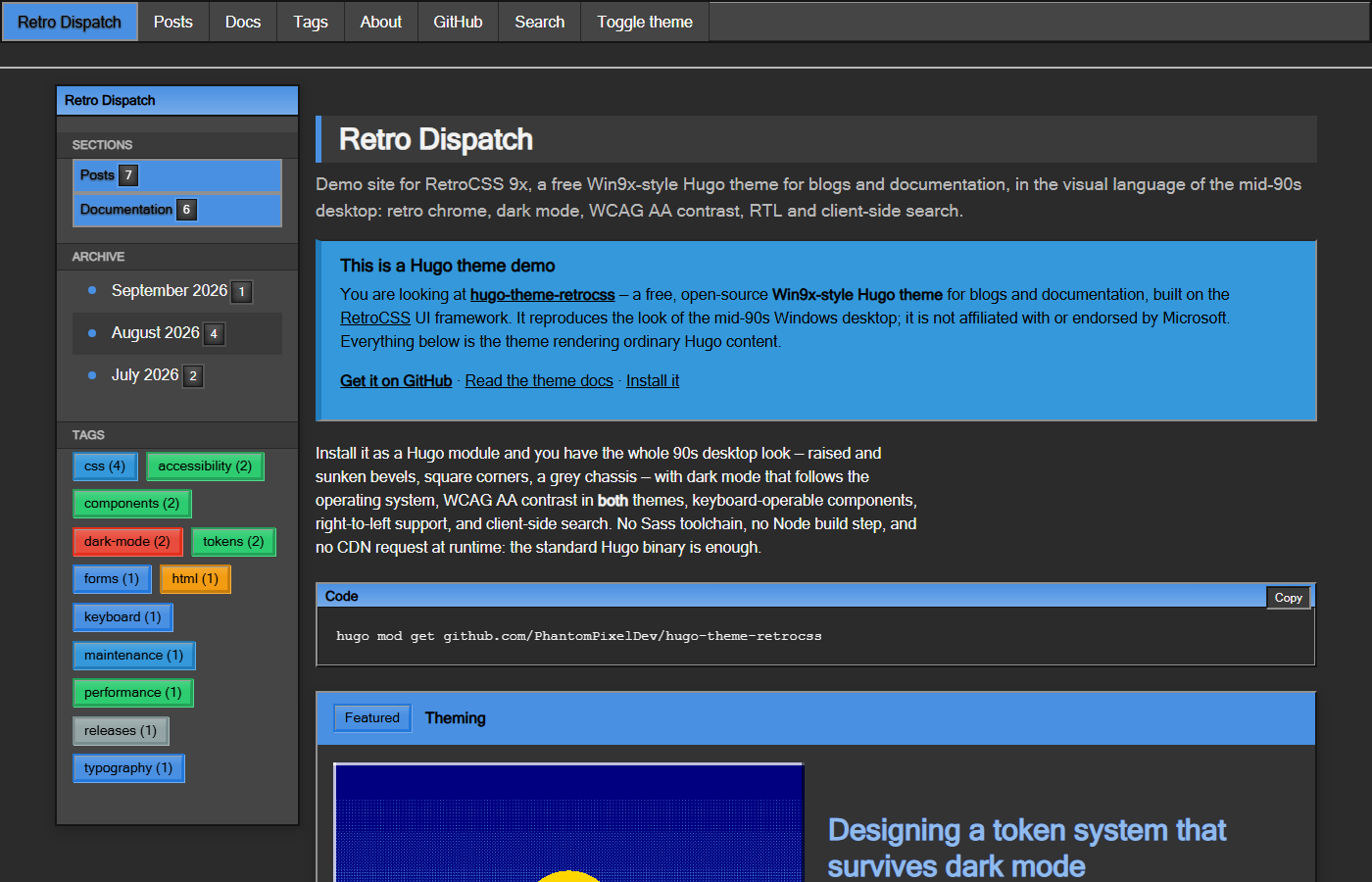
- **Dark mode that follows the OS, with no flash.** The dark palette ships under `prefers-color-scheme` as well as `[data-theme]`, so a dark-OS visitor is painted dark on the first frame — even with the bundle blocked. CI fails the build on a theme flash.
- **WCAG AA in both themes, enforced.** Every rendered text node on every page is measured against the surface actually painted behind it, at five widths, in both themes.
- **Keyboard-operable.** Skip link, roving tabindex on tab strips and rating groups, tooltips on focus, named controls. Also a gate, not a claim.
- **No Sass, no Node, no CDN.** The framework's compiled CSS and JS are vendored and served through Hugo Pipes, fingerprinted with Subresource Integrity. The **standard** Hugo binary is enough — you do not need the extended build, and the site works offline and under a strict CSP.
- **Blog and docs in one theme.** Post grids, taxonomies, pagination, RSS; plus a weighted docs tree, breadcrumbs and in-page contents.
- **Search with no library.** The index is a page resource built at compile time; the whole search runs in the browser.
- **Right-to-left.** One config line mirrors the layout. The bevels deliberately do not mirror — the desktops they imitate did not mirror them either.
## Screens
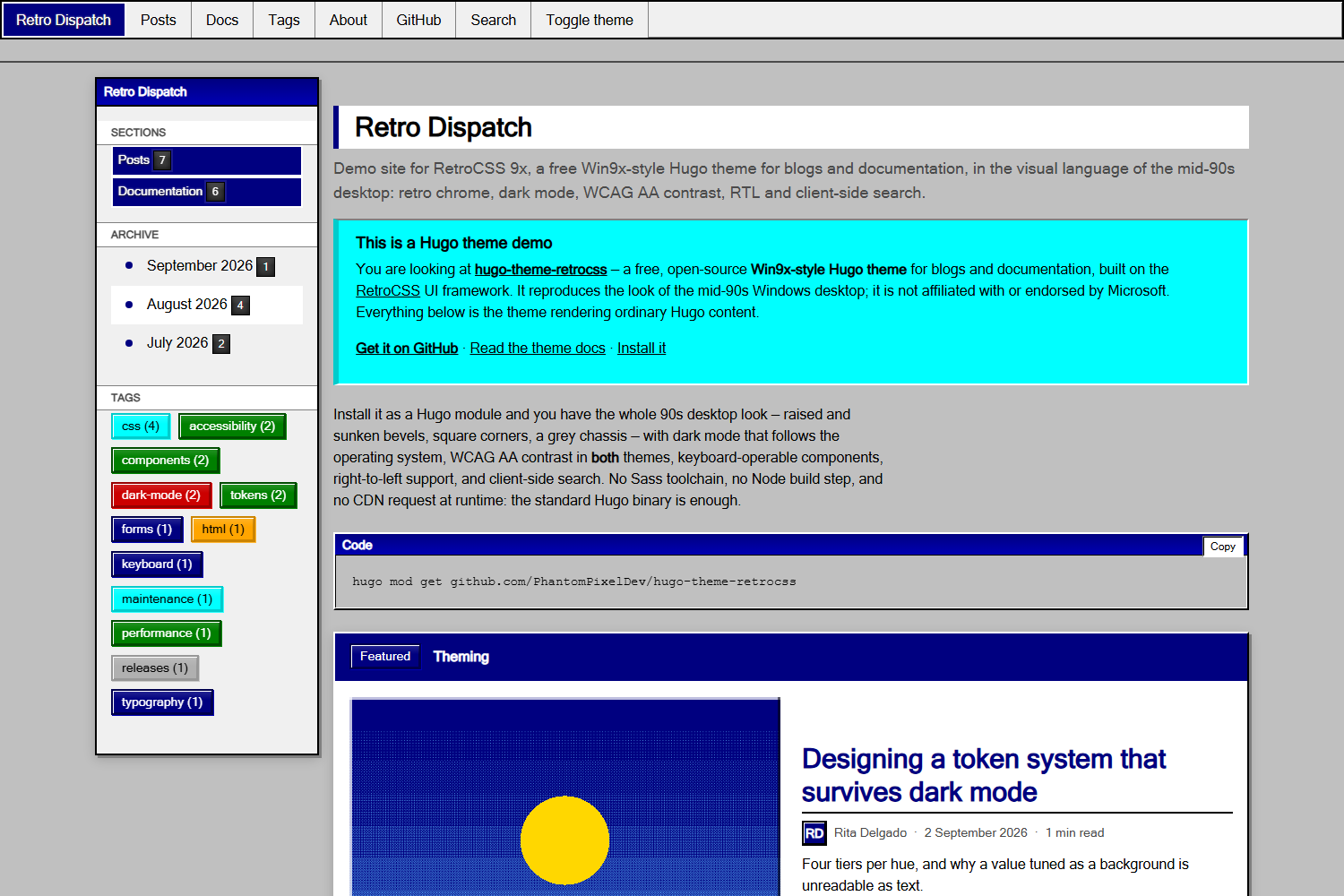
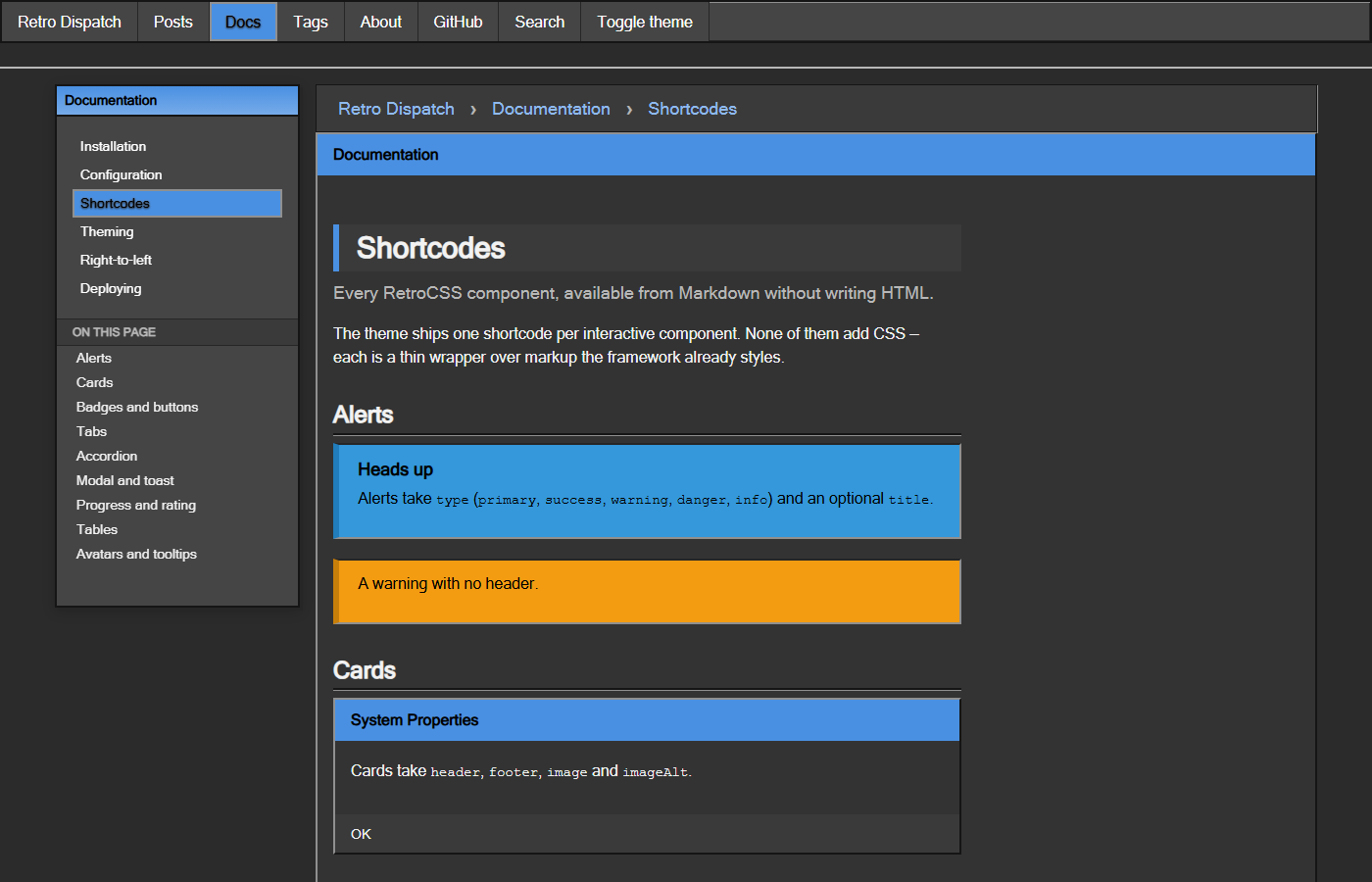
Every shot below is the demo site in this repository, captured from the built output by `node scripts/screenshots.mjs` — so they cannot drift from what the theme actually renders.
| | |
| --- | --- |
|  **Home, dark** | 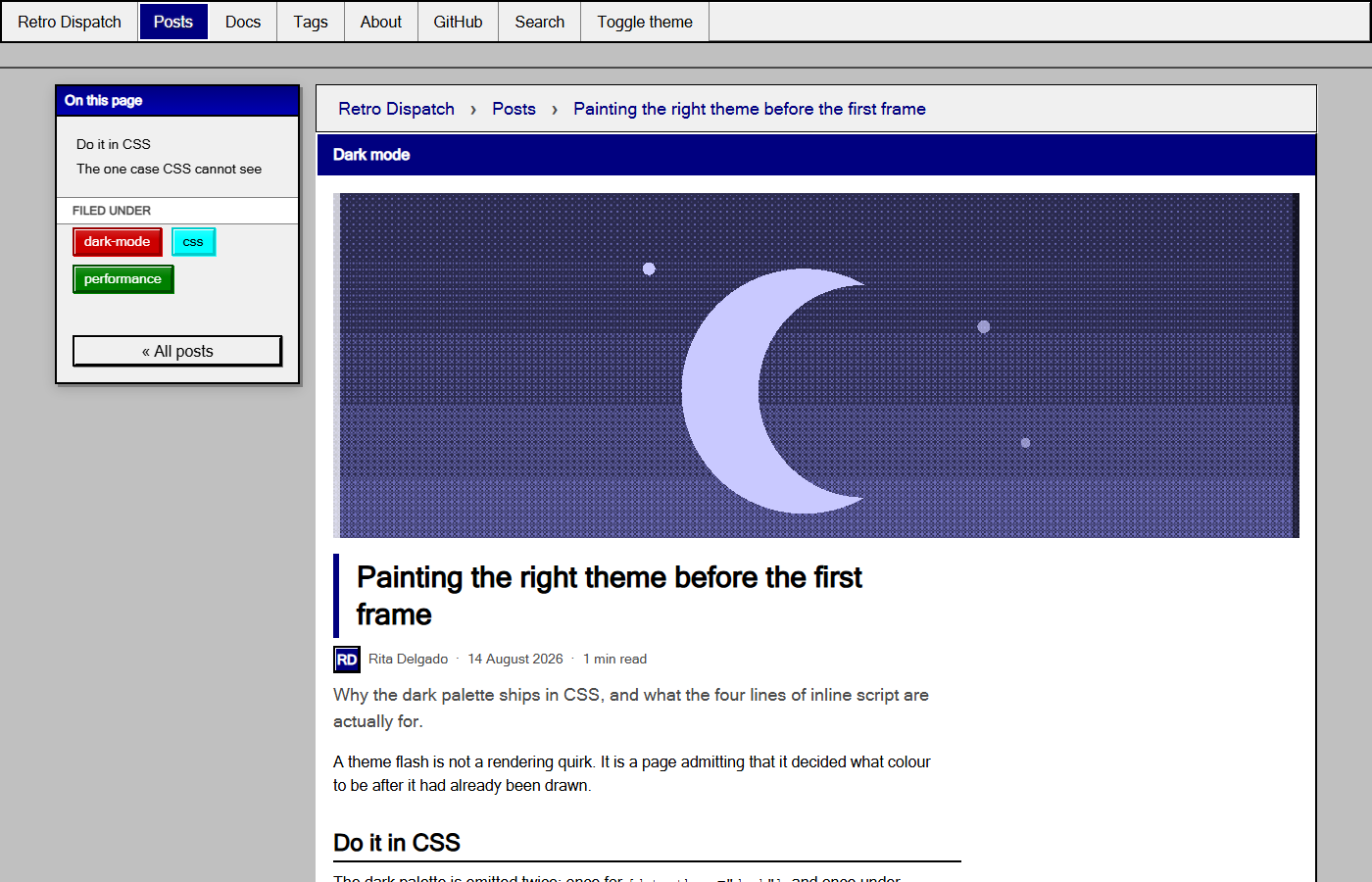 **Post, light** |
|  **Docs, dark** | 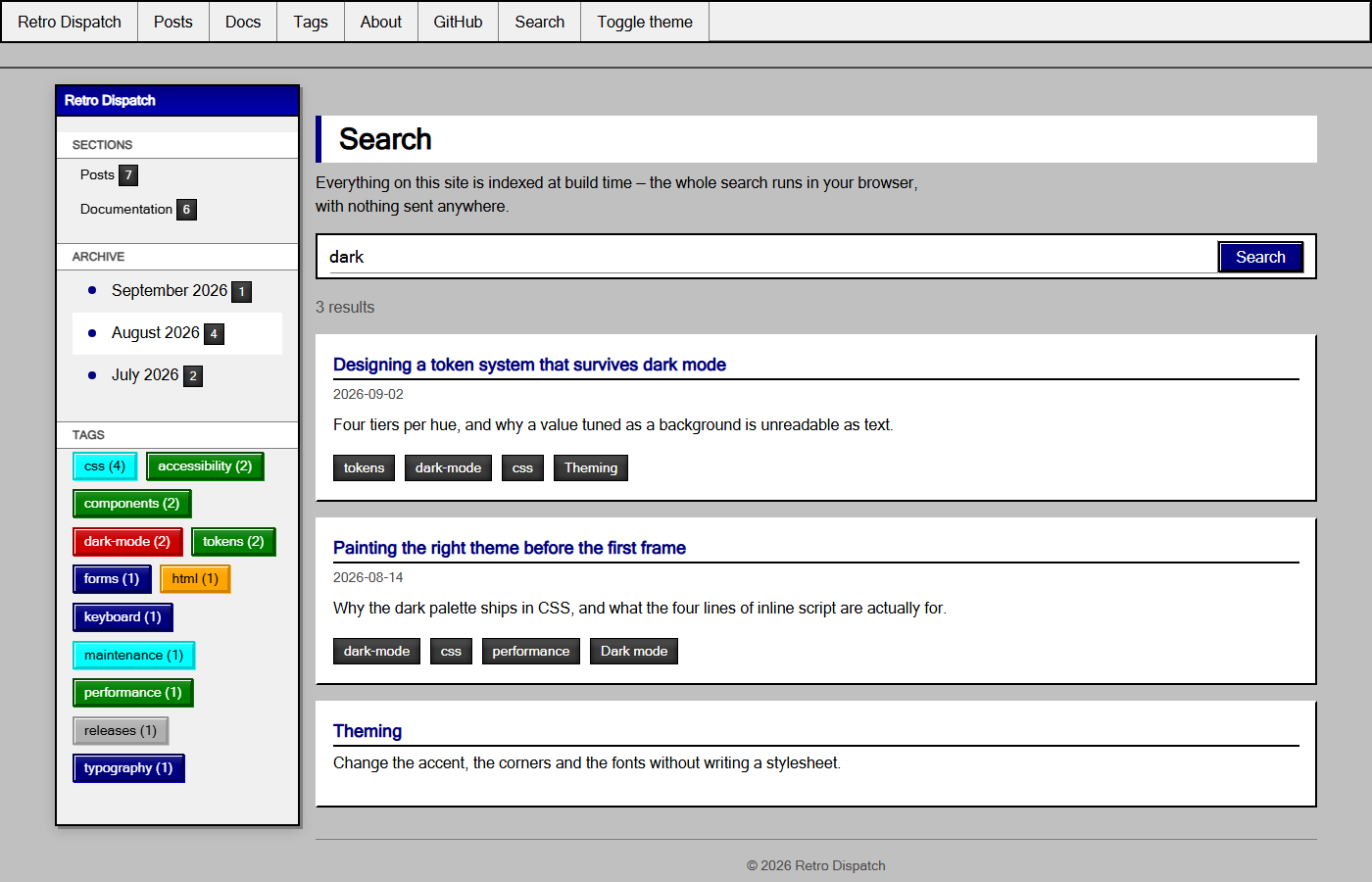 **Search, light** |
## Requirements
Hugo **0.158.0 or newer**. The standard build is fine; extended is not required.
## Installation
### Hugo Modules (recommended)
```bash
hugo mod init github.com/you/your-site
```
```toml
# hugo.toml
[module]
[[module.imports]]
path = "github.com/PhantomPixelDev/hugo-theme-retrocss"
```
```bash
hugo mod get -u
```
### Git submodule
```bash
git submodule add https://github.com/PhantomPixelDev/hugo-theme-retrocss themes/hugo-theme-retrocss
```
```toml
theme = "hugo-theme-retrocss"
```
### Download
Copy the repository into `themes/hugo-theme-retrocss/` and set `theme` as above.
## Site configuration
Hugo does not merge a theme's `markup` config into the site's, so two settings have to live in **your** config. Everything else has a working default.
```toml
baseURL = "https://example.com/"
title = "Retro Dispatch"
theme = "hugo-theme-retrocss"
# Shortcodes and render hooks emit real markup.
[markup.goldmark.renderer]
unsafe = true
# Keep tags reading the way they were written.
capitalizeListTitles = false
[pagination]
pagerSize = 6
[params]
description = "Notes on building interfaces that look like 1995 and behave like today."
tagline = "a Win9x-style Hugo theme" # appended to the home page's <title>
# --- chrome ---
accentHue = "primary" # any RetroCSS hue: teal, violet, gold, navy, …
borderRadius = "0" # one token rounds the entire framework
fontHeading = "" # e.g. "'Segoe UI', Tahoma, sans-serif"
sidebar = "left" # left | right | off
# --- content ---
dateFormat = "2 January 2006"
showReadingTime = true
showAuthor = true
showToc = true
relatedPosts = 3
mainSections = ["posts"]
docsSection = "docs"
# --- features ---
search = true
themeCredit = true # "Built with Hugo and RetroCSS for Hugo" in the footer
# --- SEO ---
images = ["images/og-card.png"]
twitterSite = "@you"
[params.author]
name = "Rita Delgado"
initials = "RD"
bio = "Writes about interface archaeology."
[params.comments]
provider = "none" # none | giscus | utterances
```
Full reference: **[the theme's own docs](https://phantompixeldev.github.io/hugo-theme-retrocss/docs/)**, which are themselves a docs section built with the theme.
### Docs section
Docs layouts are chosen by page type, so set it once on the section and let it
cascade:
```yaml
---
title: "Documentation"
type: "docs"
cascade:
type: "docs"
---
```
Order pages with `weight`; the sidebar tree, breadcrumbs and prev/next all read
it. A section not named `docs` also needs `params.docsSection`.
### Search page
```markdown
---
title: "Search"
layout: "search"
---
```
### Custom CSS
Drop a file at `assets/css/custom.css` in your site. The theme concatenates it last, so it wins without `!important`:
```css
:root { --retro-body-bg: #008080; }
```
## Shortcodes
One per interactive component, each a thin wrapper over markup the framework already styles.
| Shortcode | Notes |
| --- | --- |
| `alert` | `type`, optional `title` |
| `card` | `header`, `footer`, `image`, `imageAlt` |
| `badge`, `button` | `type`, and `size`/`href` on `button` |
| `tabs` + `tab` | `title` per tab |
| `accordion` + `accordion-item` | `title` per item |
| `modal` | `id`, `title`, `trigger`, `footer` |
| `toast` | `message`, `type`, `duration` |
| `progress` | `value`, `label`, `type`, `striped` |
| `rating` | `value`, `max`, `label` — an ARIA radiogroup |
| `carousel` + `slide` | keyboard-driven dots |
| `table` | `striped`, `bordered`, `sortable`; wraps for small screens |
| `avatar` | `initials`, `size`, `hue` |
| `tooltip` | `text` — appears on focus, not only hover |
```markdown
{{</* alert type="warning" title="Careful" */>}}
Corners are square on purpose.
{{</* /alert */>}}
```
## What the theme renders
| Template | Covers |
| --- | --- |
| `home.html` | featured post, post grid, pagination |
| `section.html` | any content section |
| `page.html` | article, byline, tags, prev/next, related, comments |
| `taxonomy.html` / `term.html` | tag and category listings |
| `docs/section.html`, `docs/page.html` | docs tree, breadcrumbs, in-page contents |
| `search.html` | client-side search over a build-time index |
| `404.html` | with links out |
Render hooks style images as figures, mark external links, add heading anchors, and give every code block the framework's title bar plus a copy button.
## Development
```bash
npm install
npm run serve # http://localhost:1313
```
```bash
npm run check # build the demo site, then both gates
```
`check:pages` renders every page of the demo site in Chromium, in both themes, at 1200/980/760/420/360px, and fails on a console error, horizontal overflow, a missing or duplicated `<h1>`, any rendered text below AA against the surface actually painted behind it, or a theme flash on first paint. `check:keyboard` asserts every control the framework drives is reachable and named, that roving-tabindex groups expose exactly one tab stop, that tooltips appear on focus, and that the skip link lands somewhere.
Both need a browser once: `npx playwright install chromium`.
### Updating RetroCSS
```bash
npm run vendor # from a sibling RetroCSS checkout
npm run vendor:npm # from the published package
```
The script refuses to vendor a `dist/` older than its `src/`, strips the sourcemap comment Hugo's fingerprinting would break, and rewrites `data/retrocss.toml` with the version and hashes. CI re-runs it and fails if the committed bundle has drifted.
## Credits
Built on [RetroCSS](https://github.com/PhantomPixelDev/RetroCSS) by PhantomPixelDev. The demo site's cover art ships with RetroCSS.
## Trademarks
This theme imitates the visual style of mid-1990s desktop software. It is an independent project, **not affiliated with, sponsored by, or endorsed by Microsoft**. Windows is a trademark of Microsoft Corporation; it is named here only to describe the look the theme reproduces, and no Microsoft artwork, icon or font is included.
## License
MIT
看看同类模板
对比同技术栈与用途的模板,找到更适合的视觉与内容结构。

hugo-PaperMod
PaperMod 是 Hugo 生态里知名度较高的主题之一,定位很明确:给博客和轻量作品集站点提供一套干净、响应式的阅读界面。
Hugo · 作品集

hugo-book
Hugo Book 是一个面向文档场景的 Hugo 主题,定位很直接:把文档站点做得像一本朴素的书。
Hugo · 文档

LoveIt
❤️A clean, elegant but advanced blog theme for Hugo 一个简洁、优雅且高效的 Hugo 主题
Hugo · 博客

hugo-coder
A minimalist blog theme for hugo.
Hugo · 博客

docsy
Hugo theme for open source documentation
Hugo · 文档

blowfish
Personal Website & Blog Theme for Hugo
Hugo · 博客