Uses the Next.js App Router with a strict TypeScript configuration
Next.jsReactSaaS
SaaS — Next.js SaaS Template
By pixeliro-sys
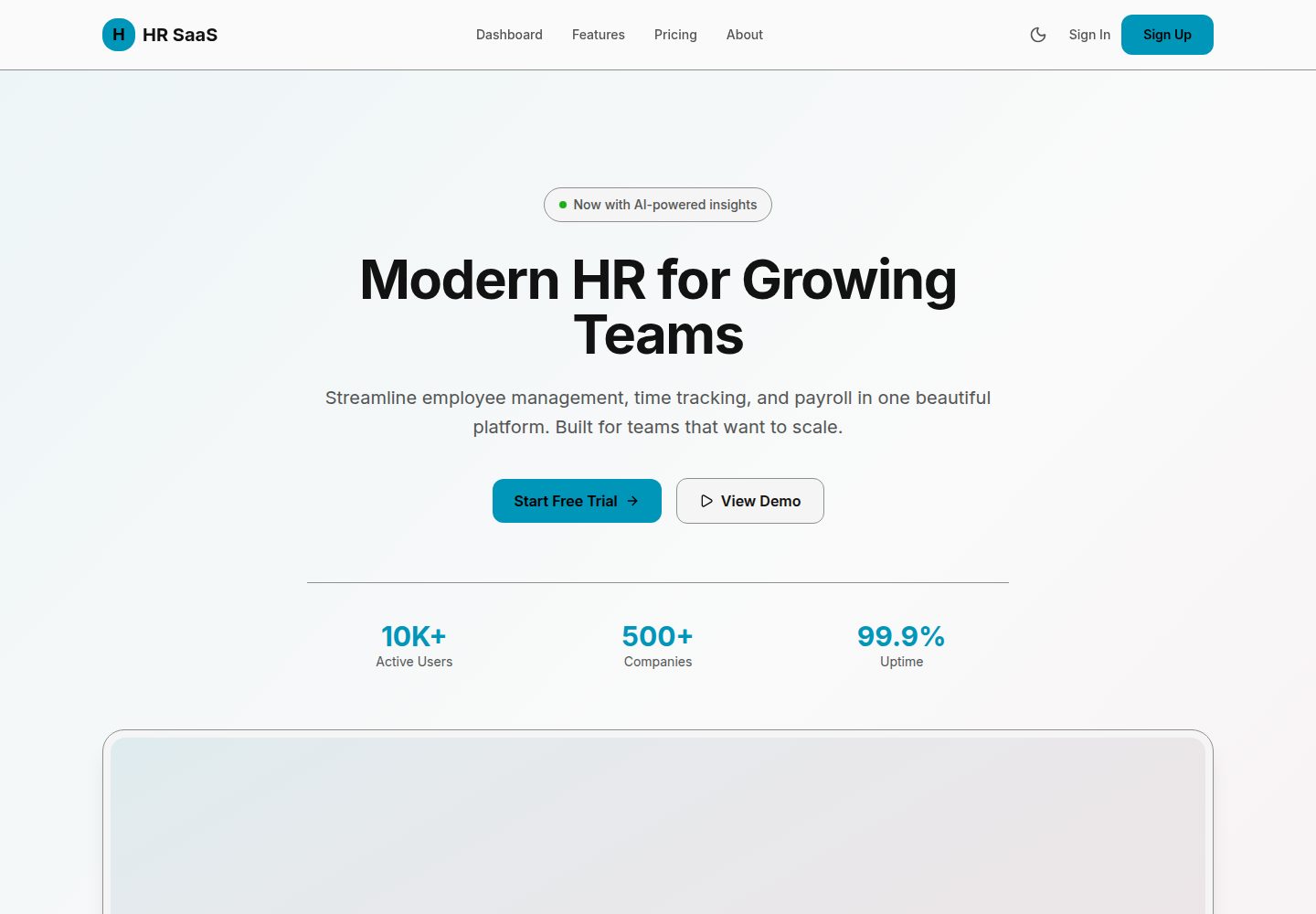
An HR SaaS starter template built on Next.js and Tailwind CSS, integrating the Pixeliro theme system, multilingual support and multiple sign-in methods, with a README covering Mock mode and full installation steps.
Explore the design
Compare the page layouts and mobile experience. Open any screenshot for a closer look.
Desktop homepage1 / 2
Desktop captureTop of page
Actual screenshot captured by the server browser.
All pages & views 2
Screenshots show visual appearance; interactive behavior may differ.
Recorded 2026-10-14View source
What stands out
A quick read of the recorded project description.
Built-in Pixeliro theme system providing 46 semantic color tokens and light/dark modes
Supports English and Vietnamese, and explains how to add languages
Authentication supports email and password, Google, Apple and optional Firebase Auth
Provides a Mock mode that starts without a database and includes test accounts
The README gives deployment steps for Vercel, Docker and PM2 self-hosting
Template Details
This is a SaaS starter template for an HR management platform; the repository is pixeliro-sys/SaaS and the README is titled HR SaaS Starter. The template organizes pages with the Next.js App Router and includes a landing page, sign-in, a protected dashboard and a pricing page; styling is based on Tailwind CSS and the Pixeliro theme system, providing 46 semantic color tokens with automatic or manual switching between light and dark modes. For internationalization it ships with English and Vietnamese, and explains how to extend languages by adding locale files and modifying AppConfig. Authentication supports email and password, Google, Apple and optional Firebase Auth, and the environment variable examples cover these providers. The data layer uses MongoDB, and the README also provides a Mock mode that starts without a database and comes with three test accounts. For deployment it gives three approaches: Vercel, Docker and PM2 self-hosting. The README does not state how fully the template implements specific business modules (such as employee management, attendance or payroll), nor does it provide notes on performance, security or production environment validation.
Next.jsSaaS
Is it right for your project?
Use Cases
- Quickly building the interface and authentication skeleton of an HR management platform
- Previewing the landing page, sign-in and dashboard pages in Mock mode
- Using it as the base structure for a multilingual SaaS project for further development
- Building actual business pages after connecting MongoDB and OAuth providers
Suitable For
- Developers who need a front-end and authentication starting point for an HR SaaS
- Teams that want to use Next.js, Tailwind CSS and MongoDB together
- SaaS projects that need multilingual support and light/dark themes
Getting started & customization
Use these recorded setup notes alongside the repository instructions for your chosen version.
- 1
Requires Node.js 20+, and npm, yarn or pnpm can be used
- 2
Mock mode: copy .env.mock to .env.local and run npm run dev; no database required
- 3
Full installation: copy .env.example to .env.local and fill in MongoDB, OAuth and optional Firebase credentials
- 4
Common scripts include dev, build, start, lint, check:types and format
- 5
Deployment options include Vercel, Docker and self-hosting with PM2
License & source material
Usage conditions & limitations
Free to use · keep license noticeWhat is listed here is the free version in a public repository under the Unlicense; the free scope covers that version's code and does not mean that external services or third-party assets are free.
Must comply with when using
- This version's code may be freely copied, modified, published, used, compiled, sold and distributed, including for commercial purposes.
- The author waives related copyright through a public-domain dedication; the legal effect of that dedication depends on the applicable jurisdiction.
- The code is provided as is; warranties and limitations of liability are governed by the original license and applicable law.
Additional costs & items to verify
- The README mentions Firebase integration; before enabling related dynamic features you must configure it yourself and check Firebase quotas and charges.
- Demo images, fonts, icons and other third-party assets must be checked against their own licenses; the code's Unlicense alone is not sufficient to judge them.
- External services such as domains, hosting, databases, payments or AI may incur separate charges.
- Full installation requires a MongoDB database, which is an external service dependency.
- A Firebase project is an optional dependency, needed only when using Firebase authentication.
- Using Google OAuth requires applying for and configuring GOOGLE_CLIENT_ID and GOOGLE_CLIENT_SECRET yourself.
- Using Apple OAuth requires configuring an Apple client ID, Team ID, Key ID and private key.
- Using Firebase Auth requires configuring a Firebase project ID, client email and private key.
- The README states an MIT license, which is inconsistent with the repository's actual Unlicense grant; the actual license should prevail.
View Original Text Basis
for any purpose, commercial or non-commercial, and by any means
Original License Text
- MongoDB database
Original README
- Firebase project (optional, for Firebase auth)
Original README
GOOGLE_CLIENT_ID=your-client-id.apps.googleusercontent.com
Original README
APPLE_CLIENT_ID=com.yourcompany.hrsaas
Original README
FIREBASE_PROJECT_ID=your-project
Original README
https://github.com/pixeliro-sys/SaaS/blob/main/LICENSEhttps://github.com/pixeliro-sys/SaaS/blob/main/README.mdMIT License — Free for personal and commercial use.
Original README
Compiled by DeepSeek based on repository license and README ·2026-10-14. Results only cover the materials read; dependencies, images, fonts, and subsequent term changes are subject to their respective original texts.
Project checks & description sources
Template Information
- Source platforms
- GitHub
- Documentation and maintenance reference score
- More documented · 83 / 100
- Technologies
- Next.js · React
- Website type
- SaaS
How this score is calculated
Our heuristic uses license records (up to 30), a demo link (12), a preview (10), stars (15), recorded maintenance (15), description completeness (8), feature records (5) and classification data (5). It is not a code, security or performance test, or a Google score. A link does not establish tested functionality.
What to verify for this project
- Repository update recorded
- 2026-03-05
- Screenshot last checked
- 2026-10-14
A demo link is listed. Check it with your own content and viewport sizes; its presence does not confirm that forms, authentication or payments work.
The catalog identifies Next.js as the primary stack. Check the actual dependency manifest and lockfile for versions and hosting requirements. These notes use recorded metadata, not a code audit or a deployment test.
Use a selection guide →How this description was prepared
AI-assisted description based on catalog records and repository material. Repository authors are not automatically the reviewers of this description.
Review declaration: codex-user-requested-batch-review-20261017 · 2026-10-16
Inspect the recorded source material
SHA-256: 23757b102d780db7dd6046b8769f184eda47f16e1cc7c54807d790d847c17f08
2026-10-14T15:52:36.612Z
Source file / repository# HR SaaS Starter > Modern HR Platform Boilerplate — Powered by Pixeliro Theme System A production-ready SaaS boilerplate for building HR management platforms. Built with Next.js 16, Tailwind CSS 4, and the Pixeliro premium theme system. 🔗 **Live Demo:** [https://saas-boilerplate.pixeliro.com](https://saas-boilerplate.pixeliro.com) 📦 **GitHub:** [https://github.com/pixeliro-sys/SaaS](https://github.com/pixeliro-sys/SaaS)  ## ✨ Features - 🎨 **Pixeliro Theme System** — Premium dark/light mode with semantic color tokens - 🌐 **Multi-language Support** — English & Vietnamese out of the box (i18n ready) - 🔐 **Multiple Auth Methods** — Google, Apple, Firebase, Email/Password - 📱 **Fully Responsive** — Mobile-first design with adaptive layouts - 🎯 **Type-Safe** — Strict TypeScript configuration - 🚀 **Production Ready** — Optimized for deployment on Vercel ## 🚀 Quick Start ### Prerequisites - Node.js 20+ - npm or yarn or pnpm - MongoDB database - Firebase project (optional, for Firebase auth) ### Quick Start (Mock Mode) Want to try it without setting up databases? Use **Mock Mode**: ```bash # Clone and install git clone https://github.com/pixeliro-sys/SaaS.git cd SaaS npm install # Use mock mode (no database needed!) cp .env.mock .env.local # Start development server npm run dev ``` **Mock credentials:** - Admin: `[email protected]` / `admin` - User: `[email protected]` / `password` - Manager: `[email protected]` / `manager` ### Full Installation ```bash # Clone the repository git clone https://github.com/pixeliro-sys/SaaS.git cd SaaS # Install dependencies npm install # Set up environment variables cp .env.example .env.local # Edit .env.local with your credentials # Start development server npm run dev ``` Open [http://localhost:3000](http://localhost:3000) to see your app. ## 📁 Project Structure ``` hr-saas-starter/ ├── src/ │ ├── app/ # Next.js App Router │ │ ├── api/ # API Routes │ │ │ └── auth/ # Authentication endpoints │ │ └── [locale]/ # Internationalized pages │ │ ├── page.tsx # Landing page │ │ ├── sign-in/ # Authentication │ │ ├── dashboard/ # Protected dashboard │ │ └── pricing/ # Pricing page │ ├── components/ │ │ ├── auth/ # Auth components │ │ ├── dashboard/ # Dashboard components │ │ ├── landing/ # Landing page sections │ │ ├── layout/ # Header, Footer │ │ └── providers/ # Context providers │ ├── lib/ # Utilities & configurations │ │ ├── Env.ts # Environment validation │ │ ├── AppConfig.ts # App configuration │ │ ├── firebase-*.ts # Firebase setup │ │ ├── mongodb.ts # Database connection │ │ ├── i18n*.ts # Internationalization │ │ └── utils.ts # Helper functions │ ├── locales/ # Translation files │ │ ├── en.json │ │ └── vi.json │ └── styles/ │ └── global.css # Pixeliro theme system ├── public/ # Static assets ├── .env.example # Environment template ├── next.config.ts # Next.js configuration ├── package.json ├── tsconfig.json └── README.md ``` ## 🎨 Pixeliro Theme System This boilerplate uses the Pixeliro premium theme system with 46 semantic color tokens: ### Color Tokens | Category | Tokens | Description | |----------|--------|-------------| | Brand | `primary`, `secondary`, `accent` | Interactive colors | | Surface | `base`, `raised`, `overlay`, `sheet` | Background layers | | Text | `primary`, `secondary`, `disabled`, `inverse` | Typography | | Status | `success`, `warning`, `danger`, `info` | Feedback states | | Border | `default`, `strong`, `focus`, `error` | Borders & outlines | ### Usage ```tsx // Tailwind classes <div className="bg-surface-base text-text-primary border-border"> <button className="bg-primary text-primary-on"> Click me </button> </div> // CSS variables .custom-class { background: var(--surface-raised); color: var(--text-primary); border: 1px solid var(--border-default); } ``` ### Dark Mode Dark mode is automatic based on system preference, or can be toggled: ```tsx import { useTheme } from '@/components/providers/ThemeProvider'; function MyComponent() { const { theme, setTheme, resolvedTheme } = useTheme(); return ( <button onClick={() => setTheme(resolvedTheme === 'dark' ? 'light' : 'dark')}> Toggle theme </button> ); } ``` ## 🔐 Authentication ### Supported Providers 1. **Email/Password** — Classic authentication 2. **Google OAuth** — One-click sign in 3. **Apple OAuth** — Sign in with Apple 4. **Firebase Auth** — Full Firebase integration (optional) ### Environment Setup ```env # Google OAuth GOOGLE_CLIENT_ID=your-client-id.apps.googleusercontent.com GOOGLE_CLIENT_SECRET=your-client-secret # Apple OAuth APPLE_CLIENT_ID=com.yourcompany.hrsaas APPLE_TEAM_ID=your-team-id APPLE_KEY_ID=your-key-id APPLE_PRIVATE_KEY="-----BEGIN PRIVATE KEY-----..." # Firebase (optional) FIREBASE_PROJECT_ID=your-project FIREBASE_CLIENT_EMAIL=firebase-admin@... FIREBASE_PRIVATE_KEY="-----BEGIN PRIVATE KEY-----..." ``` ## 🌐 Internationalization ### Adding a New Language 1. Create a new locale file: `src/locales/fr.json` 2. Update `AppConfig.ts`: ```ts export const AppConfig = { locales: ["en", "vi", "fr"], // Add new locale defaultLocale: "en", }; ``` 3. Translate all keys from `en.json` ### Using Translations ```tsx // Server Component import { getTranslations } from "next-intl/server"; export default async function Page() { const t = await getTranslations("Landing"); return <h1>{t("hero_title")}</h1>; } // Client Component 'use client'; import { useTranslations } from "next-intl"; export function MyComponent() { const t = useTranslations("Auth"); return <button>{t("sign_in_title")}</button>; } ``` ## 📦 Scripts | Command | Description | |---------|-------------| | `npm run dev` | Start development server | | `npm run build` | Build for production | | `npm run start` | Start production server | | `npm run lint` | Run ESLint | | `npm run lint:fix` | Fix ESLint errors | | `npm run check:types` | TypeScript type check | | `npm run format` | Format with Prettier | ## 🚀 Deployment ### Vercel (Recommended) [](https://vercel.com/new/clone?repository-url=https://github.com/pixeliro-sys/SaaS) 1. Click the button above 2. Set environment variables in Vercel dashboard 3. Deploy! ### Docker ```dockerfile FROM node:20-alpine AS base WORKDIR /app COPY package*.json ./ RUN npm ci --only=production COPY . . RUN npm run build EXPOSE 3000 CMD ["npm", "start"] ``` ### Self-Hosted ```bash # Build npm run build # Start with PM2 pm2 start npm --name "hr-saas" -- start ``` ## 🛠️ Customization ### Changing Brand Colors Edit `src/styles/global.css`: ```css @layer theme { :root { --brand-primary: #YOUR_COLOR; --brand-secondary: #YOUR_COLOR; --brand-accent: #YOUR_COLOR; } } ``` ### Adding New Pages 1. Create page in `src/app/[locale]/your-page/page.tsx` 2. Add translations to locale files 3. Update navigation in `Header.tsx` ### Extending the Database ```ts // src/lib/mongodb.ts const usersCollection = await getCollection<User>("users"); const employeesCollection = await getCollection<Employee>("employees"); ``` ## 📄 License MIT License — Free for personal and commercial use. ## 🙏 Credits - Built with [Next.js](https://nextjs.org/) - Styled with [Tailwind CSS](https://tailwindcss.com/) - Theme by [Pixeliro](https://pixeliro.com/) - Icons by [Lucide](https://lucide.dev/) --- Made with ❤️ by [Pixeliro](https://pixeliro.com/)
Explore similar templates
Compare previews and descriptions within the same stack and category.

Next.js SaaS Starter
The official Next.js SaaS starter template, integrating email/password authentication, Stripe Checkout subscriptions, a dashboard with user/team CRUD, basic Owner/Member RBAC, and activity logging.
Next.js · SaaS

SaaS-Boilerplate
SaaS-Boilerplate is an open-source SaaS starter template built with Next.js App Router, React 19, TypeScript, Tailwind CSS, and Shadcn UI.
Next.js · SaaS

create-t3-turbo
A full-stack TypeScript monorepo starter from T3 OSS, listed in the Vercel template directory. It splits apps for Next.js, Expo and optional TanStack Start, with shared packages for tRPC v11, better-auth, Drizzle + Supabase and shadcn/ui.
Next.js · Starter

saas-starter-kit
BoxyHQ's open-source Next.js enterprise SaaS starter template provides a reusable foundation with authentication, team management, SAML SSO, directory sync, webhooks, audit logs, and Stripe payments.
Next.js · SaaS
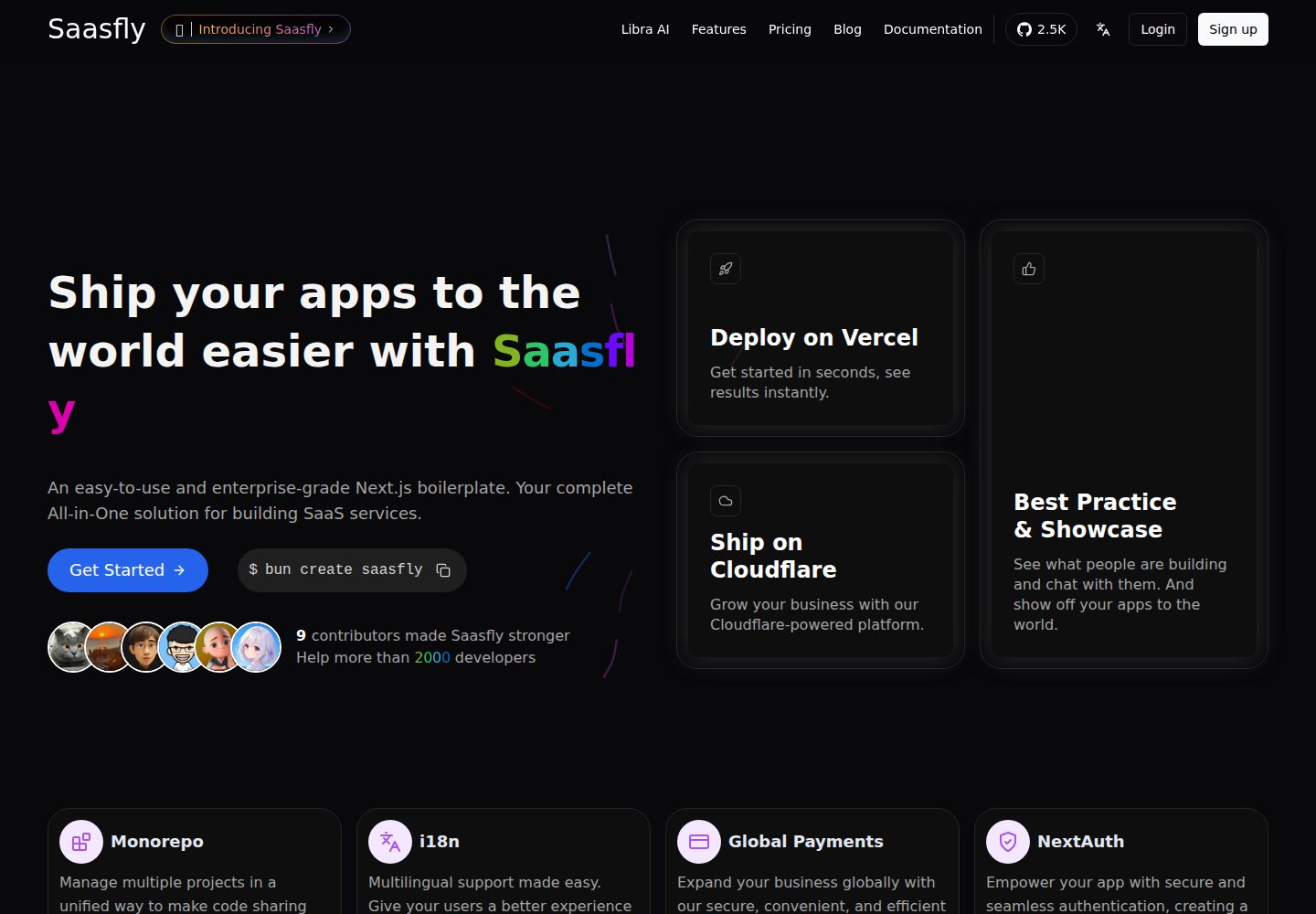
saasfly
Saasfly is an MIT-licensed Next.js SaaS starter template with built-in Clerk authentication, Stripe payment, PostgreSQL, Resend email, internationalization, SEO, tRPC, and Zustand. It is created via `bun create saasfly` and deployable on Vercel.
Next.js · SaaS

next-saas-starter
A free Next.js SaaS marketing landing page template from Blazity, using static generation and styled-components with no extra UI library.
Next.js · SaaS