使用 Next.js App Router 与严格 TypeScript 配置
Next.jsReactSaaS
SaaS — Next.js SaaS模板
作者 pixeliro-sys
基于 Next.js 与 Tailwind CSS 的 HR SaaS 启动模板,集成 Pixeliro 主题系统、多语言与多种登录方式,README 提供 Mock 模式与完整安装步骤。
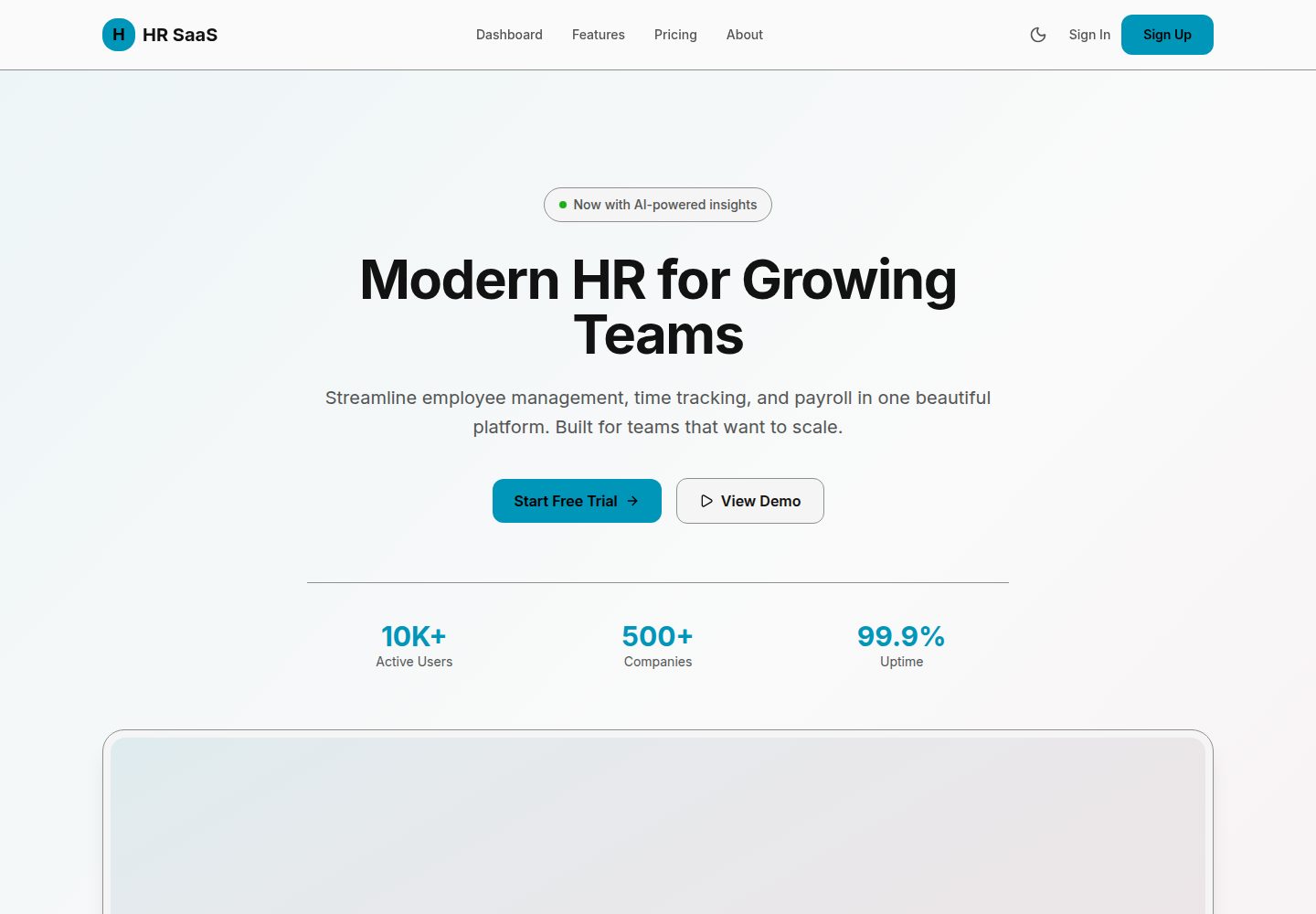
看看你的网站会是什么样
浏览真实页面截图,比较内容排版与手机效果。点击下方缩略图切换,放大查看整页细节。
全部页面与视图 2
截图用于了解视觉与布局,交互效果请以实际项目为准。
采集于 2026-10-14查看来源
值得关注的模板亮点
从已有项目资料中,快速了解它的特点。
内置 Pixeliro 主题系统,提供 46 个语义化颜色令牌与深浅色模式
支持英语和越南语,并说明如何新增语言
认证支持邮箱密码、Google、Apple 及可选 Firebase Auth
提供 Mock 模式,无需数据库即可启动并附带测试账号
README 给出 Vercel、Docker 与 PM2 自托管部署步骤
模板详细介绍
这是一个面向 HR 管理平台的 SaaS 启动模板,仓库为 pixeliro-sys/SaaS,README 标题为 HR SaaS Starter。模板使用 Next.js App Router 组织页面,包含落地页、登录、受保护的仪表盘和定价页;样式基于 Tailwind CSS 与 Pixeliro 主题系统,提供 46 个语义化颜色令牌,支持浅色/深色模式自动切换或手动切换。国际化方面内置英语和越南语,并说明可通过新增 locale 文件与修改 AppConfig 扩展语言。认证支持邮箱密码、Google、Apple 以及可选的 Firebase Auth,环境变量示例覆盖这些提供方。数据层使用 MongoDB,README 同时提供 Mock 模式,无需数据库即可启动并附带三个测试账号。部署部分给出 Vercel、Docker 和 PM2 自托管三种方式。README 未说明模板内置的具体业务模块(如员工管理、考勤、薪酬等)的实现程度,也未提供性能、安全或生产环境验证的说明。
Next.jsSaaS
适合你的项目吗?
适用场景
- 快速搭建 HR 管理平台的界面与认证骨架
- 在 Mock 模式下预览落地页、登录和仪表盘页面
- 作为多语言 SaaS 项目的基础结构进行二次开发
- 接入 MongoDB 与 OAuth 提供方后构建实际业务页面
适合人群
- 需要 HR SaaS 前端与认证起点的开发者
- 希望使用 Next.js、Tailwind CSS 和 MongoDB 组合的团队
- 需要多语言与深浅色主题支持的 SaaS 项目
上手与定制指南
结合仓库当前版本的说明,按下面的资料检查内容、配置与运行要求。
- 1
环境要求 Node.js 20+,可使用 npm、yarn 或 pnpm
- 2
Mock 模式:复制 .env.mock 为 .env.local 后运行 npm run dev,无需数据库
- 3
完整安装:复制 .env.example 为 .env.local 并填写 MongoDB、OAuth 及可选 Firebase 凭据
- 4
常用脚本包括 dev、build、start、lint、check:types 和 format
- 5
部署方式包括 Vercel、Docker 以及使用 PM2 的自托管
授权与来源资料
使用条件与限制
免费使用 · 保留许可声明本次收录的是公开仓库中采用 Unlicense 许可的免费版本;免费范围为该版本代码,不代表外部服务或第三方素材免费。
使用时需要遵守
- 允许免费复制、修改、发布、使用、编译、销售和分发该版本代码,包括商业用途。
- 作者通过公有领域贡献声明放弃相关版权;该声明的法律效果取决于适用司法辖区。
- 代码按现状提供;担保与责任限制以原许可证及适用法律为准。
额外费用与待核对事项
- README 提及 Firebase 集成;启用相关动态功能前需自行配置,并核对 Firebase 的额度与收费。
- 演示图片、字体、图标及其他第三方素材需按各自许可核对,不能仅凭代码的 Unlicense 许可判断。
- 域名、托管、数据库、支付或 AI 等外部服务可能另外收费。
- 完整安装需要 MongoDB 数据库,属于外部服务依赖。
- Firebase 项目为可选依赖,仅在使用 Firebase 认证时需要。
- 使用 Google OAuth 需要自行申请并配置 GOOGLE_CLIENT_ID 与 GOOGLE_CLIENT_SECRET。
- 使用 Apple OAuth 需要配置 Apple 客户端 ID、Team ID、Key ID 与私钥。
- 使用 Firebase Auth 需要配置 Firebase 项目 ID、客户端邮箱与私钥。
- README 声明 MIT 许可,与仓库实际 Unlicense 授权不一致,需以实际许可为准。
查看原文依据
for any purpose, commercial or non-commercial, and by any means
许可证原文
- MongoDB database
README 原文
- Firebase project (optional, for Firebase auth)
README 原文
GOOGLE_CLIENT_ID=your-client-id.apps.googleusercontent.com
README 原文
APPLE_CLIENT_ID=com.yourcompany.hrsaas
README 原文
FIREBASE_PROJECT_ID=your-project
README 原文
https://github.com/pixeliro-sys/SaaS/blob/main/LICENSEhttps://github.com/pixeliro-sys/SaaS/blob/main/README.mdMIT License — Free for personal and commercial use.
README 原文
DeepSeek 根据仓库许可证和 README 整理 ·2026-10-14。结果仅覆盖已读取资料,依赖、图片、字体及后续条款变更以各自原文为准。
项目核对记录与介绍依据
模板资料
- 来源平台
- GitHub
- 资料与维护参考分
- 资料较完整 · 83 / 100
- 技术栈
- Next.js · React
- 网站类型
- SaaS
这个分数如何计算
本站按许可资料(最高30分)、演示链接(12分)、预览图(10分)、Star数(15分)、记录的维护时间(15分)、描述完整度(8分)、功能记录(5分)和分类资料(5分)计算。它不是代码、安全或性能测试,也不是 Google 评分;有链接不代表已实测可用。
这个项目需要核对什么
- 记录的仓库更新时间
- 2026-03-05
- 截图检查日期
- 2026-10-14
已收录演示链接。请用你的内容与屏幕尺寸检查;有演示不代表表单、认证或支付已经可用。
目录记录的主要技术栈是 Next.js。请通过依赖清单和锁文件核对实际版本与托管要求。这些说明基于收录资料,不代表代码审计或部署实测。
查看具体选型方法 →介绍的制作与核对状态
介绍由 AI 辅助整理目录与仓库资料。仓库作者不等于这篇介绍的审核者。
审核声明: codex-user-requested-batch-review-20261017 · 2026-10-16
查看当时使用的来源资料
SHA-256: 23757b102d780db7dd6046b8769f184eda47f16e1cc7c54807d790d847c17f08
2026-10-14T15:52:36.612Z
来源文件 / 仓库# HR SaaS Starter > Modern HR Platform Boilerplate — Powered by Pixeliro Theme System A production-ready SaaS boilerplate for building HR management platforms. Built with Next.js 16, Tailwind CSS 4, and the Pixeliro premium theme system. 🔗 **Live Demo:** [https://saas-boilerplate.pixeliro.com](https://saas-boilerplate.pixeliro.com) 📦 **GitHub:** [https://github.com/pixeliro-sys/SaaS](https://github.com/pixeliro-sys/SaaS)  ## ✨ Features - 🎨 **Pixeliro Theme System** — Premium dark/light mode with semantic color tokens - 🌐 **Multi-language Support** — English & Vietnamese out of the box (i18n ready) - 🔐 **Multiple Auth Methods** — Google, Apple, Firebase, Email/Password - 📱 **Fully Responsive** — Mobile-first design with adaptive layouts - 🎯 **Type-Safe** — Strict TypeScript configuration - 🚀 **Production Ready** — Optimized for deployment on Vercel ## 🚀 Quick Start ### Prerequisites - Node.js 20+ - npm or yarn or pnpm - MongoDB database - Firebase project (optional, for Firebase auth) ### Quick Start (Mock Mode) Want to try it without setting up databases? Use **Mock Mode**: ```bash # Clone and install git clone https://github.com/pixeliro-sys/SaaS.git cd SaaS npm install # Use mock mode (no database needed!) cp .env.mock .env.local # Start development server npm run dev ``` **Mock credentials:** - Admin: `[email protected]` / `admin` - User: `[email protected]` / `password` - Manager: `[email protected]` / `manager` ### Full Installation ```bash # Clone the repository git clone https://github.com/pixeliro-sys/SaaS.git cd SaaS # Install dependencies npm install # Set up environment variables cp .env.example .env.local # Edit .env.local with your credentials # Start development server npm run dev ``` Open [http://localhost:3000](http://localhost:3000) to see your app. ## 📁 Project Structure ``` hr-saas-starter/ ├── src/ │ ├── app/ # Next.js App Router │ │ ├── api/ # API Routes │ │ │ └── auth/ # Authentication endpoints │ │ └── [locale]/ # Internationalized pages │ │ ├── page.tsx # Landing page │ │ ├── sign-in/ # Authentication │ │ ├── dashboard/ # Protected dashboard │ │ └── pricing/ # Pricing page │ ├── components/ │ │ ├── auth/ # Auth components │ │ ├── dashboard/ # Dashboard components │ │ ├── landing/ # Landing page sections │ │ ├── layout/ # Header, Footer │ │ └── providers/ # Context providers │ ├── lib/ # Utilities & configurations │ │ ├── Env.ts # Environment validation │ │ ├── AppConfig.ts # App configuration │ │ ├── firebase-*.ts # Firebase setup │ │ ├── mongodb.ts # Database connection │ │ ├── i18n*.ts # Internationalization │ │ └── utils.ts # Helper functions │ ├── locales/ # Translation files │ │ ├── en.json │ │ └── vi.json │ └── styles/ │ └── global.css # Pixeliro theme system ├── public/ # Static assets ├── .env.example # Environment template ├── next.config.ts # Next.js configuration ├── package.json ├── tsconfig.json └── README.md ``` ## 🎨 Pixeliro Theme System This boilerplate uses the Pixeliro premium theme system with 46 semantic color tokens: ### Color Tokens | Category | Tokens | Description | |----------|--------|-------------| | Brand | `primary`, `secondary`, `accent` | Interactive colors | | Surface | `base`, `raised`, `overlay`, `sheet` | Background layers | | Text | `primary`, `secondary`, `disabled`, `inverse` | Typography | | Status | `success`, `warning`, `danger`, `info` | Feedback states | | Border | `default`, `strong`, `focus`, `error` | Borders & outlines | ### Usage ```tsx // Tailwind classes <div className="bg-surface-base text-text-primary border-border"> <button className="bg-primary text-primary-on"> Click me </button> </div> // CSS variables .custom-class { background: var(--surface-raised); color: var(--text-primary); border: 1px solid var(--border-default); } ``` ### Dark Mode Dark mode is automatic based on system preference, or can be toggled: ```tsx import { useTheme } from '@/components/providers/ThemeProvider'; function MyComponent() { const { theme, setTheme, resolvedTheme } = useTheme(); return ( <button onClick={() => setTheme(resolvedTheme === 'dark' ? 'light' : 'dark')}> Toggle theme </button> ); } ``` ## 🔐 Authentication ### Supported Providers 1. **Email/Password** — Classic authentication 2. **Google OAuth** — One-click sign in 3. **Apple OAuth** — Sign in with Apple 4. **Firebase Auth** — Full Firebase integration (optional) ### Environment Setup ```env # Google OAuth GOOGLE_CLIENT_ID=your-client-id.apps.googleusercontent.com GOOGLE_CLIENT_SECRET=your-client-secret # Apple OAuth APPLE_CLIENT_ID=com.yourcompany.hrsaas APPLE_TEAM_ID=your-team-id APPLE_KEY_ID=your-key-id APPLE_PRIVATE_KEY="-----BEGIN PRIVATE KEY-----..." # Firebase (optional) FIREBASE_PROJECT_ID=your-project FIREBASE_CLIENT_EMAIL=firebase-admin@... FIREBASE_PRIVATE_KEY="-----BEGIN PRIVATE KEY-----..." ``` ## 🌐 Internationalization ### Adding a New Language 1. Create a new locale file: `src/locales/fr.json` 2. Update `AppConfig.ts`: ```ts export const AppConfig = { locales: ["en", "vi", "fr"], // Add new locale defaultLocale: "en", }; ``` 3. Translate all keys from `en.json` ### Using Translations ```tsx // Server Component import { getTranslations } from "next-intl/server"; export default async function Page() { const t = await getTranslations("Landing"); return <h1>{t("hero_title")}</h1>; } // Client Component 'use client'; import { useTranslations } from "next-intl"; export function MyComponent() { const t = useTranslations("Auth"); return <button>{t("sign_in_title")}</button>; } ``` ## 📦 Scripts | Command | Description | |---------|-------------| | `npm run dev` | Start development server | | `npm run build` | Build for production | | `npm run start` | Start production server | | `npm run lint` | Run ESLint | | `npm run lint:fix` | Fix ESLint errors | | `npm run check:types` | TypeScript type check | | `npm run format` | Format with Prettier | ## 🚀 Deployment ### Vercel (Recommended) [](https://vercel.com/new/clone?repository-url=https://github.com/pixeliro-sys/SaaS) 1. Click the button above 2. Set environment variables in Vercel dashboard 3. Deploy! ### Docker ```dockerfile FROM node:20-alpine AS base WORKDIR /app COPY package*.json ./ RUN npm ci --only=production COPY . . RUN npm run build EXPOSE 3000 CMD ["npm", "start"] ``` ### Self-Hosted ```bash # Build npm run build # Start with PM2 pm2 start npm --name "hr-saas" -- start ``` ## 🛠️ Customization ### Changing Brand Colors Edit `src/styles/global.css`: ```css @layer theme { :root { --brand-primary: #YOUR_COLOR; --brand-secondary: #YOUR_COLOR; --brand-accent: #YOUR_COLOR; } } ``` ### Adding New Pages 1. Create page in `src/app/[locale]/your-page/page.tsx` 2. Add translations to locale files 3. Update navigation in `Header.tsx` ### Extending the Database ```ts // src/lib/mongodb.ts const usersCollection = await getCollection<User>("users"); const employeesCollection = await getCollection<Employee>("employees"); ``` ## 📄 License MIT License — Free for personal and commercial use. ## 🙏 Credits - Built with [Next.js](https://nextjs.org/) - Styled with [Tailwind CSS](https://tailwindcss.com/) - Theme by [Pixeliro](https://pixeliro.com/) - Icons by [Lucide](https://lucide.dev/) --- Made with ❤️ by [Pixeliro](https://pixeliro.com/)
看看同类模板
对比同技术栈与用途的模板,找到更适合的视觉与内容结构。

Next.js SaaS Starter
Next.js SaaS Starter 是 Next.js 官方维护的 SaaS 起点模板,定位介于学习资源和可直接部署的脚手架之间。
Next.js · SaaS

SaaS-Boilerplate
🚀🎉📚 SaaS Boilerplate built with Next.js + Tailwind CSS + Shadcn UI + TypeScript. ⚡️ Full-stack React applic…
Next.js · SaaS

create-t3-turbo
create-t3-turbo 是一个面向全栈 TypeScript 的 monorepo 起点,由 T3 OSS 维护,在 Vercel 模板目录中收录。
Next.js · 启动器

saas-starter-kit
🔥 Enterprise SaaS Starter Kit - Kickstart your enterprise app development with the Next.js SaaS boilerplate �…
Next.js · SaaS
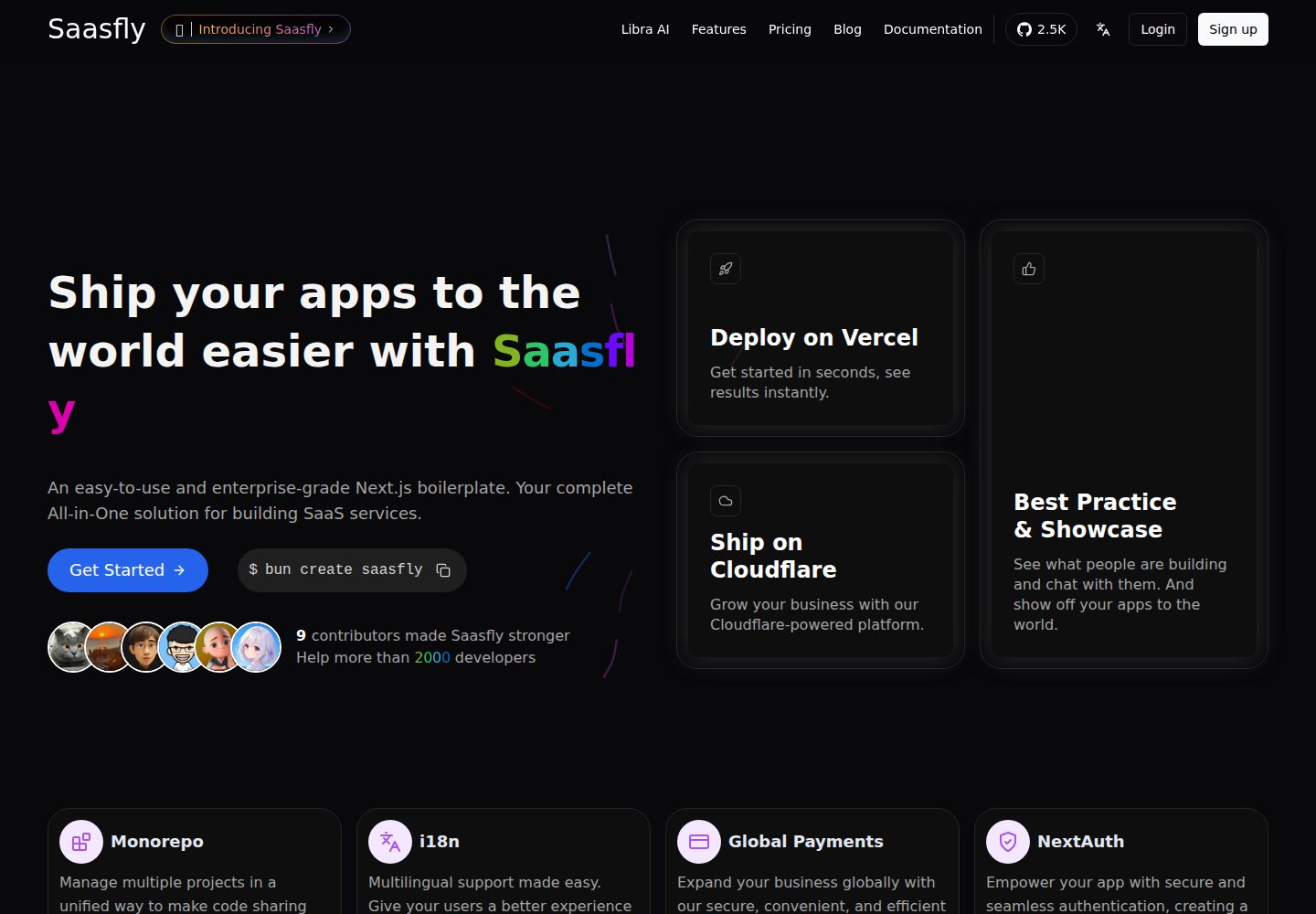
saasfly
Your Next SaaS Template or Boilerplate ! A magic trip start with `bun create saasfly` . The more stars, the mo…
Next.js · SaaS

next-saas-starter
⚡️ Free Next.js responsive landing page template for SaaS products made using JAMStack architecture.
Next.js · SaaS