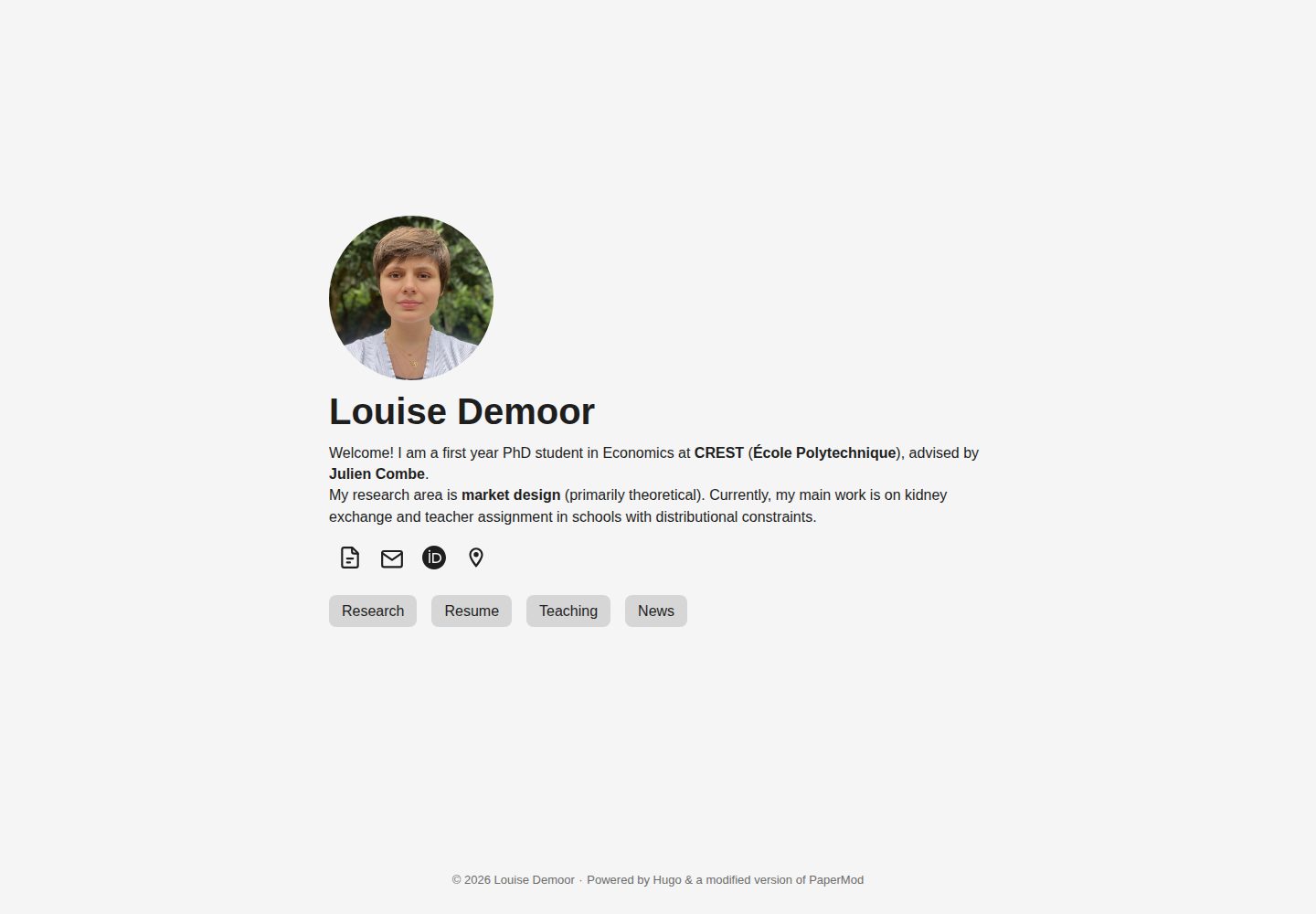
Static site generation based on Hugo, simplified and adapted from the PaperMod theme
HugoPortfolio
hugo-website — Hugo Portfolio Template
By pmichaillat
A minimalist academic personal website template built on Hugo and adapted from the PaperMod theme, automatically built and deployed to GitHub Pages via GitHub Actions.
Explore the design
Compare the page layouts and mobile experience. Open any screenshot for a closer look.
Desktop homepage1 / 2
Desktop captureTop of page
Actual screenshot captured by the server browser.
All pages & views 2
Screenshots show visual appearance; interactive behavior may differ.
Recorded 2026-10-02View source
What stands out
A quick read of the recorded project description.
Automatically builds and deploys to GitHub Pages via a GitHub Actions workflow
Local preview with hugo server at http://localhost:1313 with automatic rebuilds
Before use, set baseURL in config.yml; the default points to https://username.github.io
The README lists several actual academic personal websites and their source code for reference
Template Details
This template is for building a personal academic website. It is built with Hugo and has been simplified and adapted from the PaperMod theme to better fit the content organization of academic sites. The repository provides a complete local development and online deployment workflow: after installing Hugo locally, run hugo server to preview at http://localhost:1313 with live rebuilds; after pushing to a GitHub repository, the GitHub Actions workflow in .github/workflows/hugo.yml invokes Hugo to generate the static site and publish it to GitHub Pages. On the first push, you need to enable GitHub Actions and GitHub Pages in the repository's Pages settings and select the Deploy Hugo site to Pages action. Before use, modify the baseURL parameter in config.yml; the default value is https://username.github.io. The repository README records testing on macOS Sequoia with Safari 18.4 and iOS 18 Mobile Safari, and notes that other Hugo versions, operating systems, and browsers may require minor adjustments. The template is released under the MIT license, and the README lists several actual personal academic websites using this template along with their source links as reference implementations.
HugoPortfolio
Is it right for your project?
Use Cases
- Building a personal academic homepage to present research and personal information
- Using a GitHub repository as the content source to automatically publish a static site to GitHub Pages
- Editing content locally and previewing changes in real time via hugo server
- Referring to the source code of actual sites listed in the README to adjust page structure
Suitable For
- Researchers and scholars who need a minimalist personal academic website
- Users familiar with or willing to use Hugo and GitHub workflows
- Developers who want to host a static personal website for free on GitHub Pages
- Users who need to refer to similar academic website implementations to customize pages
Getting started & customization
Use these recorded setup notes alongside the repository instructions for your chosen version.
- 1
Install Hugo locally first; on macOS you can run brew install hugo or brew upgrade hugo via Homebrew
- 2
Click Use this template to create a new repository, then clone it locally with GitHub Desktop
- 3
Modify baseURL in config.yml; the default value is https://username.github.io
- 4
On the first push, enable GitHub Actions and GitHub Pages in the repository's Pages settings and select the Deploy Hugo site to Pages action
- 5
For local development, run hugo server in the site directory; for online publishing, commit and push to trigger the workflow
License & source material
Usage conditions & limitations
Free to use · keep license noticeThis entry covers the free version under the MIT license in a public repository; the free scope is the code of this version and does not mean external services or third-party assets are free.
Must comply with when using
- You are allowed to use, modify, use commercially, and distribute the code of this version for free.
- When distributing copies or substantial portions of the code, retain the original author's copyright notice and the full MIT license notice.
- The code is provided as is; warranties and limitations of liability are governed by the original license and applicable law.
Additional costs & items to verify
- The template by default relies on GitHub Pages to host the website and requires a GitHub account; online deployment depends on GitHub Actions and Pages settings, which are external service requirements.
- On the first push, you must enable GitHub Actions and GitHub Pages in the repository settings, otherwise the site cannot be automatically built and published.
- Before use, you must modify baseURL in config.yml; the default value is https://username.github.io, otherwise the site links will be incorrect.
- The README only states testing on Hugo v0.147.2, macOS Sequoia, Safari 18.4, and iOS 18; other versions, systems, or browsers may require minor adjustments and full compatibility is not guaranteed.
- Demo images, fonts, icons, and other third-party assets must be checked against their respective licenses and cannot be judged solely by the code's MIT license.
- External services such as domains, hosting, databases, payments, or AI may incur additional charges.
View Original Text Basis
Permission is hereby granted, free of charge
Original License Text
The website is hosted on [GitHub Pages](https://docs.github.com/en/pages/getting-started-with-github-pages/about-github-pages).
Original README
The first time that you push your repository to GitHub, you need to allow GitHub Actions and GitHub Pages so the website can be built and deployed to GitHub Pages.
Original README
Update the `baseURL` parameter in `config.yml` with the website URL that you plan to use. By default the URL is `https://username.github.io`.
Original README
https://github.com/pmichaillat/hugo-website/blob/main/LICENSE.mdhttps://github.com/pmichaillat/hugo-website/blob/main/README.mdOther Hugo versions, operating systems, and web browsers may require minor adjustments.
Original README
Compiled by DeepSeek based on repository license and README ·2026-10-02. Results only cover the materials read; dependencies, images, fonts, and subsequent term changes are subject to their respective original texts.
Project checks & description sources
Template Information
- Source platforms
- GitHub
- Documentation and maintenance reference score
- More documented · 91 / 100
- Technologies
- Hugo
- Website type
- Portfolio
How this score is calculated
Our heuristic uses license records (up to 30), a demo link (12), a preview (10), stars (15), recorded maintenance (15), description completeness (8), feature records (5) and classification data (5). It is not a code, security or performance test, or a Google score. A link does not establish tested functionality.
What to verify for this project
- Repository update recorded
- 2026-08-22
- Screenshot last checked
- 2026-10-02
A demo link is listed. Check it with your own content and viewport sizes; its presence does not confirm that forms, authentication or payments work.
The catalog identifies Hugo as the primary stack. Check the actual dependency manifest and lockfile for versions and hosting requirements. These notes use recorded metadata, not a code audit or a deployment test.
Use a selection guide →How this description was prepared
AI-assisted description based on catalog records and repository material. Repository authors are not automatically the reviewers of this description.
Automatically checked against source and license rules; no manual editorial review.
Inspect the recorded source material
SHA-256: 62fc1aafedff827e58a98a4295f1a944da3a5407954a10e11347253d84fced05
2026-10-02T07:42:08.227Z
Source file / repository# Minimalist Hugo Template for Academic Websites This repository contains a [Hugo](https://github.com/gohugoio/hugo) template to create a personal academic website. The template uses the [PaperMod theme](https://github.com/adityatelange/hugo-PaperMod) but modifies it in various ways to be more minimalist and better suited for academic websites. The website is hosted on [GitHub Pages](https://docs.github.com/en/pages/getting-started-with-github-pages/about-github-pages). ## Documentation The template is documented at https://pascalmichaillat.org/b/. ## Illustration The website produced by the template can be viewed at https://pascalmichaillat.org/hugo-website/. ## Installation ### On your local machine - Install [Hugo](https://gohugo.io/installation/). On a Mac, this can be done with [Homebrew](https://brew.sh): run `brew install hugo` in the terminal. If you already have Hugo but it is outdated, run `brew upgrade hugo`. - Since the website is hosted on GitHub Pages, it is convenient to install [GitHub Desktop](https://desktop.github.com). The website can be updated from your local machine via GitHub Desktop without going to GitHub. - Clone the template repository to your local machine. This can be done in two steps: - Click "Use this template" and then "Create a new repository" at the top of the repository. - Once the new repository is created on your GitHub account, open GitHub Desktop and click "File" and then "Clone repository". Find the newly created repository under the "GitHub.com" tab and clone it. - Update the `baseURL` parameter in `config.yml` with the website URL that you plan to use. By default the URL is `https://username.github.io`. ### On your GitHub account - The first time that you push your repository to GitHub, you need to allow GitHub Actions and GitHub Pages so the website can be built and deployed to GitHub Pages. - The first step is to [ask GitHub to publish the website with a GitHub Action](https://docs.github.com/en/pages/getting-started-with-github-pages/configuring-a-publishing-source-for-your-github-pages-site#publishing-with-a-custom-github-actions-workflow). GitHub offers a ready-made action to publish a Hugo website, called `Deploy Hugo site to Pages`. This action must be enabled in the [Pages Settings](https://github.com/pmichaillat/hugo-website/settings/pages) of your GitHub repository. You can view the workflow triggered by the action in the `.github/workflows/hugo.yml` file. - Once the GitHub Actions are enabled, GitHub will build and publish the website as soon as the repository is updated. - If you would like to update the deployment action (for instance because it became outdated and fails to deploy the site), you can find the [most recent action on GitHub](https://github.com/actions/starter-workflows/blob/main/pages/hugo.yml). You can place this file directly in the `.github/workflows` folder to replace the old `hugo.yml` file—but make sure to set `push: branches` to `["main"]`. ## Usage ### Local development Navigate to the website directory (`cd`) and run in the terminal: ```bash hugo server ``` The command builds the website on your machine and makes it available at http://localhost:1313, rebuilding automatically as you edit. You can modify the content of the repository and develop your website entirely on your machine. ### Online deployment Once your website is ready to be made public, commit your content and template changes and push them to the website repository on GitHub. It is convenient to use GitHub Desktop for this Git operation. On each push, the [GitHub Actions workflow](https://github.com/pmichaillat/hugo-website/actions/workflows/hugo.yml) invokes Hugo to generate the website and deploys the output to [GitHub Pages](https://github.com/pmichaillat/hugo-website/deployments/github-pages). During the workflow, Hugo processes your content, templates, and other project files and generates a static website. ## Performance The website performs well on mobile and desktop devices. Here is an overview of the mobile performance from [PageSpeed Insights](https://pagespeed.web.dev/): <img width="470" alt="mobile" src="https://github.com/pmichaillat/hugo-website/assets/85443660/1488df3e-19bb-4f9f-8a86-11f361414d92"> And here is an overview of the desktop performance: <img width="453" alt="desktop" src="https://github.com/pmichaillat/pmichaillat.github.io/assets/85443660/eff134d2-6097-4bc2-bfd7-4f5c18571789"> ## Software - The website is built with Hugo v0.147.2 via GitHub Actions. - The website was developed locally with Hugo v0.147.2 on macOS Sequoia. - The website was tested on the following browsers: - Safari 18.4 on macOS Sequoia - Mobile Safari on iOS 18 - Other Hugo versions, operating systems, and web browsers may require minor adjustments. Please [report any issues](https://github.com/pmichaillat/hugo-website/issues) to help improve compatibility. ## License This repository is licensed under the [MIT License](LICENSE.md). ## Real-world implementations - [Pascal Michaillat's website](https://pascalmichaillat.org/) ([source code](https://github.com/pmichaillat/pmichaillat.github.io)) - [Rosa van den Ende's website](https://rosavandenende.github.io) ([source code](https://github.com/rosavandenende/rosavandenende.github.io)) - [Samia Kabir's website](https://samiakabir.com) ([source code](https://github.com/SamiaKabir/samiakabir.github.io)) - [Dylan Laplace Mermoud's website](https://dylanlaplacemermoud.github.io) ([source code](https://github.com/DylanLaplaceMermoud/dylanlaplacemermoud.github.io)) - [Maarten Goos's website](https://maartengoos.com) ([source code](https://github.com/MaartenGoos/website)) - [Jun Wong's website](https://junwong.org) ([source code](https://github.com/junwong97/junwong97.github.io)) - [Erling Rennemo Jellum's website](https://erlingrj.github.io) ([source code](https://github.com/erlingrj/erlingrj.github.io)) - [Yangkeun Yun's website](https://yangkeunyun.github.io) ([source code](https://github.com/yangkeunyun/yangkeunyun.github.io)) - [Lucas Warwar's website](https://lucaswarwar.github.io) ([source code](https://github.com/lucaswarwar/lucaswarwar.github.io)) - [Franz Louis Cesista's website](https://leloykun.github.io) ([source code](https://github.com/leloykun/leloykun.github.io)) - [Gabe Sekeres's website](https://gabesekeres.com) ([source code](https://github.com/gsekeres/hugo_site)) - [Kevin Roice's website](https://kevroi.github.io) ([source code](https://github.com/kevroi/kevroi.github.io)) - [Daniel Barbosa's website](https://dacbarbosa.github.io) ([source code](https://github.com/dacbarbosa/dacbarbosa.github.io)) - [Wei Zhang's website](https://weizhang-econ.github.io) ([source code](https://github.com/weizhang-econ/weizhang-econ.github.io)) - [Ben Hermann's website](http://benhermann.eu) ([source code](https://github.com/bhermann/bhermann.github.io)) - [Franco Corona's website](http://fcorona.me) ([source code](https://github.com/exibios/exibios.github.io)) - [Tom George's website](https://tomge.org) ([source code](https://github.com/TomGeorge1234/TomGeorge1234.github.io)) - [Yucheng Zhou's website](https://yuchengzhou.com) ([source code](https://github.com/YuchengZ-Fin/YuchengZ-Fin.github.io)) - [Rui Sousa's website](https://ruiagmsousa.github.io) ([source code](https://github.com/ruiagmsousa/ruiagmsousa.github.io)) - [Stefano Sangiovanni's website](https://ste-sangiovanni.github.io) ([source code](https://github.com/ste-sangiovanni/ste-sangiovanni.github.io)) - [Seth Watts's website](https://www.sethbwatts.com) ([source code](https://github.com/sBwatts/hugo-website)) - [Louise Demoor's website](https://louisedemoor.github.io/website/) ([source code](https://github.com/louisedemoor/website)) - [Giwon Bahg's website](https://giwonbahg.github.io) ([source code](https://github.com/giwonbahg/giwonbahg.github.io)) - [Diego Araujo's website](https://daliego.github.io/portfolio-case-studies) ([source code](https://github.com/Daliego/portfolio-case-studies)) - [Liam Powell's website](https://liampwl.com) ([source code](https://github.com/liampwl/liampwl.github.io)) - [Anton Lundborg's website](https://www.arlundborg.com) ([source code](https://github.com/ARLundborg/web)) - [Taeyoung Kim's website](https://tykim.me) ([source code](https://github.com/SangsChicom/tykim.github.io)) - [Niladri Kal's website](https://niladrik.github.io) ([source code](https://github.com/niladrik/niladrik.github.io)) - [Somjit Roy's website](https://roy-sr-007.github.io) ([source code](https://github.com/Roy-SR-007/roy-sr-007.github.io)) - [Kostas Bimpikis's website](https://stanford.edu/~kostasb/) - [Beau Bressler's website](https://beaubressler.github.io) - [Momchil Tomov's website](https://momchiltomov.com) - [Arthur Douillard's website](https://arthurdouillard.com) - [Benjamin Hattemer's website](https://benjaminhattemer.com) - [Qiwei He's website](https://www.qiwei-he.com) - [Pierre Bardier's website](https://pierrebard.github.io/pierre-bardier/) - [Marek Wiewiórka's website](https://marekwiewiorka.org) - [Eran Shmuëli's website](https://eranshmueli.com) - [Bo Wang's website](https://bowang.finance) - [Muhammed Bulutay's website](https://muhammedbulutay.com) - [Nikhil George's website](https://ngeorge.net) - [Matthew O'Keefe's website](https://mfokeefe.github.io) - [Joshua Maynard's website](https://jshmnrd.ca) - [Suraj Kumar's website](https://surajkumar.me) ## Related resources - [latex-cv](https://github.com/pmichaillat/latex-cv) - This LaTeX template produces a minimalist academic CV, which you can post on your website. - [latex-presentation](https://github.com/pmichaillat/latex-presentation) - This LaTeX template produces minimalist research presentations, which you can post on your website. - [latex-paper](https://github.com/pmichaillat/latex-paper) - This LaTeX template produces minimalist research papers, which you can post on your website. - [latex-book](https://github.com/pmichaillat/latex-book) - This LaTeX template produces minimalist lecture notes and research monographs, which you can post on your website too.
Explore similar templates
Compare previews and descriptions within the same stack and category.

hugo-PaperMod
A fast, clean, responsive Hugo theme for blogs and lightweight portfolios, with three layout modes (Regular, Home-Info, Profile), automatic and manual light/dark themes, Fuse.js client-side search, multilingual support, and built-in Open Graph, Twitter Cards, and Schema.org data.
Hugo · Portfolio

Congo
Congo is a minimal Hugo content theme built on Tailwind CSS 3.0, designed for blogs, portfolios, and lightweight content sites. It offers multiple homepage layouts, customizable dark mode, multilingual support including RTL, and built-in client-side search, Mermaid, Chart.js, and KaTeX.
Hugo · Blog

toha
Toha is a Hugo theme for personal portfolios, featuring a minimalist, responsive design with configurable homepage sections such as about, experience timeline, and achievements gallery.
Hugo · Portfolio

hugo-profile
hugo-profile is a mobile-first Hugo theme for personal portfolios and blogs, with multilingual support, light/dark themes, categories and tags, Google Analytics, Disqus comments, and Formspree contact forms.
Hugo · Portfolio

hugo-theme-introduction
Introduction is a minimal Hugo theme that can be configured as a single-page site or a full site with multiple sections. Homepage sections are generated from Markdown files under content/home/, with weight sorting and optional images.
Hugo · Portfolio

hugo-theme-console
A minimalist, responsive Hugo theme inspired by the system terminal and built on Terminal CSS. It includes blog posts, photo galleries, and custom pages, with light/dark theming and style overrides via CSS variables.
Hugo · Portfolio