基于 Hugo 的静态站点生成,配合 PaperMod 主题做极简化改造
Hugo作品集
hugo-website — Hugo 作品集模板
作者 pmichaillat
基于 Hugo 与 PaperMod 主题改造的极简学术个人网站模板,通过 GitHub Actions 自动构建并部署到 GitHub Pages。
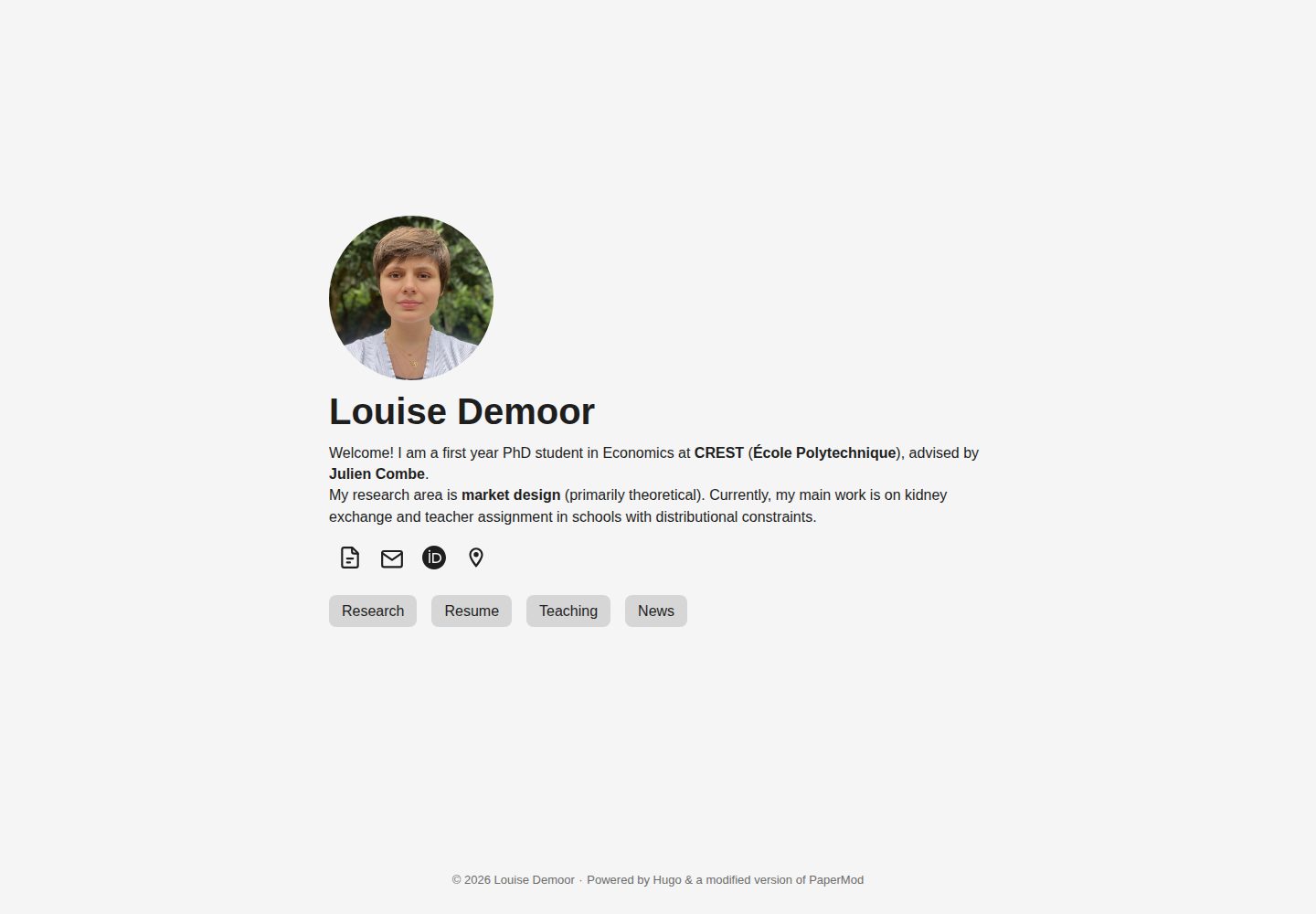
看看你的网站会是什么样
浏览真实页面截图,比较内容排版与手机效果。点击下方缩略图切换,放大查看整页细节。
全部页面与视图 2
截图用于了解视觉与布局,交互效果请以实际项目为准。
采集于 2026-10-02查看来源
值得关注的模板亮点
从已有项目资料中,快速了解它的特点。
通过 GitHub Actions 工作流自动构建并部署到 GitHub Pages
本地可用 hugo server 在 http://localhost:1313 预览并自动重建
使用前需在 config.yml 中设置 baseURL,默认指向 https://username.github.io
README 列出多个实际使用的学术个人网站及其源码,可供参考
模板详细介绍
该模板用于搭建个人学术网站,基于 Hugo 构建,并在 PaperMod 主题基础上做了极简化改造,以更贴合学术网站的内容组织方式。仓库提供完整的本地开发与在线部署流程:在本地安装 Hugo 后运行 hugo server 即可在 http://localhost:1313 预览并实时重建;推送到 GitHub 仓库后,由 .github/workflows/hugo.yml 中的 GitHub Actions 工作流调用 Hugo 生成静态站点并发布到 GitHub Pages。首次推送时需要在仓库的 Pages 设置中启用 GitHub Actions 与 GitHub Pages,并选择 Deploy Hugo site to Pages 动作。使用前需修改 config.yml 中的 baseURL 参数,默认值为 https://username.github.io。仓库 README 记录了在 macOS Sequoia 上使用 Safari 18.4 与 iOS 18 的 Mobile Safari 进行测试,并说明其他 Hugo 版本、操作系统和浏览器可能需要小幅调整。模板以 MIT 许可发布,README 中列出了多个实际使用该模板的个人学术网站及其源码链接,可作为参考实现。
Hugo作品集
适合你的项目吗?
适用场景
- 搭建个人学术主页,展示研究与个人信息
- 以 GitHub 仓库为内容源,自动发布静态站点到 GitHub Pages
- 在本地编辑内容并通过 hugo server 实时预览效果
- 参考 README 中列出的实际站点源码来调整页面结构
适合人群
- 需要极简风格个人学术网站的研究人员与学者
- 熟悉或愿意使用 Hugo 与 GitHub 工作流的用户
- 希望用 GitHub Pages 免费托管静态个人网站的开发者
- 需要参考同类学术网站实现来定制页面的使用者
上手与定制指南
结合仓库当前版本的说明,按下面的资料检查内容、配置与运行要求。
- 1
本地需先安装 Hugo,macOS 可通过 Homebrew 执行 brew install hugo 或 brew upgrade hugo
- 2
点击 Use this template 创建新仓库,再用 GitHub Desktop 克隆到本地
- 3
修改 config.yml 中的 baseURL,默认值为 https://username.github.io
- 4
首次推送时需在仓库 Pages 设置中启用 GitHub Actions 与 GitHub Pages,并选择 Deploy Hugo site to Pages 动作
- 5
本地开发在网站目录执行 hugo server,在线发布通过提交并推送触发工作流
授权与来源资料
使用条件与限制
免费使用 · 保留许可声明本次收录的是公开仓库中采用 MIT 许可的免费版本;免费范围为该版本代码,不代表外部服务或第三方素材免费。
使用时需要遵守
- 允许免费使用、修改、商用和分发该版本代码。
- 分发代码副本或实质性部分时,保留原作者版权声明和完整 MIT 许可声明。
- 代码按现状提供;担保与责任限制以原许可证及适用法律为准。
额外费用与待核对事项
- 模板默认依赖 GitHub Pages 托管网站,需要 GitHub 账号;在线部署依赖 GitHub Actions 与 Pages 设置,属于外部服务要求。
- 首次推送需在仓库设置中启用 GitHub Actions 与 GitHub Pages,否则无法自动构建和发布站点。
- 使用前必须修改 config.yml 中的 baseURL,默认值为 https://username.github.io,否则站点链接不正确。
- README 仅说明在 Hugo v0.147.2、macOS Sequoia、Safari 18.4 与 iOS 18 上测试;其他版本、系统或浏览器可能需要小幅调整,不保证完全兼容。
- 演示图片、字体、图标及其他第三方素材需按各自许可核对,不能仅凭代码的 MIT 许可判断。
- 域名、托管、数据库、支付或 AI 等外部服务可能另外收费。
查看原文依据
Permission is hereby granted, free of charge
许可证原文
The website is hosted on [GitHub Pages](https://docs.github.com/en/pages/getting-started-with-github-pages/about-github-pages).
README 原文
The first time that you push your repository to GitHub, you need to allow GitHub Actions and GitHub Pages so the website can be built and deployed to GitHub Pages.
README 原文
Update the `baseURL` parameter in `config.yml` with the website URL that you plan to use. By default the URL is `https://username.github.io`.
README 原文
https://github.com/pmichaillat/hugo-website/blob/main/LICENSE.mdhttps://github.com/pmichaillat/hugo-website/blob/main/README.mdOther Hugo versions, operating systems, and web browsers may require minor adjustments.
README 原文
DeepSeek 根据仓库许可证和 README 整理 ·2026-10-02。结果仅覆盖已读取资料,依赖、图片、字体及后续条款变更以各自原文为准。
项目核对记录与介绍依据
模板资料
- 来源平台
- GitHub
- 资料与维护参考分
- 资料较完整 · 91 / 100
- 技术栈
- Hugo
- 网站类型
- 作品集
这个分数如何计算
本站按许可资料(最高30分)、演示链接(12分)、预览图(10分)、Star数(15分)、记录的维护时间(15分)、描述完整度(8分)、功能记录(5分)和分类资料(5分)计算。它不是代码、安全或性能测试,也不是 Google 评分;有链接不代表已实测可用。
这个项目需要核对什么
- 记录的仓库更新时间
- 2026-08-22
- 截图检查日期
- 2026-10-02
已收录演示链接。请用你的内容与屏幕尺寸检查;有演示不代表表单、认证或支付已经可用。
目录记录的主要技术栈是 Hugo。请通过依赖清单和锁文件核对实际版本与托管要求。这些说明基于收录资料,不代表代码审计或部署实测。
查看具体选型方法 →介绍的制作与核对状态
介绍由 AI 辅助整理目录与仓库资料。仓库作者不等于这篇介绍的审核者。
已完成服务器许可规则与 AI 来源核对;未经过人工编辑审核。
查看当时使用的来源资料
SHA-256: 62fc1aafedff827e58a98a4295f1a944da3a5407954a10e11347253d84fced05
2026-10-02T07:42:08.227Z
来源文件 / 仓库# Minimalist Hugo Template for Academic Websites This repository contains a [Hugo](https://github.com/gohugoio/hugo) template to create a personal academic website. The template uses the [PaperMod theme](https://github.com/adityatelange/hugo-PaperMod) but modifies it in various ways to be more minimalist and better suited for academic websites. The website is hosted on [GitHub Pages](https://docs.github.com/en/pages/getting-started-with-github-pages/about-github-pages). ## Documentation The template is documented at https://pascalmichaillat.org/b/. ## Illustration The website produced by the template can be viewed at https://pascalmichaillat.org/hugo-website/. ## Installation ### On your local machine - Install [Hugo](https://gohugo.io/installation/). On a Mac, this can be done with [Homebrew](https://brew.sh): run `brew install hugo` in the terminal. If you already have Hugo but it is outdated, run `brew upgrade hugo`. - Since the website is hosted on GitHub Pages, it is convenient to install [GitHub Desktop](https://desktop.github.com). The website can be updated from your local machine via GitHub Desktop without going to GitHub. - Clone the template repository to your local machine. This can be done in two steps: - Click "Use this template" and then "Create a new repository" at the top of the repository. - Once the new repository is created on your GitHub account, open GitHub Desktop and click "File" and then "Clone repository". Find the newly created repository under the "GitHub.com" tab and clone it. - Update the `baseURL` parameter in `config.yml` with the website URL that you plan to use. By default the URL is `https://username.github.io`. ### On your GitHub account - The first time that you push your repository to GitHub, you need to allow GitHub Actions and GitHub Pages so the website can be built and deployed to GitHub Pages. - The first step is to [ask GitHub to publish the website with a GitHub Action](https://docs.github.com/en/pages/getting-started-with-github-pages/configuring-a-publishing-source-for-your-github-pages-site#publishing-with-a-custom-github-actions-workflow). GitHub offers a ready-made action to publish a Hugo website, called `Deploy Hugo site to Pages`. This action must be enabled in the [Pages Settings](https://github.com/pmichaillat/hugo-website/settings/pages) of your GitHub repository. You can view the workflow triggered by the action in the `.github/workflows/hugo.yml` file. - Once the GitHub Actions are enabled, GitHub will build and publish the website as soon as the repository is updated. - If you would like to update the deployment action (for instance because it became outdated and fails to deploy the site), you can find the [most recent action on GitHub](https://github.com/actions/starter-workflows/blob/main/pages/hugo.yml). You can place this file directly in the `.github/workflows` folder to replace the old `hugo.yml` file—but make sure to set `push: branches` to `["main"]`. ## Usage ### Local development Navigate to the website directory (`cd`) and run in the terminal: ```bash hugo server ``` The command builds the website on your machine and makes it available at http://localhost:1313, rebuilding automatically as you edit. You can modify the content of the repository and develop your website entirely on your machine. ### Online deployment Once your website is ready to be made public, commit your content and template changes and push them to the website repository on GitHub. It is convenient to use GitHub Desktop for this Git operation. On each push, the [GitHub Actions workflow](https://github.com/pmichaillat/hugo-website/actions/workflows/hugo.yml) invokes Hugo to generate the website and deploys the output to [GitHub Pages](https://github.com/pmichaillat/hugo-website/deployments/github-pages). During the workflow, Hugo processes your content, templates, and other project files and generates a static website. ## Performance The website performs well on mobile and desktop devices. Here is an overview of the mobile performance from [PageSpeed Insights](https://pagespeed.web.dev/): <img width="470" alt="mobile" src="https://github.com/pmichaillat/hugo-website/assets/85443660/1488df3e-19bb-4f9f-8a86-11f361414d92"> And here is an overview of the desktop performance: <img width="453" alt="desktop" src="https://github.com/pmichaillat/pmichaillat.github.io/assets/85443660/eff134d2-6097-4bc2-bfd7-4f5c18571789"> ## Software - The website is built with Hugo v0.147.2 via GitHub Actions. - The website was developed locally with Hugo v0.147.2 on macOS Sequoia. - The website was tested on the following browsers: - Safari 18.4 on macOS Sequoia - Mobile Safari on iOS 18 - Other Hugo versions, operating systems, and web browsers may require minor adjustments. Please [report any issues](https://github.com/pmichaillat/hugo-website/issues) to help improve compatibility. ## License This repository is licensed under the [MIT License](LICENSE.md). ## Real-world implementations - [Pascal Michaillat's website](https://pascalmichaillat.org/) ([source code](https://github.com/pmichaillat/pmichaillat.github.io)) - [Rosa van den Ende's website](https://rosavandenende.github.io) ([source code](https://github.com/rosavandenende/rosavandenende.github.io)) - [Samia Kabir's website](https://samiakabir.com) ([source code](https://github.com/SamiaKabir/samiakabir.github.io)) - [Dylan Laplace Mermoud's website](https://dylanlaplacemermoud.github.io) ([source code](https://github.com/DylanLaplaceMermoud/dylanlaplacemermoud.github.io)) - [Maarten Goos's website](https://maartengoos.com) ([source code](https://github.com/MaartenGoos/website)) - [Jun Wong's website](https://junwong.org) ([source code](https://github.com/junwong97/junwong97.github.io)) - [Erling Rennemo Jellum's website](https://erlingrj.github.io) ([source code](https://github.com/erlingrj/erlingrj.github.io)) - [Yangkeun Yun's website](https://yangkeunyun.github.io) ([source code](https://github.com/yangkeunyun/yangkeunyun.github.io)) - [Lucas Warwar's website](https://lucaswarwar.github.io) ([source code](https://github.com/lucaswarwar/lucaswarwar.github.io)) - [Franz Louis Cesista's website](https://leloykun.github.io) ([source code](https://github.com/leloykun/leloykun.github.io)) - [Gabe Sekeres's website](https://gabesekeres.com) ([source code](https://github.com/gsekeres/hugo_site)) - [Kevin Roice's website](https://kevroi.github.io) ([source code](https://github.com/kevroi/kevroi.github.io)) - [Daniel Barbosa's website](https://dacbarbosa.github.io) ([source code](https://github.com/dacbarbosa/dacbarbosa.github.io)) - [Wei Zhang's website](https://weizhang-econ.github.io) ([source code](https://github.com/weizhang-econ/weizhang-econ.github.io)) - [Ben Hermann's website](http://benhermann.eu) ([source code](https://github.com/bhermann/bhermann.github.io)) - [Franco Corona's website](http://fcorona.me) ([source code](https://github.com/exibios/exibios.github.io)) - [Tom George's website](https://tomge.org) ([source code](https://github.com/TomGeorge1234/TomGeorge1234.github.io)) - [Yucheng Zhou's website](https://yuchengzhou.com) ([source code](https://github.com/YuchengZ-Fin/YuchengZ-Fin.github.io)) - [Rui Sousa's website](https://ruiagmsousa.github.io) ([source code](https://github.com/ruiagmsousa/ruiagmsousa.github.io)) - [Stefano Sangiovanni's website](https://ste-sangiovanni.github.io) ([source code](https://github.com/ste-sangiovanni/ste-sangiovanni.github.io)) - [Seth Watts's website](https://www.sethbwatts.com) ([source code](https://github.com/sBwatts/hugo-website)) - [Louise Demoor's website](https://louisedemoor.github.io/website/) ([source code](https://github.com/louisedemoor/website)) - [Giwon Bahg's website](https://giwonbahg.github.io) ([source code](https://github.com/giwonbahg/giwonbahg.github.io)) - [Diego Araujo's website](https://daliego.github.io/portfolio-case-studies) ([source code](https://github.com/Daliego/portfolio-case-studies)) - [Liam Powell's website](https://liampwl.com) ([source code](https://github.com/liampwl/liampwl.github.io)) - [Anton Lundborg's website](https://www.arlundborg.com) ([source code](https://github.com/ARLundborg/web)) - [Taeyoung Kim's website](https://tykim.me) ([source code](https://github.com/SangsChicom/tykim.github.io)) - [Niladri Kal's website](https://niladrik.github.io) ([source code](https://github.com/niladrik/niladrik.github.io)) - [Somjit Roy's website](https://roy-sr-007.github.io) ([source code](https://github.com/Roy-SR-007/roy-sr-007.github.io)) - [Kostas Bimpikis's website](https://stanford.edu/~kostasb/) - [Beau Bressler's website](https://beaubressler.github.io) - [Momchil Tomov's website](https://momchiltomov.com) - [Arthur Douillard's website](https://arthurdouillard.com) - [Benjamin Hattemer's website](https://benjaminhattemer.com) - [Qiwei He's website](https://www.qiwei-he.com) - [Pierre Bardier's website](https://pierrebard.github.io/pierre-bardier/) - [Marek Wiewiórka's website](https://marekwiewiorka.org) - [Eran Shmuëli's website](https://eranshmueli.com) - [Bo Wang's website](https://bowang.finance) - [Muhammed Bulutay's website](https://muhammedbulutay.com) - [Nikhil George's website](https://ngeorge.net) - [Matthew O'Keefe's website](https://mfokeefe.github.io) - [Joshua Maynard's website](https://jshmnrd.ca) - [Suraj Kumar's website](https://surajkumar.me) ## Related resources - [latex-cv](https://github.com/pmichaillat/latex-cv) - This LaTeX template produces a minimalist academic CV, which you can post on your website. - [latex-presentation](https://github.com/pmichaillat/latex-presentation) - This LaTeX template produces minimalist research presentations, which you can post on your website. - [latex-paper](https://github.com/pmichaillat/latex-paper) - This LaTeX template produces minimalist research papers, which you can post on your website. - [latex-book](https://github.com/pmichaillat/latex-book) - This LaTeX template produces minimalist lecture notes and research monographs, which you can post on your website too.
看看同类模板
对比同技术栈与用途的模板,找到更适合的视觉与内容结构。

hugo-PaperMod
PaperMod 是 Hugo 生态里知名度较高的主题之一,定位很明确:给博客和轻量作品集站点提供一套干净、响应式的阅读界面。
Hugo · 作品集

Congo
Congo 是一款为 Hugo 设计的现代内容主题,核心定位是让内容本身成为页面焦点。 它基于 Tailwind CSS 3.0 构建,整体布局完全响应式,视觉风格干净且克制,没有多余装饰。
Hugo · 博客

toha
Toha 是一款面向个人作品集场景的 Hugo 主题,以极简设计和响应式布局为核心,适合用来搭建个人主页、作品展示或技术博客。
Hugo · 作品集

hugo-profile
A highly customizable and mobile first Hugo template for personal portfolio and blog.
Hugo · 作品集

hugo-theme-introduction
Minimal, single page, smooth-scrolling theme for Hugo static site generator.
Hugo · 作品集

hugo-theme-console
hugo-theme-console 是一款以系统终端为灵感的极简 Hugo 主题,基于 Terminal CSS 构建,整体视觉干净利落,强调快速加载与响应式布局。
Hugo · 作品集