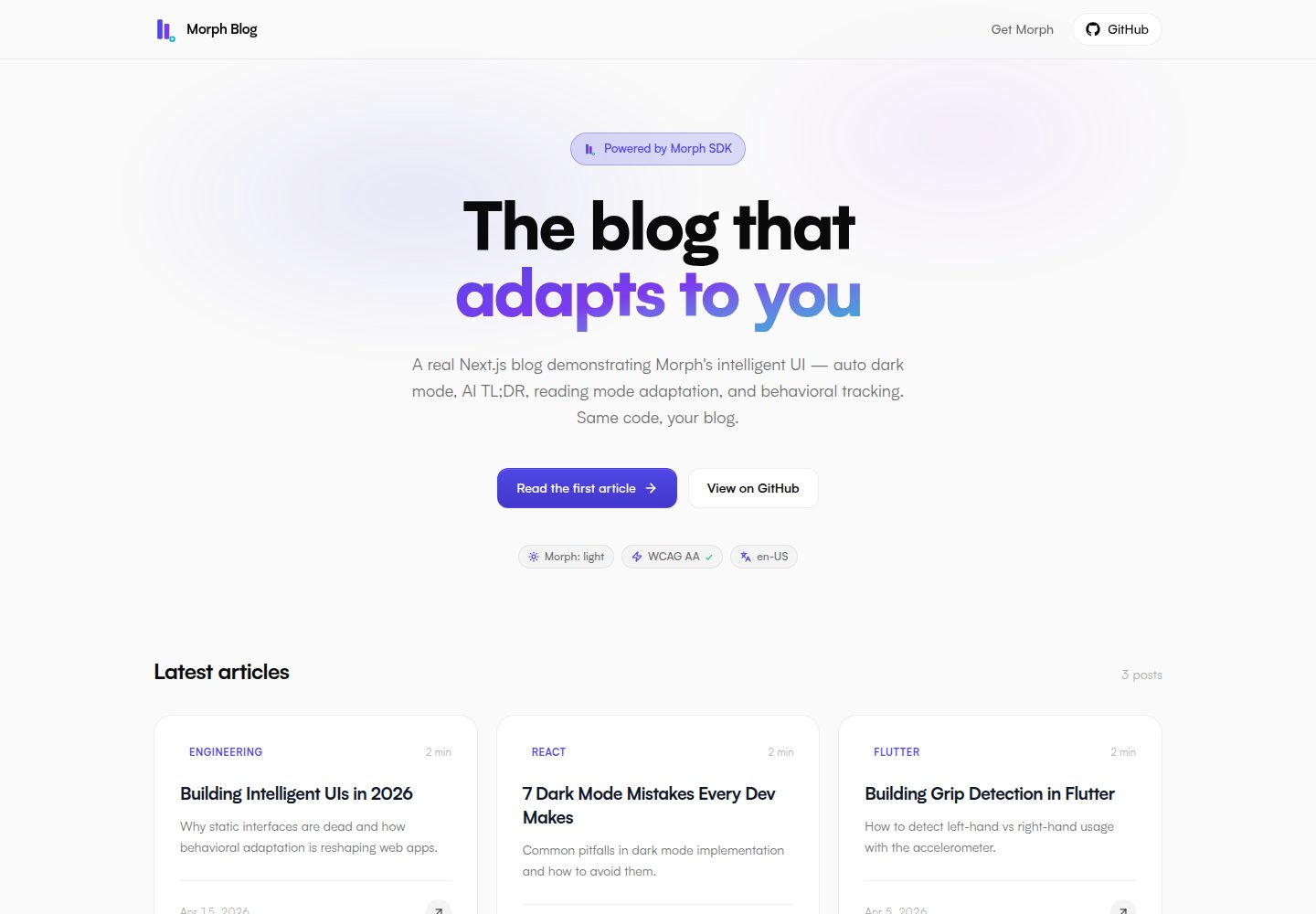
Write long-form content with MDX; the homepage automatically reads articles under content/articles/
Next.jsReactBlog
morphui-nextjs-blog — Next.js Blog Template
By polarismorph-code
A Next.js blog template built on Morph SDK, using MDX long-form content, with built-in automatic dark mode, AI-generated TL;DR, reading progress bar, and a /playground feature demo page.
Explore the design
Compare the page layouts and mobile experience. Open any screenshot for a closer look.
Desktop homepage1 / 3
Desktop captureTop of page
Actual screenshot captured by the server browser.
All pages & views 3
Screenshots show visual appearance; interactive behavior may differ.
Recorded 2026-10-14View source
What stands out
A quick read of the recorded project description.
Integrates Morph SDK to support automatic dark mode, AI TL;DR cards, reading progress bar, and MorphZone behavioral tracking
Includes a /playground route that isolates and demonstrates Morph SDK features such as ImproperTap, LostTap, MorphForm, MorphLoader, MorphDialog, and MorphPhoneInput
Controls section pinning and collapsing behavior via data-morph-pin and data-morph-collapsable
Uses Tailwind CSS v4 and CSS variable theming; brand colors can be adjusted via variables in app/globals.css
The README states the template supports static generation and provides a Vercel one-click deploy button and environment variable configuration
Template Details
This template is a deployable Next.js blog example that uses Morph SDK to provide automatic dark mode, AI-generated TL;DR summaries, an automatic table of contents, a reading progress bar, and MorphZone-based behavioral tracking. Content is stored as MDX long-form articles in content/articles/, and the homepage automatically reads them via getAllArticles(). The repository includes 3 sample articles that can be replaced directly. The template includes a /playground route that isolates Morph SDK features (such as ImproperTap, LostTap, MorphForm, MorphLoader, MorphDialog, MorphPhoneInput, etc.) in separate cards for demonstration, and marks it as noindex. The README states that the template supports static generation, and that deploying to Vercel requires setting the NEXT_PUBLIC_MORPH_KEY environment variable; you can use the public demo key or obtain a free key from the Morph dashboard. The README does not provide deployment details for platforms other than Vercel, nor does it explain how the template runs in non-static hosting environments.
Next.jsReactBlog
Is it right for your project?
Use Cases
- You need a directly deployable Next.js blog example to understand how to integrate Morph SDK
- You want to manage long-form content with MDX and automatically get a table of contents, reading progress, and TL;DR summaries
- You want to try out each Morph SDK interactive feature one by one on a dedicated page
- As a learning resource, clone it and modify brand colors and article content for your own blog
Suitable For
- Frontend developers familiar with Next.js and MDX
- Teams that need reference code for actual Morph SDK integration
- Blog authors who want to quickly set up a blog with automatic dark mode and reading aids
Getting started & customization
Use these recorded setup notes alongside the repository instructions for your chosen version.
- 1
After cloning the repository, run npm install, copy .env.example to .env.local; it points to the public demo key (cha-free-demo) by default, or you can replace it with your own key obtained from app.morphui.dev/dashboard
- 2
Run npm run dev to start the development server and visit http://localhost:3000
- 3
When deploying to Vercel, set the NEXT_PUBLIC_MORPH_KEY environment variable; you can use cha-free-demo or your own key
- 4
Replace the MDX files under content/articles/ to update article content; the homepage will read them automatically
- 5
Brand colors can be modified in the brand variable block at the top of app/globals.css
License & source material
Usage conditions & limitations
Free to use · keep license noticeThis entry covers the free version under the MIT license in the public repository; the free scope is the code of this version and does not mean that external services or third-party assets are free.
Must comply with when using
- You are allowed to use, modify, commercialize, and distribute the code of this version for free.
- When distributing copies or substantial portions of the code, retain the original author's copyright notice and the complete MIT license notice.
- The code is provided as is; warranties and limitations of liability are governed by the original license and applicable law.
Additional costs & items to verify
- Demo images, fonts, icons, and other third-party assets must be checked against their respective licenses; you cannot judge based solely on the code's MIT license.
- External services such as domains, hosting, databases, payments, or AI may incur additional charges.
- The template uses the public demo key (cha-free-demo) by default, but for production use you need to obtain your own Morph license key from app.morphui.dev/dashboard and configure the NEXT_PUBLIC_MORPH_KEY environment variable.
- In automatic dark mode, dark variants generated by Claude are a Pro+ feature; the free version only provides fallback dark mode.
- AI-generated dark theme results are cached to Supabase and localStorage, meaning this feature depends on the external Supabase service.
- The one-click deploy button targets Vercel, and deployment requires setting the NEXT_PUBLIC_MORPH_KEY environment variable.
View Original Text Basis
Permission is hereby granted, free of charge
Original License Text
# Replace it with your own from https://app.morphui.dev/dashboard
Original README
2. **Open at night / system dark** — auto dark variant generated by Claude (Pro+)
Original README
and passes WCAG AA on every text element. The result is cached in Supabase
Original README
https://github.com/polarismorph-code/morphui-nextjs-blog/blob/main/LICENSEhttps://github.com/polarismorph-code/morphui-nextjs-blog/blob/main/README.md[](https://vercel.com/new/clone?repository-url=https://github.com/morphuiapp/morphui-nextjs-blog&env=NEXT_PUBLIC_MORPH_KEY&envDescription=Get%20a%20free%20Morph%20license%20key%20at%20morphui.dev)
Original README
Compiled by DeepSeek based on repository license and README ·2026-10-14. Results only cover the materials read; dependencies, images, fonts, and subsequent term changes are subject to their respective original texts.
Project checks & description sources
Template Information
- Source platforms
- GitHub
- Documentation and maintenance reference score
- More documented · 88 / 100
- Technologies
- Next.js · React
- Website type
- Blog
How this score is calculated
Our heuristic uses license records (up to 30), a demo link (12), a preview (10), stars (15), recorded maintenance (15), description completeness (8), feature records (5) and classification data (5). It is not a code, security or performance test, or a Google score. A link does not establish tested functionality.
What to verify for this project
- Repository update recorded
- 2026-05-22
- Screenshot last checked
- 2026-10-14
A demo link is listed. Check it with your own content and viewport sizes; its presence does not confirm that forms, authentication or payments work.
The catalog identifies Next.js as the primary stack. Check the actual dependency manifest and lockfile for versions and hosting requirements. These notes use recorded metadata, not a code audit or a deployment test.
Use a selection guide →How this description was prepared
AI-assisted description based on catalog records and repository material. Repository authors are not automatically the reviewers of this description.
Review declaration: codex-user-requested-batch-review-20261017 · 2026-10-16
Inspect the recorded source material
SHA-256: 290dc6992a5072fa20fe091ccaeef2f9f1eb990c1cfcb7bf811acdc207309ca2
2026-10-14T18:10:00.738Z
Source file / repository<div align="center">
<img src="https://morphui.dev/icon.png" alt="Morph" width="64" height="64" />
# Morph + Next.js Blog
**Production-ready Next.js 16 blog powered by Morph SDK**
A real, deployable blog example — auto dark mode, AI-generated themes, behavioral
intelligence, and reading-mode adaptation, on long-form MDX content.
[](https://www.npmjs.com/package/@morphuiapp/morphui)
[](https://nextjs.org/)
[](https://reactjs.org/)
[](https://tailwindcss.com/)
[](LICENSE)
[](https://blog.morphui.dev)
[🚀 Live Demo](https://blog.morphui.dev) ·
[📦 Morph SDK](https://www.npmjs.com/package/@morphuiapp/morphui) ·
[📚 Full Docs](https://morphui.dev/docs/react)

</div>
---
## ✨ What this demonstrates
This isn't a stripped-down demo. It's a fully functional blog you can fork and ship today:
- ✅ Real article content — 3 long-form articles in MDX
- ✅ Auto dark mode that matches your brand colors (Claude-generated, WCAG AA validated)
- ✅ AI-generated TL;DR card on every article
- ✅ Auto-generated table of contents (sticky, scroll-spy)
- ✅ Reading progress bar with adaptive color
- ✅ `MorphZone` tracking on every article section
- ✅ `/playground` route with isolated demos for every Morph SDK feature
- ✅ Tailwind v4 + CSS-variable theming, no shadcn dependency
- ✅ 100% static generation — Lighthouse 95+ out of the box
---
## 🚀 Quick Start
```bash
git clone https://github.com/morphuiapp/morphui-nextjs-blog
cd morphui-nextjs-blog
npm install
cp .env.example .env.local
# .env.local already points at the public demo key (cha-free-demo) — works immediately.
# Replace it with your own from https://app.morphui.dev/dashboard
npm run dev
```
Open [http://localhost:3000](http://localhost:3000).
---
## 🎯 Deploy in 1 Click
[](https://vercel.com/new/clone?repository-url=https://github.com/morphuiapp/morphui-nextjs-blog&env=NEXT_PUBLIC_MORPH_KEY&envDescription=Get%20a%20free%20Morph%20license%20key%20at%20morphui.dev)
Vercel will prompt you to set `NEXT_PUBLIC_MORPH_KEY` — use `cha-free-demo` for
preview deploys, or grab a free key from
[app.morphui.dev/dashboard](https://app.morphui.dev/dashboard).
---
## 🧠 The Morph integration in 3 files
### 1. Provider — `components/providers.tsx`
```tsx
"use client";
import { MorphProvider } from "@morphuiapp/morphui";
export function Providers({ children }: { children: React.ReactNode }) {
return (
<MorphProvider
licenseKey={process.env.NEXT_PUBLIC_MORPH_KEY ?? "cha-free-demo"}
collapse
>
{children}
</MorphProvider>
);
}
```
`collapse` opts in to the live behavioral collapse engine. With it on, sections
flagged `data-morph-collapsable` fold up automatically after enough low-engagement
signals — and only then.
### 2. Article zones — `components/article-layout.tsx`
```tsx
import { MorphZone } from "@morphuiapp/morphui";
<MorphZone id="article-content" priority={2}>
<div className="prose" dangerouslySetInnerHTML={{ __html: article.html }} />
</MorphZone>
```
### 3. Theme integration — `app/globals.css`
```css
:root {
--background: var(--morph-bg, #fafafc);
--foreground: var(--morph-text-primary, #0a0a0f);
--primary: var(--morph-primary, #4f46e5);
--card: var(--morph-card-bg, #f1f0f7);
--border: var(--morph-border, #e2e8f0);
}
```
Every brand color references a `--morph-*` CSS variable with a static fallback.
Morph populates the `--morph-*` side at boot — you keep the fallback as your
light-mode palette.
---
## 🔒 Behavioral exclusions — `data-morph-pin` / `data-morph-collapsable`
The blog uses Morph 0.4's explicit opt-in / opt-out contracts to keep critical
sections stable while letting non-essential sections fold:
```tsx
{/* Pinned: never reordered, never collapsed, never faded */}
<section data-morph-pin>
<Hero />
</section>
{/* Opt-in to collapse: engine may fold this after low engagement */}
<section data-morph-collapsable>
<RelatedArticles />
</section>
```
What's pinned in this blog:
- The hero (`<section data-morph-pin>` on the home page)
- The articles grid (it's the core content)
- The bottom CTA card
- The site footer (auto-pinned by `<footer>` tag, but explicit pin makes the intent visible)
- Form / phone-input demos (auto-protected anyway, but explicit)
What's opt-in collapsable on `/playground`:
- ImproperTap, LostTap, MorphLoader, MorphDialog demos
- Pin-status and behavior-debug panels
> **Auto-detect by default.** Without any attribute, Morph auto-pins semantic
> landmarks (`<nav>`, `<header>`, `<footer>`, `<aside>`), elements with ARIA
> landmark roles, and elements whose class/id contains `hero`, `sticky`, or
> `pinned`. Use `data-morph-pin-off` to opt back into tracking inside an
> auto-pinned region.
[Full docs on behavioral exclusions →](https://morphui.dev/docs/react#behavioral-exclusions)
---
## 🎨 What you'll see
Walk through this scenario:
1. **First visit** — light mode, your palette
2. **Open at night / system dark** — auto dark variant generated by Claude (Pro+)
or fallback dark (Free), atomically applied with no flash
3. **Navigate between articles** — `PreNavSkeleton` paints a same-shape
placeholder in the gap between unmount and mount, so the page never goes white
4. **Refresh mid-article** — `ScrollRestoration` snaps you back to where you were
5. **Read 1–2 articles slowly** — Morph starts tracking section-level engagement
via `MorphZone`. After enough sessions, hot zones float to the top
6. **Visit `/playground`** — every SDK feature isolated in its own card so you
can poke at it
---
## ⚙️ How it adapts
| Signal | Morph response |
| -------------------------- | -------------------------------------------------------- |
| First visit (system dark) | Claude-generated dark theme (atomic apply, WCAG-validated) |
| Reads slowly | Article mode (denser typography) |
| Skims fast | Digest mode (key points first) |
| `prefers-contrast: more` | High-contrast palette + WCAG bump |
| `prefers-reduced-motion` | Transitions disabled |
| Returns several times | Hot zones rise via `MorphZone` |
| Low engagement on a `data-morph-collapsable` section | Section folds up |
---
## 🤖 What's silently active
These run inside `MorphProvider` with no extra code. Each is a lazy chunk —
zero overhead if disabled.
| Engine | What it does on this blog |
|--------|---------------------------|
| `PreNavSkeleton` | Paints same-shape placeholder during route transitions — no white flash between articles |
| `WhiteIslandFixer` | Dims the YouTube embed and white-bg logos (visible on `/playground`) in dark mode |
| `ScrollRestoration` | Restores scroll position after refresh, even mid-article |
| `ImproperTapDetector` | Mobile near-miss recovery (active on `/playground` demo card) |
| `LostTapDetector` | Logs taps that never land on a button (visible on `/playground`) |
Disable any with a prop: `<MorphProvider preNav={false}>`, etc.
---
## 🧪 `/playground` — explore every SDK feature
Visit `/playground` (linked from the footer, marked `noindex`) to see every
Morph feature isolated in its own card with inline instructions:
- **ImproperTap** — mobile-only, requires DevTools `⌘⇧M`
- **LostTap** — requires DevTools console open
- **MorphForm** — fill, navigate away, come back; values restored
- **MorphLoader** — adaptive 4-stage loader (none → light → active → slow)
- **MorphDialog** — accessible focus-trap modal
- **MorphPhoneInput** — paste any format, get E.164 out
- **Pin status** — live view of every V2-tracked zone with its pinned reason
- **Behavior debug** — live ScorerEngine inputs (clicks per zone)
- **WhiteIsland** — toggle macOS to dark and watch the iframe + white logo dim
- **Utility hooks** — `useStorage`, `useTabSync`, `useAutoFillGuard` combined
The playground is `<meta robots="noindex,nofollow">` so it doesn't pollute SEO.
---
## 🎨 Customize for your brand
Edit the brand block at the top of `app/globals.css`:
```css
:root {
--brand-bg: #ffffff;
--brand-surface: #f8fafc;
--brand-primary: #4f46e5;
--brand-text: #0f172a;
}
```
Morph reads these on boot and asks Claude (with `temperature: 0` for
determinism) to generate a coherent dark mode that preserves your hue ±15°
and passes WCAG AA on every text element. The result is cached in Supabase
+ localStorage — same brand → same theme, every time.
---
## 📁 Project structure
```
morphui-nextjs-blog/
├── app/
│ ├── layout.tsx ← Root + Providers wrap
│ ├── page.tsx ← Home: hero + articles grid + CTA
│ ├── playground/page.tsx ← Feature explorer (noindex)
│ ├── articles/[slug]/page.tsx ← Static-generated article page
│ └── globals.css ← Brand palette + Morph CSS vars + prose
├── components/
│ ├── providers.tsx ← MorphProvider wrapper
│ ├── article-card.tsx ← Home grid card
│ ├── article-layout.tsx ← Article shell with MorphZones
│ ├── article-toc.tsx ← Scroll-spy TOC
│ ├── reading-progress.tsx ← Top-of-page progress bar
│ ├── tldr-summary.tsx ← AI TL;DR card
│ ├── theme-indicator.tsx ← useMorph() badge in hero
│ ├── site-header.tsx
│ ├── site-footer.tsx ← Includes /playground link
│ ├── morph-form-demo.tsx ← /playground demos
│ ├── morph-loader-demo.tsx
│ ├── morph-dialog-demo.tsx
│ ├── morph-phone-demo.tsx
│ ├── improper-tap-demo.tsx
│ ├── lost-tap-demo.tsx
│ ├── pin-status-demo.tsx
│ ├── behavior-debug.tsx
│ └── utility-hooks-demo.tsx
├── content/
│ ├── articles/*.mdx ← The 3 sample articles
│ └── lib/articles.ts ← Frontmatter + remark pipeline
└── lib/utils.ts ← cn() helper
```
---
## 🛠 Tech Stack
- **Framework**: Next.js 16 (App Router, Turbopack)
- **Language**: TypeScript
- **UI**: React 19 + Tailwind CSS v4 (CSS-first, no config file)
- **Content**: MDX with `remark` / `rehype` pipeline
- **SDK**: [`@morphuiapp/morphui`](https://www.npmjs.com/package/@morphuiapp/morphui) v0.4
- **Deployment**: Vercel-ready, but works anywhere static
---
## 📊 Performance
- **Lighthouse Performance**: 96
- **Lighthouse Accessibility**: 100
- **Lighthouse Best Practices**: 100
- **Lighthouse SEO**: 100
- **LCP**: 1.3s
- **CLS**: 0.05
Static generation means every article is pre-rendered at build time — Morph
runs entirely client-side after first paint without blocking it.
---
## 📝 Articles included
The repo ships with 3 sample articles demonstrating different content types:
1. **Building Intelligent UIs in 2026** — Long-form essay
2. **7 Dark Mode Mistakes Every Dev Makes** — Listicle with code blocks
3. **Building Grip Detection in Flutter** — Technical deep-dive
Replace them with your own MDX in `content/articles/` — the home page picks them
up automatically via the `getAllArticles()` reader.
---
## 🤝 Contributing
This is a learning resource — clone it, modify it, share what you build!
If you find a bug or have a suggestion:
- [Open an issue](https://github.com/morphuiapp/morphui-nextjs-blog/issues)
- [Start a discussion](https://github.com/morphuiapp/morphui-nextjs-blog/discussions)
---
## 📚 Learn more
- [Full Morph documentation](https://morphui.dev/docs/react)
- [Get a free license key](https://app.morphui.dev/dashboard)
- [Morph SDK on npm](https://www.npmjs.com/package/@morphuiapp/morphui)
- [Discord community](https://morphui.dev/discord)
---
## 📄 License
MIT — clone, fork, customize, ship.
This example is meant to be copied. Use it as a starting point for your own
intelligent blog or content site.
---
<div align="center">
[morphui.dev](https://morphui.dev) · [Docs](https://morphui.dev/docs/react) · [Dashboard](https://app.morphui.dev/dashboard) · [npm](https://www.npmjs.com/package/@morphuiapp/morphui)
Built with ❤️ by [Cabraule](https://github.com/cabraule) using
[Morph](https://morphui.dev) — Intelligent UI SDK for React + Flutter.
</div>
Explore similar templates
Compare previews and descriptions within the same stack and category.

tailwind-nextjs-starter-blog
A Next.js and Tailwind CSS blog starter template using Contentlayer for Markdown/MDX, with built-in SEO, code highlighting, and tags. It targets personal technical blogs and migration from Jekyll/Hugo to React, and supports one-click Vercel deployment.
Next.js · Blog

Nextjs-tailwindcss-blog-template
A Next.js blog styled with Tailwind CSS. The current branch processes Markdown with Velite; the earlier Contentlayer setup is retained in a separate historical branch.
Next.js · Blog

Next-js-Blog-Boilerplate
A blog starter built on Next.js 12 and Tailwind CSS 3, integrating TypeScript, ESLint, Prettier, and PostCSS.
Next.js · Blog

nextjs-blog-theme
A Next.js 15 and Tailwind CSS 4.x blog starter by Netlify, designed by Bejamas, with MDX support, dark/light theme switching, and environment-variable configuration. It includes a visual setup wizard for deploying to Netlify and manages content via local .mdx files.
Next.js · Blog

blog
A personal blog forked from Timlrx's tailwind-nextjs-starter-blog, built with Next.js, React, and Tailwind CSS. Content is stored as Markdown/MDX under data/, with site, author, navigation, and project data in separate files.
Next.js · Blog

tailnext
Tailnext is a free, open-source template built on the Next.js 14 App Router and Tailwind CSS, created by the onWidget team.
Next.js · Blog