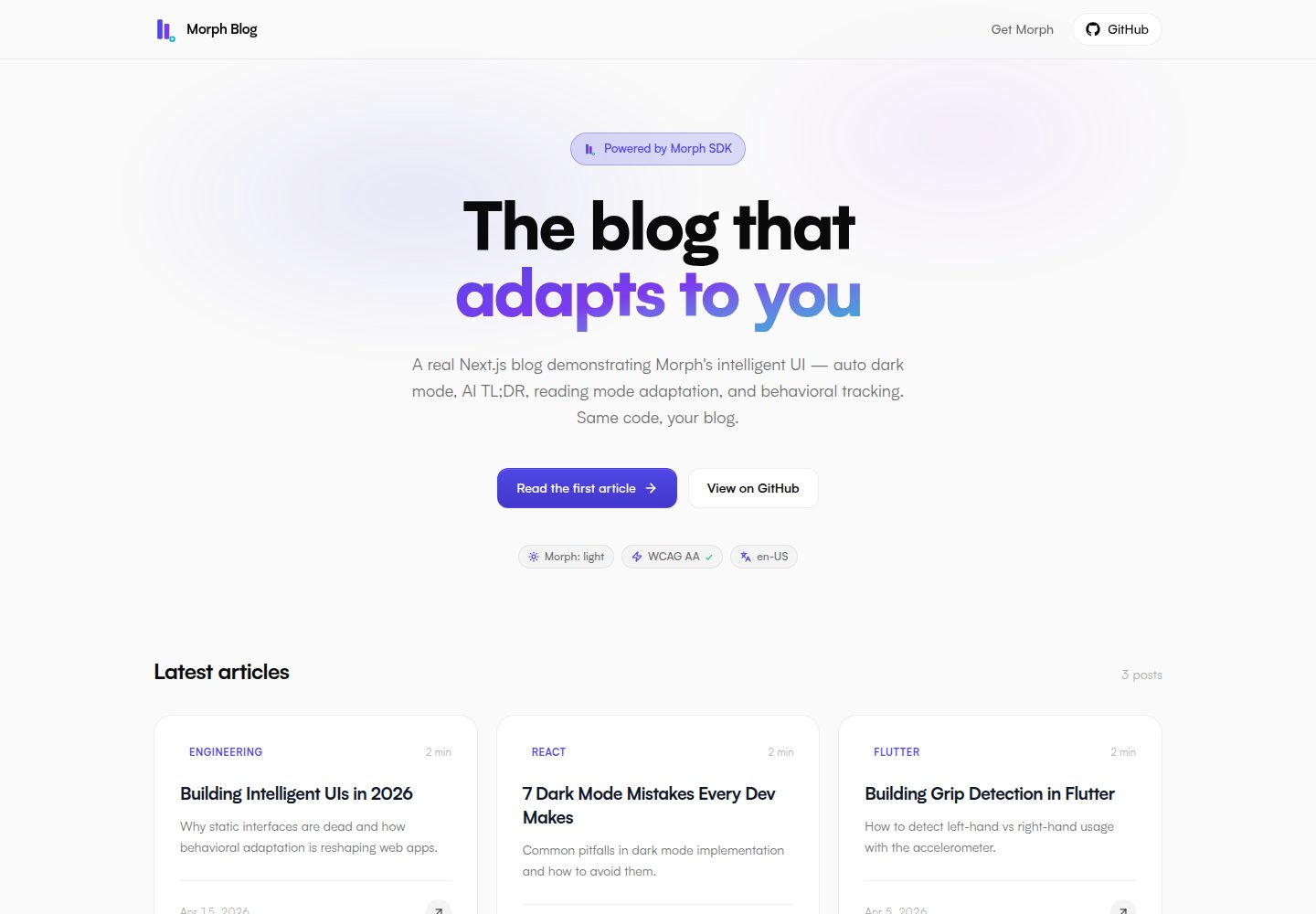
使用 MDX 编写长文内容,首页自动读取 content/articles/ 下的文章
Next.jsReact博客
morphui-nextjs-blog — Next.js 博客模板
作者 polarismorph-code
基于 Morph SDK 的 Next.js 博客模板,使用 MDX 长文内容,内置自动暗色模式、AI 生成 TL;DR、阅读进度条与 /playground 功能演示页。
看看你的网站会是什么样
浏览真实页面截图,比较内容排版与手机效果。点击下方缩略图切换,放大查看整页细节。
全部页面与视图 3
截图用于了解视觉与布局,交互效果请以实际项目为准。
采集于 2026-10-14查看来源
值得关注的模板亮点
从已有项目资料中,快速了解它的特点。
集成 Morph SDK,支持自动暗色模式、AI TL;DR 卡片、阅读进度条与 MorphZone 行为追踪
包含 /playground 路由,隔离演示 Morph SDK 的 ImproperTap、LostTap、MorphForm、MorphLoader、MorphDialog、MorphPhoneInput 等功能
通过 data-morph-pin 与 data-morph-collapsable 控制区块的固定与折叠行为
使用 Tailwind CSS v4 与 CSS 变量主题,品牌色可通过 app/globals.css 中的变量调整
README 说明模板支持静态生成,并给出 Vercel 一键部署按钮与环境变量配置
模板详细介绍
该模板是一个可部署的 Next.js 博客示例,使用 Morph SDK 提供自动暗色模式、AI 生成的 TL;DR 摘要、自动目录、阅读进度条以及基于 MorphZone 的行为追踪。内容以 MDX 长文形式存放在 content/articles/ 中,首页通过 getAllArticles() 自动读取。仓库自带 3 篇示例文章,可直接替换。模板包含 /playground 路由,将 Morph SDK 的各项功能(如 ImproperTap、LostTap、MorphForm、MorphLoader、MorphDialog、MorphPhoneInput 等)隔离在独立卡片中演示,并标记为 noindex。README 说明模板支持静态生成,部署到 Vercel 时需设置 NEXT_PUBLIC_MORPH_KEY 环境变量,可使用公开演示 key 或从 Morph 仪表盘获取免费 key。README 未提供除 Vercel 之外其他平台的部署细节,也未说明模板在非静态托管环境下的运行方式。
Next.jsReact博客
适合你的项目吗?
适用场景
- 需要一个可直接部署的 Next.js 博客示例,用来了解 Morph SDK 的集成方式
- 希望用 MDX 管理长文内容,并自动获得目录、阅读进度和 TL;DR 摘要
- 想在一个独立页面中逐一试用 Morph SDK 的各项交互功能
- 作为学习资源,克隆后修改品牌色和文章内容用于自己的博客
适合人群
- 熟悉 Next.js 与 MDX 的前端开发者
- 需要参考 Morph SDK 实际集成代码的团队
- 希望快速搭建带自动暗色模式与阅读辅助功能的博客作者
上手与定制指南
结合仓库当前版本的说明,按下面的资料检查内容、配置与运行要求。
- 1
克隆仓库后运行 npm install,复制 .env.example 为 .env.local,默认指向公开演示 key(cha-free-demo),也可替换为自己从 app.morphui.dev/dashboard 获取的 key
- 2
运行 npm run dev 启动开发服务器,访问 http://localhost:3000
- 3
部署到 Vercel 时需设置 NEXT_PUBLIC_MORPH_KEY 环境变量,可使用 cha-free-demo 或自有 key
- 4
替换 content/articles/ 下的 MDX 文件即可更新文章内容,首页会自动读取
- 5
品牌色可在 app/globals.css 顶部的品牌变量块中修改
授权与来源资料
使用条件与限制
免费使用 · 保留许可声明本次收录的是公开仓库中采用 MIT 许可的免费版本;免费范围为该版本代码,不代表外部服务或第三方素材免费。
使用时需要遵守
- 允许免费使用、修改、商用和分发该版本代码。
- 分发代码副本或实质性部分时,保留原作者版权声明和完整 MIT 许可声明。
- 代码按现状提供;担保与责任限制以原许可证及适用法律为准。
额外费用与待核对事项
- 演示图片、字体、图标及其他第三方素材需按各自许可核对,不能仅凭代码的 MIT 许可判断。
- 域名、托管、数据库、支付或 AI 等外部服务可能另外收费。
- 模板默认使用公开演示 key(cha-free-demo),但正式使用需从 app.morphui.dev/dashboard 获取自己的 Morph license key,并配置 NEXT_PUBLIC_MORPH_KEY 环境变量。
- 自动暗色模式中由 Claude 生成的暗色变体属于 Pro+ 功能;免费版仅提供 fallback 暗色。
- AI 生成的暗色主题结果会缓存到 Supabase 与 localStorage,意味着该功能依赖外部 Supabase 服务。
- 一键部署按钮面向 Vercel,部署时需设置 NEXT_PUBLIC_MORPH_KEY 环境变量。
查看原文依据
Permission is hereby granted, free of charge
许可证原文
# Replace it with your own from https://app.morphui.dev/dashboard
README 原文
2. **Open at night / system dark** — auto dark variant generated by Claude (Pro+)
README 原文
and passes WCAG AA on every text element. The result is cached in Supabase
README 原文
https://github.com/polarismorph-code/morphui-nextjs-blog/blob/main/LICENSEhttps://github.com/polarismorph-code/morphui-nextjs-blog/blob/main/README.md[](https://vercel.com/new/clone?repository-url=https://github.com/morphuiapp/morphui-nextjs-blog&env=NEXT_PUBLIC_MORPH_KEY&envDescription=Get%20a%20free%20Morph%20license%20key%20at%20morphui.dev)
README 原文
DeepSeek 根据仓库许可证和 README 整理 ·2026-10-14。结果仅覆盖已读取资料,依赖、图片、字体及后续条款变更以各自原文为准。
项目核对记录与介绍依据
模板资料
- 来源平台
- GitHub
- 资料与维护参考分
- 资料较完整 · 88 / 100
- 技术栈
- Next.js · React
- 网站类型
- 博客
这个分数如何计算
本站按许可资料(最高30分)、演示链接(12分)、预览图(10分)、Star数(15分)、记录的维护时间(15分)、描述完整度(8分)、功能记录(5分)和分类资料(5分)计算。它不是代码、安全或性能测试,也不是 Google 评分;有链接不代表已实测可用。
这个项目需要核对什么
- 记录的仓库更新时间
- 2026-05-22
- 截图检查日期
- 2026-10-14
已收录演示链接。请用你的内容与屏幕尺寸检查;有演示不代表表单、认证或支付已经可用。
目录记录的主要技术栈是 Next.js。请通过依赖清单和锁文件核对实际版本与托管要求。这些说明基于收录资料,不代表代码审计或部署实测。
查看具体选型方法 →介绍的制作与核对状态
介绍由 AI 辅助整理目录与仓库资料。仓库作者不等于这篇介绍的审核者。
审核声明: codex-user-requested-batch-review-20261017 · 2026-10-16
查看当时使用的来源资料
SHA-256: 290dc6992a5072fa20fe091ccaeef2f9f1eb990c1cfcb7bf811acdc207309ca2
2026-10-14T18:10:00.738Z
来源文件 / 仓库<div align="center">
<img src="https://morphui.dev/icon.png" alt="Morph" width="64" height="64" />
# Morph + Next.js Blog
**Production-ready Next.js 16 blog powered by Morph SDK**
A real, deployable blog example — auto dark mode, AI-generated themes, behavioral
intelligence, and reading-mode adaptation, on long-form MDX content.
[](https://www.npmjs.com/package/@morphuiapp/morphui)
[](https://nextjs.org/)
[](https://reactjs.org/)
[](https://tailwindcss.com/)
[](LICENSE)
[](https://blog.morphui.dev)
[🚀 Live Demo](https://blog.morphui.dev) ·
[📦 Morph SDK](https://www.npmjs.com/package/@morphuiapp/morphui) ·
[📚 Full Docs](https://morphui.dev/docs/react)

</div>
---
## ✨ What this demonstrates
This isn't a stripped-down demo. It's a fully functional blog you can fork and ship today:
- ✅ Real article content — 3 long-form articles in MDX
- ✅ Auto dark mode that matches your brand colors (Claude-generated, WCAG AA validated)
- ✅ AI-generated TL;DR card on every article
- ✅ Auto-generated table of contents (sticky, scroll-spy)
- ✅ Reading progress bar with adaptive color
- ✅ `MorphZone` tracking on every article section
- ✅ `/playground` route with isolated demos for every Morph SDK feature
- ✅ Tailwind v4 + CSS-variable theming, no shadcn dependency
- ✅ 100% static generation — Lighthouse 95+ out of the box
---
## 🚀 Quick Start
```bash
git clone https://github.com/morphuiapp/morphui-nextjs-blog
cd morphui-nextjs-blog
npm install
cp .env.example .env.local
# .env.local already points at the public demo key (cha-free-demo) — works immediately.
# Replace it with your own from https://app.morphui.dev/dashboard
npm run dev
```
Open [http://localhost:3000](http://localhost:3000).
---
## 🎯 Deploy in 1 Click
[](https://vercel.com/new/clone?repository-url=https://github.com/morphuiapp/morphui-nextjs-blog&env=NEXT_PUBLIC_MORPH_KEY&envDescription=Get%20a%20free%20Morph%20license%20key%20at%20morphui.dev)
Vercel will prompt you to set `NEXT_PUBLIC_MORPH_KEY` — use `cha-free-demo` for
preview deploys, or grab a free key from
[app.morphui.dev/dashboard](https://app.morphui.dev/dashboard).
---
## 🧠 The Morph integration in 3 files
### 1. Provider — `components/providers.tsx`
```tsx
"use client";
import { MorphProvider } from "@morphuiapp/morphui";
export function Providers({ children }: { children: React.ReactNode }) {
return (
<MorphProvider
licenseKey={process.env.NEXT_PUBLIC_MORPH_KEY ?? "cha-free-demo"}
collapse
>
{children}
</MorphProvider>
);
}
```
`collapse` opts in to the live behavioral collapse engine. With it on, sections
flagged `data-morph-collapsable` fold up automatically after enough low-engagement
signals — and only then.
### 2. Article zones — `components/article-layout.tsx`
```tsx
import { MorphZone } from "@morphuiapp/morphui";
<MorphZone id="article-content" priority={2}>
<div className="prose" dangerouslySetInnerHTML={{ __html: article.html }} />
</MorphZone>
```
### 3. Theme integration — `app/globals.css`
```css
:root {
--background: var(--morph-bg, #fafafc);
--foreground: var(--morph-text-primary, #0a0a0f);
--primary: var(--morph-primary, #4f46e5);
--card: var(--morph-card-bg, #f1f0f7);
--border: var(--morph-border, #e2e8f0);
}
```
Every brand color references a `--morph-*` CSS variable with a static fallback.
Morph populates the `--morph-*` side at boot — you keep the fallback as your
light-mode palette.
---
## 🔒 Behavioral exclusions — `data-morph-pin` / `data-morph-collapsable`
The blog uses Morph 0.4's explicit opt-in / opt-out contracts to keep critical
sections stable while letting non-essential sections fold:
```tsx
{/* Pinned: never reordered, never collapsed, never faded */}
<section data-morph-pin>
<Hero />
</section>
{/* Opt-in to collapse: engine may fold this after low engagement */}
<section data-morph-collapsable>
<RelatedArticles />
</section>
```
What's pinned in this blog:
- The hero (`<section data-morph-pin>` on the home page)
- The articles grid (it's the core content)
- The bottom CTA card
- The site footer (auto-pinned by `<footer>` tag, but explicit pin makes the intent visible)
- Form / phone-input demos (auto-protected anyway, but explicit)
What's opt-in collapsable on `/playground`:
- ImproperTap, LostTap, MorphLoader, MorphDialog demos
- Pin-status and behavior-debug panels
> **Auto-detect by default.** Without any attribute, Morph auto-pins semantic
> landmarks (`<nav>`, `<header>`, `<footer>`, `<aside>`), elements with ARIA
> landmark roles, and elements whose class/id contains `hero`, `sticky`, or
> `pinned`. Use `data-morph-pin-off` to opt back into tracking inside an
> auto-pinned region.
[Full docs on behavioral exclusions →](https://morphui.dev/docs/react#behavioral-exclusions)
---
## 🎨 What you'll see
Walk through this scenario:
1. **First visit** — light mode, your palette
2. **Open at night / system dark** — auto dark variant generated by Claude (Pro+)
or fallback dark (Free), atomically applied with no flash
3. **Navigate between articles** — `PreNavSkeleton` paints a same-shape
placeholder in the gap between unmount and mount, so the page never goes white
4. **Refresh mid-article** — `ScrollRestoration` snaps you back to where you were
5. **Read 1–2 articles slowly** — Morph starts tracking section-level engagement
via `MorphZone`. After enough sessions, hot zones float to the top
6. **Visit `/playground`** — every SDK feature isolated in its own card so you
can poke at it
---
## ⚙️ How it adapts
| Signal | Morph response |
| -------------------------- | -------------------------------------------------------- |
| First visit (system dark) | Claude-generated dark theme (atomic apply, WCAG-validated) |
| Reads slowly | Article mode (denser typography) |
| Skims fast | Digest mode (key points first) |
| `prefers-contrast: more` | High-contrast palette + WCAG bump |
| `prefers-reduced-motion` | Transitions disabled |
| Returns several times | Hot zones rise via `MorphZone` |
| Low engagement on a `data-morph-collapsable` section | Section folds up |
---
## 🤖 What's silently active
These run inside `MorphProvider` with no extra code. Each is a lazy chunk —
zero overhead if disabled.
| Engine | What it does on this blog |
|--------|---------------------------|
| `PreNavSkeleton` | Paints same-shape placeholder during route transitions — no white flash between articles |
| `WhiteIslandFixer` | Dims the YouTube embed and white-bg logos (visible on `/playground`) in dark mode |
| `ScrollRestoration` | Restores scroll position after refresh, even mid-article |
| `ImproperTapDetector` | Mobile near-miss recovery (active on `/playground` demo card) |
| `LostTapDetector` | Logs taps that never land on a button (visible on `/playground`) |
Disable any with a prop: `<MorphProvider preNav={false}>`, etc.
---
## 🧪 `/playground` — explore every SDK feature
Visit `/playground` (linked from the footer, marked `noindex`) to see every
Morph feature isolated in its own card with inline instructions:
- **ImproperTap** — mobile-only, requires DevTools `⌘⇧M`
- **LostTap** — requires DevTools console open
- **MorphForm** — fill, navigate away, come back; values restored
- **MorphLoader** — adaptive 4-stage loader (none → light → active → slow)
- **MorphDialog** — accessible focus-trap modal
- **MorphPhoneInput** — paste any format, get E.164 out
- **Pin status** — live view of every V2-tracked zone with its pinned reason
- **Behavior debug** — live ScorerEngine inputs (clicks per zone)
- **WhiteIsland** — toggle macOS to dark and watch the iframe + white logo dim
- **Utility hooks** — `useStorage`, `useTabSync`, `useAutoFillGuard` combined
The playground is `<meta robots="noindex,nofollow">` so it doesn't pollute SEO.
---
## 🎨 Customize for your brand
Edit the brand block at the top of `app/globals.css`:
```css
:root {
--brand-bg: #ffffff;
--brand-surface: #f8fafc;
--brand-primary: #4f46e5;
--brand-text: #0f172a;
}
```
Morph reads these on boot and asks Claude (with `temperature: 0` for
determinism) to generate a coherent dark mode that preserves your hue ±15°
and passes WCAG AA on every text element. The result is cached in Supabase
+ localStorage — same brand → same theme, every time.
---
## 📁 Project structure
```
morphui-nextjs-blog/
├── app/
│ ├── layout.tsx ← Root + Providers wrap
│ ├── page.tsx ← Home: hero + articles grid + CTA
│ ├── playground/page.tsx ← Feature explorer (noindex)
│ ├── articles/[slug]/page.tsx ← Static-generated article page
│ └── globals.css ← Brand palette + Morph CSS vars + prose
├── components/
│ ├── providers.tsx ← MorphProvider wrapper
│ ├── article-card.tsx ← Home grid card
│ ├── article-layout.tsx ← Article shell with MorphZones
│ ├── article-toc.tsx ← Scroll-spy TOC
│ ├── reading-progress.tsx ← Top-of-page progress bar
│ ├── tldr-summary.tsx ← AI TL;DR card
│ ├── theme-indicator.tsx ← useMorph() badge in hero
│ ├── site-header.tsx
│ ├── site-footer.tsx ← Includes /playground link
│ ├── morph-form-demo.tsx ← /playground demos
│ ├── morph-loader-demo.tsx
│ ├── morph-dialog-demo.tsx
│ ├── morph-phone-demo.tsx
│ ├── improper-tap-demo.tsx
│ ├── lost-tap-demo.tsx
│ ├── pin-status-demo.tsx
│ ├── behavior-debug.tsx
│ └── utility-hooks-demo.tsx
├── content/
│ ├── articles/*.mdx ← The 3 sample articles
│ └── lib/articles.ts ← Frontmatter + remark pipeline
└── lib/utils.ts ← cn() helper
```
---
## 🛠 Tech Stack
- **Framework**: Next.js 16 (App Router, Turbopack)
- **Language**: TypeScript
- **UI**: React 19 + Tailwind CSS v4 (CSS-first, no config file)
- **Content**: MDX with `remark` / `rehype` pipeline
- **SDK**: [`@morphuiapp/morphui`](https://www.npmjs.com/package/@morphuiapp/morphui) v0.4
- **Deployment**: Vercel-ready, but works anywhere static
---
## 📊 Performance
- **Lighthouse Performance**: 96
- **Lighthouse Accessibility**: 100
- **Lighthouse Best Practices**: 100
- **Lighthouse SEO**: 100
- **LCP**: 1.3s
- **CLS**: 0.05
Static generation means every article is pre-rendered at build time — Morph
runs entirely client-side after first paint without blocking it.
---
## 📝 Articles included
The repo ships with 3 sample articles demonstrating different content types:
1. **Building Intelligent UIs in 2026** — Long-form essay
2. **7 Dark Mode Mistakes Every Dev Makes** — Listicle with code blocks
3. **Building Grip Detection in Flutter** — Technical deep-dive
Replace them with your own MDX in `content/articles/` — the home page picks them
up automatically via the `getAllArticles()` reader.
---
## 🤝 Contributing
This is a learning resource — clone it, modify it, share what you build!
If you find a bug or have a suggestion:
- [Open an issue](https://github.com/morphuiapp/morphui-nextjs-blog/issues)
- [Start a discussion](https://github.com/morphuiapp/morphui-nextjs-blog/discussions)
---
## 📚 Learn more
- [Full Morph documentation](https://morphui.dev/docs/react)
- [Get a free license key](https://app.morphui.dev/dashboard)
- [Morph SDK on npm](https://www.npmjs.com/package/@morphuiapp/morphui)
- [Discord community](https://morphui.dev/discord)
---
## 📄 License
MIT — clone, fork, customize, ship.
This example is meant to be copied. Use it as a starting point for your own
intelligent blog or content site.
---
<div align="center">
[morphui.dev](https://morphui.dev) · [Docs](https://morphui.dev/docs/react) · [Dashboard](https://app.morphui.dev/dashboard) · [npm](https://www.npmjs.com/package/@morphuiapp/morphui)
Built with ❤️ by [Cabraule](https://github.com/cabraule) using
[Morph](https://morphui.dev) — Intelligent UI SDK for React + Flutter.
</div>
看看同类模板
对比同技术栈与用途的模板,找到更适合的视觉与内容结构。

tailwind-nextjs-starter-blog
tailwind-nextjs-starter-blog 是一个面向个人技术博客的 Next.js 与 Tailwind CSS 启动模板,其 v2 版本基于 App Router 与 React Server Comp…
Next.js · 博客

Nextjs-tailwindcss-blog-template
使用 Tailwind CSS 的 Next.js 博客。当前分支通过 Velite 处理 Markdown,早期 Contentlayer 实现保留在单独的历史分支中。
Next.js · 博客

Next-js-Blog-Boilerplate
Next-js-Blog-Boilerplate 是一套面向个人与技术博客的启动代码,基于 Next.js 12 与 Tailwind CSS 3 构建,同时集成了 TypeScript、ESLint、Prettier …
Next.js · 博客

nextjs-blog-theme
nextjs-blog-theme 是 Netlify 团队维护的一个博客启动模板,基于 Next.js 15(Pages Router)和 Tailwind CSS 4.x 构建,设计由 Bejamas 机构完成。
Next.js · 博客

blog
🚀 My personal blog made with Tailwind CSS and NextJS. Template from Timlrx. Feel free to fork, follow and use…
Next.js · 博客

tailnext
Tailnext 是一个基于 Next.js 14 App Router 和 Tailwind CSS 的免费开源模板,由 onWidget 团队创建并维护。
Next.js · 博客