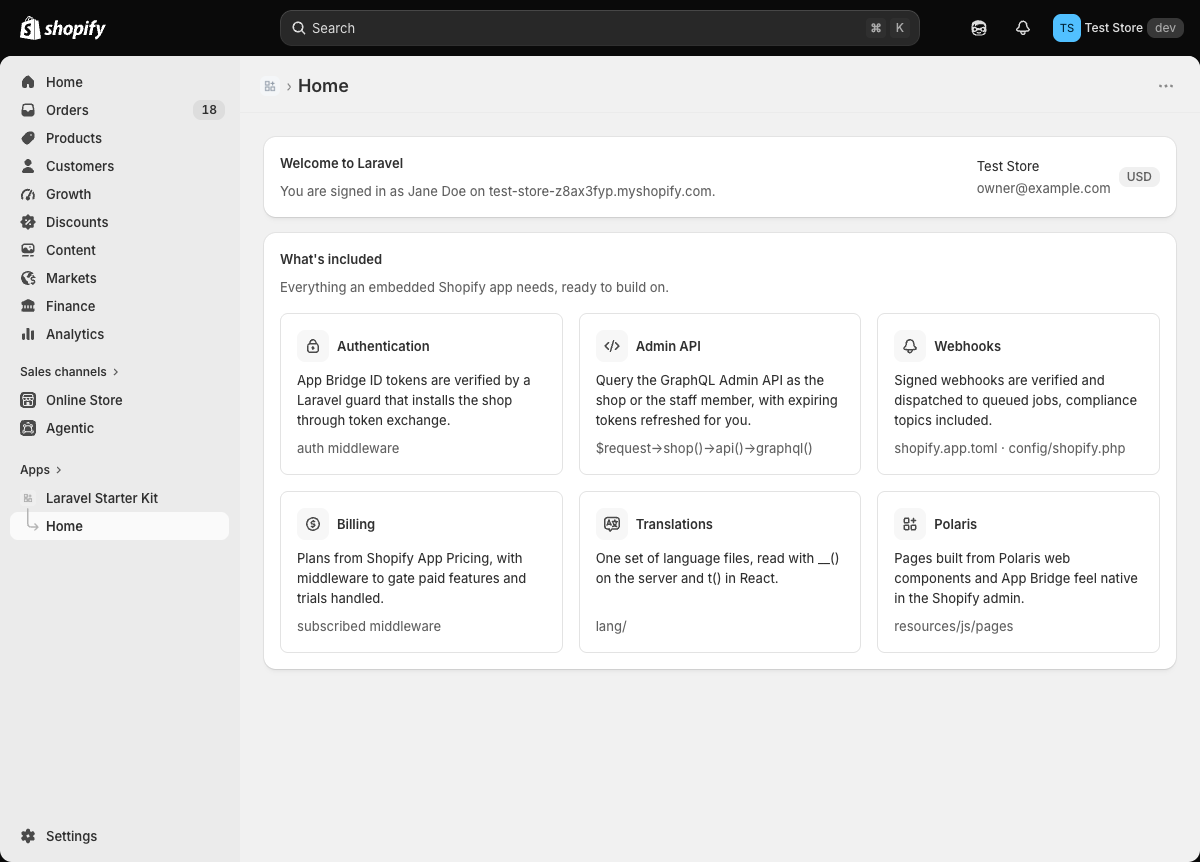
Authentication is implemented as a Laravel guard, validating the App Bridge ID token on every request, with $request->user() and $request->shop() corresponding to the staff member and shop respectively
LaravelStarter
laravel-shopify — Laravel Starter Template
By portside-labs
A Shopify embedded app starter kit built on Laravel, Inertia, and React, with built-in authentication, token exchange, webhook queue jobs, Polaris UI, and billing support.
Explore the design
Compare the page layouts and mobile experience. Open any screenshot for a closer look.
Author preview
Author-provided previewTop of page
Preview provided in the project README.
One original preview is available. Open the full image to inspect the design.
Screenshots show visual appearance; interactive behavior may differ.
Recorded 2026-10-01View source
What stands out
A quick read of the recorded project description.
Managed installation and token exchange, with no OAuth redirects; offline and online tokens are automatically exchanged, stored, and refreshed, and the app automatically reinstalls after token revocation
Webhooks are dispatched by topic as queue jobs, with compliance topics, app/uninstalled, and app/scopes_update already configured
Pages are built with Shopify Polaris Web Components, and the admin sidebar, loading bar, and toasts are integrated with Inertia
Billing through Shopify App Pricing, providing a subscribed middleware and a Cashier-like Shop API
Includes Artisan commands such as shopify:install, shopify:doctor, make:shopify-webhook, and shopify:webhook
Template Details
This is a Laravel starter kit for building embedded Shopify admin apps. The frontend uses Inertia and React, and pages are composed of Shopify's Polaris Web Components, giving the interface a native look within the Shopify admin. Authentication is implemented as a Laravel guard: every request validates the App Bridge ID token, $request->user() corresponds to the staff member, $request->shop() corresponds to the shop, and routes are protected by the auth middleware. Installation and token exchange are handled by the framework, with no OAuth redirects; offline tokens (shop) and online tokens (staff) are automatically exchanged, stored, and refreshed, and the app reinstalls when a token is revoked. Webhooks are processed as queue jobs, dispatched by topic, with compliance topics, app/uninstalled, and app/scopes_update already configured. Billing is implemented through Shopify App Pricing, providing a subscribed middleware and a Cashier-like Shop API. The project includes Artisan commands for linking the app, checking configuration, generating webhook jobs, and sending test webhooks, along with testing, static analysis, and formatting configuration.
Using this starter kit requires PHP 8.3+, Composer, Node.js 22+, the Shopify CLI, and a Dev Dashboard account and development store. The initialization flow is: create the project via Composer and install npm dependencies, create an app in the Dev Dashboard and then run php artisan shopify:install to link the app and write credentials to .env, set access scopes in shopify.app.toml and run shopify app deploy, and finally start the development environment with shopify app dev. Deployment requires HTTPS and a running queue worker, setting APP_URL, SHOPIFY_API_KEY, SHOPIFY_API_SECRET, and billing-related variables, and pointing application_url and redirect_urls in shopify.app.toml to your own domain before redeploying.
This starter kit targets Shopify app development scenarios. The code is MIT-licensed and may be used, modified, commercialized, and distributed for free, but third-party assets such as demo images, fonts, and icons require separate license verification, and external services such as domains, hosting, and databases may incur additional charges.
LaravelStarter kit
Is it right for your project?
Use Cases
- Developing embedded admin apps for Shopify merchants that need an interface natively integrated with the Shopify admin
- Needing to handle Shopify webhooks (including compliance topics, app uninstallation, and scope updates) and dispatch them to queue jobs by topic
- Needing to implement subscription billing through Shopify App Pricing and restrict route access by plan
- Needing multilingual support, reading the same set of lang/ translation files on the server side with __() and on the React side with t()
- Needing to send signed test webhooks during development with the shopify:webhook command without a tunnel
Suitable For
- Developers familiar with Laravel who want to build Shopify embedded apps the Laravel way
- Teams that need ready-made authentication, token exchange, webhook queues, and billing scaffolding to shorten time to start
- Projects using Inertia and React that want pages to use Shopify Polaris Web Components
- Projects that need to run shopify:doctor in CI to check configuration, tests, and static analysis
Getting started & customization
Use these recorded setup notes alongside the repository instructions for your chosen version.
- 1
Requires PHP 8.3+, Composer, Node.js 22+, the Shopify CLI, and a Dev Dashboard account and development store
- 2
Create the project with composer create-project portside-labs/laravel-shopify my-app, then run npm install
- 3
After creating an app in the Dev Dashboard, run php artisan shopify:install to link the app and write credentials to .env; if the linking process loses webhook subscriptions in shopify.app.toml, restore them from git
- 4
Set access scopes in shopify.app.toml and run shopify app deploy, then start the development environment with shopify app dev
- 5
Deployment requires HTTPS and a running queue worker, setting APP_URL, SHOPIFY_API_KEY, SHOPIFY_API_SECRET, and billing variables, and pointing application_url and redirect_urls in shopify.app.toml to your own domain
License & source material
Usage conditions & limitations
Free to use · keep license noticeThis entry covers the free version under the MIT license in the public repository; the free scope is the code of this version and does not mean that external services or third-party assets are free.
Must comply with when using
- The code of this version may be used, modified, commercialized, and distributed for free.
- When distributing copies or substantial portions of the code, retain the original author's copyright notice and the full MIT license notice.
- The code is provided as is; warranties and limitations of liability are governed by the original license and applicable law.
Additional costs & items to verify
- Using this starter kit requires registering a Shopify Dev Dashboard account and having a development store, which is an external platform account requirement.
- The development and deployment workflow depends on the Shopify CLI tool, which must be installed separately and logged in to a Shopify account.
- Billing features require configuring a Partner API client and an access token with Manage apps permission, which is an external service credential requirement.
- Subscription plans must be configured in the Shopify Partner Dashboard and are sold by Shopify, involving an external platform and possible fees.
- There is no webhook notification for subscription status changes; plan status is cached for five minutes, so billing decisions may be delayed by up to five minutes.
- Deployment must provide an HTTPS service and run a queue worker; otherwise webhooks and queue jobs will not work properly.
- The shopify:install linking process may lose webhook subscriptions in shopify.app.toml, requiring manual restoration from git.
- Demo images, fonts, icons, and other third-party assets must be checked against their respective licenses and cannot be judged solely by the code's MIT license.
- External services such as domains, hosting, databases, payments, or AI may incur additional charges.
View Original Text Basis
Permission is hereby granted, free of charge
Original License Text
A [Dev Dashboard](https://dev.shopify.com/dashboard) account and a development store
Original README
[Shopify CLI](https://shopify.dev/docs/api/shopify-cli)
Original README
Add to `.env`, using a Partner API client with the "Manage apps" permission:
Original README
Plans are configured in the Partner Dashboard and sold by Shopify.
Original README
Shopify sends no webhook when a subscription changes, so the plan is cached for five minutes.
Original README
Serve over HTTPS and run a queue worker.
Original README
https://github.com/portside-labs/laravel-shopify/blob/main/LICENSEhttps://github.com/portside-labs/laravel-shopify/blob/main/README.mdIf linking dropped the webhook subscriptions from `shopify.app.toml`, restore them from git.
Original README
Compiled by DeepSeek based on repository license and README ·2026-10-01. Results only cover the materials read; dependencies, images, fonts, and subsequent term changes are subject to their respective original texts.
Project checks & description sources
Template Information
- Source platforms
- GitHub
- Documentation and maintenance reference score
- Partly documented · 71 / 100
- Technologies
- Laravel
- Website type
- Starter
How this score is calculated
Our heuristic uses license records (up to 30), a demo link (12), a preview (10), stars (15), recorded maintenance (15), description completeness (8), feature records (5) and classification data (5). It is not a code, security or performance test, or a Google score. A link does not establish tested functionality.
What to verify for this project
- Repository update recorded
- 2026-09-28
- Screenshot last checked
- 2026-10-01
No demo link is recorded. Use the repository instructions to evaluate the project locally; the screenshot alone cannot establish interactive behavior.
The catalog identifies Laravel as the primary stack. Check the actual dependency manifest and lockfile for versions and hosting requirements. These notes use recorded metadata, not a code audit or a deployment test.
Use a selection guide →How this description was prepared
AI-assisted description based on catalog records and repository material. Repository authors are not automatically the reviewers of this description.
Automatically checked against source and license rules; no manual editorial review.
Inspect the recorded source material
SHA-256: 75c0c598e6d8d6d03c410013db22d550cfad82482ad1d2bee5448b608e38cfa9
2026-10-01T02:25:19.601Z
Source file / repository<p align="center">
<picture>
<source media="(prefers-color-scheme: dark)" srcset=".github/art/logo-dark.svg">
<img src=".github/art/logo-light.svg" alt="Laravel Shopify" width="360">
</picture>
</p>
<p align="center">
<a href="https://github.com/portside-labs/laravel-shopify/actions/workflows/tests.yml"><img src="https://github.com/portside-labs/laravel-shopify/actions/workflows/tests.yml/badge.svg" alt="Tests"></a>
<a href="https://packagist.org/packages/portside-labs/laravel-shopify"><img src="https://img.shields.io/packagist/v/portside-labs/laravel-shopify" alt="Latest version"></a>
<a href="LICENSE"><img src="https://img.shields.io/packagist/l/portside-labs/laravel-shopify" alt="License"></a>
</p>
## About Laravel Shopify
A starter kit for building embedded Shopify apps the Laravel way: Laravel, Inertia, and React, with pages built from Shopify's Polaris web components so they feel native in the admin.
<p align="center">
<img src=".github/art/screenshot.png" alt="The Laravel Shopify home page inside the Shopify admin" width="900">
</p>
## What's included
- **Authentication as a Laravel guard.** App Bridge ID tokens are verified on every request. `$request->user()` is the staff member, `$request->shop()` is their store, and routes are protected with `auth`.
- **Managed installation and token exchange.** No OAuth redirects. Offline tokens (the shop) and online tokens (the staff member) are exchanged, stored, and refreshed automatically, and a revoked token makes the app reinstall itself.
- **Webhooks as queued jobs.** Deliveries are verified and dispatched by topic. The compliance topics, `app/uninstalled`, and `app/scopes_update` are set up.
- **Polaris and App Bridge.** The admin's sidebar, loading bar, and toasts are wired to Inertia.
- **Translations.** One set of files in `lang/`, read with `__()` on the server and `t()` in React.
- **Billing through Shopify App Pricing.** A `subscribed` middleware and a Cashier-like API on `Shop`.
- **Artisan commands** to link the app, check its configuration, generate webhook jobs, and send test webhooks.
- **Tests, static analysis, and formatting** for all of the above.
## Requirements
- PHP 8.3+, Composer, and Node.js 22+
- [Shopify CLI](https://shopify.dev/docs/api/shopify-cli)
- A [Dev Dashboard](https://dev.shopify.com/dashboard) account and a development store
## Getting started
```bash
composer create-project portside-labs/laravel-shopify my-app
cd my-app
npm install
```
1. Create an app in the Dev Dashboard.
2. Link it and pull its credentials into `.env`:
```bash
php artisan shopify:install
```
This runs `shopify app config link` and `shopify app env pull`, then checks the configuration. If linking dropped the webhook subscriptions from `shopify.app.toml`, restore them from git.
3. Set your access scopes in `shopify.app.toml` and release the configuration:
```bash
shopify app deploy
```
4. Start the app:
```bash
shopify app dev
```
The CLI opens a tunnel, runs `composer run dev` (server, queue worker, and Vite), and prints a link that installs the app on your development store.
## Artisan commands
| Command | What it does |
| ------------------------------------ | ---------------------------------------------------------------------------------------------------------------------------------------------------------------- |
| `shopify:install` | Links the app and writes its credentials to `.env`. |
| `shopify:doctor` | Checks credentials, URLs, API version, webhooks, and billing settings. Fails on errors, so it can run in CI. |
| `make:shopify-webhook orders/create` | Creates the job and a test, maps the topic in `config/shopify.php`, and subscribes to it in `shopify.app.toml`. |
| `shopify:webhook orders/create` | Sends a signed webhook to the app in-process, with no tunnel needed. Use `--sync` to run the job immediately and `--payload=file.json` to send your own payload. |
## Using the kit
### Admin API
```php
$request->shop()->api()->graphql('{ shop { name } }')->json('data.shop');
```
`Shop::api()` acts as the shop. `User::api()` acts as the staff member, limited to their permissions. Both use Laravel's HTTP client, so `Http::fake()` works in tests.
### Webhooks
Every webhook goes to `/webhooks` and is dispatched to the job mapped to its topic in `config/shopify.php`. Add one with `php artisan make:shopify-webhook {topic}`, then run `shopify app deploy`. Jobs receive the `Shop` and the payload.
### Translations
Put every string in `lang/` and read it with `__()` or `t()`, using Laravel's `:placeholder` and `singular|plural` syntax on both sides:
```tsx
const { t } = useTranslation();
t('home.welcome', { app: name });
t('orders.count', { count: 3 }); // "{0} No orders|{1} One order|[2,*] :count orders"
```
The staff member's admin language is picked up from Shopify. To add a language, translate `lang/{locale}` and add the locale to `app.locales` in `config/app.php`.
### Billing
Plans are configured in the Partner Dashboard and sold by Shopify. Add to `.env`, using a Partner API client with the "Manage apps" permission:
```dotenv
SHOPIFY_APP_ID=1234
SHOPIFY_PARTNER_ORGANIZATION_ID=12345
SHOPIFY_PARTNER_ACCESS_TOKEN=prtapi_...
```
Gate routes with `subscribed`, or `subscribed:pro` for a specific plan:
```php
Route::get('/reports', ReportController::class)->middleware('subscribed');
```
Shops without a plan are sent to Shopify's plan selection page. Set each plan's welcome link to `/billing/welcome`. Check plans in code with:
```php
$shop->subscribed(); // any active plan
$shop->subscribed('pro'); // a specific plan
$shop->onTrial();
$shop->subscription()?->plan;
```
Shopify sends no webhook when a subscription changes, so the plan is cached for five minutes. Development stores can take any plan for free.
### Building pages
- Add pages to `resources/js/pages`, built from Polaris web components. Link to routes with Wayfinder (`resources/js/routes`).
- Register routes in `routes/web.php` behind `auth`.
- Authorize with policies using `$user->account_owner`, `$user->collaborator`, and `$user->scopes`.
- Show a toast from any controller with `Inertia::flash('toast', 'Saved.')`.
- Listen for `App\Events\ShopInstalled` and `ShopUninstalled` for onboarding and cleanup.
- Run `composer test` (Pint, PHPStan, tests) and `npm run check` (frontend lint and format).
## Deploying
- Serve over HTTPS and run a queue worker.
- Set `APP_URL`, `SHOPIFY_API_KEY`, `SHOPIFY_API_SECRET`, and the billing variables if you sell plans.
- Point `application_url` and `redirect_urls` in `shopify.app.toml` at your domain, then run `shopify app deploy`.
- Run `php artisan shopify:doctor` to catch misconfiguration. It also warns when `SHOPIFY_API_VERSION` is nearing the end of support.
## Working with AI agents
`CLAUDE.md` describes the kit's conventions for Claude Code. `.mcp.json` registers the Shopify Dev MCP server, and Laravel Boost adds Laravel tooling.
## License
MIT. See [LICENSE](LICENSE).
Explore similar templates
Compare previews and descriptions within the same stack and category.

sage
Sage is a WordPress starter theme maintained by Roots, using Laravel Blade components and templates, Vite builds, Tailwind CSS, and built-in block editor support.
Laravel · Starter

wave
Wave is an open-source SaaS starter kit built on Laravel and released under the MIT license.
Laravel · SaaS

filament-starter
A Laravel TALL stack starter template maintained by Log1x, with a preconfigured Filament admin panel and plugins including Curator, Gravatar, Exceptions, Jobs Monitor, Breezy, Peek, and Logger.
Laravel · Starter

electrik
Electrik is a Laravel SaaS starter kit installed as a Composer package, with authentication, teams, Stripe subscription billing, and the Slate 3 interface under the Electrik\ namespace rather than copied into App\.
Laravel · SaaS

php-saas
php-saas is a Laravel-based SaaS starter positioned as an everything-included kit. It generates new projects via a global Composer command and includes authentication with two-factor, API tokens, Stripe and Paddle billing, and project, team, and organization management.
Laravel · SaaS

filament-jetstream
A Laravel starter kit that implements Jetstream-like authentication and account features using Filament's native panels and components. It includes login, registration, two-factor authentication, session management, user profiles, and optional teams and API tokens.
Laravel · Starter