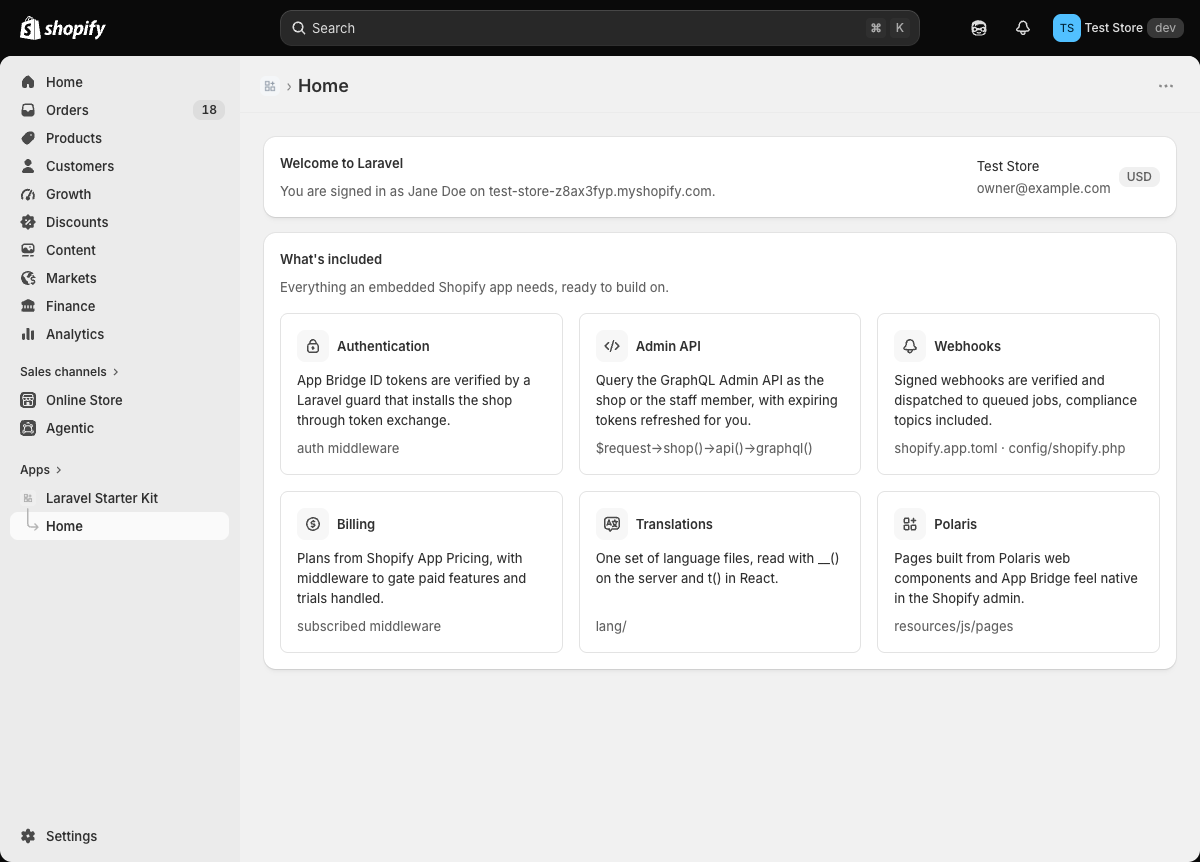
认证以 Laravel guard 实现,每个请求验证 App Bridge ID token,$request->user() 与 $request->shop() 分别对应员工和店铺
Laravel启动器
laravel-shopify — Laravel 启动器模板
作者 portside-labs
基于 Laravel、Inertia 与 React 的 Shopify 嵌入式应用启动器,内置认证、令牌交换、Webhook 队列任务、Polaris 界面与计费支持。
看看你的网站会是什么样
浏览真实页面截图,比较内容排版与手机效果。点击下方缩略图切换,放大查看整页细节。
目前有 1 张原始预览,可打开完整图片查看设计细节。
截图用于了解视觉与布局,交互效果请以实际项目为准。
采集于 2026-10-01查看来源
值得关注的模板亮点
从已有项目资料中,快速了解它的特点。
托管安装与令牌交换,无需 OAuth 重定向,离线与在线令牌自动交换、存储和刷新,令牌撤销后自动重装
Webhook 作为队列任务按主题分发,已配置合规主题、app/uninstalled 和 app/scopes_update
页面由 Shopify Polaris Web Components 构建,管理后台的侧边栏、加载条和 toast 与 Inertia 打通
通过 Shopify App Pricing 计费,提供 subscribed 中间件和类似 Cashier 的 Shop API
附带 shopify:install、shopify:doctor、make:shopify-webhook、shopify:webhook 等 Artisan 命令
模板详细介绍
这是一个用于构建 Shopify 嵌入式后台应用的 Laravel 启动器,前端采用 Inertia 与 React,页面由 Shopify 的 Polaris Web Components 组成,使界面在 Shopify 管理后台中呈现原生观感。认证以 Laravel guard 形式实现:每个请求都会验证 App Bridge ID token,$request->user() 对应员工,$request->shop() 对应店铺,路由通过 auth 中间件保护。安装与令牌交换由框架托管,无需 OAuth 重定向,离线令牌(店铺)与在线令牌(员工)会自动交换、存储和刷新,令牌被撤销时应用会重新安装。Webhook 以队列任务形式处理,按主题分发,已配置合规主题、app/uninstalled 和 app/scopes_update。计费通过 Shopify App Pricing 实现,提供 subscribed 中间件和类似 Cashier 的 Shop API。项目附带 Artisan 命令用于链接应用、检查配置、生成 Webhook 任务和发送测试 Webhook,并包含测试、静态分析与格式化配置。
使用该启动器需要 PHP 8.3+、Composer、Node.js 22+、Shopify CLI,以及 Dev Dashboard 账号和开发店铺。初始化流程为:通过 Composer 创建项目并安装 npm 依赖,在 Dev Dashboard 创建应用后运行 php artisan shopify:install 链接应用并将凭据写入 .env,在 shopify.app.toml 中设置访问范围并执行 shopify app deploy,最后用 shopify app dev 启动开发环境。部署时需使用 HTTPS 并运行队列 worker,设置 APP_URL、SHOPIFY_API_KEY、SHOPIFY_API_SECRET 及计费相关变量,将 shopify.app.toml 中的 application_url 和 redirect_urls 指向自有域名后重新部署。
该启动器面向 Shopify 应用开发场景,代码采用 MIT 许可,可免费使用、修改、商用和分发,但演示图片、字体、图标等第三方素材需单独核对许可,域名、托管、数据库等外部服务可能另行收费。
Laravel启动器
适合你的项目吗?
适用场景
- 为 Shopify 商家开发嵌入式后台应用,需要与 Shopify 管理后台原生集成的界面
- 需要处理 Shopify Webhook(含合规主题、应用卸载、权限范围更新)并按主题分发到队列任务
- 需要通过 Shopify App Pricing 实现订阅计费并按计划限制路由访问
- 需要多语言支持,在服务端用 __() 与 React 端用 t() 读取同一套 lang/ 翻译文件
- 需要在开发阶段用 shopify:webhook 命令在无隧道情况下发送签名测试 Webhook
适合人群
- 熟悉 Laravel 并希望以 Laravel 方式构建 Shopify 嵌入式应用的开发者
- 需要现成认证、令牌交换、Webhook 队列与计费脚手架以缩短起步时间的团队
- 使用 Inertia 与 React 并希望页面采用 Shopify Polaris Web Components 的项目
- 需要在 CI 中运行 shopify:doctor 检查配置、测试与静态分析的项目
上手与定制指南
结合仓库当前版本的说明,按下面的资料检查内容、配置与运行要求。
- 1
需要 PHP 8.3+、Composer、Node.js 22+、Shopify CLI,以及 Dev Dashboard 账号和开发店铺
- 2
通过 composer create-project portside-labs/laravel-shopify my-app 创建项目,然后执行 npm install
- 3
在 Dev Dashboard 创建应用后运行 php artisan shopify:install 链接应用并将凭据写入 .env;若链接过程丢失 shopify.app.toml 中的 Webhook 订阅,需从 git 恢复
- 4
在 shopify.app.toml 中设置访问范围并执行 shopify app deploy,然后用 shopify app dev 启动开发环境
- 5
部署时需使用 HTTPS 并运行队列 worker,设置 APP_URL、SHOPIFY_API_KEY、SHOPIFY_API_SECRET 及计费变量,并将 shopify.app.toml 中的 application_url 和 redirect_urls 指向自有域名
授权与来源资料
使用条件与限制
免费使用 · 保留许可声明本次收录的是公开仓库中采用 MIT 许可的免费版本;免费范围为该版本代码,不代表外部服务或第三方素材免费。
使用时需要遵守
- 允许免费使用、修改、商用和分发该版本代码。
- 分发代码副本或实质性部分时,保留原作者版权声明和完整 MIT 许可声明。
- 代码按现状提供;担保与责任限制以原许可证及适用法律为准。
额外费用与待核对事项
- 使用该启动器需要注册 Shopify Dev Dashboard 账号并拥有一个开发店铺,属于外部平台账号要求。
- 开发与部署流程依赖 Shopify CLI 工具,需另行安装并登录 Shopify 账号。
- 计费功能需要配置 Partner API 客户端及具备 Manage apps 权限的访问令牌,属于外部服务凭据要求。
- 订阅计划需在 Shopify Partner Dashboard 中配置并由 Shopify 销售,涉及外部平台与可能的费用。
- 订阅状态变更无 Webhook 通知,计划状态会缓存五分钟,计费判断存在最长五分钟延迟。
- 部署时必须提供 HTTPS 服务并运行队列 worker,否则 Webhook 与队列任务无法正常工作。
- shopify:install 链接过程可能丢失 shopify.app.toml 中的 Webhook 订阅,需手动从 git 恢复。
- 演示图片、字体、图标及其他第三方素材需按各自许可核对,不能仅凭代码的 MIT 许可判断。
- 域名、托管、数据库、支付或 AI 等外部服务可能另外收费。
查看原文依据
Permission is hereby granted, free of charge
许可证原文
A [Dev Dashboard](https://dev.shopify.com/dashboard) account and a development store
README 原文
[Shopify CLI](https://shopify.dev/docs/api/shopify-cli)
README 原文
Add to `.env`, using a Partner API client with the "Manage apps" permission:
README 原文
Plans are configured in the Partner Dashboard and sold by Shopify.
README 原文
Shopify sends no webhook when a subscription changes, so the plan is cached for five minutes.
README 原文
Serve over HTTPS and run a queue worker.
README 原文
https://github.com/portside-labs/laravel-shopify/blob/main/LICENSEhttps://github.com/portside-labs/laravel-shopify/blob/main/README.mdIf linking dropped the webhook subscriptions from `shopify.app.toml`, restore them from git.
README 原文
DeepSeek 根据仓库许可证和 README 整理 ·2026-10-01。结果仅覆盖已读取资料,依赖、图片、字体及后续条款变更以各自原文为准。
项目核对记录与介绍依据
模板资料
- 来源平台
- GitHub
- 资料与维护参考分
- 资料一般 · 71 / 100
- 技术栈
- Laravel
- 网站类型
- 启动器
这个分数如何计算
本站按许可资料(最高30分)、演示链接(12分)、预览图(10分)、Star数(15分)、记录的维护时间(15分)、描述完整度(8分)、功能记录(5分)和分类资料(5分)计算。它不是代码、安全或性能测试,也不是 Google 评分;有链接不代表已实测可用。
这个项目需要核对什么
- 记录的仓库更新时间
- 2026-09-28
- 截图检查日期
- 2026-10-01
目前没有记录演示链接。请依据仓库说明在本地评估;仅凭截图无法确认交互行为。
目录记录的主要技术栈是 Laravel。请通过依赖清单和锁文件核对实际版本与托管要求。这些说明基于收录资料,不代表代码审计或部署实测。
查看具体选型方法 →介绍的制作与核对状态
介绍由 AI 辅助整理目录与仓库资料。仓库作者不等于这篇介绍的审核者。
已完成服务器许可规则与 AI 来源核对;未经过人工编辑审核。
查看当时使用的来源资料
SHA-256: 75c0c598e6d8d6d03c410013db22d550cfad82482ad1d2bee5448b608e38cfa9
2026-10-01T02:25:19.601Z
来源文件 / 仓库<p align="center">
<picture>
<source media="(prefers-color-scheme: dark)" srcset=".github/art/logo-dark.svg">
<img src=".github/art/logo-light.svg" alt="Laravel Shopify" width="360">
</picture>
</p>
<p align="center">
<a href="https://github.com/portside-labs/laravel-shopify/actions/workflows/tests.yml"><img src="https://github.com/portside-labs/laravel-shopify/actions/workflows/tests.yml/badge.svg" alt="Tests"></a>
<a href="https://packagist.org/packages/portside-labs/laravel-shopify"><img src="https://img.shields.io/packagist/v/portside-labs/laravel-shopify" alt="Latest version"></a>
<a href="LICENSE"><img src="https://img.shields.io/packagist/l/portside-labs/laravel-shopify" alt="License"></a>
</p>
## About Laravel Shopify
A starter kit for building embedded Shopify apps the Laravel way: Laravel, Inertia, and React, with pages built from Shopify's Polaris web components so they feel native in the admin.
<p align="center">
<img src=".github/art/screenshot.png" alt="The Laravel Shopify home page inside the Shopify admin" width="900">
</p>
## What's included
- **Authentication as a Laravel guard.** App Bridge ID tokens are verified on every request. `$request->user()` is the staff member, `$request->shop()` is their store, and routes are protected with `auth`.
- **Managed installation and token exchange.** No OAuth redirects. Offline tokens (the shop) and online tokens (the staff member) are exchanged, stored, and refreshed automatically, and a revoked token makes the app reinstall itself.
- **Webhooks as queued jobs.** Deliveries are verified and dispatched by topic. The compliance topics, `app/uninstalled`, and `app/scopes_update` are set up.
- **Polaris and App Bridge.** The admin's sidebar, loading bar, and toasts are wired to Inertia.
- **Translations.** One set of files in `lang/`, read with `__()` on the server and `t()` in React.
- **Billing through Shopify App Pricing.** A `subscribed` middleware and a Cashier-like API on `Shop`.
- **Artisan commands** to link the app, check its configuration, generate webhook jobs, and send test webhooks.
- **Tests, static analysis, and formatting** for all of the above.
## Requirements
- PHP 8.3+, Composer, and Node.js 22+
- [Shopify CLI](https://shopify.dev/docs/api/shopify-cli)
- A [Dev Dashboard](https://dev.shopify.com/dashboard) account and a development store
## Getting started
```bash
composer create-project portside-labs/laravel-shopify my-app
cd my-app
npm install
```
1. Create an app in the Dev Dashboard.
2. Link it and pull its credentials into `.env`:
```bash
php artisan shopify:install
```
This runs `shopify app config link` and `shopify app env pull`, then checks the configuration. If linking dropped the webhook subscriptions from `shopify.app.toml`, restore them from git.
3. Set your access scopes in `shopify.app.toml` and release the configuration:
```bash
shopify app deploy
```
4. Start the app:
```bash
shopify app dev
```
The CLI opens a tunnel, runs `composer run dev` (server, queue worker, and Vite), and prints a link that installs the app on your development store.
## Artisan commands
| Command | What it does |
| ------------------------------------ | ---------------------------------------------------------------------------------------------------------------------------------------------------------------- |
| `shopify:install` | Links the app and writes its credentials to `.env`. |
| `shopify:doctor` | Checks credentials, URLs, API version, webhooks, and billing settings. Fails on errors, so it can run in CI. |
| `make:shopify-webhook orders/create` | Creates the job and a test, maps the topic in `config/shopify.php`, and subscribes to it in `shopify.app.toml`. |
| `shopify:webhook orders/create` | Sends a signed webhook to the app in-process, with no tunnel needed. Use `--sync` to run the job immediately and `--payload=file.json` to send your own payload. |
## Using the kit
### Admin API
```php
$request->shop()->api()->graphql('{ shop { name } }')->json('data.shop');
```
`Shop::api()` acts as the shop. `User::api()` acts as the staff member, limited to their permissions. Both use Laravel's HTTP client, so `Http::fake()` works in tests.
### Webhooks
Every webhook goes to `/webhooks` and is dispatched to the job mapped to its topic in `config/shopify.php`. Add one with `php artisan make:shopify-webhook {topic}`, then run `shopify app deploy`. Jobs receive the `Shop` and the payload.
### Translations
Put every string in `lang/` and read it with `__()` or `t()`, using Laravel's `:placeholder` and `singular|plural` syntax on both sides:
```tsx
const { t } = useTranslation();
t('home.welcome', { app: name });
t('orders.count', { count: 3 }); // "{0} No orders|{1} One order|[2,*] :count orders"
```
The staff member's admin language is picked up from Shopify. To add a language, translate `lang/{locale}` and add the locale to `app.locales` in `config/app.php`.
### Billing
Plans are configured in the Partner Dashboard and sold by Shopify. Add to `.env`, using a Partner API client with the "Manage apps" permission:
```dotenv
SHOPIFY_APP_ID=1234
SHOPIFY_PARTNER_ORGANIZATION_ID=12345
SHOPIFY_PARTNER_ACCESS_TOKEN=prtapi_...
```
Gate routes with `subscribed`, or `subscribed:pro` for a specific plan:
```php
Route::get('/reports', ReportController::class)->middleware('subscribed');
```
Shops without a plan are sent to Shopify's plan selection page. Set each plan's welcome link to `/billing/welcome`. Check plans in code with:
```php
$shop->subscribed(); // any active plan
$shop->subscribed('pro'); // a specific plan
$shop->onTrial();
$shop->subscription()?->plan;
```
Shopify sends no webhook when a subscription changes, so the plan is cached for five minutes. Development stores can take any plan for free.
### Building pages
- Add pages to `resources/js/pages`, built from Polaris web components. Link to routes with Wayfinder (`resources/js/routes`).
- Register routes in `routes/web.php` behind `auth`.
- Authorize with policies using `$user->account_owner`, `$user->collaborator`, and `$user->scopes`.
- Show a toast from any controller with `Inertia::flash('toast', 'Saved.')`.
- Listen for `App\Events\ShopInstalled` and `ShopUninstalled` for onboarding and cleanup.
- Run `composer test` (Pint, PHPStan, tests) and `npm run check` (frontend lint and format).
## Deploying
- Serve over HTTPS and run a queue worker.
- Set `APP_URL`, `SHOPIFY_API_KEY`, `SHOPIFY_API_SECRET`, and the billing variables if you sell plans.
- Point `application_url` and `redirect_urls` in `shopify.app.toml` at your domain, then run `shopify app deploy`.
- Run `php artisan shopify:doctor` to catch misconfiguration. It also warns when `SHOPIFY_API_VERSION` is nearing the end of support.
## Working with AI agents
`CLAUDE.md` describes the kit's conventions for Claude Code. `.mcp.json` registers the Shopify Dev MCP server, and Laravel Boost adds Laravel tooling.
## License
MIT. See [LICENSE](LICENSE).
看看同类模板
对比同技术栈与用途的模板,找到更适合的视觉与内容结构。

sage
WordPress starter theme with Laravel Blade components and templates, Tailwind CSS, and block editor support
Laravel · 启动器

wave
Wave - The Software as a Service Starter Kit, designed to help you build the SAAS of your dreams 🚀 💰
Laravel · SaaS

filament-starter
A beautiful starting point for your next TALL stack project using Filament. ⚡
Laravel · 启动器

electrik
Laravel SaaS starter kit: auth, teams, Stripe billing, and Slate 3 — Composer package for Laravel 12
Laravel · SaaS

php-saas
The everything-included starter kit for your next idea
Laravel · SaaS

filament-jetstream
A Laravel starter kit built with Filament inspired by Jetstream.
Laravel · 启动器