The homepage is the shelf; each post is rendered as a spine, with width determined by word count and colour by the first tag
HugoBlog
hugo-theme-bookshelf — Hugo Blog Template
By pravin
A Hugo blog theme that presents each post as a book spine on a shelf, with spine width determined by word count and colour by the first tag, and book-style typography on post pages.
Explore the design
Compare the page layouts and mobile experience. Open any screenshot for a closer look.
Desktop homepage1 / 3
Desktop captureTop of page
Actual screenshot captured by the server browser.
All pages & views 3
Screenshots show visual appearance; interactive behavior may differ.
Recorded 2026-10-12View source
What stands out
A quick read of the recorded project description.
Post pages use book-style typography: chapter openings, fleurons, small caps on the first line, Roman numeral chapter headings, and a colophon
At the end of a post, adjacent older and newer posts are laid out as spines
Supports light and dark modes that follow the system setting, and provides a toggle button that remembers the choice
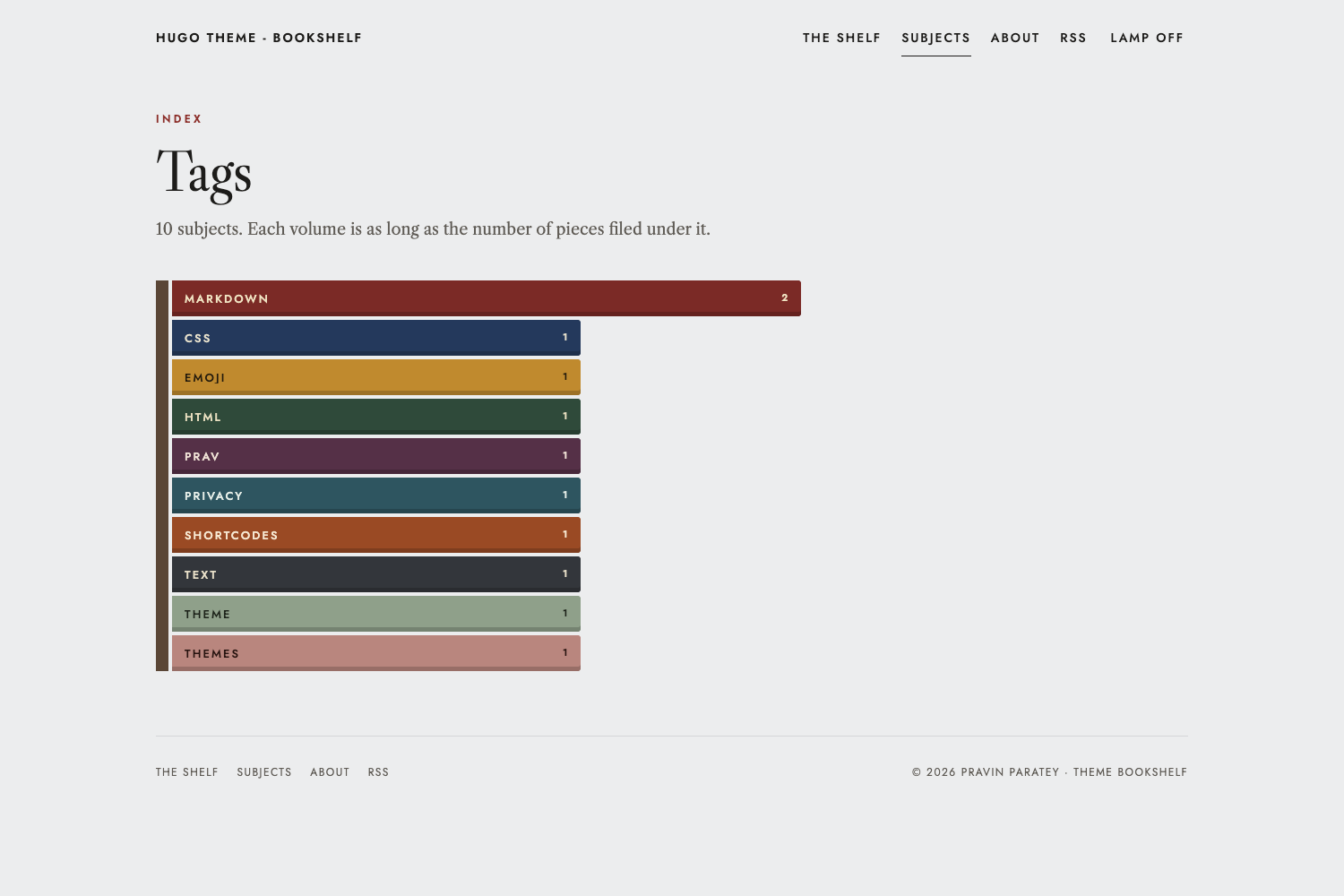
The Subjects page displays each tag as a volume whose length corresponds to the number of posts
Only one stylesheet and two small scripts, with no CSS framework or icon font
Template Details
hugo-theme-bookshelf is a Hugo blog theme whose core idea is to turn the post archive into a bookshelf: the homepage is the shelf, each post is a spine, spine width is determined by the post's word count, cloth colour comes from the post's first tag, height varies within a set range according to the title, year dividers are interspersed, and the shelf wraps automatically as the archive grows. Post pages mimic a book reading experience, including chapter openings (such as "No. 12 · Subject"), display titles, fleurons, small caps on the first line, Roman numerals for chapter headings, book-style tables, and a colophon with word count. At the end of each post, older and newer posts are laid out as spines in their respective colours. At the bottom of the page there is a reading pagination like "Page 2 of 6", measured in screens. The theme supports light and dark modes that follow the system setting, and provides a toggle button that remembers the choice. The theme consists of one stylesheet and two small scripts, with no CSS framework or icon font. The theme also provides a Subjects page that displays each tag as a volume, with length corresponding to the number of posts assigned to that tag.
HugoBlog
Is it right for your project?
Use Cases
- Building a personal blog with the post archive as the visual centre
- Providing a book-like reading experience for writing projects organised by tag
- Sites that want the homepage to show all posts directly rather than a summary list
- Hugo sites that need light and dark modes and lightweight front-end assets
Suitable For
- Writers using Hugo who want the blog homepage to appear as a bookshelf
- Blogs that organise content by tag and are willing to let the first tag determine spine colour
- Personal sites that prefer book-style typography and lightweight front-end assets
Getting started & customization
Use these recorded setup notes alongside the repository instructions for your chosen version.
- 1
Requires Hugo v0.146.0 or higher
- 2
Can be installed via git submodule or Hugo module, and the theme set in hugo.toml
- 3
The example site is in the exampleSite directory and can be previewed by running hugo server
- 4
Syntax highlighting requires markup.highlight.noClasses = false
- 5
Disqus requires services.disqus.shortname; Google Analytics requires services.googleAnalytics.ID and is only included in production builds
License & source material
Usage conditions & limitations
Free to use · keep license noticeThis entry covers the free version under the MIT licence in the public repository; the free scope is the code of that version and does not mean external services or third-party assets are free.
Must comply with when using
- The code of this version may be used, modified, used commercially, and distributed free of charge.
- When distributing copies or substantial portions of the code, retain the original author's copyright notice and the full MIT licence notice.
- The code is provided as is; warranties and limitations of liability are governed by the original licence and applicable law.
Additional costs & items to verify
- Demo images, fonts, icons, and other third-party assets must be checked against their respective licences and cannot be judged solely by the code's MIT licence.
- External services such as domains, hosting, databases, payments, or AI may incur separate charges.
- Using this theme requires Hugo v0.146.0 or higher; Hugo versions below this cannot use it properly.
- Comment functionality depends on the third-party Disqus service and requires services.disqus.shortname to be configured; analytics depends on Google Analytics, requires services.googleAnalytics.ID to be configured, and is only included in production builds.
- The theme loads the Jost and Libre Caslon fonts from Google Fonts by default, which is an external service dependency; you must verify availability yourself or override head.html to change fonts.
- Syntax highlighting requires Hugo's built-in Chroma to output CSS classes, so markup.highlight.noClasses = false must be set; otherwise the highlighting styles will not take effect.
View Original Text Basis
Permission is hereby granted, free of charge
Original License Text
This theme requires Hugo v0.146.0 or later.
Original README
Set `services.disqus.shortname` to enable Disqus on articles, and `services.googleAnalytics.ID` for Google Analytics. Analytics is only included in production builds.
Original README
The theme uses Jost and Libre Caslon from Google Fonts.
Original README
https://github.com/pravin/hugo-theme-bookshelf/blob/main/LICENSEhttps://github.com/pravin/hugo-theme-bookshelf/blob/main/README.mdThis needs Chroma to output CSS classes,
Original README
Compiled by DeepSeek based on repository license and README ·2026-10-12. Results only cover the materials read; dependencies, images, fonts, and subsequent term changes are subject to their respective original texts.
Project checks & description sources
Template Information
- Source platforms
- GitHub
- Documentation and maintenance reference score
- More documented · 80 / 100
- Technologies
- Hugo
- Website type
- Blog
How this score is calculated
Our heuristic uses license records (up to 30), a demo link (12), a preview (10), stars (15), recorded maintenance (15), description completeness (8), feature records (5) and classification data (5). It is not a code, security or performance test, or a Google score. A link does not establish tested functionality.
What to verify for this project
- Repository update recorded
- 2026-10-12
- Screenshot last checked
- 2026-10-12
A demo link is listed. Check it with your own content and viewport sizes; its presence does not confirm that forms, authentication or payments work.
The catalog identifies Hugo as the primary stack. Check the actual dependency manifest and lockfile for versions and hosting requirements. These notes use recorded metadata, not a code audit or a deployment test.
Use a selection guide →How this description was prepared
AI-assisted description based on catalog records and repository material. Repository authors are not automatically the reviewers of this description.
Review declaration: [email protected] · 2026-10-13
Inspect the recorded source material
SHA-256: 4018b3839449d28271bc23828ea9eb0eb4325c12392dcac28db7b2372b016b90
2026-10-12T18:03:30.946Z
Source file / repository# Hugo Theme Bookshelf
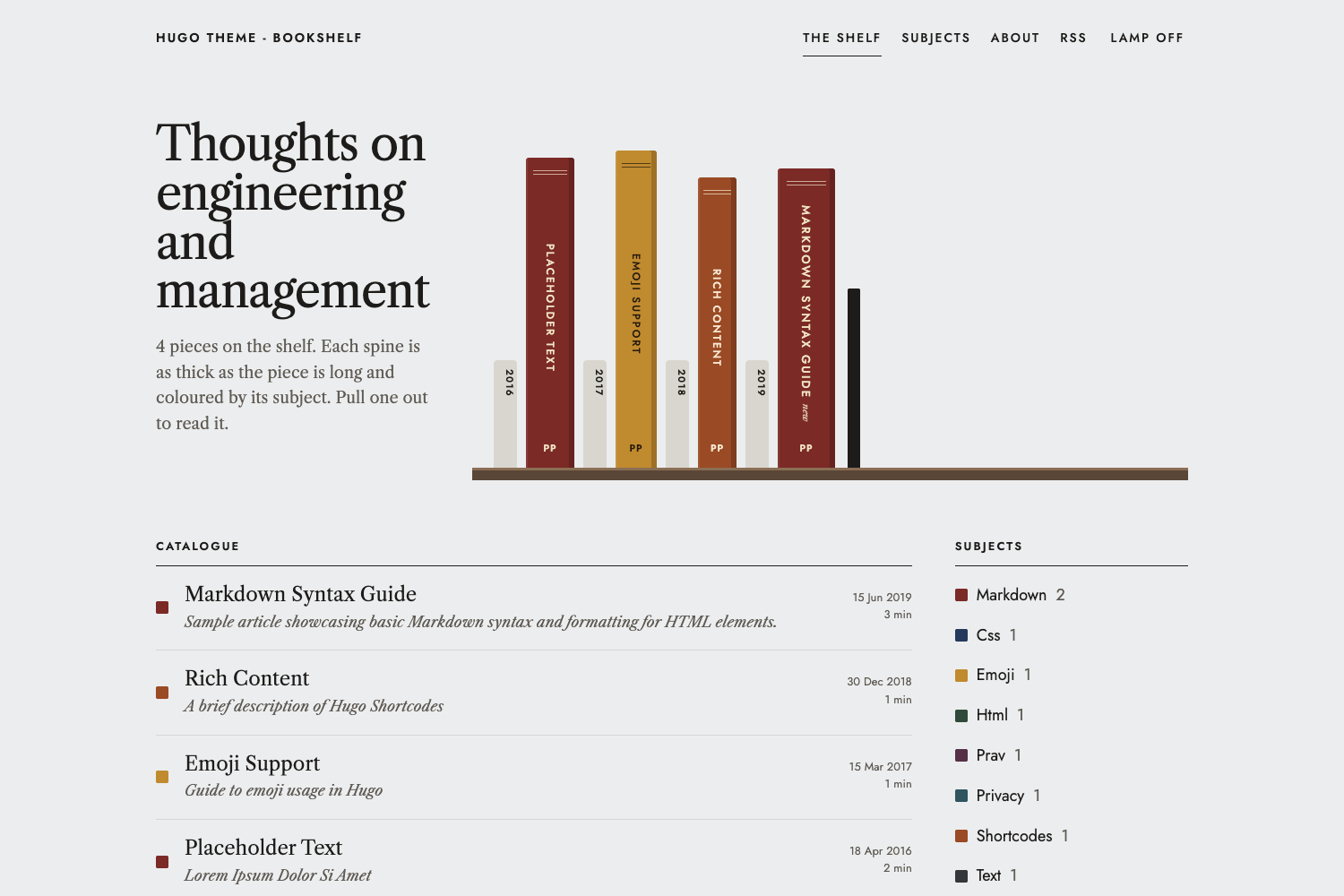
A blog theme where your archive is a bookshelf. Every post is a book spine: **as thick as the piece is long, coloured by its subject**, and filed left to right by year. Pull a spine out and the article opens as a page from a book, with a chapter opener, justified text, Roman-numeral sections and a colophon.
## What makes it different
* **The archive is the home page.** Posts stand on shelves as spines. Spine width comes from the word count, the cloth colour from the post's first tag, and the height varies a little (picked from the title, so it never changes between builds). Year dividers sit between them, and the shelves wrap as your archive grows.
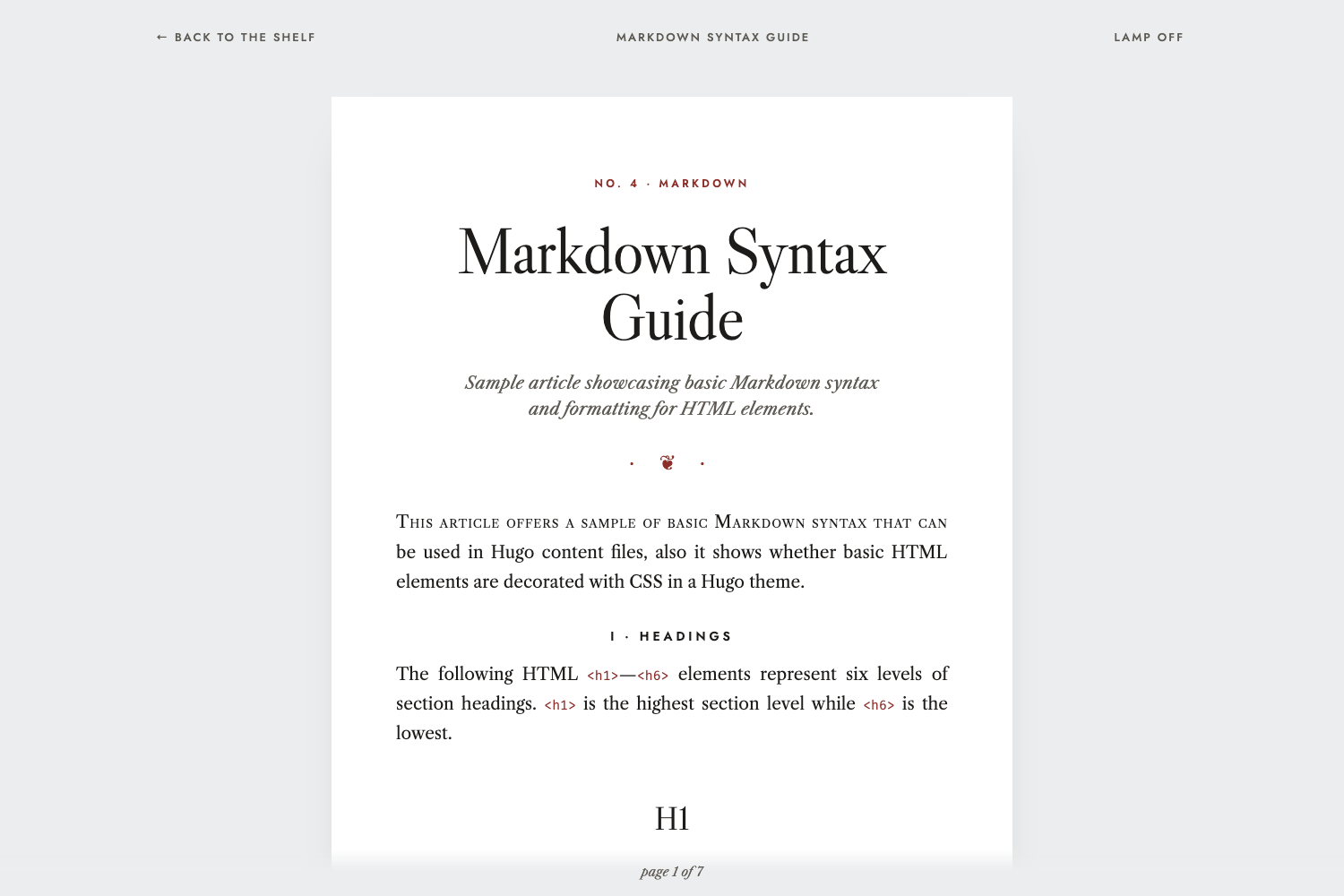
* **Articles read like a book.** A "No. 12 · Subject" chapter opener, a display title, a fleuron, small capitals on the first line, Roman numerals on every section heading, book-style tables, and a colophon with the word count.
* **Next to it on the shelf.** At the end of each article, the older and newer posts are laid flat as spines in their own colours.
* **A reading folio.** A quiet "page 2 of 6" at the foot of the window, where a page is one screenful.
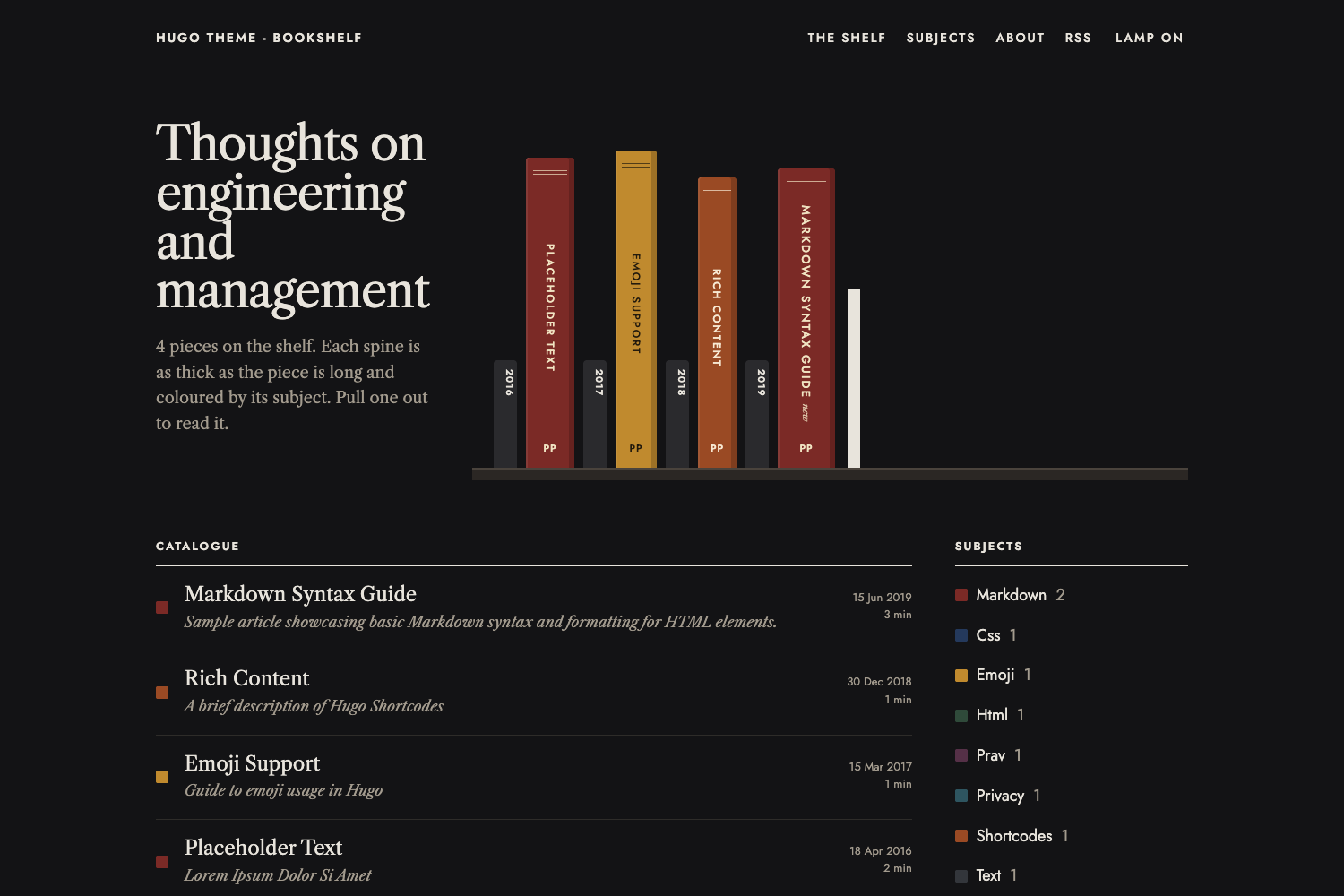
* **Lamp off, lamp on.** Light and dark mode follow the reader's OS setting, with a toggle that remembers their choice.
* **Small.** One stylesheet and two tiny scripts. No CSS framework, no icon font.
| Dark mode | An article |
| --- | --- |
|  |  |
The subjects page shows each tag as a volume, as long as the number of posts filed under it,
## Installation
This theme requires Hugo v0.146.0 or later.
As a git submodule,
```sh
git submodule add https://github.com/pravin/hugo-theme-bookshelf.git themes/hugo-theme-bookshelf
```
then set `theme = "hugo-theme-bookshelf"` in your `hugo.toml`.
Or as a Hugo module,
```sh
hugo mod init github.com/<you>/<your-site>
```
```toml
[module]
[[module.imports]]
path = "github.com/pravin/hugo-theme-bookshelf"
```
To try the example site,
```sh
cd exampleSite
hugo server
```
## Configuration
A complete example lives in [`exampleSite/hugo.toml`](https://github.com/pravin/hugo-theme-bookshelf/blob/main/exampleSite/hugo.toml).
```toml
baseURL = "https://example.com/"
locale = "en-GB"
title = "My Bookshelf"
theme = "hugo-theme-bookshelf"
[pagination]
pagerSize = 10
[params]
tagline = "Thoughts on engineering and management"
author = "Your Name"
authorImgPath = "/img/author.png"
authorBlurb = "Something about you"
mainSections = ["posts"]
defaultTheme = "auto"
themeToggle = true
[params.bookshelf]
intro = "Each spine is as thick as the piece is long and coloured by its subject. Pull one out to read it."
[params.social]
github = "https://github.com/you"
mastodon = "https://mastodon.social/@you"
email = "mailto:[email protected]"
[markup]
[markup.highlight]
noClasses = false
[markup.goldmark.renderer]
unsafe = true
```
### Site parameters
| Parameter | Default | What it does |
| --- | --- | --- |
| `tagline` | | Heading on the home page, and part of the home page title |
| `author` | | Author name, used for the copyright line, colophons and the spine monogram |
| `authorImgPath` | | Image shown beside the author blurb, and the default preview image for social cards |
| `authorBlurb` | | A line about the author on the home page. Markdown is allowed |
| `mainSections` | Hugo's default | Sections whose pages go on the shelf, in the catalogue and in the RSS feed |
| `defaultTheme` | `"auto"` | `"auto"` follows the reader's OS setting; `"light"` or `"dark"` makes that the default |
| `themeToggle` | `true` | Set to `false` to hide the "Lamp off / Lamp on" toggle |
| `favicon` | | Path to a favicon |
| `social.*` | | Links shown on the home page: `mastodon`, `bluesky`, `github`, `twitter`, `linkedin`, `medium`, `facebook`, `email`. `twitteruser` sets the Twitter card creator |
### Shelf parameters (`[params.bookshelf]`)
| Parameter | Default | What it does |
| --- | --- | --- |
| `intro` | see above | Text under the tagline on the home page, after the post count |
| `minSpine`, `maxSpine` | `40`, `120` | Narrowest and widest spine, in pixels |
| `fullSpineWords` | `1500` | Word count that gives the widest spine. Longer posts are capped |
| `minHeight`, `maxHeight` | `280`, `370` | Range of spine heights, in pixels |
| `monogram` | author's initials | Letters at the foot of every spine |
| `maxSpines` | `0` | Show only the newest N spines on the shelf. `0` shows all of them |
| `subjectsLimit` | `12` | Number of subjects listed on the home page |
| `palette` | 10 cloth colours | List of `{ bg = "#...", fg = "#..." }` used for spines. `fg` is the label colour, so keep it readable on `bg` |
| `colors` | | Pin a subject to a colour, e.g. `markdown = "#7B2A26"`. The label colour is chosen for contrast |
Subjects take palette colours in order of how many posts they have, so your most common subjects always look different from each other. Adding posts can occasionally shuffle the colours of your smaller subjects; pin the ones you care about with `colors`.
A custom palette,
```toml
[params.bookshelf]
palette = [
{ bg = "#7B2A26", fg = "#F0E3C2" },
{ bg = "#24395C", fg = "#E6E0CC" },
{ bg = "#C08A2E", fg = "#231A0C" },
]
[params.bookshelf.colors]
management = "#2F4A3A"
```
### Front matter
```yaml
title: "On Hiring"
description: "Shown under the title, and in the catalogue"
date: 2026-10-12
author: "Overrides params.author for this post"
tags: ["hiring", "management"] # the first tag sets the spine colour
previewimage: "cover.jpg" # optional social card image
disableComments: true # optional, turns off Disqus for this page
```
### Menu
By default the masthead shows The shelf, Subjects, About and RSS. To change these, define a `main` menu,
```toml
[[menus.main]]
name = "The shelf"
pageRef = "/"
weight = 10
[[menus.main]]
name = "Now"
pageRef = "/now"
weight = 20
```
### Syntax highlighting
Code is highlighted by Hugo's built-in highlighter, with colours that follow light and dark mode. This needs Chroma to output CSS classes,
```toml
[markup.highlight]
noClasses = false
```
### Comments and analytics
Set `services.disqus.shortname` to enable Disqus on articles, and `services.googleAnalytics.ID` for Google Analytics. Analytics is only included in production builds.
## Customisation
* **Colours.** All colours are CSS variables at the top of `assets/css/style.css`, written as `light-dark(<light>, <dark>)`. Copy that file to your site's `assets/css/style.css` to change them.
* **Custom head and footer code.** Create `layouts/_partials/custom_header.html` or `custom_footer.html` in your site.
* **Fonts.** The theme uses Jost and Libre Caslon from Google Fonts. Override `layouts/_partials/head.html` to change them.
## Licence
MIT, by [Pravin Paratey](https://cto.me.uk).
Explore similar templates
Compare previews and descriptions within the same stack and category.

hugo-PaperMod
A fast, clean, responsive Hugo theme for blogs and lightweight portfolios, with three layout modes (Regular, Home-Info, Profile), automatic and manual light/dark themes, Fuse.js client-side search, multilingual support, and built-in Open Graph, Twitter Cards, and Schema.org data.
Hugo · Portfolio

LoveIt
LoveIt is a clean, elegant, and feature-rich Hugo blog theme derived from LeaveIt and KeepIt, MIT-licensed. It offers light/dark modes, responsive layout, multilingual support, and search via Lunr.js or Algolia.
Hugo · Blog

hugo-coder
hugo-coder is a minimalist Hugo blog theme maintained by luizdepra under the MIT license. It provides a clean, text-focused blog appearance, configuration documentation in the docs directory, and a complete exampleSite with hugo.toml.
Hugo · Blog

blowfish
Blowfish is a Hugo personal website and blog theme built with Tailwind CSS 4, focused on lightness, simplicity, and content-first presentation.
Hugo · Blog

hugo-paper
hugo-paper is a simple, clean, and customizable Hugo blog theme configured through config.toml or hugo.toml.
Hugo · Blog

hextra
Hextra is a Hugo theme for documentation and blog sites, built on Hugo and Tailwind CSS with design referencing Nextra.
Hugo · Documentation