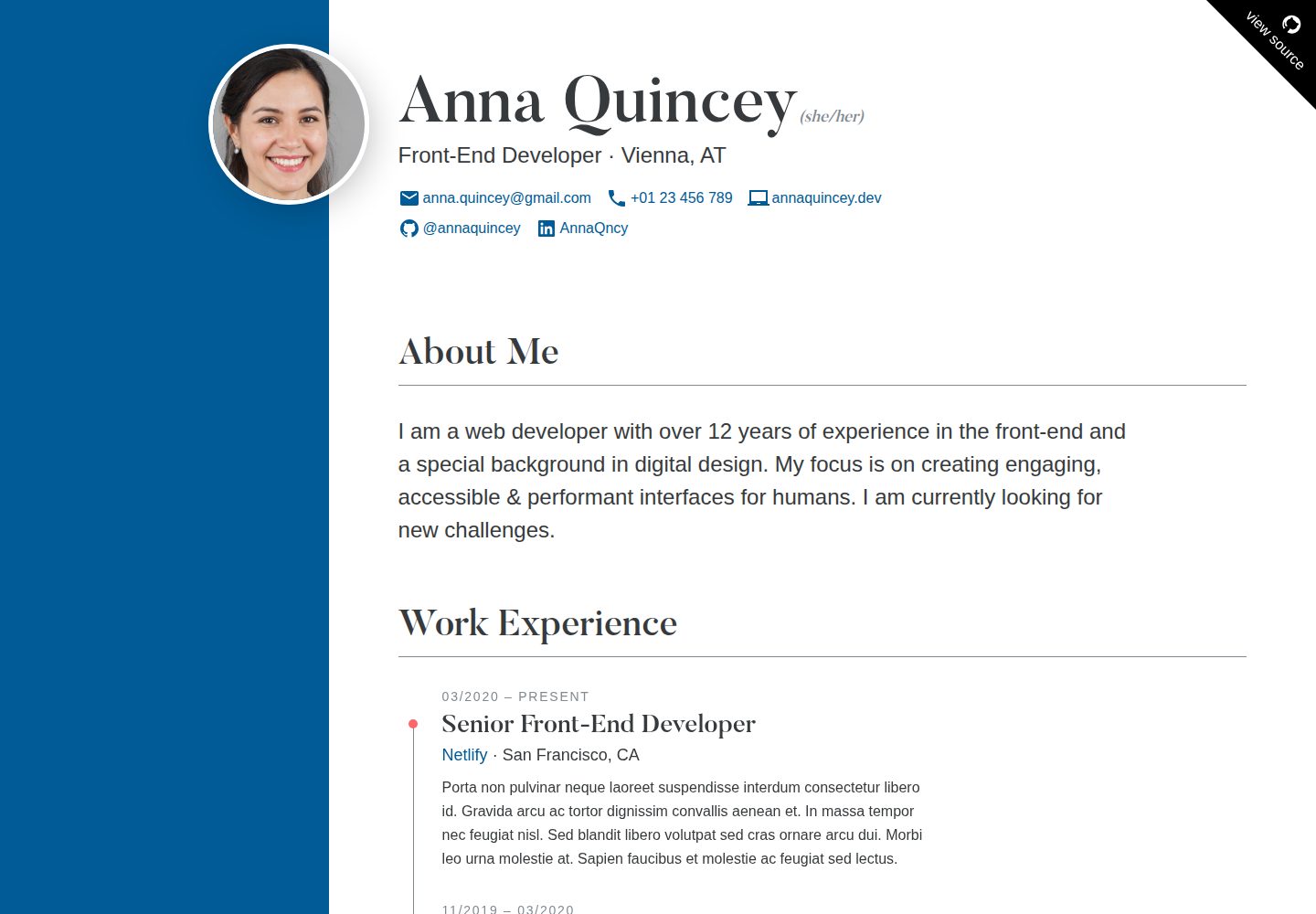
Manage work experience and education entries using Markdown files, with frontmatter defining title, start and end dates, organization, and other information
HTMLPortfolioCorporate Website
cv — HTML Portfolio Template
By profstein
An HTML-based online CV template that supports editing work experience and education in Markdown, with customizable colors, language, and metadata, and is optimized for printing and search engines.
Explore the design
Compare the page layouts and mobile experience. Open any screenshot for a closer look.
Desktop homepage1 / 2
Desktop captureTop of page
Actual screenshot captured by the server browser.
All pages & views 2
Screenshots show visual appearance; interactive behavior may differ.
Recorded 2026-10-02View source
What stands out
A quick read of the recorded project description.
Personal information, metadata, and colors are configured centrally in JSON files without modifying the template structure
Supports translating fixed English text in the interface via data/strings.json
Provides semantic HTML, h-resume microformat, inline critical CSS, and print styles
Includes development server and production build commands, and supports deployment to Netlify
Template Details
This is a static site template for generating an online CV, and the repository author uses it to publish their actual CV. The project is built on Node, uses Markdown files to store work experience and education entries, and configures personal information, metadata, and colors through JSON files. The README states that the template was tested under Node v10.15, and newer versions may have compatibility issues with some dependencies. The template provides development server and production build commands, and can be deployed via Netlify.
In terms of content structure, the CV includes personal information, an introduction, work experience, education, and an optional free-form content block. Personal information is edited in src/data/author.json, supporting fields such as name, profession, location, avatar, pronouns, email, phone, website, skills, languages, and social links. The introduction is located at entries/content/introduction.md, and work and education entries are placed in src/entries/work and src/entries/education respectively, using frontmatter to define title, start and end dates, organization, organization link, and location. The free-form content block is located at entries/content/custom.md and can be deleted to hide that section.
The template's styles and metadata are configured in src/data/meta.json, including site URL, language, locale code, and primary and secondary colors. Some fixed English text in the interface (such as section titles and labels) is stored in data/strings.json and can be translated into other languages. The README also lists features such as semantic HTML, WCAG AA accessibility, h-resume microformat, inline critical CSS, print styles, and search engine optimization.
Regarding usage limitations, the template depends on a Node environment, and the README notes that newer Node versions may cause dependency issues; the demo avatar is generated by a GAN, and the heading font Butler is licensed under CC BY-SA 4.0. These third-party assets need to be checked separately for licensing. The code itself is under the MIT license and can be used, modified, commercially used, and distributed for free, but the copyright notice and license notice must be retained when distributing.
HTMLPortfolioCorporate website
Is it right for your project?
Use Cases
- Individual job seekers publishing an online CV and retaining a printable version
- Developers modifying the MIT-licensed template into their own CV site
- Static sites that need to maintain work experience and education as Markdown entries
- Personal homepages that want to customize CV colors, language, and social links
Suitable For
- Individuals who need to display a detailed CV online
- Developers familiar with Markdown and JSON configuration
- Users building static sites with the Node toolchain
- Those planning to deploy their CV to static hosting platforms such as Netlify
Getting started & customization
Use these recorded setup notes alongside the repository instructions for your chosen version.
- 1
The project is based on Node; the README states it was tested under Node v10.15, and newer versions may have compatibility issues with some dependencies
- 2
Run npm install in the root directory to install dependencies, npm start to launch the development server, and npm run build to generate a production build
- 3
Edit src/data/author.json to fill in personal information, and edit src/data/meta.json to set the site URL, language, and colors
- 4
Work experience and education entries are stored in src/entries/work and src/entries/education, using Markdown and frontmatter
- 5
The heading font Butler is licensed under CC BY-SA 4.0, and the demo avatar is generated by a GAN; check third-party asset licensing before use
License & source material
Usage conditions & limitations
Free to use · keep license noticeThis entry covers the free version in the public repository under the MIT license; the free scope is the code of that version and does not mean that external services or third-party assets are free.
Must comply with when using
- The code of this version may be used, modified, commercially used, and distributed for free.
- When distributing copies or substantial portions of the code, retain the original author's copyright notice and the full MIT license notice.
- The code is provided as is; warranties and limitations of liability are governed by the original license and applicable law.
Additional costs & items to verify
- The project depends on a Node environment; the README states it was only tested under Node v10.15, and newer versions may have compatibility issues with some dependencies, so the runtime environment should be confirmed before use.
- The heading font Butler is licensed under CC BY-SA 4.0, which differs from the code's MIT license; when using commercially or redistributing, that font license must be followed separately and attribution retained.
- The demo avatar is generated by a GAN and comes from a third-party site; its licensing is not explained in the README and must be checked independently before use.
- Demo images, fonts, icons, and other third-party assets must be checked against their respective licenses and cannot be judged solely by the code's MIT license.
- External services such as domains, hosting, databases, payments, or AI may incur additional fees.
View Original Text Basis
Permission is hereby granted, free of charge
Original License Text
__The project is based on [Node](https://nodejs.org/en/) and was tested with v10.15__. Newer versions can apparently cause problems with some of the dependencies
Original README
"Butler" headline font by [Fabian de Smet](https://fabiandesmet.com/portfolio/butler-font/) (CC BY-SA 4.0
Original README
https://github.com/profstein/cv/blob/master/LICENSEhttps://github.com/profstein/cv/blob/master/README.mdAvatar image generated by GAN at [thispersondoesnotexist.com](https://www.thispersondoesnotexist.com/).
Original README
Compiled by DeepSeek based on repository license and README ·2026-10-02. Results only cover the materials read; dependencies, images, fonts, and subsequent term changes are subject to their respective original texts.
Project checks & description sources
Template Information
- Source platforms
- GitHub
- Documentation and maintenance reference score
- More documented · 82 / 100
- Technologies
- HTML
- Website type
- Portfolio · Corporate Website
How this score is calculated
Our heuristic uses license records (up to 30), a demo link (12), a preview (10), stars (15), recorded maintenance (15), description completeness (8), feature records (5) and classification data (5). It is not a code, security or performance test, or a Google score. A link does not establish tested functionality.
What to verify for this project
- Repository update recorded
- 2025-08-26
- Screenshot last checked
- 2026-10-02
A demo link is listed. Check it with your own content and viewport sizes; its presence does not confirm that forms, authentication or payments work.
The catalog identifies HTML as the primary stack. Check the actual dependency manifest and lockfile for versions and hosting requirements. These notes use recorded metadata, not a code audit or a deployment test.
Use a selection guide →How this description was prepared
AI-assisted description based on catalog records and repository material. Repository authors are not automatically the reviewers of this description.
Automatically checked against source and license rules; no manual editorial review.
Inspect the recorded source material
SHA-256: 97ccf0ef70c3d4c86e956163e31dc5cd5322ddef608eb6566b3bc54016e543a3
2026-10-02T23:10:17.404Z
Source file / repository# Resume
An online résumé. [Demo Site](https://demo-resume.netlify.app)

## Features
* Fully Customizable
* Semantic HTML
* Accessible (WCAG AA)
* [h-resume](http://microformats.org/wiki/h-resume) Microformat
* Self-Contained (no external resources)
* Search Engine Optimized (meta, JSON-LD, etc...)
* Critical CSS Inlined
* Print Styles
## Getting Started
__The project is based on [Node](https://nodejs.org/en/) and was tested with v10.15__. Newer versions can apparently cause problems with some of the dependencies - I'm working on resolving this soon.
To install the necessary packages, run this command in the root folder of the site:
```
npm install
```
__Commands__
* Run `npm start` for a development server and live reloading
* Run `npm run build` to generate a production build
Deploy a fork of this template to Netlify:
[](https://app.netlify.com/start/deploy?repository=https://github.com/maxboeck/resume)
## Customize your Résumé
To edit the content and design of your résumé, follow these steps:
### 1. Personal Details
Open `src/data/author.json` and edit the information describing yourself. The following properties are supported (optional properties can be removed from the JSON file):
<table>
<thead>
<tr>
<th>Key</th>
<th>Description</th>
<th>Required</th>
</tr>
</thead>
<tbody>
<tr>
<td><code>name</code></td>
<td>your full name</td>
<td>required</td>
</tr>
<tr>
<td><code>occupation</code></td>
<td>your job description</td>
<td>required</td>
</tr>
<tr>
<td><code>location</code></td>
<td>your town/state</td>
<td>optional</td>
</tr>
<tr>
<td><code>avatar</code></td>
<td>the file name of your profile photo. Must be located in <code>src/assets/images/</code></td>
<td>optional</td>
</tr>
<tr>
<td><code>pronouns</code></td>
<td>your preferred <a href="https://en.wikipedia.org/wiki/Preferred_gender_pronoun">gender pronouns</a></td>
<td>optional</td>
</tr>
<tr>
<td><code>email</code></td>
<td>your email address</td>
<td>optional</td>
</tr>
<tr>
<td><code>telephone</code></td>
<td>your phone number</td>
<td>optional</td>
</tr>
<tr>
<td><code>website</code></td>
<td>your personal website</td>
<td>optional</td>
</tr>
<tr>
<td><code>skills</code></td>
<td>an array of strings describing your skillset</td>
<td>optional</td>
</tr>
<tr>
<td><code>languages</code></td>
<td>an array of objects describing your spoken languages; each object should include a <code>name</code> (e.g. "English") and <code>level</code> (e.g. "fluent") property</td>
<td>optional</td>
</tr>
<tr>
<td><code>social</code></td>
<td>an array of objects for each social profile you want to link; each object should include a <code>name</code> (e.g. "Github"), <code>user</code> (e.g. "@maxboeck") and <code>url</code> (e.g. "https://github.com/maxboeck") property</td>
<td>optional</td>
</tr>
</tbody>
</table>
### 2. Introduction
Open `entries/content/introduction.md` and edit the text content of the file with your personal short introduction summary. Limit it to 2-3 sentences and convey your motivation. You can edit the title of the section here as well.
### 3. Work Experience & Education
The entries for the sections "work experience" and "education" are stored as markdown files in `src/entries/work` and `src/entries/education`.
Delete the demo files in there and create your own. The text should describe your responsibilities, learnings or achievements. Include the following [frontmatter](https://www.11ty.dev/docs/data-frontmatter/) data:
<table>
<thead>
<tr>
<th>Key</th>
<th>Description</th>
<th>Required</th>
</tr>
</thead>
<tbody>
<tr>
<td><code>title</code></td>
<td>the title of the entry. in "work experience", this sould be your role/position, in "education" this should be the degree/certification earned.</td>
<td>required</td>
</tr>
<tr>
<td><code>start</code></td>
<td>ISO timestamp of when you started this job or education.</td>
<td>required</td>
</tr>
<tr>
<td><code>end</code></td>
<td>ISO timestamp of when you ended this job or education. If not defined, that entry will say "- Present"</td>
<td>optional</td>
</tr>
<tr>
<td><code>organization</code></td>
<td>name of your employer (when "work") or school (when "education")</td>
<td>optional</td>
</tr>
<tr>
<td><code>organizationUrl</code></td>
<td>link to website of your employer (when "work") or school (when "education")</td>
<td>optional</td>
</tr>
<tr>
<td><code>location</code></td>
<td>location of company or school</td>
<td>optional</td>
</tr>
</tbody>
</table>
### 4. Custom Content
Edit `entries/content/custom.md` if you want to edit freeform content to the end of the CV. This could be a legal disclaimer or an additional section. Delete the file if you don't want this section to show up.
### 5. Meta Data & Design
Open `src/data/meta.json` and replace the `url` with the URL of your hosted résumé. You can also customize the language and color scheme here.
Supported properties are:
<table>
<thead>
<tr>
<th>Key</th>
<th>Description</th>
<th>Required</th>
</tr>
</thead>
<tbody>
<tr>
<td><code>url</code></td>
<td>the URL of your hosted résumé, e.g. <code>"https://my-resume.com"</code>. (no trailing slash)</td>
<td>required</td>
</tr>
<tr>
<td><code>lang</code></td>
<td>the 2-digit language identifier of your résumé, e.g. "en", "de", etc.</td>
<td>required</td>
</tr>
<tr>
<td><code>locale</code></td>
<td>the locale code of your résumé, e.g. "en_US", "de_DE", etc.</td>
<td>required</td>
</tr>
<tr>
<td><code>colors.primary</code></td>
<td>The HEX code of the primary brand color. defaults to blue <code>#005b96</code></td>
<td>optional</td>
</tr>
<tr>
<td><code>colors.secondary</code></td>
<td>The HEX code of the secondary brand color. defaults to red <code>#fc6767</code></td>
<td>optional</td>
</tr>
</tbody>
</table>
### 6. Internationalization
There are a few hardcoded english strings used in the template, such as the section titles and some labels. If you want to change the default language from english to something else, you can translate these strings by changing the values in `data/strings.json`.
## Credits
Thanks to [Eric Bailey](https://ericwbailey.design/) for his post ["How to not make a résumé in React"](https://ericwbailey.design/writing/how-to-not-make-a-resume-in-react.html), which gave me the idea.
## Colophon
* "Butler" headline font by [Fabian de Smet](https://fabiandesmet.com/portfolio/butler-font/) (CC BY-SA 4.0 [License](https://github.com/maxboeck/resume/tree/master/src/assets/fonts/Butler_ButlerStencil_FontLicense_v1_0.pdf))
* Avatar image generated by GAN at [thispersondoesnotexist.com](https://www.thispersondoesnotexist.com/).
Explore similar templates
Compare previews and descriptions within the same stack and category.

simplefolio
Simplefolio is a minimal single-page portfolio template for developers, built with HTML, Bootstrap, SCSS, and Parcel under the MIT license. It includes Hero, About, Projects, Contact, and Footer sections, with content edited in /src/index.html and theme colors controlled by two SCSS variables.
HTML · Portfolio

mazer
Mazer is a free and open-source Bootstrap 5 admin dashboard and landing page template that does not depend on jQuery. It provides prebuilt releases, source builds, and CDN inclusion, and includes dark mode, perfect-scrollbar, and ApexCharts examples.
HTML · Admin dashboard

Freelancer
A bright, single-page Bootstrap portfolio template for freelancers, designers, and small studios. It includes a responsive portfolio grid with modal detail windows and an SB Forms contact form that requires an API token.
HTML · Portfolio

Resume
A single-page resume and CV template from Start Bootstrap, built on Bootstrap with a fixed sidebar and content sections.
HTML · Portfolio

Creative
A single-page marketing template by Start Bootstrap for creative agencies and product services, built on Bootstrap with SCSS, featuring a portfolio grid and call-to-action sections. It includes pre-set SB Forms markers for form integration and npm build scripts for source customization.
HTML · Corporate Website

startbootstrap-agency
Agency is a one-page Bootstrap portfolio theme from Start Bootstrap, MIT licensed. It includes a responsive portfolio grid with modal details and a preconfigured SB Forms contact form that requires an API token.
HTML · Corporate Website