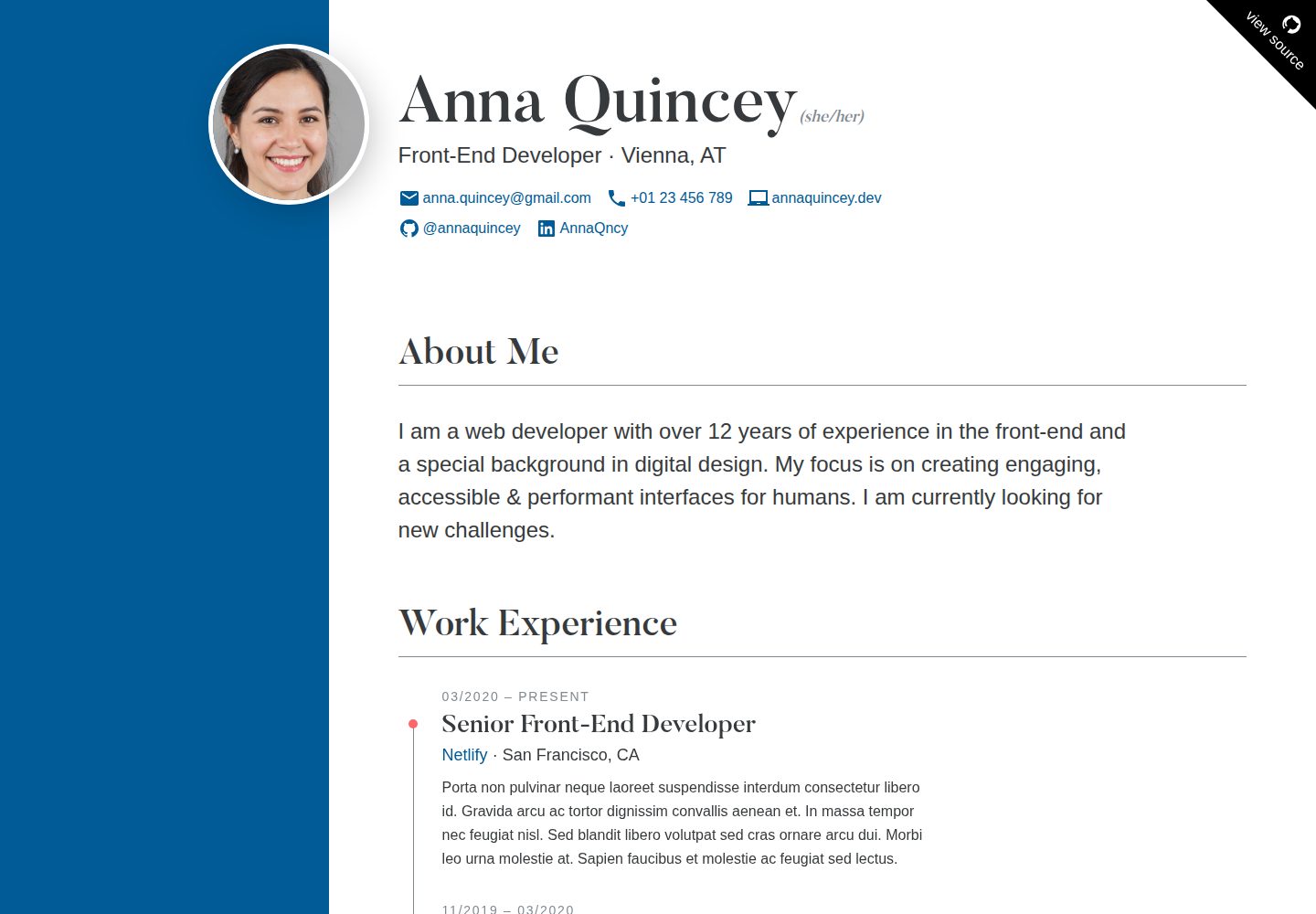
使用 Markdown 文件管理工作经历与教育背景条目,通过 frontmatter 定义标题、起止时间、机构等信息
HTML作品集企业官网
cv — HTML 作品集模板
作者 profstein
基于 HTML 的在线简历模板,支持 Markdown 编辑工作经历与教育背景,可自定义配色、语言与元数据,并针对打印和搜索引擎优化。
看看你的网站会是什么样
浏览真实页面截图,比较内容排版与手机效果。点击下方缩略图切换,放大查看整页细节。
全部页面与视图 2
截图用于了解视觉与布局,交互效果请以实际项目为准。
采集于 2026-10-02查看来源
值得关注的模板亮点
从已有项目资料中,快速了解它的特点。
个人信息、元数据和配色集中在 JSON 文件中配置,无需改动模板结构
支持通过 data/strings.json 翻译界面中的固定英文文案
提供语义化 HTML、h-resume 微格式、内联关键 CSS 和打印样式
包含开发服务器与生产构建命令,并支持部署到 Netlify
模板详细介绍
这是一个用于生成在线简历(CV)的静态网站模板,仓库作者用它发布自己的实际简历。项目基于 Node 构建,使用 Markdown 文件存放工作经历与教育背景条目,通过 JSON 文件配置个人信息、元数据与配色。README 说明该模板在 Node v10.15 环境下测试,更新的版本可能与部分依赖存在兼容问题。模板提供开发服务器与生产构建命令,并可通过 Netlify 部署。
内容结构上,简历包含个人信息、简介、工作经历、教育背景以及可选的自由内容区块。个人信息在 src/data/author.json 中编辑,支持姓名、职业、地点、头像、代词、邮箱、电话、网站、技能、语言和社交链接等字段。简介位于 entries/content/introduction.md,工作与教育条目分别放在 src/entries/work 和 src/entries/education,使用 frontmatter 定义标题、起止时间、机构、机构链接和地点。自由内容区块位于 entries/content/custom.md,可删除以隐藏该部分。
模板的样式与元数据在 src/data/meta.json 中配置,包括站点 URL、语言、区域代码以及主色和辅助色。界面中部分固定英文文案(如区块标题和标签)存放在 data/strings.json,可翻译为其他语言。README 还列出了语义化 HTML、WCAG AA 可访问性、h-resume 微格式、内联关键 CSS、打印样式和搜索引擎优化等特性。
使用限制方面,模板依赖 Node 环境,README 提示较新 Node 版本可能引发依赖问题;演示头像由 GAN 生成,标题字体 Butler 采用 CC BY-SA 4.0 许可,这些第三方素材需单独核对授权。代码本身采用 MIT 许可,可免费使用、修改、商用和分发,但分发时需保留版权声明和许可声明。
HTML作品集企业官网
适合你的项目吗?
适用场景
- 个人求职者发布在线简历,并保留可打印版本
- 开发者基于 MIT 许可的模板修改为自己的简历站点
- 需要将工作经历与教育背景以 Markdown 条目形式维护的静态站点
- 希望自定义简历配色、语言和社交链接的个人主页
适合人群
- 需要在线展示详细简历的个人
- 熟悉 Markdown 与 JSON 配置的开发者
- 使用 Node 工具链构建静态站点的用户
- 计划将简历部署到 Netlify 等静态托管平台的人
上手与定制指南
结合仓库当前版本的说明,按下面的资料检查内容、配置与运行要求。
- 1
项目基于 Node,README 说明在 Node v10.15 下测试,较新版本可能与部分依赖存在兼容问题
- 2
在根目录运行 npm install 安装依赖,npm start 启动开发服务器,npm run build 生成生产构建
- 3
编辑 src/data/author.json 填写个人信息,编辑 src/data/meta.json 设置站点 URL、语言和配色
- 4
工作经历与教育背景条目存放在 src/entries/work 和 src/entries/education,使用 Markdown 与 frontmatter
- 5
标题字体 Butler 采用 CC BY-SA 4.0 许可,演示头像由 GAN 生成,使用前需核对第三方素材授权
授权与来源资料
使用条件与限制
免费使用 · 保留许可声明本次收录的是公开仓库中采用 MIT 许可的免费版本;免费范围为该版本代码,不代表外部服务或第三方素材免费。
使用时需要遵守
- 允许免费使用、修改、商用和分发该版本代码。
- 分发代码副本或实质性部分时,保留原作者版权声明和完整 MIT 许可声明。
- 代码按现状提供;担保与责任限制以原许可证及适用法律为准。
额外费用与待核对事项
- 项目依赖 Node 环境,README 说明仅在 Node v10.15 下测试,较新版本可能与部分依赖存在兼容问题,使用前需确认运行环境。
- 标题字体 Butler 采用 CC BY-SA 4.0 许可,与代码的 MIT 许可不同,商用或再分发时需单独遵守该字体许可并保留署名。
- 演示头像由 GAN 生成,来源为第三方站点,其授权情况未在 README 中说明,使用前需自行核对。
- 演示图片、字体、图标及其他第三方素材需按各自许可核对,不能仅凭代码的 MIT 许可判断。
- 域名、托管、数据库、支付或 AI 等外部服务可能另外收费。
查看原文依据
Permission is hereby granted, free of charge
许可证原文
__The project is based on [Node](https://nodejs.org/en/) and was tested with v10.15__. Newer versions can apparently cause problems with some of the dependencies
README 原文
"Butler" headline font by [Fabian de Smet](https://fabiandesmet.com/portfolio/butler-font/) (CC BY-SA 4.0
README 原文
https://github.com/profstein/cv/blob/master/LICENSEhttps://github.com/profstein/cv/blob/master/README.mdAvatar image generated by GAN at [thispersondoesnotexist.com](https://www.thispersondoesnotexist.com/).
README 原文
DeepSeek 根据仓库许可证和 README 整理 ·2026-10-02。结果仅覆盖已读取资料,依赖、图片、字体及后续条款变更以各自原文为准。
项目核对记录与介绍依据
模板资料
- 来源平台
- GitHub
- 资料与维护参考分
- 资料较完整 · 82 / 100
- 技术栈
- HTML
- 网站类型
- 作品集 · 企业官网
这个分数如何计算
本站按许可资料(最高30分)、演示链接(12分)、预览图(10分)、Star数(15分)、记录的维护时间(15分)、描述完整度(8分)、功能记录(5分)和分类资料(5分)计算。它不是代码、安全或性能测试,也不是 Google 评分;有链接不代表已实测可用。
这个项目需要核对什么
- 记录的仓库更新时间
- 2025-08-26
- 截图检查日期
- 2026-10-02
已收录演示链接。请用你的内容与屏幕尺寸检查;有演示不代表表单、认证或支付已经可用。
目录记录的主要技术栈是 HTML。请通过依赖清单和锁文件核对实际版本与托管要求。这些说明基于收录资料,不代表代码审计或部署实测。
查看具体选型方法 →介绍的制作与核对状态
介绍由 AI 辅助整理目录与仓库资料。仓库作者不等于这篇介绍的审核者。
已完成服务器许可规则与 AI 来源核对;未经过人工编辑审核。
查看当时使用的来源资料
SHA-256: 97ccf0ef70c3d4c86e956163e31dc5cd5322ddef608eb6566b3bc54016e543a3
2026-10-02T23:10:17.404Z
来源文件 / 仓库# Resume
An online résumé. [Demo Site](https://demo-resume.netlify.app)

## Features
* Fully Customizable
* Semantic HTML
* Accessible (WCAG AA)
* [h-resume](http://microformats.org/wiki/h-resume) Microformat
* Self-Contained (no external resources)
* Search Engine Optimized (meta, JSON-LD, etc...)
* Critical CSS Inlined
* Print Styles
## Getting Started
__The project is based on [Node](https://nodejs.org/en/) and was tested with v10.15__. Newer versions can apparently cause problems with some of the dependencies - I'm working on resolving this soon.
To install the necessary packages, run this command in the root folder of the site:
```
npm install
```
__Commands__
* Run `npm start` for a development server and live reloading
* Run `npm run build` to generate a production build
Deploy a fork of this template to Netlify:
[](https://app.netlify.com/start/deploy?repository=https://github.com/maxboeck/resume)
## Customize your Résumé
To edit the content and design of your résumé, follow these steps:
### 1. Personal Details
Open `src/data/author.json` and edit the information describing yourself. The following properties are supported (optional properties can be removed from the JSON file):
<table>
<thead>
<tr>
<th>Key</th>
<th>Description</th>
<th>Required</th>
</tr>
</thead>
<tbody>
<tr>
<td><code>name</code></td>
<td>your full name</td>
<td>required</td>
</tr>
<tr>
<td><code>occupation</code></td>
<td>your job description</td>
<td>required</td>
</tr>
<tr>
<td><code>location</code></td>
<td>your town/state</td>
<td>optional</td>
</tr>
<tr>
<td><code>avatar</code></td>
<td>the file name of your profile photo. Must be located in <code>src/assets/images/</code></td>
<td>optional</td>
</tr>
<tr>
<td><code>pronouns</code></td>
<td>your preferred <a href="https://en.wikipedia.org/wiki/Preferred_gender_pronoun">gender pronouns</a></td>
<td>optional</td>
</tr>
<tr>
<td><code>email</code></td>
<td>your email address</td>
<td>optional</td>
</tr>
<tr>
<td><code>telephone</code></td>
<td>your phone number</td>
<td>optional</td>
</tr>
<tr>
<td><code>website</code></td>
<td>your personal website</td>
<td>optional</td>
</tr>
<tr>
<td><code>skills</code></td>
<td>an array of strings describing your skillset</td>
<td>optional</td>
</tr>
<tr>
<td><code>languages</code></td>
<td>an array of objects describing your spoken languages; each object should include a <code>name</code> (e.g. "English") and <code>level</code> (e.g. "fluent") property</td>
<td>optional</td>
</tr>
<tr>
<td><code>social</code></td>
<td>an array of objects for each social profile you want to link; each object should include a <code>name</code> (e.g. "Github"), <code>user</code> (e.g. "@maxboeck") and <code>url</code> (e.g. "https://github.com/maxboeck") property</td>
<td>optional</td>
</tr>
</tbody>
</table>
### 2. Introduction
Open `entries/content/introduction.md` and edit the text content of the file with your personal short introduction summary. Limit it to 2-3 sentences and convey your motivation. You can edit the title of the section here as well.
### 3. Work Experience & Education
The entries for the sections "work experience" and "education" are stored as markdown files in `src/entries/work` and `src/entries/education`.
Delete the demo files in there and create your own. The text should describe your responsibilities, learnings or achievements. Include the following [frontmatter](https://www.11ty.dev/docs/data-frontmatter/) data:
<table>
<thead>
<tr>
<th>Key</th>
<th>Description</th>
<th>Required</th>
</tr>
</thead>
<tbody>
<tr>
<td><code>title</code></td>
<td>the title of the entry. in "work experience", this sould be your role/position, in "education" this should be the degree/certification earned.</td>
<td>required</td>
</tr>
<tr>
<td><code>start</code></td>
<td>ISO timestamp of when you started this job or education.</td>
<td>required</td>
</tr>
<tr>
<td><code>end</code></td>
<td>ISO timestamp of when you ended this job or education. If not defined, that entry will say "- Present"</td>
<td>optional</td>
</tr>
<tr>
<td><code>organization</code></td>
<td>name of your employer (when "work") or school (when "education")</td>
<td>optional</td>
</tr>
<tr>
<td><code>organizationUrl</code></td>
<td>link to website of your employer (when "work") or school (when "education")</td>
<td>optional</td>
</tr>
<tr>
<td><code>location</code></td>
<td>location of company or school</td>
<td>optional</td>
</tr>
</tbody>
</table>
### 4. Custom Content
Edit `entries/content/custom.md` if you want to edit freeform content to the end of the CV. This could be a legal disclaimer or an additional section. Delete the file if you don't want this section to show up.
### 5. Meta Data & Design
Open `src/data/meta.json` and replace the `url` with the URL of your hosted résumé. You can also customize the language and color scheme here.
Supported properties are:
<table>
<thead>
<tr>
<th>Key</th>
<th>Description</th>
<th>Required</th>
</tr>
</thead>
<tbody>
<tr>
<td><code>url</code></td>
<td>the URL of your hosted résumé, e.g. <code>"https://my-resume.com"</code>. (no trailing slash)</td>
<td>required</td>
</tr>
<tr>
<td><code>lang</code></td>
<td>the 2-digit language identifier of your résumé, e.g. "en", "de", etc.</td>
<td>required</td>
</tr>
<tr>
<td><code>locale</code></td>
<td>the locale code of your résumé, e.g. "en_US", "de_DE", etc.</td>
<td>required</td>
</tr>
<tr>
<td><code>colors.primary</code></td>
<td>The HEX code of the primary brand color. defaults to blue <code>#005b96</code></td>
<td>optional</td>
</tr>
<tr>
<td><code>colors.secondary</code></td>
<td>The HEX code of the secondary brand color. defaults to red <code>#fc6767</code></td>
<td>optional</td>
</tr>
</tbody>
</table>
### 6. Internationalization
There are a few hardcoded english strings used in the template, such as the section titles and some labels. If you want to change the default language from english to something else, you can translate these strings by changing the values in `data/strings.json`.
## Credits
Thanks to [Eric Bailey](https://ericwbailey.design/) for his post ["How to not make a résumé in React"](https://ericwbailey.design/writing/how-to-not-make-a-resume-in-react.html), which gave me the idea.
## Colophon
* "Butler" headline font by [Fabian de Smet](https://fabiandesmet.com/portfolio/butler-font/) (CC BY-SA 4.0 [License](https://github.com/maxboeck/resume/tree/master/src/assets/fonts/Butler_ButlerStencil_FontLicense_v1_0.pdf))
* Avatar image generated by GAN at [thispersondoesnotexist.com](https://www.thispersondoesnotexist.com/).
看看同类模板
对比同技术栈与用途的模板,找到更适合的视觉与内容结构。

simplefolio
⚡️ A minimal portfolio template for Developers
HTML · 作品集

mazer
Free and Open-source Bootstrap 5 Admin Dashboard Template and Landing Page
HTML · 后台

Freelancer
Freelancer 是 Start Bootstrap 出品的单页作品集模板,专为自由职业者、设计师和小型工作室设计。 页面结构清晰,包含多个内容区块、响应式作品集网格,每个作品项目配有模态窗口展示详情。
HTML · 作品集

Resume
Resume 是 Start Bootstrap 推出的简历与 CV 主题,基于 Bootstrap 构建,采用固定侧边栏加内容区块的结构。
HTML · 作品集

Creative
Creative 是 Start Bootstrap 团队维护的一款单页营销模板,定位明确:为创意机构或产品服务提供一个以作品展示和行动号召为核心的落地页。
HTML · 企业官网

startbootstrap-agency
Agency 是 Start Bootstrap 维护的单页代理商作品集主题,基于 Bootstrap 构建,MIT 许可。
HTML · 企业官网