Built with Next.js, with styling handled by Emotion
Next.jsReactBlog
next-markdown-blog-YoRHa — Next.js Blog Template
By qlawmarq
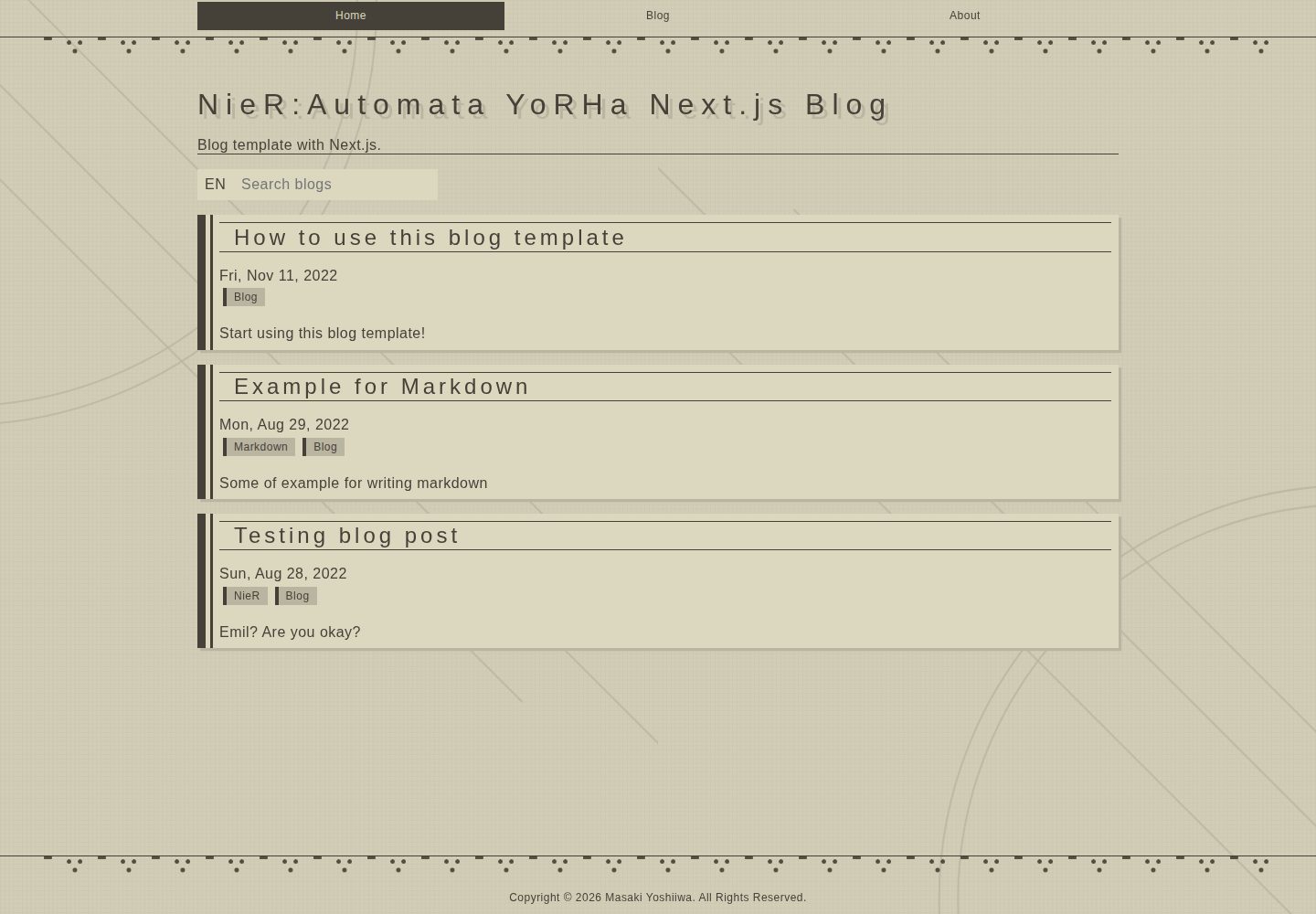
A Markdown blog template built with Next.js and Emotion, with a visual style inspired by the YoRHa design from NieR: Automata.
Explore the design
Compare the page layouts and mobile experience. Open any screenshot for a closer look.
Desktop homepage1 / 2
Desktop captureTop of page
Actual screenshot captured by the server browser.
All pages & views 2
Screenshots show visual appearance; interactive behavior may differ.
Recorded 2026-10-12View source
What stands out
A quick read of the recorded project description.
Blog posts are stored as Markdown files in the contents/blog directory
Visual design references the YoRHa interface style from NieR: Automata
Three development environment setup options: Node.js, Docker Compose, and VS Code Dev Containers
End-to-end tests written with Playwright Test
Template Details
This is a blog template built with Next.js, using Emotion for styling, with article content maintained as Markdown files. The template's visual design references the interface style of the YoRHa forces in NieR: Automata, and the repository provides actual screenshots of the desktop and mobile homepages as well as an online demo address.
For content management, blog posts are stored in the contents/blog directory, and metadata such as the site name is modified centrally in constants/siteMetadata.ts. The development environment supports three approaches: local Node.js (requires v22.x), Docker Compose, and the VS Code Dev Containers extension. The project uses Playwright Test for end-to-end tests, which can be run via npx playwright test or npm run test:e2e.
The repository is under the MIT license, allowing free use, modification, commercial use, and distribution of this version of the code, provided that the copyright notice and the full MIT license notice are retained when distributing. The licenses for third-party assets such as demo images, fonts, and icons need to be checked separately, and external services such as domains and hosting may incur additional charges.
Next.jsBlog
Is it right for your project?
Use Cases
- Building a static blog with Markdown files as the content source
- Applying a NieR: Automata-style interface design to a blog
- Quickly starting a development environment locally via Docker Compose or Dev Containers
- Adding Playwright end-to-end tests to a blog project
Suitable For
- Personal blog authors who want to manage article content with Markdown
- Front-end developers who prefer the Next.js and Emotion technology combination
- Page design scenarios that need visual references in the NieR: Automata style
Getting started & customization
Use these recorded setup notes alongside the repository instructions for your chosen version.
- 1
For local development, first install Node.js v22.x, then run npm i and npm run dev, and visit http://localhost:3000/
- 2
Alternatively, install Docker and run docker-compose up to start
- 3
When using the VS Code Dev Containers extension, run Dev Containers: Open Folder in Container... from the command palette and select the project folder
- 4
Metadata such as the site name is modified in constants/siteMetadata.ts, and blog content is maintained in the contents/blog directory
- 5
To run end-to-end tests, execute npx playwright test or npm run test:e2e
License & source material
Usage conditions & limitations
Free to use · keep license noticeThis entry covers the free version under the MIT license in the public repository; the free scope is the code of this version and does not mean that external services or third-party assets are free.
Must comply with when using
- Free use, modification, commercial use, and distribution of this version of the code are allowed.
- When distributing copies or substantial portions of the code, retain the original author's copyright notice and the full MIT license notice.
- The code is provided as is; warranties and limitations of liability are governed by the original license and applicable law.
Additional costs & items to verify
- Demo images, fonts, icons, and other third-party assets must be checked against their respective licenses and cannot be judged solely by the code's MIT license.
- External services such as domains, hosting, databases, payments, or AI may incur additional charges.
View Original Text Basis
https://github.com/qlawmarq/next-markdown-blog-YoRHa/blob/master/LICENSEhttps://github.com/qlawmarq/next-markdown-blog-YoRHa/blob/master/README.mdPermission is hereby granted, free of charge
Original License Text
Compiled by DeepSeek based on repository license and README ·2026-10-12. Results only cover the materials read; dependencies, images, fonts, and subsequent term changes are subject to their respective original texts.
Project checks & description sources
Template Information
- Source platforms
- GitHub
- Documentation and maintenance reference score
- More documented · 83 / 100
- Technologies
- Next.js · React
- Website type
- Blog
How this score is calculated
Our heuristic uses license records (up to 30), a demo link (12), a preview (10), stars (15), recorded maintenance (15), description completeness (8), feature records (5) and classification data (5). It is not a code, security or performance test, or a Google score. A link does not establish tested functionality.
What to verify for this project
- Repository update recorded
- 2026-09-14
- Screenshot last checked
- 2026-10-12
A demo link is listed. Check it with your own content and viewport sizes; its presence does not confirm that forms, authentication or payments work.
The catalog identifies Next.js as the primary stack. Check the actual dependency manifest and lockfile for versions and hosting requirements. These notes use recorded metadata, not a code audit or a deployment test.
Use a selection guide →How this description was prepared
AI-assisted description based on catalog records and repository material. Repository authors are not automatically the reviewers of this description.
Review declaration: [email protected] · 2026-10-13
Inspect the recorded source material
SHA-256: 198ca8ffebbe06188661941b722cc59cc1a63be4ffc63c9799c03a270e58ce77
2026-10-12T16:06:58.872Z
Source file / repository# NieR:Automata YoRHa Next.js Blog template ## Elements - [Next.js](https://nextjs.org/) - [Emotion](https://emotion.sh/docs/introduction) - [Markdown](https://www.markdownguide.org/cheat-sheet/) ## Live demo https://next-playground.vercel.app  --- # Development There are two ways to set up a local development environment. Read below and choose the one you prefer. ### Setup with Node.js Please install Node.js (v22.x) first. After installation is complete, follow the steps below: ```sh npm i npm run dev ``` Access following link to check the app is working: http://localhost:3000/ ### Setup with Docker Compose Please install Docker first. After installation is complete, execute the command below: ```sh docker-compose up ``` After a while, access following link to check the app is working: http://localhost:3000/ ### Setup with devcontainer The above setup can be used for development, but you can also setup dev env with using the [VS Code Dev Containers extension](https://marketplace.visualstudio.com/items?itemName=ms-vscode-remote.remote-containers). - Install VS code and the [Dev Containers extension](https://marketplace.visualstudio.com/items?itemName=ms-vscode-remote.remote-containers). - [Optional] To share git credential with the container, run `ssh-add $HOME/.ssh/your_ssh_rsa`. See following for more info: https://code.visualstudio.com/remote/advancedcontainers/sharing-git-credentials - Run the `Dev Containers: Open Folder in Container...` command from the Command Palette or quick actions Status bar item, and select the project folder. - Wait until the building of the application is finished, then access the application url ## E2E Testing The E2E testing is executed by [Playwright Test](https://playwright.dev/). Detailed in `playwright.config.ts` and `e2e-test/e2e-test.spec.ts`. To run the E2E test, do the following: ```sh npx playwright test ``` Or ```sh npm run test:e2e ``` See [Playwright Docs](https://playwright.dev/docs/intro) for more details. --- # Production ## Update site metadata Update the following file, which contains the site name and other metadata. `constants/siteMetadata.ts` ## Update or add your own contents To update the contents of your own blog, you can update the contents in `contents/blog`. You can write blogs in markdown by referring to the following: https://www.markdownguide.org/cheat-sheet/
Explore similar templates
Compare previews and descriptions within the same stack and category.

tailwind-nextjs-starter-blog
A Next.js and Tailwind CSS blog starter template using Contentlayer for Markdown/MDX, with built-in SEO, code highlighting, and tags. It targets personal technical blogs and migration from Jekyll/Hugo to React, and supports one-click Vercel deployment.
Next.js · Blog

Nextjs-tailwindcss-blog-template
A Next.js blog styled with Tailwind CSS. The current branch processes Markdown with Velite; the earlier Contentlayer setup is retained in a separate historical branch.
Next.js · Blog

Next-js-Blog-Boilerplate
A blog starter built on Next.js 12 and Tailwind CSS 3, integrating TypeScript, ESLint, Prettier, and PostCSS.
Next.js · Blog

nextjs-blog-theme
A Next.js 15 and Tailwind CSS 4.x blog starter by Netlify, designed by Bejamas, with MDX support, dark/light theme switching, and environment-variable configuration. It includes a visual setup wizard for deploying to Netlify and manages content via local .mdx files.
Next.js · Blog

blog
A personal blog forked from Timlrx's tailwind-nextjs-starter-blog, built with Next.js, React, and Tailwind CSS. Content is stored as Markdown/MDX under data/, with site, author, navigation, and project data in separate files.
Next.js · Blog

tailnext
Tailnext is a free, open-source template built on the Next.js 14 App Router and Tailwind CSS, created by the onWidget team.
Next.js · Blog