使用 Next.js 构建,样式由 Emotion 处理
Next.jsReact博客
next-markdown-blog-YoRHa — Next.js 博客模板
作者 qlawmarq
基于 Next.js 与 Emotion 的 Markdown 博客模板,视觉风格参考《尼尔:机械纪元》中的 YoRHa 设计。
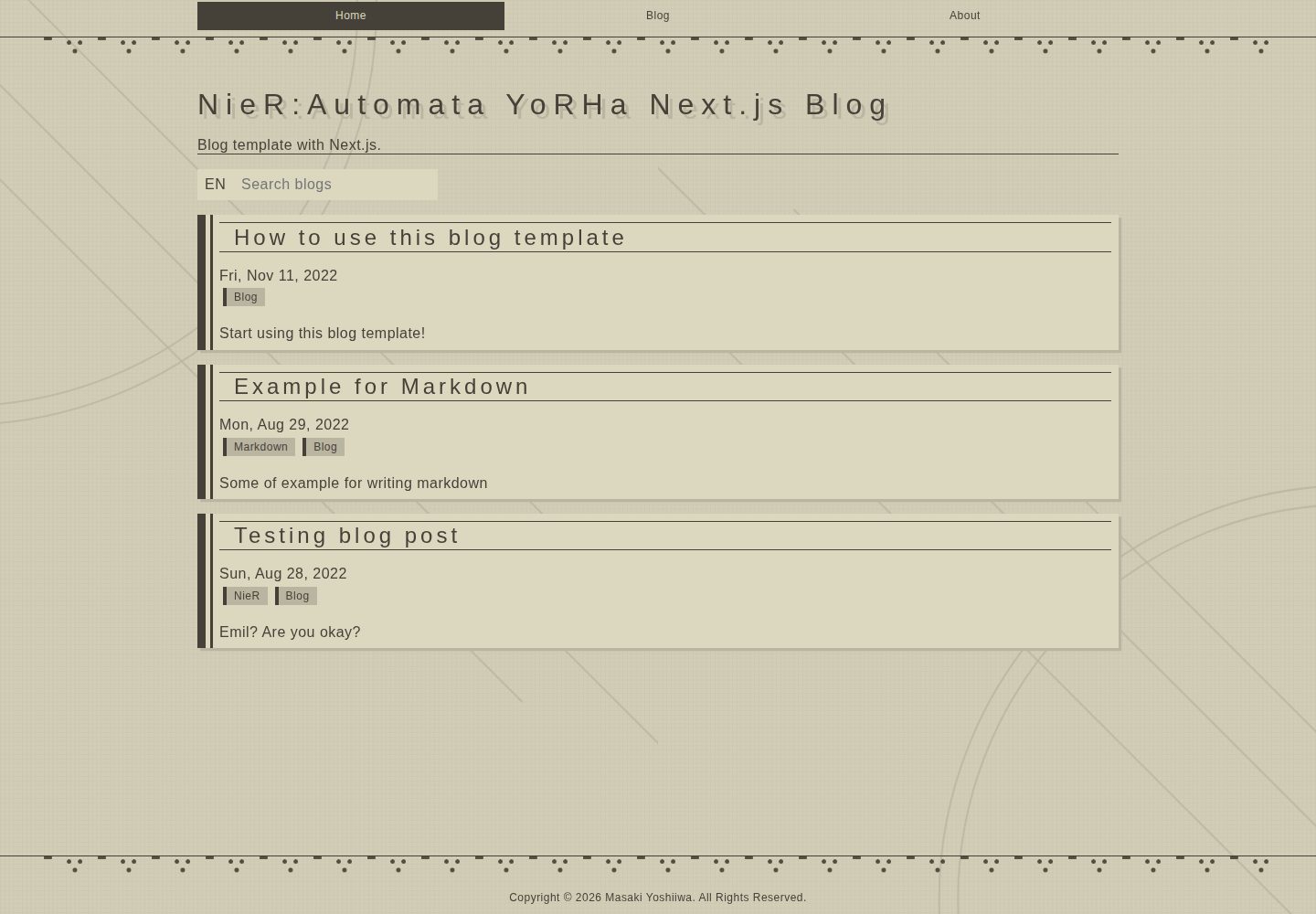
看看你的网站会是什么样
浏览真实页面截图,比较内容排版与手机效果。点击下方缩略图切换,放大查看整页细节。
全部页面与视图 2
截图用于了解视觉与布局,交互效果请以实际项目为准。
采集于 2026-10-12查看来源
值得关注的模板亮点
从已有项目资料中,快速了解它的特点。
博客文章以 Markdown 文件形式存放在 contents/blog 目录
视觉设计参考《尼尔:机械纪元》YoRHa 界面风格
提供 Node.js、Docker Compose 和 VS Code Dev Containers 三种开发环境搭建方式
使用 Playwright Test 编写端到端测试
模板详细介绍
这是一个使用 Next.js 构建的博客模板,样式方案采用 Emotion,文章内容以 Markdown 文件形式维护。模板的视觉设计参考了《尼尔:机械纪元》中 YoRHa 部队的界面风格,仓库提供了桌面端与手机端首页的实际截图以及在线演示地址。
内容管理方面,博客文章存放在 contents/blog 目录,站点名称等元数据集中在 constants/siteMetadata.ts 中修改。开发环境支持三种方式:本地 Node.js(要求 v22.x)、Docker Compose,以及 VS Code Dev Containers 扩展。项目使用 Playwright Test 编写端到端测试,可通过 npx playwright test 或 npm run test:e2e 运行。
仓库采用 MIT 许可,允许免费使用、修改、商用和分发该版本代码,分发时需保留版权声明与完整 MIT 许可声明。演示图片、字体、图标等第三方素材的许可需单独核对,域名、托管等外部服务可能另行收费。
Next.js博客
适合你的项目吗?
适用场景
- 搭建以 Markdown 文件为内容源的静态博客
- 为博客套用《尼尔:机械纪元》风格的界面设计
- 在本地通过 Docker Compose 或 Dev Containers 快速启动开发环境
- 为博客项目补充 Playwright 端到端测试
适合人群
- 希望用 Markdown 管理文章内容的个人博客作者
- 偏好 Next.js 与 Emotion 技术组合的前端开发者
- 需要《尼尔:机械纪元》风格视觉参考的页面设计场景
上手与定制指南
结合仓库当前版本的说明,按下面的资料检查内容、配置与运行要求。
- 1
本地开发需先安装 Node.js v22.x,然后执行 npm i 与 npm run dev,访问 http://localhost:3000/
- 2
也可安装 Docker 后执行 docker-compose up 启动
- 3
使用 VS Code Dev Containers 扩展时,通过命令面板执行 Dev Containers: Open Folder in Container... 并选择项目文件夹
- 4
站点名称等元数据在 constants/siteMetadata.ts 中修改,博客内容在 contents/blog 目录维护
- 5
运行端到端测试可执行 npx playwright test 或 npm run test:e2e
授权与来源资料
使用条件与限制
免费使用 · 保留许可声明本次收录的是公开仓库中采用 MIT 许可的免费版本;免费范围为该版本代码,不代表外部服务或第三方素材免费。
使用时需要遵守
- 允许免费使用、修改、商用和分发该版本代码。
- 分发代码副本或实质性部分时,保留原作者版权声明和完整 MIT 许可声明。
- 代码按现状提供;担保与责任限制以原许可证及适用法律为准。
额外费用与待核对事项
- 演示图片、字体、图标及其他第三方素材需按各自许可核对,不能仅凭代码的 MIT 许可判断。
- 域名、托管、数据库、支付或 AI 等外部服务可能另外收费。
查看原文依据
https://github.com/qlawmarq/next-markdown-blog-YoRHa/blob/master/LICENSEhttps://github.com/qlawmarq/next-markdown-blog-YoRHa/blob/master/README.mdPermission is hereby granted, free of charge
许可证原文
DeepSeek 根据仓库许可证和 README 整理 ·2026-10-12。结果仅覆盖已读取资料,依赖、图片、字体及后续条款变更以各自原文为准。
项目核对记录与介绍依据
模板资料
- 来源平台
- GitHub
- 资料与维护参考分
- 资料较完整 · 83 / 100
- 技术栈
- Next.js · React
- 网站类型
- 博客
这个分数如何计算
本站按许可资料(最高30分)、演示链接(12分)、预览图(10分)、Star数(15分)、记录的维护时间(15分)、描述完整度(8分)、功能记录(5分)和分类资料(5分)计算。它不是代码、安全或性能测试,也不是 Google 评分;有链接不代表已实测可用。
这个项目需要核对什么
- 记录的仓库更新时间
- 2026-09-14
- 截图检查日期
- 2026-10-12
已收录演示链接。请用你的内容与屏幕尺寸检查;有演示不代表表单、认证或支付已经可用。
目录记录的主要技术栈是 Next.js。请通过依赖清单和锁文件核对实际版本与托管要求。这些说明基于收录资料,不代表代码审计或部署实测。
查看具体选型方法 →介绍的制作与核对状态
介绍由 AI 辅助整理目录与仓库资料。仓库作者不等于这篇介绍的审核者。
审核声明: [email protected] · 2026-10-13
查看当时使用的来源资料
SHA-256: 198ca8ffebbe06188661941b722cc59cc1a63be4ffc63c9799c03a270e58ce77
2026-10-12T16:06:58.872Z
来源文件 / 仓库# NieR:Automata YoRHa Next.js Blog template ## Elements - [Next.js](https://nextjs.org/) - [Emotion](https://emotion.sh/docs/introduction) - [Markdown](https://www.markdownguide.org/cheat-sheet/) ## Live demo https://next-playground.vercel.app  --- # Development There are two ways to set up a local development environment. Read below and choose the one you prefer. ### Setup with Node.js Please install Node.js (v22.x) first. After installation is complete, follow the steps below: ```sh npm i npm run dev ``` Access following link to check the app is working: http://localhost:3000/ ### Setup with Docker Compose Please install Docker first. After installation is complete, execute the command below: ```sh docker-compose up ``` After a while, access following link to check the app is working: http://localhost:3000/ ### Setup with devcontainer The above setup can be used for development, but you can also setup dev env with using the [VS Code Dev Containers extension](https://marketplace.visualstudio.com/items?itemName=ms-vscode-remote.remote-containers). - Install VS code and the [Dev Containers extension](https://marketplace.visualstudio.com/items?itemName=ms-vscode-remote.remote-containers). - [Optional] To share git credential with the container, run `ssh-add $HOME/.ssh/your_ssh_rsa`. See following for more info: https://code.visualstudio.com/remote/advancedcontainers/sharing-git-credentials - Run the `Dev Containers: Open Folder in Container...` command from the Command Palette or quick actions Status bar item, and select the project folder. - Wait until the building of the application is finished, then access the application url ## E2E Testing The E2E testing is executed by [Playwright Test](https://playwright.dev/). Detailed in `playwright.config.ts` and `e2e-test/e2e-test.spec.ts`. To run the E2E test, do the following: ```sh npx playwright test ``` Or ```sh npm run test:e2e ``` See [Playwright Docs](https://playwright.dev/docs/intro) for more details. --- # Production ## Update site metadata Update the following file, which contains the site name and other metadata. `constants/siteMetadata.ts` ## Update or add your own contents To update the contents of your own blog, you can update the contents in `contents/blog`. You can write blogs in markdown by referring to the following: https://www.markdownguide.org/cheat-sheet/
看看同类模板
对比同技术栈与用途的模板,找到更适合的视觉与内容结构。

tailwind-nextjs-starter-blog
tailwind-nextjs-starter-blog 是一个面向个人技术博客的 Next.js 与 Tailwind CSS 启动模板,其 v2 版本基于 App Router 与 React Server Comp…
Next.js · 博客

Nextjs-tailwindcss-blog-template
使用 Tailwind CSS 的 Next.js 博客。当前分支通过 Velite 处理 Markdown,早期 Contentlayer 实现保留在单独的历史分支中。
Next.js · 博客

Next-js-Blog-Boilerplate
Next-js-Blog-Boilerplate 是一套面向个人与技术博客的启动代码,基于 Next.js 12 与 Tailwind CSS 3 构建,同时集成了 TypeScript、ESLint、Prettier …
Next.js · 博客

nextjs-blog-theme
nextjs-blog-theme 是 Netlify 团队维护的一个博客启动模板,基于 Next.js 15(Pages Router)和 Tailwind CSS 4.x 构建,设计由 Bejamas 机构完成。
Next.js · 博客

blog
🚀 My personal blog made with Tailwind CSS and NextJS. Template from Timlrx. Feel free to fork, follow and use…
Next.js · 博客

tailnext
Tailnext 是一个基于 Next.js 14 App Router 和 Tailwind CSS 的免费开源模板,由 onWidget 团队创建并维护。
Next.js · 博客