Pre-configured Next.js + React + TypeScript strict mode, mixing Pages Router and App Router
Next.jsReactHTMLPortfolio
template-next — Next.js Portfolio Template
By r-vilemen
A generic Next.js project starter template with built-in PWA, styled-components, TypeScript strict mode, Biome, Vitest, and Auth.js, plus a sample homepage layout that can be removed with one click.
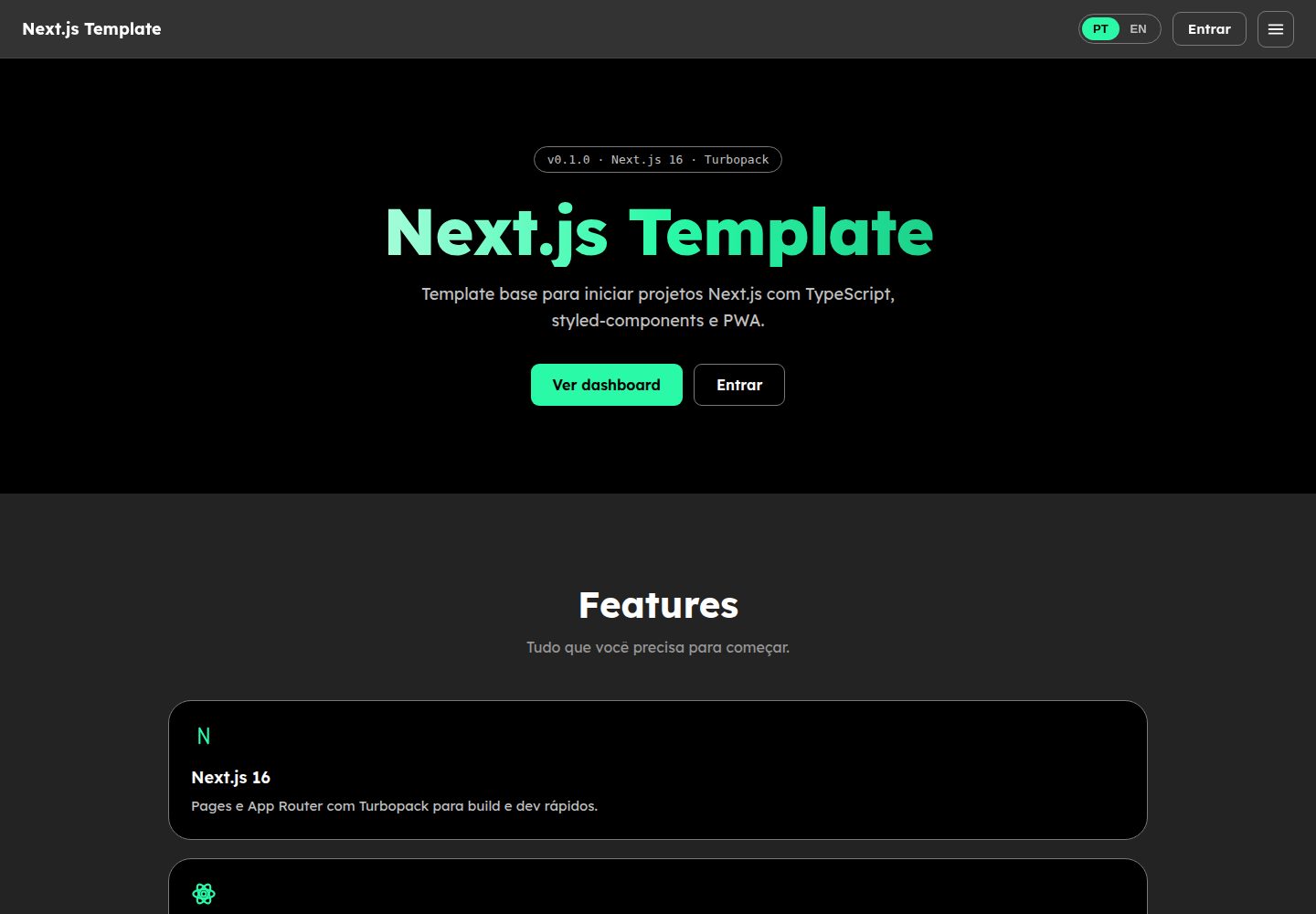
Explore the design
Compare the page layouts and mobile experience. Open any screenshot for a closer look.
Desktop homepage1 / 2
Desktop captureTop of page
Actual screenshot captured by the server browser.
All pages & views 2
Screenshots show visual appearance; interactive behavior may differ.
Recorded 2026-10-12View source
What stands out
A quick read of the recorded project description.
Built-in styled-components theme, Biome formatting and linting, Vitest tests, and GitHub Actions CI
Integrated Serwist PWA, generating a service worker at build time and serving it via a route handler
Auth.js v5 demo credentials login, with protected pages validated in getServerSideProps via withAuth
Includes a sample homepage layout that can be removed automatically or manually, with pt/en bilingual support and five homepage sections
Template Details
This template is aimed at projects that need to quickly set up a Next.js application. The repository comes with a fairly complete engineering configuration: pages are organized using the Pages Router, while the App Router hosts the Auth.js route handler and the Serwist service worker; styling uses styled-components' CSS-in-JS approach with a theme file; code quality is handled by Biome for formatting, linting, and import sorting, type checking runs via tsc --noEmit, tests use Vitest and Testing Library in a jsdom environment, and there are Husky + lint-staged pre-commit hooks and a GitHub Actions CI workflow.
The template includes an optional sample homepage layout, concentrated in the src/homepage/ directory, containing a fixed Header (with scrollspy), a Footer (with dynamically generated year), five homepage sections (Intro, Features, Como usar, Comandos, Métricas), and pt/en bilingual support. In development mode, a "Remover layout de exemplo" button appears in the bottom-right corner of the page; it automatically restores the wiring files and deletes the directory via POST /api/remove-homepage, and that endpoint returns 403 in non-development environments. You can also manually delete and revert _app.tsx, index.tsx, and GlobalStyles.ts in the order given in the README.
Authentication uses Auth.js v5, configured in src/auth.ts, and provides only a demo credentials provider ([email protected] / admin123); protected pages are validated in getServerSideProps via src/lib/withAuth.ts. The PWA is generated by Serwist at build time as a service worker, served at /serwist/sw.js through src/app/serwist/[path]/route.ts, and registered by the SerwistProvider in _app.tsx; it is not enabled in development.
Before use, note the following: the README requires Node.js v24 or higher (the repository includes .nvmrc); the login page and demo dashboard can be deleted after replacing with a production provider; third-party assets such as sample images, fonts, and icons need separate license verification, while the code itself is MIT licensed.
Next.jsReactHTMLPortfolio
Is it right for your project?
Use Cases
- New Next.js projects that need a quick start and want engineering configuration and directory structure out of the box
- Developers who want to reference how Pages Router and App Router are mixed, and how Auth.js and Serwist are integrated
- A starting layout with a sample homepage and bilingual support that can be stripped out entirely
Suitable For
- Developers preparing to create a new Next.js application and wanting to reduce initial configuration work
- Projects that need PWA, authentication, testing, and CI basics all in place
- Individuals or teams who want to freely modify and distribute the code under the MIT license
Getting started & customization
Use these recorded setup notes alongside the repository instructions for your chosen version.
- 1
After cloning the repository, run npm install, copy .env.example to .env.local, and generate a secret with npx auth secret
- 2
The README requires Node.js v24 or higher; the repository includes .nvmrc for reference
- 3
Run npm run dev in development and visit http://localhost:3000
- 4
The sample homepage can be removed automatically in development mode using the button in the bottom-right corner, or manually by following the README steps to delete src/homepage and revert the related files
- 5
The demo login page and dashboard can be deleted after replacing the credentials provider
License & source material
Usage conditions & limitations
Free to use · keep license noticeThis entry covers the free version under the MIT license in the public repository; the free scope is the code of that version and does not mean external services or third-party assets are free.
Must comply with when using
- You may use, modify, commercialize, and distribute the code of this version for free.
- When distributing copies or substantial portions of the code, retain the original author's copyright notice and the full MIT license notice.
- The code is provided as is; warranties and limitations of liability are governed by the original license and applicable law.
Additional costs & items to verify
- Demo images, fonts, icons, and other third-party assets must be checked against their respective licenses; they cannot be judged solely by the code's MIT license.
- External services such as domains, hosting, databases, payments, or AI may incur additional charges.
- Using this template requires Node.js v24 or higher; a .nvmrc file is included in the repository for reference.
- The login page and demo dashboard are for demonstration purposes only and can be deleted after replacing with a production credentials provider.
- The authentication part only provides demo credentials login ([email protected] / admin123) and is not a production-grade authentication solution.
- The endpoint for automatically removing the sample homepage is only available in development mode; in non-development environments it returns 403 and the button is hidden.
- The service worker generated by Serwist is disabled in development and only takes effect in the build output.
- Before use, copy .env.example to .env.local and generate an Auth.js secret via npx auth secret.
View Original Text Basis
Permission is hereby granted, free of charge
Original License Text
O Node.js v24+ é necessário (`.nvmrc` incluído).
Original README
A página de login e o dashboard demo podem ser removidos ao trocar o provider de credenciais pelo de produção.
Original README
Auth.js v5 (next-auth)**: login com credenciais demo (`[email protected]` / `admin123`)
Original README
A rota só executa em desenvolvimento (fora dele responde `403`) e o badge fica oculto.
Original README
em desenvolvimento o SW fica desabilitado.
Original README
https://github.com/r-vilemen/template-next/blob/main/LICENSEhttps://github.com/r-vilemen/template-next/blob/main/README.mdCopie as variáveis de ambiente e gere um secret para o Auth.js:
Original README
Compiled by DeepSeek based on repository license and README ·2026-10-12. Results only cover the materials read; dependencies, images, fonts, and subsequent term changes are subject to their respective original texts.
Project checks & description sources
Template Information
- Source platforms
- GitHub
- Documentation and maintenance reference score
- More documented · 88 / 100
- Technologies
- Next.js · React · HTML
- Website type
- Portfolio
How this score is calculated
Our heuristic uses license records (up to 30), a demo link (12), a preview (10), stars (15), recorded maintenance (15), description completeness (8), feature records (5) and classification data (5). It is not a code, security or performance test, or a Google score. A link does not establish tested functionality.
What to verify for this project
- Repository update recorded
- 2026-08-07
- Screenshot last checked
- 2026-10-12
A demo link is listed. Check it with your own content and viewport sizes; its presence does not confirm that forms, authentication or payments work.
The catalog identifies Next.js as the primary stack. Check the actual dependency manifest and lockfile for versions and hosting requirements. These notes use recorded metadata, not a code audit or a deployment test.
Use a selection guide →How this description was prepared
AI-assisted description based on catalog records and repository material. Repository authors are not automatically the reviewers of this description.
Review declaration: [email protected] · 2026-10-13
Inspect the recorded source material
SHA-256: 1f8a2e7b89375e4329fc9fb111cbed1b836fa3bdee620a0ae30058e0c6b72407
2026-10-12T13:53:24.754Z
Source file / repository# Next.js Template Project Template base para iniciar rapidamente projetos **Next.js**. Já vem com PWA (Serwist), styled-components, TypeScript estrito, Biome, testes (Vitest) e CI configurados. ## 🛠 Tecnologias Utilizadas - **Next.js 16** (Pages Router + App Router para rotas especiais) + **React 19** + TypeScript estrito - **Styled-Components** para estilos CSS-in-JS com temas - **PWA**: [Serwist](https://serwist.pages.dev/) com **Turbopack** — service worker gerado em build e servido em `/serwist/sw.js` - **Biome**: formatação, lint e organização de imports (substitui ESLint/Prettier) - **Vitest + Testing Library**: testes unitários e de componentes - **Husky + lint-staged**: hooks de pré-commit - **GitHub Actions**: CI (check, typecheck, testes e build) - **Auth.js v5 (next-auth)**: login com credenciais demo (`[email protected]` / `admin123`) ## 📂 Estrutura de Pastas ```bash src/ │ ├── components/ # Componentes reutilizáveis │ ├── Links/ # Tags <head> (manifest, ícones) │ └── SEO/ # Meta tags e SEO por página │ ├── homepage/ # Layout de exemplo (Header, Footer, Layout, │ # seções da home, i18n, hooks e estilos) │ ├── pages/ # Páginas da aplicação (Pages Router) │ ├── _app.tsx # Providers globais (auth, tema, PWA, fontes) │ ├── _document.tsx # Documento customizado (SSR styled-components) │ ├── index.tsx # Página inicial │ ├── login/ # Página de login (Auth.js) │ ├── dashboard/ # Página protegida (withAuth) │ └── 404/ # Página de erro 404 │ ├── app/ # App Router (rotas especiais) │ ├── api/auth/[...nextauth]/ # Route handler do Auth.js │ ├── serwist/[path]/ # Route handler que serve o service worker │ └── sw.ts # Service worker (Serwist + Turbopack) │ ├── auth.ts # Configuração do Auth.js v5 ├── lib/ # Utilitários de servidor (withAuth) ├── services/api/ # Camada de API (wrapper de fetch) ├── components/ │ ├── ui/ # Componentes base (Button, Input, Modal, Toast, Spinner) │ └── ... │ ├── ui/ │ ├── assets/ # Ícones e imagens │ └── styles/ # Estilos globais e tema │ ├── theme.ts # Tema (cores, fontes, breakpoints) │ ├── GlobalStyles.ts # Reset e estilos globais │ └── styles.d.ts # Tipagem do tema para styled-components │ └── utils/ └── functions/ # Funções utilitárias ├── getDate.ts # Ano, mês e dia atuais ├── hexToRgba.ts # Conversão de HEX para RGBA ├── scrollToElement.ts # Scroll suave até um elemento └── valueFormat.ts # Formatação de valores (BRL) ``` ## 🔧 Como Usar 1. Clone o repositório e instale as dependências: ```bash npm install ``` 2. Copie as variáveis de ambiente e gere um secret para o Auth.js: ```bash cp .env.example .env.local npx auth secret ``` 3. Rode em desenvolvimento: ```bash npm run dev ``` Acesse `http://localhost:3000`. ## 📜 Scripts | Script | Descrição | | ------------------ | --------------------------------------------- | | `npm run dev` | Ambiente de desenvolvimento (Turbopack) | | `npm run build` | Build de produção (Turbopack) | | `npm start` | Servidor de produção | | `npm run lint` | Lint com Biome | | `npm run format` | Formatação com Biome | | `npm run check` | Formatação + lint + organização de imports | | `npm run typecheck`| Verificação de tipos (tsc --noEmit) | | `npm test` | Executa os testes (Vitest) | | `npm run test:watch` | Executa os testes em modo watch | ## 🧪 Testes Os testes ficam colados aos arquivos utilitários (`*.test.ts`) e são executados com Vitest em ambiente `jsdom`. ## 🚀 PWA O service worker é gerado durante o build pelo Serwist com **Turbopack** (`src/app/sw.ts`, empacotado via esbuild) e servido em `/serwist/sw.js` pelo route handler `src/app/serwist/[path]/route.ts`. O registro é feito pelo `SerwistProvider` no `_app.tsx`; em desenvolvimento o SW fica desabilitado. ## 🔐 Autenticação Auth.js v5 configurado em `src/auth.ts` com provider de credenciais **demo** (`[email protected]` / `admin123`). O route handler fica em `src/app/api/auth/[...nextauth]/route.ts` e páginas protegidas usam `withAuth` (`src/lib/withAuth.ts`) no `getServerSideProps`. ## 🚀 Iniciar um novo projeto a partir deste template 1. **Crie o repositório** usando este template e clone-o. 2. **Renomeie o projeto** no `package.json` (campo `name`) e ajuste a `src/config/site.ts` (nome do site, autor, descrição, tema e URL de produção). 3. **Copie e preencha as variáveis de ambiente**: ```bash cp .env.example .env.local npx auth secret ``` 4. **Instale e verifique**: ```bash npm install npm run check npm run typecheck npm test npm run build ``` 5. **Comece a desenvolver**: adicione páginas em `src/pages/` e componentes em `src/components/`. Para autenticar uma página, use `withAuth` no `getServerSideProps`. Para chamadas de API, use `src/services/api`. > O Node.js v24+ é necessário (`.nvmrc` incluído). A página de login e o dashboard demo podem ser removidos ao trocar o provider de credenciais pelo de produção. ## 🧹 Removendo o layout de exemplo (homepage) O template inclui um layout de exemplo opcional, consolidado em `src/homepage/`: Header fixo com scrollspy, Footer com ano dinâmico, 5 seções na homepage (Intro, Features, Como usar, Comandos, Métricas), i18n pt/en e hooks auxiliares. > Guia completo e detalhado: [`src/homepage/README.md`](src/homepage/README.md) ### Opção automática (dev mode) Rodando `npm run dev`, um botão fixo **Remover layout de exemplo** aparece no canto inferior direito. Ele exige confirmação (modal com **Remover e limpar**) e dispara `POST /api/remove-homepage`, que reverte os arquivos de wiring, apaga `src/homepage` e se auto-destrói. A rota só executa em desenvolvimento (fora dele responde `403`) e o badge fica oculto. Para excluir manualmente, siga a ordem: 1. **Apague a pasta `src/homepage/`:** ```bash rm -rf src/homepage # Windows (PowerShell): # Remove-Item -Recurse -Force src/homepage ``` 2. **Reverta `src/pages/_app.tsx`** — remova o `Layout` e o `LanguageProvider`, mantendo `SerwistProvider`, `SessionProvider`, as fontes e o `<ToastProvider>` em volta de `<Component {...pageProps} />`. 3. **Reverta `src/pages/index.tsx`** — troque os imports/seções de `@/homepage/components/Home/…` pelo placeholder original (`<h1>home page</h1>`). 4. **Reverta `src/ui/styles/GlobalStyles.ts`** — remova o bloco de `scroll-behavior: smooth` e o `@media (prefers-reduced-motion: reduce)`. 5. **Verifique:** ```bash npm run check npm run typecheck npm test npm run build ``` Depois disso, `/login` e `/dashboard` renderizam sem Header/Footer/Layout, em um estado minimalista pronto para o seu próprio layout. ## 📄 Licença MIT. Sinta-se à vontade para usar, modificar e compartilhar.
Explore similar templates
Compare previews and descriptions within the same stack and category.

react-resume-template
A personal resume website template for software developers, built with Next.js, React, and TypeScript and styled with Tailwind CSS. Site content is driven by a single data file at /src/data/data.tsx, with types in dataDef.ts and images in src/images/.
Next.js · Portfolio

nxt-lnk
nxt-lnk is a Next.js-based bio link page template that manages personal information and links via BioData.js and LinksData.js, positioned as a self-hosted alternative to Linktree. It groups links by type, supports enabling/disabling individual links, and offers hexagonal or oval avatars.
Next.js · Portfolio

sylph
Sylph is a minimal portfolio and blog template built on Next.js, supporting MDX/Markdown writing, light/dark themes, and automatic OG image generation. It includes sitemap, robots.txt, metadata, and syntax highlighting, with automatic blog timestamps.
Next.js · Portfolio

sleek-portfolio
A modern, responsive portfolio template built with Next.js 15, TypeScript, Tailwind CSS, and Shadcn UI. It includes an MDX blog, project showcase, work experience timeline, and a contact form that receives messages via Telegram Bot.
Next.js · Portfolio

research-website-template
A React + Next.js template for research personal websites, aimed at PhD students and researchers. It centralizes publications, projects, and other content in src/data as arrays of objects, with optional fields automatically generating UI components.
Next.js · Portfolio

shadcn-portfolio
A developer portfolio template built with Next.js 15, shadcn/ui, Tailwind CSS, and Framer Motion, featuring an MDX blog, light and dark modes, responsive design, and SEO meta tags.
Next.js · Portfolio