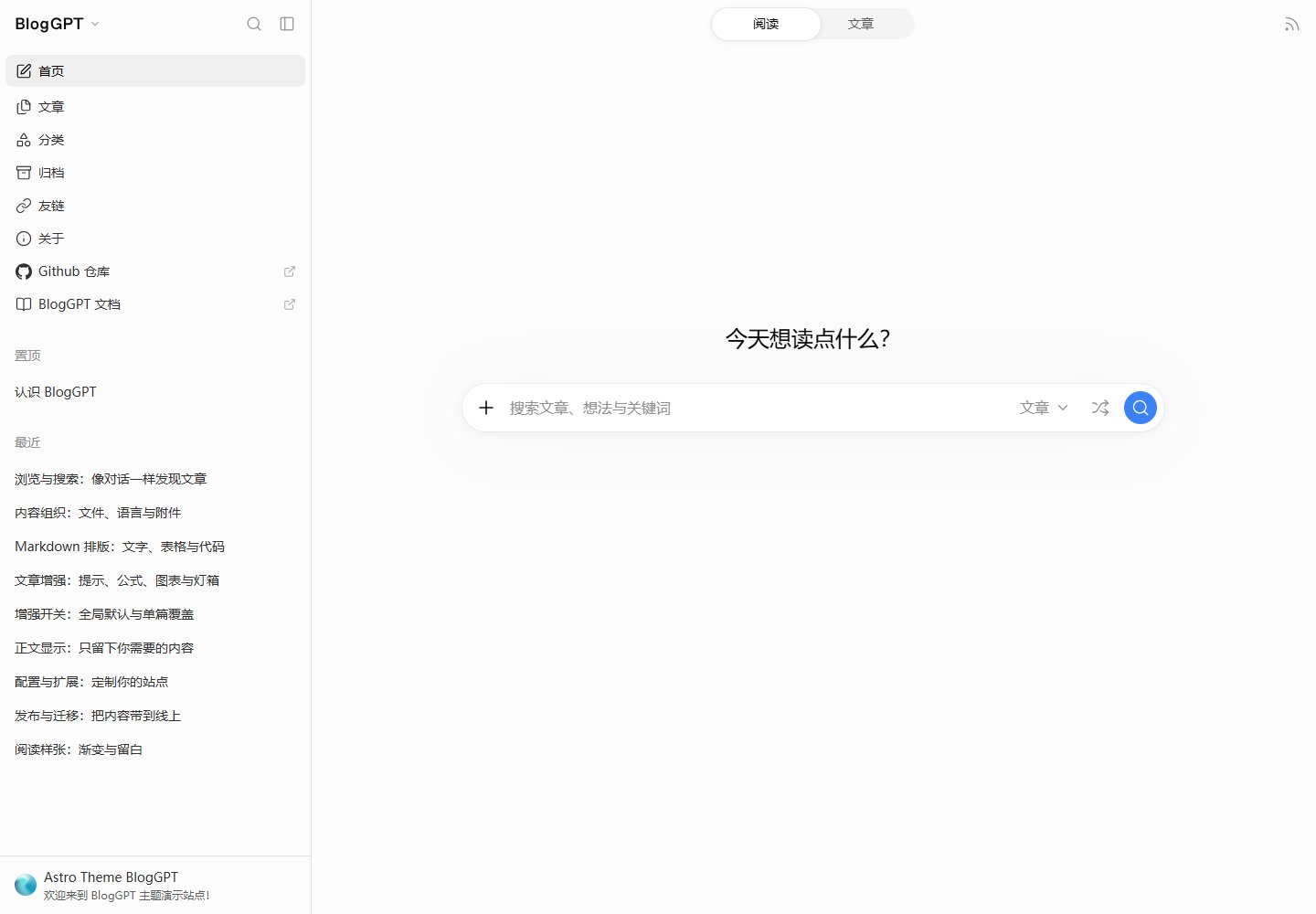
A reading interface inspired by ChatGPT's layout, including a resizable sidebar, light/dark/system appearance and an expandable outline.
AstroBlog
astro-theme-BlogGPT — Astro Blog Template
By Raincarnator
An Astro blog theme inspired by ChatGPT's layout, supporting Markdown/MDX writing, sidebar navigation, site search, multiple languages and static deployment.
Explore the design
Compare the page layouts and mobile experience. Open any screenshot for a closer look.
Desktop homepage1 / 2
Desktop captureTop of page
Actual browser screenshot of the verified live demo.
All pages & views 2
Screenshots show visual appearance; interactive behavior may differ.
Recorded 2026-10-21View source
What stands out
A quick read of the recorded project description.
Supports Markdown and MDX, with Expressive Code, KaTeX, Mermaid, Callouts, PhotoSwipe and interactive components integrated.
Site search covers posts, titles/descriptions, body text and the whole site, with highlighted context and slash commands.
Content management supports posts, pages, categories, tags, nested folders, stable slugs and packaged attachments.
Built-in Chinese and English interface translations; languages are configured through site.locales and site.defaultLocale.
Builds generate static files, with RSS, Sitemap and optional Satori share covers.
Template Details
BlogGPT is a static blog theme built on Astro, with an interface layout that references ChatGPT. Content is organized as Markdown or MDX files and supports posts, pages, categories and tags; folders can be nested, stable slugs are used, and attachments can be packaged in the same directory as a post. The reading interface provides a resizable sidebar, light/dark/system appearance, title preview, an expandable outline and keyboard shortcuts. Site search covers posts, titles/descriptions, body text and the whole site, and shows highlighted context. The theme includes built-in Chinese and English interface translations (the English is AI-translated); languages and the default language can be enabled through configuration. Builds output static files that can be deployed to Vercel or other static hosting services. The README does not document production performance, security or long-term maintenance status.
AstroBlog
Is it right for your project?
Use Cases
- Writing technical articles, notes or documentation-style blogs with Markdown or MDX.
- Personal blogs that need sidebar navigation, site search and a multilingual interface.
- Scenarios where a static blog is deployed to Vercel or other static hosting services.
- Sites that need browsing features such as categories, tags, archives, friend links and blog statistics.
Suitable For
- Developers or technical writers familiar with Astro and Markdown/MDX writing.
- Content creators who need a Chinese-English bilingual interface and are willing to configure languages according to the documentation.
- Bloggers who prefer static generation and plan to deploy to Vercel or a static hosting platform.
Getting started & customization
Use these recorded setup notes alongside the repository instructions for your chosen version.
- 1
Requires Node.js 22.12+ and pnpm 11; after cloning the repository, run pnpm install and pnpm dev.
- 2
Edit blog.config.ts to set a complete site.baseUrl, languages, author, interface copy and navigation.
- 3
Replace the friend-link groups in friends.config.ts, or export an empty array [].
- 4
Rewrite the About page and replace the sample posts, categories and tags under content/; before publishing, replace the sample avatar, social links and example.com addresses.
- 5
Build with pnpm build; the output directory is dist. When deploying to Vercel, select Astro, use pnpm build as the build command and dist as the output directory.
License & source material
Usage conditions & limitations
Free to use · keep license noticeThis listing covers the free version under the Apache-2.0 license in the public repository; the free scope is that version's code and does not mean external services or third-party assets are free.
Must comply with when using
- Free use, modification, commercial use and distribution are permitted; the Apache-2.0 license must be included when distributing.
- Modified files must carry prominent notices of the changes, and relevant copyright, patent, trademark and attribution notices must be retained.
- If the original project includes a NOTICE file, applicable attribution notices in it must be retained when distributing derivative works.
- The license includes an applicable contributor patent grant; initiating patent litigation as described in the license terminates that patent grant, and no trademark rights are granted.
- The code is provided as is; warranties and limitations of liability are governed by the original license and applicable law.
Additional costs & items to verify
- Demo images, fonts, icons and other third-party assets must be checked against their own licenses; the code's Apache-2.0 license alone is not sufficient to judge them.
- External services such as domains, hosting, databases, payments or AI may incur separate charges.
- The English interface translation is AI-translated and may be of limited quality; it must be proofread.
- Before publishing, placeholder content such as the sample avatar, social links and example.com addresses must be replaced.
- A complete production site.baseUrl (including any deployment subdirectory) must be set in blog.config.ts.
- Running requires a Node.js 22.12+ and pnpm 11 environment.
- Deployment to Vercel is recommended; the build command and output directory must be configured manually, and other static hosts must be handled by the user.
- The theme code is Apache-2.0, but the documentation uses a separate MIT license, and the blog content license must be configured through footer settings.
- Assets such as the demo gradient come from third-party tools; third-party fonts, icons and image sources must be verified in THIRD_PARTY_NOTICES.md.
View Original Text Basis
no-charge, royalty-free, irrevocable copyright license
Original License Text
| Internationalization | Configurable localization for interface copy and content; Chinese and English included (AI-translated English) |
Original README
4. Replace sample avatars, social links and example.com addresses before publishing.
Original README
1. Edit `blog.config.ts`: set the complete production `site.baseUrl` (including any deployment subdirectory), languages, author, interface copy and navigation.
Original README
Requirements: **Node.js 22.12+** and **pnpm 11**. Download or clone this repository, enter its root directory, then run:
Original README
Connecting your Git repository to **Vercel** is recommended: select Astro, use `pnpm build` as the build command and `dist` as the output directory. Production branch commits automatically build and publish the site. Follow the [Vercel deployment tutorial](https://bloggpt.reincarnatey.net/en/guide/deployment#deploy-to-vercel-recommended) for the full setup. Other static hosts can also publish the complete `dist/` directory.
Original README
Theme code is licensed under [Apache-2.0](LICENSE). Documentation uses the [MIT License](apps/docs/LICENSE). Configure the blog content license through the footer settings. See [third-party notices](THIRD_PARTY_NOTICES.md) for font, icon and image sources.
Original README
https://github.com/Raincarnator/astro-theme-BlogGPT/blob/main/LICENSEhttps://github.com/Raincarnator/astro-theme-BlogGPT/blob/main/README.mdThe layout is inspired by ChatGPT. UI icons use Lucide; social brand icons use Simple Icons. Demo gradients were created with [FeralUI Gradient Builder](https://feralui.dev/gradients); see [demo assets](https://bloggpt.reincarnatey.net/en/guide/overview#demo-site).
Original README
Compiled by DeepSeek based on repository license and README ·2026-10-18. Results only cover the materials read; dependencies, images, fonts, and subsequent term changes are subject to their respective original texts.
Project checks & description sources
Template Information
- Source platforms
- GitHub
- Documentation and maintenance reference score
- More documented · 80 / 100
- Technologies
- Astro
- Website type
- Blog
How this score is calculated
Our heuristic uses license records (up to 30), a demo link (12), a preview (10), stars (15), recorded maintenance (15), description completeness (8), feature records (5) and classification data (5). It is not a code, security or performance test, or a Google score. A link does not establish tested functionality.
What to verify for this project
- Repository update recorded
- 2026-10-18
- Screenshot last checked
- 2026-10-21
A demo link is listed. Check it with your own content and viewport sizes; its presence does not confirm that forms, authentication or payments work.
The catalog identifies Astro as the primary stack. Check the actual dependency manifest and lockfile for versions and hosting requirements. These notes use recorded metadata, not a code audit or a deployment test.
Use a selection guide →How this description was prepared
AI-assisted description based on catalog records and repository material. Repository authors are not automatically the reviewers of this description.
Review declaration: codex-user-requested-batch-review-20261021 · 2026-10-21
Inspect the recorded source material
SHA-256: 4d35c403f7205e57502bdb620884c415e149761fd9e89723b3fec61d69433896
2026-10-18T04:57:02.168Z
Source file / repository# BlogGPT **An Astro blog theme inspired by ChatGPT’s layout.** Write in Markdown or MDX. Organize content as files. Give readers a familiar sidebar, a focused reading area and a search box that helps them find the next article. **English** · [简体中文](README.zh-CN.md) [Demo](https://demo.bloggpt.reincarnatey.net) · [Documentation](https://bloggpt.reincarnatey.net/en/) > **Getting started?** Follow the [installation guide](https://bloggpt.reincarnatey.net/en/guide/getting-started), then explore configuration, writing and deployment in the [documentation](https://bloggpt.reincarnatey.net/en/).  ## Features | Category | Features | | -------------------- | ---------------------------------------------------------------------------------------------------------------------------------------------------------------- | | Reading interface | Responsive layout, resizable sidebar, light/dark/system appearance, heading previews, an expandable outline, keyboard shortcuts and client navigation | | Content management | Articles, pages, categories and tags; nested folders, stable slugs, bundled attachments and writing templates | | Rich content | Markdown / MDX, Expressive Code, KaTeX, Mermaid, Callouts, PhotoSwipe and interactive components | | Browsing | Pinned posts and chronological lists, pagination with page jumping, category covers, tag clouds, yearly archives and grouped friends | | Site search | Article, title/description, body and whole-site scopes; highlighted context, slash commands and article-title completion | | Internationalization | Configurable localization for interface copy and content; Chinese and English included (AI-translated English) | | Sharing and feeds | Formatted copy, configurable social destinations, Satori share covers, RSS and Sitemap | | Blog statistics | Article and character totals and averages, publication intervals, first publication and latest update, a publishing heatmap and article-length bars | | Customization | Extensive settings for appearance, content and interactions, combined with site-wide HTML / CSS / JS extension files, let you customize the site to your liking. | BlogGPT builds static files ready for static hosting. ## Preview ### Article page · light  <details> <summary>View six more interface previews</summary> ### Article list  ### Article page · dark  ### Categories  ### Archives  ### Friends  ### Statistics  </details> Screenshots captured at **1920 × 1200** and styled with [RicoScreenshot](https://shot.ricoui.com/). ## Quick start Requirements: **Node.js 22.12+** and **pnpm 11**. Download or clone this repository, enter its root directory, then run: ```sh pnpm install pnpm dev ``` Open the address printed in the terminal. The blog and documentation share a pnpm workspace; one install covers both. ### Make it yours 1. Edit `blog.config.ts`: set the complete production `site.baseUrl` (including any deployment subdirectory), languages, author, interface copy and navigation. 2. Replace friend groups in `friends.config.ts`, or export an empty array `[]`. 3. Rewrite the About page and replace the articles, categories and tags under `content/`. 4. Replace sample avatars, social links and example.com addresses before publishing. Set enabled languages and the default language through `site.locales` and `site.defaultLocale`. Everyday configuration, writing and customization live primarily in `blog.config.ts`, `content/`, `public/`, `custom/` and `archetypes/`, with friend links in `friends.config.ts`. Keep one-off MDX components in article bundles and reusable components in `custom/components/`. ### Write an article ```sh pnpm new post hello --title "My first article" pnpm new post hello-bundle --use bundle --title "An article with attachments" ``` The first command creates a standalone file. The second creates a bundle with `index.mdx`; add images and attachments in the same folder. Types are singular: `post`, `page`, `category`, `tag`. `--use` chooses an archetype; `--title` sets the article title and otherwise defaults to the last slug segment. Default article templates create **drafts**. Set `draft: false` and choose its publication time when the article is ready. ### Build and deploy ```sh pnpm build pnpm preview ``` Connecting your Git repository to **Vercel** is recommended: select Astro, use `pnpm build` as the build command and `dist` as the output directory. Production branch commits automatically build and publish the site. Follow the [Vercel deployment tutorial](https://bloggpt.reincarnatey.net/en/guide/deployment#deploy-to-vercel-recommended) for the full setup. Other static hosts can also publish the complete `dist/` directory. The build checks types, renders pages, copies bundled assets, generates optional share cards and creates search indexes. Preview serves the production output; rebuild after changes. Scheduled articles also need a build after their publication time. Interface translations and their registry live in `src/i18n/`. Choose content languages through `site.locales`; missing interface translations fall back automatically. Contributors add translation files and register them in `src/i18n/i18n.config.ts` as part of a repository contribution. See the [language guide](https://bloggpt.reincarnatey.net/en/content/languages). ## Documentation Read the [English documentation](https://bloggpt.reincarnatey.net/en/) or [简体中文文档](https://bloggpt.reincarnatey.net/). The guides explain installation, every configuration field, content organization and deployment. | Guide | Read about | | -------------------------------------------------------------------------------- | ----------------------------------------------------------------------------------- | | [Getting started](https://bloggpt.reincarnatey.net/en/guide/getting-started) | Installation, first edits and commands | | [Configuration reference](https://bloggpt.reincarnatey.net/en/config/reference) | Every public field: types, requirements, initial values, omitted values and effects | | [Frontmatter](https://bloggpt.reincarnatey.net/en/content/frontmatter) | Dates, covers, visibility, taxonomy and per-entry switches | | [Content organization](https://bloggpt.reincarnatey.net/en/content/organization) | Collections, stable URLs and nested folders | | [Languages](https://bloggpt.reincarnatey.net/en/content/languages) | Interface copy and translated content files | | [Archetypes](https://bloggpt.reincarnatey.net/en/content/archetypes) | New-content commands, templates and placeholders | | [Extension files](https://bloggpt.reincarnatey.net/en/customization/hooks) | Global HTML, CSS and client lifecycles | | [Deployment](https://bloggpt.reincarnatey.net/en/guide/deployment) | Domains, subdirectories and build output | ## Project structure ```text blog.config.ts Theme settings and localized copy friends.config.ts Grouped friend links src/i18n/ Interface translations and their registry content/posts/ Articles content/pages/ Standalone pages and builtin introductions content/categories/ Category names, covers and introductions content/tags/ Tag names, covers and introductions archetypes/ Default and named content templates custom/ Site-wide HTML, CSS and JS extensions custom/components/ Reusable MDX components public/ Shared public assets src/ Theme implementation apps/docs/ Documentation ``` Categories and tags are defined in content files. An `index.md` or `index.mdx` bundle publishes its directory’s attachments beside the rendered page. Use explicit slugs for stable URLs. Optional `posts.pathPrefix` adds publication-date segments such as `[year]` before the slug. ## Development ```sh pnpm check pnpm lint pnpm format:check pnpm build pnpm test pnpm docs:build ``` Build before running tests that inspect generated output. `pnpm build:all` builds both the blog and documentation. See [Contributing](CONTRIBUTING.md) for pull requests, translation contributions and the CI checks. ## Credits and license The layout is inspired by ChatGPT. UI icons use Lucide; social brand icons use Simple Icons. Demo gradients were created with [FeralUI Gradient Builder](https://feralui.dev/gradients); see [demo assets](https://bloggpt.reincarnatey.net/en/guide/overview#demo-site). Theme code is licensed under [Apache-2.0](LICENSE). Documentation uses the [MIT License](apps/docs/LICENSE). Configure the blog content license through the footer settings. See [third-party notices](THIRD_PARTY_NOTICES.md) for font, icon and image sources.
Explore similar templates
Compare previews and descriptions within the same stack and category.

astrowind
AstroWind is a free, open-source Astro starter theme using Astro and Tailwind CSS, released under the MIT license.
Astro · Blog

astro-paper
An Astro blog theme with Markdown/MDX content, Tailwind styling and Pagefind search. Search is a feature of the blog, rather than a separate tool-site product.
Astro · Blog

fuwari
Fuwari is a static blog template built with Astro and Tailwind CSS for personal blogs. It manages posts as Markdown files in src/content/posts/, with frontmatter for title, date, description, cover, tags, categories, draft status, and language.
Astro · Blog

Firefly
Firefly is a clean personal blog theme forked from Astro and Fuwari, offering four background modes, single/double sidebar and list/grid layouts, Pagefind client-side full-text search, and a six-language UI.
Astro · Blog

astro-theme-cactus
An Astro blog and notes starter with Markdown/MDX content, Tailwind styling and Pagefind search. Its main purpose is publishing posts and notes.
Astro · Blog

astrofy
Astrofy is a free and open-source personal portfolio website template built with Astro and TailwindCSS, with built-in blog, CV timeline, project showcase, store, and RSS feed modules.
Astro · Portfolio