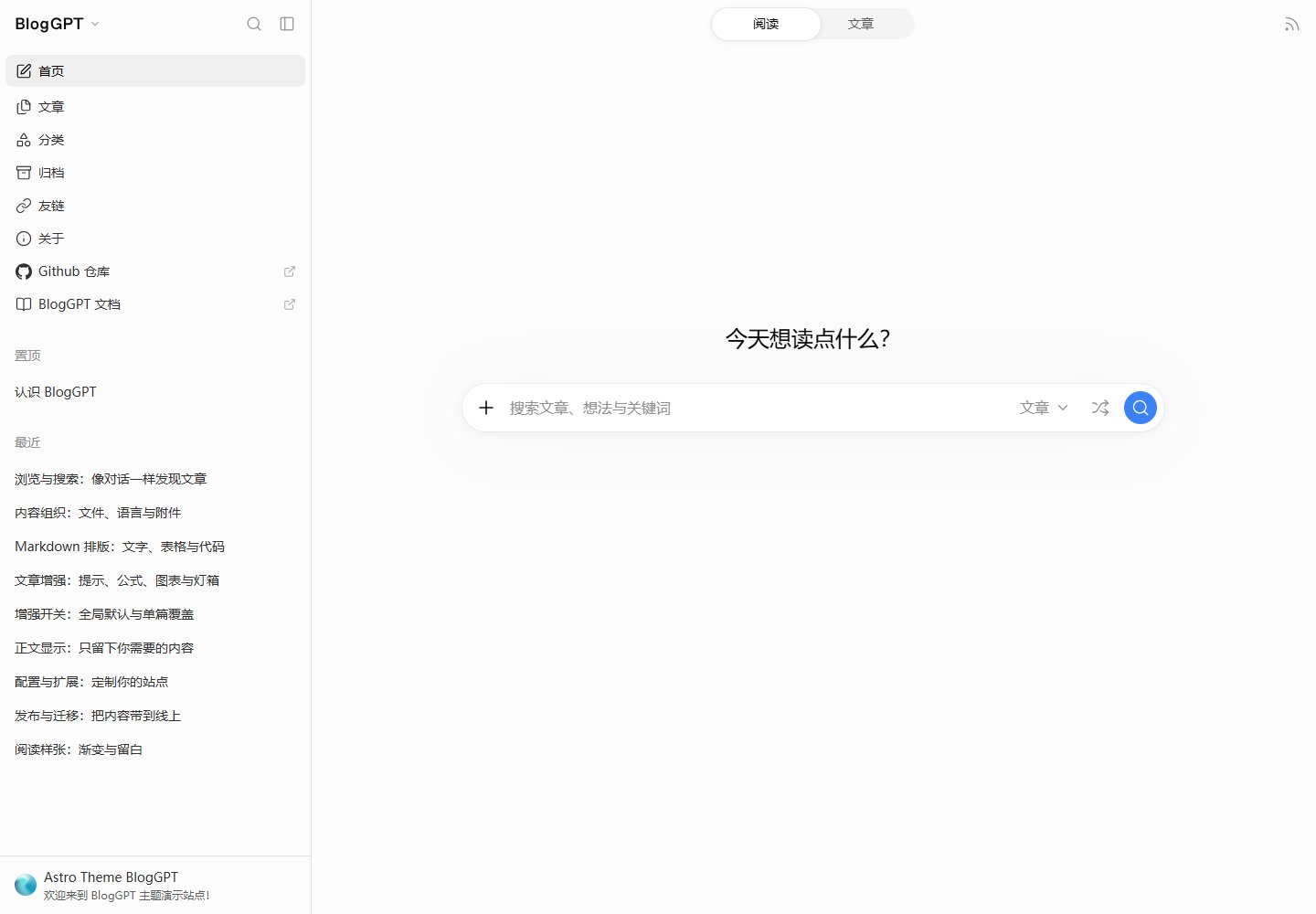
受 ChatGPT 布局启发的阅读界面,包含可调整宽度的侧边栏、明暗/跟随系统外观和可展开大纲。
Astro博客
astro-theme-BlogGPT — Astro 博客模板
作者 Raincarnator
一款受 ChatGPT 布局启发的 Astro 博客主题,支持 Markdown/MDX 写作、侧边栏导航、站内搜索、多语言与静态部署。
看看你的网站会是什么样
浏览真实页面截图,比较内容排版与手机效果。点击下方缩略图切换,放大查看整页细节。
全部页面与视图 2
截图用于了解视觉与布局,交互效果请以实际项目为准。
采集于 2026-10-21查看来源
值得关注的模板亮点
从已有项目资料中,快速了解它的特点。
支持 Markdown 与 MDX,集成 Expressive Code、KaTeX、Mermaid、Callouts、PhotoSwipe 和交互组件。
站内搜索覆盖文章、标题/描述、正文和全站范围,提供高亮上下文与斜杠命令。
内容管理支持文章、页面、分类、标签、嵌套文件夹、稳定 slug 和附件打包。
内置中英文界面翻译,可通过 site.locales 和 site.defaultLocale 配置语言。
构建生成静态文件,支持 RSS、Sitemap 和可选的 Satori 分享封面。
模板详细介绍
BlogGPT 是一个基于 Astro 的静态博客主题,界面布局参考 ChatGPT。内容以 Markdown 或 MDX 文件组织,支持文章、页面、分类和标签,可嵌套文件夹并使用稳定 slug,附件可与文章打包在同一目录。阅读界面提供可调整宽度的侧边栏、明暗/跟随系统外观、标题预览、可展开大纲和键盘快捷键。站内搜索支持文章、标题/描述、正文和全站范围,并显示高亮上下文。主题内置中英文界面翻译(英文为 AI 翻译),可通过配置启用语言和默认语言。构建输出为静态文件,可部署到 Vercel 或其他静态托管服务。README 未说明生产环境性能、安全性或长期维护状态。
Astro博客
适合你的项目吗?
适用场景
- 使用 Markdown 或 MDX 撰写技术文章、笔记或文档型博客。
- 需要侧边栏导航、站内搜索和多语言界面的个人博客。
- 希望将静态博客部署到 Vercel 或其他静态托管服务的场景。
- 需要分类、标签、归档、友情链接和博客统计等浏览功能的站点。
适合人群
- 熟悉 Astro 和 Markdown/MDX 写作的开发者或技术写作者。
- 需要中英文双语界面并愿意按文档配置语言的内容创作者。
- 偏好静态生成、计划部署到 Vercel 或静态托管平台的博客作者。
上手与定制指南
结合仓库当前版本的说明,按下面的资料检查内容、配置与运行要求。
- 1
环境要求 Node.js 22.12+ 和 pnpm 11,克隆仓库后运行 pnpm install 和 pnpm dev。
- 2
编辑 blog.config.ts 设置完整的 site.baseUrl、语言、作者、界面文案和导航。
- 3
替换 friends.config.ts 中的友链分组,或导出空数组 []。
- 4
重写 About 页面并替换 content/ 下的示例文章、分类和标签,发布前替换示例头像、社交链接和 example.com 地址。
- 5
构建使用 pnpm build,输出目录为 dist;部署到 Vercel 时选择 Astro,构建命令 pnpm build,输出目录 dist。
授权与来源资料
使用条件与限制
免费使用 · 保留许可声明本次收录的是公开仓库中采用 Apache-2.0 许可的免费版本;免费范围为该版本代码,不代表外部服务或第三方素材免费。
使用时需要遵守
- 允许免费使用、修改、商用和分发;分发时需随附 Apache-2.0 许可证。
- 修改过的文件需显著标明改动,并保留相关版权、专利、商标及归属声明。
- 若原项目附有 NOTICE 文件,分发衍生作品时需保留其中适用的归属声明。
- 许可包含适用的贡献者专利授权;发起许可所述专利诉讼会终止该专利授权,且不授予商标使用权。
- 代码按现状提供;担保与责任限制以原许可证及适用法律为准。
额外费用与待核对事项
- 演示图片、字体、图标及其他第三方素材需按各自许可核对,不能仅凭代码的 Apache-2.0 许可判断。
- 域名、托管、数据库、支付或 AI 等外部服务可能另外收费。
- 英文界面翻译为 AI 翻译,质量可能有限,需自行校对。
- 发布前需替换示例头像、社交链接和 example.com 地址等占位内容。
- 需在 blog.config.ts 中设置完整的生产 site.baseUrl(含部署子目录)。
- 运行需 Node.js 22.12+ 与 pnpm 11 环境。
- 推荐部署到 Vercel,需自行配置构建命令与输出目录;其他静态托管需自行处理。
- 主题代码为 Apache-2.0,但文档使用单独的 MIT 许可,博客内容许可需通过页脚设置配置。
- 演示渐变等素材来自第三方工具,第三方字体、图标和图片来源需查阅 THIRD_PARTY_NOTICES.md 核实。
查看原文依据
no-charge, royalty-free, irrevocable copyright license
许可证原文
| Internationalization | Configurable localization for interface copy and content; Chinese and English included (AI-translated English) |
README 原文
4. Replace sample avatars, social links and example.com addresses before publishing.
README 原文
1. Edit `blog.config.ts`: set the complete production `site.baseUrl` (including any deployment subdirectory), languages, author, interface copy and navigation.
README 原文
Requirements: **Node.js 22.12+** and **pnpm 11**. Download or clone this repository, enter its root directory, then run:
README 原文
Connecting your Git repository to **Vercel** is recommended: select Astro, use `pnpm build` as the build command and `dist` as the output directory. Production branch commits automatically build and publish the site. Follow the [Vercel deployment tutorial](https://bloggpt.reincarnatey.net/en/guide/deployment#deploy-to-vercel-recommended) for the full setup. Other static hosts can also publish the complete `dist/` directory.
README 原文
Theme code is licensed under [Apache-2.0](LICENSE). Documentation uses the [MIT License](apps/docs/LICENSE). Configure the blog content license through the footer settings. See [third-party notices](THIRD_PARTY_NOTICES.md) for font, icon and image sources.
README 原文
https://github.com/Raincarnator/astro-theme-BlogGPT/blob/main/LICENSEhttps://github.com/Raincarnator/astro-theme-BlogGPT/blob/main/README.mdThe layout is inspired by ChatGPT. UI icons use Lucide; social brand icons use Simple Icons. Demo gradients were created with [FeralUI Gradient Builder](https://feralui.dev/gradients); see [demo assets](https://bloggpt.reincarnatey.net/en/guide/overview#demo-site).
README 原文
DeepSeek 根据仓库许可证和 README 整理 ·2026-10-18。结果仅覆盖已读取资料,依赖、图片、字体及后续条款变更以各自原文为准。
项目核对记录与介绍依据
模板资料
- 来源平台
- GitHub
- 资料与维护参考分
- 资料较完整 · 80 / 100
- 技术栈
- Astro
- 网站类型
- 博客
这个分数如何计算
本站按许可资料(最高30分)、演示链接(12分)、预览图(10分)、Star数(15分)、记录的维护时间(15分)、描述完整度(8分)、功能记录(5分)和分类资料(5分)计算。它不是代码、安全或性能测试,也不是 Google 评分;有链接不代表已实测可用。
这个项目需要核对什么
- 记录的仓库更新时间
- 2026-10-18
- 截图检查日期
- 2026-10-21
已收录演示链接。请用你的内容与屏幕尺寸检查;有演示不代表表单、认证或支付已经可用。
目录记录的主要技术栈是 Astro。请通过依赖清单和锁文件核对实际版本与托管要求。这些说明基于收录资料,不代表代码审计或部署实测。
查看具体选型方法 →介绍的制作与核对状态
介绍由 AI 辅助整理目录与仓库资料。仓库作者不等于这篇介绍的审核者。
审核声明: codex-user-requested-batch-review-20261021 · 2026-10-21
查看当时使用的来源资料
SHA-256: 4d35c403f7205e57502bdb620884c415e149761fd9e89723b3fec61d69433896
2026-10-18T04:57:02.168Z
来源文件 / 仓库# BlogGPT **An Astro blog theme inspired by ChatGPT’s layout.** Write in Markdown or MDX. Organize content as files. Give readers a familiar sidebar, a focused reading area and a search box that helps them find the next article. **English** · [简体中文](README.zh-CN.md) [Demo](https://demo.bloggpt.reincarnatey.net) · [Documentation](https://bloggpt.reincarnatey.net/en/) > **Getting started?** Follow the [installation guide](https://bloggpt.reincarnatey.net/en/guide/getting-started), then explore configuration, writing and deployment in the [documentation](https://bloggpt.reincarnatey.net/en/).  ## Features | Category | Features | | -------------------- | ---------------------------------------------------------------------------------------------------------------------------------------------------------------- | | Reading interface | Responsive layout, resizable sidebar, light/dark/system appearance, heading previews, an expandable outline, keyboard shortcuts and client navigation | | Content management | Articles, pages, categories and tags; nested folders, stable slugs, bundled attachments and writing templates | | Rich content | Markdown / MDX, Expressive Code, KaTeX, Mermaid, Callouts, PhotoSwipe and interactive components | | Browsing | Pinned posts and chronological lists, pagination with page jumping, category covers, tag clouds, yearly archives and grouped friends | | Site search | Article, title/description, body and whole-site scopes; highlighted context, slash commands and article-title completion | | Internationalization | Configurable localization for interface copy and content; Chinese and English included (AI-translated English) | | Sharing and feeds | Formatted copy, configurable social destinations, Satori share covers, RSS and Sitemap | | Blog statistics | Article and character totals and averages, publication intervals, first publication and latest update, a publishing heatmap and article-length bars | | Customization | Extensive settings for appearance, content and interactions, combined with site-wide HTML / CSS / JS extension files, let you customize the site to your liking. | BlogGPT builds static files ready for static hosting. ## Preview ### Article page · light  <details> <summary>View six more interface previews</summary> ### Article list  ### Article page · dark  ### Categories  ### Archives  ### Friends  ### Statistics  </details> Screenshots captured at **1920 × 1200** and styled with [RicoScreenshot](https://shot.ricoui.com/). ## Quick start Requirements: **Node.js 22.12+** and **pnpm 11**. Download or clone this repository, enter its root directory, then run: ```sh pnpm install pnpm dev ``` Open the address printed in the terminal. The blog and documentation share a pnpm workspace; one install covers both. ### Make it yours 1. Edit `blog.config.ts`: set the complete production `site.baseUrl` (including any deployment subdirectory), languages, author, interface copy and navigation. 2. Replace friend groups in `friends.config.ts`, or export an empty array `[]`. 3. Rewrite the About page and replace the articles, categories and tags under `content/`. 4. Replace sample avatars, social links and example.com addresses before publishing. Set enabled languages and the default language through `site.locales` and `site.defaultLocale`. Everyday configuration, writing and customization live primarily in `blog.config.ts`, `content/`, `public/`, `custom/` and `archetypes/`, with friend links in `friends.config.ts`. Keep one-off MDX components in article bundles and reusable components in `custom/components/`. ### Write an article ```sh pnpm new post hello --title "My first article" pnpm new post hello-bundle --use bundle --title "An article with attachments" ``` The first command creates a standalone file. The second creates a bundle with `index.mdx`; add images and attachments in the same folder. Types are singular: `post`, `page`, `category`, `tag`. `--use` chooses an archetype; `--title` sets the article title and otherwise defaults to the last slug segment. Default article templates create **drafts**. Set `draft: false` and choose its publication time when the article is ready. ### Build and deploy ```sh pnpm build pnpm preview ``` Connecting your Git repository to **Vercel** is recommended: select Astro, use `pnpm build` as the build command and `dist` as the output directory. Production branch commits automatically build and publish the site. Follow the [Vercel deployment tutorial](https://bloggpt.reincarnatey.net/en/guide/deployment#deploy-to-vercel-recommended) for the full setup. Other static hosts can also publish the complete `dist/` directory. The build checks types, renders pages, copies bundled assets, generates optional share cards and creates search indexes. Preview serves the production output; rebuild after changes. Scheduled articles also need a build after their publication time. Interface translations and their registry live in `src/i18n/`. Choose content languages through `site.locales`; missing interface translations fall back automatically. Contributors add translation files and register them in `src/i18n/i18n.config.ts` as part of a repository contribution. See the [language guide](https://bloggpt.reincarnatey.net/en/content/languages). ## Documentation Read the [English documentation](https://bloggpt.reincarnatey.net/en/) or [简体中文文档](https://bloggpt.reincarnatey.net/). The guides explain installation, every configuration field, content organization and deployment. | Guide | Read about | | -------------------------------------------------------------------------------- | ----------------------------------------------------------------------------------- | | [Getting started](https://bloggpt.reincarnatey.net/en/guide/getting-started) | Installation, first edits and commands | | [Configuration reference](https://bloggpt.reincarnatey.net/en/config/reference) | Every public field: types, requirements, initial values, omitted values and effects | | [Frontmatter](https://bloggpt.reincarnatey.net/en/content/frontmatter) | Dates, covers, visibility, taxonomy and per-entry switches | | [Content organization](https://bloggpt.reincarnatey.net/en/content/organization) | Collections, stable URLs and nested folders | | [Languages](https://bloggpt.reincarnatey.net/en/content/languages) | Interface copy and translated content files | | [Archetypes](https://bloggpt.reincarnatey.net/en/content/archetypes) | New-content commands, templates and placeholders | | [Extension files](https://bloggpt.reincarnatey.net/en/customization/hooks) | Global HTML, CSS and client lifecycles | | [Deployment](https://bloggpt.reincarnatey.net/en/guide/deployment) | Domains, subdirectories and build output | ## Project structure ```text blog.config.ts Theme settings and localized copy friends.config.ts Grouped friend links src/i18n/ Interface translations and their registry content/posts/ Articles content/pages/ Standalone pages and builtin introductions content/categories/ Category names, covers and introductions content/tags/ Tag names, covers and introductions archetypes/ Default and named content templates custom/ Site-wide HTML, CSS and JS extensions custom/components/ Reusable MDX components public/ Shared public assets src/ Theme implementation apps/docs/ Documentation ``` Categories and tags are defined in content files. An `index.md` or `index.mdx` bundle publishes its directory’s attachments beside the rendered page. Use explicit slugs for stable URLs. Optional `posts.pathPrefix` adds publication-date segments such as `[year]` before the slug. ## Development ```sh pnpm check pnpm lint pnpm format:check pnpm build pnpm test pnpm docs:build ``` Build before running tests that inspect generated output. `pnpm build:all` builds both the blog and documentation. See [Contributing](CONTRIBUTING.md) for pull requests, translation contributions and the CI checks. ## Credits and license The layout is inspired by ChatGPT. UI icons use Lucide; social brand icons use Simple Icons. Demo gradients were created with [FeralUI Gradient Builder](https://feralui.dev/gradients); see [demo assets](https://bloggpt.reincarnatey.net/en/guide/overview#demo-site). Theme code is licensed under [Apache-2.0](LICENSE). Documentation uses the [MIT License](apps/docs/LICENSE). Configure the blog content license through the footer settings. See [third-party notices](THIRD_PARTY_NOTICES.md) for font, icon and image sources.
看看同类模板
对比同技术栈与用途的模板,找到更适合的视觉与内容结构。

astrowind
⭕️ AstroWind: A free template using Astro v7 and Tailwind CSS v4. Astro starter theme.
Astro · 博客

astro-paper
基于 Astro 的博客主题,使用 Markdown/MDX 内容、Tailwind 样式和 Pagefind 搜索。搜索属于博客功能,不代表独立工具站产品。
Astro · 博客

fuwari
✨A static blog template built with Astro.
Astro · 博客

Firefly
Firefly 是一款基于 Astro 的静态博客主题,由 CuteLeaf 在 saicaca 的 Fuwari 模板基础上二次开发,主打清新美观的视觉风格。
Astro · 博客

astro-theme-cactus
面向博客与笔记发布的 Astro 启动模板,支持 Markdown/MDX 内容、Tailwind 样式与 Pagefind 搜索,主要用途是发布文章和笔记。
Astro · 博客

astrofy
Astrofy is a free and open-source template for your Personal Portfolio Website built with Astro and TailwindCS…
Astro · 作品集