Content is organized as MDX files stored in the src/content directory
Next.jsReactBlog
nextjs-netlify-blog-template — Next.js Blog Template
By raineydavid
A Next.js and Netlify blog template with standard blog features including tags, authors, pagination, CMS, and SEO metadata.
Explore the design
Compare the page layouts and mobile experience. Open any screenshot for a closer look.
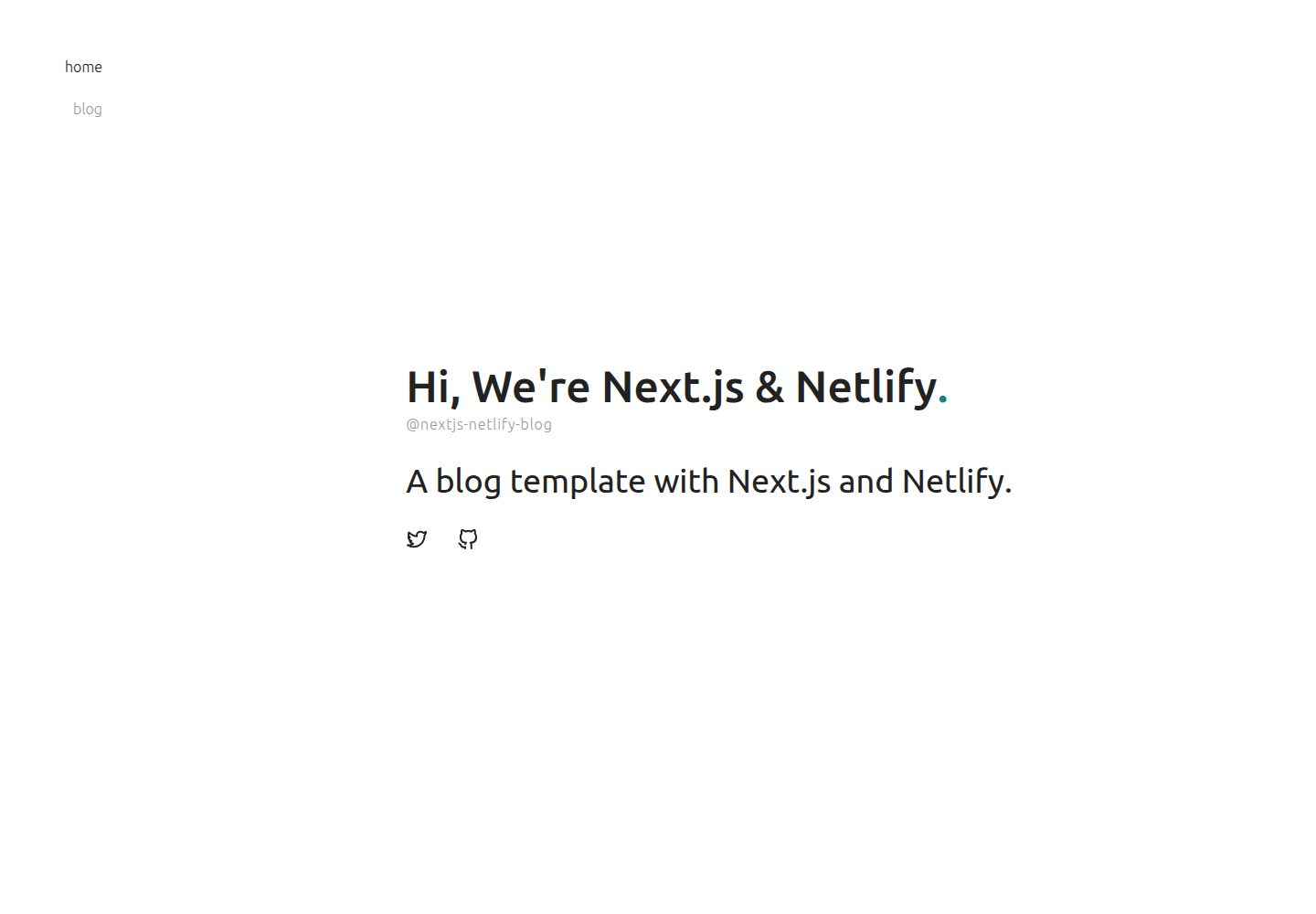
Desktop homepage1 / 2
Desktop captureTop of page
Actual screenshot captured by the server browser.
All pages & views 2
Screenshots show visual appearance; interactive behavior may differ.
Recorded 2026-10-13View source
What stands out
A quick read of the recorded project description.
Content is edited through Netlify CMS, with metadata such as authors defined in YAML under the meta directory
Built-in tags, author display, and pagination
Includes SEO metadata such as JSON-LD
Supports extending content writing with React components, similar to WordPress shortcodes
Styling is based on styled-jsx and CSS Modules and can be replaced with other styling solutions
Template Details
This is a Next.js blog template intended for Netlify deployment, positioned as a blog scaffold. The README states its goal is to fill in standard blog features missing from common Next.js + Netlify tutorials, such as tag categorization. Content is stored as MDX files in the src/content directory, while metadata such as authors is defined in YAML files under the meta directory and edited through Netlify CMS. The template includes built-in tags, author display, pagination, SEO metadata (such as JSON-LD), and the ability to extend content with React components similar to WordPress shortcodes. Styling uses styled-jsx and CSS Modules, but the README explicitly states it can be replaced with any styling solution. The repository uses the MIT license; the code may be used, modified, commercialized, and distributed for free, but third-party assets such as demo images, fonts, and icons require separate license verification, and external services such as domains and hosting may incur costs. The template was last updated in 2021 and does not declare production readiness or performance characteristics.
Next.jsBlog
Is it right for your project?
Use Cases
- Building a personal or team blog hosted on Netlify
- Sites that need standard blog features such as tags, authors, and pagination
- Maintaining article content through a CMS interface rather than editing code directly
- Writing content with MDX and needing custom React components embedded in articles
Suitable For
- Developers familiar with Next.js and TypeScript
- Users planning to deploy their blog on Netlify
- Projects that need basic blog capabilities such as tags, authors, and pagination
- Users willing to modify the template code and styles according to their own needs
Getting started & customization
Use these recorded setup notes alongside the repository instructions for your chosen version.
- 1
Use npx create-next-app and specify this repository as the example to create the project
- 2
Complete site configuration and deployment according to Netlify's official deployment guide
- 3
Metadata such as authors is maintained in YAML files in the meta directory; adding a new category requires updating the Netlify CMS configuration, the metadata module, and the display components
- 4
The Netlify CMS language setting requires modifying config.yml and index.html under public/admin
- 5
Third-party assets such as demo images, fonts, and icons require separate license verification, and external services such as hosting may incur costs
License & source material
Usage conditions & limitations
Free to use · keep license noticeThis entry covers the free version in a public repository under the MIT license; the free scope applies to that version's code and does not mean external services or third-party assets are free.
Must comply with when using
- The code of this version may be used, modified, commercialized, and distributed for free.
- When distributing copies or substantial portions of the code, retain the original author's copyright notice and the full MIT license notice.
- The code is provided as is; warranties and limitations of liability are governed by the original license and applicable law.
Additional costs & items to verify
- Demo images, fonts, icons, and other third-party assets must be checked against their respective licenses and cannot be judged solely by the code's MIT license.
- External services such as domains, hosting, databases, payments, or AI may incur additional charges.
- This template is designed specifically for the Netlify platform; building a blog depends on the Netlify technology stack, and deployment and CMS functionality are implemented around Netlify services.
- Using this template requires configuring the project according to Netlify's official guide, which means a Netlify account and corresponding hosting service are required.
- Content editing depends on Netlify CMS and must be operated through the CMS interface provided by Netlify, which is an external service dependency.
View Original Text Basis
Permission is hereby granted, free of charge
Original License Text
Next.js blogging template for Netlify is a boilerplate for building blogs with only Netlify stacks.
Original README
set up your project as following the Netlify blog:
Original README
https://github.com/raineydavid/nextjs-netlify-blog-template/blob/master/LICENSEhttps://github.com/raineydavid/nextjs-netlify-blog-template/blob/master/README.mdyou can access Netlify CMS and create new categories at any time.
Original README
Compiled by DeepSeek based on repository license and README ·2026-10-13. Results only cover the materials read; dependencies, images, fonts, and subsequent term changes are subject to their respective original texts.
Project checks & description sources
Template Information
- Source platforms
- GitHub
- Documentation and maintenance reference score
- Partly documented · 65 / 100
- Technologies
- Next.js · React
- Website type
- Blog
How this score is calculated
Our heuristic uses license records (up to 30), a demo link (12), a preview (10), stars (15), recorded maintenance (15), description completeness (8), feature records (5) and classification data (5). It is not a code, security or performance test, or a Google score. A link does not establish tested functionality.
What to verify for this project
- Repository update recorded
- 2021-08-15
- Screenshot last checked
- 2026-10-13
A demo link is listed. Check it with your own content and viewport sizes; its presence does not confirm that forms, authentication or payments work.
The catalog identifies Next.js as the primary stack. Check the actual dependency manifest and lockfile for versions and hosting requirements. These notes use recorded metadata, not a code audit or a deployment test.
Use a selection guide →How this description was prepared
AI-assisted description based on catalog records and repository material. Repository authors are not automatically the reviewers of this description.
Review declaration: [email protected] · 2026-10-13
Inspect the recorded source material
SHA-256: 967d7f94be4386ea6d8cfbbf3cdce3b65ccafe194fef8b78a95f71e691d2c49f
2026-10-13T09:47:55.109Z
Source file / repository [](https://app.netlify.com/sites/nextjs-netlify-blog-template/deploys) [](https://nextjs.org/) Next.js blogging template for Netlify is a boilerplate for building blogs with only Netlify stacks. There are some boilerplate or tutorials for the combination of Next.js and Netlify on GitHub. These resources have documentation and good tutorial to get started Next.js and Netlify quickly, but they are too simple to build blogs with standard features like tagging. Next.js blogging template for Netlify has already implemented these standard features for building blogs with only using Next.js and Netlify stacks. ## Demo Deploy on your environment by clicking here: [](https://app.netlify.com/start/deploy?repository=https://github.com/wutali/nextjs-netlify-blog-template&stack=cms) Or access the following demo site: [Next.js blog template for Netlify](https://nextjs-netlify-blog-template.netlify.app/) ## Features - **Tagging**: organizes content by tags - **Author**: displays author names who write a post - **Pagination**: limits the number of posts per page - **CMS**: built with CMS to allow editors modifying content with the quickest way - **SEO optimized**: built-in metadata like JSON-LD - **Shortcode**: extends content writing with React component like WordPress shortcodes ## Dependencies - [TypeScript](https://www.typescriptlang.org/) - [Next.js](https://nextjs.org/) - [Netlify](https://www.netlify.com/) - [MDX](https://mdxjs.com/) ## Getting started To create your blog using the template, open your terminal, `cd` into the directory you'd like to create the app in, and run the following command: ``` npx create-next-app your-blog --example "https://github.com/wutali/nextjs-netlify-blog-template" ``` After that, set up your project as following the Netlify blog: [A Step-by-Step Guide: Deploying on Netlify](https://www.netlify.com/blog/2016/09/29/a-step-by-step-guide-deploying-on-netlify/) ## Customization This template is just a template and a boilerplate in which users can customize anything after the project was cloned and started. The following instructions introduce common customization points like adding new metadata or applying a new design theme. ### Styling pages by a customized theme All source codes related to the blog are under [components](/src/components) and [pages](/src/pages) directory. You can modify it freely if you want to apply your design theme. All components use [styled-jsx](https://github.com/vercel/styled-jsx) and [css-modules](https://github.com/css-modules/css-modules) to define their styles, but you can choose any styling libraries for designing your theme. The directory tree containing the blog source code are described below: ``` meta: yaml files defining metadata like authors or tags public: images, favicons and other static assets src ├── assets: other assets using inside of components ├── components: pieces of components consisting of pages ├── content: mdx files for each post page ├── lib: project libraries like data fetching or pagination └── pages: page components managing by Next.js ``` ### Organizing content by categories The category metadata that associates with content have the same relationship with the authors' one. Then reference these implementations for adding new metadata: - [public/admin/config.yml](/public/admin/config.yml#L51): author metadata definition for Netlify CMS - [src/lib/authors.tsx](/src/lib/authors.ts): fetches metadata and defines utility functions for components - [meta/authors.yml](/src/meta/authors.yml): author content managed by Netlify CMS - [src/components/PostLayout.tsx](/src/components/PostLayout.tsx): displays author content for each page You understood they have four steps to add the category metadata on your project after you read the above source codes: 1. Define the category metadata on the above Netlify config file 2. Create an empty file named with `categories.yml` under [meta](/src/meta/) directory 3. Create a new module for fetching category metadata 4. Display the category metadata on [src/components/PostLayout.tsx](/src/components/PostLayout.tsx#L75) or other components you want It is all you have to do. After that, you can access Netlify CMS and create new categories at any time. ### Locale settings for Netlify CMS Modify [config.yml](/public/admin/config.yml) and [index.html](/public/admin/index.html) under [public/admin](/public/admin/) directory as following instructions: [Netlify CMS - Configuration Options #Locale](https://www.netlifycms.org/docs/configuration-options/#locale) ## References - [Netlify CMS Documentation](https://www.netlifycms.org/docs/intro/) - [Building a Markdown blog with Next 9.4 and Netlify](https://www.netlify.com/blog/2020/05/04/building-a-markdown-blog-with-next-9.4-and-netlify/) - [Hugo Theme - Codex](https://github.com/jakewies/hugo-theme-codex) - [Next.js Starter Template for TypeScript](https://github.com/vercel/next-learn-starter/tree/master/typescript-final) - [Building Blog with NextJS and Netlify CMS](https://dev.to/mefaba/building-blog-with-nextjs-and-netlify-cms-fom) - [Unicons](https://github.com/Iconscout/unicons) ## License MIT
Explore similar templates
Compare previews and descriptions within the same stack and category.

tailwind-nextjs-starter-blog
A Next.js and Tailwind CSS blog starter template using Contentlayer for Markdown/MDX, with built-in SEO, code highlighting, and tags. It targets personal technical blogs and migration from Jekyll/Hugo to React, and supports one-click Vercel deployment.
Next.js · Blog

Nextjs-tailwindcss-blog-template
A personal blog template built with Next.js and Tailwind CSS, using Velite to process Markdown content. It includes home, about, contact and article pages, with a demo site and a companion YouTube tutorial.
Next.js · Blog

Next-js-Blog-Boilerplate
A blog starter built on Next.js 12 and Tailwind CSS 3, integrating TypeScript, ESLint, Prettier, and PostCSS.
Next.js · Blog

nextjs-blog-theme
A Next.js 15 and Tailwind CSS 4.x blog starter by Netlify, designed by Bejamas, with MDX support, dark/light theme switching, and environment-variable configuration. It includes a visual setup wizard for deploying to Netlify and manages content via local .mdx files.
Next.js · Blog

blog
A personal blog forked from Timlrx's tailwind-nextjs-starter-blog, built with Next.js, React, and Tailwind CSS. Content is stored as Markdown/MDX under data/, with site, author, navigation, and project data in separate files.
Next.js · Blog

tailnext
Tailnext is a free, open-source template built on the Next.js 14 App Router and Tailwind CSS, created by the onWidget team.
Next.js · Blog