内容以 MDX 文件组织,存放在 src/content 目录
Next.jsReact博客
nextjs-netlify-blog-template — Next.js 博客模板
作者 raineydavid
基于 Next.js 与 Netlify 的博客模板,内置标签、作者、分页、CMS 与 SEO 元数据等标准博客功能。
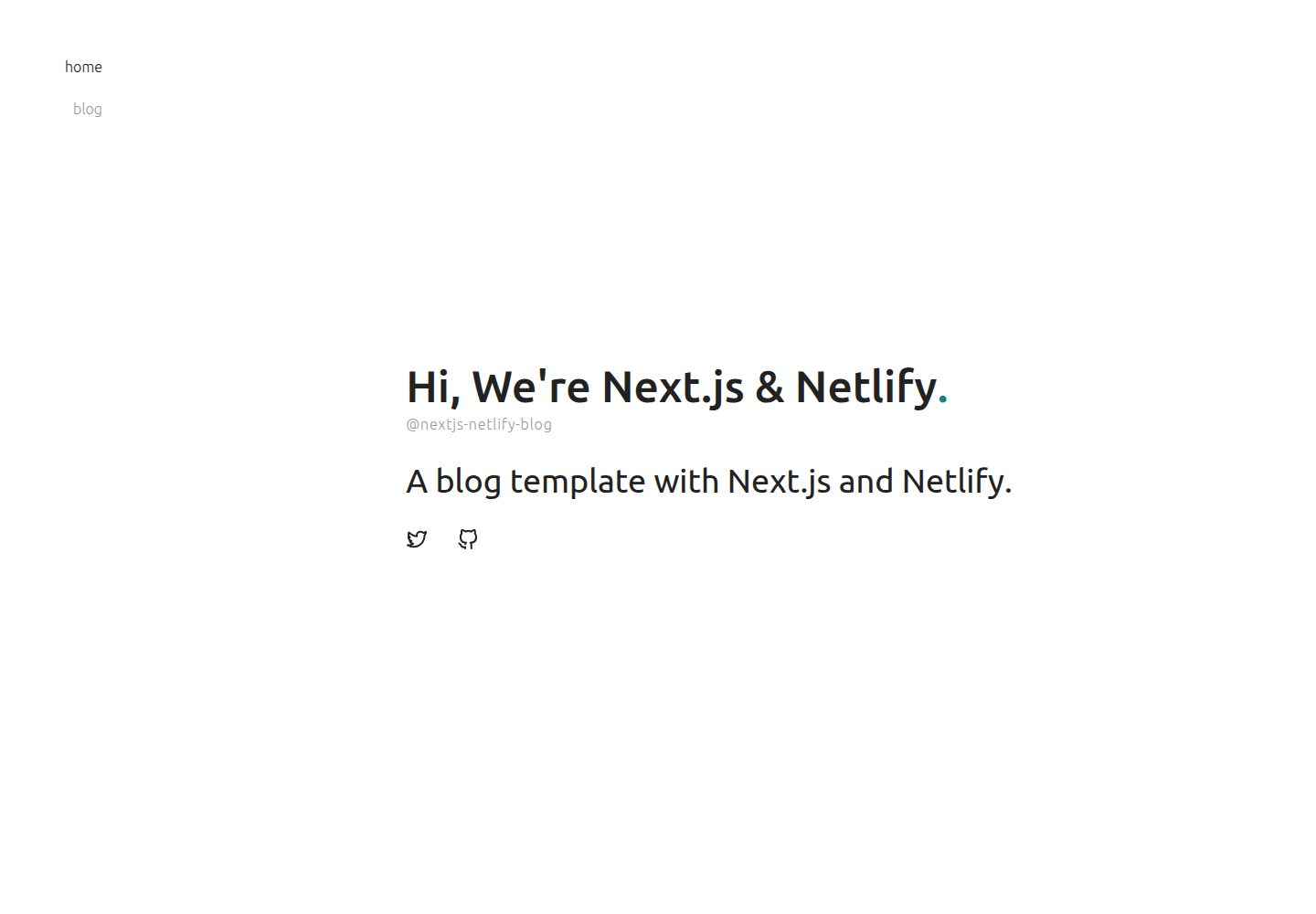
看看你的网站会是什么样
浏览真实页面截图,比较内容排版与手机效果。点击下方缩略图切换,放大查看整页细节。
全部页面与视图 2
截图用于了解视觉与布局,交互效果请以实际项目为准。
采集于 2026-10-13查看来源
值得关注的模板亮点
从已有项目资料中,快速了解它的特点。
通过 Netlify CMS 编辑内容,作者等元数据由 meta 目录下的 YAML 定义
内置标签、作者展示与分页功能
包含 JSON-LD 等 SEO 元数据
支持以 React 组件形式扩展内容写作,类似 WordPress 短代码
样式基于 styled-jsx 与 CSS Modules,可替换为其他样式方案
模板详细介绍
这是一个面向 Netlify 部署的 Next.js 博客模板,定位为博客脚手架。README 说明其目标是补齐常见 Next.js + Netlify 教程中缺失的博客标准功能,例如标签分类。内容以 MDX 文件形式存放在 src/content 目录,作者等元数据由 meta 目录下的 YAML 文件定义,并通过 Netlify CMS 进行编辑。模板内置标签、作者展示、分页、SEO 元数据(如 JSON-LD)以及类似 WordPress 短代码的 React 组件扩展能力。样式使用 styled-jsx 与 CSS Modules,但 README 明确表示可以替换为任意样式方案。仓库采用 MIT 许可,代码可免费使用、修改、商用和分发,但演示图片、字体、图标等第三方素材需单独核对许可,域名与托管等外部服务可能产生费用。模板最后更新于 2021 年,未声明生产就绪程度或性能表现。
Next.js博客
适合你的项目吗?
适用场景
- 搭建以 Netlify 为托管平台的个人或团队博客
- 需要标签、作者与分页等标准博客功能的站点
- 希望通过 CMS 界面而非直接编辑代码来维护文章内容
- 使用 MDX 编写内容并需要自定义 React 组件嵌入文章
适合人群
- 熟悉 Next.js 与 TypeScript 的开发者
- 计划将博客部署在 Netlify 上的用户
- 需要标签、作者、分页等基础博客能力的项目
- 愿意按自身需求修改模板代码与样式的使用者
上手与定制指南
结合仓库当前版本的说明,按下面的资料检查内容、配置与运行要求。
- 1
使用 npx create-next-app 并指定该仓库作为 example 来创建项目
- 2
按 Netlify 官方部署指南完成站点配置与部署
- 3
作者等元数据在 meta 目录的 YAML 文件中维护,新增分类需同步修改 Netlify CMS 配置、元数据模块与展示组件
- 4
Netlify CMS 的语言设置需修改 public/admin 下的 config.yml 与 index.html
- 5
演示图片、字体、图标等第三方素材需单独核对许可,托管等外部服务可能产生费用
授权与来源资料
使用条件与限制
免费使用 · 保留许可声明本次收录的是公开仓库中采用 MIT 许可的免费版本;免费范围为该版本代码,不代表外部服务或第三方素材免费。
使用时需要遵守
- 允许免费使用、修改、商用和分发该版本代码。
- 分发代码副本或实质性部分时,保留原作者版权声明和完整 MIT 许可声明。
- 代码按现状提供;担保与责任限制以原许可证及适用法律为准。
额外费用与待核对事项
- 演示图片、字体、图标及其他第三方素材需按各自许可核对,不能仅凭代码的 MIT 许可判断。
- 域名、托管、数据库、支付或 AI 等外部服务可能另外收费。
- 该模板专为 Netlify 平台设计,构建博客时依赖 Netlify 技术栈,部署与 CMS 功能均围绕 Netlify 服务实现。
- 使用该模板需按 Netlify 官方指南配置项目,意味着需要 Netlify 账户及相应托管服务。
- 内容编辑依赖 Netlify CMS,需通过 Netlify 提供的 CMS 界面操作,属于外部服务依赖。
查看原文依据
Permission is hereby granted, free of charge
许可证原文
Next.js blogging template for Netlify is a boilerplate for building blogs with only Netlify stacks.
README 原文
set up your project as following the Netlify blog:
README 原文
https://github.com/raineydavid/nextjs-netlify-blog-template/blob/master/LICENSEhttps://github.com/raineydavid/nextjs-netlify-blog-template/blob/master/README.mdyou can access Netlify CMS and create new categories at any time.
README 原文
DeepSeek 根据仓库许可证和 README 整理 ·2026-10-13。结果仅覆盖已读取资料,依赖、图片、字体及后续条款变更以各自原文为准。
项目核对记录与介绍依据
模板资料
- 来源平台
- GitHub
- 资料与维护参考分
- 资料一般 · 65 / 100
- 技术栈
- Next.js · React
- 网站类型
- 博客
这个分数如何计算
本站按许可资料(最高30分)、演示链接(12分)、预览图(10分)、Star数(15分)、记录的维护时间(15分)、描述完整度(8分)、功能记录(5分)和分类资料(5分)计算。它不是代码、安全或性能测试,也不是 Google 评分;有链接不代表已实测可用。
这个项目需要核对什么
- 记录的仓库更新时间
- 2021-08-15
- 截图检查日期
- 2026-10-13
已收录演示链接。请用你的内容与屏幕尺寸检查;有演示不代表表单、认证或支付已经可用。
目录记录的主要技术栈是 Next.js。请通过依赖清单和锁文件核对实际版本与托管要求。这些说明基于收录资料,不代表代码审计或部署实测。
查看具体选型方法 →介绍的制作与核对状态
介绍由 AI 辅助整理目录与仓库资料。仓库作者不等于这篇介绍的审核者。
审核声明: [email protected] · 2026-10-13
查看当时使用的来源资料
SHA-256: 967d7f94be4386ea6d8cfbbf3cdce3b65ccafe194fef8b78a95f71e691d2c49f
2026-10-13T09:47:55.109Z
来源文件 / 仓库 [](https://app.netlify.com/sites/nextjs-netlify-blog-template/deploys) [](https://nextjs.org/) Next.js blogging template for Netlify is a boilerplate for building blogs with only Netlify stacks. There are some boilerplate or tutorials for the combination of Next.js and Netlify on GitHub. These resources have documentation and good tutorial to get started Next.js and Netlify quickly, but they are too simple to build blogs with standard features like tagging. Next.js blogging template for Netlify has already implemented these standard features for building blogs with only using Next.js and Netlify stacks. ## Demo Deploy on your environment by clicking here: [](https://app.netlify.com/start/deploy?repository=https://github.com/wutali/nextjs-netlify-blog-template&stack=cms) Or access the following demo site: [Next.js blog template for Netlify](https://nextjs-netlify-blog-template.netlify.app/) ## Features - **Tagging**: organizes content by tags - **Author**: displays author names who write a post - **Pagination**: limits the number of posts per page - **CMS**: built with CMS to allow editors modifying content with the quickest way - **SEO optimized**: built-in metadata like JSON-LD - **Shortcode**: extends content writing with React component like WordPress shortcodes ## Dependencies - [TypeScript](https://www.typescriptlang.org/) - [Next.js](https://nextjs.org/) - [Netlify](https://www.netlify.com/) - [MDX](https://mdxjs.com/) ## Getting started To create your blog using the template, open your terminal, `cd` into the directory you'd like to create the app in, and run the following command: ``` npx create-next-app your-blog --example "https://github.com/wutali/nextjs-netlify-blog-template" ``` After that, set up your project as following the Netlify blog: [A Step-by-Step Guide: Deploying on Netlify](https://www.netlify.com/blog/2016/09/29/a-step-by-step-guide-deploying-on-netlify/) ## Customization This template is just a template and a boilerplate in which users can customize anything after the project was cloned and started. The following instructions introduce common customization points like adding new metadata or applying a new design theme. ### Styling pages by a customized theme All source codes related to the blog are under [components](/src/components) and [pages](/src/pages) directory. You can modify it freely if you want to apply your design theme. All components use [styled-jsx](https://github.com/vercel/styled-jsx) and [css-modules](https://github.com/css-modules/css-modules) to define their styles, but you can choose any styling libraries for designing your theme. The directory tree containing the blog source code are described below: ``` meta: yaml files defining metadata like authors or tags public: images, favicons and other static assets src ├── assets: other assets using inside of components ├── components: pieces of components consisting of pages ├── content: mdx files for each post page ├── lib: project libraries like data fetching or pagination └── pages: page components managing by Next.js ``` ### Organizing content by categories The category metadata that associates with content have the same relationship with the authors' one. Then reference these implementations for adding new metadata: - [public/admin/config.yml](/public/admin/config.yml#L51): author metadata definition for Netlify CMS - [src/lib/authors.tsx](/src/lib/authors.ts): fetches metadata and defines utility functions for components - [meta/authors.yml](/src/meta/authors.yml): author content managed by Netlify CMS - [src/components/PostLayout.tsx](/src/components/PostLayout.tsx): displays author content for each page You understood they have four steps to add the category metadata on your project after you read the above source codes: 1. Define the category metadata on the above Netlify config file 2. Create an empty file named with `categories.yml` under [meta](/src/meta/) directory 3. Create a new module for fetching category metadata 4. Display the category metadata on [src/components/PostLayout.tsx](/src/components/PostLayout.tsx#L75) or other components you want It is all you have to do. After that, you can access Netlify CMS and create new categories at any time. ### Locale settings for Netlify CMS Modify [config.yml](/public/admin/config.yml) and [index.html](/public/admin/index.html) under [public/admin](/public/admin/) directory as following instructions: [Netlify CMS - Configuration Options #Locale](https://www.netlifycms.org/docs/configuration-options/#locale) ## References - [Netlify CMS Documentation](https://www.netlifycms.org/docs/intro/) - [Building a Markdown blog with Next 9.4 and Netlify](https://www.netlify.com/blog/2020/05/04/building-a-markdown-blog-with-next-9.4-and-netlify/) - [Hugo Theme - Codex](https://github.com/jakewies/hugo-theme-codex) - [Next.js Starter Template for TypeScript](https://github.com/vercel/next-learn-starter/tree/master/typescript-final) - [Building Blog with NextJS and Netlify CMS](https://dev.to/mefaba/building-blog-with-nextjs-and-netlify-cms-fom) - [Unicons](https://github.com/Iconscout/unicons) ## License MIT
看看同类模板
对比同技术栈与用途的模板,找到更适合的视觉与内容结构。

tailwind-nextjs-starter-blog
tailwind-nextjs-starter-blog 是一个面向个人技术博客的 Next.js 与 Tailwind CSS 启动模板,其 v2 版本基于 App Router 与 React Server Comp…
Next.js · 博客

Nextjs-tailwindcss-blog-template
⭐Build SEO optimized personal blog website with Next.js, Tailwind CSS and Contentlayer. If you want to learn t…
Next.js · 博客

Next-js-Blog-Boilerplate
Next-js-Blog-Boilerplate 是一套面向个人与技术博客的启动代码,基于 Next.js 12 与 Tailwind CSS 3 构建,同时集成了 TypeScript、ESLint、Prettier …
Next.js · 博客

nextjs-blog-theme
nextjs-blog-theme 是 Netlify 团队维护的一个博客启动模板,基于 Next.js 15(Pages Router)和 Tailwind CSS 4.x 构建,设计由 Bejamas 机构完成。
Next.js · 博客

blog
🚀 My personal blog made with Tailwind CSS and NextJS. Template from Timlrx. Feel free to fork, follow and use…
Next.js · 博客

tailnext
Tailnext 是一个基于 Next.js 14 App Router 和 Tailwind CSS 的免费开源模板,由 onWidget 团队创建并维护。
Next.js · 博客