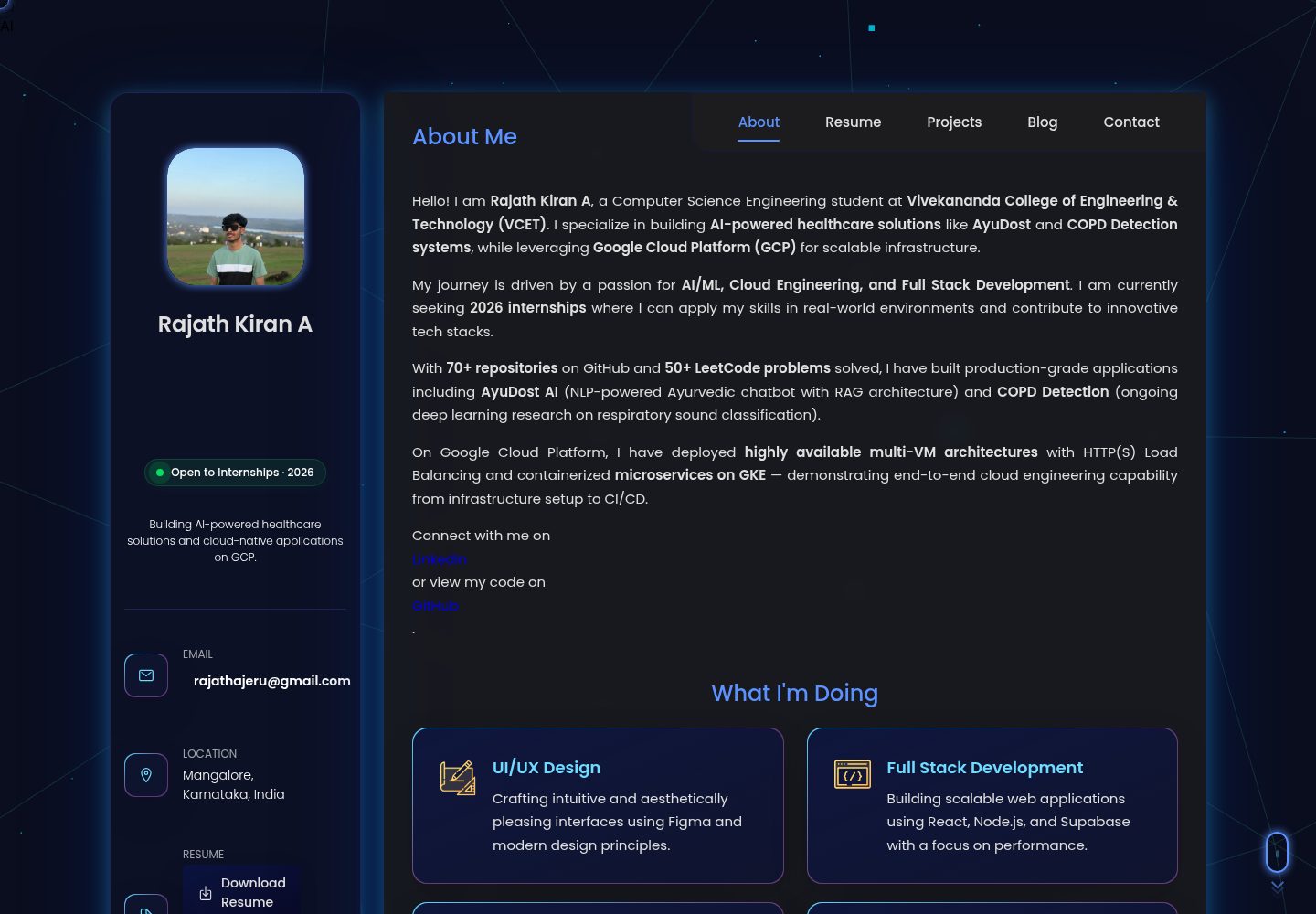
Single-page portfolio structure with sections including About, Resume, Projects, Certifications, and Contact
HTMLPortfolio
rajathkiran.me — HTML Portfolio Template
By Rajath2005
Rajath Kiran A's personal portfolio website, built with HTML, CSS, and vanilla JavaScript, featuring a dark interface, animations, interactive modals, and an AI chat assistant integrated with Netlify Functions and Google Gemini.
Explore the design
Compare the page layouts and mobile experience. Open any screenshot for a closer look.
Desktop homepage1 / 2
Desktop captureTop of page
Actual screenshot captured by the server browser.
All pages & views 2
Screenshots show visual appearance; interactive behavior may differ.
Recorded 2026-10-13View source
What stands out
A quick read of the recorded project description.
Dark-themed interface using CSS custom properties and glassmorphism styling
Projects section is a filterable grid, with some projects having dedicated detail pages
AI chat assistant that calls Google Gemini through a Netlify Functions proxy
Contact form uses Formspree; certificates are viewed in modals
Includes a Three.js WebGL background and interactions such as a Hacker Mode easter egg
Template Details
This is a single-page portfolio template for personal job seeking and project showcasing. The repository is MIT licensed, and the source code is primarily HTML, CSS, and vanilla JavaScript. The page is organized into sections such as About, Resume, Projects, Certifications, and Contact. The projects section provides a filterable grid, and some projects have dedicated pages.
Beyond static presentation, the template includes several features that require additional configuration: the AI chat assistant calls the Google Gemini API through a Netlify Functions proxy, requiring you to apply for and configure a GEMINI_API_KEY; the contact form uses Formspree and requires configuring a service endpoint for real submissions. The Three.js WebGL background, Hacker Mode easter egg, Recruiter Mode, and other interactions mentioned in the README are also part of the repository code.
Before use, note that the personal profile, projects, certificates, avatar, and other content in the template belong to the author; they must be replaced before using it as your own portfolio. The licensing of third-party assets such as demo images, fonts, and icons must be checked separately and cannot be judged solely by the code's MIT license.
HTMLPortfolio
Is it right for your project?
Use Cases
- Individual developers or students building their own portfolio and online resume
- Showcasing skills, project experience, and certificates, with downloadable certificate PDFs
- Adding a Gemini-based Q&A self-introduction to a portfolio
- Presentation-oriented websites that need a dark theme, animations, and mobile bottom navigation
Suitable For
- Developers or job seekers who want a personal portfolio page quickly
- Users who can replace the personal profile and project content in the HTML themselves
- Those willing to configure Netlify and a Gemini API key to enable the AI chat feature
- Projects that need to freely modify and distribute the code under the MIT license
Getting started & customization
Use these recorded setup notes alongside the repository instructions for your chosen version.
- 1
After cloning the repository, run npm install to install the dependencies required by Netlify Functions
- 2
Create a .env in the root directory and set GEMINI_API_KEY for the AI chat feature
- 3
Use the Netlify CLI's netlify dev to start the local development server so that /.netlify/functions/* requests are mapped
- 4
The contact form uses Formspree; replace it with your own form endpoint to receive submissions
- 5
Replace the personal information, projects, certificates, and images in the repository, and verify the licensing of third-party assets
License & source material
Usage conditions & limitations
Free to use · keep license noticeThis entry covers the free version in the public repository under the MIT license; the free scope is the code of this version and does not mean that external services or third-party assets are free.
Must comply with when using
- Free use, modification, commercial use, and distribution of this version's code are permitted.
- When distributing copies or substantial portions of the code, retain the original author's copyright notice and the full MIT license notice.
- The code is provided as is; warranties and limitations of liability are governed by the original license and applicable law.
Additional costs & items to verify
- The README mentions the Formspree form service; real submissions require configuring a service endpoint, and its usage quotas and fees must be checked separately.
- Demo images, fonts, icons, and other third-party assets must be checked under their respective licenses and cannot be judged solely by the code's MIT license.
- External services such as domains, hosting, databases, payments, or AI may incur additional charges.
- The AI chat assistant feature requires applying for a Google Gemini API key; otherwise, the feature cannot be used.
- You must create a .env in the root directory and configure GEMINI_API_KEY for the AI chat feature to work properly.
- Running features that include server-side functions locally requires installing and using the Netlify CLI, not a regular static server.
- The contact form relies on the third-party Formspree service; you must configure a form endpoint yourself to receive submissions.
- You may freely fork and use it as a template, but you must retain attribution and replace the author's personal profile with your own content.
View Original Text Basis
Permission is hereby granted, free of charge
Original License Text
A [Google Gemini API Key](https://aistudio.google.com/) for the AI Chat feature.
Original README
Create a `.env` file in the root directory and add your API keys: ```env GEMINI_API_KEY="your-gemini-api-key-here" ```
Original README
The easiest way to run the project locally with the serverless functions is using the Netlify CLI:
Original README
**Contact (`<article class="contact">`)**: Formspree-powered contact form and recruiter-specific FAQ accordion.
Original README
https://github.com/Rajath2005/rajathkiran.me/blob/main/LICENSEhttps://github.com/Rajath2005/rajathkiran.me/blob/main/README.mdYou are free to fork and use this template, provided you retain attribution and replace my personal data with your own.
Original README
Compiled by DeepSeek based on repository license and README ·2026-10-13. Results only cover the materials read; dependencies, images, fonts, and subsequent term changes are subject to their respective original texts.
Project checks & description sources
Template Information
- Source platforms
- GitHub
- Documentation and maintenance reference score
- More documented · 83 / 100
- Technologies
- HTML
- Website type
- Portfolio
How this score is calculated
Our heuristic uses license records (up to 30), a demo link (12), a preview (10), stars (15), recorded maintenance (15), description completeness (8), feature records (5) and classification data (5). It is not a code, security or performance test, or a Google score. A link does not establish tested functionality.
What to verify for this project
- Repository update recorded
- 2026-08-25
- Screenshot last checked
- 2026-10-13
A demo link is listed. Check it with your own content and viewport sizes; its presence does not confirm that forms, authentication or payments work.
The catalog identifies HTML as the primary stack. Check the actual dependency manifest and lockfile for versions and hosting requirements. These notes use recorded metadata, not a code audit or a deployment test.
Use a selection guide →How this description was prepared
AI-assisted description based on catalog records and repository material. Repository authors are not automatically the reviewers of this description.
Review declaration: [email protected] · 2026-10-13
Inspect the recorded source material
SHA-256: 97725ad5eb94e158c1e4e61c40ab2b8b34c5b742aef9ae34ce08144377fc709f
2026-10-13T00:18:58.641Z
Source file / repository<div align="center"> <!-- <img src="docs/images/banner.png" alt="Rajath Kiran A Portfolio Banner" width="100%" /> --> # Rajath Kiran A — Personal Portfolio <p><strong>Cloud Engineer | AI/ML Developer | Full Stack Engineer</strong></p> [](https://app.netlify.com/sites/rajathkiran/deploys) [](https://opensource.org/licenses/MIT) []() []() </div> <br /> Welcome to the open-source repository for my personal portfolio! This highly optimized, interactive, and responsive web application serves as a dynamic resume, project showcase, and AI-powered interaction hub. --- ## 📸 Visual Showcase | Desktop View | Mobile View | | :---: | :---: | |  |  | | *Clean, dark-mode aesthetic with glassmorphism* | *Fully responsive, buttery smooth mobile experience* | > 📌 **View the full visual breakdown in [SHOWCASE.md](docs/SHOWCASE.md)** --- ## ✨ Features Overview This portfolio goes beyond a simple static site. It includes: - 🤖 **AI Chat Assistant**: Ask my AI clone questions about my skills and experience, powered by Google Gemini and Netlify Functions. - 🎭 **Recruiter Mode**: Automatically sorts projects by enterprise/impact relevance for hiring managers. - 🚀 **Buttery Smooth Animations**: Integrated Three.js WebGL backgrounds and CSS transitions optimized for 60fps scrolling. - 🕹️ **Hacker Mode Easter Egg**: Hidden interactive terminal featuring a matrix rain canvas and interactive commands. - 📱 **Mobile-First Design**: Intuitive bottom-navigation on mobile and off-canvas sidebars. > 📌 **Explore every UI component in detail in [FEATURES.md](docs/FEATURES.md)** --- ## 🏗️ Architecture & Tech Stack This project uses a vanilla, dependency-free frontend approach to maximize performance and minimize bundle size, coupled with serverless functions for dynamic capabilities. - **Frontend Core**: HTML5, Vanilla JavaScript (ES6+), CSS3 (Custom Properties & Glassmorphism) - **3D & Graphics**: Three.js (WebGL) - **Icons & Fonts**: Ionicons, Google Fonts (Poppins, Syne) - **Backend / API**: Node.js via Netlify Functions - **AI Integration**: Google Generative AI (Gemini SDK) - **Deployment & Hosting**: Netlify CI/CD > 📌 **Read the deep-dive technical breakdown in [ARCHITECTURE.md](docs/ARCHITECTURE.md)** --- ## 🚀 Getting Started ### Prerequisites - [Node.js](https://nodejs.org/en/) (v18+ recommended) - A [Google Gemini API Key](https://aistudio.google.com/) for the AI Chat feature. ### Installation 1. **Clone the repository:** ```bash git clone https://github.com/Rajath2005/rajathkiran.io.git cd rajathkiran.io ``` 2. **Install dependencies:** *(Required only for the Netlify serverless functions)* ```bash npm install ``` ### Environment Variables Create a `.env` file in the root directory and add your API keys: ```env GEMINI_API_KEY="your-gemini-api-key-here" ``` ### Local Development The easiest way to run the project locally with the serverless functions is using the Netlify CLI: 1. Install Netlify CLI globally: ```bash npm install netlify-cli -g ``` 2. Start the local development server: ```bash netlify dev ``` This will spin up the local server (usually on `http://localhost:8888`) and automatically map requests to `/.netlify/functions/*`. --- ## 📂 Folder Structure ```text 📦 rajathkiran.io ┣ 📂 assets ┃ ┣ 📂 css # Core stylesheets (style.css, os-intelligence.css) ┃ ┣ 📂 images # Avatars, project thumbnails, icons ┃ ┣ 📂 js # Core logic, Three.js backgrounds, AI Chat ┃ ┗ 📂 certificates # Downloadable PDF assets ┣ 📂 docs # Comprehensive project documentation ┣ 📂 netlify ┃ ┗ 📂 functions # Serverless endpoints (e.g., ask-rajath.js) ┣ 📜 index.html # Main Single Page Application ┣ 📜 package.json # Project dependencies ┗ 📜 netlify.toml # Deployment configuration ``` --- ## 🧩 Project Sections Explanation - **About (`<article class="about">`)**: High-level introduction, core services, education timeline, and testimonials. - **Resume (`<article class="resume">`)**: Detailed work experience, hackathons, and a granular skills radar. - **Projects (`<article class="portfolio">`)**: Filterable grid of technical projects, with dedicated standalone pages (`ayudost.html`, `copd-detection.html`, etc.) for programmatic SEO. - **Certifications (`<article class="blog">`)**: Interactive modal viewer for verifying cloud and AI credentials. - **Contact (`<article class="contact">`)**: Formspree-powered contact form and recruiter-specific FAQ accordion. --- ## 🤖 Specialized Integrations ### AI Chat Assistant Located in the dock menu, this feature allows users to query an AI model trained on my specific resume data. It dynamically imports `ai-chat.js` to prevent render blocking, and communicates with `ask-rajath.js` (a Netlify function acting as a secure proxy to the Gemini API). ### Easter Eggs Type `hacker` into the navigation bar or use the Konami code to trigger special UI overrides. > 📌 **Discover all secrets in [EASTER_EGGS.md](docs/EASTER_EGGS.md)** --- ## ⚡ Technical Achievements - **SEO & Performance**: Achieves perfect 100/100 Lighthouse scores through deferred module loading (`type="module"`), passive scroll event listeners, `requestAnimationFrame` throttling, and strict Cumulative Layout Shift (CLS) prevention using explicit image dimensions. - **Accessibility (A11y)**: Fully navigable via keyboard, respects `prefers-reduced-motion` queries by gracefully degrading WebGL rendering, and utilizes semantic ARIA attributes. - **Responsive Design**: Employs CSS Grid, Flexbox, and extensive media queries to adapt from 4K ultrawide monitors down to 320px mobile screens without a single horizontal scrollbar. --- ## 🗺️ Future Roadmap - [ ] Add Kannada and Hindi i18n support (See [i18n-plan.md](docs/i18n-plan.md)) - [ ] Implement a headless CMS for dynamic blog posts - [ ] Integrate 3D model viewing for hardware/IoT projects - [ ] Add a visual web traffic analytics dashboard --- ## 🤝 Contributing Contributions, issues, and feature requests are welcome! Feel free to check out the [issues page](https://github.com/Rajath2005/rajathkiran.io/issues). --- ## 📝 License This project is [MIT](https://opensource.org/licenses/MIT) licensed. You are free to fork and use this template, provided you retain attribution and replace my personal data with your own. <div align="center"> <p>Built with ❤️ by Rajath Kiran A</p> </div>
Explore similar templates
Compare previews and descriptions within the same stack and category.

simplefolio
Simplefolio is a minimal single-page portfolio template for developers, built with HTML, Bootstrap, SCSS, and Parcel under the MIT license. It includes Hero, About, Projects, Contact, and Footer sections, with content edited in /src/index.html and theme colors controlled by two SCSS variables.
HTML · Portfolio

Freelancer
A bright, single-page Bootstrap portfolio template for freelancers, designers, and small studios. It includes a responsive portfolio grid with modal detail windows and an SB Forms contact form that requires an API token.
HTML · Portfolio

Resume
A single-page resume and CV template from Start Bootstrap, built on Bootstrap with a fixed sidebar and content sections.
HTML · Portfolio

Creative
A single-page marketing template by Start Bootstrap for creative agencies and product services, built on Bootstrap with SCSS, featuring a portfolio grid and call-to-action sections. It includes pre-set SB Forms markers for form integration and npm build scripts for source customization.
HTML · Corporate Website

Grayscale
A dark single-page Bootstrap template from Start Bootstrap for photography, events and brand storytelling, with a large hero and clearly separated sections.
HTML · Corporate Website

startbootstrap-stylish-portfolio
A one-page Bootstrap portfolio theme from Start Bootstrap with multiple content sections and an off-canvas navigation menu. Basic use means editing HTML/CSS under dist and opening index.html; advanced use relies on npm with Pug and SCSS build scripts.
HTML · Portfolio