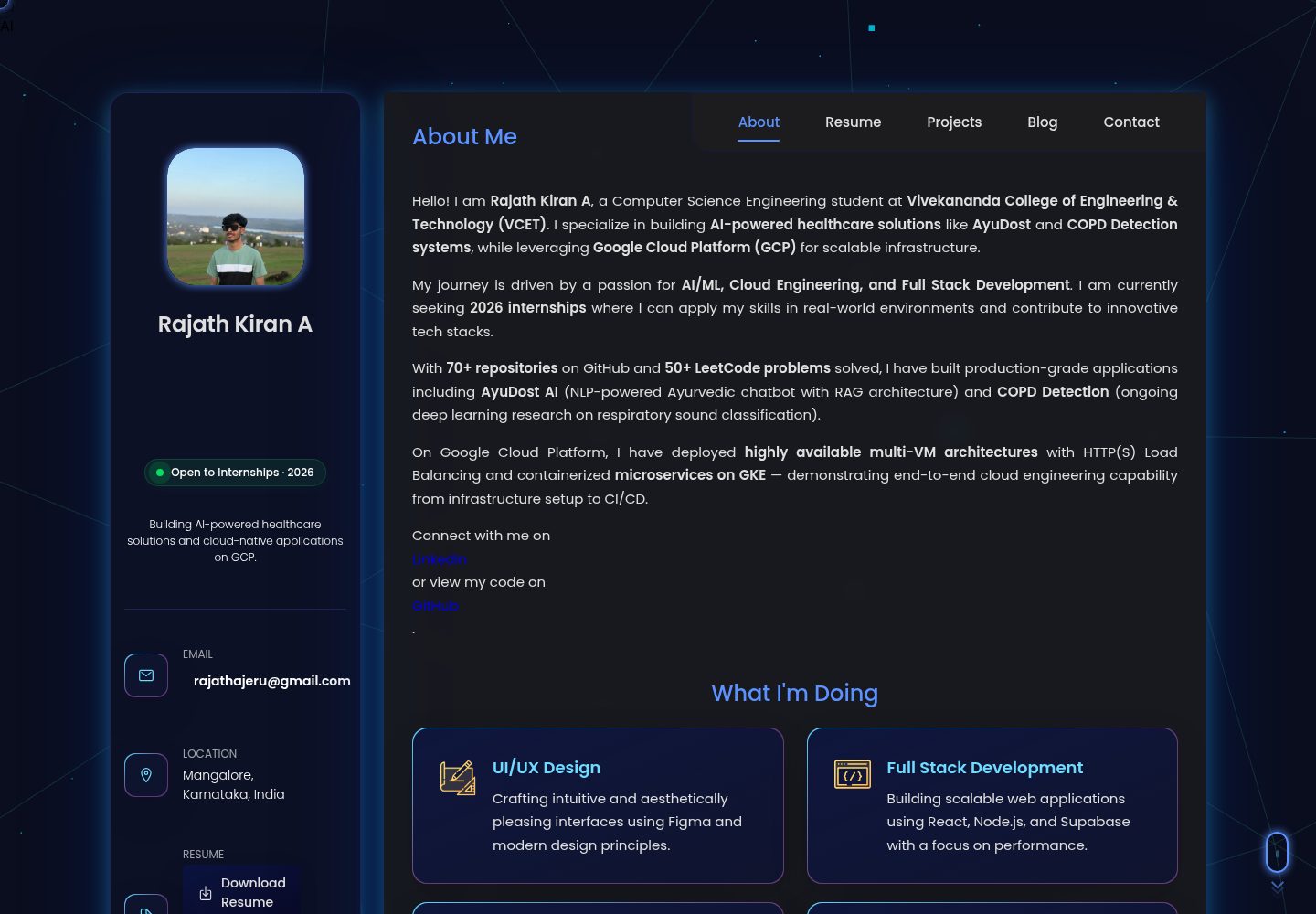
单页作品集结构,包含 About、Resume、Projects、Certifications、Contact 等区块
HTML作品集
rajathkiran.me — HTML 作品集模板
作者 Rajath2005
Rajath Kiran A 的个人作品集网站,使用 HTML、CSS 与原生 JavaScript 构建,包含深色界面、动画与交互式弹窗,并集成 Netlify Functions 与 Google Gemini 的 AI 聊天助手。
看看你的网站会是什么样
浏览真实页面截图,比较内容排版与手机效果。点击下方缩略图切换,放大查看整页细节。
全部页面与视图 2
截图用于了解视觉与布局,交互效果请以实际项目为准。
采集于 2026-10-13查看来源
值得关注的模板亮点
从已有项目资料中,快速了解它的特点。
深色主题界面,使用 CSS 自定义属性与玻璃拟态风格
项目区为可筛选网格,部分项目配有独立详情页
通过 Netlify Functions 代理调用 Google Gemini 的 AI 聊天助手
联系表单使用 Formspree,证书以弹窗形式查看
包含 Three.js WebGL 背景与 Hacker Mode 彩蛋等交互
模板详细介绍
这是一个面向个人求职与项目展示的单页作品集模板,仓库采用 MIT 许可,源码以 HTML、CSS 和原生 JavaScript 为主。页面按 About、Resume、Projects、Certifications、Contact 等区块组织,项目部分提供可筛选网格,并为部分项目准备了独立页面。
除静态展示外,模板还包含若干需要额外配置的功能:AI 聊天助手通过 Netlify Functions 代理调用 Google Gemini API,需要自行申请并配置 GEMINI_API_KEY;联系表单使用 Formspree,需要配置服务端点才能真实提交。README 中提到的 Three.js WebGL 背景、Hacker Mode 彩蛋、Recruiter Mode 等交互也属于该仓库代码的一部分。
使用前需注意:模板中的个人资料、项目、证书、头像等均为作者本人内容,替换后才能作为自己的作品集;演示图片、字体、图标等第三方素材的许可需单独核对,不能仅凭代码的 MIT 许可判断。
HTML作品集
适合你的项目吗?
适用场景
- 个人开发者或学生搭建自己的作品集与在线简历
- 展示技能、项目经历与证书,并附带可下载的证书 PDF
- 在作品集中加入基于 Gemini 的问答式自我介绍
- 需要深色主题、动画与移动端底部导航的展示型网站
适合人群
- 希望快速拥有个人作品集页面的开发者或求职者
- 能自行替换 HTML 中个人资料与项目内容的使用者
- 愿意配置 Netlify 与 Gemini API 密钥以启用 AI 聊天功能的人
- 需要 MIT 许可下自由修改与分发代码的项目
上手与定制指南
结合仓库当前版本的说明,按下面的资料检查内容、配置与运行要求。
- 1
克隆仓库后执行 npm install 安装 Netlify Functions 所需依赖
- 2
在根目录创建 .env 并设置 GEMINI_API_KEY,用于 AI 聊天功能
- 3
使用 Netlify CLI 的 netlify dev 启动本地开发服务器,以便映射 /.netlify/functions/* 请求
- 4
联系表单使用 Formspree,需替换为自己的表单端点才能接收提交
- 5
替换仓库中的个人信息、项目、证书与图片,并核对第三方素材的许可
授权与来源资料
使用条件与限制
免费使用 · 保留许可声明本次收录的是公开仓库中采用 MIT 许可的免费版本;免费范围为该版本代码,不代表外部服务或第三方素材免费。
使用时需要遵守
- 允许免费使用、修改、商用和分发该版本代码。
- 分发代码副本或实质性部分时,保留原作者版权声明和完整 MIT 许可声明。
- 代码按现状提供;担保与责任限制以原许可证及适用法律为准。
额外费用与待核对事项
- README 提及 Formspree 表单服务;真实提交需配置服务端点,其使用额度与费用需单独核对。
- 演示图片、字体、图标及其他第三方素材需按各自许可核对,不能仅凭代码的 MIT 许可判断。
- 域名、托管、数据库、支付或 AI 等外部服务可能另外收费。
- AI 聊天助手功能需要自行申请 Google Gemini API 密钥,否则该功能无法使用。
- 必须在根目录创建 .env 并配置 GEMINI_API_KEY,AI 聊天功能才能正常调用。
- 本地运行含服务端函数的功能需安装并使用 Netlify CLI,而非普通静态服务器。
- 联系表单依赖第三方 Formspree 服务,需自行配置表单端点才能接收提交。
- 可自由 fork 并作为模板使用,但须保留署名,并将作者的个人资料替换为自己的内容。
查看原文依据
Permission is hereby granted, free of charge
许可证原文
A [Google Gemini API Key](https://aistudio.google.com/) for the AI Chat feature.
README 原文
Create a `.env` file in the root directory and add your API keys: ```env GEMINI_API_KEY="your-gemini-api-key-here" ```
README 原文
The easiest way to run the project locally with the serverless functions is using the Netlify CLI:
README 原文
**Contact (`<article class="contact">`)**: Formspree-powered contact form and recruiter-specific FAQ accordion.
README 原文
https://github.com/Rajath2005/rajathkiran.me/blob/main/LICENSEhttps://github.com/Rajath2005/rajathkiran.me/blob/main/README.mdYou are free to fork and use this template, provided you retain attribution and replace my personal data with your own.
README 原文
DeepSeek 根据仓库许可证和 README 整理 ·2026-10-13。结果仅覆盖已读取资料,依赖、图片、字体及后续条款变更以各自原文为准。
项目核对记录与介绍依据
模板资料
- 来源平台
- GitHub
- 资料与维护参考分
- 资料较完整 · 83 / 100
- 技术栈
- HTML
- 网站类型
- 作品集
这个分数如何计算
本站按许可资料(最高30分)、演示链接(12分)、预览图(10分)、Star数(15分)、记录的维护时间(15分)、描述完整度(8分)、功能记录(5分)和分类资料(5分)计算。它不是代码、安全或性能测试,也不是 Google 评分;有链接不代表已实测可用。
这个项目需要核对什么
- 记录的仓库更新时间
- 2026-08-25
- 截图检查日期
- 2026-10-13
已收录演示链接。请用你的内容与屏幕尺寸检查;有演示不代表表单、认证或支付已经可用。
目录记录的主要技术栈是 HTML。请通过依赖清单和锁文件核对实际版本与托管要求。这些说明基于收录资料,不代表代码审计或部署实测。
查看具体选型方法 →介绍的制作与核对状态
介绍由 AI 辅助整理目录与仓库资料。仓库作者不等于这篇介绍的审核者。
审核声明: [email protected] · 2026-10-13
查看当时使用的来源资料
SHA-256: 97725ad5eb94e158c1e4e61c40ab2b8b34c5b742aef9ae34ce08144377fc709f
2026-10-13T00:18:58.641Z
来源文件 / 仓库<div align="center"> <!-- <img src="docs/images/banner.png" alt="Rajath Kiran A Portfolio Banner" width="100%" /> --> # Rajath Kiran A — Personal Portfolio <p><strong>Cloud Engineer | AI/ML Developer | Full Stack Engineer</strong></p> [](https://app.netlify.com/sites/rajathkiran/deploys) [](https://opensource.org/licenses/MIT) []() []() </div> <br /> Welcome to the open-source repository for my personal portfolio! This highly optimized, interactive, and responsive web application serves as a dynamic resume, project showcase, and AI-powered interaction hub. --- ## 📸 Visual Showcase | Desktop View | Mobile View | | :---: | :---: | |  |  | | *Clean, dark-mode aesthetic with glassmorphism* | *Fully responsive, buttery smooth mobile experience* | > 📌 **View the full visual breakdown in [SHOWCASE.md](docs/SHOWCASE.md)** --- ## ✨ Features Overview This portfolio goes beyond a simple static site. It includes: - 🤖 **AI Chat Assistant**: Ask my AI clone questions about my skills and experience, powered by Google Gemini and Netlify Functions. - 🎭 **Recruiter Mode**: Automatically sorts projects by enterprise/impact relevance for hiring managers. - 🚀 **Buttery Smooth Animations**: Integrated Three.js WebGL backgrounds and CSS transitions optimized for 60fps scrolling. - 🕹️ **Hacker Mode Easter Egg**: Hidden interactive terminal featuring a matrix rain canvas and interactive commands. - 📱 **Mobile-First Design**: Intuitive bottom-navigation on mobile and off-canvas sidebars. > 📌 **Explore every UI component in detail in [FEATURES.md](docs/FEATURES.md)** --- ## 🏗️ Architecture & Tech Stack This project uses a vanilla, dependency-free frontend approach to maximize performance and minimize bundle size, coupled with serverless functions for dynamic capabilities. - **Frontend Core**: HTML5, Vanilla JavaScript (ES6+), CSS3 (Custom Properties & Glassmorphism) - **3D & Graphics**: Three.js (WebGL) - **Icons & Fonts**: Ionicons, Google Fonts (Poppins, Syne) - **Backend / API**: Node.js via Netlify Functions - **AI Integration**: Google Generative AI (Gemini SDK) - **Deployment & Hosting**: Netlify CI/CD > 📌 **Read the deep-dive technical breakdown in [ARCHITECTURE.md](docs/ARCHITECTURE.md)** --- ## 🚀 Getting Started ### Prerequisites - [Node.js](https://nodejs.org/en/) (v18+ recommended) - A [Google Gemini API Key](https://aistudio.google.com/) for the AI Chat feature. ### Installation 1. **Clone the repository:** ```bash git clone https://github.com/Rajath2005/rajathkiran.io.git cd rajathkiran.io ``` 2. **Install dependencies:** *(Required only for the Netlify serverless functions)* ```bash npm install ``` ### Environment Variables Create a `.env` file in the root directory and add your API keys: ```env GEMINI_API_KEY="your-gemini-api-key-here" ``` ### Local Development The easiest way to run the project locally with the serverless functions is using the Netlify CLI: 1. Install Netlify CLI globally: ```bash npm install netlify-cli -g ``` 2. Start the local development server: ```bash netlify dev ``` This will spin up the local server (usually on `http://localhost:8888`) and automatically map requests to `/.netlify/functions/*`. --- ## 📂 Folder Structure ```text 📦 rajathkiran.io ┣ 📂 assets ┃ ┣ 📂 css # Core stylesheets (style.css, os-intelligence.css) ┃ ┣ 📂 images # Avatars, project thumbnails, icons ┃ ┣ 📂 js # Core logic, Three.js backgrounds, AI Chat ┃ ┗ 📂 certificates # Downloadable PDF assets ┣ 📂 docs # Comprehensive project documentation ┣ 📂 netlify ┃ ┗ 📂 functions # Serverless endpoints (e.g., ask-rajath.js) ┣ 📜 index.html # Main Single Page Application ┣ 📜 package.json # Project dependencies ┗ 📜 netlify.toml # Deployment configuration ``` --- ## 🧩 Project Sections Explanation - **About (`<article class="about">`)**: High-level introduction, core services, education timeline, and testimonials. - **Resume (`<article class="resume">`)**: Detailed work experience, hackathons, and a granular skills radar. - **Projects (`<article class="portfolio">`)**: Filterable grid of technical projects, with dedicated standalone pages (`ayudost.html`, `copd-detection.html`, etc.) for programmatic SEO. - **Certifications (`<article class="blog">`)**: Interactive modal viewer for verifying cloud and AI credentials. - **Contact (`<article class="contact">`)**: Formspree-powered contact form and recruiter-specific FAQ accordion. --- ## 🤖 Specialized Integrations ### AI Chat Assistant Located in the dock menu, this feature allows users to query an AI model trained on my specific resume data. It dynamically imports `ai-chat.js` to prevent render blocking, and communicates with `ask-rajath.js` (a Netlify function acting as a secure proxy to the Gemini API). ### Easter Eggs Type `hacker` into the navigation bar or use the Konami code to trigger special UI overrides. > 📌 **Discover all secrets in [EASTER_EGGS.md](docs/EASTER_EGGS.md)** --- ## ⚡ Technical Achievements - **SEO & Performance**: Achieves perfect 100/100 Lighthouse scores through deferred module loading (`type="module"`), passive scroll event listeners, `requestAnimationFrame` throttling, and strict Cumulative Layout Shift (CLS) prevention using explicit image dimensions. - **Accessibility (A11y)**: Fully navigable via keyboard, respects `prefers-reduced-motion` queries by gracefully degrading WebGL rendering, and utilizes semantic ARIA attributes. - **Responsive Design**: Employs CSS Grid, Flexbox, and extensive media queries to adapt from 4K ultrawide monitors down to 320px mobile screens without a single horizontal scrollbar. --- ## 🗺️ Future Roadmap - [ ] Add Kannada and Hindi i18n support (See [i18n-plan.md](docs/i18n-plan.md)) - [ ] Implement a headless CMS for dynamic blog posts - [ ] Integrate 3D model viewing for hardware/IoT projects - [ ] Add a visual web traffic analytics dashboard --- ## 🤝 Contributing Contributions, issues, and feature requests are welcome! Feel free to check out the [issues page](https://github.com/Rajath2005/rajathkiran.io/issues). --- ## 📝 License This project is [MIT](https://opensource.org/licenses/MIT) licensed. You are free to fork and use this template, provided you retain attribution and replace my personal data with your own. <div align="center"> <p>Built with ❤️ by Rajath Kiran A</p> </div>
看看同类模板
对比同技术栈与用途的模板,找到更适合的视觉与内容结构。

simplefolio
⚡️ A minimal portfolio template for Developers
HTML · 作品集

Freelancer
Freelancer 是 Start Bootstrap 出品的单页作品集模板,专为自由职业者、设计师和小型工作室设计。 页面结构清晰,包含多个内容区块、响应式作品集网格,每个作品项目配有模态窗口展示详情。
HTML · 作品集

Resume
Resume 是 Start Bootstrap 推出的简历与 CV 主题,基于 Bootstrap 构建,采用固定侧边栏加内容区块的结构。
HTML · 作品集

Creative
Creative 是 Start Bootstrap 团队维护的一款单页营销模板,定位明确:为创意机构或产品服务提供一个以作品展示和行动号召为核心的落地页。
HTML · 企业官网

Grayscale
Grayscale 是 Start Bootstrap 出品的深色系单页 HTML 模板,基于 Bootstrap 构建。 它的视觉重心放在大尺寸首屏和清晰的内容分区上,整体氛围偏暗,适合摄影、活动或品牌叙事类网站。
HTML · 企业官网

startbootstrap-stylish-portfolio
Stylish Portfolio 是 Start Bootstrap 维护的单页作品集主题,基于 Bootstrap 构建,采用多个内容区块加离屏导航菜单的结构。
HTML · 作品集