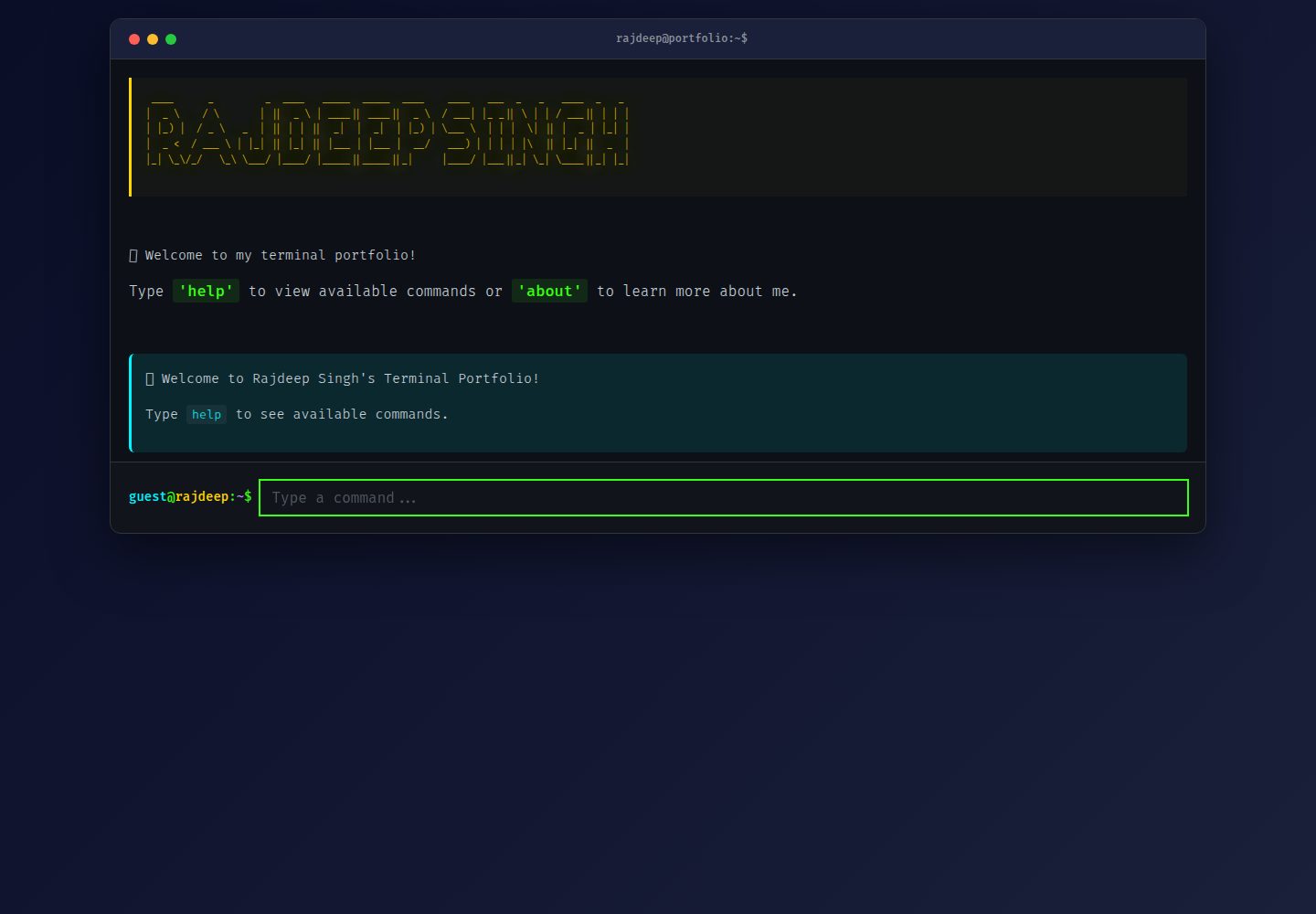
Terminal-style command-line interface; enter commands such as help to browse portfolio content
HTMLPortfolio
terminal-theme-portfolio — HTML Portfolio Template
By RajdeepKushwaha5
A terminal-themed personal portfolio website that presents skills, projects, and contact information through a command-line interface, and pulls repositories and profile data from the GitHub API in real time.
Explore the design
Compare the page layouts and mobile experience. Open any screenshot for a closer look.
Desktop homepage1 / 2
Desktop captureTop of page
Actual screenshot captured by the server browser.
All pages & views 2
Screenshots show visual appearance; interactive behavior may differ.
Recorded 2026-10-13View source
What stands out
A quick read of the recorded project description.
Fetches repositories, personal bio, and statistics in real time via the GitHub API
Supports ↑/↓ arrow keys to browse command history, and Ctrl/Cmd+K or L to clear the screen
Provides a quick help button and a touch-friendly layout on mobile
Uses vanilla JavaScript, with no frameworks and no build tools
The README mentions a 15-minute cache for GitHub API data
Template Details
This is an interactive personal portfolio website with a terminal theme, where visitors browse information by typing commands in the browser rather than through a traditional graphical interface. Enter help to view all commands, including whoami, about, skills, projects, achievements, resume, contact, website, and clear. The project automatically fetches repositories, personal bio, and statistics via the GitHub API, keeping the portfolio in sync with the latest work. The README states that it is built with vanilla JavaScript, with no frameworks and no build tools, and includes command history, keyboard shortcuts, a mobile quick help button, loading states, and fallback handling when the API fails.
For customization, the README requires modifying GITHUB_USERNAME in commands.js, the email and resume link in getContact(), the CSS variables in styles.css, and the ASCII banner in index.html; adding or modifying commands requires editing the executeCommand() function in app.js. The README does not provide a dependency list, specific framework versions, deployment steps, or browser compatibility details, nor does it describe production performance.
HTMLPortfolio
Is it right for your project?
Use Cases
- Developers who want to showcase personal projects and skills through command-line interaction
- Need portfolio content to sync automatically as GitHub repositories update
- Provide a consistent browsing experience on desktop, tablet, and phone
- Quickly replace personal information and color scheme by modifying commands.js and styles.css
Suitable For
- Developers familiar with GitHub who want to present a portfolio with a terminal theme
- Front-end users who prefer a no-framework, vanilla JavaScript implementation
- Users who need a personal portfolio page that works on mobile
Getting started & customization
Use these recorded setup notes alongside the repository instructions for your chosen version.
- 1
After cloning the repository, open index.html directly in the browser; no build step is required
- 2
In commands.js, change GITHUB_USERNAME to your GitHub username
- 3
In getContact() in commands.js, update the email, resume link, and social links
- 4
In :root in styles.css, adjust the CSS variables to change the color scheme
- 5
In index.html, replace the ASCII art banner; in executeCommand() in app.js, add or modify commands
License & source material
Usage conditions & limitations
Free to use · keep license noticeThis listing covers the free version under the MIT license in the public repository; the free scope is the code of that version and does not mean that external services or third-party assets are free.
Must comply with when using
- You may use, modify, commercialize, and distribute the code of this version for free.
- When distributing copies or substantial portions of the code, retain the original author's copyright notice and the complete MIT license notice.
- The code is provided as is; warranties and limitations of liability are governed by the original license and applicable law.
Additional costs & items to verify
- The README mentions Firebase integration; before enabling related dynamic features, you must configure it yourself and check Firebase quotas and charges.
- Demo images, fonts, icons, and other third-party assets must be checked against their respective licenses; they cannot be judged solely by the code's MIT license.
- External services such as domains, hosting, databases, payments, or AI may incur separate charges.
- Customizing the portfolio requires a GitHub account in order to configure GITHUB_USERNAME and fetch real-time data.
- The portfolio relies on the GitHub API to fetch repository, language, follower, and bio data; using this feature requires access to the GitHub API.
- The page loads fonts via Google Fonts, which makes external requests to Google when used.
View Original Text Basis
Permission is hereby granted, free of charge
Original License Text
- A GitHub account (for customization)
Original README
- **IBM Plex Mono** - Professional monospace fontThe portfolio fetches your latest repositories, languages, follower count, and bio directly from GitHub API, ensuring your portfolio is always current.
Original README
https://github.com/RajdeepKushwaha5/terminal-theme-portfolio/blob/main/LICENSEhttps://github.com/RajdeepKushwaha5/terminal-theme-portfolio/blob/main/README.md- **Optimized Font Loading** - Preconnect to Google Fonts
Original README
Compiled by DeepSeek based on repository license and README ·2026-10-13. Results only cover the materials read; dependencies, images, fonts, and subsequent term changes are subject to their respective original texts.
Project checks & description sources
Template Information
- Source platforms
- GitHub
- Documentation and maintenance reference score
- Partly documented · 74 / 100
- Technologies
- HTML
- Website type
- Portfolio
How this score is calculated
Our heuristic uses license records (up to 30), a demo link (12), a preview (10), stars (15), recorded maintenance (15), description completeness (8), feature records (5) and classification data (5). It is not a code, security or performance test, or a Google score. A link does not establish tested functionality.
What to verify for this project
- Repository update recorded
- 2025-10-12
- Screenshot last checked
- 2026-10-13
A demo link is listed. Check it with your own content and viewport sizes; its presence does not confirm that forms, authentication or payments work.
The catalog identifies HTML as the primary stack. Check the actual dependency manifest and lockfile for versions and hosting requirements. These notes use recorded metadata, not a code audit or a deployment test.
Use a selection guide →How this description was prepared
AI-assisted description based on catalog records and repository material. Repository authors are not automatically the reviewers of this description.
Review declaration: codex-user-requested-batch-review-20261015 · 2026-10-15
Inspect the recorded source material
SHA-256: 75e3475c5cc45b91f9b598981cc78ee772b31f4a2780ca2620d0916cce737f30
2026-10-13T06:23:22.568Z
Source file / repository# 💻 Terminal Portfolio - Rajdeep Singh
<div align="center">> A unique, interactive terminal-themed portfolio website with real-time GitHub integration
.png).png)
**An interactive, terminal-themed portfolio website with real-time GitHub integration**## 🌟 Features
[](https://rajdeep-singh.vercel.app/)- **Terminal-Like Interface** - Authentic command-line experience in the browser
[](https://github.com/RajdeepKushwaha5/terminal-theme-portfolio)- **Real GitHub Integration** - Automatically fetches your projects and data from GitHub API
[](./LICENSE)- **Fully Responsive** - Works seamlessly on desktop, tablet, and mobile devices
- **Modern UI/UX** - Beautiful animations, smooth transitions, and polished design
</div>- **Command History** - Navigate through previous commands with arrow keys
- **Mobile Optimized** - Quick help button and touch-friendly interface
---- **Fast & Lightweight** - Built with vanilla JavaScript for optimal performance
## 📋 Table of Contents
- [Overview](#-overview)- [Overview](#overview)
- [Features](#-features)- [Commands](#commands)
- [Demo](#-demo)- [Screenshots](#screenshots)
- [Screenshots](#-screenshots)- [Technologies](#technologies)
- [Technologies](#️-technologies)- [Setup](#setup)
- [Getting Started](#-getting-started)- [Customization](#customization)
- [Commands](#-commands)- [Links](#links)
- [Customization](#-customization)
- [Performance](#-performance)## 🎯 Overview
- [Deployment](#-deployment)
- [Improvements Made](#-improvements-made)This is not your typical GUI portfolio website. Instead, you can access information via an interactive command-line interface. Type 'help' to view all available commands and navigate through different sections to learn about skills, projects, achievements, and more.
- [Contributing](#-contributing)
- [License](#-license)The portfolio automatically fetches real data from your GitHub profile, including repositories, bio, and statistics, making it always up-to-date with your latest work.
- [Contact](#-contact)
## 💻 Commands
---
| Command | Description |
## 🎯 Overview|---------|-------------|
| `help` | Display all available commands |
This is not your typical GUI portfolio website. Experience a unique, **terminal-themed interactive portfolio** that brings the command-line interface to the web. Type commands to explore projects, skills, achievements, and more!| `whoami` | Show roles and what I do |
| `about` | Learn more about me |
The portfolio features:| `skills` | View technical skills |
| `projects` | Browse my projects |
- **Real-time GitHub Integration** - Automatically fetches and displays your latest repositories, bio, and statistics| `achievements` | See accomplishments |
- **Smart Caching** - 15-minute cache for optimal performance| `resume` | View/download resume |
- **Fully Responsive** - Perfect experience on desktop, tablet, and mobile devices| `contact` | Get contact information |
- **Accessibility First** - WCAG compliant with ARIA labels and semantic HTML| `website` | Visit portfolio website |
- **SEO Optimized** - Open Graph tags, meta descriptions, and structured data| `clear` | Clear terminal screen |
- **PWA Ready** - Installable as a Progressive Web App| `ctrl/cmd + k` | Keyboard shortcut to clear |
---## 📸 Screenshots
## ✨ Features

### Core Features

- 🖥️ **Authentic Terminal Experience** - Command-line interface with realistic behavior
- 🔄 **Real-time Data** - Fetches live data from GitHub API
- 📱 **Mobile Optimized** - Touch-friendly with quick help button
- ⌨️ **Keyboard Shortcuts** - `Ctrl/Cmd+K` or `Ctrl/Cmd+L` to clear terminal## 🛠️ Technologies
- 📜 **Command History** - Navigate with ↑/↓ arrow keys
- 🎨 **Modern Design** - Beautiful animations and smooth transitions- **HTML5** - Semantic markup
- ⚡ **Lightning Fast** - Built with vanilla JavaScript, no framework overhead- **CSS3** - Modern styling with animations
- ♿ **Accessible** - Screen reader friendly with proper ARIA labels- **JavaScript (ES6+)** - Vanilla JS, no frameworks
- 🌐 **SEO Ready** - Complete meta tags for social media sharing- **GitHub API** - Real-time data fetching
- **Responsive Design** - Mobile-first approach
### Advanced Features
## 🚀 Setup
- **Smart Caching System** - Reduces API calls and improves load times
- **Error Handling** - Graceful fallbacks if GitHub API is unavailable1. Clone the repository:
- **Command Suggestions** - Helpful suggestions for mistyped commands```bash
- **Auto-focus** - Command input always ready for typinggit clone https://github.com/RajdeepKushwaha5/terminal-theme-portfolio.git
- **Paste Handling** - Automatically cleans pasted commandscd terminal-theme-portfolio
- **Loading States** - Visual feedback during data fetching```
- **Performance Optimized** - Debounced scrolling, GPU-accelerated animations
2. Update your information in `commands.js`:
--- - Change `GITHUB_USERNAME` to your GitHub username
- Update email in `getPortfolio()` function
## 🌐 Demo - Update resume link
- Customize the contact links in `getContact()`
**Live Site:** [https://rajdeep-singh.vercel.app/](https://rajdeep-singh.vercel.app/)
3. Open `index.html` in your browser or deploy to your hosting service.
**Repository:** [https://github.com/RajdeepKushwaha5/terminal-theme-portfolio](https://github.com/RajdeepKushwaha5/terminal-theme-portfolio)
## 🎨 Customization
---
### Change Colors
## 📸 Screenshots
Edit the CSS variables in `styles.css`:
<details>
<summary>Click to view screenshots</summary>```css
:root {
 --bg-primary: #0a0e27;
*Main terminal interface with welcome message* --accent-green: #39ff14;
--accent-yellow: #ffd700;
 --accent-cyan: #00f5ff;
*Skills grid showing technical expertise* /* ... more colors */
}
```
*Projects fetched from GitHub*
### Update GitHub Username

*Mobile-optimized interface*In `commands.js`, change:
</details>```javascript
const GITHUB_USERNAME = 'YourGitHubUsername';
---```
## 🛠️ Technologies### Modify Commands
### FrontendAdd or modify commands in `app.js` in the `executeCommand()` function.
- **HTML5** - Semantic markup with accessibility features## 🔗 Links
- **CSS3** - Modern styling with CSS Grid, Flexbox, animations
- **JavaScript (ES6+)** - Vanilla JS with ES modules- **Live Site**: [https://rajdeep-singh.vercel.app/](https://rajdeep-singh.vercel.app/)
- **GitHub API v3** - Real-time data integration- **GitHub**: [https://github.com/RajdeepKushwaha5](https://github.com/RajdeepKushwaha5)
- **LinkedIn**: [https://www.linkedin.com/in/rajdeepsingh5/](https://www.linkedin.com/in/rajdeepsingh5/)
### Development
## 📱 Responsive Features
- **No Build Tools** - Pure vanilla JavaScript
- **No Dependencies** - Lightweight and fast- **Desktop**: Full terminal experience with keyboard shortcuts
- **Progressive Enhancement** - Works everywhere- **Tablet**: Optimized layout with touch support
- **Mobile-First** - Responsive design approach- **Mobile**: Compact design with quick help button
### Fonts## 🎯 Key Features Explained
- **Fira Code** - Monospace font with ligatures### Real-Time GitHub Integration
- **IBM Plex Mono** - Professional monospace fontThe portfolio fetches your latest repositories, languages, follower count, and bio directly from GitHub API, ensuring your portfolio is always current.
---### Command History
Use ↑/↓ arrow keys to navigate through previously entered commands, just like a real terminal.
## 🚀 Getting Started
### Keyboard Shortcuts
### Prerequisites- `Ctrl/Cmd + K` - Clear terminal
- `↑` - Previous command
- A modern web browser (Chrome, Firefox, Safari, Edge)- `↓` - Next command
- A GitHub account (for customization)
- Basic knowledge of HTML, CSS, JavaScript (for customization)### Loading States
Displays loading indicators while fetching data from GitHub API.
### Installation
### Error Handling
1. **Clone the repository**Graceful fallback if API requests fail, ensuring the site always works.
```bash## 🤝 Contributing
git clone https://github.com/RajdeepKushwaha5/terminal-theme-portfolio.git
cd terminal-theme-portfolioFeel free to fork this project and customize it for your own portfolio. If you have suggestions for improvements, please open an issue or submit a pull request.
```
## 📄 License
2. **Open in browser**
This project is open source and available under the MIT License.
Simply open `index.html` in your web browser:
## 👨💻 Author
```bash
# On macOS**Rajdeep Singh**
open index.html- GitHub: [@RajdeepKushwaha5](https://github.com/RajdeepKushwaha5)
- LinkedIn: [rajdeepsingh5](https://www.linkedin.com/in/rajdeepsingh5/)
# On Windows- Twitter: [@rajdeeptwts](https://x.com/rajdeeptwts)
start index.html- Medium: [@rajdeep01](https://medium.com/@rajdeep01)
# On Linux---
xdg-open index.html
```⭐ Star this repo if you find it helpful!
3. **Start customizing!**Made with ❤️ by Rajdeep Singh
See the [Customization](#-customization) section below.
---
## 💻 Commands
Type these commands in the terminal to explore:
| Command | Description |
|---------|-------------|
| `help` | Display all available commands with descriptions |
| `whoami` | Show my roles and what I do |
| `about` | Learn more about me and my journey |
| `skills` | View technical skills and expertise |
| `projects` | Browse my projects fetched from GitHub |
| `achievements` | See accomplishments and milestones |
| `resume` | View and download my resume |
| `contact` | Get contact information and social links |
| `website` | Visit my portfolio website |
| `clear` | Clear the terminal screen |
### Keyboard Shortcuts
- `↑` / `↓` - Navigate command history
- `Ctrl/Cmd + K` - Clear terminal
- `Ctrl/Cmd + L` - Clear terminal (alternative)
- `Enter` - Execute command
---
## 🎨 Customization
### 1. Update GitHub Username
Edit `commands.js`:
```javascript
const GITHUB_USERNAME = 'YourGitHubUsername';
```
### 2. Update Contact Information
Edit `commands.js` in the `getContact()` function:
```javascript
email = "[email protected]";
resume = "https://your-resume-link.com";
```
Update the social links in the `contacts` array.
### 3. Customize Colors
Edit `styles.css`:
```css
:root {
--bg-primary: #0a0e27;
--bg-secondary: #1a1f3a;
--accent-green: #39ff14;
--accent-yellow: #ffd700;
--accent-cyan: #00f5ff;
/* ... more colors */
}
```
### 4. Update ASCII Banner
Edit `index.html` to change the ASCII art banner with your name.
Use an [ASCII art generator](http://patorjk.com/software/taag/) for custom text.
### 5. Add/Remove Commands
Edit `app.js` in the `executeCommand()` function to add custom commands:
```javascript
case "newcommand":
showCommandOutput(newCommandHTML);
addCommandToHistory();
break;
```
---
## ⚡ Performance
### Optimization Features
- **Smart Caching** - GitHub data cached for 15 minutes
- **Lazy Loading** - Images and resources loaded on demand
- **Debounced Scrolling** - Smooth scroll performance
- **GPU Acceleration** - Hardware-accelerated animations
- **Minimal Dependencies** - No external libraries
- **Optimized Font Loading** - Preconnect to Google Fonts
### Performance Metrics
- **First Contentful Paint** - < 1.5s
- **Time to Interactive** - < 2.5s
- **Lighthouse Score** - 95+
- **Bundle Size** - < 50KB (HTML + CSS + JS)
---
## 🌍 Deployment
### Deploy to Vercel (Recommended)
1. Push your code to GitHub
2. Visit [Vercel](https://vercel.com)
3. Import your repository
4. Deploy with one click!
### Deploy to Netlify
1. Push your code to GitHub
2. Visit [Netlify](https://netlify.com)
3. Connect your repository
4. Deploy automatically
### Deploy to GitHub Pages
1. Push your code to GitHub
2. Go to Settings > Pages
3. Select source: `main` branch
4. Your site will be live at `https://yourusername.github.io/terminal-theme-portfolio`
### Other Options
- **Firebase Hosting**
- **Cloudflare Pages**
- **AWS S3 + CloudFront**
- **Traditional Web Hosting** (upload via FTP)
---
## 🎯 Improvements Made
This portfolio has been comprehensively audited and enhanced:
### SEO & Accessibility
- ✅ Added Open Graph meta tags for social media sharing
- ✅ Added Twitter Card meta tags
- ✅ Implemented semantic HTML5 elements (`<main>`, `<header>`, `<section>`)
- ✅ Added ARIA labels and roles for screen readers
- ✅ Improved meta descriptions and keywords
- ✅ Added favicon and app manifest support
- ✅ Ensured keyboard navigation works flawlessly
### UI/UX Enhancements
- ✅ Enhanced terminal aesthetics with better colors and shadows
- ✅ Added smooth animations and transitions
- ✅ Improved mobile responsiveness with better breakpoints
- ✅ Added loading states and error messages
- ✅ Enhanced scrollbar styling
- ✅ Improved typography and readability
- ✅ Added focus styles for better accessibility
### Performance & Code Quality
- ✅ Implemented smart caching system (15-minute cache)
- ✅ Added debounced scrolling for better performance
- ✅ Optimized font loading with preconnect
- ✅ Added GPU acceleration for animations
- ✅ Improved error handling with graceful fallbacks
- ✅ Added command validation and suggestions
- ✅ Cleaned up code and improved modularity
### Features Added
- ✅ Command history navigation with arrow keys
- ✅ Multiple keyboard shortcuts (Ctrl+K, Ctrl+L)
- ✅ Paste handling with automatic cleanup
- ✅ Mobile help button for quick access
- ✅ Welcome message on page load
- ✅ Smart command suggestions for typos
- ✅ Enhanced help menu with tips
- ✅ Page visibility tracking
### Documentation
- ✅ Comprehensive README with all information
- ✅ Detailed customization guide
- ✅ Deployment instructions for multiple platforms
- ✅ Clear setup steps for beginners
- ✅ Performance metrics and best practices
---
## 🤝 Contributing
Contributions are welcome! Here's how you can help:
1. **Fork the repository**
2. **Create a feature branch** (`git checkout -b feature/AmazingFeature`)
3. **Commit your changes** (`git commit -m 'Add some AmazingFeature'`)
4. **Push to the branch** (`git push origin feature/AmazingFeature`)
5. **Open a Pull Request**
### Development Guidelines
- Follow existing code style and conventions
- Test on multiple browsers and devices
- Ensure accessibility standards are maintained
- Update documentation for new features
- Add comments for complex logic
---
## 📄 License
This project is open source and available under the [MIT License](./LICENSE).
Feel free to use this project as a template for your own portfolio!
---
## 📧 Contact
**Rajdeep Singh**
- 💼 **GitHub:** [@RajdeepKushwaha5](https://github.com/RajdeepKushwaha5)
- 🔗 **LinkedIn:** [rajdeepsingh5](https://www.linkedin.com/in/rajdeepsingh5/)
- 🐦 **Twitter/X:** [@rajdeeptwts](https://x.com/rajdeeptwts)
- ✍️ **Medium:** [@rajdeep01](https://medium.com/@rajdeep01)
- 🌐 **Portfolio:** [rajdeep-singh.vercel.app](https://rajdeep-singh.vercel.app/)
- 📧 **Email:** [email protected]
---
<div align="center">
### ⭐ Star this repository if you find it helpful!
**Made with ❤️ by Rajdeep Singh**
[Back to Top](#-terminal-portfolio---rajdeep-singh)
</div>
Explore similar templates
Compare previews and descriptions within the same stack and category.

simplefolio
Simplefolio is a minimal single-page portfolio template for developers, built with HTML, Bootstrap, SCSS, and Parcel under the MIT license. It includes Hero, About, Projects, Contact, and Footer sections, with content edited in /src/index.html and theme colors controlled by two SCSS variables.
HTML · Portfolio

Freelancer
A bright, single-page Bootstrap portfolio template for freelancers, designers, and small studios. It includes a responsive portfolio grid with modal detail windows and an SB Forms contact form that requires an API token.
HTML · Portfolio

Resume
A single-page resume and CV template from Start Bootstrap, built on Bootstrap with a fixed sidebar and content sections.
HTML · Portfolio

Creative
A single-page marketing template by Start Bootstrap for creative agencies and product services, built on Bootstrap with SCSS, featuring a portfolio grid and call-to-action sections. It includes pre-set SB Forms markers for form integration and npm build scripts for source customization.
HTML · Corporate Website

Grayscale
A dark single-page Bootstrap template from Start Bootstrap for photography, events and brand storytelling, with a large hero and clearly separated sections.
HTML · Corporate Website

startbootstrap-stylish-portfolio
A one-page Bootstrap portfolio theme from Start Bootstrap with multiple content sections and an off-canvas navigation menu. Basic use means editing HTML/CSS under dist and opening index.html; advanced use relies on npm with Pug and SCSS build scripts.
HTML · Portfolio