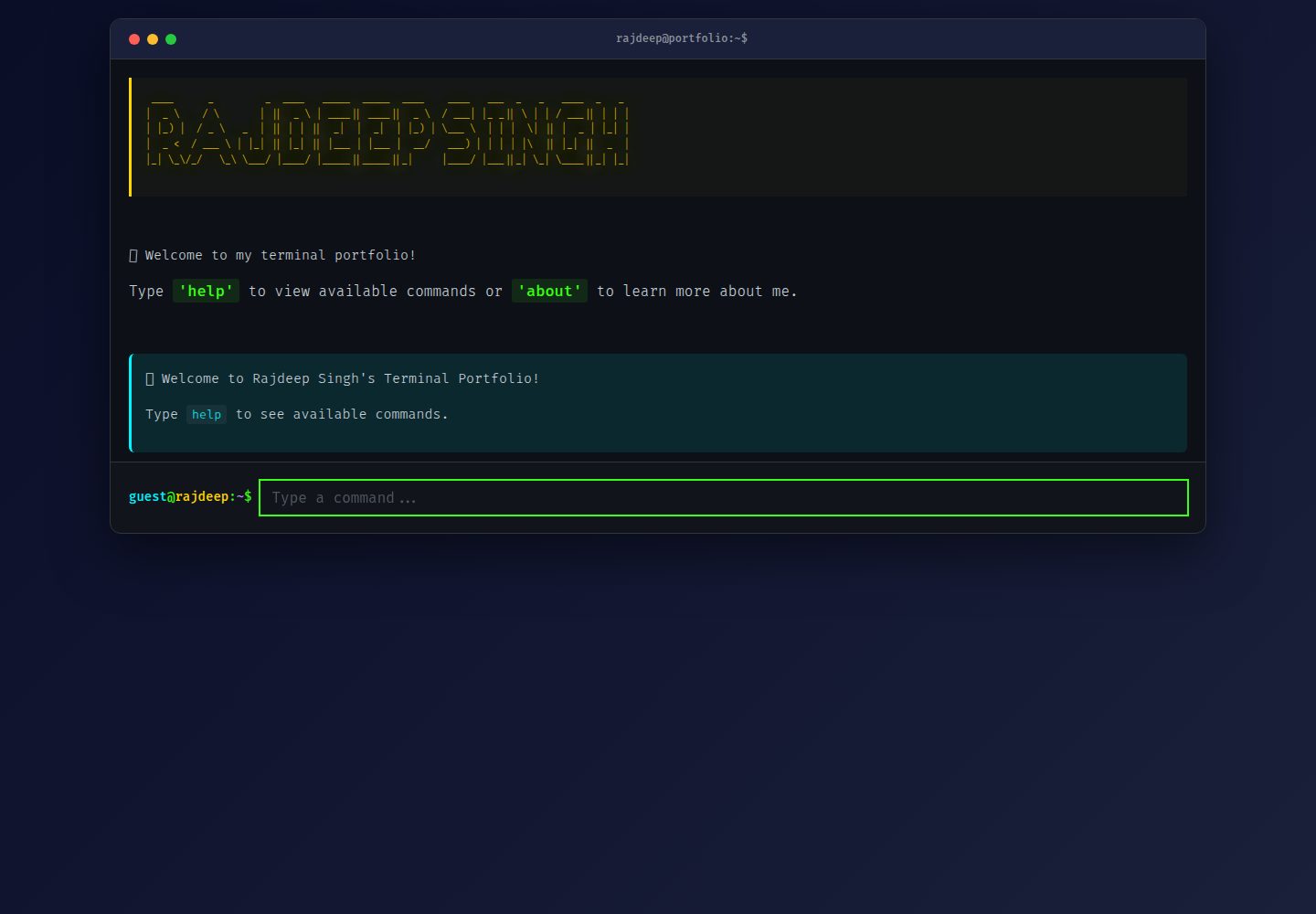
终端风格命令行界面,输入 help 等命令浏览作品集内容
HTML作品集
terminal-theme-portfolio — HTML 作品集模板
作者 RajdeepKushwaha5
终端主题的个人作品集网站,通过命令行界面展示技能、项目与联系方式,并从 GitHub API 实时拉取仓库与个人资料。
看看你的网站会是什么样
浏览真实页面截图,比较内容排版与手机效果。点击下方缩略图切换,放大查看整页细节。
全部页面与视图 2
截图用于了解视觉与布局,交互效果请以实际项目为准。
采集于 2026-10-13查看来源
值得关注的模板亮点
从已有项目资料中,快速了解它的特点。
通过 GitHub API 实时获取仓库、个人简介和统计数据
支持 ↑/↓ 方向键浏览命令历史,Ctrl/Cmd+K 或 L 清屏
移动端提供快速帮助按钮和触控友好的布局
使用原生 JavaScript,无框架和构建工具
README 提及对 GitHub API 数据设置 15 分钟缓存
模板详细介绍
这是一个以终端为主题的交互式个人作品集网站,访问者通过在浏览器中输入命令来浏览信息,而非传统的图形界面。输入 help 可查看全部命令,包括 whoami、about、skills、projects、achievements、resume、contact、website 和 clear。项目通过 GitHub API 自动获取仓库、个人简介和统计数据,使作品集与最新工作保持同步。README 说明其使用原生 JavaScript 构建,无框架和构建工具,并包含命令历史、键盘快捷键、移动端快速帮助按钮、加载状态与 API 失败时的回退处理。
定制方面,README 要求修改 commands.js 中的 GITHUB_USERNAME、getContact() 里的邮箱与简历链接、styles.css 中的 CSS 变量,以及 index.html 中的 ASCII 横幅;新增或修改命令则需编辑 app.js 的 executeCommand() 函数。README 未提供依赖清单、具体框架版本、部署步骤或浏览器兼容性细节,也未说明生产环境下的性能表现。
HTML作品集
适合你的项目吗?
适用场景
- 开发者希望以命令行交互方式展示个人项目与技能
- 需要作品集内容随 GitHub 仓库更新而自动同步
- 在桌面、平板和手机上提供一致的浏览体验
- 通过修改 commands.js 和 styles.css 快速替换个人信息与配色
适合人群
- 熟悉 GitHub 并希望用终端主题展示作品集的开发者
- 偏好无框架、原生 JavaScript 实现的前端使用者
- 需要移动端可用的个人作品集页面的用户
上手与定制指南
结合仓库当前版本的说明,按下面的资料检查内容、配置与运行要求。
- 1
克隆仓库后可直接在浏览器中打开 index.html,无需构建步骤
- 2
在 commands.js 中修改 GITHUB_USERNAME 为你的 GitHub 用户名
- 3
在 commands.js 的 getContact() 中更新邮箱、简历链接和社交链接
- 4
在 styles.css 的 :root 中调整 CSS 变量以更改配色
- 5
在 index.html 中替换 ASCII 艺术横幅,在 app.js 的 executeCommand() 中添加或修改命令
授权与来源资料
使用条件与限制
免费使用 · 保留许可声明本次收录的是公开仓库中采用 MIT 许可的免费版本;免费范围为该版本代码,不代表外部服务或第三方素材免费。
使用时需要遵守
- 允许免费使用、修改、商用和分发该版本代码。
- 分发代码副本或实质性部分时,保留原作者版权声明和完整 MIT 许可声明。
- 代码按现状提供;担保与责任限制以原许可证及适用法律为准。
额外费用与待核对事项
- README 提及 Firebase 集成;启用相关动态功能前需自行配置,并核对 Firebase 的额度与收费。
- 演示图片、字体、图标及其他第三方素材需按各自许可核对,不能仅凭代码的 MIT 许可判断。
- 域名、托管、数据库、支付或 AI 等外部服务可能另外收费。
- 定制作品集需要拥有 GitHub 账号,以便配置 GITHUB_USERNAME 并获取实时数据。
- 作品集依赖 GitHub API 获取仓库、语言、关注者与简介数据,使用该功能需要可访问 GitHub API。
- 页面字体通过 Google Fonts 加载,使用时会向 Google 发起外部请求。
查看原文依据
Permission is hereby granted, free of charge
许可证原文
- A GitHub account (for customization)
README 原文
- **IBM Plex Mono** - Professional monospace fontThe portfolio fetches your latest repositories, languages, follower count, and bio directly from GitHub API, ensuring your portfolio is always current.
README 原文
https://github.com/RajdeepKushwaha5/terminal-theme-portfolio/blob/main/LICENSEhttps://github.com/RajdeepKushwaha5/terminal-theme-portfolio/blob/main/README.md- **Optimized Font Loading** - Preconnect to Google Fonts
README 原文
DeepSeek 根据仓库许可证和 README 整理 ·2026-10-13。结果仅覆盖已读取资料,依赖、图片、字体及后续条款变更以各自原文为准。
项目核对记录与介绍依据
模板资料
- 来源平台
- GitHub
- 资料与维护参考分
- 资料一般 · 74 / 100
- 技术栈
- HTML
- 网站类型
- 作品集
这个分数如何计算
本站按许可资料(最高30分)、演示链接(12分)、预览图(10分)、Star数(15分)、记录的维护时间(15分)、描述完整度(8分)、功能记录(5分)和分类资料(5分)计算。它不是代码、安全或性能测试,也不是 Google 评分;有链接不代表已实测可用。
这个项目需要核对什么
- 记录的仓库更新时间
- 2025-10-12
- 截图检查日期
- 2026-10-13
已收录演示链接。请用你的内容与屏幕尺寸检查;有演示不代表表单、认证或支付已经可用。
目录记录的主要技术栈是 HTML。请通过依赖清单和锁文件核对实际版本与托管要求。这些说明基于收录资料,不代表代码审计或部署实测。
查看具体选型方法 →介绍的制作与核对状态
介绍由 AI 辅助整理目录与仓库资料。仓库作者不等于这篇介绍的审核者。
审核声明: codex-user-requested-batch-review-20261015 · 2026-10-15
查看当时使用的来源资料
SHA-256: 75e3475c5cc45b91f9b598981cc78ee772b31f4a2780ca2620d0916cce737f30
2026-10-13T06:23:22.568Z
来源文件 / 仓库# 💻 Terminal Portfolio - Rajdeep Singh
<div align="center">> A unique, interactive terminal-themed portfolio website with real-time GitHub integration
.png).png)
**An interactive, terminal-themed portfolio website with real-time GitHub integration**## 🌟 Features
[](https://rajdeep-singh.vercel.app/)- **Terminal-Like Interface** - Authentic command-line experience in the browser
[](https://github.com/RajdeepKushwaha5/terminal-theme-portfolio)- **Real GitHub Integration** - Automatically fetches your projects and data from GitHub API
[](./LICENSE)- **Fully Responsive** - Works seamlessly on desktop, tablet, and mobile devices
- **Modern UI/UX** - Beautiful animations, smooth transitions, and polished design
</div>- **Command History** - Navigate through previous commands with arrow keys
- **Mobile Optimized** - Quick help button and touch-friendly interface
---- **Fast & Lightweight** - Built with vanilla JavaScript for optimal performance
## 📋 Table of Contents
- [Overview](#-overview)- [Overview](#overview)
- [Features](#-features)- [Commands](#commands)
- [Demo](#-demo)- [Screenshots](#screenshots)
- [Screenshots](#-screenshots)- [Technologies](#technologies)
- [Technologies](#️-technologies)- [Setup](#setup)
- [Getting Started](#-getting-started)- [Customization](#customization)
- [Commands](#-commands)- [Links](#links)
- [Customization](#-customization)
- [Performance](#-performance)## 🎯 Overview
- [Deployment](#-deployment)
- [Improvements Made](#-improvements-made)This is not your typical GUI portfolio website. Instead, you can access information via an interactive command-line interface. Type 'help' to view all available commands and navigate through different sections to learn about skills, projects, achievements, and more.
- [Contributing](#-contributing)
- [License](#-license)The portfolio automatically fetches real data from your GitHub profile, including repositories, bio, and statistics, making it always up-to-date with your latest work.
- [Contact](#-contact)
## 💻 Commands
---
| Command | Description |
## 🎯 Overview|---------|-------------|
| `help` | Display all available commands |
This is not your typical GUI portfolio website. Experience a unique, **terminal-themed interactive portfolio** that brings the command-line interface to the web. Type commands to explore projects, skills, achievements, and more!| `whoami` | Show roles and what I do |
| `about` | Learn more about me |
The portfolio features:| `skills` | View technical skills |
| `projects` | Browse my projects |
- **Real-time GitHub Integration** - Automatically fetches and displays your latest repositories, bio, and statistics| `achievements` | See accomplishments |
- **Smart Caching** - 15-minute cache for optimal performance| `resume` | View/download resume |
- **Fully Responsive** - Perfect experience on desktop, tablet, and mobile devices| `contact` | Get contact information |
- **Accessibility First** - WCAG compliant with ARIA labels and semantic HTML| `website` | Visit portfolio website |
- **SEO Optimized** - Open Graph tags, meta descriptions, and structured data| `clear` | Clear terminal screen |
- **PWA Ready** - Installable as a Progressive Web App| `ctrl/cmd + k` | Keyboard shortcut to clear |
---## 📸 Screenshots
## ✨ Features

### Core Features

- 🖥️ **Authentic Terminal Experience** - Command-line interface with realistic behavior
- 🔄 **Real-time Data** - Fetches live data from GitHub API
- 📱 **Mobile Optimized** - Touch-friendly with quick help button
- ⌨️ **Keyboard Shortcuts** - `Ctrl/Cmd+K` or `Ctrl/Cmd+L` to clear terminal## 🛠️ Technologies
- 📜 **Command History** - Navigate with ↑/↓ arrow keys
- 🎨 **Modern Design** - Beautiful animations and smooth transitions- **HTML5** - Semantic markup
- ⚡ **Lightning Fast** - Built with vanilla JavaScript, no framework overhead- **CSS3** - Modern styling with animations
- ♿ **Accessible** - Screen reader friendly with proper ARIA labels- **JavaScript (ES6+)** - Vanilla JS, no frameworks
- 🌐 **SEO Ready** - Complete meta tags for social media sharing- **GitHub API** - Real-time data fetching
- **Responsive Design** - Mobile-first approach
### Advanced Features
## 🚀 Setup
- **Smart Caching System** - Reduces API calls and improves load times
- **Error Handling** - Graceful fallbacks if GitHub API is unavailable1. Clone the repository:
- **Command Suggestions** - Helpful suggestions for mistyped commands```bash
- **Auto-focus** - Command input always ready for typinggit clone https://github.com/RajdeepKushwaha5/terminal-theme-portfolio.git
- **Paste Handling** - Automatically cleans pasted commandscd terminal-theme-portfolio
- **Loading States** - Visual feedback during data fetching```
- **Performance Optimized** - Debounced scrolling, GPU-accelerated animations
2. Update your information in `commands.js`:
--- - Change `GITHUB_USERNAME` to your GitHub username
- Update email in `getPortfolio()` function
## 🌐 Demo - Update resume link
- Customize the contact links in `getContact()`
**Live Site:** [https://rajdeep-singh.vercel.app/](https://rajdeep-singh.vercel.app/)
3. Open `index.html` in your browser or deploy to your hosting service.
**Repository:** [https://github.com/RajdeepKushwaha5/terminal-theme-portfolio](https://github.com/RajdeepKushwaha5/terminal-theme-portfolio)
## 🎨 Customization
---
### Change Colors
## 📸 Screenshots
Edit the CSS variables in `styles.css`:
<details>
<summary>Click to view screenshots</summary>```css
:root {
 --bg-primary: #0a0e27;
*Main terminal interface with welcome message* --accent-green: #39ff14;
--accent-yellow: #ffd700;
 --accent-cyan: #00f5ff;
*Skills grid showing technical expertise* /* ... more colors */
}
```
*Projects fetched from GitHub*
### Update GitHub Username

*Mobile-optimized interface*In `commands.js`, change:
</details>```javascript
const GITHUB_USERNAME = 'YourGitHubUsername';
---```
## 🛠️ Technologies### Modify Commands
### FrontendAdd or modify commands in `app.js` in the `executeCommand()` function.
- **HTML5** - Semantic markup with accessibility features## 🔗 Links
- **CSS3** - Modern styling with CSS Grid, Flexbox, animations
- **JavaScript (ES6+)** - Vanilla JS with ES modules- **Live Site**: [https://rajdeep-singh.vercel.app/](https://rajdeep-singh.vercel.app/)
- **GitHub API v3** - Real-time data integration- **GitHub**: [https://github.com/RajdeepKushwaha5](https://github.com/RajdeepKushwaha5)
- **LinkedIn**: [https://www.linkedin.com/in/rajdeepsingh5/](https://www.linkedin.com/in/rajdeepsingh5/)
### Development
## 📱 Responsive Features
- **No Build Tools** - Pure vanilla JavaScript
- **No Dependencies** - Lightweight and fast- **Desktop**: Full terminal experience with keyboard shortcuts
- **Progressive Enhancement** - Works everywhere- **Tablet**: Optimized layout with touch support
- **Mobile-First** - Responsive design approach- **Mobile**: Compact design with quick help button
### Fonts## 🎯 Key Features Explained
- **Fira Code** - Monospace font with ligatures### Real-Time GitHub Integration
- **IBM Plex Mono** - Professional monospace fontThe portfolio fetches your latest repositories, languages, follower count, and bio directly from GitHub API, ensuring your portfolio is always current.
---### Command History
Use ↑/↓ arrow keys to navigate through previously entered commands, just like a real terminal.
## 🚀 Getting Started
### Keyboard Shortcuts
### Prerequisites- `Ctrl/Cmd + K` - Clear terminal
- `↑` - Previous command
- A modern web browser (Chrome, Firefox, Safari, Edge)- `↓` - Next command
- A GitHub account (for customization)
- Basic knowledge of HTML, CSS, JavaScript (for customization)### Loading States
Displays loading indicators while fetching data from GitHub API.
### Installation
### Error Handling
1. **Clone the repository**Graceful fallback if API requests fail, ensuring the site always works.
```bash## 🤝 Contributing
git clone https://github.com/RajdeepKushwaha5/terminal-theme-portfolio.git
cd terminal-theme-portfolioFeel free to fork this project and customize it for your own portfolio. If you have suggestions for improvements, please open an issue or submit a pull request.
```
## 📄 License
2. **Open in browser**
This project is open source and available under the MIT License.
Simply open `index.html` in your web browser:
## 👨💻 Author
```bash
# On macOS**Rajdeep Singh**
open index.html- GitHub: [@RajdeepKushwaha5](https://github.com/RajdeepKushwaha5)
- LinkedIn: [rajdeepsingh5](https://www.linkedin.com/in/rajdeepsingh5/)
# On Windows- Twitter: [@rajdeeptwts](https://x.com/rajdeeptwts)
start index.html- Medium: [@rajdeep01](https://medium.com/@rajdeep01)
# On Linux---
xdg-open index.html
```⭐ Star this repo if you find it helpful!
3. **Start customizing!**Made with ❤️ by Rajdeep Singh
See the [Customization](#-customization) section below.
---
## 💻 Commands
Type these commands in the terminal to explore:
| Command | Description |
|---------|-------------|
| `help` | Display all available commands with descriptions |
| `whoami` | Show my roles and what I do |
| `about` | Learn more about me and my journey |
| `skills` | View technical skills and expertise |
| `projects` | Browse my projects fetched from GitHub |
| `achievements` | See accomplishments and milestones |
| `resume` | View and download my resume |
| `contact` | Get contact information and social links |
| `website` | Visit my portfolio website |
| `clear` | Clear the terminal screen |
### Keyboard Shortcuts
- `↑` / `↓` - Navigate command history
- `Ctrl/Cmd + K` - Clear terminal
- `Ctrl/Cmd + L` - Clear terminal (alternative)
- `Enter` - Execute command
---
## 🎨 Customization
### 1. Update GitHub Username
Edit `commands.js`:
```javascript
const GITHUB_USERNAME = 'YourGitHubUsername';
```
### 2. Update Contact Information
Edit `commands.js` in the `getContact()` function:
```javascript
email = "[email protected]";
resume = "https://your-resume-link.com";
```
Update the social links in the `contacts` array.
### 3. Customize Colors
Edit `styles.css`:
```css
:root {
--bg-primary: #0a0e27;
--bg-secondary: #1a1f3a;
--accent-green: #39ff14;
--accent-yellow: #ffd700;
--accent-cyan: #00f5ff;
/* ... more colors */
}
```
### 4. Update ASCII Banner
Edit `index.html` to change the ASCII art banner with your name.
Use an [ASCII art generator](http://patorjk.com/software/taag/) for custom text.
### 5. Add/Remove Commands
Edit `app.js` in the `executeCommand()` function to add custom commands:
```javascript
case "newcommand":
showCommandOutput(newCommandHTML);
addCommandToHistory();
break;
```
---
## ⚡ Performance
### Optimization Features
- **Smart Caching** - GitHub data cached for 15 minutes
- **Lazy Loading** - Images and resources loaded on demand
- **Debounced Scrolling** - Smooth scroll performance
- **GPU Acceleration** - Hardware-accelerated animations
- **Minimal Dependencies** - No external libraries
- **Optimized Font Loading** - Preconnect to Google Fonts
### Performance Metrics
- **First Contentful Paint** - < 1.5s
- **Time to Interactive** - < 2.5s
- **Lighthouse Score** - 95+
- **Bundle Size** - < 50KB (HTML + CSS + JS)
---
## 🌍 Deployment
### Deploy to Vercel (Recommended)
1. Push your code to GitHub
2. Visit [Vercel](https://vercel.com)
3. Import your repository
4. Deploy with one click!
### Deploy to Netlify
1. Push your code to GitHub
2. Visit [Netlify](https://netlify.com)
3. Connect your repository
4. Deploy automatically
### Deploy to GitHub Pages
1. Push your code to GitHub
2. Go to Settings > Pages
3. Select source: `main` branch
4. Your site will be live at `https://yourusername.github.io/terminal-theme-portfolio`
### Other Options
- **Firebase Hosting**
- **Cloudflare Pages**
- **AWS S3 + CloudFront**
- **Traditional Web Hosting** (upload via FTP)
---
## 🎯 Improvements Made
This portfolio has been comprehensively audited and enhanced:
### SEO & Accessibility
- ✅ Added Open Graph meta tags for social media sharing
- ✅ Added Twitter Card meta tags
- ✅ Implemented semantic HTML5 elements (`<main>`, `<header>`, `<section>`)
- ✅ Added ARIA labels and roles for screen readers
- ✅ Improved meta descriptions and keywords
- ✅ Added favicon and app manifest support
- ✅ Ensured keyboard navigation works flawlessly
### UI/UX Enhancements
- ✅ Enhanced terminal aesthetics with better colors and shadows
- ✅ Added smooth animations and transitions
- ✅ Improved mobile responsiveness with better breakpoints
- ✅ Added loading states and error messages
- ✅ Enhanced scrollbar styling
- ✅ Improved typography and readability
- ✅ Added focus styles for better accessibility
### Performance & Code Quality
- ✅ Implemented smart caching system (15-minute cache)
- ✅ Added debounced scrolling for better performance
- ✅ Optimized font loading with preconnect
- ✅ Added GPU acceleration for animations
- ✅ Improved error handling with graceful fallbacks
- ✅ Added command validation and suggestions
- ✅ Cleaned up code and improved modularity
### Features Added
- ✅ Command history navigation with arrow keys
- ✅ Multiple keyboard shortcuts (Ctrl+K, Ctrl+L)
- ✅ Paste handling with automatic cleanup
- ✅ Mobile help button for quick access
- ✅ Welcome message on page load
- ✅ Smart command suggestions for typos
- ✅ Enhanced help menu with tips
- ✅ Page visibility tracking
### Documentation
- ✅ Comprehensive README with all information
- ✅ Detailed customization guide
- ✅ Deployment instructions for multiple platforms
- ✅ Clear setup steps for beginners
- ✅ Performance metrics and best practices
---
## 🤝 Contributing
Contributions are welcome! Here's how you can help:
1. **Fork the repository**
2. **Create a feature branch** (`git checkout -b feature/AmazingFeature`)
3. **Commit your changes** (`git commit -m 'Add some AmazingFeature'`)
4. **Push to the branch** (`git push origin feature/AmazingFeature`)
5. **Open a Pull Request**
### Development Guidelines
- Follow existing code style and conventions
- Test on multiple browsers and devices
- Ensure accessibility standards are maintained
- Update documentation for new features
- Add comments for complex logic
---
## 📄 License
This project is open source and available under the [MIT License](./LICENSE).
Feel free to use this project as a template for your own portfolio!
---
## 📧 Contact
**Rajdeep Singh**
- 💼 **GitHub:** [@RajdeepKushwaha5](https://github.com/RajdeepKushwaha5)
- 🔗 **LinkedIn:** [rajdeepsingh5](https://www.linkedin.com/in/rajdeepsingh5/)
- 🐦 **Twitter/X:** [@rajdeeptwts](https://x.com/rajdeeptwts)
- ✍️ **Medium:** [@rajdeep01](https://medium.com/@rajdeep01)
- 🌐 **Portfolio:** [rajdeep-singh.vercel.app](https://rajdeep-singh.vercel.app/)
- 📧 **Email:** [email protected]
---
<div align="center">
### ⭐ Star this repository if you find it helpful!
**Made with ❤️ by Rajdeep Singh**
[Back to Top](#-terminal-portfolio---rajdeep-singh)
</div>
看看同类模板
对比同技术栈与用途的模板,找到更适合的视觉与内容结构。

simplefolio
⚡️ A minimal portfolio template for Developers
HTML · 作品集

Freelancer
Freelancer 是 Start Bootstrap 出品的单页作品集模板,专为自由职业者、设计师和小型工作室设计。 页面结构清晰,包含多个内容区块、响应式作品集网格,每个作品项目配有模态窗口展示详情。
HTML · 作品集

Resume
Resume 是 Start Bootstrap 推出的简历与 CV 主题,基于 Bootstrap 构建,采用固定侧边栏加内容区块的结构。
HTML · 作品集

Creative
Creative 是 Start Bootstrap 团队维护的一款单页营销模板,定位明确:为创意机构或产品服务提供一个以作品展示和行动号召为核心的落地页。
HTML · 企业官网

Grayscale
Grayscale 是 Start Bootstrap 出品的深色系单页 HTML 模板,基于 Bootstrap 构建。 它的视觉重心放在大尺寸首屏和清晰的内容分区上,整体氛围偏暗,适合摄影、活动或品牌叙事类网站。
HTML · 企业官网

startbootstrap-stylish-portfolio
Stylish Portfolio 是 Start Bootstrap 维护的单页作品集主题,基于 Bootstrap 构建,采用多个内容区块加离屏导航菜单的结构。
HTML · 作品集