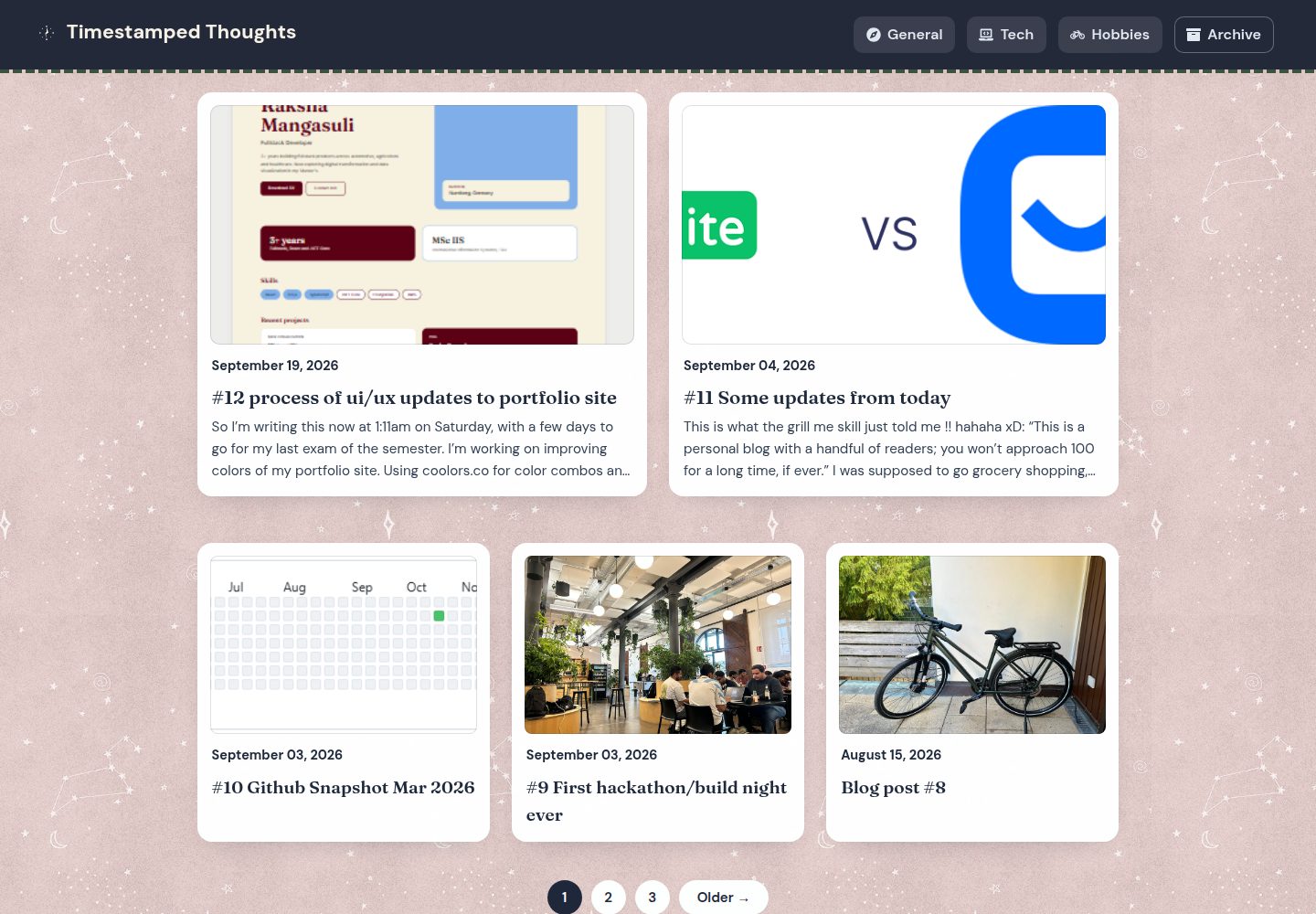
Jekyll static site deployed on GitHub Pages, with a demo at raksha-mangasuli.github.io/blog
JekyllBlog
blog (raksha-mangasuli) — Jekyll Blog Template
By raksha-mangasuli
A Jekyll-based personal blog hosted on GitHub Pages, with posts categorized into Tech, Hobbies, and General, and cross-linked with the author's portfolio site.
Explore the design
Compare the page layouts and mobile experience. Open any screenshot for a closer look.
Desktop homepage1 / 3
Desktop captureTop of page
Actual screenshot captured by the server browser.
All pages & views 3
Screenshots show visual appearance; interactive behavior may differ.
Recorded 2026-09-30View source
What stands out
A quick read of the recorded project description.
Posts are divided into Tech, Hobbies, and General categories; _config.yml applies layout: post and categories: General by default
Integrates the jekyll-admin local admin interface for writing and editing posts at localhost:4000/admin
Supports drafting in Obsidian with the vault root pointed at _posts/, and enables kramdown hard_wrap to match single-line-break paragraph habits
Uses jekyll-feed and jekyll-paginate to provide feeds and pagination
Comes with a POST-FORMATTING.md formatting cheat sheet and a pre-commit hook that prevents assets from being accidentally committed under _posts/
Template Details
This is a personal blog built with Jekyll, deployed on GitHub Pages at raksha-mangasuli.github.io/blog, and cross-linked with the same author's portfolio site. Posts are organized into three topics: Tech, Hobbies, and General, with General as the default category. The site is based on the type-on-strap Jekyll theme and uses jekyll-feed to generate feeds and jekyll-paginate for pagination.
There are two writing workflows: one is to write and edit posts through the local admin interface provided by jekyll-admin (localhost:4000/admin) and then commit and push as usual; the other is to draft in Obsidian with the vault root pointed at _posts/. The README explicitly documents the caveats for each approach: jekyll-admin's "new metadata field" interface may write literal Key:/Value: instead of valid YAML, and clicking Create may throw a 500 error even though the post is actually saved; images pasted in Obsidian are stored in _posts/assets/images/, but Jekyll skips directories starting with an underscore, so they must be manually moved to assets/images/ at the repository root and their reference paths rewritten.
The repository also includes a POST-FORMATTING.md formatting cheat sheet and a pre-commit hook that prevents asset files from being accidentally committed under _posts/. Regarding configuration, _config.yml is only read at startup, so jekyll serve must be restarted after any changes. The license is Unlicense (public domain), inherited from the original type-on-strap theme.
JekyllBlog
Is it right for your project?
Use Cases
- Building a tech and hobby blog that cross-links with a personal portfolio site
- Wanting to write, edit, and commit Jekyll posts locally through a visual admin interface
- Preferring to write in Obsidian and have drafts land directly in the _posts/ directory
- Needing RSS/Atom feeds and post pagination for a blog
Suitable For
- Individual bloggers familiar with Git and GitHub Pages deployment workflows
- Developers using Jekyll or willing to install Ruby and Bundler following the README steps
- Authors organizing posts under broad topics such as Tech, Hobbies, and General
Getting started & customization
Use these recorded setup notes alongside the repository instructions for your chosen version.
- 1
Ruby and Bundler must be installed first, then run bundle install and bundle exec jekyll serve; the site runs at http://localhost:4000/blog/
- 2
_config.yml is only read at startup; jekyll serve must be restarted after any configuration change
- 3
Each clone requires running git config core.hooksPath .githooks once to enable the pre-commit hook that blocks asset files under _posts/
- 4
Images and PDFs go in assets/images/ at the repository root and are referenced with {{ "/assets/images/NAME" | relative_url }}; images pasted in Obsidian must be manually moved out of _posts/assets/images/ and their paths rewritten
- 5
jekyll-admin has known issues: new metadata fields may be written as invalid YAML, and clicking Create may report a 500 error even though the post has been saved; check the raw front matter before committing
License & source material
Usage conditions & limitations
Free to use · keep license noticeThis entry covers the free version in the public repository under the Unlicense; the free scope is the code of that version and does not imply that external services or third-party assets are free.
Must comply with when using
- The code of this version may be freely copied, modified, published, used, compiled, sold, and distributed, including for commercial purposes.
- The author waives related copyright through a public domain dedication; the legal effect of that dedication depends on the applicable jurisdiction.
- The code is provided as is; warranties and limitations of liability are governed by the original license and applicable law.
Additional costs & items to verify
- The writing workflow relies on the local jekyll-admin interface (localhost:4000/admin) to write and edit posts, after which you must commit and push yourself; this admin runs only locally and does not provide hosted online editing.
- jekyll-admin's "new metadata field" interface is flawed and may write literal Key:/Value: instead of valid YAML; the raw front matter of posts must be manually checked before committing.
- Clicking Create in jekyll-admin to create a post may throw a 500 error; this is a known defect rather than a true failure, so check _posts/ and refresh the list to confirm whether the post was saved.
- If using the Obsidian writing workflow, the vault root must be pointed at _posts/, and it relies on the kramdown hard_wrap setting in _config.yml to match single-line-break paragraph habits.
- Images pasted in Obsidian are saved to _posts/assets/images/, but Jekyll skips directories starting with an underscore, so images will not be published; they must be manually moved to assets/images/ at the repository root and their reference paths rewritten.
- Each clone requires running git config core.hooksPath .githooks once to enable the pre-commit hook that prevents asset files from being accidentally committed under _posts/.
- Jekyll reads _config.yml only at startup; after any configuration change, jekyll serve must be restarted, and the site will not regenerate automatically.
- Demo images, fonts, icons, and other third-party assets must be checked against their respective licenses; the code's Unlicense cannot be used to judge them.
- External services such as domains, hosting, databases, payments, or AI may incur separate charges.
View Original Text Basis
for any purpose, commercial or non-commercial, and by any means
Original License Text
Posts are drafted locally through the jekyll-admin UI at `http://localhost:4000/admin`, then committed and pushed as usual.
Original README
The "New metadata field" UI in jekyll-admin is buggy: it can write a literal `Key:`/`Value:` pair instead of proper YAML.
Original README
Creating a post can throw a 500 error after clicking Create. This is a known jekyll-admin bug, not a real failure.
Original README
Posts are drafted in Obsidian, with the vault root pointed at `_posts/`.
Original README
Obsidian saves the image to `_posts/assets/images/`. Jekyll skips `_`-prefixed folders, so it never gets published.
Original README
Run `git config core.hooksPath .githooks` once per clone.
Original README
https://github.com/raksha-mangasuli/blog/blob/master/UNLICENSE.txthttps://github.com/raksha-mangasuli/blog/blob/master/README.mdJekyll only reads `_config.yml` at startup, so restart `jekyll serve` after any config change.
Original README
Compiled by DeepSeek based on repository license and README ·2026-09-30. Results only cover the materials read; dependencies, images, fonts, and subsequent term changes are subject to their respective original texts.
Project checks & description sources
Template Information
- Source platforms
- GitHub
- Documentation and maintenance reference score
- Partly documented · 72 / 100
- Technologies
- Jekyll
- Website type
- Blog
How this score is calculated
Our heuristic uses license records (up to 30), a demo link (12), a preview (10), stars (15), recorded maintenance (15), description completeness (8), feature records (5) and classification data (5). It is not a code, security or performance test, or a Google score. A link does not establish tested functionality.
What to verify for this project
- Repository update recorded
- 2026-09-25
- Screenshot last checked
- 2026-09-30
A demo link is listed. Check it with your own content and viewport sizes; its presence does not confirm that forms, authentication or payments work.
The catalog identifies Jekyll as the primary stack. Check the actual dependency manifest and lockfile for versions and hosting requirements. These notes use recorded metadata, not a code audit or a deployment test.
Use a selection guide →How this description was prepared
AI-assisted description based on catalog records and repository material. Repository authors are not automatically the reviewers of this description.
Automatically checked against source and license rules; no manual editorial review.
Inspect the recorded source material
SHA-256: 08f851d38f9822920271a024d606f59a4073c74bf3a820bbb207d11c56819dd2
2026-09-30T11:11:22.969Z
Source file / repository# blog
Raksha's personal blog, a Jekyll site hosted on GitHub Pages at [raksha-mangasuli.github.io/blog](https://raksha-mangasuli.github.io/blog/), interconnected with the [portfolio site](https://raksha-mangasuli.github.io/raksha-portfolio/). Posts cover Tech, Hobbies, and General topics.
Built on the [type-on-strap](https://github.com/niklasbuschmann/contrast) Jekyll theme.
## Tech stack
- Jekyll (Ruby)
- [jekyll-admin](https://github.com/jekyll/jekyll-admin): local admin UI for writing/editing posts
- jekyll-feed, jekyll-paginate
- Deployed via GitHub Pages
## Local development
Install [Ruby](https://www.ruby-lang.org/en/documentation/installation/) and Bundler, then:
```
bundle install
bundle exec jekyll serve
```
The site runs at `http://localhost:4000/blog/`.
### Writing posts
Posts are drafted locally through the jekyll-admin UI at `http://localhost:4000/admin`, then committed and pushed as usual. A few things to know before using it:
- The "New metadata field" UI in jekyll-admin is buggy: it can write a literal `Key:`/`Value:` pair instead of proper YAML. Always double-check a new post's raw front matter before committing.
- Creating a post can throw a 500 error after clicking Create. This is a known jekyll-admin bug, not a real failure. Check `_posts/` and refresh the admin post list rather than assuming the post wasn't saved.
- `_config.yml` applies `layout: post` and `categories: General` to everything in `_posts` by default. Only set `categories` manually if a post isn't General.
See [POST-FORMATTING.md](POST-FORMATTING.md) for the full formatting cheat sheet (line breaks, lists, links, etc.).
### Writing in Obsidian
Posts are drafted in Obsidian, with the vault root pointed at `_posts/`. `_config.yml` sets `kramdown: hard_wrap: true` specifically so single newlines render as line breaks, matching how Obsidian writes paragraphs. If posts start rendering with run-together lines, check that setting is still there and restart the Jekyll server.
Images pasted in Obsidian need a manual fix before they'll publish, since Obsidian and Jekyll disagree on paths:
1. Obsidian saves the image to `_posts/assets/images/`. Jekyll skips `_`-prefixed folders, so it never gets published.
2. Obsidian writes the embed as ``, a vault-relative path that won't resolve on the built site.
Fix for each new image: move it to `assets/images/NAME.ext` at the repo root, then rewrite the embed to `{{ "/assets/images/NAME" | relative_url }}` per the Assets section below.
### Assets (images, PDFs)
All images and PDFs go in `assets/images/`, referenced as `{{ "/assets/images/NAME" | relative_url }}`. Nothing goes under `_posts/`: Jekyll skips `_`-prefixed folders, so it 404s live even though it works locally.
Run `git config core.hooksPath .githooks` once per clone. A pre-commit hook blocks asset files accidentally staged under `_posts/`.
## Restarting after config changes
Jekyll only reads `_config.yml` at startup, so restart `jekyll serve` after any config change. It won't auto-regenerate on its own.
## License
[Public domain](UNLICENSE.txt), inherited from the original [type-on-strap](https://github.com/niklasbuschmann/contrast) theme.
Explore similar templates
Compare previews and descriptions within the same stack and category.

al-folio
A Jekyll academic homepage theme for scholars and researchers, with a clean responsive design and out-of-the-box support for publication lists, project showcases, CVs, and blogs.
Jekyll · Portfolio

minimal-mistakes
Minimal Mistakes is a two-column Jekyll theme for personal sites, blogs, project documentation, or portfolios.
Jekyll · Portfolio

Beautiful Jekyll
Beautiful Jekyll is a mature, easy-to-use Jekyll blog theme maintained by Dean Attali since 2015, with over 50,000 users.
Jekyll · Blog

jekyll-TeXt-theme
A customizable Jekyll theme for personal sites, team sites, blogs, projects, and documentation.
Jekyll · Blog

startbootstrap-clean-blog-jekyll
The official Jekyll version of Start Bootstrap's Clean Blog theme, offering a blog home page, about page, contact page, and sample post pages, with a Formspree-powered contact form.
Jekyll · Blog

So Simple
A minimal reading-oriented Jekyll theme by Michael Rose for personal blogs, portfolios, and long-form reading. It offers multiple layouts, microformat markup, Disqus comments, Google Analytics, Jekyll SEO Tag, three skins, and aggregation by year, category, and tag with a grid view.
Jekyll · Blog