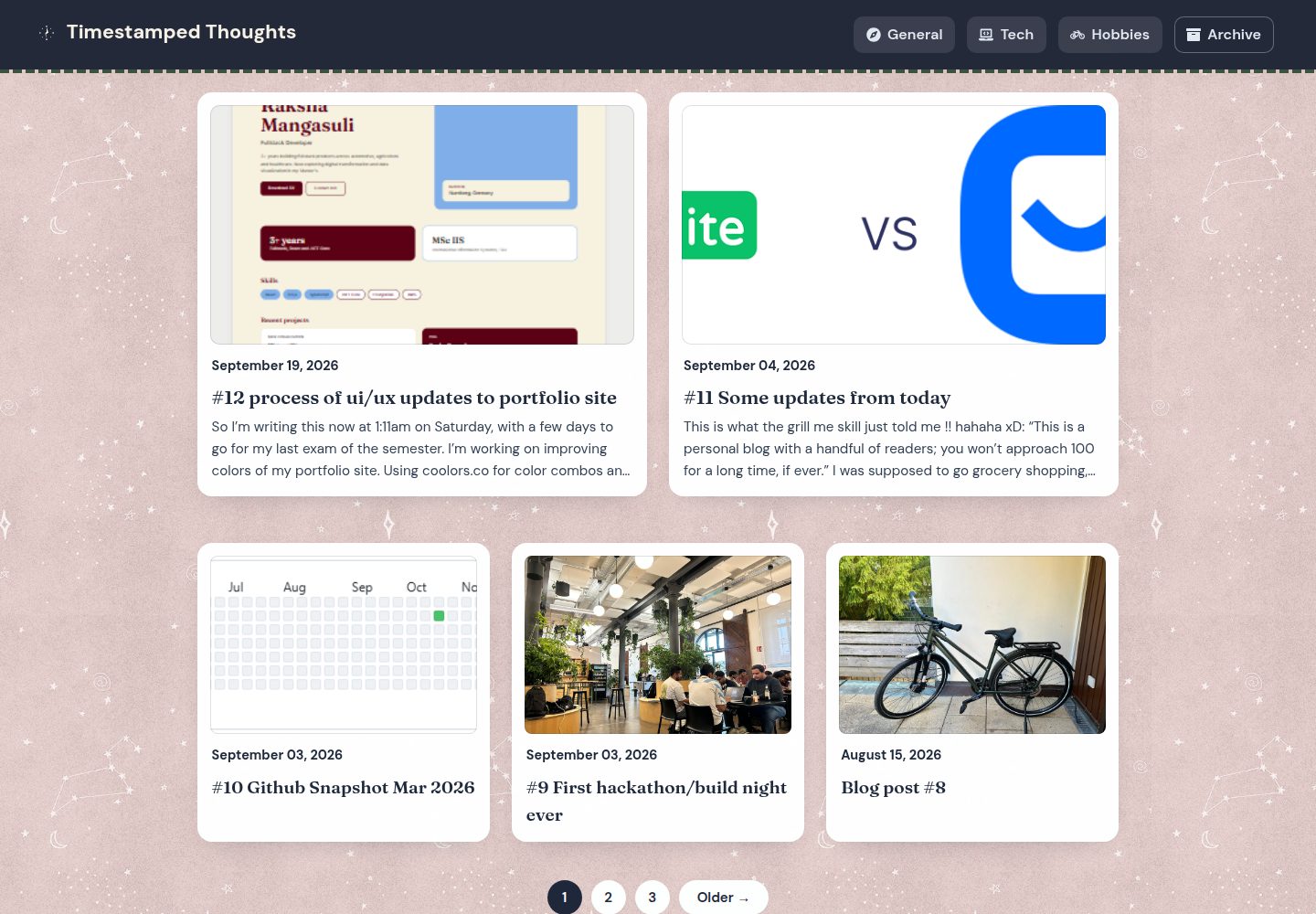
Jekyll 静态站点,部署在 GitHub Pages,演示地址为 raksha-mangasuli.github.io/blog
Jekyll博客
blog (raksha-mangasuli) — Jekyll 博客模板
作者 raksha-mangasuli
基于 Jekyll 的个人博客站点,托管在 GitHub Pages,文章分为 Tech、Hobbies 与 General 三类,并与作者的作品集站点互相链接。
看看你的网站会是什么样
浏览真实页面截图,比较内容排版与手机效果。点击下方缩略图切换,放大查看整页细节。
全部页面与视图 3
截图用于了解视觉与布局,交互效果请以实际项目为准。
采集于 2026-09-30查看来源
值得关注的模板亮点
从已有项目资料中,快速了解它的特点。
文章分为 Tech、Hobbies、General 三类,_config.yml 默认套用 layout: post 与 categories: General
集成 jekyll-admin 本地管理界面,可在 localhost:4000/admin 撰写和编辑文章
支持在 Obsidian 中起草,vault 根目录指向 _posts/,并启用 kramdown hard_wrap 以匹配单换行分段习惯
使用 jekyll-feed 与 jekyll-paginate 提供订阅源和分页
附带 POST-FORMATTING.md 格式速查表与阻止资源误提交到 _posts/ 的 pre-commit 钩子
模板详细介绍
这是一个用 Jekyll 构建的个人博客,部署在 GitHub Pages 上,线上地址为 raksha-mangasuli.github.io/blog,并与同一作者的 portfolio 站点相互链接。文章按 Tech、Hobbies、General 三个主题分类,默认分类为 General。站点基于 type-on-strap Jekyll 主题,使用 jekyll-feed 生成订阅源、jekyll-paginate 做分页。
写作流程有两套:一是通过 jekyll-admin 提供的本地管理界面(localhost:4000/admin)撰写和编辑文章,再照常提交推送;二是在 Obsidian 中起草,把 vault 根目录指向 _posts/。README 明确记录了这两种方式各自的注意事项:jekyll-admin 的“新建元数据字段”界面可能写入字面量 Key:/Value: 而非合法 YAML,点击 Create 后也可能抛出 500 错误但文章实际已保存;Obsidian 粘贴的图片会被存到 _posts/assets/images/,而 Jekyll 会跳过下划线开头的目录,需要手动移动到仓库根目录的 assets/images/ 并改写引用路径。
仓库还包含一份 POST-FORMATTING.md 格式速查表,以及一个 pre-commit 钩子,用于阻止资源文件被误提交到 _posts/ 下。配置方面,_config.yml 只在启动时读取,修改后必须重启 jekyll serve。许可证为 Unlicense(公有领域),继承自原始 type-on-strap 主题。
Jekyll博客
适合你的项目吗?
适用场景
- 搭建一个与个人作品集站点互相链接的技术与兴趣类博客
- 希望在本地用可视化后台撰写、编辑并提交 Jekyll 文章
- 习惯在 Obsidian 中写作并希望草稿直接落到 _posts/ 目录
- 需要为博客提供 RSS/Atom 订阅源与文章分页
适合人群
- 熟悉 Git 与 GitHub Pages 部署流程的个人博主
- 使用 Jekyll 或愿意按 README 步骤安装 Ruby 与 Bundler 的开发者
- 以 Tech、Hobbies、General 这类宽泛主题组织文章的作者
上手与定制指南
结合仓库当前版本的说明,按下面的资料检查内容、配置与运行要求。
- 1
需先安装 Ruby 与 Bundler,然后执行 bundle install 与 bundle exec jekyll serve,站点运行在 http://localhost:4000/blog/
- 2
_config.yml 只在启动时读取,任何配置改动后都要重启 jekyll serve
- 3
每个克隆需执行一次 git config core.hooksPath .githooks 以启用阻止 _posts/ 下资源文件的 pre-commit 钩子
- 4
图片与 PDF 统一放在仓库根目录 assets/images/,用 {{ "/assets/images/NAME" | relative_url }} 引用;Obsidian 粘贴的图片需手动从 _posts/assets/images/ 移出并改写路径
- 5
jekyll-admin 存在已知问题:新建元数据字段可能写入非合法 YAML,点击 Create 后可能报 500 但文章已保存,提交前应检查原始 front matter
授权与来源资料
使用条件与限制
免费使用 · 保留许可声明本次收录的是公开仓库中采用 Unlicense 许可的免费版本;免费范围为该版本代码,不代表外部服务或第三方素材免费。
使用时需要遵守
- 允许免费复制、修改、发布、使用、编译、销售和分发该版本代码,包括商业用途。
- 作者通过公有领域贡献声明放弃相关版权;该声明的法律效果取决于适用司法辖区。
- 代码按现状提供;担保与责任限制以原许可证及适用法律为准。
额外费用与待核对事项
- 写作流程依赖本地 jekyll-admin 管理界面(localhost:4000/admin)来撰写和编辑文章,之后需自行提交并推送;该后台仅本地运行,不提供线上托管编辑功能。
- jekyll-admin 的“新建元数据字段”界面存在缺陷,可能写入字面量 Key:/Value: 而非合法 YAML,提交前必须人工检查文章的原始 front matter。
- 在 jekyll-admin 中点击 Create 新建文章可能抛出 500 错误,这是已知缺陷而非真正失败,需检查 _posts/ 并刷新列表确认文章是否已保存。
- 若采用 Obsidian 写作流程,需将 vault 根目录指向 _posts/,并依赖 _config.yml 中的 kramdown hard_wrap 设置来匹配单换行分段习惯。
- Obsidian 粘贴的图片会被保存到 _posts/assets/images/,而 Jekyll 会跳过下划线开头的目录导致图片无法发布,必须手动移动到仓库根目录 assets/images/ 并改写引用路径。
- 每个克隆都需执行一次 git config core.hooksPath .githooks,以启用阻止资源文件被误提交到 _posts/ 下的 pre-commit 钩子。
- Jekyll 仅在启动时读取 _config.yml,任何配置改动后都必须重启 jekyll serve,站点不会自动重新生成。
- 演示图片、字体、图标及其他第三方素材需按各自许可核对,不能仅凭代码的 Unlicense 许可判断。
- 域名、托管、数据库、支付或 AI 等外部服务可能另外收费。
查看原文依据
for any purpose, commercial or non-commercial, and by any means
许可证原文
Posts are drafted locally through the jekyll-admin UI at `http://localhost:4000/admin`, then committed and pushed as usual.
README 原文
The "New metadata field" UI in jekyll-admin is buggy: it can write a literal `Key:`/`Value:` pair instead of proper YAML.
README 原文
Creating a post can throw a 500 error after clicking Create. This is a known jekyll-admin bug, not a real failure.
README 原文
Posts are drafted in Obsidian, with the vault root pointed at `_posts/`.
README 原文
Obsidian saves the image to `_posts/assets/images/`. Jekyll skips `_`-prefixed folders, so it never gets published.
README 原文
Run `git config core.hooksPath .githooks` once per clone.
README 原文
https://github.com/raksha-mangasuli/blog/blob/master/UNLICENSE.txthttps://github.com/raksha-mangasuli/blog/blob/master/README.mdJekyll only reads `_config.yml` at startup, so restart `jekyll serve` after any config change.
README 原文
DeepSeek 根据仓库许可证和 README 整理 ·2026-09-30。结果仅覆盖已读取资料,依赖、图片、字体及后续条款变更以各自原文为准。
项目核对记录与介绍依据
模板资料
- 来源平台
- GitHub
- 资料与维护参考分
- 资料一般 · 72 / 100
- 技术栈
- Jekyll
- 网站类型
- 博客
这个分数如何计算
本站按许可资料(最高30分)、演示链接(12分)、预览图(10分)、Star数(15分)、记录的维护时间(15分)、描述完整度(8分)、功能记录(5分)和分类资料(5分)计算。它不是代码、安全或性能测试,也不是 Google 评分;有链接不代表已实测可用。
这个项目需要核对什么
- 记录的仓库更新时间
- 2026-09-25
- 截图检查日期
- 2026-09-30
已收录演示链接。请用你的内容与屏幕尺寸检查;有演示不代表表单、认证或支付已经可用。
目录记录的主要技术栈是 Jekyll。请通过依赖清单和锁文件核对实际版本与托管要求。这些说明基于收录资料,不代表代码审计或部署实测。
查看具体选型方法 →介绍的制作与核对状态
介绍由 AI 辅助整理目录与仓库资料。仓库作者不等于这篇介绍的审核者。
已完成服务器许可规则与 AI 来源核对;未经过人工编辑审核。
查看当时使用的来源资料
SHA-256: 08f851d38f9822920271a024d606f59a4073c74bf3a820bbb207d11c56819dd2
2026-09-30T11:11:22.969Z
来源文件 / 仓库# blog
Raksha's personal blog, a Jekyll site hosted on GitHub Pages at [raksha-mangasuli.github.io/blog](https://raksha-mangasuli.github.io/blog/), interconnected with the [portfolio site](https://raksha-mangasuli.github.io/raksha-portfolio/). Posts cover Tech, Hobbies, and General topics.
Built on the [type-on-strap](https://github.com/niklasbuschmann/contrast) Jekyll theme.
## Tech stack
- Jekyll (Ruby)
- [jekyll-admin](https://github.com/jekyll/jekyll-admin): local admin UI for writing/editing posts
- jekyll-feed, jekyll-paginate
- Deployed via GitHub Pages
## Local development
Install [Ruby](https://www.ruby-lang.org/en/documentation/installation/) and Bundler, then:
```
bundle install
bundle exec jekyll serve
```
The site runs at `http://localhost:4000/blog/`.
### Writing posts
Posts are drafted locally through the jekyll-admin UI at `http://localhost:4000/admin`, then committed and pushed as usual. A few things to know before using it:
- The "New metadata field" UI in jekyll-admin is buggy: it can write a literal `Key:`/`Value:` pair instead of proper YAML. Always double-check a new post's raw front matter before committing.
- Creating a post can throw a 500 error after clicking Create. This is a known jekyll-admin bug, not a real failure. Check `_posts/` and refresh the admin post list rather than assuming the post wasn't saved.
- `_config.yml` applies `layout: post` and `categories: General` to everything in `_posts` by default. Only set `categories` manually if a post isn't General.
See [POST-FORMATTING.md](POST-FORMATTING.md) for the full formatting cheat sheet (line breaks, lists, links, etc.).
### Writing in Obsidian
Posts are drafted in Obsidian, with the vault root pointed at `_posts/`. `_config.yml` sets `kramdown: hard_wrap: true` specifically so single newlines render as line breaks, matching how Obsidian writes paragraphs. If posts start rendering with run-together lines, check that setting is still there and restart the Jekyll server.
Images pasted in Obsidian need a manual fix before they'll publish, since Obsidian and Jekyll disagree on paths:
1. Obsidian saves the image to `_posts/assets/images/`. Jekyll skips `_`-prefixed folders, so it never gets published.
2. Obsidian writes the embed as ``, a vault-relative path that won't resolve on the built site.
Fix for each new image: move it to `assets/images/NAME.ext` at the repo root, then rewrite the embed to `{{ "/assets/images/NAME" | relative_url }}` per the Assets section below.
### Assets (images, PDFs)
All images and PDFs go in `assets/images/`, referenced as `{{ "/assets/images/NAME" | relative_url }}`. Nothing goes under `_posts/`: Jekyll skips `_`-prefixed folders, so it 404s live even though it works locally.
Run `git config core.hooksPath .githooks` once per clone. A pre-commit hook blocks asset files accidentally staged under `_posts/`.
## Restarting after config changes
Jekyll only reads `_config.yml` at startup, so restart `jekyll serve` after any config change. It won't auto-regenerate on its own.
## License
[Public domain](UNLICENSE.txt), inherited from the original [type-on-strap](https://github.com/niklasbuschmann/contrast) theme.
看看同类模板
对比同技术栈与用途的模板,找到更适合的视觉与内容结构。

al-folio
al-folio 是一个面向学者与研究人员的 Jekyll 作品集主题,设计简洁、响应式,适合搭建个人学术主页。
Jekyll · 作品集

minimal-mistakes
:triangular_ruler: Jekyll theme for building a personal site, blog, project documentation, or portfolio.
Jekyll · 作品集

Beautiful Jekyll
Beautiful Jekyll 是一个在 Jekyll 生态中经过长期打磨的博客主题,由 Dean Attali 维护,自 2015 年起积累了超过 5 万用户。
Jekyll · 博客

jekyll-TeXt-theme
💎 🐳 A super customizable Jekyll theme for personal site, team site, blog, project, documentation, etc.
Jekyll · 博客

startbootstrap-clean-blog-jekyll
A Jekyll version of the Clean Blog theme by Start Bootstrap
Jekyll · 博客

So Simple
So Simple 是 Michael Rose 开发的 Jekyll 主题,定位清晰:为文字和图片提供一个干净、可读性强的展示框架。
Jekyll · 博客